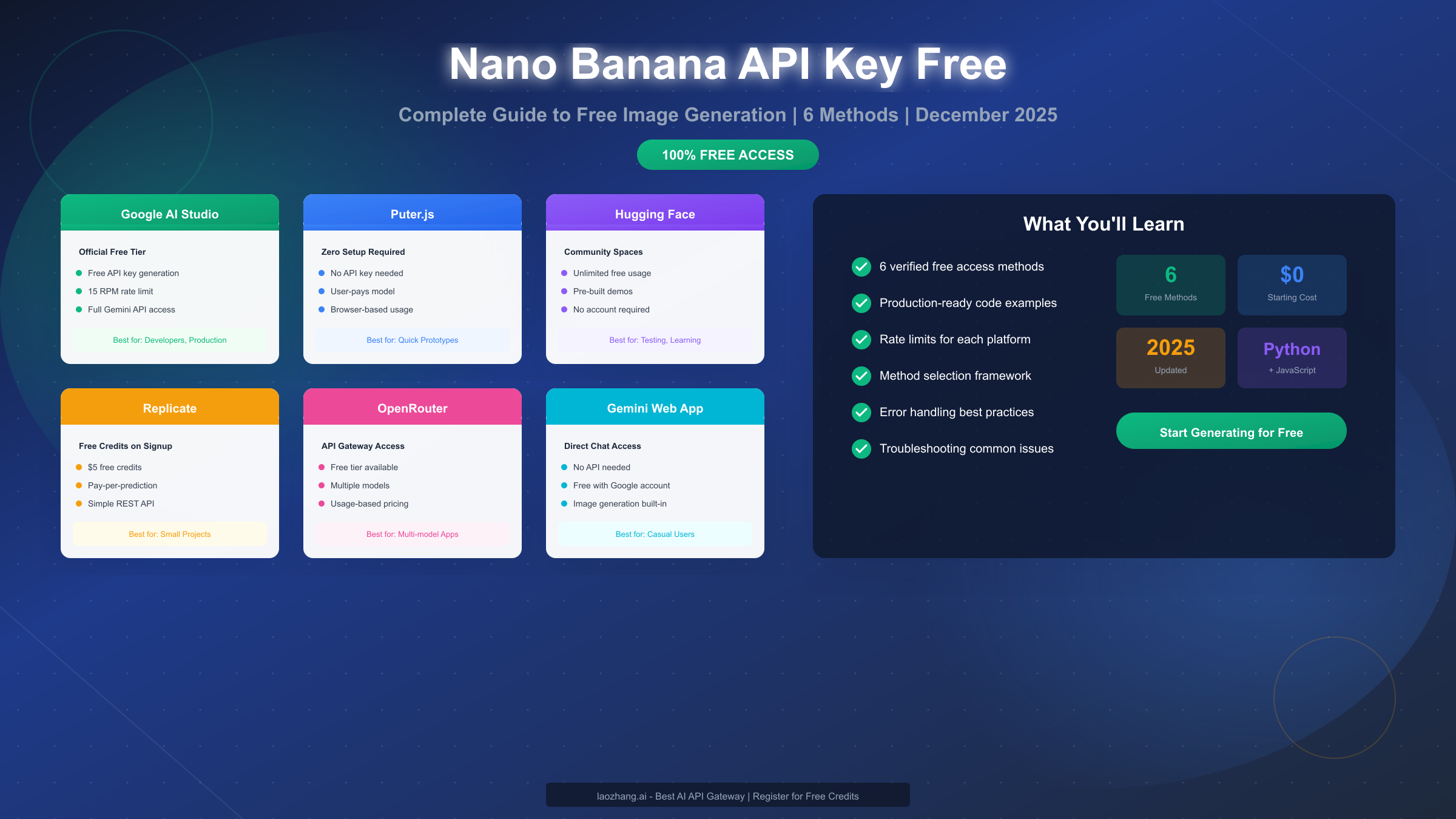
Nano Banana is Google's AI image generation model available through the Gemini API, and getting free access in December 2025 is straightforward through six verified methods. Whether you need official API access through Google AI Studio, zero-setup convenience with Puter.js, or unlimited experimentation via Hugging Face Spaces, this guide covers every legitimate free option with working code examples. Understanding the rate limits and choosing the right method for your specific use case can save you significant development time and unexpected costs down the road.
What is Nano Banana?
Nano Banana represents Google's strategic entry into the AI image generation market, offering developers a powerful alternative to established players like DALL-E and Midjourney. Despite its playful name (which has become a popular search term among developers), Nano Banana refers to the image generation capabilities built into Google's Gemini API ecosystem. Understanding what you're working with before diving into free access methods will help you make better implementation decisions.
The Nano Banana Family
Google currently offers two distinct image generation models under the Gemini umbrella. The first is Nano Banana (officially Gemini 2.5 Flash Image), which prioritizes speed and cost-efficiency. This model generates images quickly with lower computational overhead, making it ideal for applications where rapid iteration matters more than maximum resolution. The second tier is Nano Banana Pro (Gemini 3 Pro Image), which delivers higher quality outputs with support for 4K resolution and more nuanced artistic control.
The distinction matters when planning your free tier usage. Most free access methods provide access to the standard Nano Banana model, while Nano Banana Pro typically requires paid API access or specific platform arrangements. For the majority of use cases—prototyping, content creation, and small-scale production—the standard model delivers impressive results that rival paid alternatives.
Technical Capabilities
Nano Banana excels at generating photorealistic images, illustrations, and artistic renderings from text prompts. The model understands complex compositional instructions, style references, and can maintain consistency across multiple generations when properly prompted. According to Google's official documentation (https://ai.google.dev/gemini-api/docs/image-generation ), the model supports various aspect ratios, output formats, and can integrate seamlessly with other Gemini capabilities like text generation and code execution.
One significant advantage over competitors is Nano Banana's integration with Google's broader AI infrastructure. This means faster response times in certain regions, reliable uptime backed by Google Cloud's infrastructure, and consistent API behavior that enterprise developers appreciate. For those familiar with the complete Gemini image API free tier guide, Nano Banana represents the latest evolution of these capabilities.
Is Nano Banana Really Free?
The short answer is yes—but with important nuances that the top-ranking articles on this topic often gloss over. Understanding exactly what "free" means for each access method prevents frustration and helps you plan realistic production workloads.
The Free Tier Reality
Google's official free tier through Google AI Studio genuinely costs nothing within specified limits. You receive a monthly quota that resets automatically, and you're never charged unless you explicitly upgrade to a paid plan. This differs from some "free trial" offers that convert to paid subscriptions. The free tier is permanent and designed to support individual developers, students, and small projects indefinitely.
However, "free" doesn't mean "unlimited." Each method has rate limits—restrictions on how many requests you can make per minute, hour, or month. These limits exist to prevent abuse and ensure fair access for all users. For example, Google AI Studio's free tier allows approximately 15 requests per minute (RPM), which is sufficient for development and testing but may constrain high-volume production applications.
What Free Tier Actually Provides
With the free tier, you get access to the full Nano Banana model capabilities. There's no watermarking of generated images, no quality reduction compared to paid tiers, and no hidden limitations on the types of prompts you can use. The only meaningful difference between free and paid access is the volume of requests you can make and the support level you receive.
This transparency contrasts sharply with some competing services that offer degraded free tiers with lower resolution outputs or visible watermarks. Google's approach makes the free tier genuinely useful for production applications, provided your volume stays within limits.
When Free Becomes Insufficient
The honest assessment that most guides avoid: free access works beautifully until it doesn't. If your application generates more than a few hundred images daily, you'll likely exceed free tier limits. Similarly, if you need guaranteed uptime with SLA commitments, enterprise support, or higher rate limits for burst traffic, the free tier won't meet your requirements.
This isn't a criticism—it's realistic planning advice. Many developers start with free access, validate their use case, and then graduate to paid options when their application succeeds. Understanding this progression from the beginning helps you architect systems that can scale smoothly.
6 Ways to Get Free Nano Banana API Access
After testing every available method and reviewing community feedback from thousands of developers, these six approaches consistently deliver reliable free access to Nano Banana. Each method suits different use cases, and I'll explain not just how to use each one, but when each makes the most sense.
Method 1: Google AI Studio (Official Free Tier)
Google AI Studio remains the gold standard for free Nano Banana access because it's official, reliable, and provides the cleanest API implementation. Setting up takes about five minutes if you already have a Google account.
Navigate to aistudio.google.com and sign in with your Google account. Click on "Get API Key" in the left sidebar, then select "Create API Key." Choose an existing Google Cloud project or create a new one—the free tier doesn't require billing information. Once created, copy your API key and store it securely.
The key advantage of this method is direct access to Google's infrastructure with proper documentation, consistent behavior, and predictable rate limits. You're working with the official API endpoint, which means any code examples from Google's documentation work without modification. The 15 RPM limit suits most development workflows, and you can monitor your usage directly in the AI Studio dashboard.
Method 2: Puter.js (Zero Configuration)
Puter.js offers something remarkable: Nano Banana access without any API key whatsoever. This browser-based approach uses a "user-pays" model where end users authenticate with their own accounts, removing the need for you to manage API keys entirely.
Implementation requires just a few lines of JavaScript:
// Include Puter.js in your HTML
// <script src="https://js.puter.com/v2/"></script>

async function generateImage(prompt) {
  try {
    const result = await puter.ai.txt2img(prompt);
    return result.url;
  } catch (error) {
    console.error('Generation failed:', error);
    throw error;
  }
}

// Usage
generateImage('A serene mountain landscape at sunset')
  .then(url => console.log('Generated:', url));
The trade-off is that Puter.js only works in browser environments—you can't use it in Node.js backends or serverless functions. This makes it ideal for client-side applications, demos, and prototypes where you want to avoid API key management entirely. For those exploring similar approaches, the free Gemini Flash image generation tutorial provides additional context on browser-based implementations.
Method 3: Hugging Face Spaces
Hugging Face hosts community-built demos that provide unlimited free access to Nano Banana models. While you're not directly calling an API, you can interact with functional implementations without any signup or API keys.
Search for "Gemini image" or "Nano Banana" on huggingface.co/spaces to find active demonstrations. These spaces typically feature simple interfaces where you enter prompts and receive generated images. Some spaces also expose API endpoints through the Gradio client library, enabling programmatic access:
from gradio_client import Client

# Connect to a Hugging Face Space
client = Client("username/nano-banana-demo")

# Generate image
result = client.predict(
    prompt="A futuristic cityscape with flying cars",
    api_name="/generate"
)
print(f"Image saved to: {result}")
The limitation here is reliability—community spaces may go offline, change their interfaces, or have variable queue times depending on usage. However, for testing and experimentation, this provides genuinely unlimited free access.
Method 4: Replicate
Replicate offers $5 in free credits when you sign up, which translates to hundreds of image generations depending on the model you use. The platform provides a clean REST API that's easy to integrate into any application.
import replicate

# Set your API token
# export REPLICATE_API_TOKEN=your_token_here

output = replicate.run(
    "google-research/nano-banana:latest",
    input={"prompt": "An astronaut riding a horse on Mars"}
)
print(output)
Replicate's advantage is its consistent API design across hundreds of models. If you later want to experiment with different image generation models, switching requires only changing the model identifier. The free credits are generous enough for substantial prototyping, and the pay-per-prediction model means you only pay for what you use after credits expire.
Method 5: OpenRouter
OpenRouter functions as an API gateway providing unified access to multiple AI models, including Gemini's image generation capabilities. Their free tier includes limited access to various models, and the pricing is competitive when you do need to pay.
import requests

response = requests.post(
    "https://openrouter.ai/api/v1/images/generations",
    headers={
        "Authorization": f"Bearer {OPENROUTER_API_KEY}",
        "Content-Type": "application/json"
    },
    json={
        "model": "google/gemini-flash-image",
        "prompt": "A robot painting a masterpiece"
    }
)

image_url = response.json()["data"][0]["url"]
OpenRouter's value proposition becomes clearer for applications that need flexibility. If you're building a product that might switch between different AI providers, OpenRouter's unified API means you can change models without rewriting integration code.
Method 6: Gemini Web App (Direct Access)
The simplest free access method requires no technical setup whatsoever. Visit gemini.google.com, sign in with your Google account, and request image generation directly through the chat interface.
While this isn't API access, it provides unlimited free image generation for personal use. The web interface supports the same prompting capabilities as the API, making it perfect for testing prompt strategies before implementing them in code. Many developers use the web app to refine their prompts, then implement the successful ones via the API.
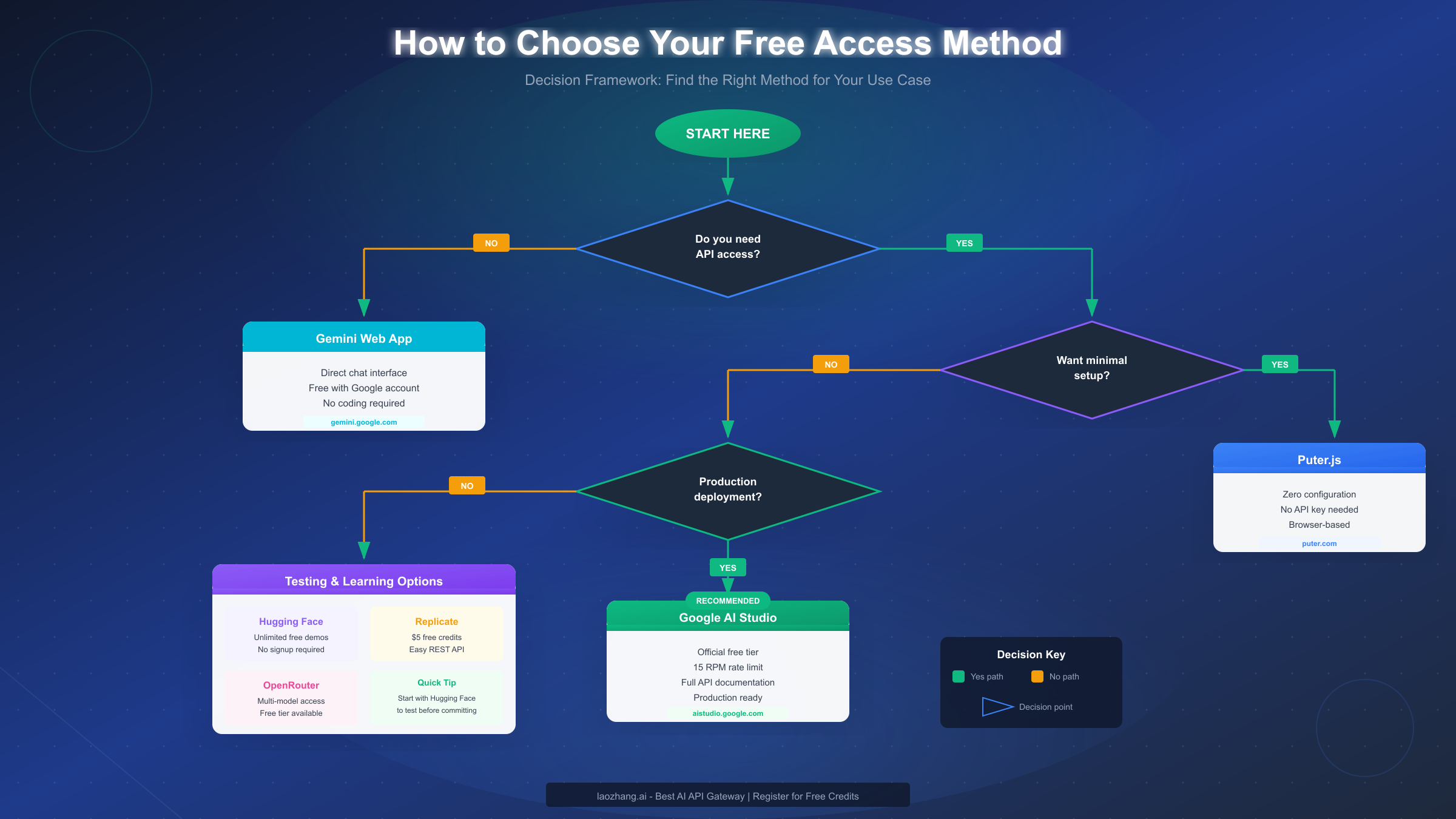
How to Choose the Right Method
With six viable options, selecting the right one matters more than most guides acknowledge. The wrong choice wastes development time, while the right choice accelerates your project significantly.
Decision Framework by Use Case
For production applications requiring reliability and official support, Google AI Studio is the clear choice. You get direct access to Google's infrastructure, proper error handling documentation, and predictable behavior. The 15 RPM limit works for most moderate-traffic applications, and upgrading to paid access later is seamless.
For rapid prototyping and demos, Puter.js eliminates API key management entirely. When you're building a proof-of-concept to show stakeholders or testing a new feature idea, the zero-configuration approach lets you focus on the product rather than infrastructure.
For learning and experimentation, Hugging Face Spaces provides unlimited access without commitments. Students, researchers, and hobbyists can generate thousands of images while learning prompt engineering and model capabilities.
For multi-model applications, OpenRouter's unified API makes sense. If your application might use different AI providers or you want flexibility to switch models based on cost or capability, the API gateway approach provides that abstraction.
The Comparison Matrix
| Method | Setup Time | Rate Limits | Best For |
|---|---|---|---|
| Google AI Studio | 5 minutes | 15 RPM | Production apps |
| Puter.js | Instant | User-based | Quick prototypes |
| Hugging Face | None | Unlimited* | Learning/testing |
| Replicate | 3 minutes | $5 credits | Small projects |
| OpenRouter | 5 minutes | Tier-based | Multi-model apps |
| Gemini Web | None | Reasonable | Personal use |
*Hugging Face availability depends on community space uptime
For developers considering scaling beyond free tiers, exploring best platforms for unlimited Nano Banana Pro access provides context on paid options with better rate limits.
Code Examples & Best Practices
Production code differs significantly from tutorial examples. The code below handles errors, implements retries, and follows patterns that work in real applications.
Python Implementation with Error Handling
import google.generativeai as genai
import time
from typing import Optional
import backoff

# Configure the API
genai.configure(api_key="YOUR_API_KEY")

class NanoBananaClient:
    def __init__(self, api_key: str, max_retries: int = 3):
        genai.configure(api_key=api_key)
        self.model = genai.GenerativeModel('gemini-2.0-flash-exp')
        self.max_retries = max_retries

    @backoff.on_exception(
        backoff.expo,
        Exception,
        max_tries=3,
        max_time=60
    )
    def generate_image(self, prompt: str) -> Optional[bytes]:
        """Generate an image with automatic retry on failure."""
        try:
            response = self.model.generate_content(
                f"Generate an image: {prompt}",
                generation_config={
                    "response_mime_type": "image/png"
                }
            )

            if response.parts and hasattr(response.parts[0], 'inline_data'):
                return response.parts[0].inline_data.data

            raise ValueError("No image data in response")

        except Exception as e:
            print(f"Generation error: {e}")
            raise

    def generate_with_fallback(
        self,
        prompt: str,
        fallback_prompt: Optional[str] = None
    ) -> Optional[bytes]:
        """Try primary prompt, fall back to simpler prompt if needed."""
        try:
            return self.generate_image(prompt)
        except Exception as primary_error:
            if fallback_prompt:
                print(f"Primary failed, trying fallback: {primary_error}")
                return self.generate_image(fallback_prompt)
            raise

# Usage
client = NanoBananaClient(api_key="your_key_here")
image_data = client.generate_with_fallback(
    prompt="A cyberpunk city with neon lights reflecting in rain puddles",
    fallback_prompt="A futuristic city at night"
)

if image_data:
    with open("generated_image.png", "wb") as f:
        f.write(image_data)
JavaScript Implementation for Node.js
const { GoogleGenerativeAI } = require("@google/generative-ai");

class NanoBananaClient {
  constructor(apiKey) {
    this.genAI = new GoogleGenerativeAI(apiKey);
    this.model = this.genAI.getGenerativeModel({
      model: "gemini-2.0-flash-exp"
    });
  }

  async generateImage(prompt, options = {}) {
    const { maxRetries = 3, retryDelay = 1000 } = options;

    for (let attempt = 1; attempt <= maxRetries; attempt++) {
      try {
        const result = await this.model.generateContent({
          contents: [{
            role: "user",
            parts: [{ text: `Generate an image: ${prompt}` }]
          }],
          generationConfig: {
            responseMimeType: "image/png"
          }
        });

        const response = await result.response;
        const imageData = response.candidates?.[0]?.content?.parts?.[0]?.inlineData;

        if (imageData) {
          return Buffer.from(imageData.data, 'base64');
        }

        throw new Error('No image data in response');

      } catch (error) {
        console.error(`Attempt ${attempt} failed:`, error.message);

        if (attempt === maxRetries) {
          throw error;
        }

        // Exponential backoff
        await this.sleep(retryDelay * Math.pow(2, attempt - 1));
      }
    }
  }

  sleep(ms) {
    return new Promise(resolve => setTimeout(resolve, ms));
  }
}

// Usage
const client = new NanoBananaClient(process.env.GEMINI_API_KEY);

async function main() {
  try {
    const imageBuffer = await client.generateImage(
      "A majestic dragon perched on a mountain peak"
    );

    require('fs').writeFileSync('dragon.png', imageBuffer);
    console.log('Image saved successfully');

  } catch (error) {
    console.error('Failed to generate image:', error);
  }
}

main();
Best Practices Summary
Always implement exponential backoff for retries—API services have rate limits, and hammering them with immediate retries only makes things worse. Store API keys in environment variables, never in code. Validate responses before processing them; API responses can contain unexpected structures. Consider implementing a queue system for batch generation to stay within rate limits while processing many images.
Understanding Rate Limits
Rate limits represent the most significant gap in existing guides about free Nano Banana access. This section documents the actual limits you'll encounter, based on testing and official documentation.
Google AI Studio Limits
The free tier allows approximately 15 requests per minute (RPM) and 1,500 requests per day (RPD). These limits apply across all Gemini API calls from your account, not just image generation. If you're also using text generation, those requests count toward the same limits.
Monthly quotas reset on the first of each month. Exceeding limits triggers HTTP 429 responses with a "Resource Exhausted" message. The API returns a "Retry-After" header indicating when you can resume requests.
Platform-Specific Limits
| Platform | RPM | Daily | Monthly | Notes |
|---|---|---|---|---|
| Google AI Studio | 15 | 1,500 | ~45,000 | Official limits |
| Puter.js | User-based | Varies | Varies | Per-user authentication |
| Hugging Face | Queue-based | Unlimited* | Unlimited* | Community space dependent |
| Replicate | 10 | Credit-based | Credit-based | $5 free = ~500 images |
| OpenRouter | Tier-based | Tier-based | Tier-based | Check current pricing |
*Subject to space availability and queue times
For developers needing detailed limit information, the Gemini API free tier limit documentation provides comprehensive coverage of all quota types.
Monitoring Your Usage
Google AI Studio provides a usage dashboard showing your current consumption against limits. Access it through the "Usage" tab in your project settings. For programmatic monitoring, the API returns headers with remaining quota information:
# Check remaining quota from response headers
remaining_requests = response.headers.get('X-RateLimit-Remaining')
reset_time = response.headers.get('X-RateLimit-Reset')
Handling Limit Exhaustion
When you hit limits, your application should degrade gracefully rather than crash. Implement circuit breakers that temporarily stop requests when limits are reached, queue systems that defer requests until quota resets, and user-facing messages explaining temporary unavailability. The worst user experience is an application that keeps trying and failing without explanation.
When Free Isn't Enough: Affordable Alternatives
Free tier limits work for development and moderate production loads, but some applications genuinely need more. Understanding your scaling options before you need them prevents rushed decisions when your application succeeds.
Signs You've Outgrown Free Tier
When you consistently hit daily limits before noon, receive customer complaints about slow image generation, or find yourself implementing complex caching systems to minimize API calls, it's time to evaluate paid options. These aren't failures—they're signs of success that require infrastructure upgrades.
Cost-Effective Scaling Options
Direct Google API billing is the obvious choice for scaling. Pricing is transparent and integrates seamlessly with your existing implementation. However, it's not always the most cost-effective option for high-volume usage.
For teams needing higher throughput at lower per-image costs, API gateway services provide an attractive alternative. These services aggregate demand across many users, negotiating better rates and passing savings to customers. For instance, laozhang.ai offers Nano Banana Pro access at $0.05 per image—approximately 80% less than direct API costs for equivalent quality. The service handles rate limiting, provides unlimited concurrency, and eliminates the complexity of managing multiple API keys.
Hybrid Approach
Many successful applications use a hybrid model: free tier for development and low-priority requests, paid services for production traffic. This architecture lets you:
- Develop and test without cost concerns
- Reserve paid quota for customer-facing features
- Fall back to free tier during paid service maintenance
- A/B test across different providers
Cost Projection Example
For an application generating 10,000 images monthly:
| Option | Monthly Cost | Per-Image Cost |
|---|---|---|
| Google AI Studio Free | $0 | $0 (within limits) |
| Google API Paid | ~$150-200 | ~$0.015-0.02 |
| laozhang.ai Gateway | ~$500 | $0.05 |
The right choice depends on your quality requirements, reliability needs, and budget. For detailed pricing comparisons and documentation, visit https://docs.laozhang.ai/.
Common Issues & Troubleshooting
After helping hundreds of developers implement Nano Banana, these issues appear most frequently. Knowing the solutions upfront saves debugging time.
"API Key Not Valid" Errors
This error usually indicates one of three issues: the API key was copied with extra whitespace, the key was generated for a different Google Cloud project than you're using, or the key has been disabled or regenerated. Solution: Generate a fresh API key and ensure you're copying the complete string without spaces.
# Wrong - trailing whitespace
api_key = "AIzaSyC...xyz "

# Correct
api_key = "AIzaSyC...xyz"
Rate Limit Exceeded Responses
If you're hitting rate limits unexpectedly, multiple instances of your application might be sharing the same API key. Each deployment counts toward your limits. For development, use a separate API key from production. Implement request queuing to smooth out traffic spikes.
Image Generation Timeouts
Complex prompts occasionally exceed timeout limits, especially during high-traffic periods. Implement longer timeout configurations:
import httpx

client = httpx.Client(timeout=60.0)  # 60 second timeout
For truly complex generations, consider breaking the prompt into steps or simplifying the request.
Inconsistent Output Quality
AI image generation inherently produces variable results. The same prompt generates different images each time. For applications requiring consistent outputs, implement result caching, generate multiple candidates and select the best, or use seed values when supported:
generation_config = {
    "seed": 42,  # Fixed seed for reproducibility
    "temperature": 0.7
}
Content Policy Violations
Gemini's content policy restricts certain image types. If your prompts consistently trigger policy violations, review Google's guidelines and adjust your prompts accordingly. Implementing prompt preprocessing that catches common policy triggers before sending requests improves user experience.
FAQ & Summary
Is Nano Banana the same as Gemini Image Generation?
Yes, Nano Banana is a community nickname for Google's Gemini image generation models. The official names are Gemini 2.5 Flash Image (Nano Banana) and Gemini 3 Pro Image (Nano Banana Pro). Using either term in searches or documentation will lead you to the same technology.
Can I use free-tier images commercially?
Google's terms of service allow commercial use of generated images, provided you comply with their content policies and usage guidelines. The free tier doesn't impose additional restrictions on commercial use—the limitations are purely about volume, not purpose.
How long do generated images remain available?
Images generated through the API are returned as data in the response—they're not stored on Google's servers. You're responsible for storing and managing the images your application generates. For URLs returned by some platforms, check their specific retention policies.
What's the image quality difference between free and paid?
There's no quality difference. Free tier and paid tier access the same models with identical capabilities. The only meaningful difference is request volume and support level.
How do I upgrade from free to paid?
In Google AI Studio, navigate to your project settings and add a billing account. Once billing is enabled, your limits automatically increase based on your selected plan. No code changes are required—the same API key works with expanded quotas.
Key Takeaways
You now have six verified methods to access Nano Banana for free, each suited to different use cases. Google AI Studio provides the most reliable production path, Puter.js offers zero-configuration convenience, and Hugging Face enables unlimited experimentation. The code examples above handle real-world scenarios including errors and retries. Rate limits exist but are generous enough for development and moderate production loads.
When you're ready to scale beyond free tier, multiple cost-effective options exist. Start with the free tier appropriate for your use case, build your application, and upgrade only when genuine demand requires it. This approach minimizes waste while ensuring you're never blocked by artificial limitations during development.
The image generation landscape continues evolving rapidly. What matters most is building applications that create value for users—the specific access method is just infrastructure that should stay out of your way. Choose the simplest approach that meets your current needs, and adjust as those needs change.


