
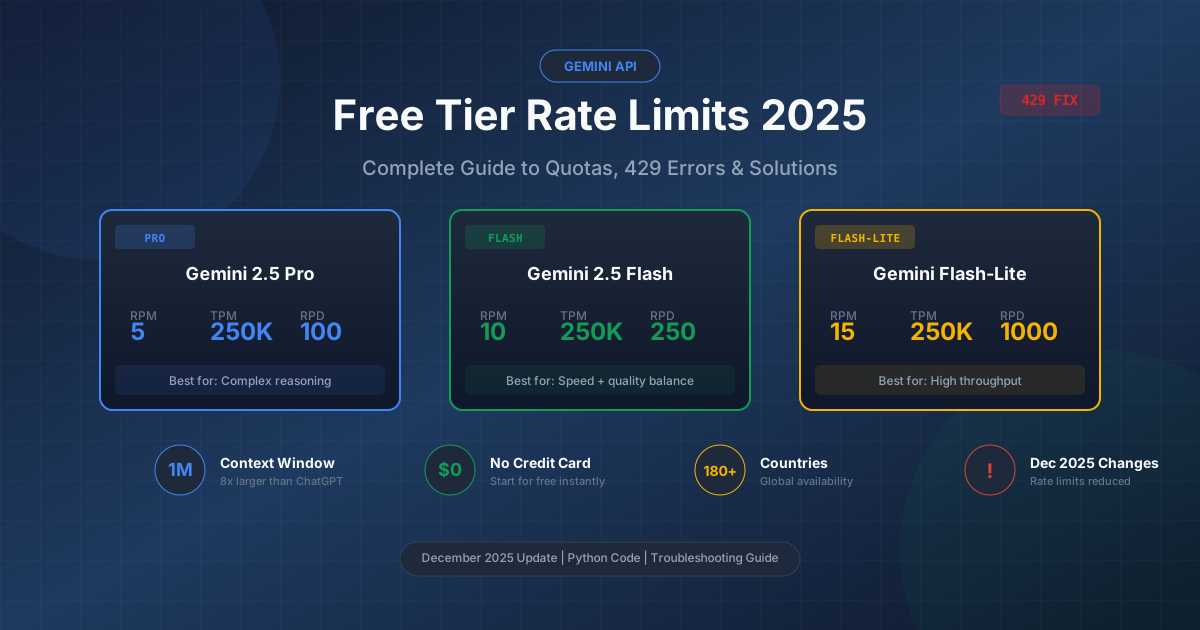
If you've been using the Gemini API free tier and suddenly started seeing 429 errors in December 2025, you're not alone. Google quietly reduced rate limits by 50-80% in early December, catching many developers off guard. This comprehensive guide explains exactly what changed, why you're hitting limits, and how to work around them effectively.
The Gemini API offers one of the most generous free tiers in the AI industry—1 million token context window, no credit card required, and access to cutting-edge models. But understanding the rate limit structure is crucial for building reliable applications. Whether you're prototyping a new project or running a small production workload, this guide covers everything you need to know about Gemini API free tier limits in December 2025.
Understanding Gemini API Free Tier in 2025
Google's Gemini API free tier provides developers with access to three main model families without any payment or credit card requirement. This makes it ideal for learning, prototyping, and small-scale production use cases. Here's what the free tier includes as of December 2025.
The free tier grants access to Gemini 2.5 Pro, Google's most capable model with advanced reasoning and a massive 1 million token context window. You also get Gemini 2.5 Flash, which balances speed and quality for most use cases, and Gemini 2.5 Flash-Lite, optimized for high-throughput scenarios where cost efficiency matters most.
Key Free Tier Features
| Feature | Specification |
|---|---|
| Context Window | 1,048,576 tokens (1M) |
| Credit Card Required | No |
| Geographic Availability | 180+ countries |
| Model Access | Pro, Flash, Flash-Lite |
| Multimodal Support | Text, Images, Audio, Video |
| Output Tokens | Up to 65,536 per response |
The 1 million token context window is particularly notable—it's 8x larger than ChatGPT's 128K limit and 10x larger than Claude's standard 100K context. This enables processing of entire codebases, long documents, and complex multi-turn conversations without truncation.
Unlike OpenAI's GPT-4, which requires payment information to access the API, Gemini's free tier is truly free. You can start using it immediately after creating a Google Cloud project and generating an API key. For a detailed walkthrough of the setup process, see our complete Gemini API key guide.
What Free Tier Doesn't Include
While generous, the free tier has important limitations beyond rate limits. Your data may be used to improve Google's models (unless you're in the EU), there's no guaranteed SLA, and certain advanced features like fine-tuning are restricted to paid tiers.
The most significant limitation is the rate limiting structure, which determines how many requests you can make and how much data you can process. Understanding these limits is essential for any developer building on the Gemini API.
How Free Tier Compares to Competitors
Understanding how Gemini's free tier stacks up against other providers helps contextualize its value:
| Provider | Free Model | Context Window | Daily Limit | Credit Card Required |
|---|---|---|---|---|
| Google Gemini | 2.5 Pro/Flash | 1M tokens | 100-1000 RPD | No |
| OpenAI | GPT-4o-mini | 128K tokens | $5 credits | Yes |
| Anthropic | Claude 3 Haiku | 100K tokens | Limited | Yes |
| Mistral | Mistral Small | 32K tokens | 1M tokens/month | No |
| Cohere | Command | 128K tokens | 100 API calls/minute | No |
Gemini stands out with its 1 million token context window—dramatically larger than any competitor—and no credit card requirement. The main tradeoff is the per-day request limits, which are more restrictive than some alternatives.
Accessing the Free Tier
Getting started with the Gemini API free tier involves these steps:
- Visit Google AI Studio
- Sign in with your Google account
- Click "Get API Key" in the top navigation
- Create a new Google Cloud project or select existing one
- Generate your API key
- Start making requests immediately
No billing information is required for free tier access. The API key works instantly once generated, with rate limits automatically applied at the project level.
December 2025 Rate Limit Changes: What You Need to Know
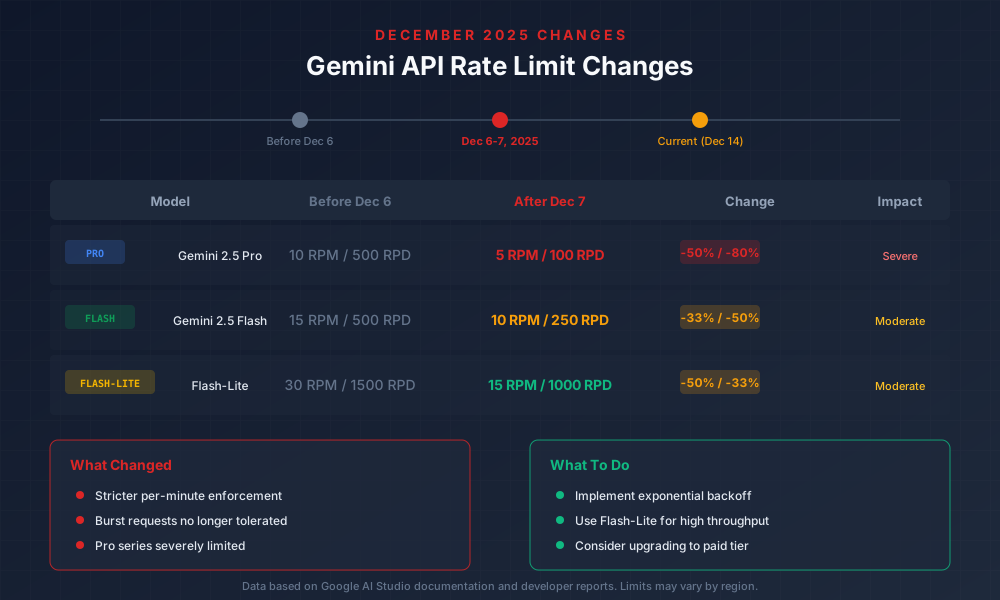
Between December 6-7, 2025, Google implemented significant changes to the Gemini API free tier rate limits. These changes weren't widely announced and caught many developers off guard, leading to a surge of 429 errors in applications that had been working fine for months.
Timeline of Changes
| Date | Event |
|---|---|
| Before Dec 6, 2025 | Original rate limits in effect |
| Dec 6-7, 2025 | Google implements new stricter limits |
| Dec 8, 2025 | Developer reports start appearing online |
| Dec 14, 2025 | Current documentation reflects new limits |
The changes primarily affected three dimensions: requests per minute (RPM), tokens per minute (TPM), and requests per day (RPD). The reductions were substantial, with some models seeing their daily quotas cut by 80%.
Before vs After Comparison
| Model | Before (Dec 5) | After (Dec 7) | Reduction |
|---|---|---|---|
| Gemini 2.5 Pro | |||
| - RPM | 10 | 5 | -50% |
| - TPM | 500,000 | 250,000 | -50% |
| - RPD | 500 | 100 | -80% |
| Gemini 2.5 Flash | |||
| - RPM | 15 | 10 | -33% |
| - TPM | 500,000 | 250,000 | -50% |
| - RPD | 500 | 250 | -50% |
| Gemini 2.5 Flash-Lite | |||
| - RPM | 30 | 15 | -50% |
| - TPM | 500,000 | 250,000 | -50% |
| - RPD | 1,500 | 1,000 | -33% |
Why Google Made These Changes
While Google hasn't officially explained the rate limit reductions, several factors likely contributed:
- Increased adoption: The free tier saw massive growth in 2025, straining infrastructure
- Abuse prevention: Some users were running production workloads on free tier quotas
- Cost management: Inference costs for advanced models like 2.5 Pro are substantial
- Capacity allocation: Prioritizing resources for paying customers
The Gemini 2.5 Pro model was hit hardest, with an 80% reduction in daily requests. This suggests Google wants to reserve Pro capacity for paid users while keeping Flash variants more accessible for developers.
Impact on Developers
The December 2025 changes affect different use cases differently:
- Learning/Prototyping: Minimal impact—100 RPD is still enough for experimentation
- Demo Applications: Moderate impact—may need request throttling
- Production Free Tier Users: Severe impact—likely need to upgrade or optimize
If your application was working fine before December 6 and suddenly started failing, these rate limit changes are almost certainly the cause. The good news is that with proper implementation of retry logic and rate limiting, most applications can adapt to the new quotas.
Real-World Impact Examples
Here are specific scenarios showing how the December 2025 changes affected real applications:
Example 1: AI Writing Assistant
- Before: 500 RPD allowed ~35 document analyses per user/day (assuming 15 users)
- After: 100 RPD allows ~6 document analyses per user/day (assuming 15 users)
- Solution: Implemented caching and switched to Flash-Lite for simple tasks
Example 2: Code Review Bot
- Before: 10 RPM allowed real-time review of every commit
- After: 5 RPM causes delays during busy development periods
- Solution: Added request queuing and batch processing
Example 3: Customer Support Chatbot
- Before: Could handle ~20 concurrent conversations comfortably
- After: Rate limits triggered during peak hours
- Solution: Upgraded to Tier 1 (billing enabled)
The key lesson: applications with consistent, predictable traffic can still use the free tier effectively, but burst-heavy workloads need optimization or upgrade.
Complete Rate Limits by Model (December 2025)
Understanding the full rate limit structure is crucial for designing applications that work reliably within quotas. The Gemini API uses four dimensions to control usage, and each model has different limits across both free and paid tiers.
Rate Limit Dimensions Explained
| Dimension | Abbreviation | Description | Reset Period |
|---|---|---|---|
| Requests Per Minute | RPM | Total API calls per minute | Rolling 60 seconds |
| Tokens Per Minute | TPM | Input + output tokens per minute | Rolling 60 seconds |
| Requests Per Day | RPD | Total API calls per day | Midnight Pacific Time |
| Images Per Minute | IPM | Images in requests per minute | Rolling 60 seconds |
RPM and TPM use a rolling window, meaning the limit applies to the last 60 seconds at any given moment. RPD resets at midnight Pacific Time (00:00 PT), which is important for planning batch operations.
Complete Free Tier Rate Limits (December 2025)
| Model | RPM | TPM | RPD | IPM |
|---|---|---|---|---|
| Gemini 2.5 Pro | 5 | 250,000 | 100 | 20 |
| Gemini 2.5 Pro Preview | 2 | 250,000 | 50 | 20 |
| Gemini 2.5 Flash | 10 | 250,000 | 250 | 20 |
| Gemini 2.5 Flash Preview | 10 | 250,000 | 250 | 20 |
| Gemini 2.5 Flash-Lite | 15 | 250,000 | 1,000 | 20 |
| Gemini 2.0 Flash | 10 | 250,000 | 500 | 20 |
| Gemini 1.5 Pro | 5 | 250,000 | 100 | 20 |
| Gemini 1.5 Flash | 15 | 1,000,000 | 1,500 | 20 |
Paid Tier Comparison
For reference, here's how the paid tiers compare. For complete pricing details, see our Gemini API pricing guide.
| Tier | Monthly Spend | RPM Multiplier | RPD Multiplier |
|---|---|---|---|
| Free | $0 | 1x | 1x |
| Tier 1 | $0+ (billing enabled) | 4-10x | 10-50x |
| Tier 2 | $250+ | 10-20x | 50-100x |
| Tier 3 | $1,000+ | 20-50x | 100-500x |
Simply enabling billing (even without spending) typically grants Tier 1 access, which can increase your limits significantly. This is often the most cost-effective way to handle rate limit issues if the free tier isn't sufficient.
Model Selection Strategy
Based on December 2025 limits, here's when to use each model:
- Gemini 2.5 Pro: Complex reasoning, analysis, coding assistance. Use sparingly due to 100 RPD limit.
- Gemini 2.5 Flash: Balanced performance for most applications. Good default choice.
- Gemini 2.5 Flash-Lite: High-volume, simpler tasks. Best throughput at 1,000 RPD.
A common strategy is to route simple requests to Flash-Lite and reserve Pro for tasks that genuinely need advanced reasoning. This can extend your daily quota significantly.
How Rate Limiting Actually Works
Understanding how Gemini's rate limiting system actually works helps explain why you might hit 429 errors even when your dashboard shows remaining quota. The architecture involves several layers that can be confusing.
Project-Level vs Key-Level Limits
This is the most important concept to understand: rate limits are enforced at the project level, not the API key level. Creating multiple API keys within the same Google Cloud project does NOT give you additional quota.
Google Cloud Project
└── Rate Limit Quota (shared)
    ├── API Key 1 ─────┐
    ├── API Key 2 ─────┼── All share the SAME quota
    └── API Key 3 ─────┘
If you have three API keys and the limit is 5 RPM, you can make 5 total requests per minute across all keys combined—not 15. This catches many developers off guard.
Why You Get 429 Errors "Under Quota"
Several scenarios can cause 429 errors even when quotas appear available:
-
Rolling window timing: You made 5 requests between 12:00:01 and 12:00:30. At 12:00:45, you try another request. Even though it's a "new minute," those earlier requests are still within the rolling 60-second window.
-
Token counting differences: Your request might use more tokens than expected. Gemini counts both input and output tokens against TPM, and system instructions consume tokens too.
-
Concurrent request collision: Multiple requests starting simultaneously can all count against the same window before any responses return.
-
Capacity-based throttling: Google may temporarily reduce quotas during high-demand periods, even below documented limits.
The Token Bucket Algorithm
Gemini uses a variation of the token bucket algorithm for rate limiting. Imagine a bucket that fills with tokens at a constant rate:
- The bucket has a maximum capacity (your RPM or TPM limit)
- Tokens are added continuously (e.g., 5 tokens per minute for Pro RPM)
- Each request removes tokens from the bucket
- If the bucket is empty, the request is rejected with 429
This explains why burst traffic can deplete your quota quickly even if your average usage is below limits. The bucket needs time to refill between bursts.
Pro-to-Flash Fallback Behavior
An undocumented behavior that confuses many developers: when Gemini 2.5 Pro capacity is constrained, Google may internally route requests to Flash models. This can cause unexpected behavior differences in responses without any error indication.
This capacity management happens transparently and isn't something you can control. If you're getting inconsistent response quality, this might be the cause. The workaround is to explicitly specify the model and implement retry logic to handle capacity issues.
Quota Inheritance and Organization
If you're using Google Cloud organizations, quotas can be affected by organizational policies. Quotas set at the organization level may override project-level settings. This is particularly relevant for enterprise users who might have additional restrictions imposed by their IT department.
For most individual developers, the project-level quotas documented by Google apply directly. For similar rate limiting concepts in other APIs, see our guide on handling concurrent request patterns.
Troubleshooting 429 Errors: Complete Diagnostic Guide
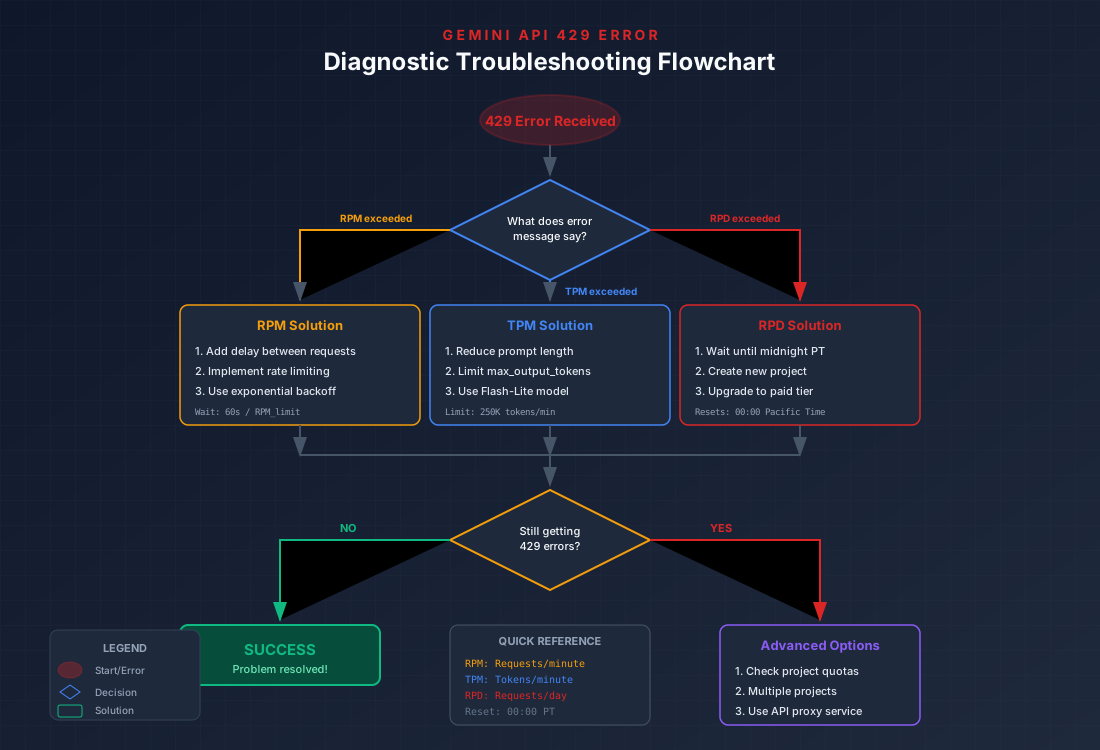
The 429 "Too Many Requests" error is the most common issue developers face with the Gemini API free tier. This section provides a systematic approach to diagnosing and resolving these errors.
Understanding the Error Message
Gemini API 429 errors include a message that tells you which limit you've exceeded:
json{
  "error": {
    "code": 429,
    "message": "Resource has been exhausted (e.g. check quota).",
    "status": "RESOURCE_EXHAUSTED",
    "details": [
      {
        "@type": "type.googleapis.com/google.rpc.ErrorInfo",
        "reason": "RATE_LIMIT_EXCEEDED",
        "metadata": {
          "quota_limit": "GenerateContent-FreeTier-RPM",
          "quota_location": "global"
        }
      }
    ]
  }
}
The quota_limit field tells you exactly which limit was exceeded:
RPM: Requests per minute limitTPM: Tokens per minute limitRPD: Requests per day limit
Step-by-Step Diagnostic Process
Step 1: Identify the Limit Type
Check the error message or error details for the specific limit. Each requires a different solution:
| Limit Hit | Immediate Action | Long-term Solution |
|---|---|---|
| RPM | Wait 60 seconds | Add delays between requests |
| TPM | Reduce prompt size | Use smaller prompts, limit output |
| RPD | Wait until midnight PT | Use different model or upgrade |
Step 2: Check Your Current Usage
Visit the Google Cloud Console to view your actual usage:
- Go to Google Cloud Console
- Navigate to APIs & Services → Gemini API
- Click on "Quotas" tab
- Review current usage vs limits
Step 3: Analyze Request Patterns
Common patterns that cause issues:
- Burst requests: Sending many requests simultaneously
- Large prompts: Context-heavy requests consuming TPM
- No retry logic: Failing permanently on temporary errors
Common Causes and Fixes
| Problem | Symptom | Fix |
|---|---|---|
| No delay between requests | Hit RPM within seconds | Add time.sleep(12) for 5 RPM |
| Large context window use | Hit TPM despite few requests | Truncate history, summarize context |
| Batch processing at midnight | RPD exhausted quickly | Spread requests throughout day |
| Multiple services sharing key | Unexpected 429 errors | Use separate projects per service |
| December 2025 changes | App broke after Dec 6 | Reduce request frequency |
Checking Quotas in Google Cloud Console
The most reliable way to understand your current situation:
- API Dashboard: Shows real-time request counts and error rates
- Quota Page: Displays limits and current usage percentage
- Error Reports: Lists recent errors with timestamps
- Billing: Shows if you're on free tier or have billing enabled
If you consistently hit limits, enabling billing (even without spending) often increases quotas automatically through Tier 1 access.
For related troubleshooting of rate limit errors in other APIs, see our Claude API 429 solution guide.
Python Code Solutions for Rate Limiting
The most reliable way to handle Gemini API rate limits is implementing proper retry logic in your code. This section provides production-ready Python implementations using best practices.
Basic Retry with Tenacity
The tenacity library provides powerful retry mechanisms. Install it with:
bashpip install tenacity google-generativeai
Here's a basic implementation:
pythonimport time
from tenacity import (
    retry,
    stop_after_attempt,
    wait_exponential,
    retry_if_exception_type
)
import google.generativeai as genai
from google.api_core.exceptions import ResourceExhausted

genai.configure(api_key="YOUR_API_KEY")

@retry(
    retry=retry_if_exception_type(ResourceExhausted),
    wait=wait_exponential(multiplier=1, min=4, max=60),
    stop=stop_after_attempt(5)
)
def generate_with_retry(prompt: str, model_name: str = "gemini-2.5-flash") -> str:
    """Generate content with automatic retry on rate limits."""
    model = genai.GenerativeModel(model_name)
    response = model.generate_content(prompt)
    return response.text


result = generate_with_retry("Explain quantum computing in simple terms")
print(result)
This implementation automatically retries on 429 errors with exponential backoff, starting at 4 seconds and increasing up to 60 seconds between attempts.
Production-Ready Implementation
For production use, you need comprehensive error handling, logging, and monitoring:
pythonimport time
import logging
from typing import Optional, Dict, Any
from dataclasses import dataclass
from tenacity import (
    retry,
    stop_after_attempt,
    wait_exponential,
    retry_if_exception_type,
    before_sleep_log
)
import google.generativeai as genai
from google.api_core.exceptions import (
    ResourceExhausted,
    ServiceUnavailable,
    DeadlineExceeded
)

# Configure logging
logging.basicConfig(level=logging.INFO)
logger = logging.getLogger(__name__)

@dataclass
class RateLimitConfig:
    """Configuration for rate limiting behavior."""
    max_retries: int = 5
    min_wait: int = 4
    max_wait: int = 60
    requests_per_minute: int = 5

class GeminiClient:
    """Production-ready Gemini API client with rate limiting."""

    def __init__(
        self,
        api_key: str,
        model_name: str = "gemini-2.5-flash",
        config: Optional[RateLimitConfig] = None
    ):
        genai.configure(api_key=api_key)
        self.model = genai.GenerativeModel(model_name)
        self.config = config or RateLimitConfig()
        self.last_request_time = 0
        self.request_count = 0

    def _wait_for_rate_limit(self):
        """Ensure minimum delay between requests."""
        min_interval = 60.0 / self.config.requests_per_minute
        elapsed = time.time() - self.last_request_time
        if elapsed < min_interval:
            sleep_time = min_interval - elapsed
            logger.debug(f"Rate limiting: sleeping {sleep_time:.2f}s")
            time.sleep(sleep_time)

    @retry(
        retry=retry_if_exception_type((
            ResourceExhausted,
            ServiceUnavailable,
            DeadlineExceeded
        )),
        wait=wait_exponential(multiplier=1, min=4, max=60),
        stop=stop_after_attempt(5),
        before_sleep=before_sleep_log(logger, logging.WARNING)
    )
    def generate(
        self,
        prompt: str,
        generation_config: Optional[Dict[str, Any]] = None
    ) -> str:
        """Generate content with rate limiting and retry logic."""
        self._wait_for_rate_limit()

        try:
            self.last_request_time = time.time()
            self.request_count += 1

            response = self.model.generate_content(
                prompt,
                generation_config=generation_config
            )

            logger.info(f"Request #{self.request_count} successful")
            return response.text

        except ResourceExhausted as e:
            logger.warning(f"Rate limit hit: {e}")
            raise
        except Exception as e:
            logger.error(f"Unexpected error: {e}")
            raise

    def generate_batch(
        self,
        prompts: list,
        delay_between: float = 12.0
    ) -> list:
        """Process multiple prompts with rate limiting."""
        results = []
        for i, prompt in enumerate(prompts):
            logger.info(f"Processing prompt {i+1}/{len(prompts)}")
            result = self.generate(prompt)
            results.append(result)
            if i < len(prompts) - 1:
                time.sleep(delay_between)
        return results

# Usage
client = GeminiClient(
    api_key="YOUR_API_KEY",
    model_name="gemini-2.5-flash",
    config=RateLimitConfig(requests_per_minute=10)
)

result = client.generate("What is machine learning?")
print(result)
Circuit Breaker Pattern
For high-reliability applications, implement a circuit breaker to prevent cascading failures:
pythonfrom enum import Enum
from datetime import datetime, timedelta

class CircuitState(Enum):
    CLOSED = "closed"
    OPEN = "open"
    HALF_OPEN = "half_open"

class CircuitBreaker:
    """Circuit breaker for API calls."""

    def __init__(
        self,
        failure_threshold: int = 5,
        recovery_timeout: int = 60,
        half_open_requests: int = 3
    ):
        self.failure_threshold = failure_threshold
        self.recovery_timeout = recovery_timeout
        self.half_open_requests = half_open_requests
        self.failures = 0
        self.state = CircuitState.CLOSED
        self.last_failure_time = None
        self.half_open_successes = 0

    def can_execute(self) -> bool:
        """Check if request can proceed."""
        if self.state == CircuitState.CLOSED:
            return True

        if self.state == CircuitState.OPEN:
            if datetime.now() - self.last_failure_time > timedelta(seconds=self.recovery_timeout):
                self.state = CircuitState.HALF_OPEN
                self.half_open_successes = 0
                return True
            return False

        return True  # HALF_OPEN

    def record_success(self):
        """Record successful request."""
        if self.state == CircuitState.HALF_OPEN:
            self.half_open_successes += 1
            if self.half_open_successes >= self.half_open_requests:
                self.state = CircuitState.CLOSED
                self.failures = 0
        else:
            self.failures = 0

    def record_failure(self):
        """Record failed request."""
        self.failures += 1
        self.last_failure_time = datetime.now()

        if self.failures >= self.failure_threshold:
            self.state = CircuitState.OPEN

        if self.state == CircuitState.HALF_OPEN:
            self.state = CircuitState.OPEN
Monitoring and Logging
Add monitoring to track your API usage patterns:
pythonfrom collections import defaultdict
from datetime import datetime

class UsageMonitor:
    """Track API usage for rate limit analysis."""

    def __init__(self):
        self.requests_by_hour = defaultdict(int)
        self.errors_by_type = defaultdict(int)
        self.token_usage = []

    def record_request(self, tokens_used: int = 0):
        """Record an API request."""
        hour = datetime.now().strftime("%Y-%m-%d %H:00")
        self.requests_by_hour[hour] += 1
        if tokens_used:
            self.token_usage.append({
                "timestamp": datetime.now().isoformat(),
                "tokens": tokens_used
            })

    def record_error(self, error_type: str):
        """Record an error occurrence."""
        self.errors_by_type[error_type] += 1

    def get_summary(self) -> dict:
        """Get usage summary."""
        return {
            "requests_by_hour": dict(self.requests_by_hour),
            "errors_by_type": dict(self.errors_by_type),
            "total_tokens": sum(r["tokens"] for r in self.token_usage),
            "total_requests": sum(self.requests_by_hour.values())
        }
For API key management best practices, refer to our Gemini API key guide.
Async Implementation for High Performance
For applications handling multiple requests, async implementation improves efficiency:
pythonimport asyncio
from typing import List
import google.generativeai as genai
from google.api_core.exceptions import ResourceExhausted

class AsyncGeminiClient:
    """Async Gemini client with rate limiting."""

    def __init__(self, api_key: str, rpm_limit: int = 5):
        genai.configure(api_key=api_key)
        self.model = genai.GenerativeModel("gemini-2.5-flash")
        self.semaphore = asyncio.Semaphore(rpm_limit)
        self.request_times: List[float] = []

    async def _enforce_rate_limit(self):
        """Enforce RPM limit with sliding window."""
        now = asyncio.get_event_loop().time()
        # Remove requests older than 60 seconds
        self.request_times = [t for t in self.request_times if now - t < 60]

        if len(self.request_times) >= self.semaphore._value:
            wait_time = 60 - (now - self.request_times[0])
            if wait_time > 0:
                await asyncio.sleep(wait_time)

        self.request_times.append(now)

    async def generate_async(self, prompt: str) -> str:
        """Generate content asynchronously with rate limiting."""
        async with self.semaphore:
            await self._enforce_rate_limit()

            for attempt in range(5):
                try:
                    response = await asyncio.to_thread(
                        self.model.generate_content,
                        prompt
                    )
                    return response.text
                except ResourceExhausted:
                    wait = 2 ** attempt
                    await asyncio.sleep(wait)

            raise Exception("Max retries exceeded")

    async def generate_batch_async(
        self,
        prompts: List[str]
    ) -> List[str]:
        """Process multiple prompts concurrently."""
        tasks = [self.generate_async(p) for p in prompts]
        return await asyncio.gather(*tasks)

# Usage
async def main():
    client = AsyncGeminiClient("YOUR_API_KEY", rpm_limit=10)
    prompts = [f"Explain {topic}" for topic in ["AI", "ML", "NLP"]]
    results = await client.generate_batch_async(prompts)
    for result in results:
        print(result[:100])

asyncio.run(main())
This async implementation processes multiple requests efficiently while respecting rate limits.
Free Tier vs Paid: When to Upgrade
The decision to upgrade from free tier to paid depends on your specific use case, volume, and reliability requirements. This section helps you evaluate whether upgrading makes sense for your situation.
Tier Comparison Table
| Feature | Free Tier | Tier 1 (Billing Enabled) | Tier 2 ($250+/mo) | Tier 3 ($1000+/mo) |
|---|---|---|---|---|
| Gemini 2.5 Pro | ||||
| - RPM | 5 | 20 | 100 | 200 |
| - RPD | 100 | 1,000 | 5,000 | 10,000 |
| Gemini 2.5 Flash | ||||
| - RPM | 10 | 100 | 500 | 1,000 |
| - RPD | 250 | 5,000 | 25,000 | 100,000 |
| Features | ||||
| - SLA | None | 99.9% | 99.9% | 99.95% |
| - Support | Community | Priority | Dedicated | |
| - Data Use | May be used | Not used | Not used | Not used |
Use Case Scenarios
Scenario 1: Learning and Experimentation
- Verdict: Stay on free tier
- Reasoning: 100 RPD is plenty for learning, no cost
- Tip: Use Flash-Lite for quick iterations
Scenario 2: Personal Project / Side Project
- Verdict: Free tier or Tier 1
- Reasoning: If hitting limits occasionally, enable billing for automatic Tier 1
- Cost: Typically $0-5/month for light usage
Scenario 3: Startup MVP / Demo
- Verdict: Tier 1 minimum
- Reasoning: Reliability matters for demos, users expect responsiveness
- Cost: $10-50/month typical
Scenario 4: Production Application
- Verdict: Tier 2 or higher
- Reasoning: SLA, support, higher limits, data privacy
- Cost: $250+/month, variable by usage
Cost Analysis
Gemini API pricing is competitive. Here's a real-world estimate:
| Usage Level | Requests/Day | Est. Monthly Cost |
|---|---|---|
| Light | 100 | $0 (Free) |
| Moderate | 1,000 | $5-15 |
| Heavy | 10,000 | $50-150 |
| Production | 100,000+ | $500-2,000 |
Actual costs depend heavily on prompt length and model choice. Flash-Lite is roughly 10x cheaper per token than Pro.
Upgrade Decision Framework
Consider upgrading when:
- You hit RPD limits more than 2-3 times per week
- Application reliability is important (customer-facing)
- You need data privacy guarantees
- You require support beyond community forums
- Your monthly savings from optimization < potential upgrade cost
Stay on free tier when:
- Building prototypes or learning
- Traffic is unpredictable but generally low
- Occasional 429 errors are acceptable
- You can implement aggressive caching
The Tier 1 Sweet Spot
The best value often comes from simply enabling billing without spending much. Tier 1 access provides:
- 4x more RPM than free tier
- 10x more RPD than free tier
- Pay-per-use pricing (no minimum spend)
- Data not used for training
For many developers, this is the ideal balance—significant limit increases with minimal cost if usage remains low.
For detailed pricing information and cost optimization strategies, see our comprehensive Gemini API pricing guide. You might also find our guide on Gemini 2.5 Pro free tier limits helpful for understanding Pro-specific constraints.
Maximizing Your Free Quota: Pro Tips
Even with reduced limits in December 2025, you can accomplish significant work on the free tier by implementing smart optimization strategies. These techniques help you get the most out of your available quota.
Request Batching
Instead of sending many small requests, batch related queries together:
python# Inefficient: 5 separate requests (consumes 5 RPM)
for question in questions:
    response = model.generate_content(question)

# Efficient: 1 batched request (consumes 1 RPM)
combined_prompt = """Answer each of the following questions:

1. What is Python?
2. What is JavaScript?
3. What is Rust?
4. What is Go?
5. What is TypeScript?

Format: Number followed by answer."""

response = model.generate_content(combined_prompt)
This approach uses 1 RPM instead of 5, effectively 5x your request capacity for certain use cases.
Response Caching
Cache responses to avoid redundant API calls:
pythonimport hashlib
import json
from functools import lru_cache
from pathlib import Path

CACHE_DIR = Path("./cache")
CACHE_DIR.mkdir(exist_ok=True)

def get_cache_key(prompt: str, model: str) -> str:
    """Generate cache key from prompt and model."""
    content = f"{model}:{prompt}"
    return hashlib.md5(content.encode()).hexdigest()

def get_cached_response(prompt: str, model: str) -> str | None:
    """Retrieve cached response if available."""
    cache_file = CACHE_DIR / f"{get_cache_key(prompt, model)}.json"
    if cache_file.exists():
        return json.loads(cache_file.read_text())["response"]
    return None

def cache_response(prompt: str, model: str, response: str):
    """Cache a response for future use."""
    cache_file = CACHE_DIR / f"{get_cache_key(prompt, model)}.json"
    cache_file.write_text(json.dumps({
        "prompt": prompt,
        "model": model,
        "response": response
    }))
Model Routing Strategy
Route requests to appropriate models based on complexity:
pythondef route_to_model(prompt: str, complexity: str = "auto") -> str:
    """Route request to appropriate model based on complexity."""

    if complexity == "auto":
        # Simple heuristic: longer prompts or code -> more complex
        word_count = len(prompt.split())
        has_code = "```" in prompt or "def " in prompt or "function" in prompt
        complexity = "high" if (word_count > 500 or has_code) else "low"

    model_map = {
        "low": "gemini-2.5-flash-lite",    # 1000 RPD
        "medium": "gemini-2.5-flash",       # 250 RPD
        "high": "gemini-2.5-pro"            # 100 RPD
    }

    return model_map.get(complexity, "gemini-2.5-flash")
Timing Optimization
RPD resets at midnight Pacific Time. Plan batch operations accordingly:
pythonfrom datetime import datetime
import pytz

def get_time_until_reset() -> float:
    """Get seconds until RPD quota resets (midnight PT)."""
    pt = pytz.timezone('America/Los_Angeles')
    now = datetime.now(pt)
    midnight = now.replace(hour=0, minute=0, second=0, microsecond=0)
    if now.hour >= 0:
        midnight += timedelta(days=1)
    return (midnight - now).total_seconds()

def should_wait_for_reset(remaining_rpd: int, needed_requests: int) -> bool:
    """Determine if waiting for reset is more efficient."""
    hours_until_reset = get_time_until_reset() / 3600
    return remaining_rpd < needed_requests and hours_until_reset < 4
Prompt Optimization
Reduce token consumption with efficient prompts:
| Instead of | Use |
|---|---|
| "Can you please explain in detail how quantum computing works and provide examples?" | "Explain quantum computing with 2 examples" |
| "I would like you to write Python code that..." | "Write Python:" |
| Including full conversation history | Summarize history, keep last 2-3 turns |
Every token saved extends your TPM quota. With 250K TPM, efficient prompts can mean the difference between 50 and 200+ requests per minute.
Multi-Project Strategy
For advanced users, separate projects can provide independent quotas:
- Create multiple Google Cloud projects
- Each project gets its own free tier limits
- Route requests based on workload type
Important: This is allowed for legitimate use cases (different applications, dev/prod separation) but shouldn't be used to circumvent limits for a single application.
Frequently Asked Questions
Why do I get 429 errors when my dashboard shows quota remaining?
This happens because rate limits use a rolling 60-second window, not clock minutes. If you made 5 requests between 12:30:01 and 12:30:45, you can't make another request until 12:31:01—even though it's technically a "new minute." The dashboard may also have a few minutes of delay in reporting.
Additionally, if you have multiple API keys in the same project, they share quota. Your dashboard shows project-level usage, but you might be exceeding limits from combined usage across keys.
Can I use multiple API keys to bypass rate limits?
No. Rate limits are enforced at the Google Cloud project level, not the API key level. Creating multiple keys within the same project provides no additional quota. They all share the same pool.
To get genuinely independent quotas, you need separate Google Cloud projects. However, Google's terms of service prohibit creating multiple projects specifically to circumvent rate limits for a single application.
When do rate limits reset?
RPM and TPM limits use a rolling 60-second window—they don't "reset" at specific times but continuously allow new capacity as old requests age out. RPD (requests per day) resets at midnight Pacific Time (00:00 PT / 08:00 UTC).
What's the difference between RPM, TPM, and RPD?
- RPM (Requests Per Minute): How many API calls you can make in a rolling 60-second period. Each call counts as 1, regardless of size.
- TPM (Tokens Per Minute): Total input and output tokens in a rolling 60-second period. Long prompts and responses consume more TPM.
- RPD (Requests Per Day): Total API calls in a 24-hour period, resetting at midnight Pacific Time.
You can hit any of these limits independently. A few very long prompts might hit TPM while staying under RPM.
Is Gemini API free tier suitable for production?
For low-traffic production applications (under 100 requests/day with Gemini 2.5 Pro or 1000/day with Flash-Lite), the free tier can work. However, there are important considerations:
- No SLA or uptime guarantee
- Your data may be used to improve models (outside EU)
- Limited support options
- Quotas may change without notice (as seen in December 2025)
For customer-facing applications where reliability matters, Tier 1 (billing enabled, pay-per-use) is recommended.
How do I check my current usage?
- Go to Google Cloud Console
- Select your project
- Navigate to APIs & Services → Enabled APIs
- Click on "Gemini API"
- View the "Metrics" tab for real-time usage
- Check the "Quotas" tab for limits and current consumption
You can also enable billing alerts to notify you when approaching limits.
Why did my quota suddenly change in December 2025?
Google reduced free tier rate limits by 50-80% between December 6-7, 2025. This wasn't widely announced, so many developers discovered it only after their applications started failing with 429 errors. The changes affected all models, with Gemini 2.5 Pro seeing the most significant reduction (100 RPD, down from 500).
Can I increase my free tier limits without paying?
No, free tier limits are fixed. However, you have several options:
- Multiple projects: Create separate Google Cloud projects for different applications (legitimate use only)
- Enable billing: Simply adding a payment method enables Tier 1, which increases limits significantly even if you spend $0
- Optimize usage: Implement caching, batching, and model routing to maximize effective throughput
What happens if I exceed my rate limits?
When you exceed rate limits, the API returns a 429 "Too Many Requests" error. Your request is rejected, and you need to wait before retrying. The wait time depends on which limit you hit:
- RPM exceeded: Wait until the oldest request in the 60-second window expires
- TPM exceeded: Wait until tokens from the oldest request expire from the window
- RPD exceeded: Wait until midnight Pacific Time (quota resets)
Your quota is not permanently affected—you just need to wait for the limit to reset.
Is there a way to see how much quota I have left in real-time?
Yes, but with limitations. The Google Cloud Console shows usage metrics, but there's typically a few minutes of delay. For real-time tracking, you need to implement your own monitoring:
python# Track usage in your application
class QuotaTracker:
    def __init__(self, rpm_limit: int = 5, rpd_limit: int = 100):
        self.rpm_limit = rpm_limit
        self.rpd_limit = rpd_limit
        self.minute_requests = []
        self.day_requests = 0
        self.day_start = datetime.now().date()

    def can_make_request(self) -> tuple[bool, str]:
        now = datetime.now()
        # Check daily reset
        if now.date() > self.day_start:
            self.day_requests = 0
            self.day_start = now.date()
        # Clean old minute requests
        cutoff = now - timedelta(seconds=60)
        self.minute_requests = [t for t in self.minute_requests if t > cutoff]
        # Check limits
        if len(self.minute_requests) >= self.rpm_limit:
            return False, "RPM limit reached"
        if self.day_requests >= self.rpd_limit:
            return False, "RPD limit reached"
        return True, "OK"
Do rate limits apply to streaming responses?
Yes, rate limits apply equally to streaming and non-streaming requests. A streaming request counts as 1 request toward your RPM and RPD limits. The TPM counts all tokens whether delivered at once or streamed gradually. Streaming doesn't help you avoid rate limits, but it can improve user experience by showing partial results while waiting.
Summary and Next Steps
The Gemini API free tier remains one of the most accessible ways to build with advanced AI models, despite the December 2025 rate limit reductions. Here are the key takeaways:
Rate Limits (December 2025):
- Gemini 2.5 Pro: 5 RPM, 250K TPM, 100 RPD
- Gemini 2.5 Flash: 10 RPM, 250K TPM, 250 RPD
- Gemini 2.5 Flash-Lite: 15 RPM, 250K TPM, 1,000 RPD
Critical Understanding:
- Limits are per-project, not per-API-key
- December 2025 changes reduced limits by 50-80%
- Rolling windows can cause unexpected 429 errors
- RPD resets at midnight Pacific Time
Best Practices:
- Implement exponential backoff with tenacity
- Use Flash-Lite for high-volume, simple tasks
- Cache responses to avoid redundant calls
- Monitor usage through Google Cloud Console
When to Upgrade:
- Hitting limits regularly
- Need reliability guarantees
- Require data privacy
- Customer-facing applications
Decision Checklist
Answer these questions to determine your next step:
- Do you hit rate limits more than twice per week? → Consider Tier 1
- Is your application customer-facing? → Consider Tier 1+
- Do you need guaranteed uptime? → Tier 2 or higher
- Is 100 Pro requests/day enough? → Stay on free tier
- Can you optimize with caching/batching? → Optimize first, upgrade if needed
Resources
- Google AI Studio - API key generation and testing
- Gemini API Documentation - Official docs
- Rate Limit Quotas - Current limits
For developers building production applications who need higher limits and unified API access across multiple providers, consider using laozhang.ai for aggregated API access with pooled quotas and competitive pricing.
The Gemini API free tier is ideal for learning, prototyping, and low-volume production use. With proper implementation of retry logic, caching, and model routing, you can build reliable applications even within the reduced December 2025 limits. For higher-volume needs, the paid tiers offer excellent value with significantly increased quotas and enterprise features.