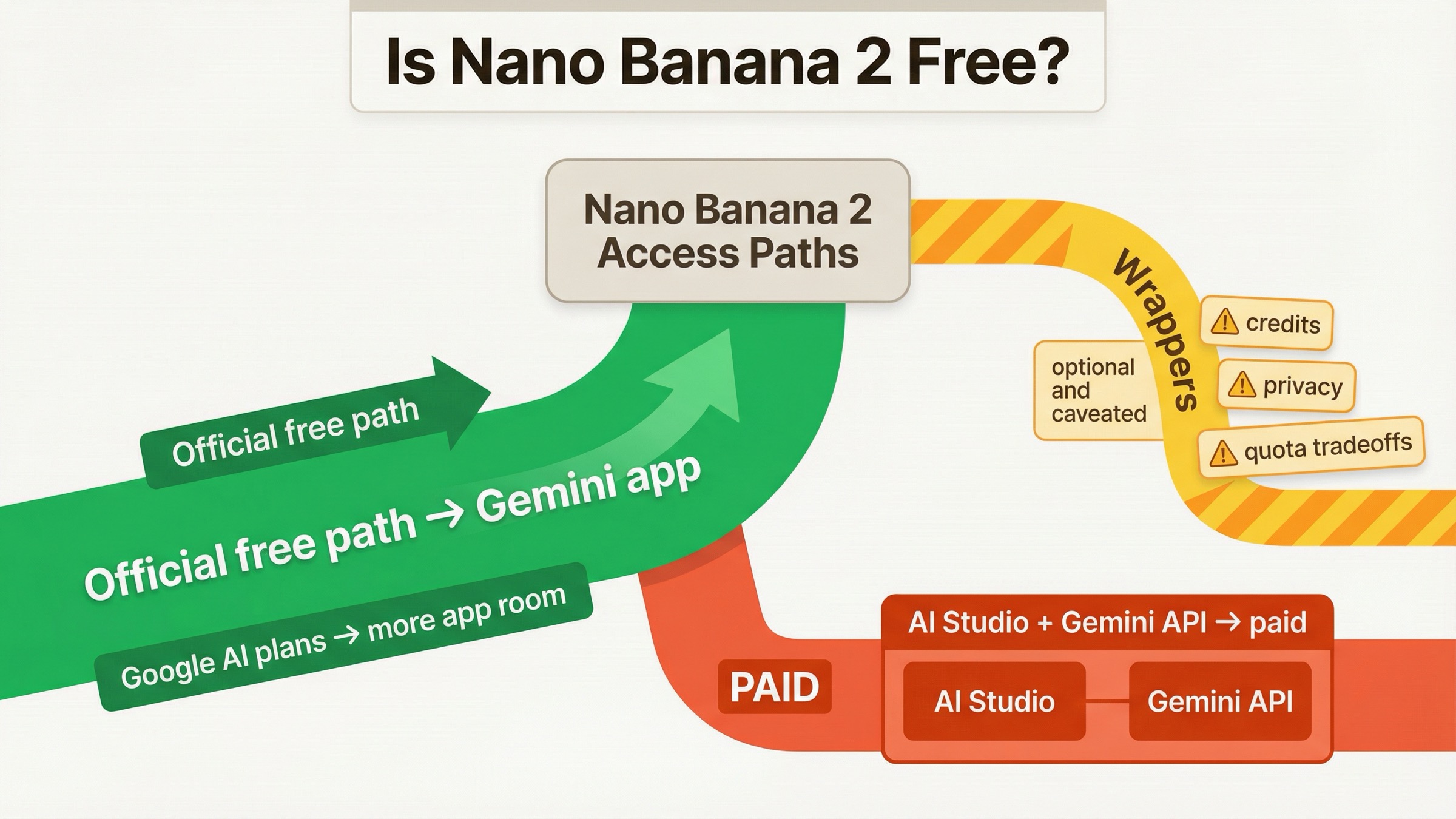
If you want official free Nano Banana 2 access, start in the Gemini app. As of March 29, 2026, Google's own Gemini help page says Basic users can generate or edit up to 20 images per day with Nano Banana 2. That is the clean answer most search results still bury.
What trips people up is that Google exposes the same model family across multiple surfaces. Nano Banana 2 is available in Gemini for personal use, it appears in Google AI plan marketing, and it maps to gemini-3.1-flash-image-preview in the Gemini API docs. Those are connected, but they are not billed the same way. The official Gemini app has a real free path. The official developer API does not.
So if your question is "Can I try Nano Banana 2 without paying first?", the answer is yes in Gemini, no in the official API. If your real question is "Can I automate it, run it through AI Studio, or build with it for free forever?", the answer is much stricter. This page is for that split.
| Surface | Official? | Free today? | Best for | Main catch |
|---|---|---|---|---|
| Gemini app | Yes | Yes | Personal image generation and editing | Daily caps apply and can change |
| Google AI plan trial or upgrade | Yes | Trial sometimes, then paid | Higher app limits and paid-plan features | A plan trial is not a permanent free tier |
| AI Studio / Gemini API | Yes | No public free tier for Nano Banana 2 | Developers and production workflows | Billing account and paid pricing apply |
| Third-party wrapper sites | No | Sometimes, depending on credits or promotions | Quick tests, no-login demos, casual experiments | Privacy, quota, and reliability vary widely |
TL;DR
- Use the Gemini app if you want official free Nano Banana 2 access.
- Google's current help page lists up to 20 images/day for Basic users, with higher caps on paid plans.
- The official AI Studio / Gemini API route is paid, not free.
- Treat no-login or unlimited sites as wrappers with tradeoffs, not as equivalent official access.
Where Nano Banana 2 is actually free today
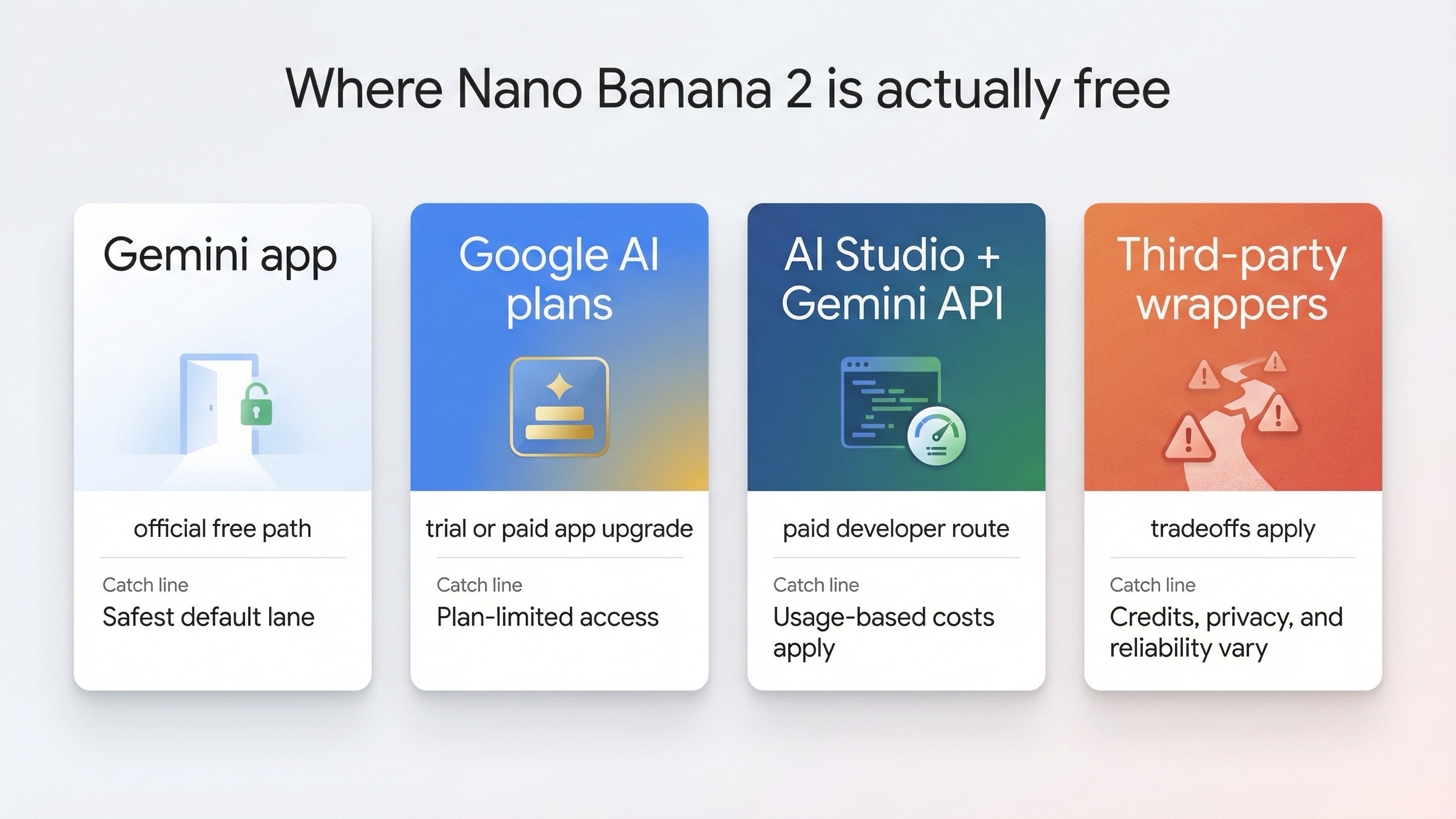
The easiest way to think about Nano Banana 2 is to separate consumer access from developer access. Google's consumer path is the Gemini app. Google's developer path is AI Studio and the Gemini API. The SERP keeps treating those as one thing because "free" is a stronger click word than "which product surface are you really asking about?"
That is why the search results are full of exact-match domains promising "free," "no login," and "unlimited." Those pages are speaking to the user's emotional question, not the operational one. The operational question is: which free option is official, stable, and clear enough to build around?
Today, the safest answer is simple. If you only want to make images, edit photos, or test prompts, use Gemini. Google's own image-generation page says Nano Banana 2 is available wherever the Gemini app is available, and the app puts the tool behind Create images in the tools menu. You do not need to understand model IDs, AI Studio, or per-image token pricing to get started.
The moment you move into API thinking, the economics change. Google's developer docs define Nano Banana 2 as gemini-3.1-flash-image-preview, and Google's pricing page lists that model under the paid tier only. That is the line many wrapper pages and older tutorials blur. They treat "I can use Nano Banana 2 somewhere for free" as if it also means "the official API is free." It does not.
That does not make wrapper sites automatically bad. It just means you should classify them correctly. They are convenience layers with their own credit systems, promo budgets, moderation rules, and privacy tradeoffs. Some are useful for fast experimentation. None should be confused with the official free Gemini path.
What free users get in the Gemini app right now
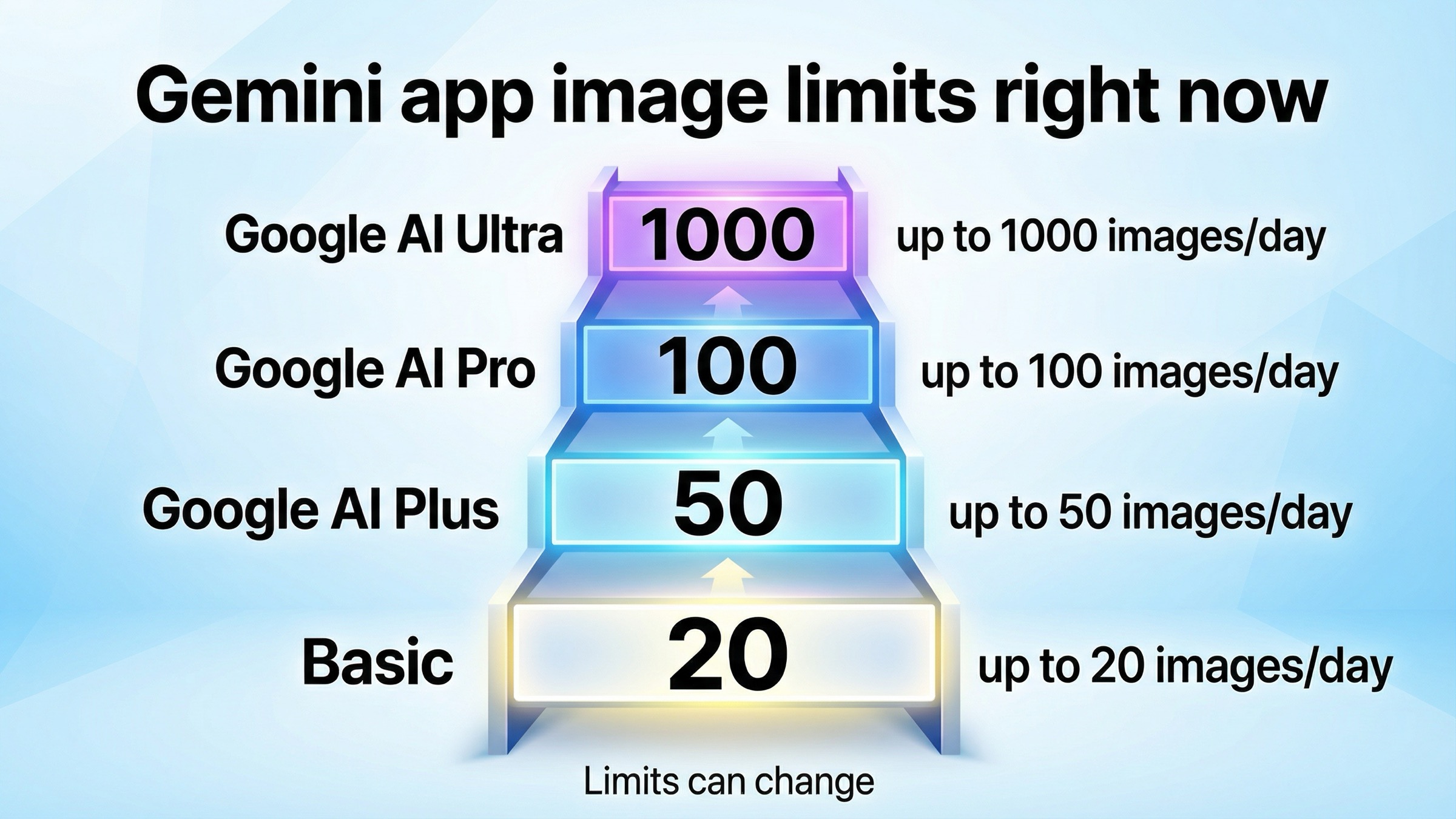
For most readers, this is the only section that actually matters. Google's current Gemini Apps limits page lists Nano Banana 2 image-generation and editing limits by plan, and for free Basic users the number is up to 20 images per day. That is the strongest official answer to the free query because it is both current and specific.
The same help page currently lists:
- Basic: up to 20 images per day
- Google AI Plus: up to 50 images per day
- Google AI Pro: up to 100 images per day
- Google AI Ultra: up to 1000 images per day
Google also warns that these limits can change frequently and reset daily. That warning matters. You should treat the free Gemini path as real, but not as a fixed contract with a permanent guarantee. If you are comparing Google's current app generosity to a competitor, use an exact date. If you are deciding whether the free path is useful for everyday experimentation, the answer is still yes.
In practice, the Gemini app is the best free starting point for three kinds of users:
- people who want a clean official workflow without thinking about API billing
- creators who need a small daily batch of image generations or edits
- anyone learning prompt structure before they decide whether paid API access is worth it
This is also the right place to test creative workflows before you over-optimize. If you want better image ideas, prompt structure, or edit strategies, move from this page to our Nano Banana 2 prompts guide. Do that before you start worrying about AI Studio pricing. For many people, better prompts create more value than more quota.
One subtle point worth keeping in mind: Google's plan pages also advertise monthly AI credits, but those are not the cleanest way to reason about Nano Banana 2 in Gemini. Google's AI plans page explains that those daily and monthly credits are pooled across other surfaces like Flow and Whisk, while the Gemini help page separately lists Nano Banana 2 image caps inside the Gemini app. If you mix those systems together, you will misread what you actually get.
The practical rule is this: if you are asking "how many Nano Banana 2 images can I make in Gemini today?", trust the Gemini help page's daily image limits first.
When a Google AI plan or trial changes the answer
Searchers often jump from "is it free?" to "should I just use the trial?" Google currently markets a 1-month Google AI Pro trial on its AI plans page, and that can be a reasonable path if you already know that the free Basic limit is too tight for your workload. But you should classify the trial correctly: it is a trial of a paid app plan, not a permanent free workaround.
What changes when you move beyond Basic is not just more volume. Google AI Plus, Pro, and Ultra raise app limits, and Google's plan pages also highlight higher access to related features such as Nano Banana Pro redo options. That matters if you are a creator who likes the Gemini workflow and just needs more headroom, not a separate billing stack.
The upgrade question becomes easier if you ask it in plain English:
- If you only occasionally hit the free limit, stay on Basic.
- If you like Gemini and need more room for regular creative work, a Google AI plan is the simplest upgrade.
- If you need automation, batching, or app integration, skip the subscription framing and think in API terms instead.
That last point is where readers lose time. A Google AI plan can improve your Gemini experience, but it does not magically turn the official developer API into a free playground. The plan question and the API question are related, yet still separate.
There is also some naming noise in Google's current public pages. Depending on which Google page you open, you may still see a mix of legacy Google One packaging and newer Google AI plan language. Do not let that distract you from the operational answer. The important distinction is not the branding label. It is whether you are talking about Gemini app access or developer API billing.
If you want a more specific breakdown of what paid Nano Banana access costs once you leave the free path, our Nano Banana 2 API pricing guide goes deeper into the math.
Why AI Studio and the Gemini API are not free in the same way
This is the section most ranking pages still get wrong.
In Google's developer docs, Nano Banana 2 maps to gemini-3.1-flash-image-preview. That model is available in the Gemini API docs and in AI Studio, but Google's public Gemini API pricing page does not show a free tier for it. Instead, the pricing page lists the current paid image costs at roughly:
| Image size | Paid API cost | When it is worth paying |
|---|---|---|
| 0.5K | about $0.045 per image | quick cheap tests where lower resolution is acceptable |
| 1K | about $0.067 per image | standard web and social output |
| 2K | about $0.101 per image | sharper marketing or editorial assets |
| 4K | about $0.151 per image | high-resolution output where the extra detail is genuinely useful |
That is why the official answer to "Is the Nano Banana 2 API free?" is no. You may be able to find wrapper sites, sponsored demos, or temporary third-party credit offers that let you touch the model without entering your own card details, but that is not the same thing as Google offering a free official API tier.
The rate-limit page strengthens that distinction even further. Google ties API access to billing-based usage tiers, and Tier 1 requires an active billing account. That is a developer-access rule, not a Gemini-app subscription perk. So if someone tells you their AI Pro or Gemini plan means the official API is now free, they are collapsing two separate systems.
This matters most for developers and teams because the wrong assumption shows up late. You test a few prompts in Gemini, see the model in AI Studio, assume the build step will be similar, and only then discover that API pricing and billing tier requirements still apply. That is the exact failure mode this article is trying to help you avoid.
If your actual goal is "I need a free way to experiment with the model before I decide whether to integrate it," do your experimentation in Gemini first. If your goal is "I need programmatic image generation," go in expecting paid API math from day one. If you want the longer version of that distinction, read our guide to whether Gemini 3.1 Flash Image Preview has a free API tier.
How to judge third-party "free" and "unlimited" sites
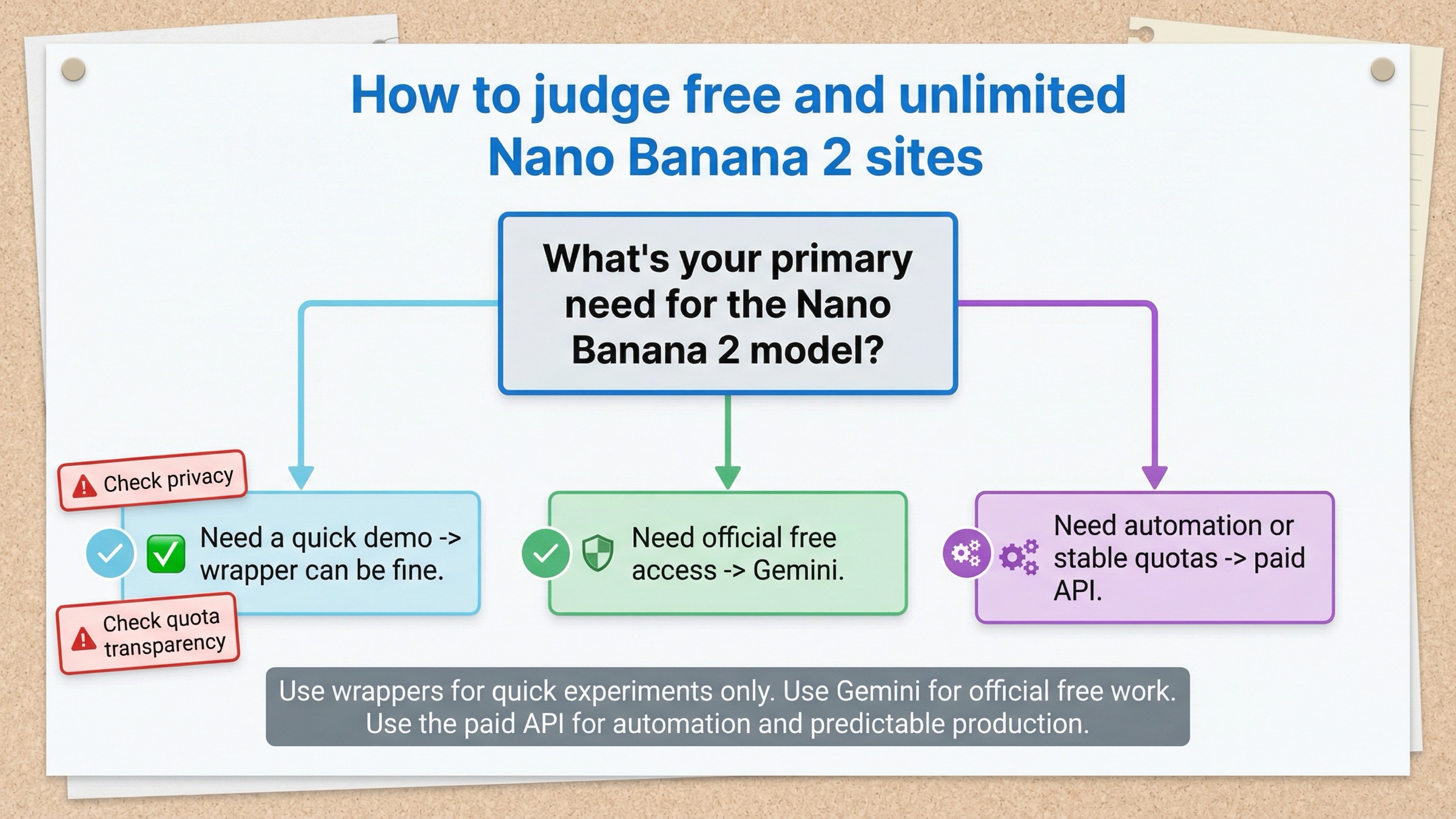
The live SERP is full of sites that promise free or unlimited Nano Banana 2 access. Some offer no-login demos. Some give a small credit bundle. Some wrap the model in their own interface and call it unlimited until you hit a hidden quota, moderation wall, or speed throttle.
The right way to evaluate those sites is not to ask "are they lying?" The better question is "what business model is paying for my images?" Once you ask that, the tradeoff becomes clearer.
A third-party wrapper can still be useful when:
- you want a quick demo without signing into Gemini
- you only need a small number of experiments
- you want a different interface or a bundled workflow
But the wrapper path becomes much weaker when:
- you care about prompt privacy or client-sensitive images
- you need predictable availability
- you want clean documentation for long-term usage
- you need to understand whether your quota is daily, weekly, account-based, or promotion-based
This is where the exact-match landing pages on page one are strongest on click appeal and weakest on decision support. They understand that searchers want a faster answer than Google's own docs provide, but they usually do not tell you enough about quotas, data handling, or whether your "free" access is a trial, a wrapper budget, or a permanent service level.
A good rule of thumb is simple: if a site does not say whether it is the Gemini app, its own wrapper, or the official API with someone else's billing in front, assume it is a wrapper and judge it on wrapper terms.
That also means you should not let third-party pages reset your default recommendation. For official free access, Gemini is still the answer. Wrappers are optional, not primary.
Best path for casual users, creators, and developers
If you are a casual user, do not overthink this. Use Gemini. The free Basic path is good enough to learn the tool, test prompt ideas, and handle light creative work. If you never hit the cap, you do not need a plan and you definitely do not need API billing.
If you are a creator who uses Nano Banana 2 regularly, the free Gemini path is still the best place to start, but you should watch how often you hit the limit. If it happens once in a while, stay free. If it happens constantly and the Gemini workflow already fits you well, a Google AI plan is the cleanest upgrade because it raises app-side access without forcing you into developer tooling.
If you are a developer, skip the false hope stage. The official API should be treated as paid infrastructure, not as a hidden free tier waiting to be unlocked. Use Gemini to validate prompt quality and user experience. Then move to API pricing with clear expectations around image size, cost, and billing tiers.
And if you are comparing all of this against Nano Banana Pro, do that after you solve the free-access question. The right comparison is not "free versus Pro" in the abstract. It is "do I still need the free path, or have I reached the point where better fidelity or a different billing model matters?" Our Nano Banana 2 vs Nano Banana Pro comparison is the better page for that decision.
The short version is still the same one from the top:
- want official free access: use Gemini
- want more app-side room: consider a Google AI plan or trial
- want programmatic access: assume paid API pricing
- want instant no-login demos: use wrappers carefully and knowingly
FAQ
Is Nano Banana 2 free in the official API?
No. Google's public pricing page lists gemini-3.1-flash-image-preview on the paid tier, not the free tier.
Does a Google AI Pro trial make the API free?
No. A Google AI plan trial can improve your Gemini app access, but it does not turn the official developer API into a permanent free tier.
Is AI Studio the same thing as the Gemini app?
No. They are related Google surfaces, but they serve different use cases. Gemini is the consumer-facing app path. AI Studio sits on the developer side, where pricing and billing tiers matter.
Are third-party no-login Nano Banana 2 sites worth using?
They can be fine for quick experiments, but they should be treated as wrappers with their own quota, privacy, and reliability tradeoffs. They are not a substitute for understanding the official free Gemini path.


