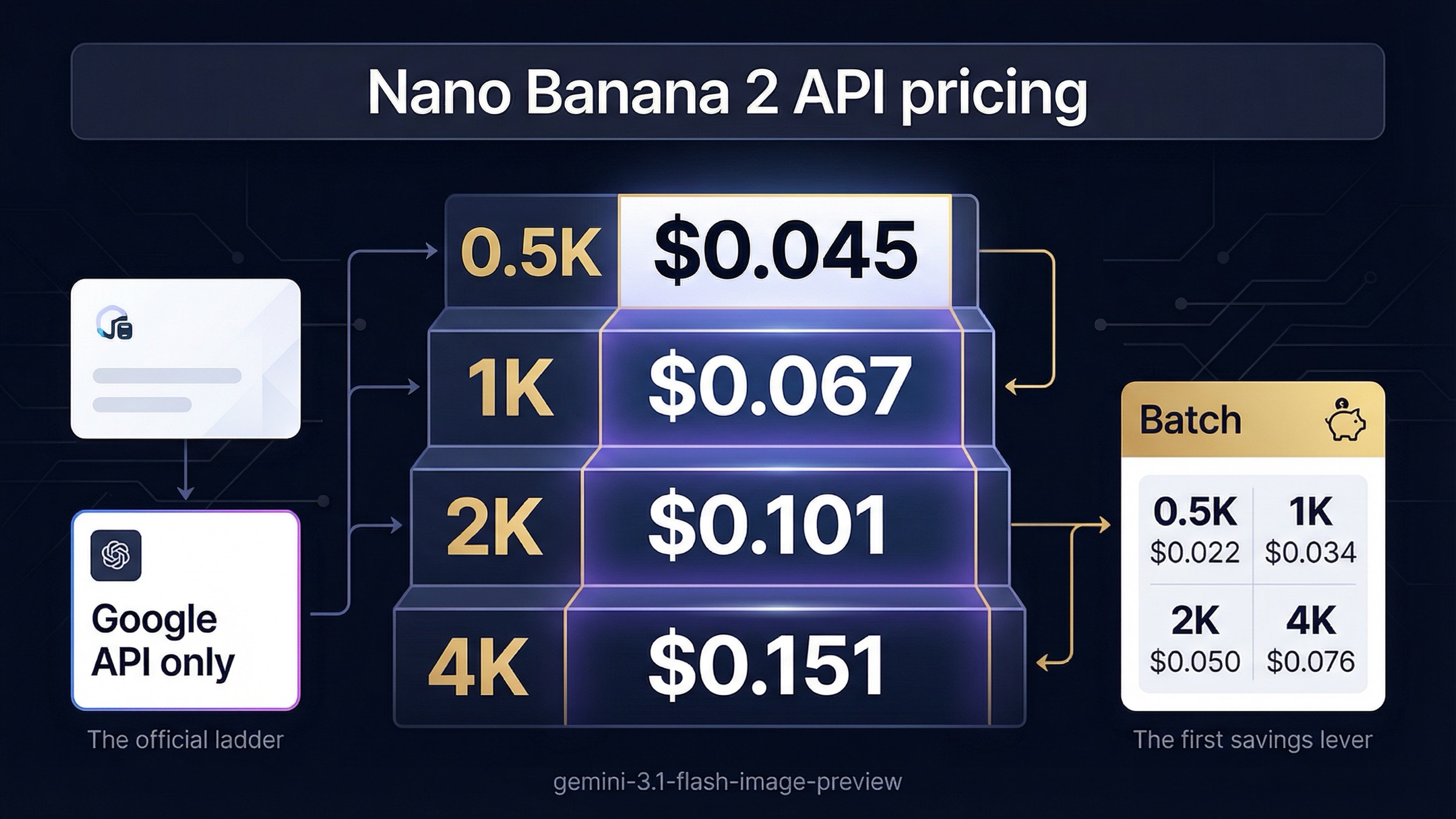
As of March 24, 2026, Google's official Nano Banana 2 API pricing runs from $0.045 per image at 0.5K to $0.151 per image at 4K on the Gemini API. If your workload can wait for Batch mode, the same ladder drops to $0.022, $0.034, $0.050, and $0.076. For most developers, that is the number that matters most because it is Google's own pricing surface for the model Google calls Nano Banana 2 in the API docs.
The confusing part is that search results do not stay on that surface. Some pages are quoting Google API billing, some are quoting subscription credits, and some are model indexes that summarize Google's rates without being the billing source of truth. That is why the easiest-looking answer is often not the safest budgeting answer. If you are costing Google's API, trust the official pricing page first, then use the rest of the SERP only to understand the market around it.
The other easy mistake is not knowing what Google means by Nano Banana 2 at all. In the current image generation guide, Google maps Nano Banana 2 to gemini-3.1-flash-image-preview, Nano Banana Pro to gemini-3-pro-image-preview, and plain Nano Banana to gemini-2.5-flash-image. If you budget without resolving that alias mapping first, it is very easy to pick up the wrong price, the wrong rate-limit expectations, or an already stale screenshot.
TL;DR
If you want the shortest reliable answer, use this table first.
| Output size | Standard price | Batch price | When it makes sense |
|---|---|---|---|
| 0.5K | $0.045 | $0.022 | Thumbnails, previews, fast low-cost iterations |
| 1K | $0.067 | $0.034 | Default web and product content |
| 2K | $0.101 | $0.050 | Larger marketing assets and sharper crop room |
| 4K | $0.151 | $0.076 | Premium creative where higher resolution is actually visible |
The practical rule is simple: if you mean Google's own API, start with the Google ladder above. Treat Batch as the default when your workflow is asynchronous. Treat standard mode as the premium for low-latency or interactive generation. Then, before you compare those numbers with other pages, check whether the other page is still talking about Google's API at all.
Nano Banana 2 API Pricing at a Glance
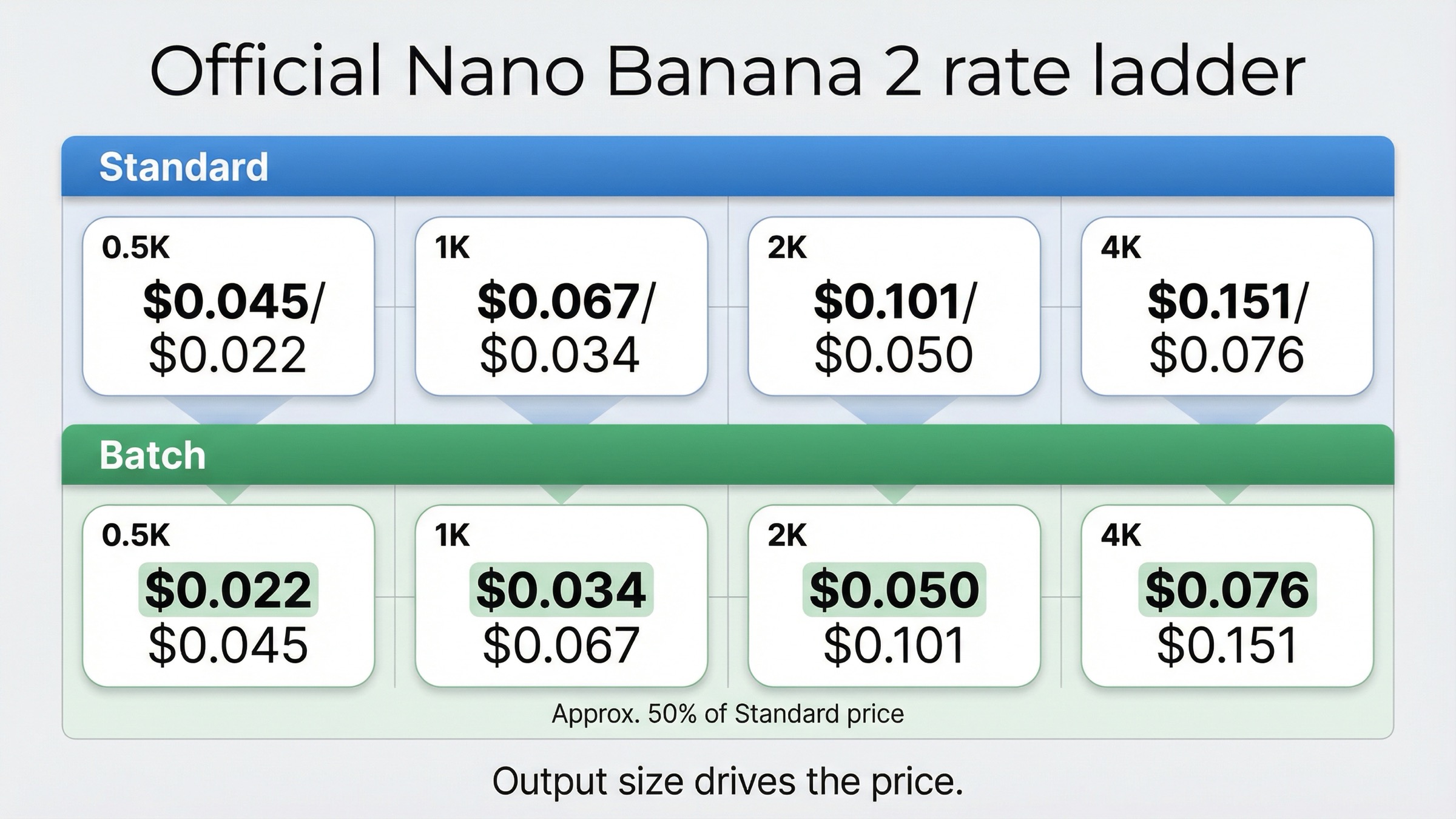
Google's March 24, 2026 pricing page lists Nano Banana 2 under its formal model ID, gemini-3.1-flash-image-preview, not under the nickname alone. That pricing ladder is currently split across four output sizes and two processing modes.
| Mode | 0.5K | 1K | 2K | 4K |
|---|---|---|---|---|
| Standard | $0.045 | $0.067 | $0.101 | $0.151 |
| Batch | $0.022 | $0.034 | $0.050 | $0.076 |
This is the clean answer the query deserves, but the details behind it are still worth understanding because they explain why the numbers scale the way they do. Google's current pricing page says image output on this model is billed at $60 per 1,000,000 output tokens in standard mode and $30 per 1,000,000 output tokens in Batch mode. The per-image price goes up with image size because Google's own footnote ties 0.5K output to 747 tokens, 1K to 1120 tokens, 2K to 1680 tokens, and 4K to 2520 tokens. In other words, the ladder is not arbitrary. It is Google's token math already converted into planning-ready per-image numbers.
That matters because it tells you what the page is and is not answering. The visible ladder is the dominant output cost for simple text-to-image generation. It is also the right number to use for top-line planning when your prompt is just text and your workload is straightforward generation. But it is not a promise that every real request will land on exactly that number in every workflow. If you add grounded search, reference-heavy edits, or repeated retries, your total spend can rise above the clean output-only number even though the public pricing row still remains correct.
The main budgeting choice here is therefore not mysterious. It is whether your product actually benefits from 2K or 4K output, and whether you need the image right now or later. Teams often overspend not because the price is hidden, but because they default to a higher resolution or standard mode without checking whether the downstream use case can even show the difference. A product listing thumbnail, email header, or blog illustration rarely needs 4K output. A hero banner, premium advertising creative, or large-format asset might.
For readers who want the adjacent model context, this article should stay narrower than a broad Google-family pricing guide. If you need the bigger picture across all live Google image routes, the more useful companion read is our Gemini image generation API pricing guide. For the exact Nano Banana 2 API query, the job here is to keep the answer focused on Google's current pricing surface and the decisions that change your bill.
What Google Means by Nano Banana 2 in the API
Google's own naming is the first thing the article needs to fix because a pricing answer is only trustworthy when it is attached to the right model. In the current Nano Banana image generation guide, Google says:
- Nano Banana 2 =
gemini-3.1-flash-image-preview - Nano Banana Pro =
gemini-3-pro-image-preview - Nano Banana =
gemini-2.5-flash-image
This mapping changes the pricing conversation immediately. A reader searching for Nano Banana 2 is usually not looking for some random subscription page called "Nano Banana 2 pricing." They are trying to figure out what Google is charging for the current high-efficiency image lane inside the Gemini API. If the page never says the model ID out loud, the answer stays one click away from being misread.
The March 2026 models page reinforces the same structure. Google lists Nano Banana 2 and Nano Banana Pro as separate image lanes inside the Gemini 3 family and still labels both as preview routes. That preview status matters for two reasons. First, it is a reminder that the pricing and limit surfaces should be refreshed aggressively. Second, it explains why older screenshots and older discussions can survive in search even after the live product stack has shifted underneath them.
This is also where many broad pricing pages lose the reader. They try to cover Nano Banana, Nano Banana 2, Nano Banana Pro, and every third-party access path in one pass. That is fine for a product-family overview, but it is weak for the exact API-pricing query because the reader does not need every branch at once. They need one reliable rule: if you are budgeting Nano Banana 2 on Google's API today, budget gemini-3.1-flash-image-preview using the current official ladder, not an older Flash Image Preview reference and not a third-party credit plan.
The alias mapping also explains why so many people feel like they are seeing inconsistent product names even on trustworthy pages. Google uses the friendlier Nano Banana branding on the image-generation guide and the blog post, but the pricing page stays formal and bills the model under the exact model ID. That split is normal for Google documentation, but it creates a real SERP gap because a pricing page built around the nickname can still outrank the official rate table without being the actual billing source.
When Batch Mode Is the Default Cost Decision
If your image workflow is not interactive, Batch should usually be your default cost assumption. The official Nano Banana 2 Batch prices are almost exactly half the standard prices at every size, and the difference is large enough to change the economics of the model for any repeatable production pipeline.
That 50 percent discount is not some marginal optimization. At 1K output, you move from $0.067 to $0.034. At 4K, you move from $0.151 to $0.076. Over 1,000 images, that is the difference between $67 and $34 at 1K, or between $151 and $76 at 4K. If you are generating catalog images, queueing marketing assets, or running overnight creative jobs, ignoring Batch is essentially choosing to pay a latency premium you probably do not need.
The better way to think about it is not "standard good, batch cheaper." It is "standard is the premium lane for immediacy." If a user is waiting in a live interface or a human editor needs feedback during an interactive session, standard mode makes sense. If the image can arrive later without harming the experience, standard mode is often just the more expensive path to the same output.
There is also a strategic reason to treat Batch as a first-class decision rather than a footnote. It gives you a clean lever to test whether Nano Banana 2 is cost-effective for your workload before you start shopping for more complex alternative routes. Many teams jump straight from "Google's 4K number feels expensive" to "we need another provider." A more disciplined first move is often to ask whether the work actually needs real-time delivery. If the answer is no, the official Google discount may already solve most of the cost objection.
That is why this section belongs in prose instead of as one more pricing row. The decision is behavioral. It depends on whether your workflow is user-facing and time-sensitive or pipeline-driven and delay-tolerant. Pricing articles that bury Batch under the main rate table miss the actual action point hidden underneath the query.
Rate Limits, Paid Access, and What Google Does Not Promise Publicly
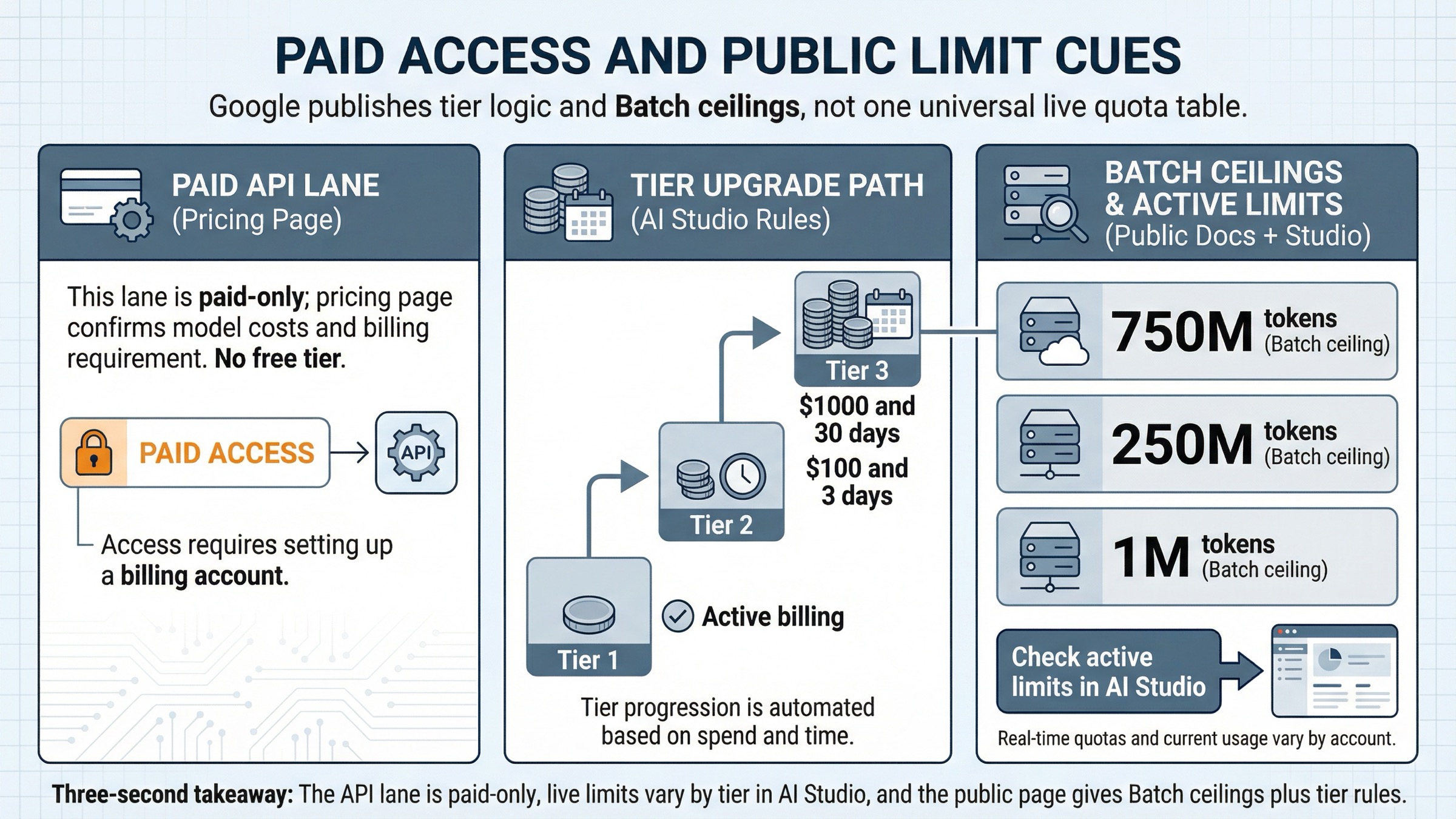
The official pricing page is very clear about one important point: the Nano Banana 2 API lane is not listed as free on the pricing table. That does not mean the broader Nano Banana 2 product story is paid-only everywhere. Google's own blog post talks about Nano Banana 2 showing up across products like Gemini, Search, Ads, and Flow. But the pricing question here is narrower than that. If you are using Google's own API billing surface, the public pricing page is pointing you at the paid tier.
The rate-limit story is more nuanced. Google's current rate-limits page says that active limits depend on your project usage tier and should be viewed in AI Studio. That is the official reason a careful article should not pretend there is one universal March 2026 RPM or IPM table that applies to every reader. Google also says preview models can have more restrictive limits and that actual capacity may vary.
What Google does publish publicly, and what is safe to quote, is the tier structure and the Batch ceilings. The rate-limits page says:
- Free tier means an active project or free trial
- Tier 1 requires an active billing account
- Tier 2 requires $100 paid toward the billing account and at least 3 days since the first successful payment
- Tier 3 requires $1,000 paid and at least 30 days since the first successful payment
For Batch mode, Google also publishes current enqueued-token ceilings for Gemini 3.1 Flash Image Preview:
- Tier 1: 1,000,000
- Tier 2: 250,000,000
- Tier 3: 750,000,000
Those are useful numbers because they show the direction of scale Google expects for the model even though the active non-Batch quotas remain account-specific. In practical terms, the takeaway is not "here is your exact per-minute limit." It is "if throughput matters, your billing tier and your AI Studio view matter as much as the public price table."
There is one more cost caveat worth keeping visible. Google's pricing page also ties Grounding with Google Search to its own pricing rule: 5,000 prompts per month are free, then the cost becomes $14 per 1,000 search queries for text- and image-based grounding on this lane. For many image workflows, that will never matter. But if you are using Nano Banana 2 as part of grounded creative generation rather than plain prompt-only generation, the headline per-image number is no longer the whole request-cost story.
Why Search Results Show Different Nano Banana 2 Prices
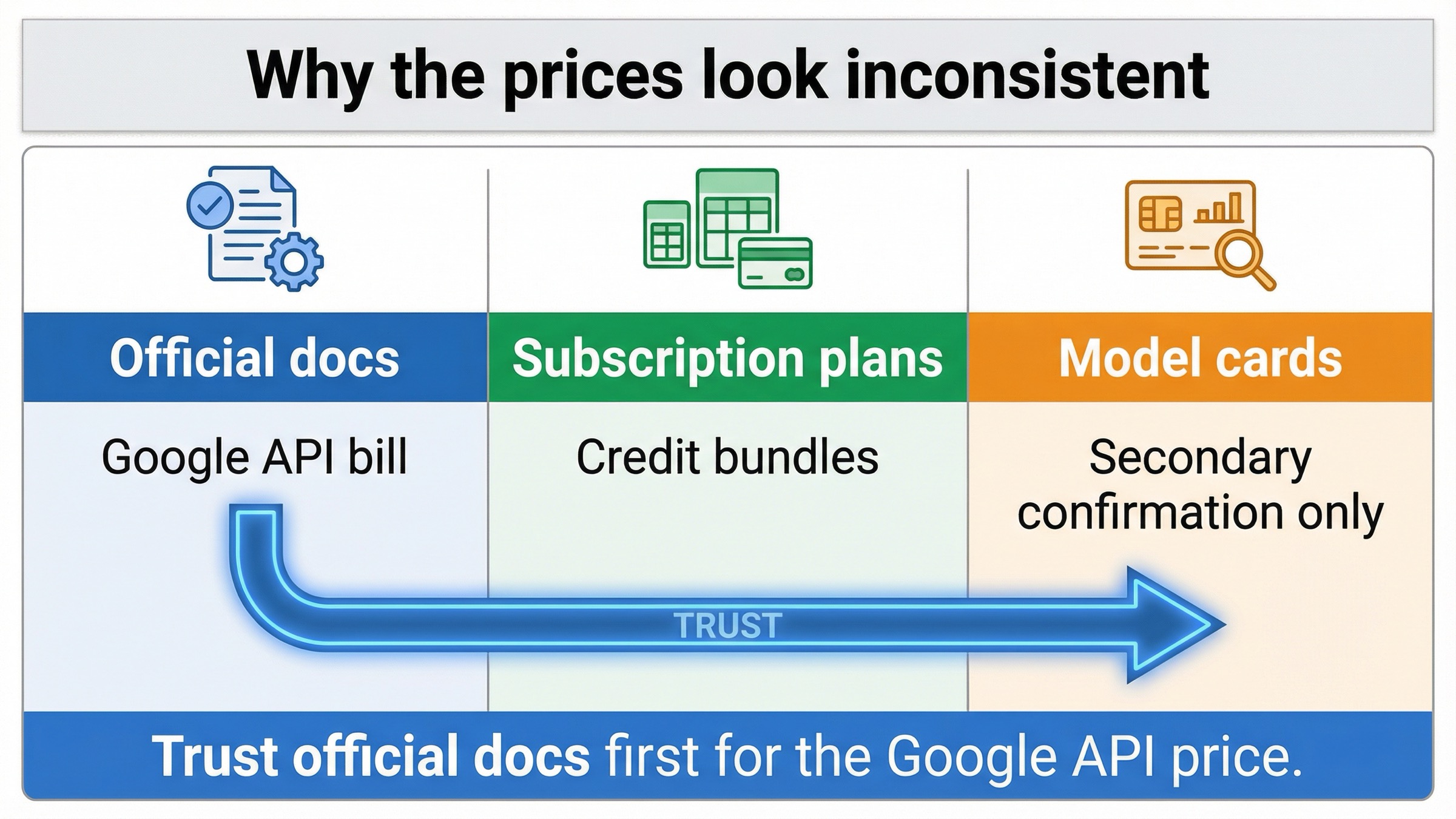
Search results disagree because they are often answering different billing surfaces, not because one side necessarily miscopied Google's rate table.
The first page usually contains at least three page types:
- Official Google docs
- Subscription or credit-plan pages
- Independent model indexes or gateway cards
The official Google docs are the answer if your question is "what does Google's own API charge?" They publish the live rate ladder, the exact model ID, the preview label, and the rate-limit framing. The weakness of those pages is not that they are wrong. It is that they are fragmented. The reader has to move between pricing, image generation, models, and rate limits to build the full picture.
Subscription and credit-plan pages are different. A page like a standalone Nano Banana pricing landing page may be perfectly honest about its own plans while still being the wrong source for the official API question. The number on that page can be real for that vendor and still misleading for a reader who came searching for Google's API pricing. The SERP rewards those pages anyway because their titles are short, direct, and easy to click.
Independent model indexes sit somewhere in the middle. They are often helpful for fast comparison and can mirror Google's numbers accurately, but they are still downstream from Google's own pricing page. They are useful as secondary confirmation, not as the billing source of truth.
Old model references create a second layer of confusion. Google's public changelog says gemini-2.5-flash-image-preview was shut down on January 15, 2026. That means a pre-2026 article or screenshot can still look familiar enough to be trusted while quietly pointing at an older product surface. Once you know that, the disagreement on page one stops looking mysterious. It becomes a taxonomy problem: different product, different page type, or different date.
That is why the safest trust rule is so simple. If you are costing Google's API today, trust the current Google pricing page first. Use the rest of the SERP to understand alternatives, packaging, or market behavior only after you have the official number fixed in place.
Should You Use Nano Banana 2 or Pay for Nano Banana Pro Instead?
The pricing answer becomes more useful when it ends with a routing decision instead of just another price recap. Google's own docs position Nano Banana 2 as the high-efficiency image lane and Nano Banana Pro as the more advanced premium lane. The current pricing gap reflects that split.
| Route | Standard output pricing | Batch output pricing | Best fit |
|---|---|---|---|
Nano Banana 2 (gemini-3.1-flash-image-preview) | $0.045 to $0.151 | $0.022 to $0.076 | Default choice for high-volume work and faster iteration |
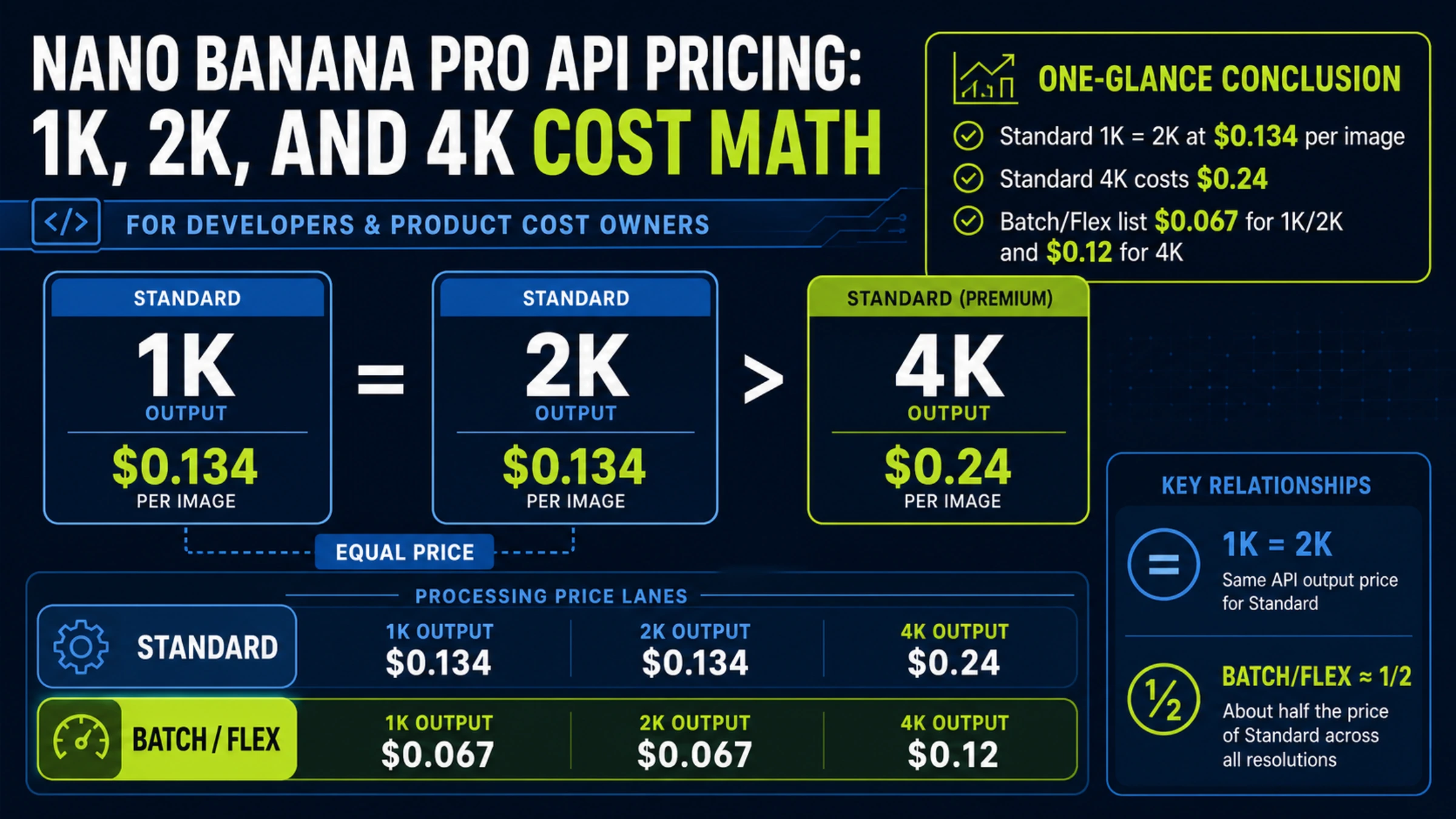
Nano Banana Pro (gemini-3-pro-image-preview) | $0.134 at 1K or 2K, $0.24 at 4K | $0.067 at 1K or 2K, $0.12 at 4K | Higher-stakes creative where premium reasoning and image quality are worth paying for |
The wrong way to read this table is "Nano Banana 2 cheaper, therefore always better." The right way to read it is "Nano Banana 2 is the default unless the cost of getting the image wrong is high enough to justify Pro." If you are shipping high-volume campaign variants, product imagery at scale, or user-facing generation where speed matters, Nano Banana 2 is the more defensible starting point. If you are making premium assets where text rendering, complex layouts, or higher contextual fidelity matter more than generation cost, the Pro lane may still be the smarter budget choice even at a higher per-image rate.
For a broader quality-versus-cost comparison, the more useful next read is our Nano Banana 2 vs Nano Banana Pro guide. For this pricing article, the recommendation should stay narrow: start with Nano Banana 2 when you need the current Google default for speed and scale, and move to Pro only when the output itself is valuable enough to absorb the premium.
FAQ
Is Nano Banana 2 API pricing free?
Not on Google's current API pricing page. As checked on March 24, 2026, the pricing table lists Free Tier as not available for gemini-3.1-flash-image-preview.
What is the official Nano Banana 2 model ID?
Google's image-generation guide maps Nano Banana 2 to gemini-3.1-flash-image-preview.
Does Batch really cut the price in half?
Yes. On the official March 24, 2026 pricing page, each Nano Banana 2 Batch row is roughly half the standard row: $0.022 versus $0.045 at 0.5K, $0.034 versus $0.067 at 1K, $0.050 versus $0.101 at 2K, and $0.076 versus $0.151 at 4K.
Why do other Nano Banana 2 pricing pages show different numbers?
Because many of them are not quoting Google's API bill. Some are quoting subscription plans, some are summarizing Google's rates in a model directory, and some are using older model references that are no longer the live default.
When should I read a broader pricing guide instead of this page?
Read a broader guide when you need to compare multiple Google image lanes or the whole Gemini image family. This page is intentionally narrower: it is meant to answer the exact Nano Banana 2 API pricing question cleanly.
Bottom Line
The clean answer is this: Google currently prices Nano Banana 2 API output from $0.045 to $0.151 per image in standard mode, or from $0.022 to $0.076 in Batch mode, depending on output size. If you are budgeting Google's own API, those are the numbers to trust first.
The more important decision, though, is not memorizing the ladder. It is choosing the right billing surface and the right mode. Trust the current Google pricing page for the official answer. Treat Batch as the default when latency is not part of the job. Use Nano Banana 2 as the normal starting point for faster, high-volume work, and only pay the Pro premium when the image itself is expensive enough to justify it.
If you need the family-wide context after that, continue with the broader Nano Banana 2 pricing guide or the live Gemini image pricing comparison. For the exact API-pricing query, the safest move is simpler: keep Google's current rate ladder fixed first, then decide everything else around it.