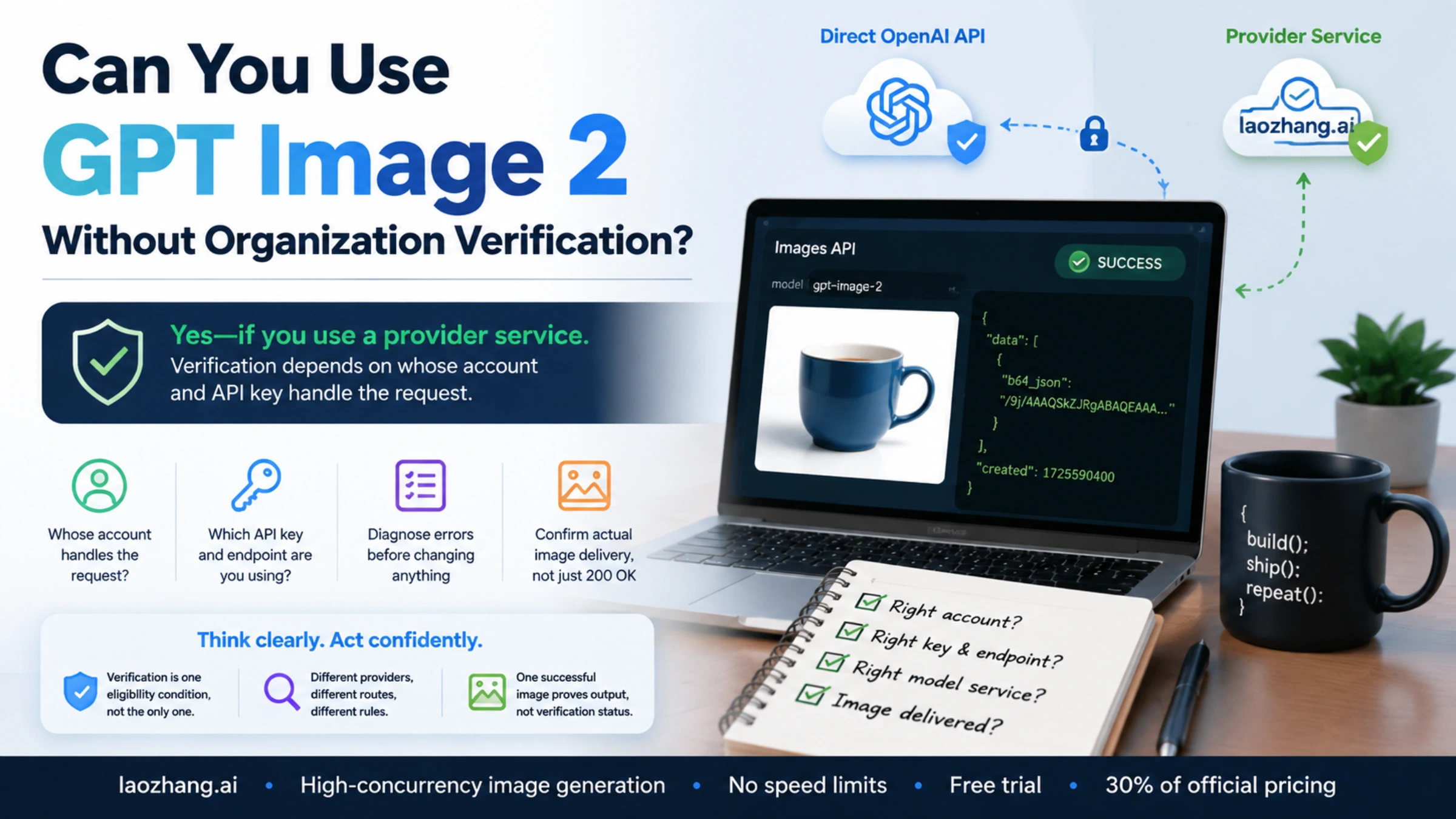
You can use a provider that offers GPT Image 2 without creating and verifying your own OpenAI API organization. That is different from removing a verification requirement on a direct OpenAI request. OpenAI's image-generation guide says GPT Image models, including gpt-image-2, may require organization verification; it does not document a request parameter that bypasses an applicable check. OpenAI image-generation guide
If you already have an OpenAI key and receive a verification error, start with the organization associated with that key. If you prefer a separate provider account, change the API endpoint and credentials together, then confirm which model service the provider actually supplies. The same gpt-image-2 string can select different services under different provider token groups.
The details below reflect OpenAI's documentation as of September 6, 2026. The request example follows that documentation and has not been run as a paid generation.
Choose based on whose account handles the request
| Your intended setup | Account and key you need | What happens to verification |
|---|---|---|
| Call the OpenAI API directly | Your OpenAI project key and its organization | Follow the verification notice shown for that account. Other access requirements still apply. |
| Use a provider's GPT Image 2 service | An account and key issued by that provider | Your personal OpenAI organization is not the account being used. The provider sets its own acceptance and access requirements. |
| Keep an existing OpenAI integration after completing verification | A key for the intended account, organization and project | Diagnose any remaining restriction before changing credentials or providers. |
For a concrete provider option, LaoZhang's documentation says a separate account with the original model provider is unnecessary: customers use a LaoZhang account and API key. This supports using its service without verifying your own OpenAI organization. It does not establish that every intermediary has no identity checks, that OpenAI endorses the service, or that it is available in every country.
Before choosing an intermediary, confirm that it accepts your account and intended use, that its data-handling terms suit the images you will send, and that the documented model supports your application's parameters. If your application specifically requires the official API rather than a web-based image service, the provider's token group matters as much as the model name.
What OpenAI verification currently requires
The current API organization verification help page distinguishes business verification from identity verification. Follow the notice presented in the product: it may request either or both. The term “organization” does not by itself mean every developer must own a registered company.
When identity verification is requested, OpenAI requires an original, physical, valid government-issued ID from a supported country, with a selfie if requested. A passport is not the only possible document. Individuals can verify only one account or organization, so make sure you are signed into the intended account before starting.
Verification also does not replace model eligibility or billing requirements. The GPT Image 2 model page lists the Free API tier as unsupported. A verified account on an unsupported tier is therefore a different problem from an unverified account. Our GPT Image 2 API tiers guide covers that adjacent access question.
Country support is another separate condition. The United States is on OpenAI's supported-countries list; an English-language interface does not determine eligibility. Check the list for the location where you will access the direct API. Creating a provider account does not change the geographic requirements for your own direct OpenAI account.
If verification is blocking an existing integration
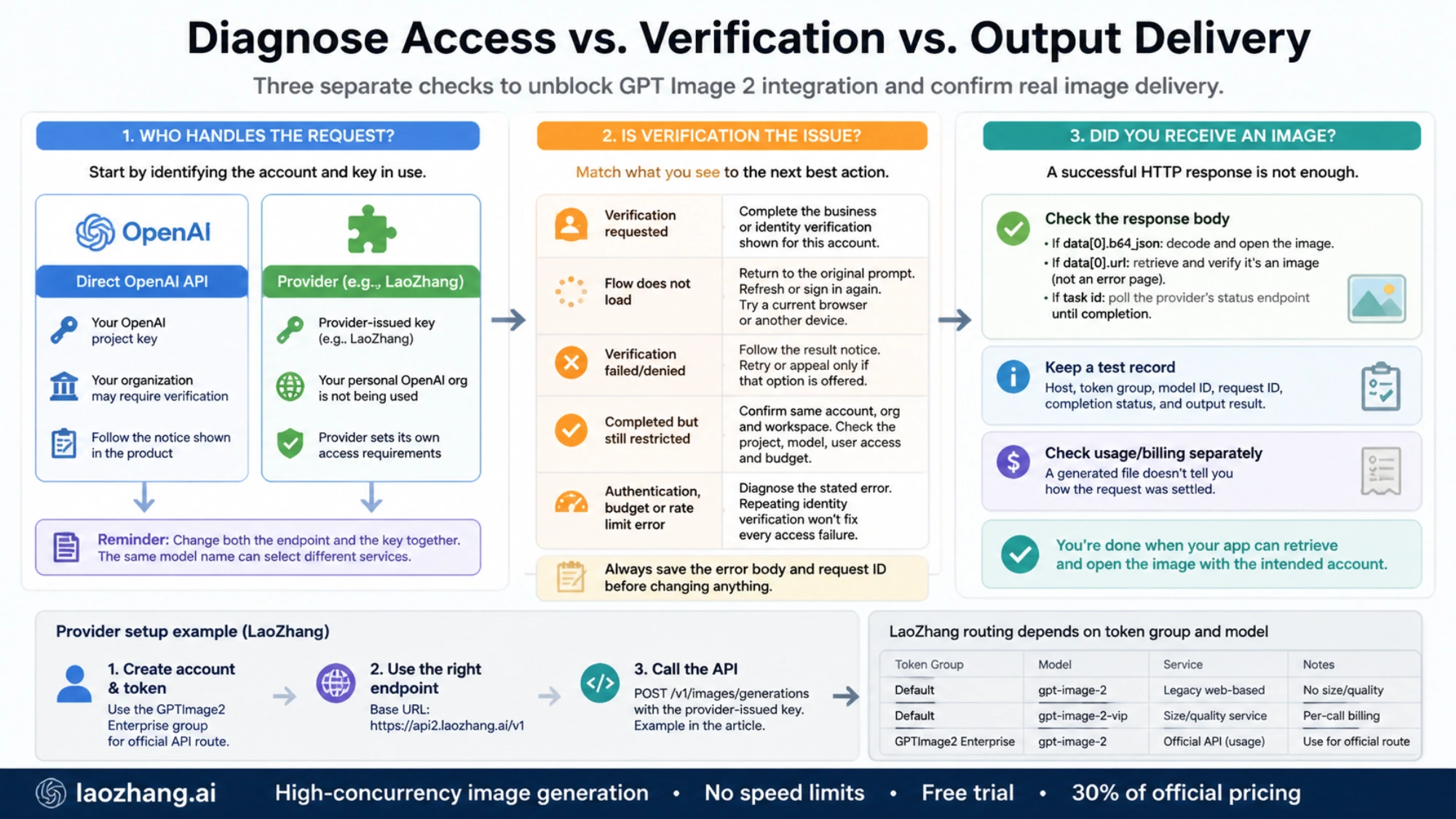
Save the error body and request identifier before changing anything. Check the hostname receiving the request and the account that issued the key. An error returned by a provider belongs to that provider's service, even if your SDK and model name look like an OpenAI example.
Then match the next action to what you can actually observe:
| What you see | What to check next |
|---|---|
| A verification request in OpenAI | Complete the specific business or identity flow shown for the intended account and organization. |
| The verification flow does not load | Return to the original prompt, refresh or sign in again, and try a current browser or another device. |
| Verification failed or was denied | Follow the result notice. Retry or appeal only if that option is offered. |
| Verification completed, but the API remains restricted | Confirm the same account, organization and workspace; then check the project, model, user access and budget. |
| An authentication, budget or rate-limit error | Diagnose the stated error. Repeating identity verification does not resolve every access failure. |
OpenAI says verification decisions cannot be manually overridden, and unsuccessful verification can leave existing access available. Its current help page does not promise that every restriction clears within 15 or 30 minutes, or that generating a new key immediately fixes the problem. Avoid treating those older troubleshooting shortcuts as guarantees. Current verification guidance
For example, suppose the dashboard reports completion but your deployed application still receives an organization error. First compare the account and project used by the deployment with the ones you verified. Refreshing your browser does not update a server's configuration. Once you correct a real mismatch, make one minimal image request to check access; repeatedly submitting billed generations is an expensive substitute for checking account status.
Set up a provider request without mixing credentials
LaoZhang currently documents https://api2.laozhang.ai/v1 as its API base URL. Use a LaoZhang-issued key at that address. Keep your OpenAI key configured only for your direct OpenAI integration.
Its GPT Image 2 documentation distinguishes these choices:
| LaoZhang token group and model | Documented service | Integration consequence |
|---|---|---|
Default group, gpt-image-2 | Legacy web-based service | Does not support size or quality. |
Default group, gpt-image-2-vip | Service with size and quality controls | Supports those controls and uses per-call billing. |
GPTImage2 Enterprise group, gpt-image-2 | Service documented as using official API keys | Uses usage-based billing; select this group when you need the documented official API service. |
This is why replacing only the base URL in an existing example is insufficient. A key in the default group does not become an Enterprise key because the request says gpt-image-2.
After creating the appropriate provider token, the following minimal example targets the GPTImage2 Enterprise group. Set LAOZHANG_API_KEY locally to that token before running it. Executing the command can incur the provider's generation charge.
curl --fail-with-body https://api2.laozhang.ai/v1/images/generations \
  -H "Authorization: Bearer ${LAOZHANG_API_KEY}" \
  -H "Content-Type: application/json" \
  --data '{
    "model": "gpt-image-2",
    "prompt": "A blue ceramic coffee cup on a plain white background",
    "n": 1
  }' \
  --output image-response.json
The provider documents /v1/images/generations for generation and /v1/images/edits for editing. In an SDK that appends those paths, configure the base URL ending in /v1; do not append /v1 twice. Treat more advanced parameters as provider-specific until you confirm support for the selected group.
If you are deciding between a direct Images API call and an assistant that generates images through Responses, use the GPT Image 2 API integration guide. Those are different request shapes; switching API styles does not itself satisfy an account verification requirement.
Confirm image delivery separately from account status
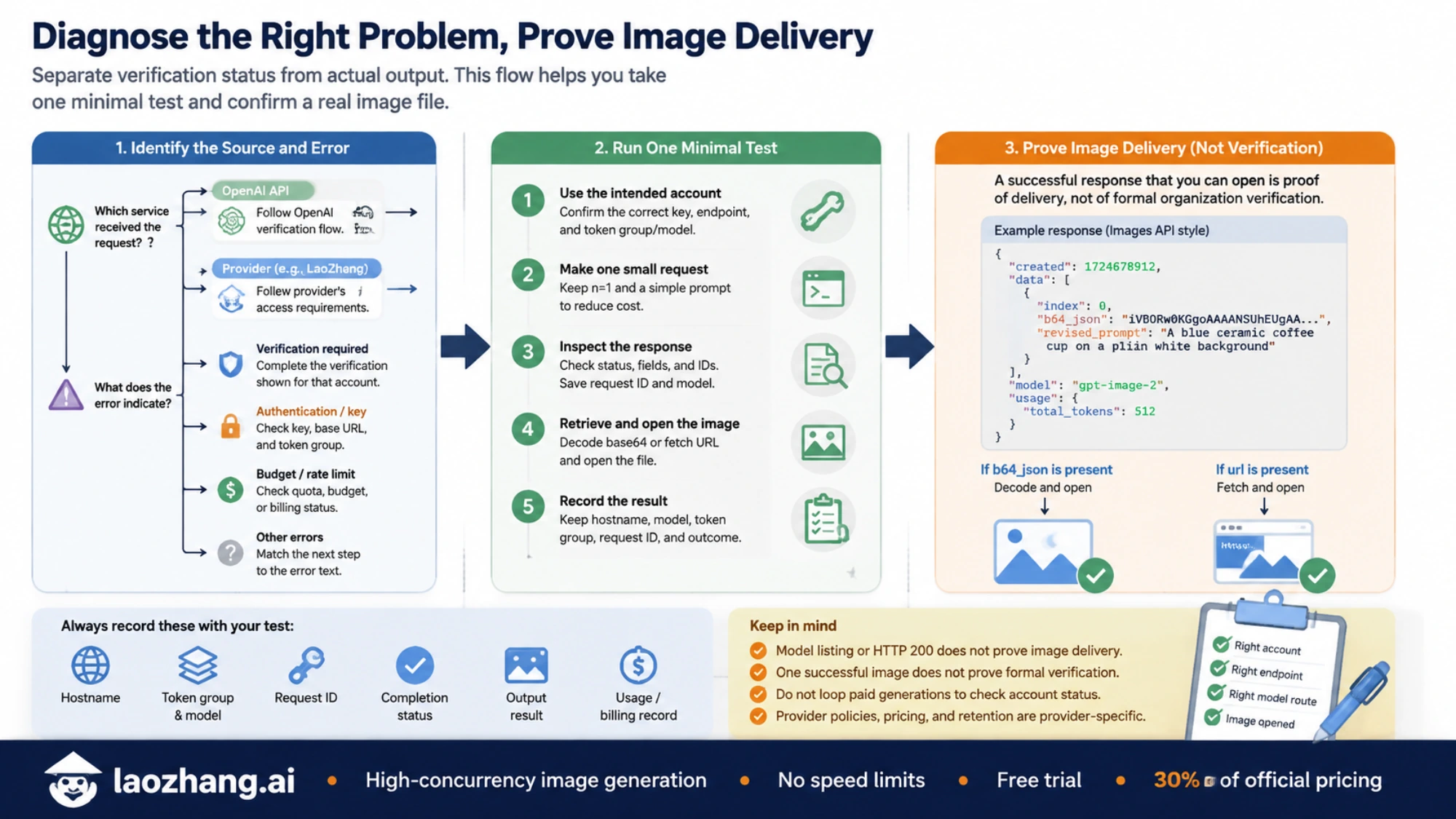
A successful model-list request confirms that the listing endpoint responded. An HTTP 200 confirms an HTTP-level success. Neither proves that an image was delivered, and neither establishes formal verification status.
For one small generation request, inspect the returned JSON and follow the documented output format:
- If
data[0].b64_jsonis present, decode the image data and open the resulting file. LaoZhang notes that a data-URI prefix or missing base64 padding may need handling. - If
data[0].urlis present, retrieve the image and check that the response contains a decodable image, rather than an error page. - If a service returns a task identifier, use that service's documented status endpoint until completion. A task ID alone is not an image.
Keep the provider hostname, token group, model ID, request ID, completion status and output result with your test record. Check the provider's usage or billing record separately; a generated file does not tell you how the request was billed.
You have resolved the integration problem when the intended account can make the intended request and your application can retrieve and open the output. You have established formal OpenAI verification only when the relevant OpenAI account reports that status. Keeping these two conclusions separate makes both direct-API troubleshooting and provider selection much clearer.