
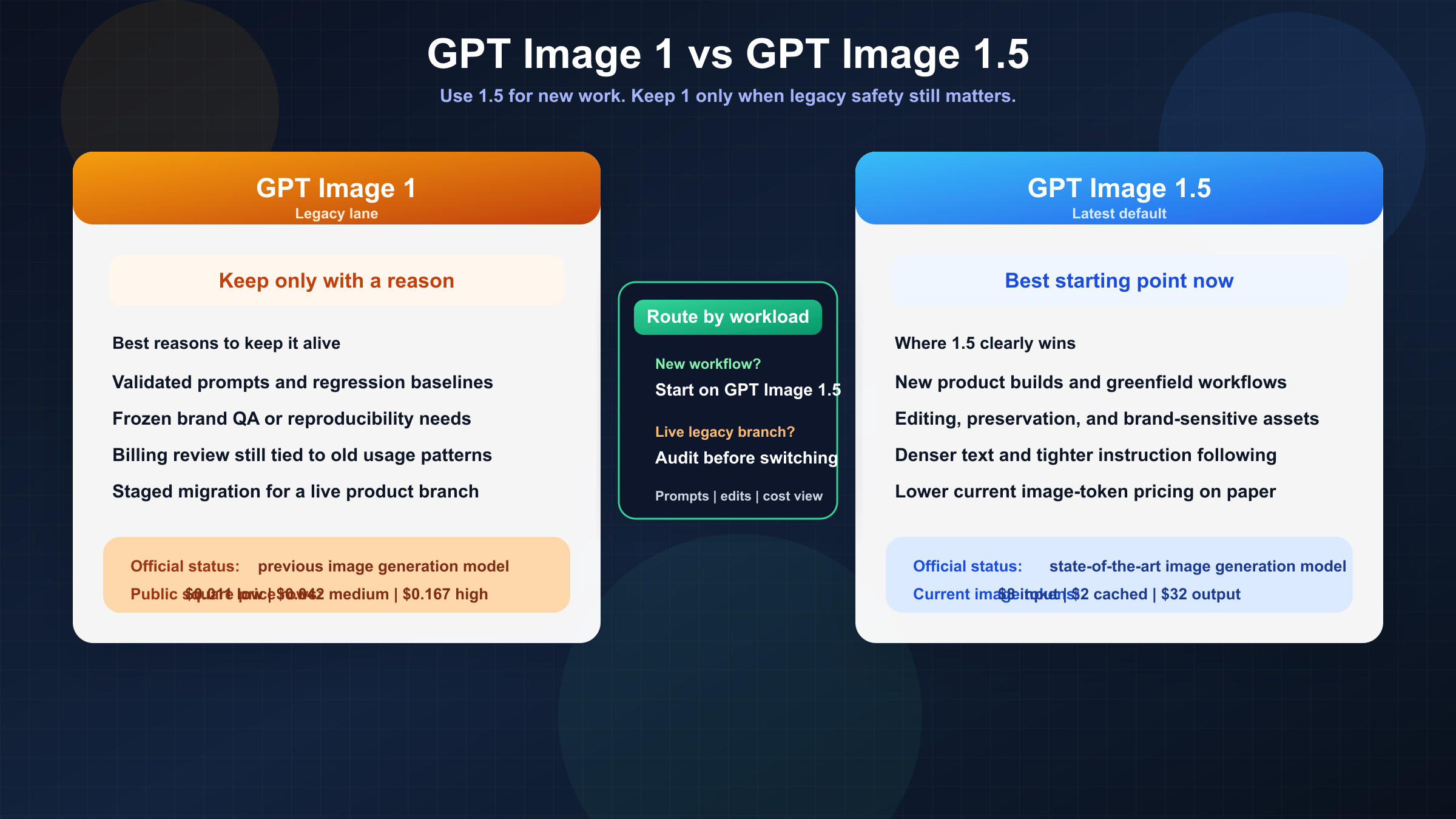
Short answer as of March 22, 2026: use gpt-image-1.5 for new OpenAI image work. OpenAI's current model directory labels it as the state-of-the-art GPT Image model, while gpt-image-1 is now explicitly the previous generation. If you are starting a new image pipeline, the burden of proof is on the old model, not on the new one.
That does not mean gpt-image-1 is dead. The legacy model still has a live model page, live pricing rows, and real value for teams that care about reproducibility, validated prompt behavior, or avoiding migration risk inside a shipping product. But that is a much narrower argument than "either one is fine." Most people searching this query are not choosing between equals. They are deciding whether a legacy surface is still worth keeping.
The practical rule is simple. If your team needs the best current OpenAI image experience for editing, instruction following, and current vendor support, move toward gpt-image-1.5. If your team already has a production workflow tuned around gpt-image-1, do not switch blindly. Audit your prompts, usage assumptions, and edit-heavy test cases first, then migrate deliberately.
TL;DR
| Question | Better answer | Why |
|---|---|---|
| Starting a new OpenAI image workflow today | GPT Image 1.5 | OpenAI's current docs recommend it as the latest and most advanced GPT Image model. |
| Precise editing and preservation of logos, faces, or branded assets | GPT Image 1.5 | OpenAI's December 16, 2025 release notes position it as stronger at image preservation and editing than GPT Image 1. |
| Multi-image edit workflows with higher fidelity | GPT Image 1.5 | The current image-generation guide says gpt-image-1.5 can preserve the first five input images with higher fidelity. |
| Lowest migration risk for an already-validated legacy workflow | GPT Image 1 | If your prompts, regression tests, and cost forecasts were tuned on the older model, freezing behavior can still be rational. |
| Cleaner current vendor recommendation | GPT Image 1.5 | OpenAI lists GPT Image 1.5 as state-of-the-art and GPT Image 1 as the previous image model. |
| Need a safe "do nothing yet" answer for a live pipeline | GPT Image 1 for now, then test 1.5 | Migration is still worth doing, but only after you measure output drift and billing behavior on your own workload. |
The key mistake is to read that table as a beauty contest. This is really a routing article. gpt-image-1.5 is the default for new work, but default does not mean mandatory. The older model still has one honest advantage: it is the model you already know if your system has been shipping on it for months.
What actually changed from GPT Image 1 to GPT Image 1.5
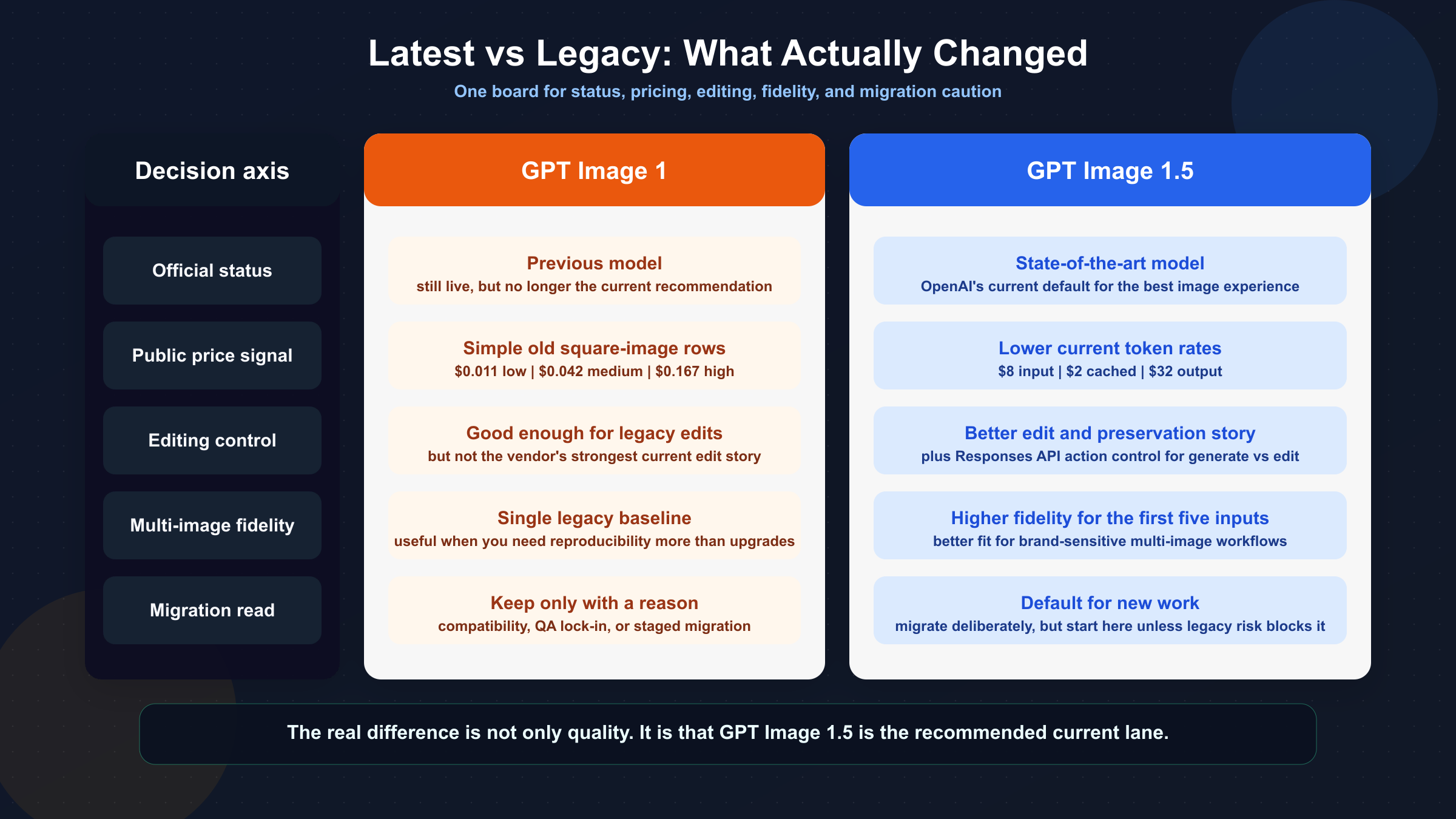
The biggest change is not a hidden benchmark number. It is the official product position. OpenAI's current model catalog lists GPT Image 1.5 as the state-of-the-art image generation model, while GPT Image 1 is listed as the previous image generation model. That matters because many model-comparison pages still talk as if the two versions are just adjacent options in the same lineup. They are not being presented that way by the vendor anymore.
The second change is workflow quality. OpenAI's current image-generation guide says the GPT Image family shares the same API surface, but it explicitly recommends gpt-image-1.5 for the best experience. In the same guide, OpenAI notes that gpt-image-1.5 supports the Responses API action parameter for controlling generate-versus-edit behavior, and that higher input fidelity can preserve the first five input images more accurately. That is not just a spec difference. It points to where OpenAI expects serious image workflows to go: richer edits, more reliable preservation, and fewer workarounds around multi-image inputs.
The December 16, 2025 release post makes the upgrade story even clearer. OpenAI positioned GPT Image 1.5 as stronger at image preservation and editing than GPT Image 1, capable of denser text rendering, more reliable instruction following, and up to 4x faster generation in the new Images experience. That launch framing is important because it tells you what changed in business terms, not only in API terms. GPT Image 1.5 is supposed to reduce the number of times you regenerate or manually fix an asset before it becomes usable.
There is also a cost shift. GPT Image 1.5's current public pricing page lists lower token rates than GPT Image 1: image tokens are currently $8 input / $2 cached / $32 output for GPT Image 1.5, versus $10 input / $2.50 cached / $40 output on the GPT Image 1 model page. OpenAI's December 16 launch materials summarize that shift as image inputs and outputs becoming 20% cheaper in GPT Image 1.5 compared with GPT Image 1. That does not automatically mean your monthly bill drops 20% in practice, but it does remove one of the obvious reasons a team might have had to stay on the older model.
The final change is less glamorous but very real: migration complexity moved from pure output quality into usage behavior. Community threads from the GPT Image 1.5 rollout show that some developers were confused by launch-day availability, and others noticed new billing details such as text output tokens showing up alongside image tokens. That is exactly why this article should not end at "1.5 is newer, so just switch." The model recommendation is easy. The migration is where teams can still get burned.
Put differently: GPT Image 1.5 is not just a prettier checkpoint. It is the newer recommended surface around which OpenAI is concentrating the story for editing, brand preservation, multi-image fidelity, and future-facing API use. That is the main reason the article's default answer can be decisive without pretending migration is free.
If you need a reminder of how the older model entered real creative tooling, our guide to OpenAI GPT Image 1 in ComfyUI is useful context because it shows the kind of installed workflow surface that teams may hesitate to disturb.
When GPT Image 1.5 is the obvious choice
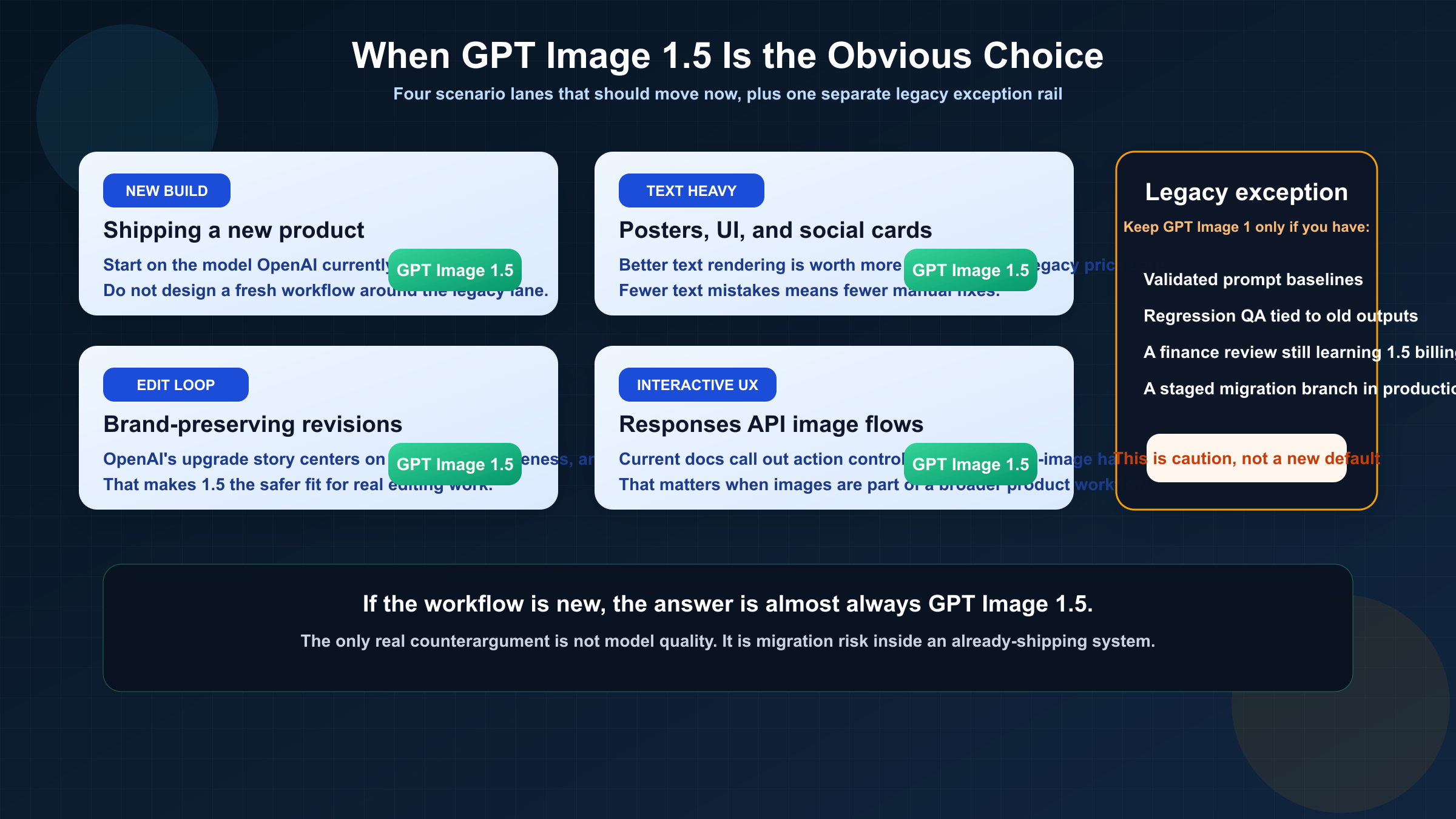
If you are building a new image feature today, the answer is almost boringly straightforward: start on gpt-image-1.5. The model is the current official recommendation, its token pricing is better on paper, and OpenAI's current docs spend their energy telling you how to use the newer family surface, not how to keep stretching the older one.
The strongest case for GPT Image 1.5 is edit-heavy work. OpenAI's release post puts unusual emphasis on image preservation, precise edits, and keeping details like lighting, composition, likeness, logos, and key visuals consistent across changes. That is the kind of improvement that matters to teams producing real assets, not just one-off aesthetic outputs. A marketing team editing branded materials, an ecommerce team generating product variations, and a product design team iterating on mockups all suffer when an edit model keeps drifting away from the source. GPT Image 1.5 is clearly the model OpenAI wants those teams using now.
Text-heavy images are another obvious fit. OpenAI's own upgrade framing highlights denser and smaller text rendering as an improvement area over the previous version. That matters more than many comparison pages admit. If you generate posters, social cards, UI concepts, diagrams, packaging mockups, or educational visuals, a model that draws attractive images but mangles the text is not actually cheaper. It just moves the cost into rework.
The newer model is also the better choice when your system needs to evolve. The current guide's note that gpt-image-1.5 can preserve the first five input images with higher fidelity is not a flashy headline, but it matters for multi-image workflows, style transfer, brand-preservation tasks, and iterative editing pipelines. The more your product needs to feel like a controllable image system instead of a one-shot generator, the less attractive the old model becomes.
This is especially true if your application is built around conversation and revision rather than isolated prompts. Teams using the Responses API to create a more interactive image-editing experience should care about the action parameter and the way the newer model is documented for generate-versus-edit control. Even when the surrounding product uses a mainline text model for orchestration, the image layer still benefits from being the current preferred image model rather than the legacy one.
Even cost-sensitive teams should not overread GPT Image 1's old public per-image rows as a reason to stay. Yes, the GPT Image 1 page still gives you neat square image numbers like $0.011, $0.042, and $0.167 for low, medium, and high quality. That feels easier to reason about than GPT Image 1.5's public token framing. But those simpler rows do not outweigh the fact that OpenAI's current pricing and release language both point toward the newer model as the cheaper and better long-term surface. A cleaner old price card is not the same as a better buying decision.
For most teams, then, the real GPT Image 1.5 lane looks like this: you are doing new work, you care about editing or text, you want the vendor's current default, and you do not need to preserve legacy behavior for its own sake. If that describes your situation, stop debating and start testing 1.5 on your real prompts.
One more point is easy to miss: vendor alignment is itself a form of risk reduction. Teams often think staying on a legacy model is the conservative choice. Sometimes it is. But if OpenAI is clearly putting current documentation, recommendations, and workflow language behind GPT Image 1.5, then staying on GPT Image 1 can become the riskier long-term path because you are swimming against the vendor's own forward guidance.
When GPT Image 1 can still be the rational choice
The best reason to keep gpt-image-1 is not that it is secretly better. It is that stability can be worth more than a vendor's current recommendation when a live system already depends on the old model's behavior.
That matters most for teams with regression-sensitive outputs. If you have a library of prompts, post-processing assumptions, QA thresholds, or customer-facing visual expectations built around GPT Image 1, moving to 1.5 can introduce output drift even when the new model is better overall. Better text rendering, stronger prompt adherence, or different preservation behavior can change your pass/fail logic, template alignment, and acceptance thresholds. If the business cost of revalidating all of that is higher than the short-term upside of moving, staying on GPT Image 1 for a while is not irrational. It is operational caution.
The second valid reason is reproducibility. Some teams need to recreate or extend an older body of work with minimal variance. If a creative pipeline, product catalog, or internal design system was tuned on GPT Image 1, "upgrade" is not always the right first word. "Compare" is. In those cases, the right strategy is usually to keep GPT Image 1 running for the old branch while you test whether GPT Image 1.5 can match or improve the results without forcing a costly rewrite of prompts and approval logic.
The third reason is billing predictability. OpenAI's current pricing story favors GPT Image 1.5, but community threads show that some developers were surprised by how the newer model surfaced text output tokens and by how usage details appeared in dashboards during rollout. That does not make the old model cheaper overall. It means the new model may require your finance or platform team to re-learn how image generation costs appear in practice. If your organization is slow-moving on billing review, that alone can justify a staged migration rather than an instant cutover.
The fourth reason is integration inertia. Some organizations simply do not migrate quickly, especially when the current system is "working well enough." That is not an exciting answer, but it is real. If you are in that situation, the honest recommendation is not to pretend GPT Image 1 is still the best default. It is to admit that you are making a temporary stability tradeoff and to document it clearly so it does not become accidental long-term drift.
There is a fifth, quieter reason too: compliance and process debt. Some teams have internal approvals, creative review rubrics, or customer contracts built around assets generated on a known model line. Even if the legal documents do not name GPT Image 1 directly, the review process may effectively assume its behavior. In those environments the right answer is not ideological loyalty to legacy tooling. It is a staged migration plan with sample approval, stakeholder sign-off, and a rollback path if the newer model changes outputs in ways the organization is not ready to absorb.
If any of those reasons sound familiar, do not let comparison pages shame you into a blind upgrade. But also do not tell yourself that the old model is still the current best pick. What you have is not a superior model choice. You have a migration constraint.
How to migrate without breaking a live workflow
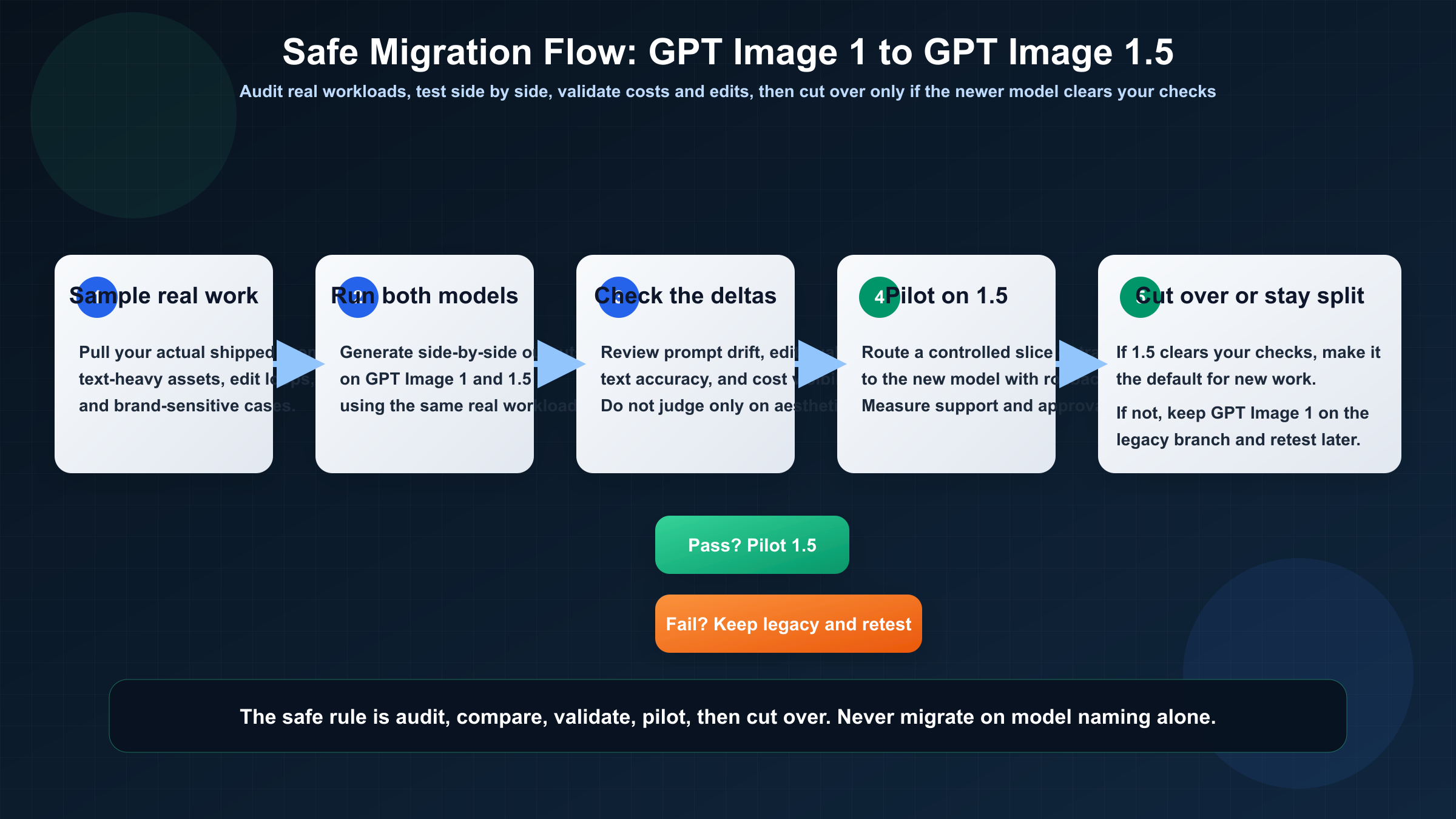
The cleanest migration path is not "swap the model name and hope." It is a short audit process with explicit pass/fail checks.
Start with your real workload, not benchmark prompts. Pull a representative sample of the images your team actually ships: text-heavy assets, edit-heavy revisions, brand-preservation cases, product variation requests, and any prompt families that historically needed careful tuning on GPT Image 1. Run those side by side on both models. You are not looking only for prettier images. You are looking for differences that would change whether the asset ships.
Then separate the checks into four buckets.
First, test prompt compatibility. Does a prompt that reliably worked on GPT Image 1 become too literal, too aggressive, or too layout-sensitive on GPT Image 1.5? Better instruction following is good until it exposes vague prompting habits your team had been getting away with.
Second, test edit preservation. This is the place where GPT Image 1.5 should usually win, especially if you work with logos, faces, layouts, or structured design assets. If it does not win on your own cases, you need to know that before migration, not after.
Third, test usage accounting. Compare not just visual output but also how the calls show up in your cost dashboards. GPT Image 1.5's public token pricing is better, but cost governance still needs to make sense to the people who approve spend.
Fourth, test rollback readiness. If you switch a live workflow to GPT Image 1.5, decide in advance what failure would trigger a rollback to GPT Image 1. That could be output drift, unacceptable prompt rewrites, edit failures, or cost-reporting confusion. Teams that skip the rollback rule usually end up in a messy in-between state where nobody trusts the new model but nobody wants to admit the migration was under-tested.
In practice, the cleanest rollout is usually phased. Keep GPT Image 1 for a frozen legacy branch, route new experiments and edit-heavy work to GPT Image 1.5, and only promote 1.5 to full default status after the newer model clears your approval samples. That hybrid period may feel slower, but it is usually much faster than forcing one big switchover and then spending weeks cleaning up output drift nobody measured in advance.
Once you have those four checks, the decision usually becomes obvious. Many teams will discover that GPT Image 1.5 is clearly better for edits, text, and current vendor alignment, while GPT Image 1 only remains necessary for a shrinking set of frozen legacy flows. That is a good outcome. It means you can route by job instead of pretending one answer must cover the entire stack forever.
If your real decision is becoming broader than OpenAI-only routing, our comparison of Nano Banana 2 vs GPT Image 1.5 is the better next read because it covers when the question stops being "old OpenAI versus new OpenAI" and becomes "OpenAI versus the wider image-model market."
The practical recommendation
For almost every new project, choose gpt-image-1.5. That is the cleanest answer to the keyword and the answer OpenAI's current product positioning supports.
Keep gpt-image-1 only when one of three things is true: you need reproducibility on an already-validated legacy workflow, you are still auditing the migration impact on prompts and billing behavior, or a live product would be put at unnecessary risk by changing model behavior before a proper comparison pass. None of those reasons turn the older model into the better long-term default. They only explain why you might keep it a little longer.
That distinction matters because many comparison pages collapse "still live" into "still equally recommended." Those are not the same. GPT Image 1 still matters. GPT Image 1.5 is still the better place to start.
If you are also trying to understand why older OpenAI image pricing and access language still shows up across the platform, our GPT Image 1 tier system guide is the useful companion because it explains the legacy access and pricing confusion that still bleeds into this comparison.
FAQ
Is GPT Image 1 deprecated?
Not based on the current official pages. OpenAI still keeps a live GPT Image 1 model page with pricing and endpoint details. The right description is that GPT Image 1 is the previous image generation model, not that it has already disappeared.
Is GPT Image 1.5 actually cheaper than GPT Image 1?
At the current official token layer, yes. OpenAI's public pricing shows lower image-token rates for GPT Image 1.5 than for GPT Image 1, and OpenAI's December 16, 2025 release language says image inputs and outputs are 20% cheaper on 1.5. But teams should still verify real workload costs because billing behavior and token mix can feel different in practice.
Can I treat the APIs as interchangeable?
Mostly at the family level, but not safely enough to skip testing. OpenAI's current guide says the GPT Image models share the same API surface, yet GPT Image 1.5 gets newer workflow features and different behavior around editing and fidelity. For a live system, "similar API surface" is not the same as "identical migration outcome."
Which model is better for editing and brand preservation?
GPT Image 1.5. That is one of the clearest improvements in OpenAI's own release framing and one of the strongest reasons to upgrade.
Which model should I choose if I am launching a new product this month?
Choose gpt-image-1.5 unless you have a very unusual constraint. The legacy model only becomes the better answer when you already have meaningful legacy behavior to protect.


