
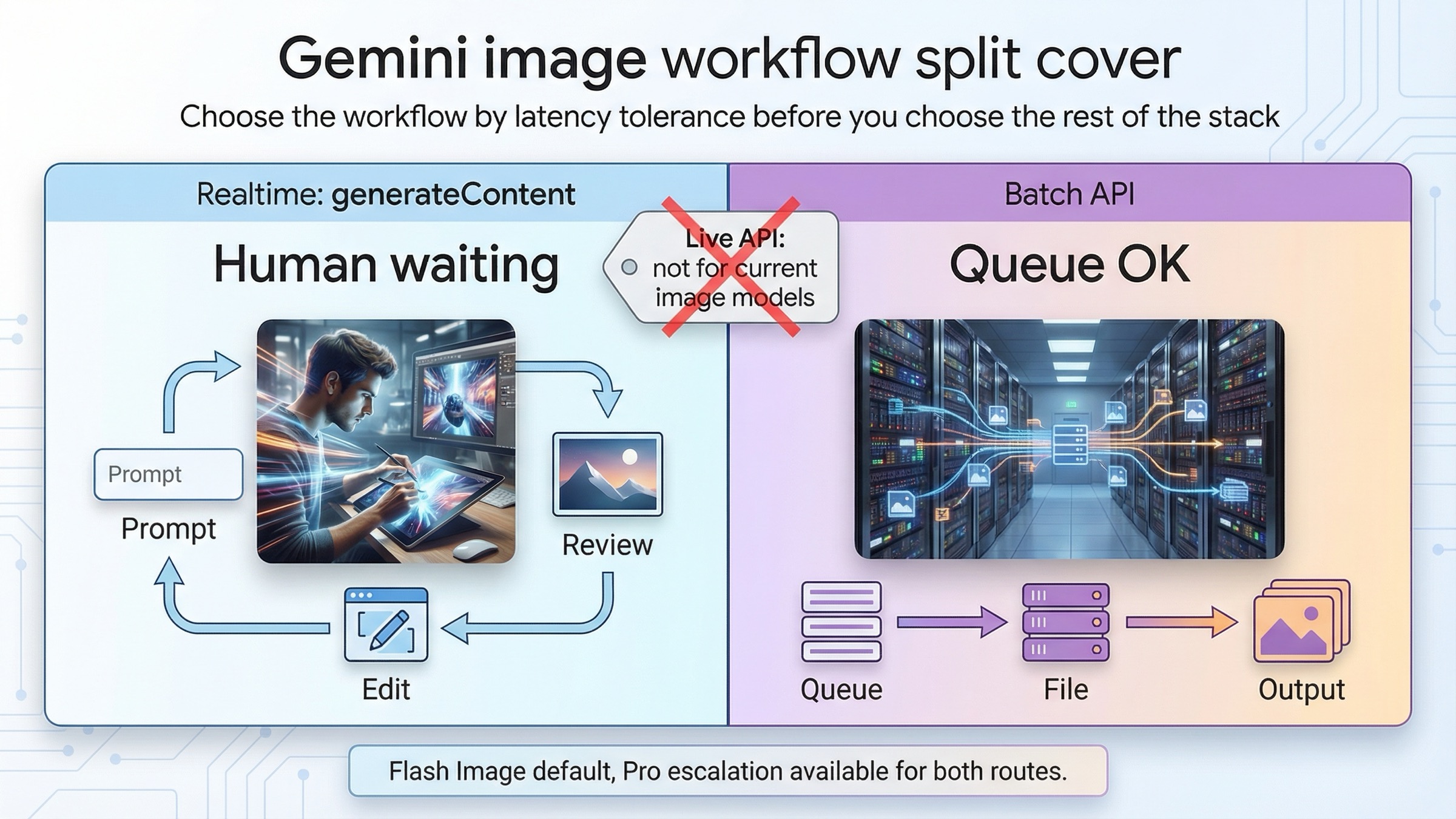
As of March 23, 2026, the clean default for Gemini image generation is simple: if a person is waiting on the result, stay on synchronous generateContent; if the work is non-urgent and high volume, move it to Batch API. That rule is better than starting with price, because the workflow split comes first. Once you know whether the job is interactive or queueable, the pricing and model choice become easier to get right.
The other clarification belongs in the opening too. For current Gemini image models, "realtime" does not mean the Live API. Google's model pages for gemini-3.1-flash-image-preview and gemini-3-pro-image-preview both show Batch API supported and Live API not supported, while the current image-generation guide shows ordinary synchronous generateContent examples. In practice, that means the realtime side of this topic is standard request-response image generation and multi-turn editing, not a live image stream.
That distinction matters because the current docs are strong but fragmented. One page explains Batch API. Another explains Nano Banana image generation. Another lists pricing. Another lists model capabilities. If you read them separately, it is easy to know all the facts and still choose the wrong workflow. This article is the missing synthesis layer: one decision rule, one cost split, one model table, and one set of operational warnings.
TL;DR
If you only need the fast answer, use this table.
| Question | Best current answer | Why |
|---|---|---|
| A human is waiting on the image or edit result | Use synchronous generateContent | The current image guide is built around synchronous calls and multi-turn edits, which is the right shape for prompt iteration and review |
| Nobody is waiting and cost matters more than latency | Use Batch API | Google's Batch API page says it runs at 50% of standard cost with a 24-hour target turnaround time |
| You mean "realtime" like a live image session | That is the wrong mental model for current Gemini image models | The current Gemini image model pages say Live API is not supported |
| Best default image model for most new work | gemini-3.1-flash-image-preview | It is the current high-efficiency image lane and the official replacement path for gemini-2.5-flash-image |
| Premium lane when image quality or text rendering is expensive to get wrong | gemini-3-pro-image-preview | Better fit for text-heavy visuals, factual image work, and harder design-sensitive assets |
| Cheapest official native Gemini image lane | gemini-2.5-flash-image | Still cheapest on the public pricing page, but Google also schedules it to shut down on October 2, 2026 |
The practical mistake to avoid is picking Batch API just because it is cheaper. Cheap only wins when the delayed turnaround does not break the job. If your team is still refining prompts, waiting for stakeholder review, or running a user-facing image tool, synchronous calls are usually the right first route even when the per-image cost is higher.
If you want three quick routing examples, use this shorthand:
- a product editor where a user expects the next image now: synchronous
- an internal creative team refining prompts with same-day review: synchronous first, then batch only after the prompt stabilizes
- an overnight job generating thousands of approved variants from settled prompts: batch
If your next question is code rather than workflow, jump to Gemini image generation code examples. If your next question is cost, Gemini image generation API pricing goes deeper into the current resolution math. If your real problem is editing instead of routing, Gemini image-to-image editing is the better companion page.
The real split: synchronous generateContent versus Batch API
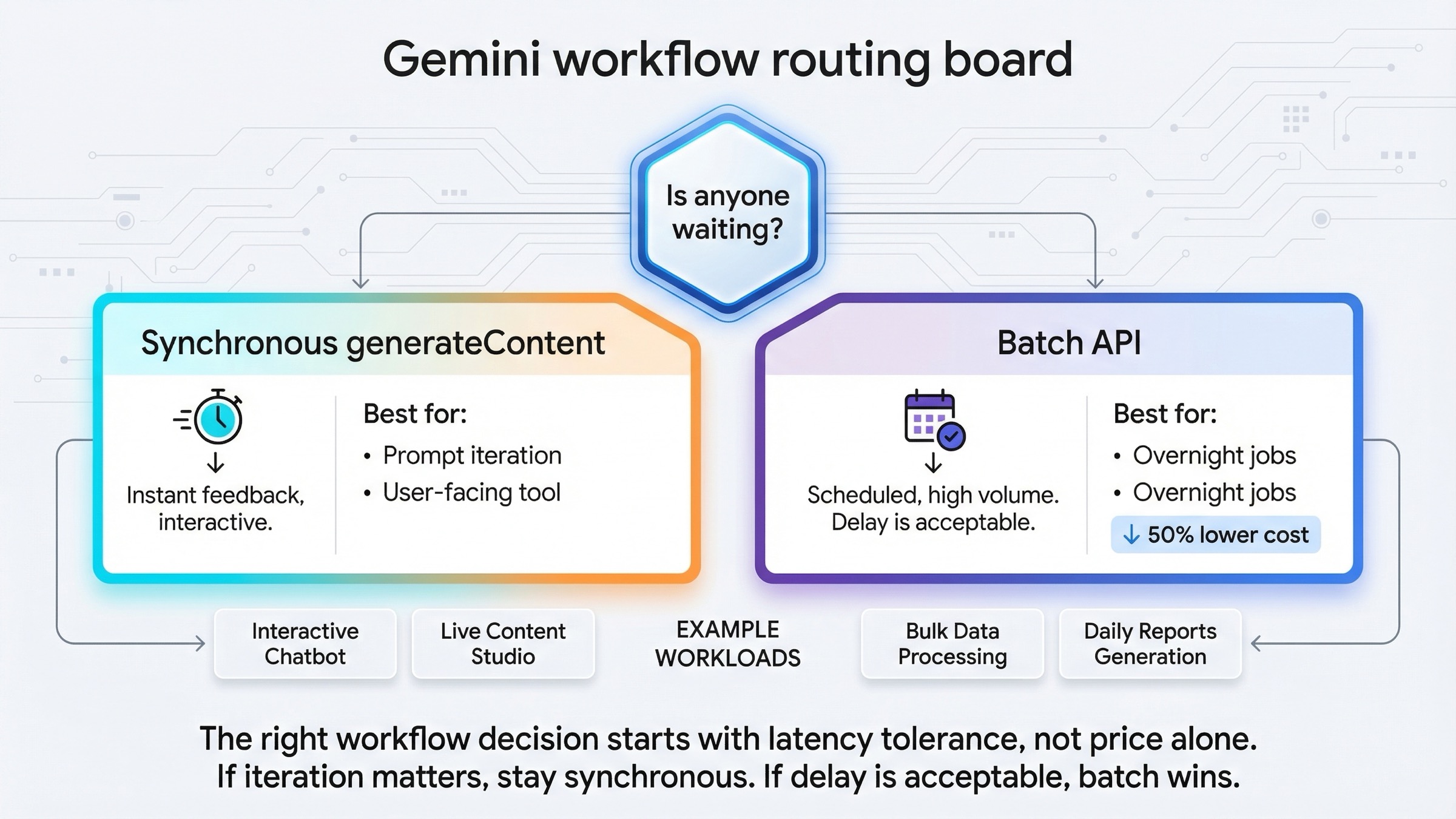
Most people arrive at this topic by asking a technical question and hiding an operational one inside it. They ask, "Should I use batch or realtime?" What they really mean is, "Should this job stay in an interactive loop, or can I safely hand it off to a queue?"
That is why the right first question is not about models, tokens, or SDKs. It is this:
Is anyone waiting on the output?
If the answer is yes, stay synchronous. That covers:
- prompt exploration
- product-facing image tools
- human review loops
- iterative image editing
- fast retries after a weak first result
If the answer is no, Batch API becomes attractive. That covers:
- overnight content generation
- queue-driven asset pipelines
- large catalog or variant jobs
- non-urgent enrichment work
- long-running backfills where lower cost matters more than immediate completion
Google's current Batch API documentation makes the trade explicit: the Batch API is designed for large volumes of requests, runs asynchronously, and is priced at 50% of the standard cost. The same page also says the target turnaround time is 24 hours, although many jobs finish faster. That is a valuable deal for queue work, but it is a bad fit for any image workflow where the next human or system action depends on immediate output.
The opposite is also true. Synchronous image generation is not only for tiny toy calls. It is the right route whenever the value of the next result depends on fast iteration. The current Nano Banana image-generation guide is built around synchronous generateContent examples and multi-turn image editing for exactly that reason. A good image workflow often improves through one prompt, one result, one correction, and one follow-up turn. Batch is not designed for that kind of back-and-forth.
So the clean rule is:
- interactive, human-in-the-loop, or product-facing work: synchronous
- queued, bulk, cost-sensitive, or non-urgent work: batch
Once you frame it that way, the rest of the workflow is easier to reason about.
That single question also prevents a common architecture mistake. Teams often start with a queue because they know they eventually want one. But the fact that you will need a queue later does not mean the workflow should begin there. The fastest stable route is usually to prove the prompt, the model, and the output handling synchronously, then decide whether the now-stable request deserves a batch path.
Which Gemini image model should sit behind each workflow
The workflow decision and the model decision are related, but they are not the same thing. Batch is not a model. Realtime is not a model. You can run the same underlying image model through different workflow choices.
For most new work, the current default should still be gemini-3.1-flash-image-preview. Google's product pages position it as the high-efficiency image lane, and Google's deprecations page lists it as the official replacement for gemini-2.5-flash-image.
| Model | Status on March 23, 2026 | Batch API | Live API | Standard price signal | Batch price signal | Best fit |
|---|---|---|---|---|---|---|
gemini-3.1-flash-image-preview | Current preview default | Supported | Not supported | $0.067 per 1K image | $0.034 per 1K image | Most new interactive and queued image workflows |
gemini-3-pro-image-preview | Current premium preview lane | Supported | Not supported | $0.134 per 1K or 2K image | $0.067 per 1K or 2K image | Higher-stakes text rendering, diagrams, polished product assets |
gemini-2.5-flash-image | Live legacy lane | Supported | Not supported | $0.039 per image | $0.0195 per image | Cheapest official native Gemini lane when 1K-only output and legacy status are acceptable |
Three conclusions matter more than the table itself.
First, current Gemini image models support Batch API but not Live API. That means you should not waste time trying to force this topic into a live-session architecture. The current model pages are unambiguous about that capability split.
Second, Flash Image Preview is the default answer unless you have a reason to leave it. It is fast, current, and flexible enough for most image-generation and image-editing workflows. That makes it the best place to start on both the synchronous path and the batch path.
Third, the cheapest lane is not the same as the best default lane. gemini-2.5-flash-image is still cheaper, but Google's deprecations page also gives it a shutdown date of October 2, 2026. If you are standing up something fresh, you should choose that model deliberately as a legacy economy move, not as the default path you plan to live on for the long term. If you want the broader family context, Gemini image generator: Nano Banana 2, Pro, or Imagen 4? covers that comparison in more depth.
The best realtime workflow for prompting, reviewing, and editing images
If a human is waiting on the result, the best workflow is still ordinary synchronous generateContent. That is true whether the caller is a backend service, a small internal tool, or a multi-turn chat flow sitting behind a product UI.
The reason is not just speed. It is iteration quality.
Good Gemini image work often happens in short loops:
- send one clear prompt
- inspect the result
- tighten one instruction
- run the next turn
That is especially true for editing. The current image-generation docs show Gemini image work as conversational and multi-turn. That is the right mental model for image tools, because the second request usually depends on what the first image did right or wrong. Batch is the wrong tool for that loop because you learn too late.
Here is the kind of synchronous request that should anchor most new work:
javascriptimport { GoogleGenAI } from "@google/genai";
import * as fs from "node:fs";

const ai = new GoogleGenAI({ apiKey: process.env.GEMINI_API_KEY });

const response = await ai.models.generateContent({
  model: "gemini-3.1-flash-image-preview",
  contents: "Create a clean 16:9 product hero image of a matte black coffee grinder on a soft gray background with premium ecommerce lighting.",
  config: {
    responseModalities: ["IMAGE"],
    imageConfig: {
      aspectRatio: "16:9",
      imageSize: "2K"
    }
  }
});

for (const part of response.candidates[0].content.parts) {
  if (part.inlineData) {
    fs.writeFileSync("coffee-grinder.png", Buffer.from(part.inlineData.data, "base64"));
  }
}
Keep the first request boring on purpose. The job of the first call is not to prove that Gemini can do everything. The job is to confirm the model, size, and response handling all work in your environment. Once that is stable, then move into editing, follow-up turns, or higher-stakes prompts.
Two habits make the synchronous path work better:
- describe the scene instead of throwing keywords at it
- protect what must stay unchanged when you are editing
Google's older but still useful developers.googleblog.com prompt guide is still right on that second point. Gemini responds better when you describe what should change and what should stay fixed. That is another reason interactive work belongs on synchronous calls first: the fastest way to improve output is often one narrow follow-up instruction, not one enormous initial prompt.
For teams building edit-heavy products, there is one more practical advantage to the synchronous route: it keeps the image itself in the review loop. You can preserve context from the previous turn, inspect the exact failure mode, and request a focused correction. That is a much stronger fit for product UIs, merch tools, ad generators, and internal design ops than a batch-first pipeline that only tells you tomorrow that your prompt logic was weak today.
If you are testing in AI Studio before moving to code, that is fine. Just do not confuse the testing surface with the production contract. Google's February 26, 2026 Nano Banana 2 developer post says a paid API key is required to use the model in Google AI Studio. Use AI Studio to learn faster, then move the settled workflow into your own synchronous request path.
The best batch workflow for queued or overnight image generation
Batch API is the right answer when the work is real, large, and not urgent. That usually means you are optimizing for one of three things:
- total cost
- queue throughput
- operational separation between request intake and final output delivery
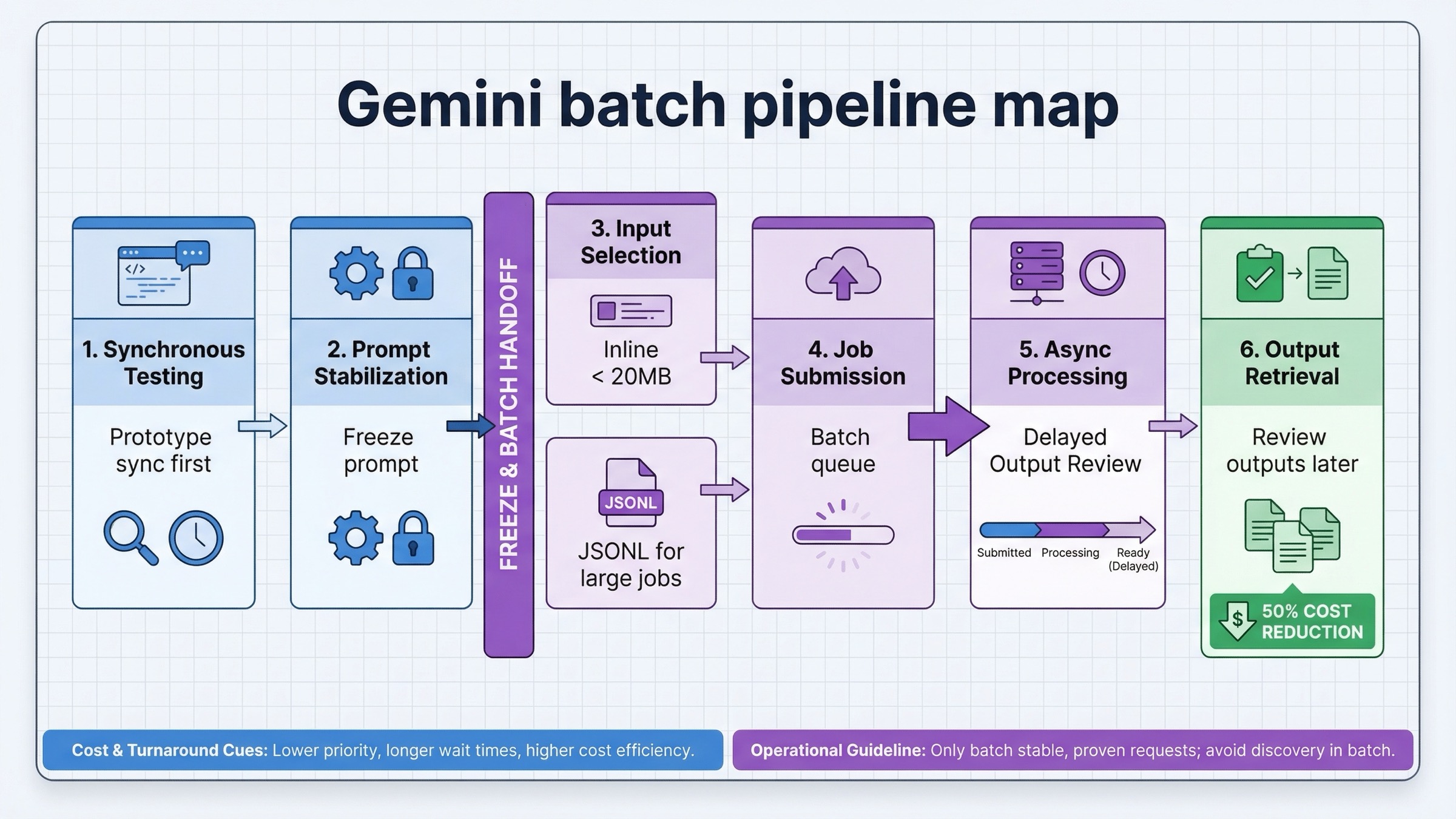
This is where Batch API becomes stronger than simple retries around synchronous calls. Google's Batch API docs say you can submit inline requests for smaller jobs and JSONL input files for larger ones. For image generation, Google's own batch guide explicitly points toward the file-input route for large jobs.
The shape of a good batch workflow is usually:
- finalize prompts and parameters on the synchronous path first
- freeze the request format
- serialize jobs into JSONL or smaller inline groups
- submit batch work only when waiting no longer improves the result
- collect outputs later and handle retries separately
That order matters. Teams often make the mistake of discovering prompts in batch because the per-image cost is lower there. That saves money per call and loses time everywhere else. Prompt discovery is an interactive job. Stable repetition is a batch job.
The cost difference becomes meaningful fast once the request is stable. At current March 23, 2026 list prices, 10,000 1K images on gemini-3.1-flash-image-preview work out to about $670 at standard pricing and about $340 in batch. The same 10,000-image run on gemini-3-pro-image-preview is about $1,340 at standard pricing and about $670 in batch. That is why the batch branch matters so much for approved templates, catalog refreshes, localization runs, or scheduled asset generation. The discount is not cosmetic at production volume.
The other important point is that Batch API is not only a pricing feature. It is a different operational surface. Google's current rate-limits page says Batch API has separate limits, including 100 concurrent batch requests, a 2GB input file size limit, and 20GB file storage. It also tracks capacity through enqueued tokens per model, which means you can run into batch-specific pressure even when your ordinary synchronous traffic looks fine.
The shape of the request matters too. Google's Batch API documentation says inline requests are suitable when the total request payload stays under 20MB, while larger jobs should move into an uploaded JSONL file. The JSONL path is the one that usually survives real production usage because it keeps the batch creation request itself small and makes job replay easier to reason about.
json{"key":"shoe-0001","request":{"contents":[{"parts":[{"text":"Create a clean white-background ecommerce image of a running shoe in side profile."}]}],"generation_config":{"response_modalities":["IMAGE"]}}}
{"key":"shoe-0002","request":{"contents":[{"parts":[{"text":"Create a clean white-background ecommerce image of a black leather loafer in side profile."}]}],"generation_config":{"response_modalities":["IMAGE"]}}}
That example is intentionally plain. The point of a good batch file is not elegance. The point is reproducibility. By the time requests reach JSONL, the prompt and generation settings should already be proven on the synchronous path.
For a lot of image teams, that leads to a better hybrid pattern:
- use synchronous
generateContentfor prompt design, first-pass approval, and editing - move stable, repetitive work into Batch API
- reserve batch for the jobs where a 24-hour target window is acceptable
That hybrid route is usually stronger than a pure batch-first architecture, because it separates the part of the workflow that benefits from human judgment from the part that benefits from lower-cost repetition.
There is one more caveat here. Google's Batch API docs say the target turnaround is 24 hours, not a promise. Community threads in early 2026 reported some periods where jobs stayed in processing much longer. That forum evidence should not replace the official doc, but it is a good reminder that Batch is a queue tool, not an interactive SLA. If your workflow fails when a job finishes tomorrow instead of this minute, it probably belongs on the synchronous path.
When Pro changes the answer even if the workflow does not
The easiest mistake after reading pricing tables is to act as if the whole topic is Flash Image versus Batch Image. It is not. Sometimes the workflow stays the same and the model changes.
That is where gemini-3-pro-image-preview matters.
Pro becomes rational when image quality or text fidelity is expensive to get wrong. Common examples include:
- diagrams or infographics with real wording
- polished product or campaign assets
- high-stakes client visuals
- factual visualizations where layout and label accuracy matter
- premium outputs where you want fewer failed first drafts
Notice what did not change in that list: the workflow decision. If a designer, PM, or user is still waiting on the output, the job is still synchronous. If the job is still a large non-urgent export run, batch may still be the better operational surface. The model question and the workflow question are separate.
That separation is useful because it keeps the article honest. The right first rule is not "always use Flash" or "always use Pro." It is:
- choose the workflow based on latency tolerance
- choose the model based on output difficulty and business risk
That gives you four practical lanes instead of two:
- Flash + synchronous for most interactive image work
- Flash + batch for large, repeatable, cost-sensitive generation
- Pro + synchronous for premium iterative work
- Pro + batch for non-urgent high-stakes bulk jobs where quality still matters more than unit cost
The easiest way to make this real is to map the workflow and the model to the business risk:
- low-risk, high-volume, approved prompt template: Flash + batch
- medium-risk, interactive tool or internal creative loop: Flash + synchronous
- high-risk, text-heavy or design-sensitive image work with human review: Pro + synchronous
- high-risk, non-urgent export jobs where the prompt template is already proven: Pro + batch
If your real decision is mostly about model quality, Gemini image generator: Nano Banana 2, Pro, or Imagen 4? is the better next read. If the real problem is editing behavior rather than output quality alone, Gemini image-to-image editing goes deeper into that workflow.
Troubleshooting the workflow choice
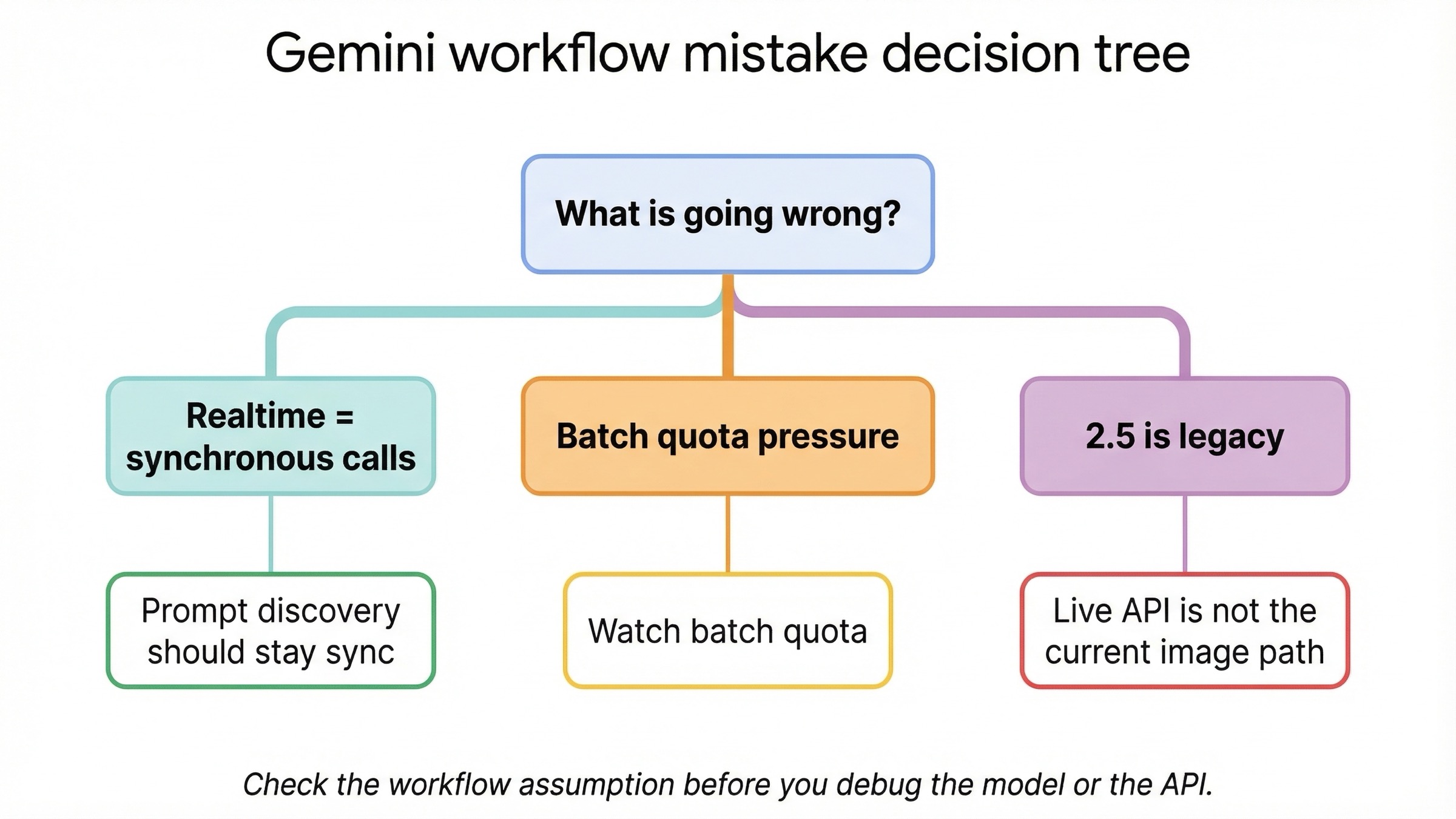
Most failures in this topic are workflow mistakes, not raw API mistakes.
You are using the word "realtime" too loosely. For current Gemini image models, realtime should mean ordinary synchronous request-response generation and editing. It should not mean Live API image output. Google's current image model pages show Live API as not supported. If you skip that clarification, you can spend hours designing the wrong architecture.
You are choosing batch during prompt discovery. Batch is attractive because the discount is real, but it is still the wrong place to learn what your prompts should be. Discover the prompt and output shape synchronously first. Move to batch only after the request has stabilized.
You are mixing workflow questions with lifecycle questions. gemini-2.5-flash-image is still cheap. It is also still scheduled to shut down on October 2, 2026. If you pick it, do it because the economics genuinely justify it, not because an older article still treats it like the neutral default.
You are reading ordinary quotas and missing batch-specific pressure. Batch has separate constraints, including enqueued-token pressure. Community threads from late 2025 and early 2026 show that some users hit confusing batch behavior even when they believed they were under standard quotas. That should change how you monitor the workflow: batch needs its own operational expectations.
You are treating AI Studio as the whole product story. AI Studio is useful for testing and iteration, but your application will still live under the API contract, the current model capability pages, and the pricing surface you actually deploy against. Do not let a smooth AI Studio test hide an unexamined production workflow.
Bottom line
As of March 23, 2026, the best answer to "Gemini image generation batch vs realtime" is not a model name. It is a workflow rule:
If a human is waiting, stay on synchronous generateContent. If the work is non-urgent and high volume, move it to Batch API.
That rule stays strong because it matches the current official picture:
- Batch API is asynchronous and priced at 50% of standard cost
- the current image models support Batch API
- the current image models do not support Live API
- the default image model for most new work is still
gemini-3.1-flash-image-preview
Everything else is a second-order decision. Once you know the latency tolerance, you can decide whether Flash Image is enough, whether Pro is worth it, and whether the older 2.5 lane is still worth using as a deliberate economy move. If you reverse that order, you end up optimizing the wrong thing first.


