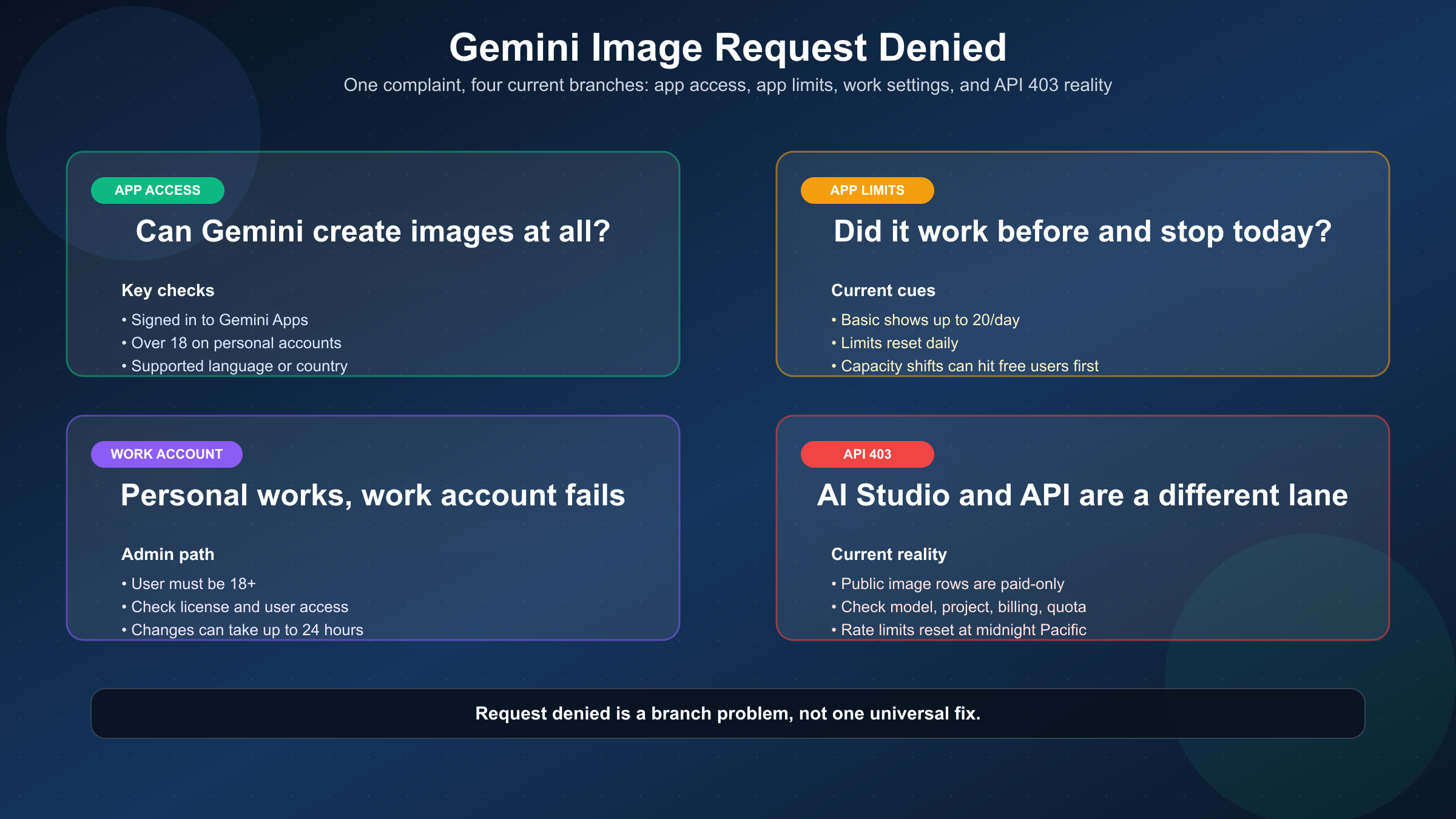
As of March 23, 2026, a Gemini image generation request denied error is usually not one bug. In the Gemini app, the common branches are account eligibility, daily limits or temporary capacity pressure, or an image removed for policy reasons. On work or school accounts, the usual issue is access or admin configuration. In AI Studio or the Gemini API, the current image models are paid lanes, so a 403 PERMISSION_DENIED usually points to billing, project, quota, or account state instead of the app's free-image rules.
That is why random fixes waste time. Clearing cookies will not repair a suspended API project. Enabling billing will not help if your personal account is under 18 or the app feature is not available in your language or country. The fastest route is to match the visible symptom to the right denial branch first.
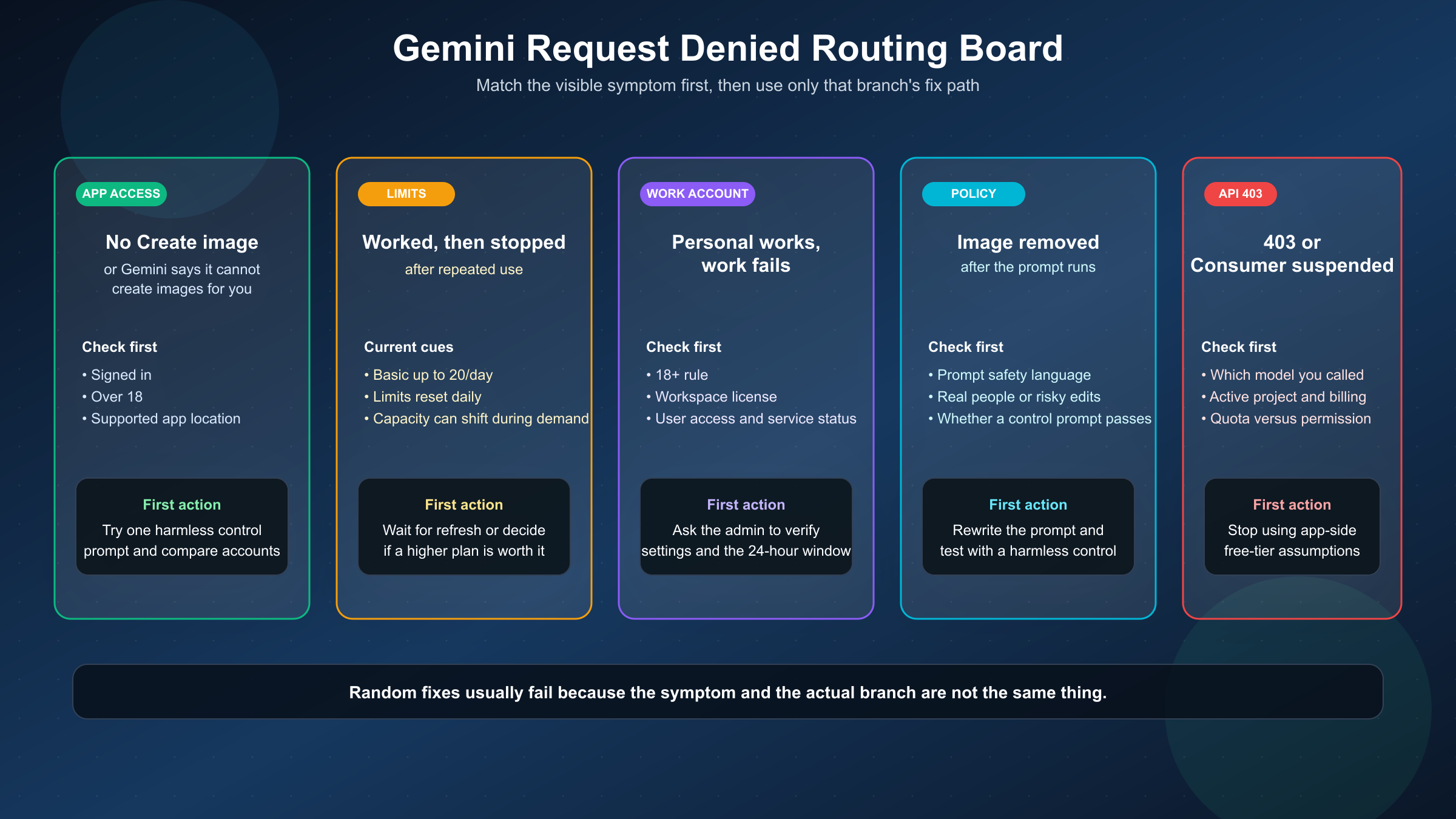
If you only want the shortest useful answer, use this table first.
| What you see | Most likely branch | What to do first |
|---|---|---|
Image Generation Request Denied, no Create image tool, or Gemini says it cannot create images for you yet | Personal-account app eligibility or rollout | Check sign-in, age, supported app availability, and whether another account on the same device works |
| Image creation worked before but now stops after repeated use | Gemini Apps daily cap or capacity change | Check current plan limits, wait for the daily refresh, or upgrade the app plan if you need more room |
| Personal account works, but work or school account cannot generate images | Workspace access or admin block | Check license, over-18 requirement, and ask the admin to verify Gemini app access and service status |
| Gemini generates text but removes the image or refuses a prompt after submission | Policy-removal branch | Rewrite the prompt, remove risky details, and test again with a harmless control prompt |
AI Studio or the API returns 403, PERMISSION_DENIED, or Consumer suspended | API billing, project, or account-state issue | Check whether you are using a paid image model, verify billing or project status, and confirm you are looking at quota rather than app limits |
Key Takeaways
- The Gemini app still supports image generation, but access depends on account type, age, supported app availability, and current limits.
- On personal accounts, Google's current help pages say the feature is limited to supported languages and countries, requires sign-in, and is unavailable to users under 18.
- On work accounts, access depends on Workspace licensing and admin settings, and Google says admin changes can take up to 24 hours.
- On the API side, Google's current pricing page shows Free Tier: Not available for
gemini-3.1-flash-image-preview,gemini-3-pro-image-preview, andgemini-2.5-flash-image. - If the app removes an image after you submit the prompt, that is usually a policy branch, not an API billing branch.
Troubleshooting: Match the Denial Before You Fix It
The query sounds broad because the product surface is broad. Searchers use the same phrase for at least four different failures, and page one reflects that confusion. Community threads rank because they repeat the exact error text, while official Google pages rank because they explain the current feature, limits, billing, or admin controls. Neither group of pages usually gives the whole route in one place.
The cleanest way to think about the problem is by surface.
If you are using gemini.google.com or the mobile app with a personal account, start with app access and limits. If you are using a work or school account, treat that as a separate branch immediately. If you are in AI Studio, using the Gemini API, or looking at a literal 403 response, switch your mental model completely and think about project, billing, quota, and model availability.
That split matters because Google's official pages are scoped narrowly. The image-generation help page explains how image creation works in Gemini Apps and who can use it. The limits page explains how many images each plan currently gets. The Workspace docs explain admin controls. The pricing and billing pages explain the Gemini API. Your job is not to memorize every page. Your job is to stop applying the wrong page to the wrong denial.
If Gemini Apps Will Not Create Images on a Personal Account
Start with the official Generate & edit images with Gemini Apps page, because it answers the current app-side eligibility questions directly.
As checked on March 23, 2026, Google says image generation in Gemini Apps is limited to the supported languages and countries of that app, requires that you are signed in, and is not available to users under 18 on a personal Google Account. The same page also says free users download generated images at 1K resolution while paid subscribers can download at 2K resolution. That means a denial on a personal account is not always a bug. It can be the product doing exactly what the current eligibility rules say.
The fastest practical test is to narrow the surface. Confirm that you are signed in, try a safe prompt such as "Create a watercolor image of a red apple on a white table," and compare the result across accounts if you have access to more than one. If another account on the same browser and device can create images while yours cannot, the issue is probably account-specific rather than browser-specific.
The second check is whether the feature disappeared after you had already been using it successfully. In that case, look at the current Gemini Apps limits & upgrades page. Google's live table currently lists 20 Nano Banana 2 images per day on Basic, 50 on Google AI Plus, 100 on Google AI Pro, and 1000 on Google AI Ultra. The same page says limits may change frequently, are distributed throughout the day, and reset daily. Google also says capacity changes can limit users without Pro or Ultra before users with a plan.
That language is important because it explains a common real-world complaint: "it worked yesterday, and today it says denied." Sometimes the feature is not gone. You are closer to the current capacity edge than you realized. If that is your branch, the fix is not a permissions ritual. It is to wait for the refresh, reduce usage, or decide whether a higher app plan is cheaper than the time you are losing.
One more detail matters here: Google's image help page and the limits page are complementary, not redundant. The help page tells you whether the feature should exist for your account at all. The limits page tells you how much room your current plan has once the feature is available. Readers often bounce between the two pages because the failure feels the same from the outside. Editorially, that is exactly why the article needs to keep those checks together in one branch.
If your real question is no longer "why denied?" but "how many images do I actually get and when do they come back?", the more focused follow-up is Gemini image generation limit reset. That page goes deeper on reset behavior and app-side ceilings.
If a Work or School Account Can Chat but Cannot Generate Images
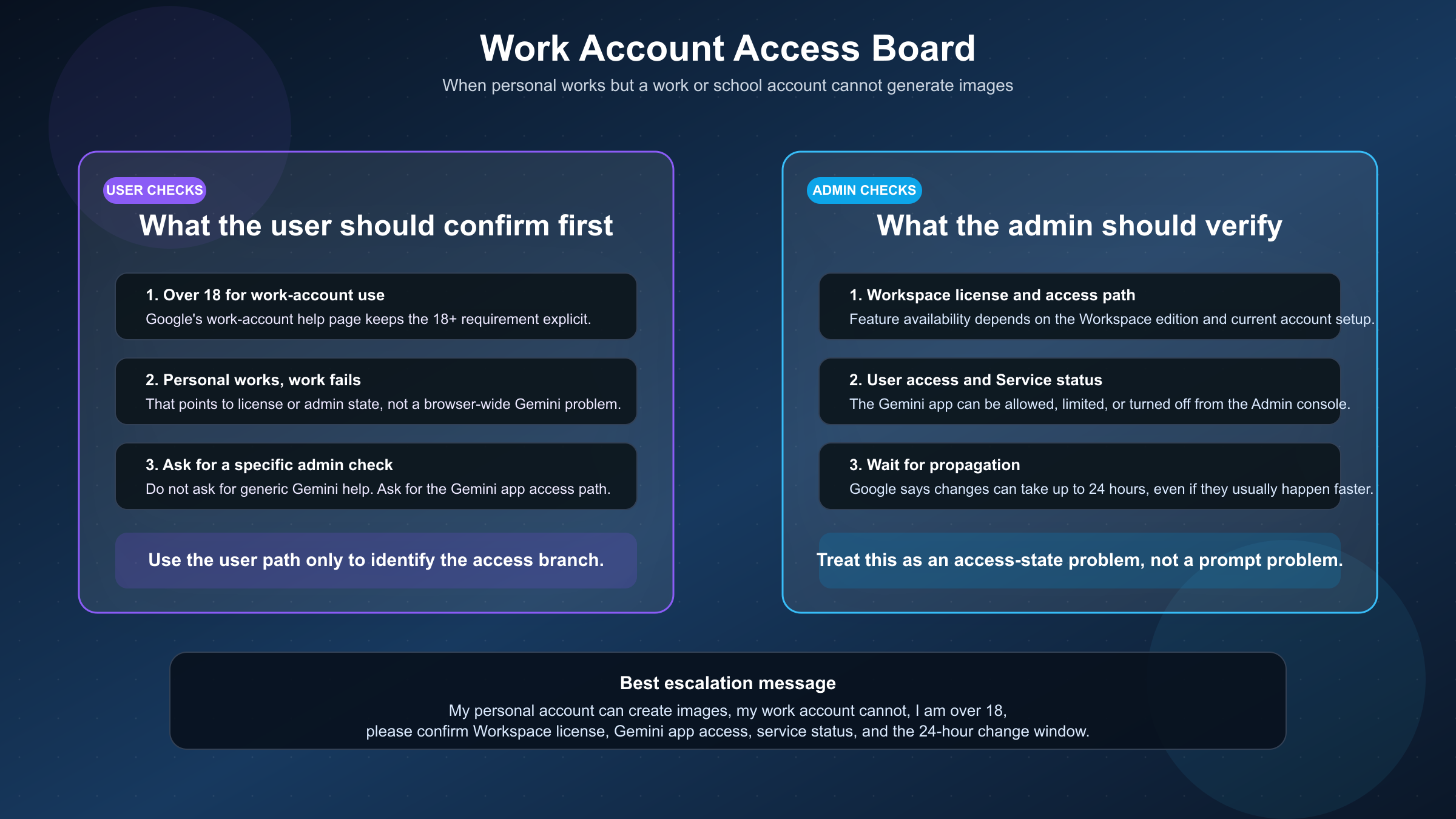
Do not assume your organization account works like your personal account. Google's Use Gemini Apps with a work or school Google Account page says work-account feature availability depends on the Workspace license, and it also says users must be 18 or over to use Gemini Apps with a work account.
That still is not the whole fix path. For organization-managed access, the stronger operational page is Google's Turn the Gemini app on or off admin documentation. That page says admins can allow all users to access Gemini Apps regardless of license, or change the Gemini app service status for the organization. It also says changes can take up to 24 hours but often happen more quickly.
So if your personal account can create images but your work account cannot, ask three questions in this order:
- Is the account eligible under the current Workspace edition and over-18 requirement?
- Has the admin actually enabled Gemini app access and service status for your org or group?
- Was the setting changed recently enough that you are still inside Google's up-to-24-hour propagation window?
That sequence is much better than asking the admin for generic "Gemini troubleshooting." It gives them the right branch immediately.
It also gives you a cleaner escalation message. Instead of saying "Gemini is broken," you can say: my personal account works, my work account does not, I am over 18, and I need you to confirm the Workspace license, Gemini app access, and current service status for my org or group. That saves time because it points the admin to the exact controls Google documents.
This is also the branch where community advice becomes especially unreliable. A consumer Reddit workaround tells you almost nothing about a managed Workspace domain. If your company account is blocked, the real fix is usually policy or licensing, not prompt phrasing.
If Gemini Removes the Image or Refuses the Prompt After Submission
Not every request-denied experience is an access problem. Sometimes Gemini accepts the general interaction, then removes the image or refuses the image prompt because the request crossed a policy boundary.
Google's current Gemini Apps image-generation help page says Gemini Apps may remove images for prompts when its systems detect a possible violation of Google's Terms of Service, including the Prohibited Use Policy. That means the right question is not "why is image generation broken?" It is "what part of this request looks risky enough that the image branch was blocked?"
The fastest way to test that is to change one thing at a time. Start with a harmless control prompt that should obviously pass. If that works, rewrite the original request to remove unnecessary references to real people, sensitive identity edits, explicit violence, sexual content, or anything that sounds like evasion. If the control prompt works but the original does not, you are not in the billing or account branch anymore.
This is where many users lose time by trying the wrong fix. They relogin, clear cache, or check app quotas when the real issue is prompt safety. Those steps do nothing because the system is not confused about your account. It is rejecting the content request.
If your use case includes editing or combining uploaded images, keep the prompt narrow and literal. Say exactly what should change and what should stay fixed. That often reduces the chance that the model interprets a vague edit request as something riskier than you intended. For broader setup help on prompts and surfaces, Gemini image generation tutorial is the better companion piece.
If AI Studio or the API Returns 403, Permission Denied, or Consumer Suspended
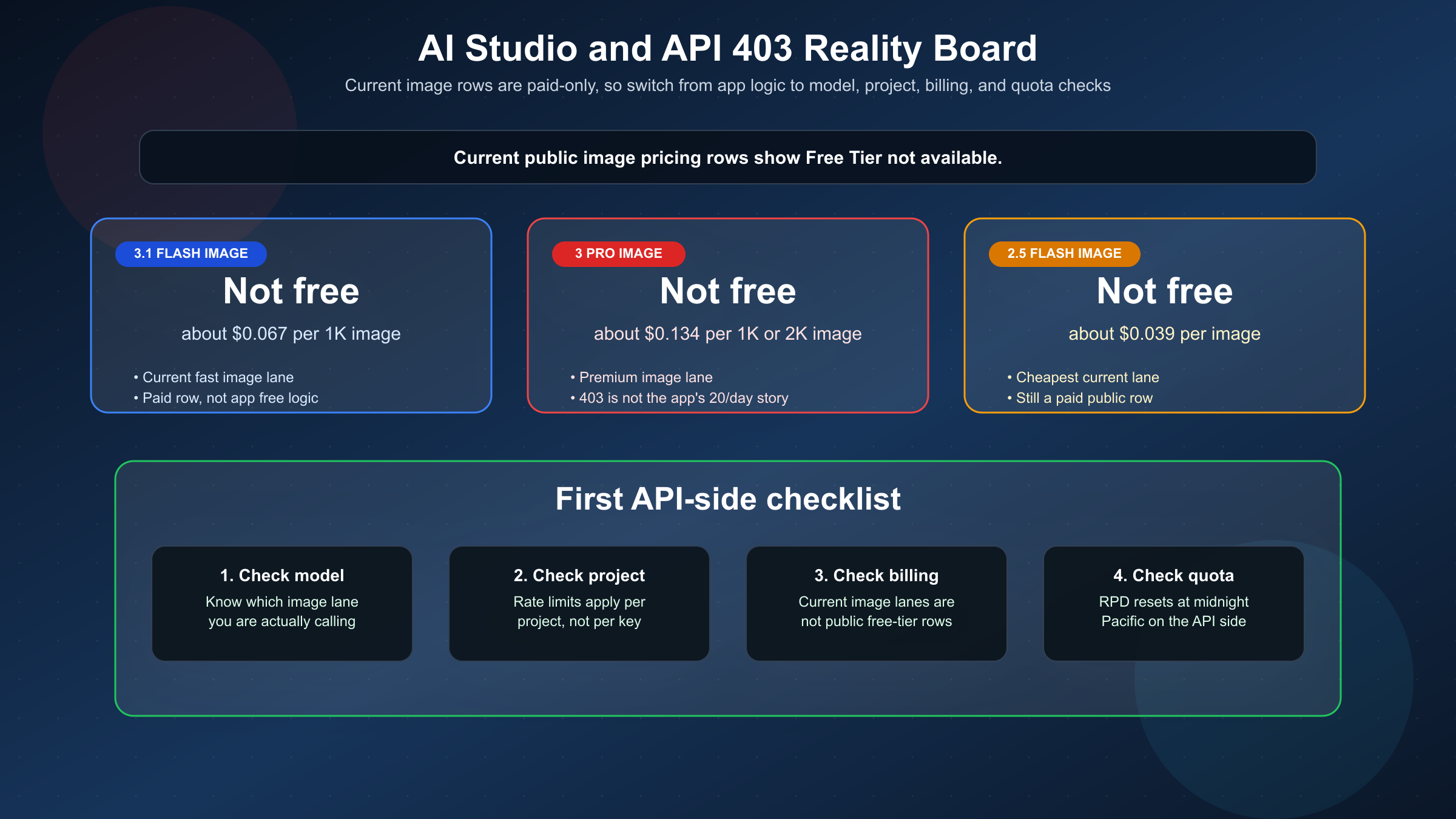
This is the branch where many articles become stale or sloppy. App-side rules and API-side rules are not interchangeable.
Google's live Gemini Developer API pricing page currently shows Free Tier: Not available for all three public Gemini image lanes that matter here:
| Model | Current public free tier | Current public paid signal |
|---|---|---|
gemini-3.1-flash-image-preview | Not available | about $0.067 per 1K image |
gemini-3-pro-image-preview | Not available | about $0.134 per 1K/2K image |
gemini-2.5-flash-image | Not available | about $0.039 per image |
That does not mean every 403 is a billing error. It does mean you should stop thinking like a Gemini app user the moment you hit this branch.
Google's Billing page says new accounts begin on the Free tier for certain models in the Gemini API and AI Studio, but that is not the same as saying the current image models are free. The same billing page also says AI Studio usage remains free unless users link a paid API key for paid features, and that failed 400 or 500 requests are not billed even though they still count against quota. Put together, the safe reading is this: if you are trying to use the current paid image models, the API-side questions are project, billing, and quota questions, not personal-app-free-tier questions.
Google's Rate limits page adds two more operational points: requests per day reset at midnight Pacific time, and rate limits apply per project, not per API key. So if you see a denial in AI Studio or your code, check the active project before you assume the key itself is the whole story.
In practice, that means your first API-side checklist should be brutally narrow:
- confirm which image model you are calling
- confirm the active project and whether billing or account action is needed
- check whether the failure is really
403or a quota-style error you misread in logs
If you skip step one, you can end up debugging the wrong commercial lane. If you skip step two, you can keep recreating keys inside the same broken project. If you skip step three, you can treat a refreshable limit as a permanent permissions problem.
Community threads help explain how this feels in practice. A current Google AI Developers Forum thread shows a 403 PERMISSION_DENIED error saying the API key consumer had been suspended. That is a good example of why API denials deserve their own branch. You can be completely outside the app's image-limit story and still be blocked because the project or account state is wrong.
If your failure mode is clearly API-side, the better companion articles are Gemini API request failed precondition and Gemini 3 Pro Image 403 Permission Denied. Use this page when you are still deciding which branch you are in. Use those narrower pages once you know you are inside the API branch.
Why Older Gemini Image Answers Still Feel Contradictory
The confusion is not just user error. Google's image surface changed faster than many ranking pages were updated.
The current image-generation page uses the Nano Banana family naming and maps Nano Banana 2 to gemini-3.1-flash-image-preview, Nano Banana Pro to gemini-3-pro-image-preview, and Nano Banana to gemini-2.5-flash-image. That naming layer alone is enough to keep older model-specific troubleshooting posts ranking for a question that now sounds broader.
The timing also matters. By February 26, 2026, Google had already published the Nano Banana 2 developer push, which shifted the center of gravity for Gemini image generation. That means a late-2025 guide built around only one model or one type of denial can still rank while answering an older version of the problem.
Page one still reflects that split today:
- community threads win by matching the raw error text
- official help pages win by being current and trustworthy
- older narrow guides keep traffic because they sound more concrete than the official docs
That is exactly why this article needs to exist. The user does not want to build a mental map of every Gemini surface. The user wants to know what to do next. The page-one gap is not missing facts. It is missing synthesis.
FAQ
Does a Google AI Pro or Google AI Ultra plan fix Gemini API image 403 errors?
Not by itself. Those plans raise Gemini Apps access and image limits. They do not turn the public Gemini image API rows into a free lane. API-side denials need API-side checks.
Does "AI Studio is free" mean the current Gemini image models are free there?
No. Google's billing page describes AI Studio's general free-use posture for certain models and projects. Google's public pricing page still shows the current Gemini image models as paid-only rows. Read the pricing row before assuming the image lane is free.
When do limits refresh?
For the Gemini app, Google says image limits reset daily and may change due to demand. For the Gemini API, Google says requests per day reset at midnight Pacific time.
What is the fastest safe test when I do not know which branch I am in?
Try one harmless control prompt in the Gemini app, compare personal versus work account behavior if you can, and separately check whether your failing workflow is actually in AI Studio or the API. That usually tells you more in one minute than a long generic troubleshooting checklist.
Bottom Line
If Gemini image generation says request denied, do not start with random fixes. Start by identifying the surface.
Personal Gemini app problems are usually about eligibility, limits, capacity, or policy. Work-account problems are usually about access and admin controls. AI Studio and API problems are usually about paid image models, project state, quota, or billing rather than the app's free-image rules.
Once that split is clear, the fix usually gets much shorter.