
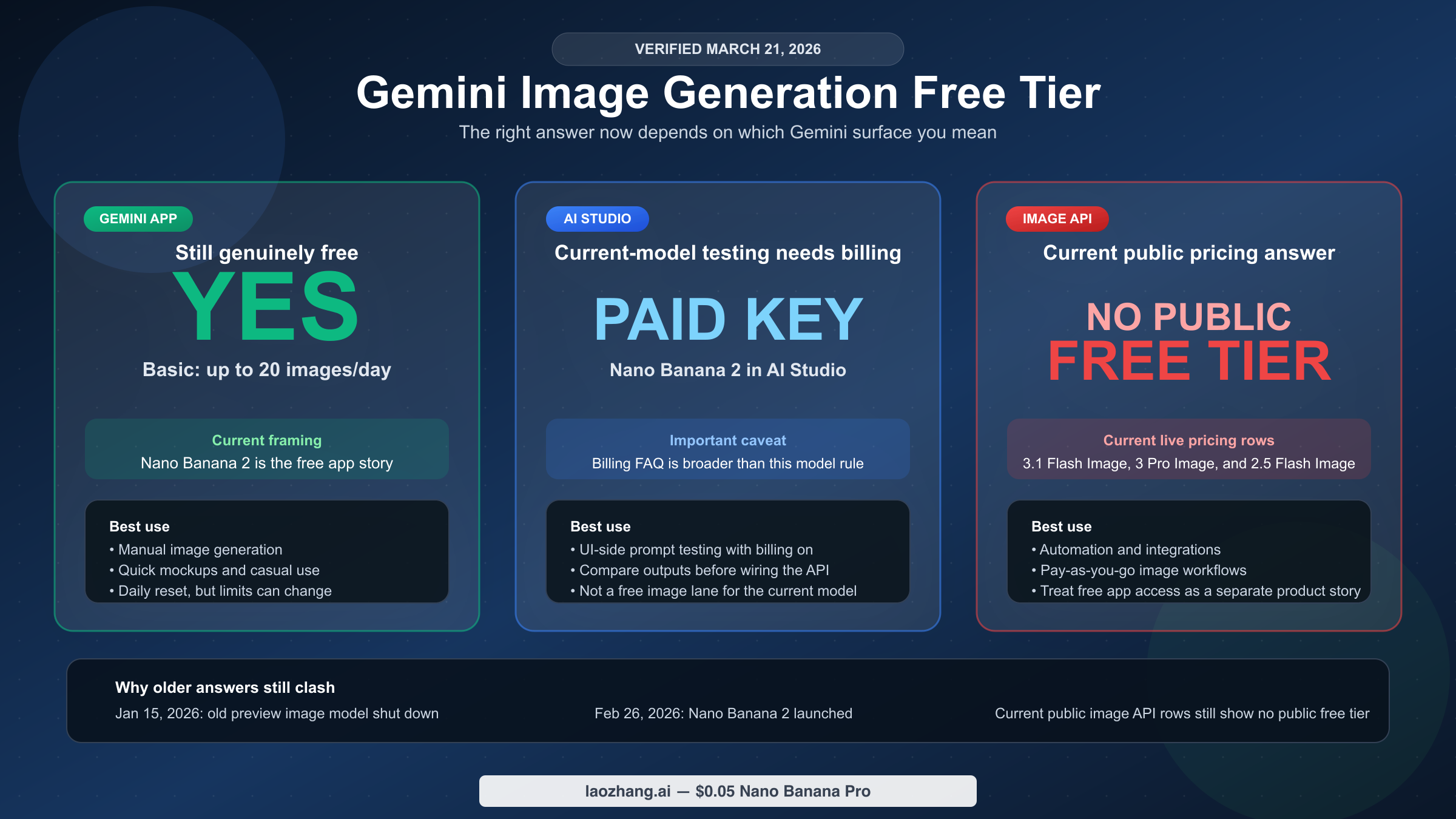
As of March 21, 2026, Gemini image generation is still free in the Gemini app. But for the current Nano Banana 2 and Gemini 3.1 Flash Image path, Google's developer post says a paid API key is required in AI Studio, and Google's live image API pricing tables still do not list a public free tier for the current Gemini image models. That is why search results feel contradictory. One official page describes AI Studio's general billing posture, while another describes the current image model's paid access rule.
If you only need the shortest useful answer, use this table first.
| Surface | Is it free right now? | What the official pages say | Best fit |
|---|---|---|---|
| Gemini app | Yes | Basic currently shows up to 20 images/day with Nano Banana 2, and paid Google AI plans raise that ceiling | Manual image generation inside Gemini |
| AI Studio | Not as a free lane for the current main image model | Google's billing FAQ still describes AI Studio as free unless you link a paid key, but Google's Nano Banana 2 developer post says the model requires a paid API key in AI Studio | UI-side testing of the current model once billing is enabled |
| Gemini image API | No public free tier on the live image-model pricing rows | The public pricing page currently shows Free Tier: Not available for gemini-3.1-flash-image-preview, gemini-3-pro-image-preview, and gemini-2.5-flash-image | Automation, integrations, and production workflows |
That split matters more than the word free by itself. If you mean "Can I still make images in Gemini without paying?", the answer is yes. If you mean "Does the current public Gemini image API expose a real free tier I can design a production workflow around?", the answer is much stricter.
TL;DR
- Want free manual image generation: use the Gemini app first.
- Want to test the current image model in AI Studio: Google's Nano Banana 2 developer post says a paid API key is required there, so do not treat AI Studio as the free image lane.
- Want automation or integrations: Google's current Gemini pricing page still shows Free Tier: Not available for the live Gemini image models.
What Is Actually Free Right Now
The easiest way to stay grounded on this topic is to start with Google's current Gemini Apps limits and upgrades page, not with recycled 2025 quota screenshots.
Google's live help table now frames app-side image generation around Nano Banana 2, not around the older "free Nano Banana Pro" story that many ranking pages still carry. As checked on March 21, 2026, the current help page lists:
- Basic: up to 20 images/day
- Google AI Plus: up to 50 images/day
- Google AI Pro: up to 100 images/day
- Google AI Ultra: up to 1,000 images/day
The same page also breaks out Redo images with Nano Banana Pro as a paid-plan benefit rather than the main free path. That shift matters. It means the modern free answer is no longer "Gemini gives everyone a couple of Nano Banana Pro shots." The current official framing is closer to this:
- free users get a real image-generation path in the app
- paid plans get more daily room
- Nano Banana Pro now sits more clearly on the paid side
Google also adds two caveats that most shallow roundup pages still underplay. First, image generation is in high demand. Second, the help page says limits may change frequently and reset daily. That is intentionally softer language than a hard public timezone guarantee. In other words, the app still has a real free image tier, but Google is not promising a perfectly rigid daily experience that every user will feel the same way at every hour.
For most casual users, this is the answer they were actually trying to find. If your job is making a handful of images manually inside Gemini, the free tier still exists and is more generous than many people assume from stale Nano Banana Pro articles. If your problem is heavier daily use rather than automation, the more useful next read is our broader guide to Gemini image free tier limits and app-vs-API differences, because that page goes deeper on resets, plan ceilings, and what happens after you hit the cap.
Why AI Studio And The Gemini Image API Are Not The Same Answer
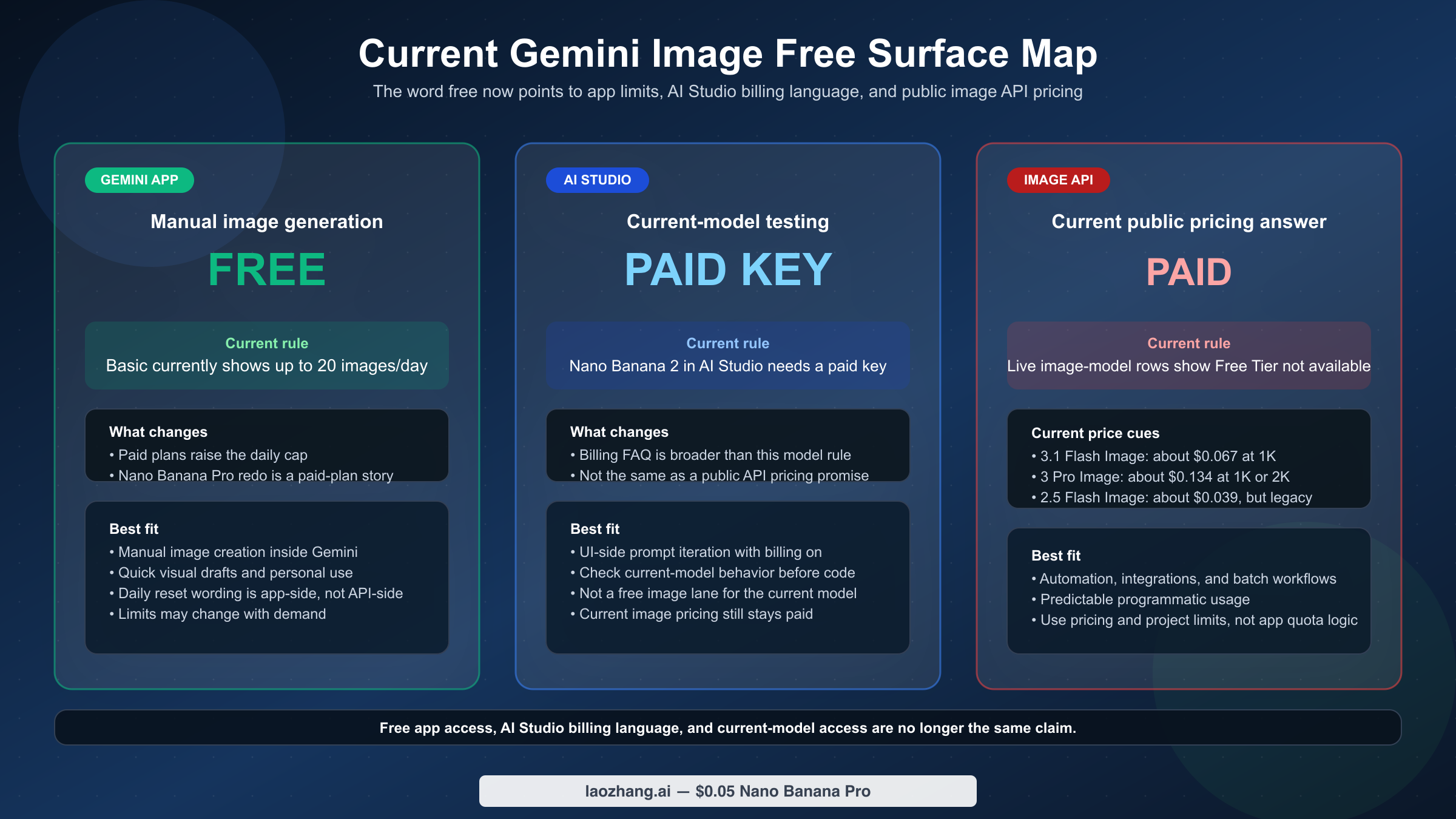
This is where most pages lose the reader.
Google's billing documentation still says new accounts begin on the Free tier with access to certain models in the Gemini API and AI Studio. The same billing FAQ also says AI Studio usage remains free of charge unless users link a paid API key for paid features. That is the official reason many people still believe "Gemini image generation is free" in a broader sense.
But Google's newer Nano Banana 2 developer post adds the product-specific line many roundup pages miss: a paid API key is required to use the model in Google AI Studio. For this exact keyword, that is the harder fact that matters.
But that statement is not the same thing as a public free tier on the current image API pricing rows.
When you move from the billing page to Google's live Gemini Developer API pricing page, the picture changes. As checked on March 21, 2026, the public image-model rows currently show Free Tier: Not available for the main live image models:
| Current image model | Free tier on public pricing page | Standard output pricing | What that means |
|---|---|---|---|
gemini-3.1-flash-image-preview | Not available | about $0.067 per 1K image | Current default Gemini image lane for new builds |
gemini-3-pro-image-preview | Not available | about $0.134 per 1K or 2K image | Premium Gemini image lane |
gemini-2.5-flash-image | Not available | about $0.039 per image | Cheapest current Gemini-native lane, but now a legacy model |
That is why the clean answer has to separate three ideas:
- Gemini app free usage
- AI Studio's general billing status versus current image-model access
- A public free tier on the live image API pricing table
Those are no longer interchangeable.
That split is the missing nuance. The AI Studio product can still have a general free-use story in billing docs, while the current flagship image model in AI Studio still requires paid access. For planning purposes, the safe rule is:
- use the Gemini app when your need is manual image generation
- use AI Studio with a paid key when you need to test the current Nano Banana 2 model before wiring the API directly
- treat the current public image API as a paid workflow unless Google's live pricing table changes
That distinction is the main gap in weaker SERP pages. They often take the very real fact that "Gemini is still free somewhere" and stretch it too far into "the current image API is free," which the live pricing page does not support.
If your question is already shifting from "is it free?" to "what would paid usage cost me?", our dedicated guide to Gemini image generation API pricing is the better next read because that article goes deeper on the current price lanes and batch math.
What To Use In Three Common Situations
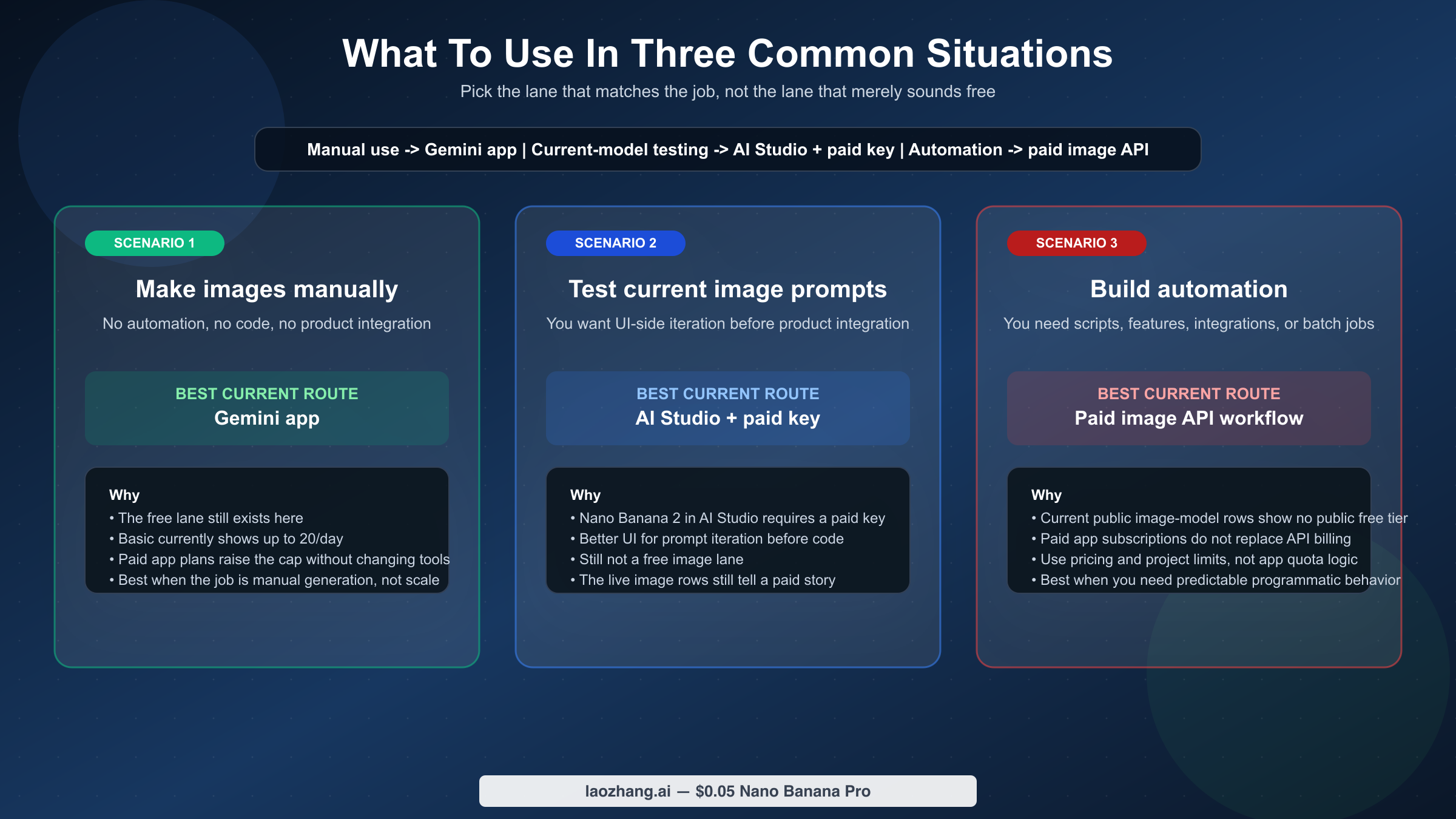
The most useful way to answer this keyword is not to stop at the facts. It is to route the reader toward the right next move.
1. You just want to make images inside Gemini without paying
Stay in the Gemini app.
This is the cleanest current free path. The official app help page already gives you the current daily ceilings, and you do not need to translate billing docs or API pricing tables into something they are not. If your goal is idea boards, social images, quick concept art, or occasional everyday use, the free app tier is the right answer.
2. You want to test the current image model before wiring the API
Use AI Studio with a paid API key if you want a friendlier UI for prompt iteration before you build against the API directly.
This is where many developers and technical users get tripped up. Google's billing docs still describe AI Studio broadly, but Google's Nano Banana 2 developer post is more specific for this model: a paid API key is required in AI Studio. So AI Studio can still be the right testing surface, but it is no longer the free image path people keep assuming from older summaries.
3. You need automation, integrations, or product usage
Assume you are moving into a paid image API workflow.
Once your job is no longer manual generation but scripts, scheduled jobs, app features, or team workflows, the real question is not "Can I still click generate for free somewhere?" It is "Which paid image lane should I budget for, and what are my live project limits?" At that point, the image API pricing page matters more than the app help page.
This is also why app subscriptions and API budgets should not be blended into one decision. A paid Google AI plan raises your app-side room. It does not turn the live public image API pricing rows into a free tier.
If you want the shortest routing version, use this:
| Situation | Best current path | Why |
|---|---|---|
| Manual image generation inside Gemini | Gemini app Basic first | The free tier still exists there |
| Current-model testing before full integration | AI Studio with a paid key | Better UI for iteration, but not a free image lane |
| Real automation or integrations | Paid Gemini image API workflow | The public pricing rows for live image models are paid-only |
That routing also keeps this page from becoming a duplicate of the broader limit-reset articles in the cluster. If your real problem is that you hit today's cap and want to know whether to wait or switch plans, our Gemini image generation reset guide is more specific than this exact-query explainer.
Why Older Gemini Free-Tier Answers Still Disagree
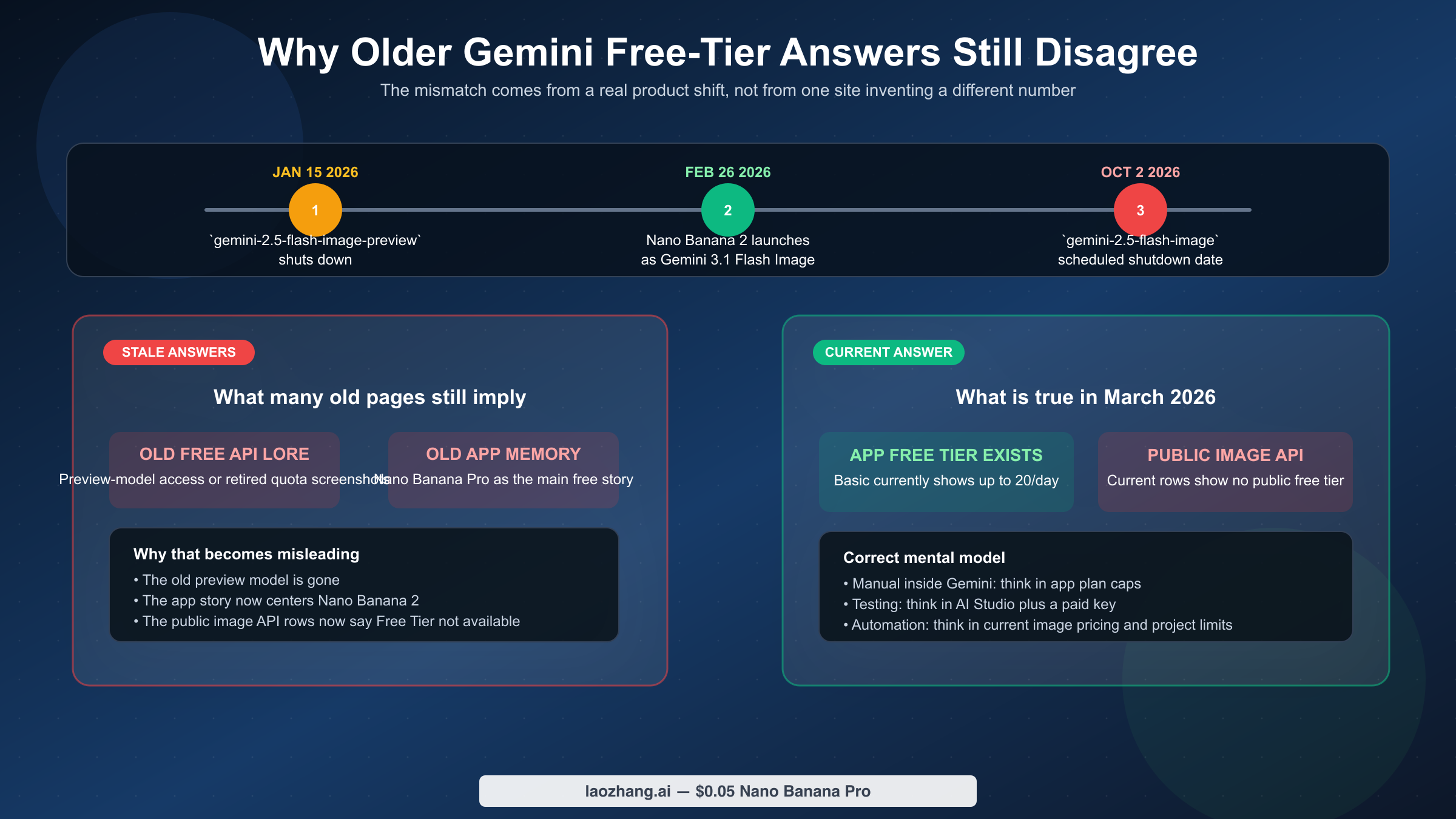
The SERP confusion is not random. It is the result of product changes landing faster than many ranking pages were updated.
The first major date is January 15, 2026. Google's deprecations page says gemini-2.5-flash-image-preview shut down on that date. A lot of older forum posts, tutorials, and low-cost image articles still orbit that preview model. If a page still builds its free-tier answer around that old preview line without mentioning the shutdown, it is already missing part of the current story.
The second major date is February 26, 2026. That is when Google published the Nano Banana 2 rollout, explicitly identifying it as Gemini 3.1 Flash Image. This helps explain why the current app help page centers Nano Banana 2 instead of the older Nano Banana Pro-first framing that still shows up in broad "Is Gemini free?" guides.
The third important date is October 2, 2026. Google's deprecations page says gemini-2.5-flash-image is scheduled to shut down then, with gemini-3.1-flash-image-preview as the replacement. That does not change the free-tier answer directly, but it matters because many cost-sensitive pages now point people toward the cheapest current paid image lane without warning that it is also the legacy lane.
That sequence creates three different stale-result traps:
- pages that still talk as if Nano Banana Pro is the main free image story
- pages that still treat
gemini-2.5-flash-image-previewlike a live free-tier option - pages that say "Gemini is free" without telling the reader which surface they mean
This is why freshness matters more than usual for this keyword. The user is not just looking for a definition. They are trying to avoid an expensive misunderstanding after a product transition.
If an article does not mention the current app-side Nano Banana 2 framing, the old preview shutdown, or the public pricing page's current Free Tier: Not available rows for the live image models, it is probably answering an older version of the question.
FAQ
Does Google AI Pro or Google AI Ultra give me free Gemini image API access?
No. Those plans raise your app-side access and image limits. They do not convert the current public Gemini image API pricing rows into a free tier.
Does "AI Studio is free" mean the current Gemini image model is free there?
No. Google's billing docs still describe AI Studio's general free-use posture, but Google's Nano Banana 2 developer post separately says a paid API key is required to use the model on Google AI Studio. And the public pricing rows for the live Gemini image models still show Free Tier: Not available. For this keyword, AI Studio is a testing surface for the paid model, not a hidden free image lane.
When do Gemini image limits reset?
For the Gemini app, Google currently uses softer wording: image generation is in high demand, limits may change, and they reset daily. For the Gemini API, Google's rate-limits page says requests per day reset at midnight Pacific time.
Can I use the Google Cloud $300 welcome credit for Gemini image generation?
No. Google's billing documentation says welcome credits cannot be used on AI Studio or the Gemini API.
What is the cheapest paid Gemini image route if I outgrow the free path?
On the current public pricing page, gemini-2.5-flash-image is the cheapest Gemini-native image lane at about $0.039 per image. The catch is that it is also the legacy lane with a published October 2, 2026 shutdown date. If you are starting new work, the more future-safe default is usually gemini-3.1-flash-image-preview.
Where should I look if I only care about the current API free-tier picture?
Read the more API-focused Gemini image API free tier guide. This exact-query page is intentionally broader because many searchers mean the app, AI Studio, and API at the same time without realizing it.
Bottom Line
The clean 2026 answer is not one number.
Gemini image generation is still free in the Gemini app. But for the current Nano Banana 2 and Gemini 3.1 Flash Image path, AI Studio now requires a paid API key, and Google's live public image API pricing rows still do not expose a free tier for the current Gemini image models. That is the split most nearby pages still blur.
If you only want manual image generation, stay in the app first. If you need to test the current model before building, use AI Studio with billing enabled. If you need automation or predictable API usage, start from the current paid image-model pricing rather than from the idea of a free image tier.


