
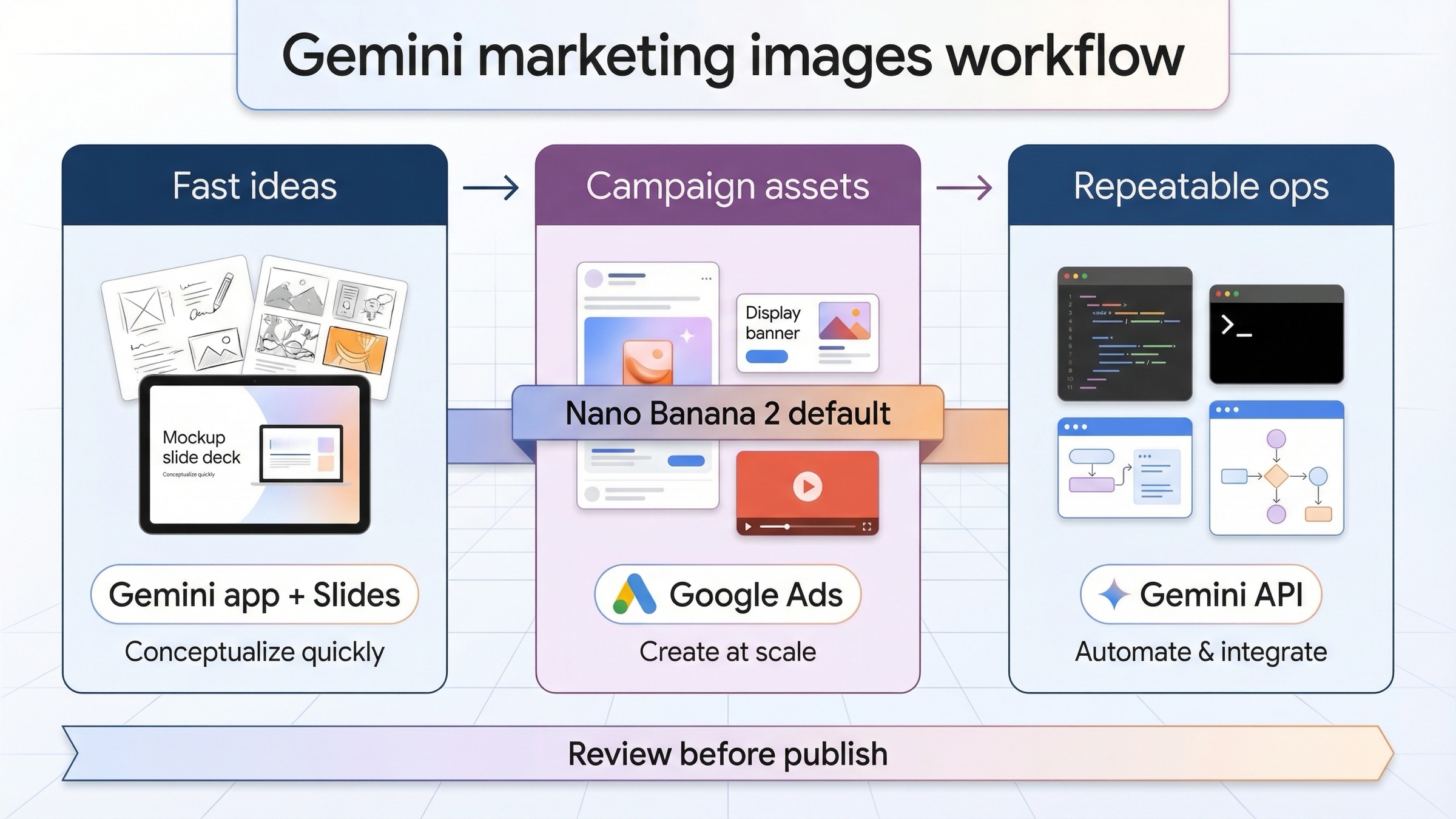
Use Gemini for marketing as a routed workflow, not as one magic image button. Start with Gemini app or Slides when you need fast concepts, moodboards, or lightweight social visuals. Use Google Ads generated images when the asset is going straight into campaign creation. Use the Gemini API only when your team needs repeatable brand workflows, higher-volume creative operations, or tighter control over output and automation.
That split matters more than the first prompt. Google's current page one is strong on slices but weak on sequence. The Workspace marketing pages show prompt ideas, the Gemini app help page shows fast image creation and editing, the Gemini API docs show the live model family and prices, and Google Ads help explains campaign-native generation. What page one still does not give you is one practical answer to the marketer's real question: where should I start, and what should I not expect Gemini to do by itself?
The best current default is Nano Banana 2, which maps to gemini-3.1-flash-image-preview in the Gemini API. It is fast enough for ideation, flexible enough for most routine campaign visuals, and cheaper than jumping straight into Pro. Move up to Nano Banana Pro only when the image is expensive to get wrong, especially if you need stronger text rendering, infographic-like layouts, or more polished premium assets. And do not confuse that model choice with the workflow choice. Even a better model does not fix the wrong surface.
TL;DR
If you want the shortest useful answer, use this table first.
| Marketing job | Best starting surface | Why this is the right default | Main caveat |
|---|---|---|---|
| Moodboards, visual exploration, quick social concepts | Gemini app or Slides | Fastest route to first ideas and easy variation loops | Good for ideation, not automatically your final campaign asset |
| Asset creation directly inside campaign setup | Google Ads generated images | Keeps style references, product imagery, and policy review closer to the campaign workflow | Access is eligibility-based, and you still need to review every asset before publishing |
| Repeatable brand workflows, automation, or large creative batches | Gemini API | Best route for reusable prompts, logging, automation, and downstream integration | More setup, more cost discipline, and not necessary for every marketing team |
| Text-heavy infographics, premium hero images, or polished ad mockups | Nano Banana Pro on the route above | Better fit when text rendering or premium finish matters enough to justify the higher price | Costs much more than Nano Banana 2, so it should be a deliberate upgrade |
If your question is broader than marketing workflow, start with Gemini Image Generation Tutorial. If you mostly need code or SDK examples, Gemini Image Generation Code Examples is the better companion. If the next question is budget, go straight to Gemini Image Generation Cost Calculator.
Choose the right Gemini surface for the marketing job
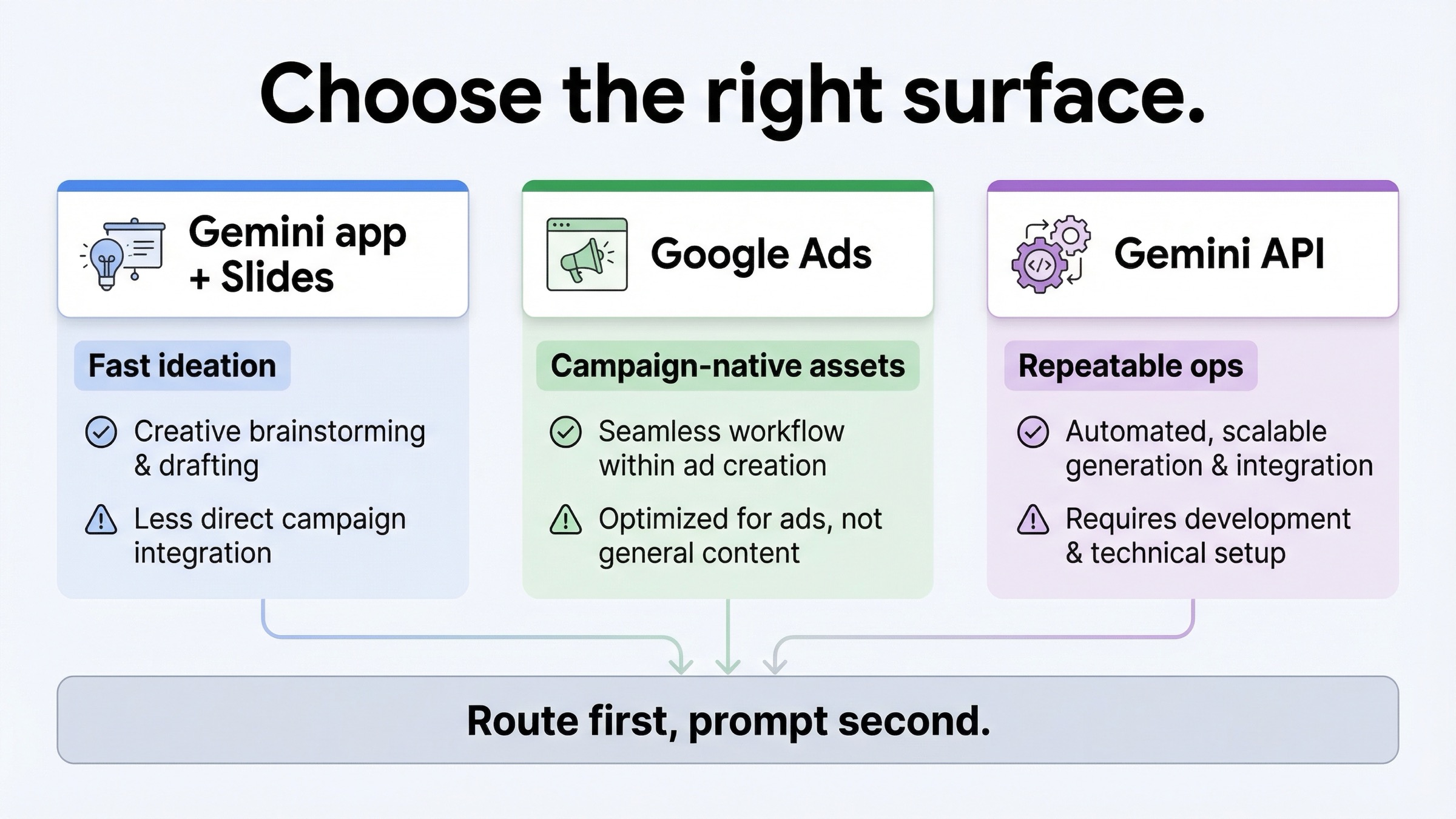
The easiest way to waste time with Gemini image generation is to treat all Google surfaces as the same product. They are related, but they do different jobs.
Gemini app is the fastest no-code lane. Google's current Gemini Apps help page, checked on March 23, 2026, positions Nano Banana 2 as the default image model in the app and highlights quick creation, local edits, better text rendering, and character consistency. The same page says paid subscribers can download at 2K, while free users download at 1K, and that Nano Banana Pro is available as a redo path when an image needs more detail. That is exactly the kind of workflow marketers want at the start of a campaign: fast first ideas, fast revisions, and no engineering overhead.
Slides is the best Workspace lane for campaign ideation, not for final asset operations. Google's Workspace marketing handbook and prompt guide both push marketers toward Gemini in Slides for inspirational campaign images and moodboards. That is useful because early campaign work usually needs visual territory, not final production. It also helps clarify a mistake that page one keeps encouraging: if Google itself frames Slides image generation as a creative-thinking aid, you should not build your whole publishing workflow around it.
Google Ads generated images is the right surface when the visual is already heading into ad creation. Google's Google Ads generated images help page, also checked on March 23, 2026, says you can generate images from prompts while setting up campaigns, while editing ads or asset groups, in Asset Library, and even from recommendations. The same page says generated images can also be based on campaign text assets, landing pages, or product inputs. That makes Ads the better route when the question is not "can I get a nice image?" but "can I get a campaign-ready starting point in the place where the campaign will actually be reviewed and approved?"
Gemini API is the right route only when marketing work becomes an operational system. The Gemini image-generation docs are strong on current model names, capabilities, and controls, but they are not written like a marketer playbook. That is the point. If your team wants reusable brand prompts, scheduled batch generation, internal tooling, asset logging, or a repeatable approval pipeline, the API becomes valuable. If you just need a dozen concept images for next week's social push, it is usually overkill.
That is why the right first question is not "what prompt should I use?" The right first question is "which surface matches the job?" Once you answer that, the rest of the workflow becomes much easier.
Start with Nano Banana 2, move to Pro only when the asset is expensive to get wrong
Most marketers do not need a complex model decision tree. They need one clean rule.
Start with Nano Banana 2, which the current Gemini image docs map to gemini-3.1-flash-image-preview. Google's pricing page, checked on March 23, 2026, lists standard output prices at $0.045 for 0.5K, $0.067 for 1K, $0.101 for 2K, and $0.151 for 4K. Google's deprecations page shows that gemini-3.1-flash-image-preview was released on February 26, 2026 and currently has no shutdown date announced. That is why it is the safest default for new marketing work: current, flexible, and much cheaper than starting with Pro.
Move to Nano Banana Pro, or gemini-3-pro-image-preview, only when the output itself is high-stakes. Google's pricing page lists Pro at $0.134 per 1K or 2K image and $0.24 at 4K. That is a meaningful jump. You should pay it when the creative brief really demands it: infographic-style visuals, poster-like layouts, premium hero assets, or text-heavy brand mockups where weak rendering will trigger rework anyway. Google's own Nano Banana Pro launch post frames Pro around studio-quality output, stronger text rendering, and advertisement-style mockups. That is the right way to think about it. Pro is not the default. It is the upgrade path when quality failure is already expensive.
The legacy lane still exists, but it is not the right default. Google's deprecations page says gemini-2.5-flash-image is still live and scheduled to shut down on October 2, 2026. If you are optimizing around the cheapest current official 1K image and you knowingly accept the lifecycle risk, it can still matter. But a fresh marketing workflow should not be built around the lane Google has already put on a retirement path.
| Model | Current status | Best marketing fit | Why you would use it | What to watch |
|---|---|---|---|---|
gemini-3.1-flash-image-preview | Current default image lane | Most campaign ideation, social concepts, product imagery, and first-pass ad visuals | Best balance of cost, speed, and current support | Preview status and live quotas still matter |
gemini-3-pro-image-preview | Current premium image lane | Text-heavy graphics, polished hero images, infographic-like assets, premium ad mockups | Better when quality or text rendering is expensive to get wrong | Higher price means it should be a selective upgrade |
gemini-2.5-flash-image | Live legacy lane | Cheapest official fallback only | Useful if lowest cost matters more than long-term stability | Shutdown scheduled for October 2, 2026 |
The clean operational rule is simple: use Nano Banana 2 for exploration and routine creative work, use Pro when premium output is cheaper than redoing weak output, and leave the legacy 2.5 lane to very deliberate cost-sensitive cases.
A practical Gemini workflow for moodboards, social posts, and ad mockups
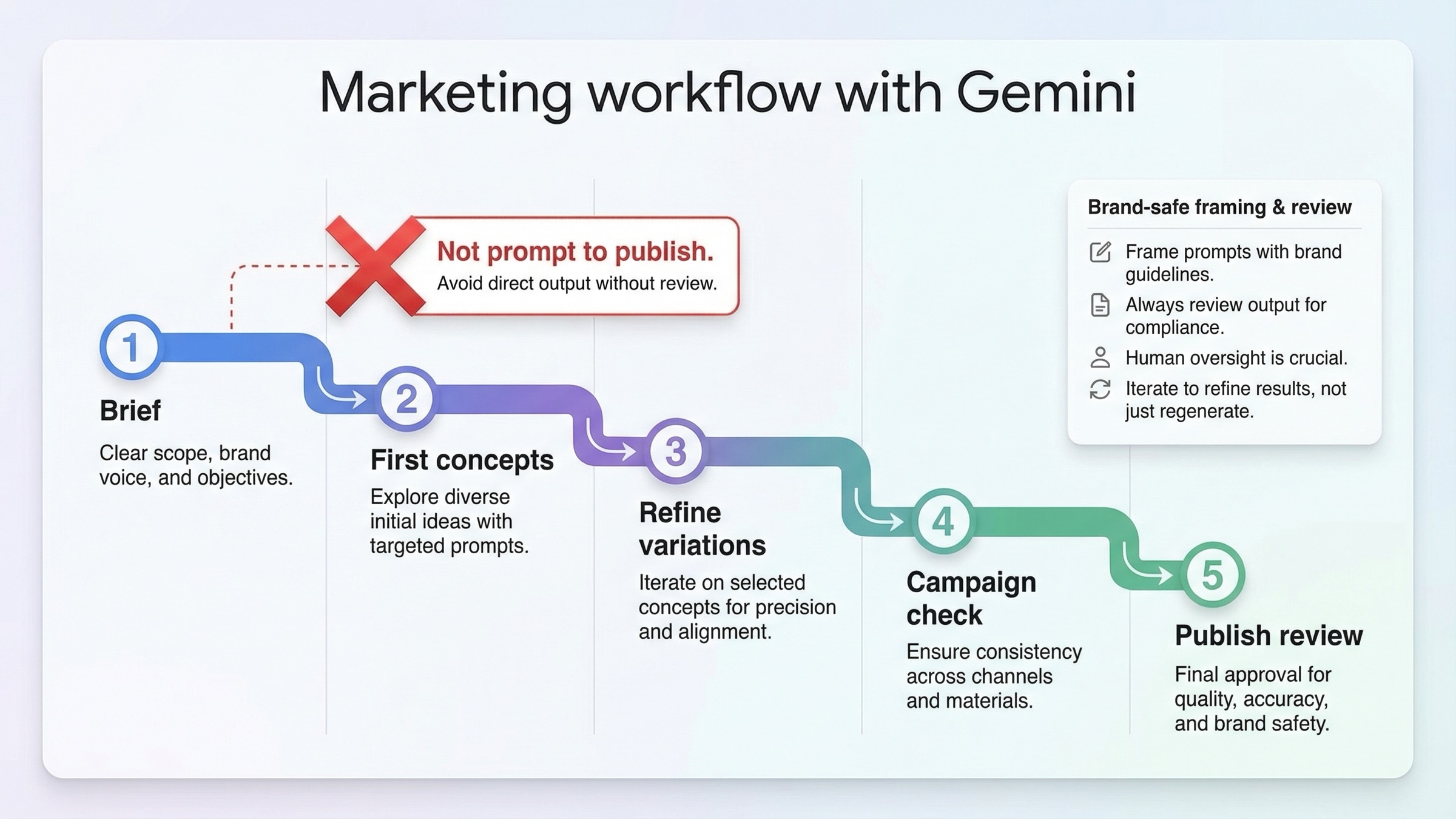
The most useful way to use Gemini for marketing is not to ask for a final ad on the first try. It is to move through a short workflow that protects brand intent while keeping speed where it helps.
Step 1: start with the campaign job, not the image style. Before you prompt anything, write down the asset's real role. Is it a moodboard for internal review, a social visual for fast publishing, a product-centered ad concept, or a premium hero image for a landing page? This matters because the right surface, cost tolerance, and review depth all change with the job. A moodboard can live with looseness. A paid campaign creative cannot.
Step 2: build one good prompt frame before you build variations. Google's own marketing prompt guide shows the right pattern: subject, style, color direction, and setting. That is enough to get useful first concepts. For example, a prompt for a travel brand should not be "luxury travel ad." It should be closer to: "Create a photorealistic campaign concept for a premium travel brand, using warm sunrise light, soft clouds, and understated gold-and-sand tones. Keep the composition clean enough for headline placement." That gives Gemini a scene to solve, not a vague mood word.
Step 3: generate wide first, then narrow quickly. Use the first round to test composition, palette, and emotional direction. Then tighten with follow-up prompts that change only one thing at a time: "keep the composition, but make it feel more premium," or "keep the resort scene, but simplify the background and leave more negative space for copy." Marketers often waste time by throwing away the whole concept when they only needed a tighter variation loop.
Step 4: decide whether the image stays in ideation or moves toward production. This is where most teams get stuck. If the visual is still for internal direction, keep working in Gemini app or Slides. If it is headed into Google Ads, shift into Ads-native generation or at least test the creative inside Ads early. If the workflow needs repeatable outputs at volume, move the prompt logic into the API instead of relying on manual rerolls.
Step 5: review before you publish, even when the image looks good. Google's tools are fast, but they do not remove the need for human approval. Marketing visuals still need brand review, factual review, layout review, and sometimes policy review. The fastest way to make Gemini feel unreliable is to skip that step and then blame the model for downstream publishing problems that a review pass should have caught.
This is also where Gemini is better used as a creative accelerator than as a final design replacement. The Reddit and forum friction around Gemini image generation is consistent: people like the speed, but the workflow feels clunky when they expect the first output to finish the whole job. That frustration usually disappears when the workflow is reframed as brief -> concept -> variation -> review -> publish, rather than prompt -> publish.
If your main job is editing existing product or lifestyle images rather than making first-pass concepts, the more specific follow-up is Gemini Image-to-Image Editing Guide.
How to keep Gemini outputs on-brand with references, style direction, and review loops
Brand control is the point where weak Gemini marketing workflows break.
The first rule is to give Gemini style direction, not just adjectives. "Modern" and "premium" are weak instructions by themselves. A better prompt names visual territory, color rules, composition, and what the brand should avoid. For example: "Create a clean 4:5 social image for a premium skincare brand. Use muted beige, off-white, and brushed-metal accents. Keep the lighting soft and editorial, avoid loud gradients, and leave room for a short headline in the upper third." That is still brief, but it is a brand-aware brief rather than a pile of taste words.
The second rule is to use reference-driven control when the surface supports it. Google's Google Ads help page says style reference images can guide the look and feel of generated images, and that you can use up to 5 reference images per generation there. That matters for marketers because "same brand, different campaign" is a normal workload. But Google's own note also matters: style reference images and outputs should not contain logos, watermarks, or product images. So if the job is to preserve a visual language, use style references. If the job is to feature the actual product, use the product-image workflow instead of trying to force one input type to do both jobs.
The third rule is to separate brand elements from brand atmosphere. Gemini is good at atmosphere: palette, lighting, product context, mood, and layout direction. It is improving on embedded text and brand-like design language, especially in Nano Banana Pro, but that does not mean every brand should let Gemini invent the final logo lockup, compliance line, or offer text. Google's Nano Banana 2 and Pro launch materials emphasize text rendering and localization improvements. That is useful. It is not permission to skip design review.
The fourth rule is to review the image in the place where it will be used. A square social visual can feel strong in Gemini app and still fail once it sits next to campaign copy, landing-page typography, or platform crop rules. That is why fast ideation should stay fast, but final approval should happen closer to the campaign environment. For many teams that means Slides for internal review, then Ads or the final design tool for the real publishing decision.
The fifth rule is to keep one short negative brief around recurring brand failures. Examples: "avoid generic tech-blue gradients," "avoid fake dashboard UI," "do not add extra product labels," "leave clean space for copy," or "do not make the people look like stock-photo composites." Gemini improves faster when your follow-ups describe the failure clearly instead of asking for another random variation.
When Google Ads generated images are the better route than doing everything in Gemini first
Some marketers should skip the "generate everything in Gemini app first" habit entirely.
If the asset is going into a live campaign, Google's current Google Ads generated images help page is the strongest official reason to work closer to Ads. Google says generated images can be created while setting up campaigns, while editing ads or asset groups, in Asset Library, and even from recommendations. It also says images may be generated from campaign text assets, your landing page, or product inputs. That means Ads is not only an output destination. It is already part of the creative-generation workflow.
This changes the default when the campaign system itself matters more than the raw image. If you are building a brand moodboard or a concept deck, Gemini app or Slides is still the easier first stop. But if you are building Performance Max or other campaign assets and you already know the image will need product accuracy, style control, and policy review, it is often smarter to start closer to Ads.
Google Ads also gives marketers a more useful brand-preservation mechanic than generic prompt tweaking alone. The help page says style reference images can guide the look and feel you want. It also describes a product-image route that uses your tangible product images to generate more faithful lifestyle imagery. That is a much stronger fit for ecommerce, retail, and product-centered performance marketing than asking Gemini app to guess what brand faithfulness means from text alone.
The catch is that Google Ads is more constrained, and that is a good thing. The same help page says manual prompted image generation is eligibility-based, still rolling out, and limited by account history, policy compliance, and sensitive-vertical restrictions. Google also says advertisers must review generated images for accuracy, policy compliance, and whether they are misleading before publishing them. That makes Ads less magical than generic AI-marketing hype, but more useful for real campaign work.
The practical rule is straightforward: if you need fast inspiration, start in Gemini. If you need campaign-native asset generation with brand cues and policy awareness closer to the workflow, move into Ads early instead of late.
Pricing, policy, and publishing checks marketers should not ignore
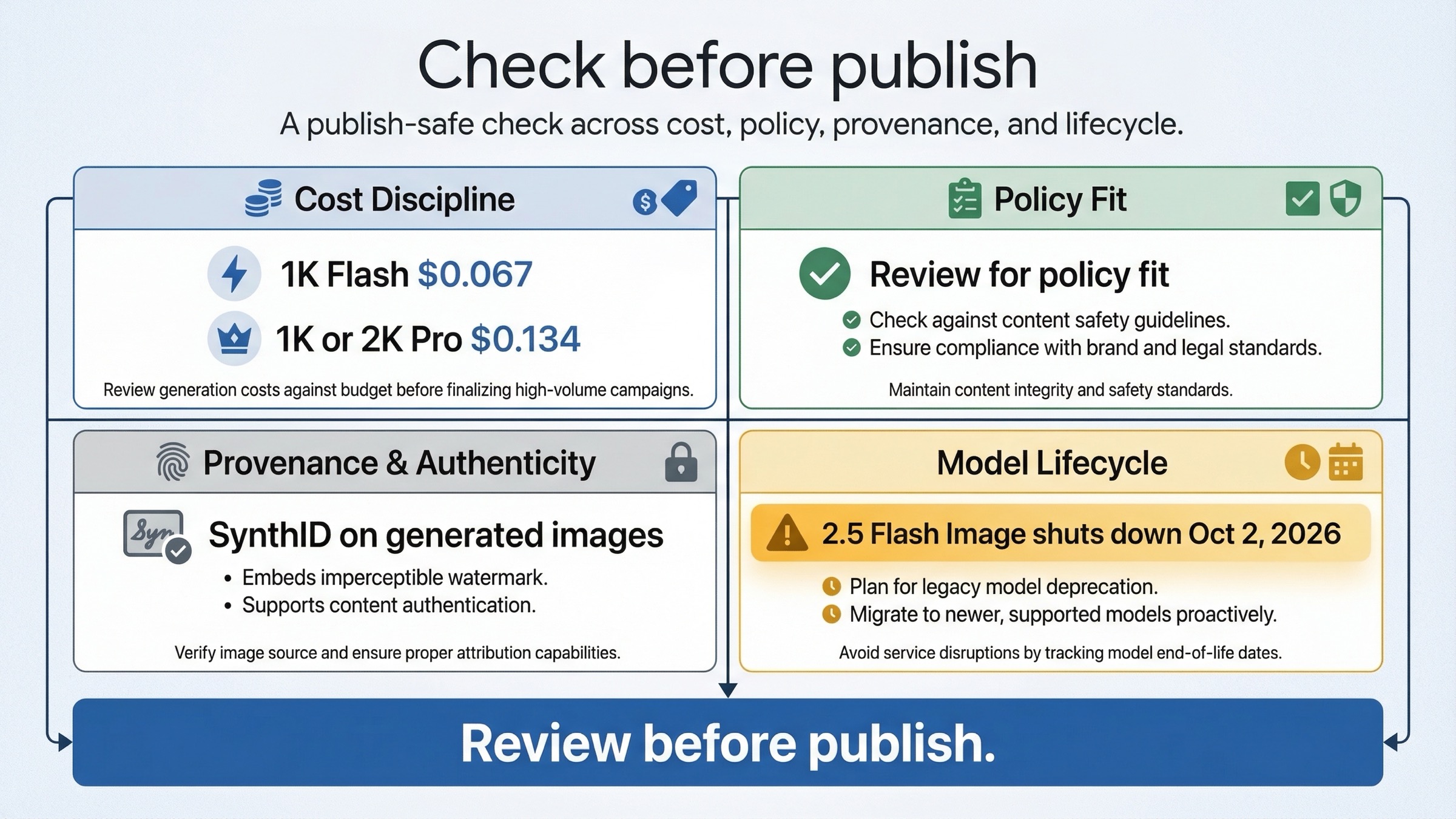
The biggest mistake in this keyword family is treating image generation like the only job. Marketing teams still have to ship the asset safely.
The first check is cost discipline. Nano Banana 2 is cheap enough to support exploration, especially at 1K, but that does not mean every asset should be rerolled forever. Google's pricing page puts 1K Flash Image at $0.067 and 1K or 2K Pro at $0.134. That is not expensive for a high-value hero image, but it becomes wasteful quickly if the team is using Pro as the default for early ideation. Use Flash Image to learn what the creative should be. Pay for Pro when the asset itself is already expensive enough that better output saves time.
The second check is publishing review. Google's Gemini image docs say all generated images include a SynthID watermark, and the Google Ads help page says generated images in Ads include identification mechanisms as well. That does not automatically block a marketing use case, but it does mean teams should stop pretending the origin of the image is invisible or irrelevant. Brand, legal, and policy stakeholders should know the image is AI-generated or AI-assisted.
The third check is policy and eligibility. Google's Google Ads page says generated image features are not equally available to every advertiser, and some categories are restricted or excluded. It also notes that images with adults and faces have separate safety handling, while sensitive categories, minors, and certain likeness cases are limited. If your campaign depends on regulated claims, sensitive verticals, or prominent identity edits, you should expect more friction than a generic lifestyle-mockup workflow.
The fourth check is resolution and final-use fit. The Gemini app's 1K vs 2K split is useful, but marketers should still think about where the asset will end up. A rough social concept can be fine at lower resolution. A homepage hero, premium ad creative, or print-adjacent mockup often needs more deliberate output settings and downstream polishing. Fast access to a 2K download does not mean the image is automatically ready for every placement.
The fifth check is model lifecycle. If your team builds even a lightweight repeatable workflow around gemini-2.5-flash-image, remember that Google's deprecations page already schedules its shutdown for October 2, 2026. That does not make the model unusable today. It does make it a poor default for fresh operational investment.
Common mistakes that make Gemini feel clunky for marketing teams
Most of the "Gemini is clunky for marketing" complaint comes from using the right tool in the wrong sequence.
Mistake 1: starting with the wrong surface. Teams use Gemini app for a task that really belongs in Google Ads or a repeatable API workflow, then blame the model when the process feels manual or fragile.
Mistake 2: asking for final ads too early. Gemini is strongest when it accelerates ideation and variation. If you expect the first prompt to deliver the finished campaign asset, the workflow will feel worse than it needs to.
Mistake 3: using vague taste words instead of a brand brief. "Premium," "viral," and "high-converting" are not strong creative instructions. Gemini needs scene, layout, palette, audience tone, and what to avoid.
Mistake 4: skipping the review loop. Google itself tells advertisers to review generated images for accuracy and policy compliance before publishing. Ignoring that step and then discovering brand or policy issues later is not a model problem. It is a workflow problem.
Mistake 5: paying for Pro too soon. A more expensive model will not rescue a weak brief or the wrong surface. Use Pro when the creative job actually needs better text rendering or higher-fidelity polish, not as a substitute for clearer direction.
Mistake 6: treating old 2.5-era advice as the current default. The official model map changed. Current workflows should start from Nano Banana 2 unless there is a specific reason not to.
That is the cleanest way to make Gemini feel less clunky: route the job properly, write a better brief, keep review where it belongs, and pay for premium output only when the asset justifies it.
Bottom line
Gemini image generation is already useful for marketing, but it works best when you stop treating it like one tool and start treating it like a workflow.
Use Gemini app or Slides for fast concepts, moodboards, and early creative exploration. Use Google Ads generated images when the asset is headed straight into campaign creation and needs style references, product inputs, and policy review closer to the ad workflow. Use the Gemini API only when the marketing team actually needs repeatable creative operations, automation, or internal tooling. Start with Nano Banana 2, move to Nano Banana Pro when premium output is cheaper than rework, and leave gemini-2.5-flash-image for deliberate cost-sensitive use cases rather than fresh workflow defaults.
That is the answer page one still buries. Gemini is not hard to use for marketing because the model is weak. It feels hard when the team starts on the wrong surface, skips the review loop, or expects ideation speed to replace campaign discipline.


