If your Gemini API suddenly started throwing errors after working fine for months, the December 2025 quota reductions are almost certainly the cause. Google slashed free tier limits by 80-92% with little warning, breaking countless developer integrations overnight. The good news? Most issues can be fixed once you understand what changed and which error you're actually facing. This guide provides complete diagnosis and solutions for every common error scenario, updated with verified January 2026 data.
Understanding Why Your Free Tier Stopped Working
The sudden failure of Gemini API integrations that had been running smoothly caught many developers off guard. Understanding the timeline and context helps you diagnose your specific situation and choose the right fix.
Google made significant changes to the Gemini API free tier in December 2025, fundamentally altering what developers could accomplish without paying. These weren't minor adjustments—they represented a fundamental shift in Google's approach to offering free API access. The changes rolled out in stages, which explains why some developers experienced failures earlier than others.
Logan Kilpatrick, a Google representative, provided context for the changes in a public forum discussion (ai.google.dev, December 2025): "We dialed down the 2.5 Pro free limits which was only intended to be available for a weekend originally. Due to high demand on 3.0 Pro and other models, had to reallocate capacity." This statement reveals that the generous free tier many developers had come to rely on was never intended to be permanent.
The impact on working integrations was immediate and severe. Applications that previously made 200+ API calls per day suddenly started failing after just 20 requests. Automated workflows that had been running for months broke without warning. Developers who had built prototypes or personal projects around free tier access found themselves unable to continue without either paying or completely restructuring their applications.
What makes this situation particularly frustrating is the lack of advance warning. Many developers learned about the changes only when their applications started failing, forcing them into emergency debugging sessions. The official documentation updates lagged behind the actual changes, creating confusion about what the new limits actually were. Even now, some developers aren't sure whether their errors reflect the new normal or indicate a separate problem.
The timing of these changes matters for understanding your situation. If your integration broke in early December 2025, you likely hit the first wave of reductions affecting Gemini 2.5 Pro. If failures started in mid-to-late December, you may have been affected by subsequent tightening of Flash model limits. If you're experiencing issues in January 2026, you're dealing with the current steady-state limits that Google has indicated will remain in place for the foreseeable future.
Understanding the broader context helps explain why Google made these changes. The AI API market has become increasingly competitive, with OpenAI, Anthropic, and open-source alternatives all vying for developer attention. Google's initial generous free tier was partly a customer acquisition strategy designed to get developers building on their platform. Now that they've established a user base and face capacity constraints from launching newer models, the economics of maintaining such generous free access no longer make sense for them.
The community response has been mixed. Some developers understand the business reality and appreciate that any free access remains available. Others feel betrayed by the sudden changes, particularly those who built production applications around what they assumed were stable limits. GitHub issues and developer forums are filled with complaints, but also with helpful workarounds that the community has developed—many of which are incorporated into this guide.
For developers evaluating their options, the key question is whether the current free tier limits are sufficient for your specific use case. Twenty to fifty requests per day sounds limiting, but for personal projects, prototypes, or applications with light usage, it may actually be adequate. The next sections will help you determine exactly which limits you're hitting and whether workarounds can extend the practical utility of your free tier access.
The December 2025 Quota Reductions Explained
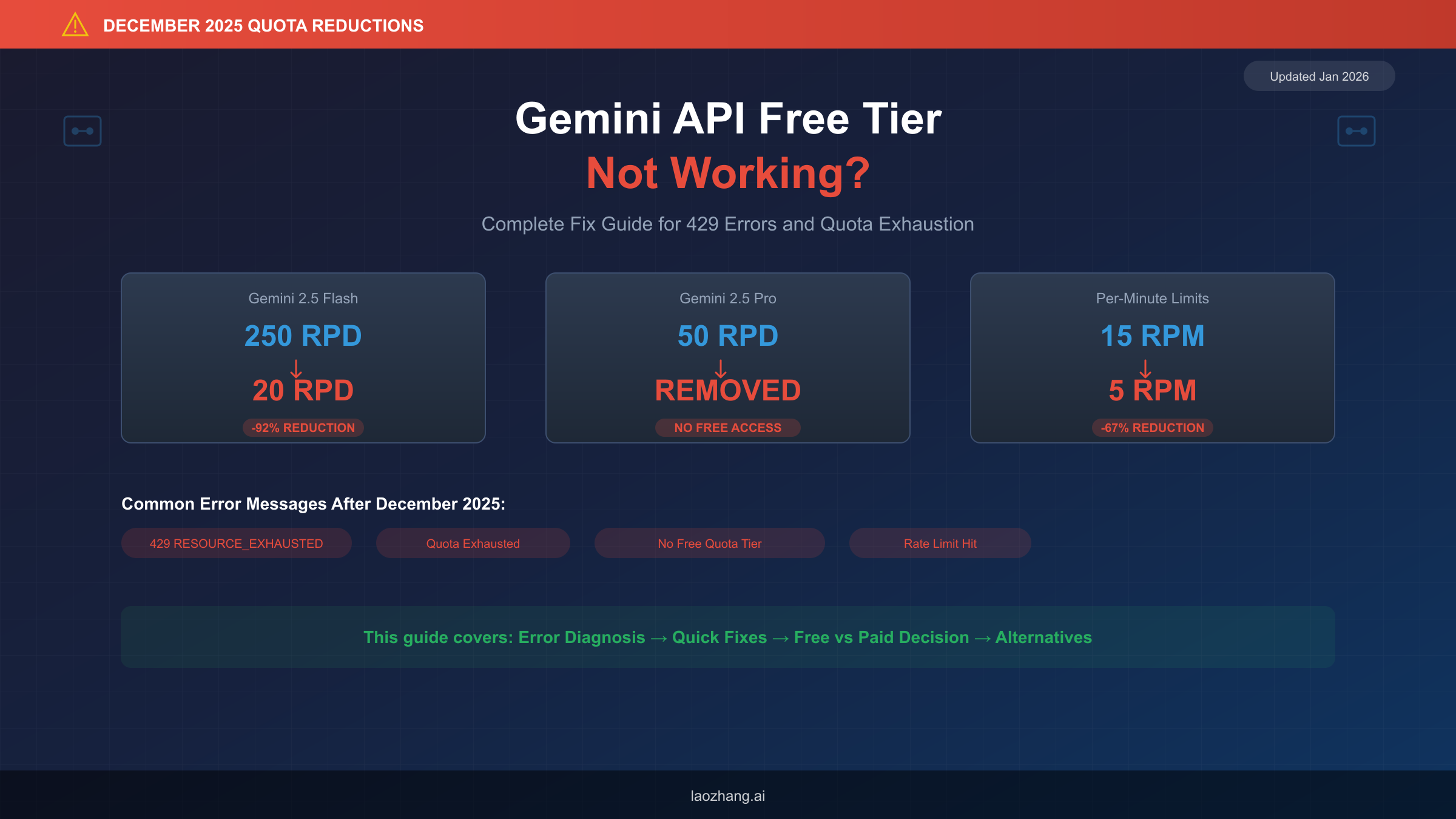
Understanding exactly what changed helps you determine whether your current usage can still work on the free tier or whether you need to explore other options. The reductions were substantial across all models, but the specifics vary significantly.
| Model | Before December 2025 | After December 2025 | Reduction |
|---|---|---|---|
| Gemini 2.5 Flash (RPD) | ~250 requests/day | 20-50 requests/day | 80-92% |
| Gemini 2.5 Pro (RPD) | ~50 requests/day | REMOVED | 100% |
| Gemini 2.5 Flash (RPM) | 15 requests/minute | 5-10 requests/minute | 33-67% |
| Gemini 2.5 Pro (RPM) | 15 requests/minute | N/A (no free access) | 100% |
| Gemini 3.0 Pro | Not available yet | NO free tier access | Paid only |
The most significant change is the complete removal of Gemini 2.5 Pro from the free tier. This model was popular among developers for its superior reasoning capabilities compared to Flash, and many applications were built specifically to leverage Pro's strengths. Those applications now require either migration to Flash (with corresponding quality trade-offs) or enabling billing.
Gemini 2.5 Flash remains available on the free tier, but with dramatically reduced limits. The roughly 250 requests per day that developers had grown accustomed to dropped to just 20-50 requests per day depending on region and specific usage patterns. For applications making regular API calls, this reduction means hitting the daily limit within the first hour or two of operation.
Per-minute rate limits also tightened considerably. The previous 15 requests per minute ceiling dropped to 5-10 RPM for Flash. This affects applications that make burst requests—for example, processing multiple user inputs in rapid succession. Even if you're well under your daily quota, you can hit the per-minute limit and receive errors.
It's worth noting what didn't change: the context window. Free tier users still have access to the impressive 1 million token context window, which remains valuable for applications that need to process large documents or maintain extensive conversation history. If your use case primarily involves long-context processing rather than high-volume requests, the free tier may still serve your needs.
Google's rate limiting system applies these quotas through three separate mechanisms: requests per minute (RPM), tokens per minute (TPM), and requests per day (RPD). Understanding which limit you're hitting is crucial for choosing the right fix, as we'll explore in the diagnosis section.
The official stance on free tier stability is sobering. Google has described the free tier as "unstable, best effort, might be turned off at any time and shouldn't be used for production." This statement, while honest, represents a significant warning for developers who had been treating free tier access as a reliable foundation for their applications.
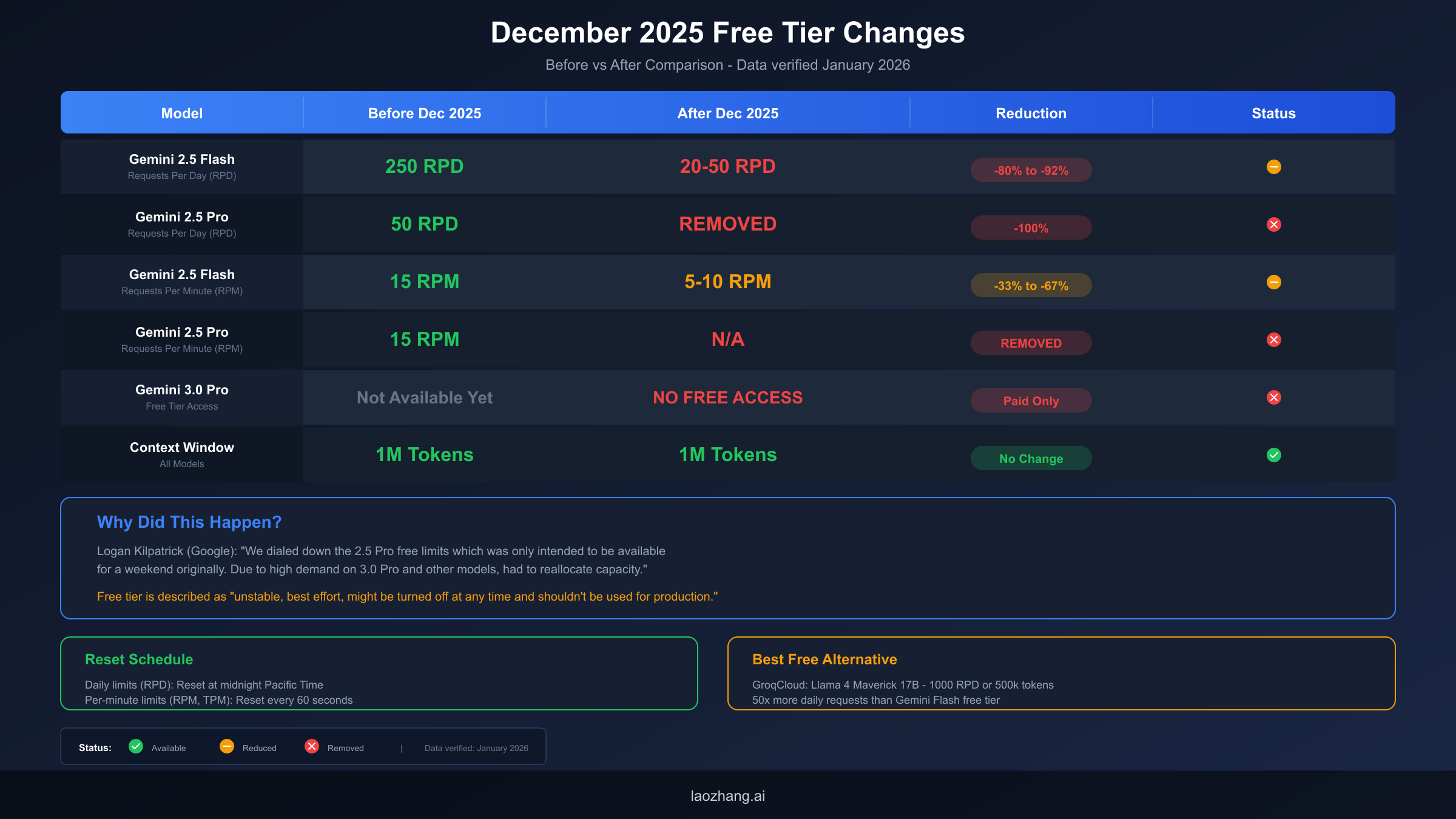
The implications extend beyond just request counts. Applications that relied on Gemini 2.5 Pro's superior reasoning capabilities now face a choice between quality degradation (switching to Flash) or cost introduction (enabling billing). Flash is a capable model, but for applications involving complex multi-step reasoning, code generation, or nuanced analysis, the quality difference can be noticeable. Some developers report needing to restructure their prompts entirely when switching from Pro to Flash to maintain acceptable output quality.
For applications that made burst requests—processing multiple inputs in quick succession—the RPM reductions create new architectural challenges. An application that previously could process a user's request involving ten quick API calls now needs to either serialize those calls with delays, batch them differently, or accept potential rate limiting. This affects user experience in real-time applications where latency matters.
The token-per-minute limits, while less discussed, also create subtle issues. Large context operations that previously worked smoothly may now trigger TPM limits even when RPM and RPD limits aren't reached. Developers processing lengthy documents or maintaining extensive conversation histories need to be especially aware of TPM as an additional constraint on their operations.
Diagnosing Your Specific Error
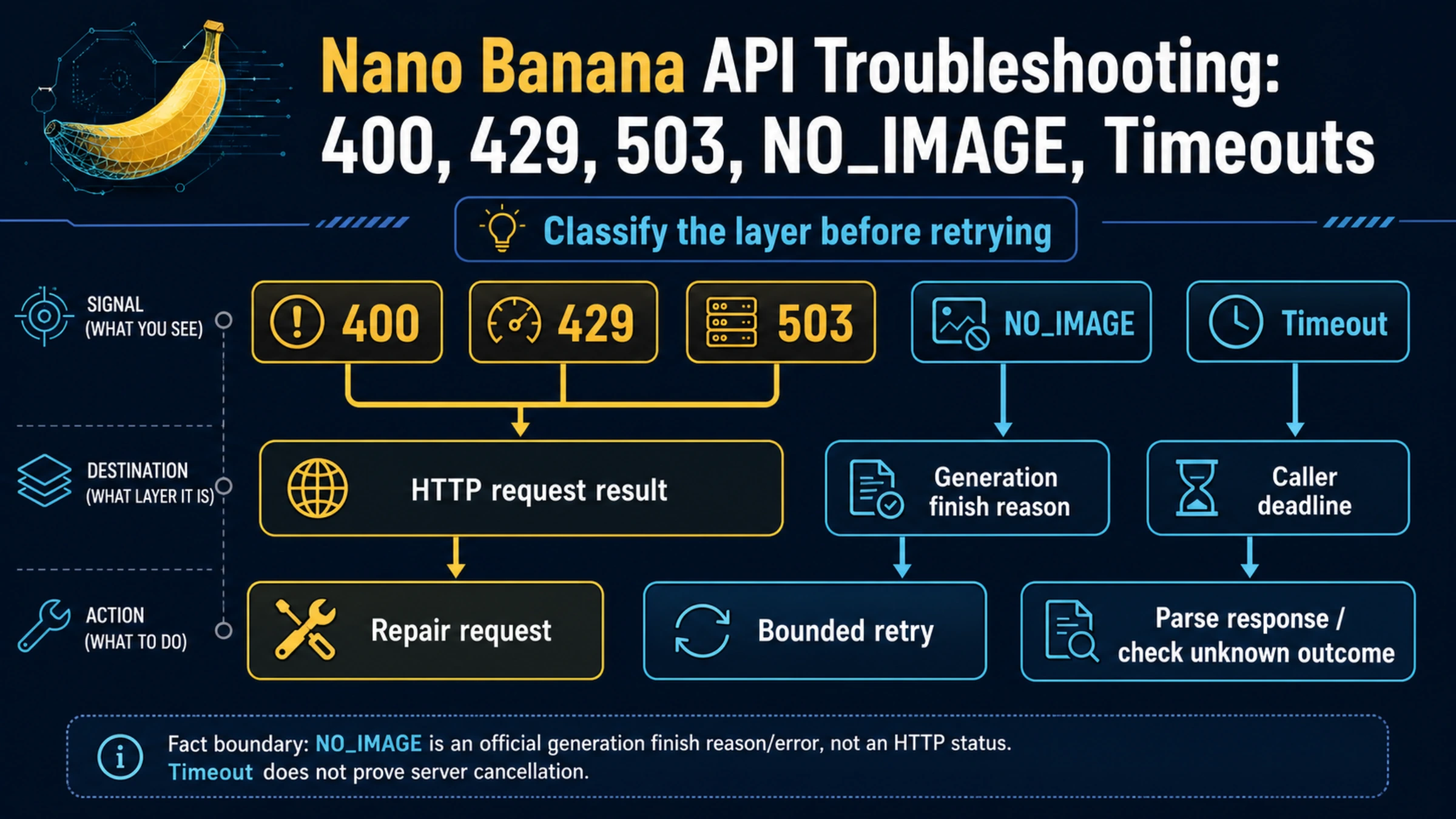
Different error messages indicate different underlying problems, and the correct fix depends on accurately identifying which limit you've hit. The diagnostic flowchart below provides a quick path to identification, followed by detailed explanations for each error type.
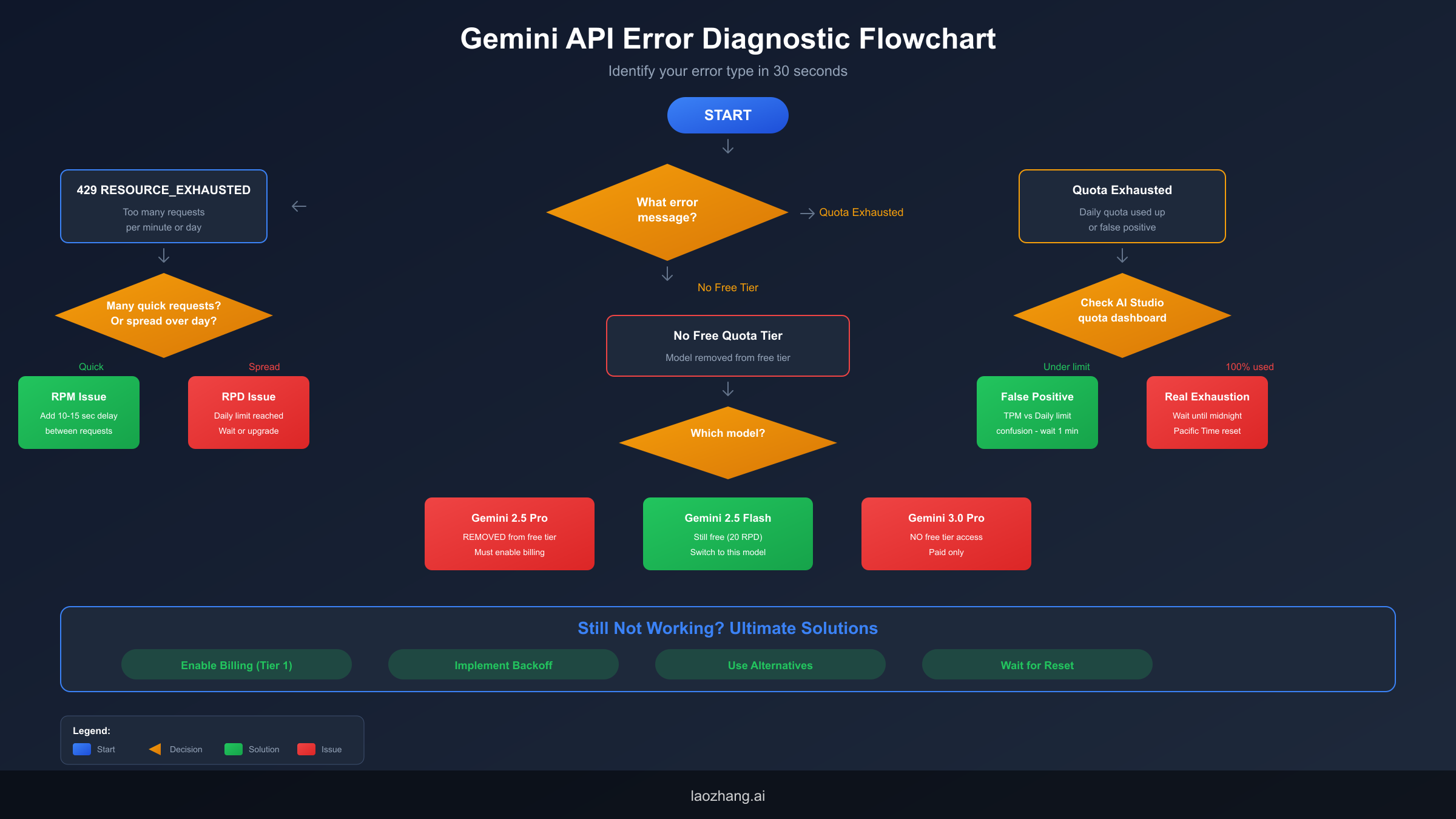
The three most common error categories each require different approaches. Let's examine how to distinguish between them and understand what each actually means.
429 RESOURCE_EXHAUSTED errors indicate you've exceeded either your per-minute or per-day request limit. The error itself doesn't specify which, so you need to determine this from context. If you're making many requests in quick succession and hit this error after just a few, you've likely exceeded the RPM limit. If you've been making requests throughout the day and hit the error after dozens of calls, you've exhausted your daily quota.
"You have exhausted your daily quota on this model" is a more specific message indicating daily limits. This error typically appears when your RPD is completely used up, and you'll need to wait until the quota resets at midnight Pacific Time. However, there's a common confusion point: some developers see this message when they've actually exhausted TPM (tokens per minute), not the daily quota. If you see this error but your AI Studio dashboard shows remaining daily quota, you've likely hit the TPM limit and just need to wait 60 seconds.
"Gemini 2.5 Pro Preview doesn't have a free quota tier" and similar messages indicate you're trying to use a model that's no longer available on the free tier. This requires either switching models or enabling billing—there's no workaround within the free tier itself.
For quick reference, here's the error-to-cause mapping:
| Error Message | Likely Cause | Quick Fix |
|---|---|---|
| 429 RESOURCE_EXHAUSTED (quick succession) | RPM limit hit | Add 10-15 second delays between requests |
| 429 RESOURCE_EXHAUSTED (throughout day) | RPD limit hit | Wait for midnight PT reset or upgrade |
| "exhausted your daily quota" (dashboard shows quota left) | TPM confusion | Wait 60 seconds, retry |
| "exhausted your daily quota" (dashboard shows 100% used) | Real daily exhaustion | Wait for midnight PT reset |
| "doesn't have a free quota tier" | Model removed from free tier | Switch to Flash or enable billing |
| "exceeded your current quota" | General quota error | Check AI Studio dashboard for specifics |
The Google AI Studio dashboard (aistudio.google.com) provides the definitive answer about your current quota status. Navigate to the API keys section and check your usage statistics. This shows remaining quota for each limit type and helps distinguish between false positives and genuine exhaustion.
A particularly frustrating scenario involves what developers call "false quota exhaustion." This occurs when you receive a quota error even though your dashboard shows available capacity. The most common cause is confusion between TPM (tokens per minute) and daily limits. If you send a very large request—perhaps a lengthy document for summarization—you might exhaust your TPM allocation while still having plenty of daily requests remaining. The error message may say "quota exhausted," leading you to think you've hit your daily limit when you've actually just temporarily exceeded your per-minute token allocation.
Another diagnostic consideration is whether you're using the API directly or through a library. Some older library versions may not handle the new rate limits gracefully, potentially triggering more errors than necessary. If you're using the official google-generativeai Python library, ensure you're on version 0.3.0 or later, which includes better error handling and retry logic for rate limiting scenarios.
Geographic factors can also affect your error patterns. Some developers in certain regions report more aggressive rate limiting than the official documentation suggests. If you're experiencing unexpectedly low limits, your geographic location might be a factor. The workaround—enabling billing even without spending money—sometimes resolves these geographic restrictions by moving you into a different tier of access.
Current Free Tier Limits by Model
Accurate, current limit information is essential for planning your API usage. The following data reflects verified January 2026 limits based on official documentation and community testing.
| Model | RPM (Requests/Min) | TPM (Tokens/Min) | RPD (Requests/Day) | Notes |
|---|---|---|---|---|
| Gemini 2.5 Flash | 5-10 | 250,000-500,000 | 20-50 | Highest free limits |
| Gemini 2.5 Flash-Lite | 5-10 | 250,000-500,000 | 20-100 | Lighter model variant |
| Gemini 2.5 Pro | - | - | - | ❌ No free access |
| Gemini 3.0 Pro | - | - | - | ❌ Paid only |
The ranges in these limits reflect variation by region and Google account type. EU users face additional restrictions due to regulatory considerations, with some reporting complete unavailability of free tier access. If you're in the EU and experiencing blocks even with low usage, geographic restrictions rather than quota limits may be your issue.
For more detailed information on the nuances of these limits, check our comprehensive guide to free tier limitations and our breakdown of detailed rate limits.
Reset schedules matter for planning your usage. Daily limits (RPD) reset at midnight Pacific Time (PT), not your local time zone. If you're in Europe, that's 8-9 AM depending on daylight saving time. In Asia, it's late afternoon to early evening. Per-minute limits (RPM and TPM) reset on a rolling 60-second window, so waiting just one minute after hitting these limits allows continued requests.
The context window deserves special mention. Despite the quota reductions, the 1 million token context window remains available on all models. This means free tier users can still process extremely long documents or maintain extensive conversation context—they just can't do it many times per day. If your application's value lies in processing large inputs rather than high-volume interactions, the free tier may still meet your needs with appropriate architectural adjustments.
Geographic restrictions add another layer of complexity. Some EU users report being completely blocked from free tier access, receiving geographic restriction errors rather than quota errors. If you're seeing unexpected blocks and you're located in the EU, enabling billing (even without spending money) may be required to access the API at all.
Understanding the tiered billing system helps clarify your options. Google structures Gemini API access in tiers that unlock progressively higher limits based on your billing relationship with them. The free tier (no billing) provides the lowest limits. Tier 1 (billing enabled, minimal or no spending) provides significantly higher limits. Tier 2 ($250+ historical spend) and Tier 3 ($1000+ historical spend) provide enterprise-level access. Many developers find that simply enabling billing—without actually spending money—unlocks sufficient capacity for their needs, making this a low-risk way to escape free tier limitations.
The practical difference between free tier and Tier 1 is substantial. Free tier might give you 20 RPD; Tier 1 might give you 1000+ RPD. The exact numbers vary and aren't always publicly documented, but the improvement is typically 10-50x. If you're consistently hitting free tier limits but don't want to commit to ongoing costs, enabling billing and setting strict budget alerts at $0.01 provides a middle path that many developers successfully use.
Fixing Common Free Tier Errors
With your specific error identified, let's walk through the proven fixes for each scenario. These solutions are verified working as of January 2026.
Fixing 429 RESOURCE_EXHAUSTED (RPM limit)
If you're hitting per-minute limits, implementing request delays solves the problem. The key is adding sufficient spacing between requests to stay under the 5-10 RPM ceiling.
pythonimport time
import google.generativeai as genai

def make_request_with_delay(prompt, delay_seconds=15):
    """Make API request with delay to avoid RPM limits."""
    genai.configure(api_key="YOUR_API_KEY")
    model = genai.GenerativeModel("gemini-2.5-flash")

    response = model.generate_content(prompt)
    time.sleep(delay_seconds)  # Wait before next request
    return response.text

# For batch processing, use a simple queue
def process_batch(prompts, delay=15):
    results = []
    for prompt in prompts:
        result = make_request_with_delay(prompt, delay)
        results.append(result)
        print(f"Processed, waiting {delay}s before next...")
    return results
For more robust error handling, implement exponential backoff that automatically increases delays when errors occur:
pythonimport time
import random

def request_with_backoff(prompt, max_retries=5):
    """Make request with exponential backoff on rate limit errors."""
    genai.configure(api_key="YOUR_API_KEY")
    model = genai.GenerativeModel("gemini-2.5-flash")

    for attempt in range(max_retries):
        try:
            response = model.generate_content(prompt)
            return response.text
        except Exception as e:
            if "429" in str(e) or "RESOURCE_EXHAUSTED" in str(e):
                wait_time = (2 ** attempt) + random.uniform(0, 1)
                print(f"Rate limited. Waiting {wait_time:.1f}s...")
                time.sleep(wait_time)
            else:
                raise
    raise Exception("Max retries exceeded")
For detailed strategies on handling 429 resource exhausted errors, our dedicated guide covers additional edge cases and production-ready implementations.
Fixing "Quota Exhausted" Errors
If you've genuinely exhausted your daily quota (verified via AI Studio dashboard), you have three options: wait for reset, enable billing for higher limits, or reduce your usage. Waiting is free but means downtime. Enabling billing unlocks Tier 1 limits immediately, even if you don't actually spend any money—Google grants higher limits simply for having a payment method on file.
To enable billing without committing to costs, visit the Google Cloud Console, create or select a project, and add a payment method. You can set budget alerts at $0.01 if you want to be notified before any charges occur. Many developers find this unlocks sufficient limits for their needs without actually incurring costs.
Fixing False Quota Errors
The TPM vs. daily limit confusion catches many developers. If the AI Studio dashboard shows remaining daily quota but you're seeing "exhausted" errors, you've likely hit TPM limits with a large request. Solutions include waiting 60 seconds (TPM resets every minute), breaking large prompts into smaller pieces, or reducing the size of any attached files or context.
Fixing Model Availability Errors
If you're seeing "doesn't have a free quota tier" for Gemini 2.5 Pro or 3.0 Pro, your only free option is switching to Flash. Update your model specification in code:
python# Instead of this (no longer free):
model = genai.GenerativeModel("gemini-2.5-pro")

# Use this:
model = genai.GenerativeModel("gemini-2.5-flash")
Flash offers lower latency and remains capable for most tasks, though reasoning-heavy applications may see quality differences. Test your specific use case to determine if Flash meets your needs.
Optimizing Your Usage Within Free Tier Limits
If you want to maximize what you can accomplish within free tier constraints rather than upgrading, several strategies can help. First, consider caching responses for common queries. If your application frequently sends similar prompts, storing responses locally prevents redundant API calls. A simple dictionary or Redis cache can dramatically reduce your effective request count.
Second, batch your thinking. Instead of making multiple small requests, consolidate them into fewer larger ones where possible. If you need to analyze five short documents, processing them in a single request uses one RPD allocation rather than five. The 1 million token context window makes this feasible for most batching scenarios.
Third, implement smart fallbacks. Design your application to gracefully degrade when approaching limits. Perhaps offer cached responses, simplified functionality, or helpful error messages rather than failing completely. This maintains user experience even when API access is constrained.
Fourth, schedule non-urgent tasks. If you have background processing that doesn't need immediate completion, schedule it to spread across multiple days rather than consuming your entire daily quota at once. A task queue that respects rate limits can help manage this automatically.
Finally, consider hybrid architectures. Use the Gemini API for tasks that truly require its capabilities, but handle simpler operations locally. Text preprocessing, basic formatting, and validation can happen without API calls, reserving your limited quota for genuinely complex AI tasks.
Free Tier vs Paid: Making the Decision
After implementing fixes, you may find the new free tier limits too restrictive for your needs. Here's a framework for deciding whether to pay, and what that would actually cost.
Usage-Based Recommendation:
| Your Daily Usage | Recommendation | Estimated Monthly Cost |
|---|---|---|
| < 20 requests/day | Free tier still works | $0 |
| 20-100 requests/day | Enable billing (Tier 1) | $0-5 |
| 100-1000 requests/day | Tier 1 or Tier 2 | $5-50 |
| > 1000 requests/day | Tier 2+ or alternatives | $50+ |
The "enable billing" tier deserves special attention. Simply adding a payment method to your Google Cloud account unlocks Tier 1 limits without requiring actual spending. Google offers free credits for new accounts, and many developers find their usage falls within these credits indefinitely. This is often the path of least resistance for developers whose applications need 50-100 daily requests.
Data privacy considerations matter for some users. Free tier usage means your prompts and responses may be used by Google to improve their models. Paid tiers include an option to opt out of this data usage, which matters for applications handling sensitive information. If privacy is a concern, paid tiers provide more control.
For developers comfortable exploring other options, API aggregation services like laozhang.ai offer unified access to multiple AI models (including Gemini, GPT, and Claude) through a single API endpoint. This approach can provide both cost savings and redundancy—if one provider has issues, you can fall back to alternatives without changing your code structure.
The decision ultimately depends on three factors: how many daily requests you actually need, whether you're willing to adapt your code for the new limits, and whether the free tier's instability (Google's explicit warning that it could change again) is acceptable for your use case. For hobby projects and prototypes, free tier with careful usage management may suffice. For anything approaching production use, the official guidance to avoid relying on free tier access seems prudent.
Understanding Google's billing tiers in detail helps make informed decisions. When you enable billing, you don't automatically start spending money—you simply unlock higher limits. Google provides $300 in free credits for new Google Cloud accounts, which typically lasts months for moderate API usage. Many developers report using these credits for a year or more before ever paying out of pocket. Additionally, setting budget alerts at $0.01 ensures you're notified before any charges occur, providing a safety net that makes "enabling billing" essentially risk-free.
The pricing structure for paid usage is actually quite reasonable for most applications. Gemini 2.5 Flash charges approximately $0.075 per 1 million input tokens and $0.30 per 1 million output tokens. For context, 1 million tokens represents roughly 750,000 words—far more than most applications need daily. A typical chatbot interaction might use 1000-2000 tokens total, meaning 1000 such interactions would cost less than $0.50. Many developers find their monthly costs stay in the single digits even with active applications.
The decision matrix becomes clearer when you calculate your actual costs. Track your token usage for a week on the free tier (the AI Studio dashboard shows this), extrapolate to monthly usage, and calculate what that would cost at paid rates. Most developers discovering this for the first time are surprised at how affordable moderate usage actually is. The psychological barrier of "having to pay" often looms larger than the actual financial impact.
Verification and Testing
After implementing fixes, verify they're working before deploying to production. These test procedures confirm your integration is functioning correctly with the new limits.
Quick Python Test:
pythonimport google.generativeai as genai

def test_api_connection():
    """Quick test to verify API is working."""
    genai.configure(api_key="YOUR_API_KEY")
    model = genai.GenerativeModel("gemini-2.5-flash")

    try:
        response = model.generate_content("Say 'API working' and nothing else.")
        print(f"✅ Success: {response.text}")
        return True
    except Exception as e:
        print(f"❌ Error: {e}")
        return False

if __name__ == "__main__":
    test_api_connection()
curl Command Test:
bashcurl -X POST "https://generativelanguage.googleapis.com/v1beta/models/gemini-2.5-flash:generateContent?key=YOUR_API_KEY" \
  -H "Content-Type: application/json" \
  -d '{"contents":[{"parts":[{"text":"Say hello"}]}]}'
Expected successful response includes a candidates array with generated text. Any response containing "429", "quota", or "exhausted" indicates ongoing issues.
Troubleshooting Continued Failures:
If tests still fail after implementing fixes, check this sequence. First verify your API key is correct and active in AI Studio. Second, confirm you're using the correct model name (gemini-2.5-flash, not older version names). Third, check your IP isn't being blocked—some VPNs and data center IPs face restrictions. Finally, verify your Google Cloud project has the Generative Language API enabled.
For persistent issues, the Google AI Studio dashboard provides detailed error logs that can pinpoint the specific failure reason. Access these through your project settings to get more detailed diagnostic information than the API error messages provide.
Monitoring Your Usage
Once fixes are implemented, ongoing monitoring helps prevent future issues. The AI Studio dashboard provides real-time quota information, but you can also implement programmatic monitoring within your application. Consider logging each API call with a timestamp, tracking cumulative usage, and implementing alerts when you approach 80% of your daily quota.
A simple monitoring approach adds minimal overhead while providing valuable visibility. Log each request with its token count (available in the API response), maintain a rolling daily counter that resets at midnight PT, and alert yourself when approaching limits. This proactive monitoring is far better than discovering limit exhaustion through user-facing errors.
For applications with variable usage patterns, historical tracking helps with capacity planning. If you know that Mondays typically see 3x normal traffic, you can adjust your request strategy accordingly—perhaps using more aggressive caching on high-traffic days or implementing graceful degradation sooner when approaching limits.
The combination of immediate verification testing and ongoing monitoring creates a robust system that catches issues before they impact users. Many of the complaints in developer forums stem from running into limits unexpectedly—proper monitoring eliminates this surprise and gives you time to adapt.
Alternatives to Gemini API
If the new Gemini limits don't meet your needs and you'd prefer not to pay Google, several alternatives offer generous free tiers or different pricing models that may work better for your use case.
GroqCloud stands out for free tier generosity. Their Llama 4 Maverick 17B model offers approximately 1000 requests per day or 500,000 tokens—roughly 50 times more daily capacity than Gemini Flash's reduced limits. The model quality differs from Gemini, but for many applications, the quantity advantage outweighs quality differences.
| Provider | Model | Free Daily Limit | Quality | Notes |
|---|---|---|---|---|
| Gemini Flash | gemini-2.5-flash | 20-50 RPD | High | Current default |
| GroqCloud | llama-4-maverick | ~1000 RPD | Good | 50x more requests |
| OpenRouter | Various | Credit-based | Varies | Pay-as-you-go |
| Local LLM | Ollama/LMStudio | Unlimited | Varies | Requires hardware |
For developers seeking comprehensive options, our guide to Gemini API alternatives covers additional providers and detailed feature comparisons.
Self-hosted options eliminate external dependencies entirely. Tools like Ollama and LMStudio allow running open-source models locally with no API limits. The trade-off is needing appropriate hardware (modern GPU with 8GB+ VRAM for reasonable performance) and handling infrastructure yourself. For applications where latency isn't critical and you have suitable hardware, this provides true unlimited access.
API aggregation services offer a middle path. Platforms like laozhang.ai (docs: https://docs.laozhang.ai/ ) provide unified access to multiple model providers through a single API endpoint. This approach offers several advantages: automatic fallback if one provider fails, simplified billing across providers, and access to models without regional restrictions. For developers building applications that need reliability across different AI models, aggregation services reduce the complexity of managing multiple provider relationships.
The right alternative depends on your specific priorities. If you need the highest volume for free, GroqCloud's limits are hard to beat. If you need production reliability without managing multiple integrations, aggregation services simplify operations. If you want complete control and have the hardware, local deployment eliminates external dependencies entirely.
Migration Considerations
If you decide to switch from Gemini to an alternative, plan the migration carefully. API formats differ between providers—GroqCloud follows OpenAI's API format, while Gemini has its own structure. Using an API wrapper library or aggregation service can simplify this, providing a unified interface that abstracts away provider differences.
Testing is crucial during any migration. Model outputs differ in subtle ways—response formatting, handling of edge cases, and performance on specific task types all vary. Before committing to a switch, run your critical use cases through the new provider and verify acceptable quality. What works well on Gemini might need prompt adjustments on other models.
Consider a hybrid approach during transition. Rather than switching completely, route some requests to the new provider while keeping others on Gemini. This provides real-world comparison data and creates fallback options if either provider experiences issues. Many production applications use multiple AI providers for exactly this kind of redundancy.
Cost comparison should include hidden factors beyond per-token pricing. Some providers charge differently for input versus output tokens, have varying context window sizes, or include features (like function calling or image processing) that others charge extra for. Calculate your total expected cost based on realistic usage patterns, not just headline rates.
Finally, consider lock-in implications. Building directly against a provider's proprietary API creates switching costs. Using abstraction layers—whether your own wrapper code or third-party libraries—reduces this friction and makes future migrations easier if circumstances change again.
Frequently Asked Questions
Why did Google reduce Gemini API free tier limits?
Google explained that the generous free tier limits, particularly for Gemini 2.5 Pro, were always intended to be temporary. Logan Kilpatrick (Google) stated in a December 2025 forum discussion that Pro free access "was only intended to be available for a weekend originally" and that high demand for newer models like 3.0 Pro required reallocating capacity. The reductions reflect Google's shift toward a more sustainable free tier rather than the generous promotional limits that existed previously. Additionally, the computational costs of running large language models are substantial, and maintaining generous free access while also supporting paid customers creates resource allocation challenges that Google chose to address by prioritizing paid usage.
Is Gemini 2.5 Pro still free?
No. As of December 2025, Gemini 2.5 Pro has been completely removed from the free tier. Attempting to use this model without billing enabled will result in an error message explicitly stating the model doesn't have a free quota tier. Developers who previously relied on Pro's superior reasoning capabilities must now either enable billing on their Google Cloud account or switch to the Flash model, which remains available on the free tier with reduced limits. The good news is that enabling billing often provides sufficient limits through free credits without requiring actual payment, and Flash has improved significantly, handling many tasks that previously seemed to require Pro.
How do I fix 429 errors in Gemini API?
The fix depends on which limit you're hitting. For RPM (requests per minute) limits, add 10-15 second delays between requests using time.sleep() or implement exponential backoff—the code examples earlier in this guide provide production-ready implementations. For RPD (requests per day) limits, you'll need to either wait until midnight Pacific Time for the quota reset, enable billing to unlock higher limits, or reduce your daily usage to stay within the 20-50 request ceiling. If you're uncertain which limit you've hit, check the AI Studio dashboard for detailed quota information. The exponential backoff approach is particularly recommended because it handles both limit types gracefully, automatically adjusting delay times based on response patterns.
Do I need to enable billing to use Gemini API?
For basic free tier access to Gemini 2.5 Flash, billing is not required. However, enabling billing provides several benefits even if you don't plan to spend money: significantly higher rate limits (Tier 1 access provides roughly 10-50x more requests), the option to use Pro and newer models, and the option to prevent your data from being used for model training. Some EU users report needing billing enabled to access the API at all due to regional restrictions. The process of enabling billing is straightforward through Google Cloud Console, and setting budget alerts at $0.01 ensures you're notified before any charges occur. Many developers find this essentially risk-free path to better limits worth the minimal setup effort.
What are the current Gemini API free tier limits?
As of January 2026, Gemini 2.5 Flash free tier provides approximately 5-10 requests per minute (RPM), 250,000-500,000 tokens per minute (TPM), and 20-50 requests per day (RPD), with some variation by region and account type. The impressive 1 million token context window remains available, which is actually one of the best values in the AI API market—competitors typically offer far smaller context windows at this price point (free). Gemini 2.5 Pro and 3.0 Pro have no free tier access whatsoever—they require billing to be enabled. The Gemini 2.5 Flash-Lite model may offer slightly higher limits in some regions but with reduced capability compared to standard Flash.
Can I still use Gemini API for free in 2026?
Yes, but with significantly reduced capacity compared to what was available in 2025. Gemini 2.5 Flash and Flash-Lite remain available on the free tier with 20-50 daily requests. This level of access is sufficient for light usage, testing, learning and experimentation, and small personal projects with infrequent usage. However, most production applications or anything requiring consistent daily access will need either paid access or alternative providers with more generous free tiers. Google has explicitly described the free tier as "unstable" and warned that limits could change again without notice, so building critical functionality on free access carries risk even if current limits meet your needs.
Why does my Gemini API say quota exhausted when it shouldn't?
This often indicates TPM (tokens per minute) confusion rather than actual daily quota exhaustion. If your AI Studio dashboard shows remaining quota but you're getting exhausted errors, you've likely hit the TPM limit with a large request. The solution is straightforward: wait 60 seconds (TPM resets every minute) and retry, or break your request into smaller pieces that fit within the per-minute token limit. Large file attachments, extensive conversation context, or very long prompts can trigger TPM limits even when your daily quota shows plenty of remaining capacity. The error messaging from the API could be clearer about which specific limit was exceeded, but checking the dashboard timing helps—if the error appeared after a particularly large request and your daily usage is low, TPM is almost certainly the culprit.
What is the best alternative to Gemini API free tier?
For maximum free requests, GroqCloud offers approximately 1000 requests per day with their Llama models—significantly more than Gemini's 20-50 requests, representing roughly 50x more daily capacity. For flexibility across multiple providers without managing separate integrations, API aggregation services provide unified access to various models including Gemini, GPT, and Claude through a single endpoint. For complete control without any external limits, local deployment with tools like Ollama or LMStudio eliminates external dependencies entirely if you have suitable hardware (typically a modern GPU with 8GB+ VRAM). The best choice depends on your priorities: GroqCloud for volume, aggregation services for convenience and redundancy, local deployment for independence and unlimited access. Many developers use a combination, with local models for development and cloud APIs for production.