![Gemini 3 vs Midjourney V7 Realism: Complete Comparison Guide [December 2025]](/posts/en/gemini-3-vs-midjourney-v7-realism/img/cover.png)
The battle for AI image generation supremacy has reached a fascinating turning point in December 2025. Google's Gemini 3 Pro Image (codenamed Nano Banana Pro) and Midjourney's V7 represent two fundamentally different philosophies for creating photorealistic images. After extensive testing with identical prompts across multiple categories, this guide delivers the definitive comparison you need to make an informed decision.
Whether you're a digital artist weighing subscription costs, a marketing team evaluating production workflows, or a developer assessing API integration options, this comprehensive analysis covers every angle. We've moved beyond surface-level comparisons to provide quantitative benchmarks, practical prompt templates, and a clear decision framework.
The stakes for choosing correctly have never been higher. AI image generation has matured from novelty to production tool, with major brands, publishers, and creative agencies integrating these capabilities into daily workflows. Selecting the wrong platform means either overpaying for unnecessary capabilities or underdelivering on quality requirements that clients expect.
This guide synthesizes hands-on testing across multiple image categories, detailed pricing analysis considering hidden costs and volume economics, practical workflow recommendations from real production environments, and technical comparisons relevant to both creative professionals and developers. By the end, you'll have the information needed to make a confident, informed decision aligned with your specific requirements.
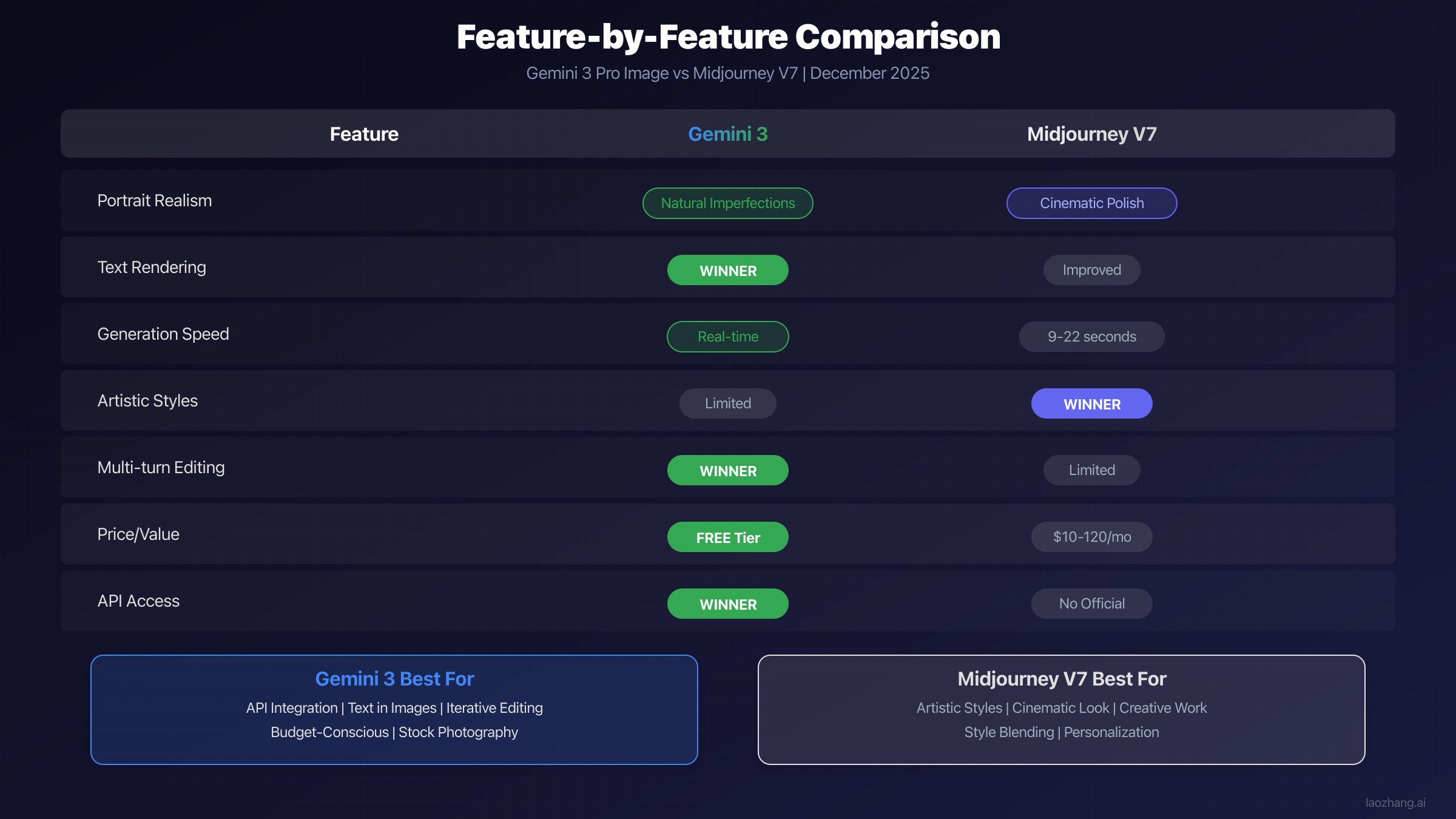
Head-to-Head Realism Comparison
The most meaningful way to evaluate these two powerhouses is through direct comparison using identical prompts. We ran systematic tests across six categories, analyzing results for technical accuracy, aesthetic quality, and practical usability.
Portrait Photography Test Results
Portrait generation reveals the most dramatic differences between these tools. Using the prompt "Professional headshot of a 45-year-old female CEO, natural lighting, corporate background, genuine smile," both tools produced distinctly different interpretations.
Gemini 3 Pro Image delivered portraits with remarkable authenticity. The skin texture captured pores, subtle sun damage, and natural facial asymmetry that photographs typically show. Hair strands had realistic flyaways, and the lighting created soft shadows that photographers spend considerable effort achieving in real shoots. The image felt like it came from a professional studio session.
Midjourney V7 produced an undeniably beautiful result, but with what photographers call "magazine polish." The skin appeared smoother, almost professionally retouched, with perfect lighting that emphasized the subject's best features. While technically impressive, trained eyes can detect the subtle over-smoothing that distinguishes AI-generated content from photographs.
| Aspect | Gemini 3 Pro Image | Midjourney V7 |
|---|---|---|
| Skin Texture Accuracy | Natural imperfections visible | Smooth, retouched appearance |
| Hair Realism | Flyaways and natural variation | Styled, controlled look |
| Lighting Authenticity | Studio-realistic shadows | Cinematic enhancement |
| Eye Detail | Catchlights match described lighting | Artistic interpretation |
| Overall Impression | Documentary photograph | Fashion editorial |
Product Photography Analysis
For e-commerce and marketing applications, product photography demands technical precision. Testing with "White ceramic coffee mug on marble countertop, soft morning light from left window, steam rising from coffee," revealed important distinctions.
Gemini 3 excelled at maintaining consistent physics throughout the image. The steam behavior matched the described lighting direction, the ceramic material showed appropriate specularity, and the marble surface exhibited realistic veining without artificial patterns. Text on products rendered with exceptional clarity, making it viable for packaging mockups.
Midjourney V7 created an aesthetically stunning interpretation that many would prefer for advertising purposes. The composition felt more intentionally artistic, with the steam creating photogenic swirls and the marble appearing almost idealized. However, fine text on the mug showed occasional artifacts, a limitation for brands needing accurate logo reproduction.
Product photography often requires multiple variations with consistent style. Here, Gemini's multi-turn editing capability proved valuable. You can request adjustments like "move the light source to the right" or "change the marble to dark granite" while maintaining image consistency. Midjourney requires regenerating entirely, introducing variation that may not match an established visual direction.
Landscape and Environment Testing
Natural environments test different aspects of realism, particularly how tools handle complex organic structures and atmospheric effects. Our test prompt: "Mountain lake at sunrise, morning mist over water, pine forest reflection, Patagonia style landscape."
Both tools produced spectacular results, though with characteristically different approaches. Midjourney V7's interpretation leaned toward the dramatic, with enhanced color saturation in the sunrise and mist that created an almost ethereal atmosphere. The result resembled high-end landscape photography with professional post-processing.
Gemini 3 produced a more naturalistic interpretation that could pass as an unedited photograph. The colors matched what you'd actually see at sunrise, the mist behavior followed realistic physics, and the forest detail remained sharp without the enhancement that often signals AI generation.
For nature photographers and travel content creators, Midjourney's artistic interpretation may better match the processed aesthetic common in the industry. Documentary or editorial applications benefit from Gemini's more literal approach.
Architectural and Interior Photography
Architectural photography presents unique challenges requiring precise geometry, accurate material rendering, and sophisticated lighting. Testing with "Modern minimalist living room, floor-to-ceiling windows, afternoon light casting long shadows, Scandinavian design furniture," revealed significant differences in how each tool handles built environments.
Gemini 3 Pro Image maintained accurate perspective geometry throughout the scene. Window frames aligned properly, furniture proportions remained realistic, and the shadow angles consistently matched the described afternoon lighting. Material surfaces like wood, fabric, and glass each exhibited appropriate reflectance characteristics that architects and interior designers would recognize as physically accurate.
Midjourney V7 produced a more aspirational interpretation that would excel in lifestyle marketing. The space appeared slightly idealized, with lighting that enhanced the furniture's appeal and a composition that drew the eye through the space intentionally. While technically less accurate, many real estate marketers would prefer this aesthetic for property listings.
| Category | Gemini 3 Winner | Midjourney V7 Winner |
|---|---|---|
| Portrait Realism | Natural authenticity | Artistic beauty |
| Product Photography | Technical accuracy | Lifestyle appeal |
| Landscape | Documentary style | Dramatic impact |
| Architecture | Geometric precision | Aspirational aesthetic |
| Text Rendering | Clear winner | Improved but inconsistent |
| Overall Speed | Near real-time | 9-22 seconds |
Text Rendering Comparison
Text rendering has historically been AI image generation's greatest weakness. This comparison revealed perhaps the most significant capability gap between the tools. Testing with "Wooden sign in forest saying 'Welcome to Pine Creek Trail' with rustic carved lettering," produced dramatically different results.
Gemini 3 Pro Image demonstrated what can only be described as a breakthrough in AI text rendering. The words appeared correctly spelled, properly spaced, and stylistically appropriate for the rustic aesthetic. The carved wood texture interacted realistically with the letterforms, and the sign looked like an actual photograph.
Midjourney V7 shows substantial improvement over previous versions but still produces occasional character errors. In our test, "Creek" rendered correctly, but complex words sometimes show subtle issues. For applications requiring reliable text, this remains a meaningful limitation.
The implications extend beyond simple signage. Marketing teams requiring product packaging mockups with accurate nutritional labels, architects creating visualization renders with dimensional annotations, or educational content creators needing accurate diagrams with explanatory text all face the same constraint. Until Midjourney achieves consistent text accuracy, these use cases strongly favor Gemini or require post-processing workflows.
Understanding What Makes AI Images Realistic
Before diving deeper into tool-specific guidance, understanding the technical factors that create photorealism helps explain why each tool performs differently across use cases.
Technical Factors in Photorealism
Photorealism emerges from the interaction of multiple technical elements that our visual system has learned to expect from photographs. Training data, model architecture, and post-processing all contribute to the final result.
Lighting coherence stands as perhaps the most important factor. Real photographs capture light from specific sources that create consistent shadows, highlights, and reflections throughout the scene. AI models must learn these physical relationships rather than simply pattern-matching training images.
Material properties require the model to understand how different surfaces interact with light. Skin scatters light differently than metal, which reflects differently than fabric. The most realistic AI images demonstrate understanding of these subsurface scattering and reflectance properties.
Detail consistency at multiple scales separates impressive images from truly convincing ones. A realistic portrait needs accurate macro features (face shape, proportions) while simultaneously maintaining micro-level detail (pore structure, hair follicles) that remains consistent when examined closely.
Depth of field simulation proves particularly challenging for AI systems. Photographs show focus falloff based on camera physics, creating bokeh effects that follow specific optical rules. AI-generated images sometimes apply blur inconsistently or in ways that don't match any real optical system.
How Midjourney V7 Approaches Realism
Midjourney's development philosophy prioritizes aesthetic impact while maintaining technical credibility. Version 7, released to alpha testing in April 2025 and becoming the default in June 2025, introduced several realism-focused features that significantly advanced the platform's capabilities.
The Raw Mode option explicitly optimizes for photorealistic output by reducing the artistic interpretation that defines Midjourney's signature style. When enabled, the model produces images with more neutral color grading, natural lighting ratios, and reduced stylization. This mode represents Midjourney's direct response to users seeking photography replacement rather than artistic enhancement.
Personalization in V7 learns user preferences over time, creating a style fingerprint that influences all generations. For photographers using Midjourney as a production tool, this means the AI gradually aligns with their established aesthetic. The system remembers preferences for contrast levels, color temperature, and composition tendencies.
The Omni Reference system allows blending multiple reference images to guide generation. You can combine a lighting reference, a subject reference, and a style reference to achieve precise control over the final output. This capability enables matching established brand photography styles or recreating specific visual approaches.
How Gemini 3 Pro Image Achieves Realism
Google's approach with Gemini 3 Pro Image focuses on technical accuracy and practical utility rather than artistic interpretation. Built on the Imagen 3 foundation with Gemini 3's multimodal understanding, the system prioritizes photographic authenticity.
Multi-turn editing fundamentally changes the image creation workflow. Rather than regenerating entirely when adjustments are needed, you can converse with the model: "Make the background slightly blurry," "Add more contrast to the shadows," or "Change the subject's expression to more confident." The system maintains image consistency through multiple rounds of refinement.
Text rendering excellence stems from Gemini's language model integration. Because the same architecture understands both text and images, the system generates words with genuine comprehension rather than treating them as visual patterns. This explains why text accuracy dramatically exceeds other solutions.
Resolution flexibility up to 4K enables professional production use. The system can generate at 1K, 2K, or 4K resolution, with higher resolutions capturing additional detail rather than simply upscaling. For large-format printing or high-resolution displays, this capability proves essential.
The practical impact of these differences becomes clear in production scenarios. A photographer generating 50 headshots for a corporate directory would experience dramatically different workflows. With Midjourney, each generation produces a unique interpretation, requiring sorting through variations to find suitable candidates. With Gemini, the iterative approach allows refining a single image until it meets requirements, then applying similar adjustments across subsequent generations.
Professional studios increasingly report using both tools in complementary ways. Gemini handles the technical execution where precision matters, while Midjourney provides creative inspiration when exploring visual directions. This hybrid approach leverages each platform's architectural philosophy rather than forcing either tool into unsuitable applications.
Pricing and Value Comparison
Cost analysis requires examining not just monthly subscription prices but also generation limits, feature access, and hidden costs that affect real-world budgets.
Midjourney Pricing Tiers Explained
Midjourney operates on a subscription model with four tiers, each offering different fast generation hours and access to advanced features.
| Plan | Monthly Price | Fast Hours | Relaxed Mode | Stealth Mode |
|---|---|---|---|---|
| Basic | $10 | 3.3 hours | No | No |
| Standard | $30 | 15 hours | Unlimited | No |
| Pro | $60 | 30 hours | Unlimited | Yes |
| Mega | $120 | 60 hours | Unlimited | Yes |
Fast mode provides priority generation, typically completing images in 9-22 seconds depending on complexity and server load. Relaxed mode on Standard and higher plans queues generations during lower-priority processing, taking longer but not consuming fast hours. Turbo mode further accelerates generation to approximately 9 seconds but costs twice the fast hours.
The Draft Mode introduced in V7 generates lower-resolution previews in 4-5 seconds at reduced cost, enabling rapid iteration before committing to full-quality renders. Professional users report significant fast hour savings by validating compositions in draft before final generation.
Stealth mode, available on Pro and Mega plans, prevents generated images from appearing in public galleries. Commercial users concerned about revealing creative directions before launches particularly value this feature.
Annual billing provides approximately 20% savings across all tiers. Teams requiring multiple accounts can also access bulk licensing arrangements through Midjourney's enterprise program.
Understanding the real cost requires calculating images per dollar. At the Basic tier ($10/month for 3.3 fast hours), assuming approximately 200 images per fast hour with standard settings, users receive roughly 660 images monthly. This translates to approximately $0.015 per image. However, this calculation shifts dramatically when using Turbo mode (halving output) or high-resolution settings that consume additional time.
| Calculation | Basic ($10) | Standard ($30) | Pro ($60) |
|---|---|---|---|
| Fast Hours | 3.3 | 15 | 30 |
| Est. Images (Standard) | ~660 | ~3,000 | ~6,000 |
| Cost per Image | ~$0.015 | ~$0.01 | ~$0.01 |
| Relaxed Mode | No | Unlimited | Unlimited |
| Commercial Use | Yes | Yes | Yes |
The relaxed mode on Standard and Pro plans fundamentally changes the economics for high-volume users. While generation times increase (sometimes significantly during peak hours), the ability to queue unlimited generations without consuming fast hours makes these tiers dramatically more cost-effective for users who can tolerate variable timing.
Gemini Pricing and Free Tier Options
Gemini's pricing structure integrates image generation into the broader Gemini ecosystem rather than treating it as a standalone product.
| Access Level | Price | Image Generation | Limitations |
|---|---|---|---|
| Free (Gemini) | $0 | Yes | No people images, square only |
| Gemini Advanced | ~$20/month | Full access | Part of Google One AI Premium |
| API (Imagen 3) | Pay-per-use | Full access | Developer integration |
The free tier provides genuine utility for users not requiring human subjects in their images. Landscapes, products, abstracts, and illustrations generate without restriction. The square-only format limitation affects some use cases but remains acceptable for social media content.
Gemini Advanced, bundled with Google One AI Premium at approximately $20/month, unlocks full image generation capabilities including people, multiple aspect ratios, and higher priority processing. This subscription also includes access to Gemini Ultra capabilities across other modalities, making it attractive for users already invested in the Google ecosystem.
API access enables programmatic generation for developers building applications. Pricing follows per-image cost structure that scales favorably for high-volume usage. For detailed API implementation guidance, see our Gemini 3 API guide.
For organizations generating high volumes through API, gateway services like laozhang.ai can help reduce costs and simplify multi-model integration. These services aggregate multiple AI provider APIs behind unified interfaces, often providing cost optimization through intelligent routing.
Best Use Cases for Each Tool
Understanding where each tool excels enables choosing the right solution for specific projects rather than attempting to force a single tool into all situations.
When to Choose Midjourney V7
Midjourney V7 emerges as the superior choice for projects prioritizing artistic impact and creative expression. The platform's aesthetic sensibility produces images that captivate viewers in ways that pure technical accuracy cannot achieve.
Album covers and music visualization benefit enormously from Midjourney's artistic interpretation. The platform can generate imagery with emotional resonance that matches sonic aesthetics, creating visual identities for artists that feel intentional rather than generic.
Concept art and pre-visualization for film, games, and advertising leverage Midjourney's ability to rapidly explore visual directions. The variation across generations helps creative teams discover approaches they might not have conceived, while the consistent high aesthetic quality ensures results remain presentation-ready.
Social media content requiring stopping power in crowded feeds benefits from Midjourney's inherent drama. The platform produces images that demand attention, with color choices and composition that optimize for engagement metrics.
Portrait photography with artistic intent should consider Midjourney when the goal is beautiful imagery rather than documentary accuracy. Fashion, lifestyle, and aspirational content often benefits from the polished aesthetic.
Professional photographers frequently use Midjourney for client pitch concepts, generating potential shoot directions before committing to actual production. The speed enables presenting multiple creative approaches within consultation meetings.
When to Choose Gemini 3 Pro Image
Gemini 3 Pro Image excels in applications requiring technical accuracy, text rendering, or integration into automated workflows.
E-commerce product visualization benefits from Gemini's material accuracy and text handling. Products appear with correct proportions, appropriate material properties, and readable brand elements. Multi-turn editing enables generating consistent product lines by refining a base image across variations.
Editorial and documentary contexts requiring photographic credibility should prefer Gemini's naturalistic approach. The images look like photographs rather than idealized renderings, matching expectations for journalistic or informational content.
Applications requiring text in images have essentially no alternative at current quality levels. Signage, packaging mockups, interface designs, and any use case where readable text matters strongly favors Gemini.
Developer integrations benefit from official API access, comprehensive documentation, and the stability of Google's infrastructure. For applications requiring programmatic image generation, see our guide on Gemini 3 Pro Image API integration.
Budget-conscious users and those wanting to evaluate capabilities before committing should start with Gemini's free tier. The limitations are clear, and upgrading when necessary involves straightforward subscription decisions.
When to Use Both Together
Many professional workflows benefit from using both tools at different stages of projects. Understanding their complementary strengths enables sophisticated production approaches.
A common pattern involves using Gemini for initial concepting to rapidly validate ideas with good-enough quality, then Midjourney for hero images requiring maximum visual impact. The cost efficiency of Gemini's free tier enables broad exploration, while Midjourney's artistic polish delivers final assets.
Alternatively, Midjourney generates the creative concept with its artistic interpretation, then Gemini handles technical requirements like adding accurate text overlays or creating size variations with consistent rendering.
For brand asset creation, teams often generate logo placement and typography in Gemini for accuracy, then composite those elements into Midjourney backgrounds for aesthetic enhancement. This hybrid approach captures each tool's strengths.
The economics of dual-tool workflows deserve consideration. A typical production scenario might involve using Gemini's free tier for 80% of initial exploration and technical requirements, then allocating Midjourney budget exclusively to final hero assets. This approach can reduce overall costs by 60-70% compared to using Midjourney exclusively while maintaining creative quality where it matters most.
Content agencies report developing specialized workflows for different client types. E-commerce clients receive predominantly Gemini-generated assets for product consistency and text accuracy. Entertainment and lifestyle brands receive Midjourney-generated creative work where artistic impact drives engagement. Educational and corporate clients often receive hybrid outputs optimized for their specific communication requirements.
Settings and Prompts for Maximum Realism
Achieving optimal results from either tool requires understanding the available controls and how to structure prompts for photorealistic output.
Midjourney V7 Realism Settings
Midjourney V7 provides several parameters and modes specifically designed for photorealistic generation. Mastering these controls dramatically improves output quality for photography-replacement use cases.
Raw Mode reduces Midjourney's signature aesthetic enhancement:
photorealistic portrait of elderly man, weathered face, natural window light --style raw --v 7
Stylize parameter controls how strongly Midjourney interprets prompts artistically. Lower values produce more literal, photographic results:
product photo, wireless headphones on white surface, soft shadows --stylize 50 --v 7
The stylize range is 0-1000, with 100 as default. Values below 100 produce more photographic results, while higher values increase artistic interpretation.
Chaos parameter affects variation between generations. For consistent photorealistic output, keep chaos low:
corporate headshot, professional woman, gray background --chaos 0 --v 7
Draft Mode for rapid iteration before committing to final renders:
/imagine landscape, mountain lake, sunrise, mist --quality .25 --v 7
Complete realism-optimized template:
[subject description], photorealistic, [lighting description], shot on [camera model], [lens specifications] --style raw --stylize 25 --chaos 0 --v 7
Example using template:
45-year-old architect at construction site, hard hat, genuine expression, afternoon golden hour lighting, shot on Canon R5, 85mm f/1.4 --style raw --stylize 25 --chaos 0 --v 7
Gemini Optimal Prompting Strategies
Gemini's conversational interface requires different prompting approaches than Midjourney's parameter-based system. Understanding how to structure requests maximizes output quality.
Explicit photographic context helps the model understand desired output:
Generate a photograph (not illustration or rendering) of a mountain cabin at dusk. The image should look like it was captured with a full-frame camera using a wide-angle lens. Include natural variations in lighting and imperfect details that real photographs contain.
Multi-turn refinement workflow example:
Turn 1: "Create a product photo of a leather messenger bag on a wooden desk with soft studio lighting."

Turn 2: "The bag looks good, but make the leather appear more worn and vintage with natural creases."

Turn 3: "Add a coffee mug and notebook in the background, keeping them slightly out of focus."

Turn 4: "Adjust the lighting to come from the upper left at about 45 degrees."
Technical specification template:
Create a [resolution: 4K/2K/1K] photograph of [subject]. Technical requirements:
- Lighting: [natural/studio/mixed] from [direction]
- Camera perspective: [wide/normal/telephoto]
- Depth of field: [deep/shallow/moderate]
- Color palette: [warm/cool/neutral]
- Mood: [professional/casual/dramatic]

Include realistic imperfections: [specific details relevant to subject]
Text integration prompt structure:
Generate an image containing the text "[EXACT TEXT HERE]" rendered as [style: carved/printed/handwritten/neon]. The text should be [position] on [surface/object]. Ensure all characters are spelled correctly and clearly legible. Overall scene: [environment description].
Example:
Generate an image containing the text "Fresh Baked Daily" rendered as painted wooden signage. The text should be centered on a rustic wooden board mounted above a bakery entrance. Ensure all characters are spelled correctly and clearly legible. Overall scene: Charming French bakery storefront with warm morning light.
Advanced prompt engineering tips for both tools:
The most effective prompts share common characteristics regardless of which tool you're using. Specificity about lighting dramatically improves realism, as vague lighting descriptions force the AI to make assumptions that may break physical coherence. Instead of "good lighting," specify "soft diffused natural light from large north-facing window at 2pm."
Camera and lens references help both tools understand the desired perspective and depth characteristics. Including phrases like "shot on 50mm lens" or "wide-angle perspective" provides concrete guidance about field of view and distortion characteristics. Professional photographers report that referencing specific camera bodies (Canon R5, Sony A7R V, Hasselblad X2D) can influence rendering characteristics toward each system's known aesthetic.
Negative prompting proves more effective in Midjourney than Gemini. Adding "--no artificial, CGI, plastic, unrealistic" to Midjourney prompts can reduce unwanted synthetic artifacts. Gemini responds better to positive specification of desired qualities rather than listing what to avoid.
Color palette specification improves consistency across both platforms. Rather than allowing the AI to choose colors, explicitly describing "warm earth tones with terracotta and sage green" or "cool corporate blues and grays" produces more predictable results. This proves particularly valuable when generating assets that must match existing brand guidelines.
Limitations and Trade-offs
Honest assessment of each tool's limitations helps set appropriate expectations and plan workarounds.
Midjourney V7 Limitations
Despite its impressive capabilities, Midjourney V7 exhibits several consistent limitations that affect professional workflows.
Text rendering unreliability remains the most significant practical limitation. While improved from previous versions, Midjourney still produces spelling errors, character substitutions, and inconsistent letterforms with sufficient frequency that text-dependent use cases require post-processing or alternative tools.
No official API forces users into Discord-based or web-based workflows. Automation requires third-party tools or workarounds that may violate terms of service. For developers building applications, this limitation often proves decisive. Our Midjourney API guide explores available options.
Consistency across variations can be challenging when specific visual elements must remain constant. While seeds provide some control, complex scenes often vary in ways that affect production continuity.
Portrait over-smoothing tends toward idealized beauty standards even in raw mode. Generating authentically average-looking people proves difficult, which affects documentary or inclusive visual applications.
Subscription requirement with no free tier prevents evaluation before commitment. Users cannot assess whether the tool meets their needs without paying for at least a basic subscription.
Processing speed during peak hours can extend significantly beyond quoted times. Users report waits exceeding quoted generation times during busy periods, affecting deadline-driven workflows.
Gemini 3 Limitations
Gemini 3 Pro Image has its own distinct limitations that inform appropriate use cases.
Artistic interpretation constraints produce images that can feel generic compared to Midjourney's distinctive aesthetic. For applications requiring visual impact or artistic uniqueness, Gemini's outputs may appear too "stock photo" in character.
People image restrictions on free tier significantly limit utility for many users. Portrait photography, lifestyle imagery, and most commercial applications require the paid subscription.
Square format limitation on free tier affects aspect ratio dependent uses like social media headers, video thumbnails, or widescreen compositions.
Style consistency across generations can be challenging to maintain. Without Midjourney's personalization system, achieving consistent visual identity requires careful prompting.
Processing of complex scenes occasionally produces physics inconsistencies. Very detailed prompts with many elements sometimes show lighting or perspective errors that require regeneration.
Limited artistic style range compared to Midjourney's extensive style vocabulary. Gemini produces technically competent images but struggles to match specific artistic movements or photographer styles.
For users needing free-tier image generation with fewer restrictions, our free Gemini Flash image API guide provides alternative approaches.
Workaround Strategies
Many limitations can be mitigated through thoughtful workflow design. For Midjourney's text rendering issues, successful practitioners generate text-free images and add typography in post-processing using design tools like Figma or Canva. This maintains Midjourney's artistic quality while ensuring text accuracy.
Gemini's artistic limitations can be addressed through prompt engineering that explicitly requests stylistic treatments. While not matching Midjourney's natural artistic sensibility, prompts specifying "in the style of [photographer/artist]" or describing specific visual treatments can push outputs toward more distinctive aesthetics.
Consistency challenges in Midjourney can be partially addressed using seed values combined with consistent prompt structures. Documenting successful prompts with their seeds enables recreation of similar outputs. Some studios maintain prompt libraries with proven combinations for different use cases.
For high-volume production, both tools benefit from batching strategies. Midjourney's relaxed mode works best during off-peak hours (typically early morning US time). Gemini's API enables programmatic batching with rate limiting to manage costs while maintaining throughput.
API Access and Developer Integration
For developers and teams building applications, API access capabilities significantly influence tool selection.
Programmatic image generation enables automated workflows, application integration, and scalable production systems. The two tools differ dramatically in their API approaches, creating distinct opportunities and constraints for technical implementations.
| Feature | Gemini 3 (Imagen 3) | Midjourney |
|---|---|---|
| Official API | Yes | No |
| Authentication | Google Cloud / API Key | N/A |
| Rate Limits | Configurable | N/A |
| Pricing Model | Per-image | Subscription hours |
| Documentation | Comprehensive | N/A |
| SDK Support | Python, Node, Go, others | N/A |
Gemini's API access through Google Cloud provides enterprise-grade infrastructure with comprehensive documentation, official SDKs, and configurable rate limiting. Integration follows standard REST patterns familiar to developers. The API supports all generation features available in the web interface, including multi-turn editing through conversation history management.
Basic API implementation structure:
pythonfrom google import genai

client = genai.Client(api_key="YOUR_API_KEY")

response = client.models.generate_images(
    model="imagen-3.0-generate-002",
    prompt="Professional product photography, wireless earbuds on marble surface",
    config=genai.types.GenerateImagesConfig(
        number_of_images=4,
        aspect_ratio="16:9",
        safety_filter_level="BLOCK_ONLY_HIGH"
    )
)

for image in response.generated_images:
    image.save(f"output_{image.index}.png")
Midjourney currently provides no official API access. Third-party services and automation tools exist but operate in legal gray areas and may violate terms of service. These unofficial solutions often experience reliability issues as Midjourney's infrastructure changes.
For production applications requiring both artistic quality and API access, unified API gateway platforms like laozhang.ai simplify multi-model integration. These services provide consistent interfaces across multiple AI providers, enabling applications to route requests to appropriate models based on use case requirements.
Developers should also consider hybrid architectures that use Gemini API for bulk generation and programmatic needs while supplementing with manual Midjourney generation for hero assets requiring maximum artistic quality.
For teams evaluating build-versus-buy decisions, the development effort for image generation features varies significantly based on chosen approach. Gemini's official API enables straightforward integration in days for basic functionality, with weeks of refinement for production-quality implementations. Midjourney's lack of official API means either accepting manual workflows or investing in third-party solutions with associated reliability risks.
Cost optimization at scale favors Gemini's per-image pricing model for predictable high-volume usage. Midjourney's subscription model provides better economics for variable workloads where usage fluctuates significantly month-to-month. Many production systems implement dynamic routing between providers based on request characteristics and budget constraints.
Error handling and retry logic require different approaches for each platform. Gemini's API provides structured error responses enabling programmatic handling of rate limits, content policy rejections, and temporary failures. Midjourney automation through unofficial channels faces less predictable failure modes requiring more defensive programming practices.
Frequently Asked Questions
Which tool produces more realistic portraits?
For documentary-style realism capturing natural skin texture, imperfections, and authentic appearance, Gemini 3 Pro Image produces more photographic results. For idealized, professionally-polished portraits resembling magazine photography, Midjourney V7's aesthetic produces more conventionally beautiful results. The "more realistic" answer depends on whether you define realism as "looks like an untouched photograph" (Gemini) or "looks like professional portrait photography" (Midjourney).
Can I use these tools commercially?
Both tools permit commercial use of generated images. Midjourney's terms grant commercial usage rights to all paid subscribers. Gemini Advanced subscribers similarly receive commercial rights. Free tier users should review current terms, as they may have restrictions. Neither tool grants copyright to users in most jurisdictions, as AI-generated images currently lack copyright protection under US law.
How do generation speeds compare?
Midjourney V7 generates images in approximately 22 seconds (Fast mode), 9 seconds (Turbo mode), or 4-5 seconds (Draft mode). Gemini generates in near real-time, typically producing results within seconds. For high-volume workflows, Gemini's speed advantage compounds significantly.
Which is better for product photography?
Gemini 3 Pro Image generally outperforms for product photography due to superior material rendering, text accuracy for product labeling, and multi-turn editing for variations. The ability to iteratively refine products while maintaining consistency proves particularly valuable. Midjourney excels when the goal is lifestyle product photography with artistic styling rather than technical accuracy.
Do I need both tools?
Professional creative teams increasingly use both tools for different purposes. Gemini handles text-heavy use cases, rapid iteration, and technical accuracy needs. Midjourney delivers artistic impact for hero images and creative exploration. Budget-conscious users can start with Gemini's free tier and add Midjourney when artistic enhancement becomes necessary.
What about image editing capabilities?
Gemini 3 Pro Image's multi-turn editing allows conversational refinement of generated images, adjusting elements while maintaining overall consistency. Midjourney lacks comparable editing features, requiring regeneration for changes. For workflows involving extensive refinement, this capability difference proves significant.
How accurate are these tools for specific industries?
Both tools show strengths in different industries. Real estate and architecture benefit from Gemini's geometric accuracy and Midjourney's aspirational aesthetics depending on listing type. Fashion and entertainment overwhelmingly prefer Midjourney for editorial-quality results. E-commerce and technical documentation favor Gemini for product accuracy and text handling. Medical and scientific visualization should approach both tools cautiously given accuracy requirements.
What happens if I need to generate images of real people or celebrities?
Both tools implement safeguards against generating images of real, identifiable individuals. Midjourney and Gemini will decline requests that appear to reference specific real people. For use cases requiring human likenesses, both platforms are designed to generate fictional people rather than replicate real individuals. This protects against misuse while enabling legitimate creative applications.
Which tool updates more frequently?
Midjourney maintains an aggressive update schedule with major version releases and feature additions throughout each year. The V7 release in 2025 introduced significant capabilities, and incremental improvements continue regularly. Gemini updates as part of Google's broader AI infrastructure, receiving capabilities as they're developed across the Gemini platform. Both tools continue advancing rapidly, making comparison conclusions potentially short-lived.
Conclusion
The Gemini 3 vs Midjourney V7 comparison ultimately comes down to your specific priorities. Neither tool universally outperforms the other; each excels in different dimensions that matter to different users.
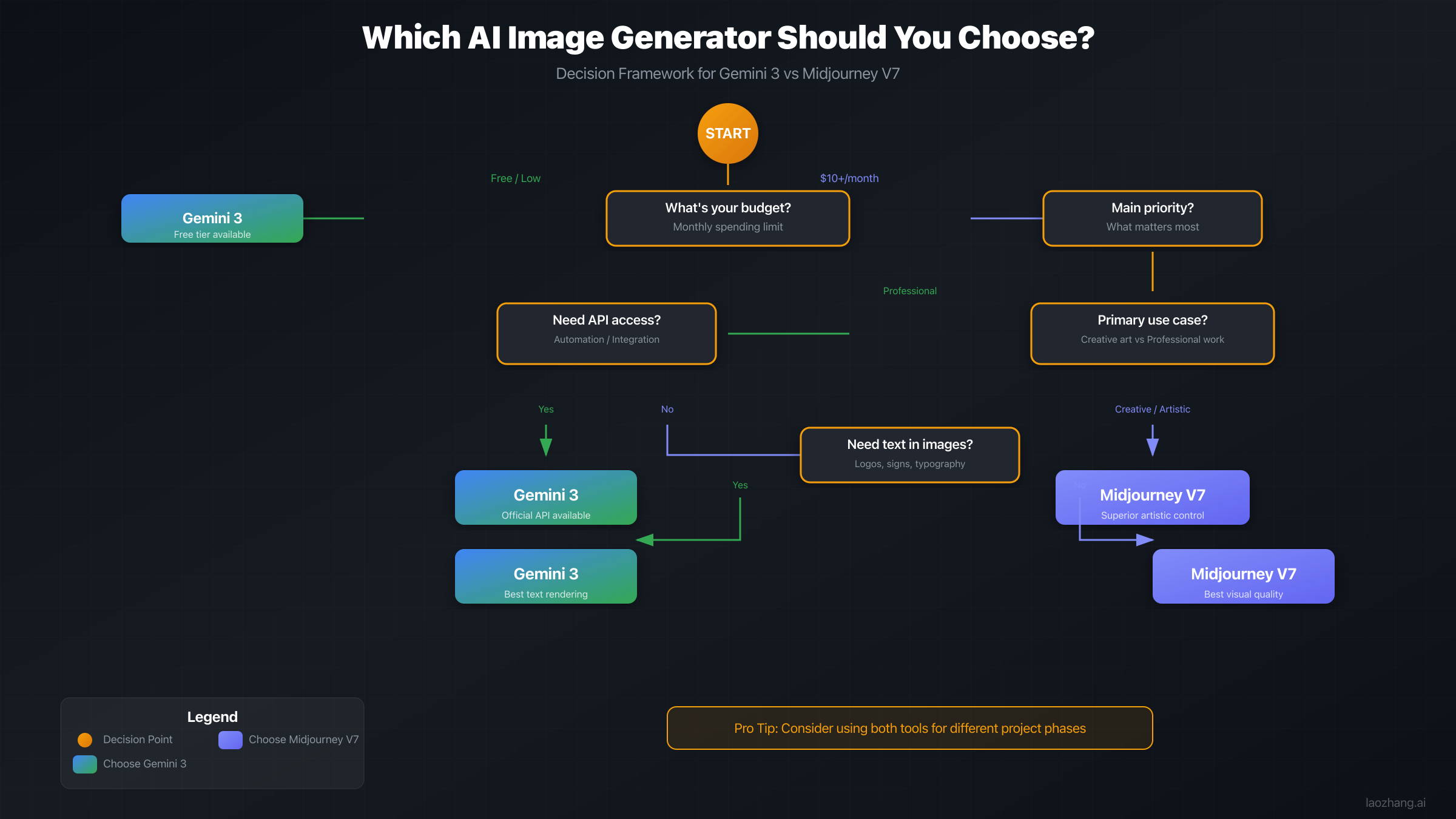
Choose Gemini 3 Pro Image when you need:
- Reliable text rendering in images
- API access for automation
- Free tier to evaluate and prototype
- Multi-turn iterative editing
- Technical accuracy over artistic interpretation
Choose Midjourney V7 when you need:
- Maximum artistic impact and visual beauty
- Distinctive aesthetic for creative projects
- Style personalization and consistency
- Cinematic quality for marketing materials
- Creative exploration across artistic styles
For many professionals, the optimal approach uses both tools strategically. Gemini's strengths in technical accuracy and text handling complement Midjourney's artistic excellence, enabling workflows that leverage each tool's capabilities where they matter most.
As these tools continue evolving, the gap in certain areas may narrow. Text rendering improvements in future Midjourney versions and enhanced artistic control in future Gemini updates seem likely directions. For now, understanding each tool's current strengths enables making informed decisions for your specific projects.
The decision framework above provides a starting point, but the best way to evaluate is hands-on experience. Gemini's free tier enables risk-free testing, while Midjourney's basic plan provides affordable access to validate whether its aesthetic matches your needs.
Looking forward, both platforms continue rapid development. Midjourney's team has indicated ongoing improvements to text rendering and consistency features. Google continues integrating Gemini capabilities across its product ecosystem, potentially expanding image generation access and features. The competitive pressure between major AI image generators benefits users through accelerated capability development.
For organizations building long-term strategies around AI image generation, maintaining flexibility to use multiple tools provides the most robust approach. The rapid pace of advancement means today's limitations may disappear in future updates, while new capabilities may create previously impossible applications. Building workflows that can incorporate multiple tools positions teams to leverage the best available technology as it evolves.
The tools analyzed in this guide represent the current state-of-the-art for photorealistic AI image generation. Whether you choose Gemini's technical precision, Midjourney's artistic excellence, or a strategic combination of both, you're accessing capabilities that simply didn't exist even two years ago. The question isn't whether AI can generate realistic images, but rather which approach best serves your specific creative and business objectives.
Start with clear requirements, experiment with both tools using identical prompts, and let the results guide your decision. The best choice is the one that reliably delivers the images your projects need.