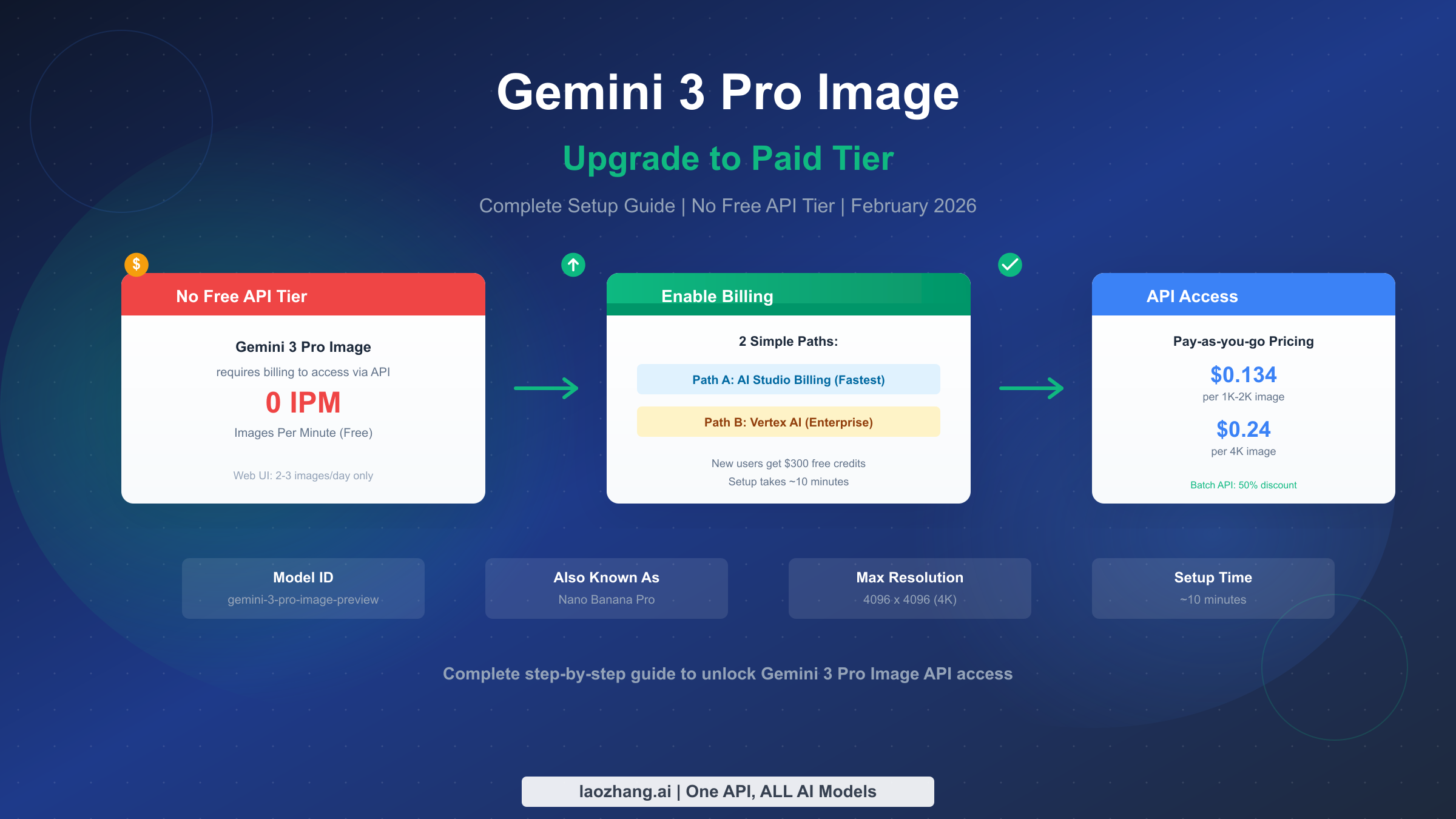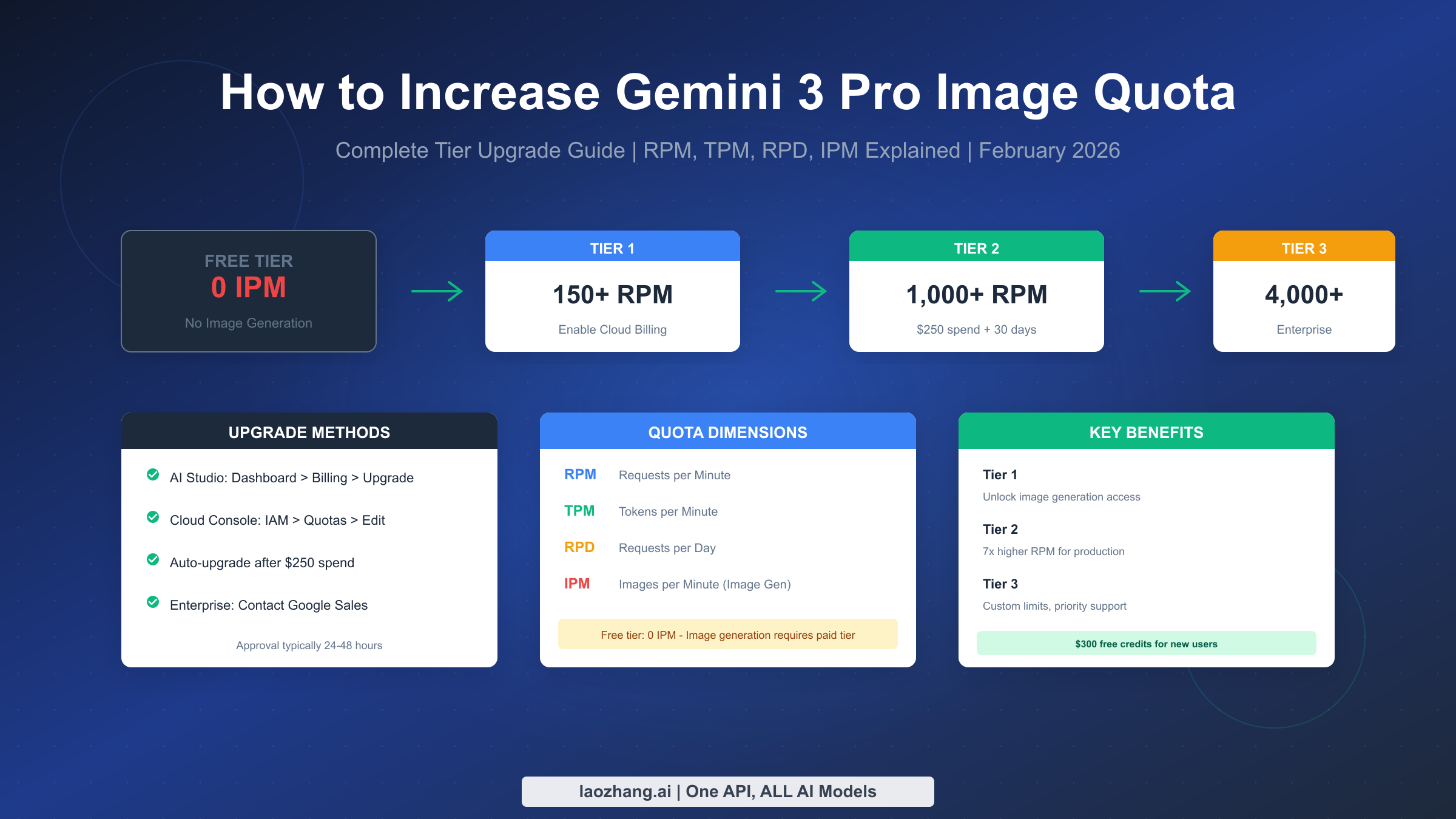
To increase your Gemini 3 Pro Image quota, you need to upgrade your tier through Google Cloud. The free tier provides 0 IPM (images per minute)—image generation requires at minimum Tier 1 with billing enabled. Navigate to AI Studio, go to Dashboard, then Usage and Billing, click the Billing tab, and select "Set up Billing" to link a Cloud Billing account. Tier 2 unlocks automatically after $250 cumulative spend plus 30 days. For custom enterprise limits, contact Google Cloud sales directly.
If you've hit rate limits or received 429 errors while using the Gemini 3 Pro Image API, you're facing one of the most common challenges developers encounter. Unlike text-based models that offer modest free tier access, image generation through Gemini 3 Pro Image (also known as Nano Banana Pro) requires paid access from the very first API call. This guide walks you through exactly how to increase your quota, what each tier offers, and how to optimize your costs while scaling your image generation workloads.
Quick Answer - Increase Your Quota in 3 Steps
For developers who need immediate answers, here's the fastest path to higher quotas. The entire process takes about five minutes for Tier 1, with automatic upgrades to higher tiers based on your usage patterns.
First, go to Google AI Studio at aistudio.google.com and sign in with your Google account. Navigate to Dashboard, then Usage and Billing, and click the Billing tab. This is where you'll see your current quota status and billing configuration.
Second, click "Set up Billing" and either create a new Cloud Billing account or link an existing one. You'll need to provide a payment method, typically a credit card. Google may require a one-time prepayment to activate the paid tier, but this becomes account credit rather than a fee.
Third, for higher tiers, you either wait for automatic upgrades or submit manual quota increase requests. Tier 2 activates automatically once you've spent $250 cumulatively and maintained an account for 30 days. For Tier 3 or custom limits, you'll need to contact Google Cloud sales or submit a quota increase request through the Cloud Console.
New Google Cloud users receive $300 in free credits valid for 90 days, which applies to Gemini API usage. At current pricing, this covers approximately 2,200 images at standard resolution before you spend any actual money.
Understanding Quota Dimensions (RPM, TPM, RPD, IPM)
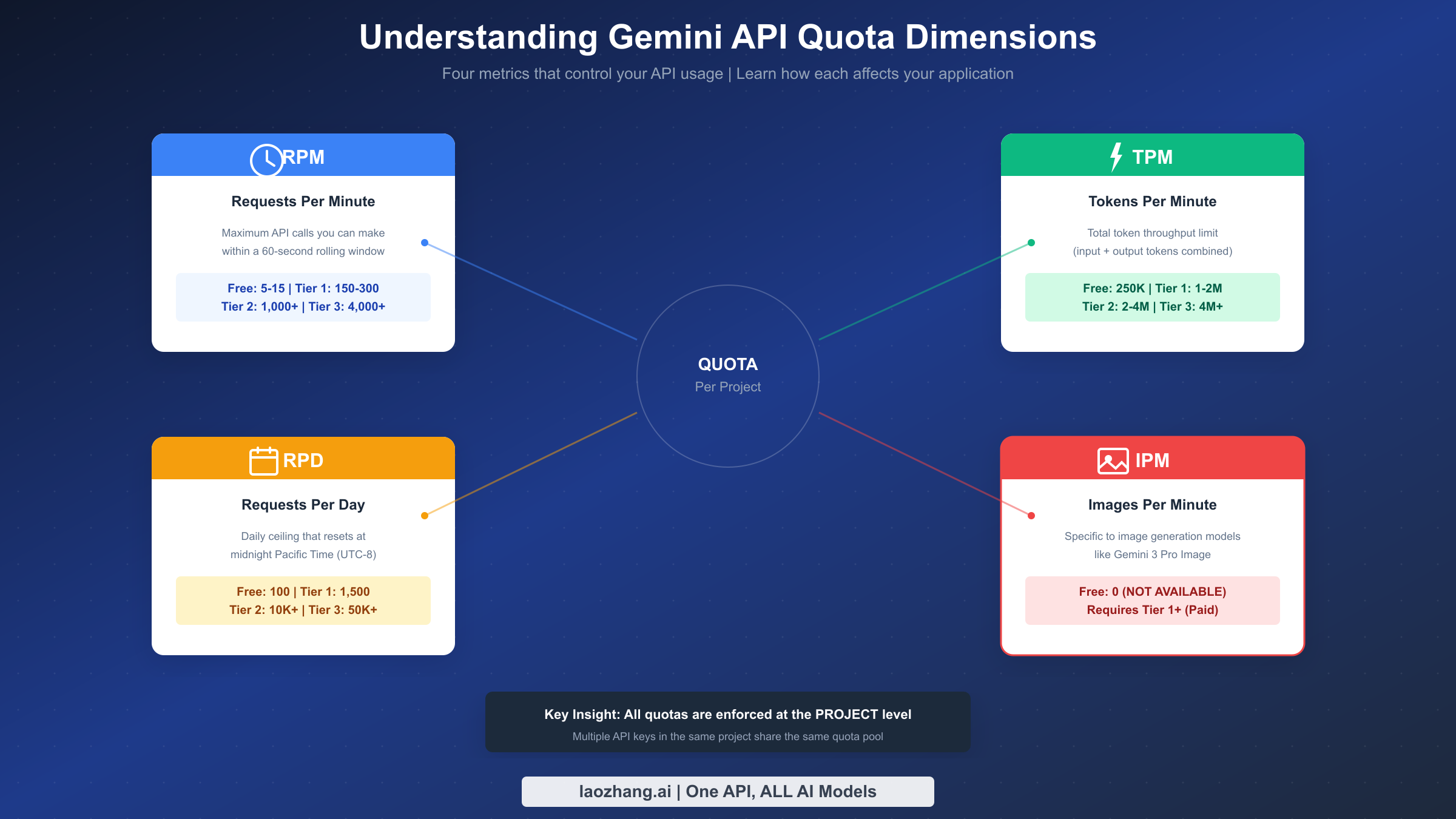
Before diving into tier upgrades, you need to understand the four dimensions that govern your API usage. Each dimension represents a different type of limit, and exceeding any of them triggers a 429 error. The Gemini API uses a combination of these metrics to ensure fair resource allocation across all users.
RPM stands for Requests Per Minute and caps how many individual API calls you can make regardless of their size. This limit resets on a rolling 60-second window, meaning it tracks your requests over the last minute continuously rather than resetting at fixed intervals. A burst of 100 requests followed by silence still counts against your RPM for the next 60 seconds.
TPM means Tokens Per Minute and restricts your total token throughput. This combines both input and output tokens, so a request with 1,000 input tokens that generates 500 output tokens consumes 1,500 tokens from your TPM quota. For image generation, token consumption works differently since the model processes visual data.
RPD represents Requests Per Day and provides a daily ceiling that resets at midnight Pacific Time, which is UTC-8 or UTC-7 during daylight saving time. This metric prevents sustained high-volume usage that might impact system resources. Even if you stay under RPM and TPM limits, you can still hit your daily cap.
IPM is Images Per Minute and specifically governs image generation models like Gemini 3 Pro Image. This is the critical dimension for image generation workloads. Unlike text generation where TPM dominates resource consumption, image generation uses GPU-intensive diffusion processes that require separate tracking through IPM.
Understanding that quotas apply at the project level rather than per API key is essential. Creating multiple API keys within the same Google Cloud project won't multiply your limits—all keys share the same quota pool. To genuinely increase your available quota, you need to either upgrade your tier or distribute workloads across multiple projects.
Complete Tier System and Limits
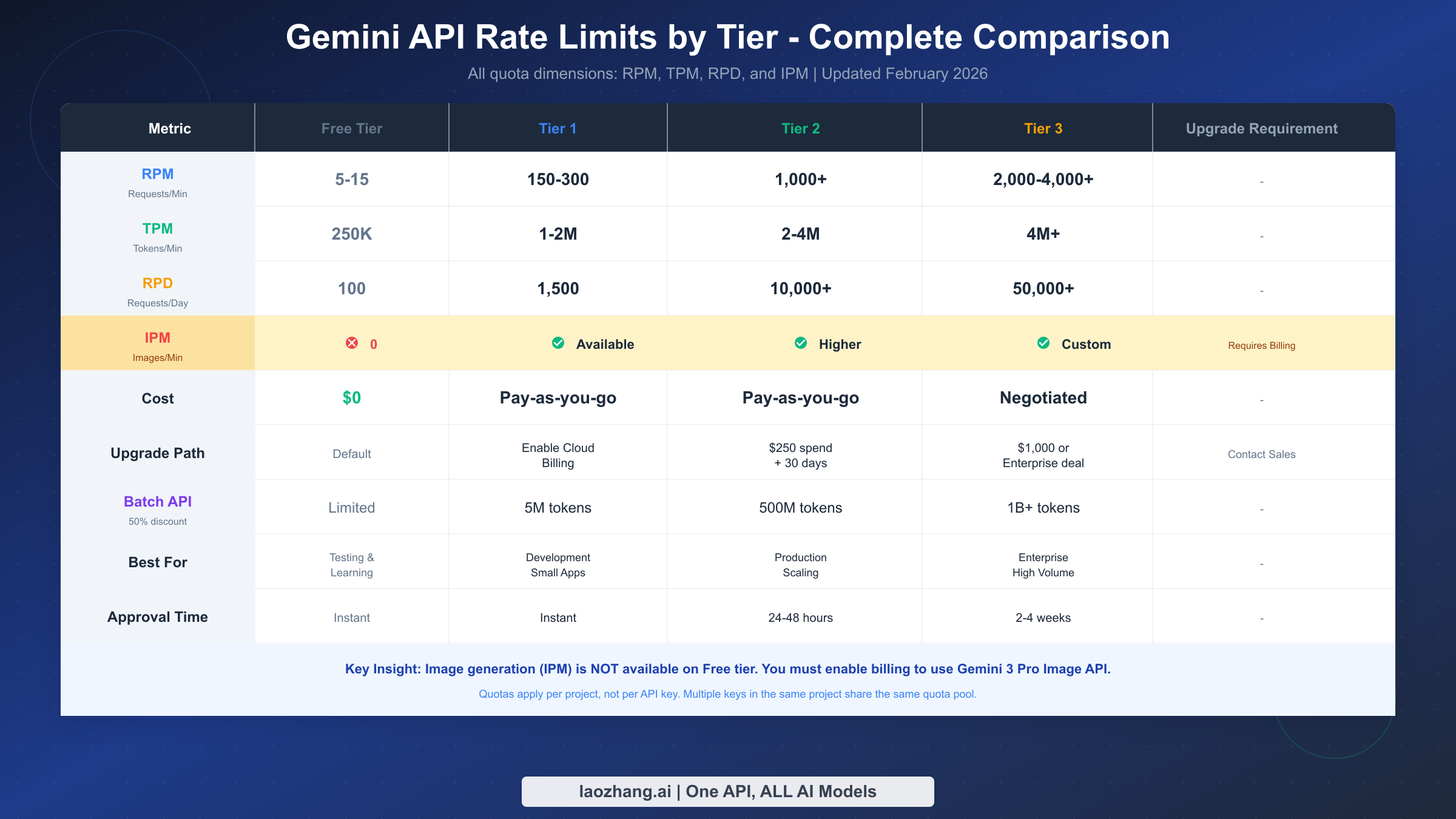
Google structures Gemini API access into four tiers, each with progressively higher quotas and different requirements. Understanding what each tier offers helps you choose the right upgrade path for your use case. The tier system applies across all Gemini models, though specific limits vary by model variant.
The Free Tier provides minimal access suitable only for testing and learning. You get 5-15 RPM depending on the model, 250,000 TPM, and 100 RPD. For image generation specifically, the free tier offers 0 IPM—meaning Gemini 3 Pro Image is completely unavailable without billing enabled. This tier requires no payment and activates automatically when you create an API key.
Tier 1 unlocks when you enable Cloud Billing on your project. This is the minimum requirement for any image generation access. Limits jump significantly: 150-300 RPM, 1-2 million TPM, and 1,500 RPD. Image generation becomes available with Tier 1, though Google doesn't publicly specify exact IPM limits. Activation is instant once billing is configured.
Tier 2 requires meeting two conditions: $250 in cumulative Google Cloud spending across any services and maintaining an account for at least 30 days since your first successful payment. Once you meet both requirements, Tier 2 limits activate automatically within 24-48 hours. You'll get approximately 1,000+ RPM, 2-4 million TPM, and 10,000+ RPD. The "Upgrade" button appears in AI Studio once you qualify.
Tier 3 represents enterprise-level access with custom limits negotiable through Google Cloud sales. Requirements include either $1,000 in cumulative spending or a formal enterprise agreement. RPM can reach 2,000-4,000 or higher, TPM exceeds 4 million, and RPD can go above 50,000. Approval typically takes 2-4 weeks minimum through the enterprise sales process.
For batch processing workloads that don't require real-time responses, the Batch API offers a compelling alternative. Google provides a 50% discount on all batch requests, and quotas are measured in enqueued tokens rather than per-minute metrics. Tier 1 allows 5 million batch tokens, Tier 2 jumps to 500 million, and Tier 3 provides access to 1 billion or more.
Image Generation Quota Deep Dive
Image generation through Gemini 3 Pro Image operates under different constraints than text generation. The IPM dimension reflects the computational intensity of diffusion-based image synthesis, which requires dedicated GPU resources that scale differently than text processing. Understanding these specific limitations helps you plan your image generation workloads effectively.
The most critical point for developers to understand is that image generation has zero availability on the free tier. While text models offer modest free access, Gemini 3 Pro Image requires at minimum Tier 1 with active billing. This restriction exists because image generation consumes significantly more computational resources than text generation, making free access economically unfeasible for Google.
Resolution affects quota consumption in ways that aren't immediately obvious. Higher resolution images require more GPU memory and longer generation times, which impacts both IPM limits and per-image costs. Gemini 3 Pro Image supports multiple resolutions including 1K-2K standard and 4K high resolution, with the latter consuming approximately 1.8x the quota of standard resolution.
Aspect ratio selection also influences resource usage. The model supports 9 aspect ratios including 21:9 ultrawide, and non-standard ratios may require additional processing. When planning high-volume image generation, standardizing on common aspect ratios can help optimize quota utilization.
For applications requiring consistent high-volume image generation, consider implementing a queue-based architecture that smooths out request spikes. Rather than sending burst requests that hit IPM limits, a queue can maintain steady throughput at just under your limit. This approach maximizes utilization while avoiding 429 errors that disrupt user experience.
Third-party API services like laozhang.ai provide an alternative path for developers who need higher image generation quotas without navigating Google's tier system. These services aggregate capacity across multiple accounts and offer unified API access with different rate limiting structures. For more information, see the documentation at docs.laozhang.ai.
Step-by-Step Upgrade Guide
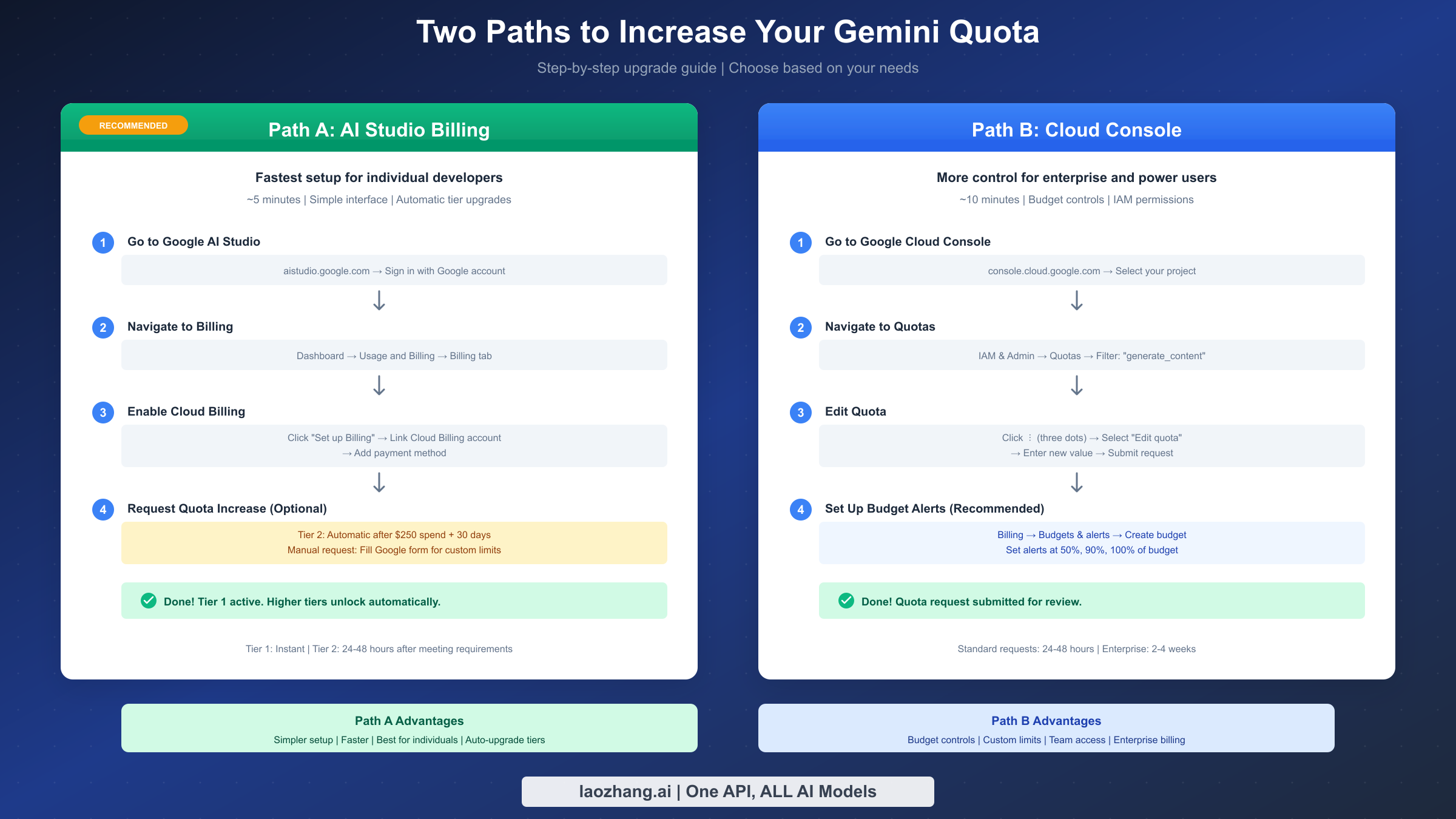
Google provides two primary paths for upgrading your Gemini quota: through AI Studio for simplicity or through Cloud Console for more control. The right choice depends on whether you're an individual developer or part of an enterprise team with specific billing and access control requirements.
The AI Studio path works best for individual developers and small teams who want the fastest setup. Start by navigating to aistudio.google.com and signing in with your Google account. Click Dashboard in the left navigation, then select Usage and Billing. Within this section, find and click the Billing tab.
You'll see your current billing status, which for new users shows "Free tier" or "No billing account linked." Click the "Set up Billing" button to begin the account linking process. Google will present options to either create a new Cloud Billing account or select an existing one if you've used Google Cloud before.
Enter your billing information including country, account type (individual or business), and payment details. Google accepts major credit cards and, in some regions, bank account linking. After billing setup completes, return to AI Studio to verify your tier has updated. You should now have Tier 1 access with image generation enabled.
For Tier 2 upgrades through AI Studio, the process is largely automatic. Once your account meets both requirements (the $250 cumulative spend threshold and the 30-day account age), an "Upgrade" button appears on the API keys page. Click it, complete the brief validation, and your project upgrades to Tier 2 within 24-48 hours.
The Cloud Console path provides more control and is recommended for enterprise environments. Start at console.cloud.google.com and select or create the project you want to upgrade. Navigate to IAM & Admin in the left sidebar, then click Quotas. Use the filter box to search for "generate_content_requests_per_minute" to find the Gemini API quotas.
Click the three dots menu at the end of the row for the quota you want to modify, then select "Edit quota." Enter your desired new value and submit the request. Google reviews these requests based on your usage history, account standing, and business justification if provided.
Setting up budget alerts is strongly recommended for production use. Within the Billing section of Cloud Console, click "Budgets & alerts" and then "Create budget." Set a monthly budget amount and configure alert thresholds at 50%, 90%, and 100% of your budget. Google will email you when spending approaches these thresholds, preventing unexpected bills.
For detailed guidance on enabling paid tier access for the first time, see our complete guide to enabling paid tier for Gemini 3 Pro Image. That article covers prepayment requirements, billing account setup, and common troubleshooting steps in more depth.
Handling 429 Rate Limit Errors
When you exceed any quota dimension, Google returns a 429 "Resource Exhausted" error. Handling these errors gracefully is essential for production applications. The error response includes headers indicating which limit was exceeded and when requests can resume, enabling intelligent retry logic.
The standard approach uses exponential backoff with jitter. Start with a base delay of 1 second and double it after each failed attempt, up to a maximum delay of 32 or 64 seconds. Adding random jitter of plus or minus 20% prevents the "thundering herd" problem where multiple clients retry simultaneously and overwhelm the API again.
Here's a Python implementation demonstrating proper retry logic:
pythonimport time
import random
from google import generativeai as genai

def generate_with_retry(prompt, max_retries=5):
    base_delay = 1
    for attempt in range(max_retries):
        try:
            model = genai.GenerativeModel('gemini-3-pro-image-preview')
            response = model.generate_content(prompt)
            return response
        except Exception as e:
            if '429' in str(e) and attempt < max_retries - 1:
                delay = base_delay * (2 ** attempt)
                jitter = delay * 0.2 * (random.random() - 0.5)
                time.sleep(delay + jitter)
            else:
                raise
Beyond reactive error handling, proactive rate limiting helps prevent 429 errors entirely. Implement a token bucket or sliding window algorithm that tracks your requests and throttles outgoing calls to stay just under your limits. This provides a smoother user experience than constantly hitting limits and backing off.
For image generation specifically, consider batching requests when possible. Rather than sending images one at a time, group related generations into batches that process together. This reduces per-request overhead and can improve throughput within your quota limits.
If you're consistently hitting rate limits despite optimization efforts, it may indicate that your current tier is insufficient for your workload. Review your usage patterns in the Cloud Console under the Quotas page, which shows historical utilization. If you're regularly approaching limits, upgrading to the next tier or exploring the 429 Resource Exhausted error troubleshooting guide can help identify additional solutions.
For production applications with unpredictable demand spikes, consider implementing a circuit breaker pattern. When 429 errors exceed a threshold, the circuit "opens" and immediately returns cached or fallback responses rather than hammering the API. This protects both your application's responsiveness and your relationship with the API provider.
Cost Optimization and Alternatives
Understanding the true cost of different tier levels helps you make informed decisions about when to upgrade. While higher tiers provide more quota, they also require reaching spending thresholds that may or may not align with your actual needs.
For Tier 2, you need $250 in cumulative Google Cloud spending. This doesn't have to be exclusively Gemini API usage—any Google Cloud service counts toward this threshold. If you're already using Compute Engine, Cloud Storage, or BigQuery, you may qualify for Tier 2 sooner than expected.
The cost-per-image breakdown helps contextualize different usage levels. At current Gemini 3 Pro Image pricing of approximately $0.134 per 1K-2K resolution image and $0.24 per 4K image (February 2026, Google Cloud documentation), a developer generating 100 images monthly spends roughly $13.40. That same developer reaches the $250 threshold in about 19 months at that rate.
For users who need higher throughput without the administrative overhead of tier upgrades, third-party API aggregators offer an alternative model. Services like laozhang.ai provide access to Gemini 3 Pro Image through a unified endpoint with different rate limiting structures. Pricing varies but can be significantly lower than direct Google pricing for certain usage patterns.
The Batch API represents another cost optimization path. By accepting asynchronous processing with potential delays of minutes to hours, you receive a 50% discount on token costs. For workloads like bulk content generation, thumbnail creation, or background asset production, batch processing dramatically reduces costs while staying within quota limits.
Caching strategies can reduce API calls substantially. If your application generates images for similar prompts, implementing a content-addressable cache prevents redundant generation. Hash the prompt text and any parameters, check your cache first, and only call the API for cache misses. Well-designed caching can reduce API costs by 30-80% depending on your use case.
For detailed pricing information and cost calculators, see our complete pricing and quota guide or the detailed rate limits breakdown for each tier.
FAQ
How long does it take for quota increases to take effect?
The timeline depends on the type of upgrade. Tier 1 activates instantly once you enable billing. Tier 2 activates automatically within 24-48 hours after meeting both requirements ($250 spend and 30 days). Manual quota increase requests through Cloud Console typically take 1-3 business days for standard requests, though complex or unusually high requests may take longer. Enterprise Tier 3 negotiations through Google sales typically require 2-4 weeks minimum.
Can I use free credits to reach the $250 threshold for Tier 2?
No. The $250 cumulative spend requirement specifically refers to billed charges, not free credits. Google's promotional credits, including the $300 new user credit, don't count toward the spending threshold. However, these credits do apply to actual API usage, so you can use them to test and build while working toward the tier upgrade through other Google Cloud spending.
Why does image generation have 0 IPM on the free tier?
Image generation requires GPU-intensive diffusion processes that consume significantly more computational resources than text generation. Google positions Gemini 3 Pro Image as a premium offering with costs that make free tier access economically unfeasible. The zero IPM limit ensures that image generation resources are reserved for paying customers who contribute to the infrastructure costs.
Do multiple API keys increase my quota?
No. All quotas apply at the Google Cloud project level, not per API key. Creating additional API keys within the same project doesn't multiply your limits—they all share the same quota pool. To genuinely increase your total available quota, you need to either upgrade your tier within a single project or distribute workloads across multiple separate projects, each with its own billing account.
What happens if my quota request gets denied?
If Google denies a manual quota increase request, you'll receive an email explaining the decision. Common denial reasons include insufficient account history, usage patterns that don't justify the increase, or concerns about the intended use case. You can resubmit requests with additional business justification, or contact Google Cloud support to discuss your specific situation. For enterprise needs, engaging with Google Cloud sales directly often provides a faster path to custom quotas than the self-service request system.
How do I check my current tier and quota usage?
In AI Studio, navigate to Dashboard and then Usage and Billing to see your current tier status and recent usage. For more detailed quota information, go to the Google Cloud Console, navigate to IAM & Admin, then Quotas. Filter for "Gemini" or specific quota names to see your limits and current utilization. The Cloud Console provides historical usage graphs that help identify patterns and predict when you might need to upgrade.