![Three tile stacks on a white plinth comparing price per 1 MP image: [klein] LoRA $0.015, [pro] with one reference $0.045, [dev] LoRA $0.021](/posts/en/flux-2-pro-lora-product-photography-n8n/img/cover.webp)
FLUX.2 [pro] does not accept a LoRA. As of October 2, 2026, neither the Black Forest Labs (BFL) endpoint nor the fal.ai endpoint for [pro] has a field for one. A "FLUX.2 pro + LoRA" product photography workflow in n8n is therefore one of three different builds:
- FLUX.2 [pro] with reference images. You send the product photo with every request, up to 8 images per call. There is nothing to train, and one image costs $0.045 at 1 megapixel with one reference. This fits a catalog with many SKUs and a few shots of each.
- FLUX.2 [klein] with your own LoRA on BFL. You train the LoRA yourself, upload it to the BFL Dashboard and call a
-finetunedendpoint, which is in Public Beta. Images start at $0.015 and everything stays on one BFL bill. This fits a few hero products or one brand look with a lot of volume, if you have a GPU. - FLUX.2 [dev] with a LoRA on fal. fal trains the LoRA for $6.40 at the default 1,000 steps and serves it at $0.021 per megapixel. This fits the same high-volume case when you have no GPU.
All three use the same n8n skeleton: submit, wait, poll, download. Only the URL, the auth header and the request body change.
Can FLUX.2 [pro] use a LoRA? No, the endpoint has no LoRA field
The BFL API reference for FLUX.2 [pro] lists prompt, input_image through input_image_8, width, height, seed, safety_tolerance, output_format, webhook_url, webhook_secret and disable_pup. It has no finetune_id, no finetune_strength and no LoRA array. fal's fal-ai/flux-2-pro schema has no loras parameter either. BFL does not publish a sentence saying "[pro] has no LoRA"; the conclusion comes from the schema and from the list of fine-tuned endpoints, which covers only [klein].
The confusion has an obvious origin. FLUX.2 as a family does support LoRAs, and "FLUX.2 Pro supports LoRA fine-tuning" gets repeated on third-party pages as if it applied to the hosted [pro] model. Two things are true instead:
- BFL's FLUX.2 LoRA Inference runs on six FLUX.2 [klein] endpoints, such as
/v1/flux-2-klein-9b-finetuned. No [pro], [max] or [flex] fine-tuned endpoint is listed. - fal's LoRA endpoint,
fal-ai/flux-2/lora, runs FLUX.2 [dev].
What [pro] offers for product consistency is multi-reference editing. BFL's image editing guide allows up to 8 reference images per API call, passed as URLs or base64, with output up to 4 megapixels.
Which route fits your catalog: reference images, [klein] LoRA or [dev] LoRA
Start with [pro] and reference images unless you expect a few hundred images of the same product or the same look. The table shows what each route asks of you, with BFL and fal list prices as of October 2, 2026. The [klein] fine-tuned endpoints are the only ones of the three in Public Beta.
| FLUX.2 [pro] + references | FLUX.2 [klein] LoRA on BFL | FLUX.2 [dev] LoRA on fal | |
|---|---|---|---|
| How the product stays consistent | Product photo sent with each request | LoRA you trained, plus optional references | LoRA trained on fal, plus optional references |
| Setup per product | None | Train locally, upload .safetensors | Zip of at least 10 images, $6.40 at 1,000 steps |
| Limit per request | 8 reference images | 1 LoRA | 3 LoRAs, 4 reference images on the edit endpoint |
| Price at 1 MP, no reference | $0.03 | $0.015 (9B) | $0.021 |
| Price at 1 MP, one reference | $0.045 | $0.017 (9B) | $0.042 |
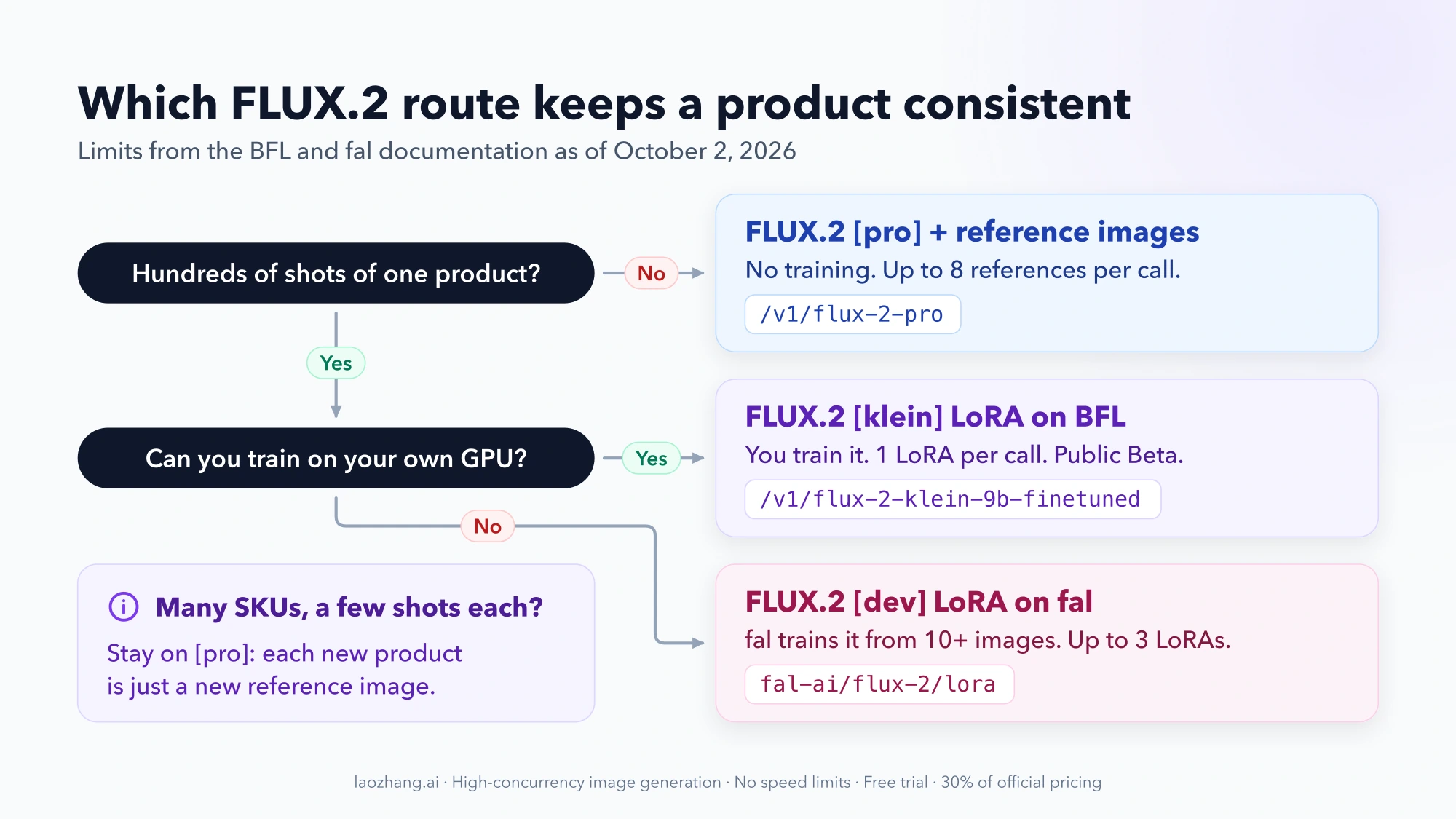
Three conditions change the choice:
- Many SKUs, few shots each. Training a LoRA per SKU costs more than it saves. Reference images need no setup, so a new product is just a new row in your sheet.
- One product or one brand look, hundreds of shots. A LoRA pays for itself once the volume passes the break-even point in the cost section below. Choose BFL [klein] if you can train locally and want one vendor. Choose fal if you want training handled for you.
- Licensing. [klein] 4B weights are Apache 2.0, and [klein] 9B weights are under the FLUX Non-Commercial License, according to BFL's training guide. BFL's public pages do not spell out commercial terms for a 9B-based LoRA served through its API, so confirm with BFL before selling images made that way. fal's model page tags its [dev] LoRA endpoint for commercial use, while BFL lists the [dev] weights as non-commercial for self-hosting. The terms depend on where the model runs.
Output quality may differ between [pro], [klein] and [dev]. Run the same five prompts through your two candidate routes before you commit a batch to either.
Build the n8n workflow: submit, wait, poll, download
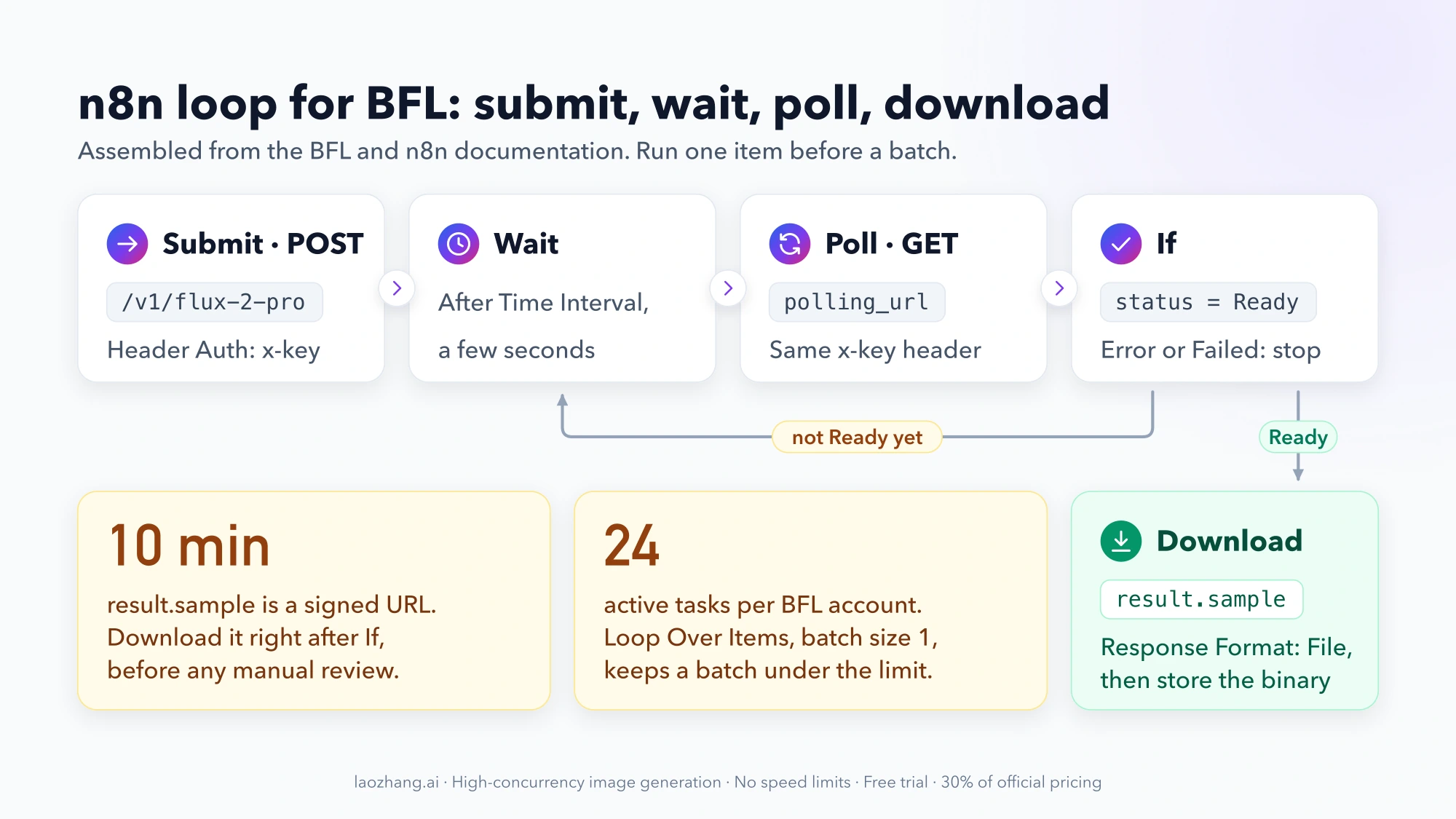
The settings below come from the BFL, fal and n8n documentation and have not been executed as a complete workflow. Build the nodes by hand, run one item, and only then attach your product list.
Create a Header Auth credential named x-key
BFL authenticates with an x-key header. In n8n, create a credential of type Header Auth, set Name to x-key and Value to your BFL API key. Every HTTP Request node that talks to BFL uses this credential through Authentication → Generic Credential Type → Header Auth. That includes the polling node, which also needs the key.
Submit the request to /v1/flux-2-pro
Add an HTTP Request node named Submit:
- Method:
POST - URL:
https://api.bfl.ai/v1/flux-2-pro - Body: JSON, with the fields below mapped from your input item
{
  "prompt": "The bottle from image 1 on a wet slate surface, soft morning window light, shallow depth of field",
  "input_image": "https://your-cdn.example.com/products/sku-1042-front.jpg",
  "width": 1024,
  "height": 1024,
  "output_format": "png"
}
/v1/flux-2-pro is a pinned snapshot, which suits a batch that should look the same next month. /v1/flux-2-pro-preview always points to the latest [pro]. Add input_image_2, input_image_3 and so on for more angles of the product. Each extra reference adds $0.015 per megapixel.
Map prompt and input_image from fields rather than pasting expressions into a raw JSON string. A quotation mark inside a prompt would otherwise break the body.
The response is not the image. According to BFL's generation guide, it contains id, polling_url, cost, input_mp and output_mp.
Wait, then GET the polling_url until status is Ready
Add three nodes after Submit:
- Wait with Resume: After Time Interval. A few seconds is enough to start with. BFL's sample code polls every 0.5 to 1 second and documents no minimum interval. n8n keeps the execution in memory for waits under 65 seconds, so short intervals do not write to the database.
- HTTP Request named
Poll, methodGET, URL{{ $('Submit').item.json.polling_url }}, samex-keycredential. BFL requires the returnedpolling_urlonapi.bfl.ai,api.eu.bfl.aiandapi.us.bfl.ai. Do not build the URL yourself from theid. - If with the condition
{{ $json.status }}equalsReady. The true branch goes to the download. On the false branch, add a second If that sendsErrororFailedto your error handling and everything else back to the Wait node.
Cap the loop. A status that never becomes Ready would otherwise poll until the execution times out. A counter field, or a check on {{ $runIndex }} in the If node, can stop it after a fixed number of rounds.
Download result.sample within 10 minutes
When status is Ready, the image URL is in result.sample. That URL is signed and valid for 10 minutes. BFL's integration guidelines say it is served from delivery.*.bfl.ai without CORS and is not meant to be shown to end users.
Put the download directly after the If node: an HTTP Request node with method GET, URL {{ $json.result.sample }} and Response Format: File. The binary then goes to your storage node, such as S3, Google Drive or your store's media API. Writing the signed URL into a sheet for later use will leave you with dead links.
Keep a batch under 24 active tasks
BFL allows 24 active tasks per account and returns 429 above that. A 402 means the account is out of credits. The simplest safe design is a Loop Over Items node with a batch size of 1 around the whole chain, so one image finishes before the next starts. If you submit in parallel instead, use the HTTP Request node's Options → Batching with Items per Batch and Batch Interval to stay under 24, and retry 429 responses with a growing delay.
Switch to a LoRA on BFL: the [klein] -finetuned endpoint
Only the Submit node changes for a [klein] LoRA. The credential, the polling loop and the 10-minute download stay the same, because BFL's fine-tuned endpoints use the same asynchronous pattern.
The preparation happens outside n8n:
- Train a LoRA against a FLUX.2 [klein] Base model with AI-Toolkit or Diffusers. BFL's training guide lists 12 GB of VRAM and 32 GB of RAM as the minimum for 4B Base, and 22 GB of VRAM and 64 GB of RAM for 9B Base.
- In the BFL Dashboard, open Customization → Finetunes, click + Add Finetune, pick the matching base model and upload the
.safetensorsfile. The name you enter becomes thefinetune_id. A trigger phrase is optional. - Point the
Submitnode at the endpoint for that base model, for examplehttps://api.bfl.ai/v1/flux-2-klein-9b-finetuned.
{
  "prompt": "ohwx bottle on a wet slate surface, soft morning window light",
  "finetune_id": "sku-1042-bottle",
  "finetune_strength": 1.0,
  "width": 1024,
  "height": 1024
}
Three limits from BFL's LoRA inference page matter in a workflow:
- One LoRA per request. You cannot stack a product LoRA and a style LoRA on BFL.
- The endpoint must match the base model. A LoRA uploaded for 9B fails on a 4B endpoint.
- The trigger phrase must be in the prompt if you set one. If every output looks like the training set regardless of the prompt, BFL suggests sweeping
finetune_strengthfrom 0.7 to 0.9 with a fixedseed.
The fine-tuned endpoints accept the base endpoint's other parameters, including input_image, so a LoRA and a reference photo can go in the same request. BFL bills them at the base endpoint's rate during the beta and states that pricing, parameters and endpoint names may change before general availability.
Train and run a [dev] LoRA on fal: Authorization header and queue URLs
On fal the loop has the same four steps, with different names. Create a second Header Auth credential with Name Authorization and Value Key YOUR_FAL_KEY.
Training. POST to https://queue.fal.run/fal-ai/flux-2-trainer with a link to a zip of product photos. The trainer documentation asks for at least 10 images. Each image needs a caption in a .txt file with the same name, or you must pass default_caption; without either, training fails.
{
  "image_data_url": "https://your-cdn.example.com/training/sku-1042.zip",
  "default_caption": "a photo of ohwx bottle",
  "steps": 1000
}
Training costs 0.0064 × steps in dollars, so $6.40 at the default 1,000 steps. The result contains diffusers_lora_file, and its URL is what you pass to inference.
Inference. POST to https://queue.fal.run/fal-ai/flux-2/lora:
{
  "prompt": "ohwx bottle on a wet slate surface, soft morning window light",
  "loras": [{ "path": "https://.../sku-1042-lora.safetensors", "scale": 1 }],
  "image_size": { "width": 1024, "height": 1024 },
  "output_format": "png"
}
loras takes up to 3 entries, and scale ranges from 0 to 4 with a default of 1. To add product photos as references, use fal-ai/flux-2/lora/edit with image_urls, which accepts up to 4 images.
Polling. fal's queue API returns request_id, status_url and response_url. Change the loop in three places:
- The
Pollnode calls{{ $('Submit').item.json.status_url }}. - The If node checks for
COMPLETED. The earlier states areIN_QUEUEandIN_PROGRESS. - A failed request also ends as
COMPLETED, with anerrorfield. Check that field before the next step.
After COMPLETED, one more GET to response_url returns the result, and the image is at images[0].url. Download it with Response Format: File as on BFL.
How much does a FLUX.2 [pro] product image cost? $0.045 with one reference
On BFL, FLUX.2 [pro] costs $0.03 for the first megapixel of output, $0.015 for each additional megapixel and $0.015 per megapixel of each reference image, according to the BFL pricing page as of October 2, 2026. BFL counts 1 MP as 1024×1024 and rounds the output and each reference up to the next megapixel separately. Resizing reference photos to 1024×1024 or smaller before upload keeps each one at 1 MP.
| Request at 1 MP output | Formula | Per image | 500 images |
|---|---|---|---|
| [pro], text only | $0.03 | $0.03 | $15.00 |
| [pro], one reference | $0.03 + $0.015 | $0.045 | $22.50 |
| [pro], two references | $0.03 + 2 × $0.015 | $0.06 | $30.00 |
| [pro], 2 MP output, one reference | $0.03 + $0.015 + $0.015 | $0.06 | $30.00 |
| [klein] 9B LoRA on BFL, text only | $0.015 | $0.015 | $7.50, plus your own training |
| [klein] 9B LoRA on BFL, one reference | $0.015 + $0.002 | $0.017 | $8.50, plus your own training |
| [dev] LoRA on fal, text only | $0.021 | $0.021 | $10.50 + $6.40 per LoRA |
| [dev] LoRA on fal, one reference | $0.021 + $0.021 | $0.042 | $21.00 + $6.40 per LoRA |
The fal rows use fal's prices for fal-ai/flux-2/lora and its edit endpoint, where inputs are resized to 1 MP. LoRA files over 2 GB in total cost more there.
A fal LoRA beats [pro] with one reference from 267 images
Compare one product on fal's text-to-image LoRA endpoint with the same product on [pro] with one reference. With n images per trained LoRA:
6.40 + 0.021 × n < 0.045 × n, which gives n > 266.7.
At 266 images the LoRA costs $11.986 and [pro] costs $11.97, so [pro] is still cheaper. At 267 images the LoRA costs $12.007 and [pro] costs $12.015. If the LoRA request also carries a reference image at $0.042, the saving shrinks to $0.003 per image and the crossover moves to 2,134 images.
These figures assume 1 MP output, references of 1 MP or less, 1,000 training steps and list prices. They leave out rejected images, retries and the time spent preparing a dataset. More training steps or a larger output moves the threshold.
Where to stop trusting the output: logos, label text and small print
Neither reference images nor a LoRA guarantees an exact copy of your packaging. BFL's documentation describes multi-reference editing as a way to keep identity across scenes, and it does not promise exact logos, label text or small print. Treat every image that shows the following as unverified until a person has looked at it:
- the logo, including its proportions and letter shapes;
- any readable text on the label, especially ingredients, volumes and legal lines;
- barcodes and certification marks;
- the brand color against a real photo;
- the number and position of parts such as caps, straps and buttons.
In n8n, put that review inside the workflow. The Wait node can resume On Webhook Call or On Form Submitted, according to the n8n Wait node documentation, so the workflow can save the image, notify a reviewer and continue to publishing only after approval. Save the file before this pause: the BFL link expires after 10 minutes, and a reviewer will not be that fast.
Questions about LoRAs, references and webhooks
Can I combine a LoRA with reference images on FLUX.2?
Yes, on both LoRA routes. BFL's [klein] -finetuned endpoints accept the base endpoint's input_image fields next to finetune_id. On fal, fal-ai/flux-2/lora/edit takes loras and up to 4 image_urls. On [pro] you can only use references.
How many LoRAs can one FLUX.2 request use?
One on BFL and up to three on fal. BFL's fine-tuned endpoints take a single finetune_id and do not support stacking. fal's loras array has a maximum of 3 entries.
Should the n8n workflow poll or use a webhook?
Polling is easier to build and debug, and it is enough for sequential batches. Both BFL (webhook_url) and fal support webhooks, and n8n's Wait node can resume on a webhook call. That removes the polling loop, but your n8n instance must be reachable from the internet.
If you have not chosen a model yet, the FLUX API guide to FLUX.2 models, pricing and the first request covers the rest of the family. FLUX.2 endpoints remain listed and priced after BFL released FLUX 3 Image on October 1, 2026, and everything above applies to FLUX.2 only.