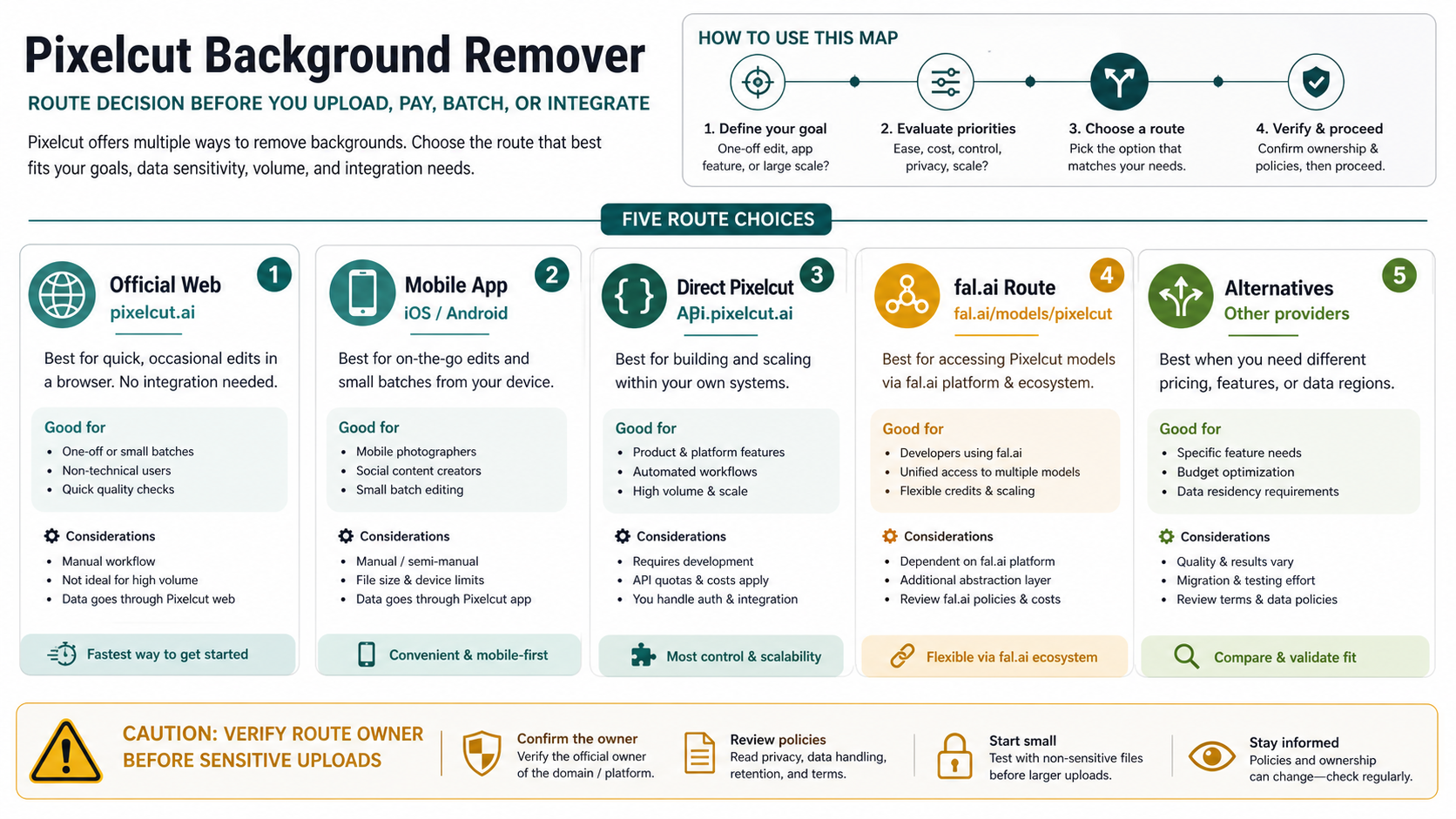
Pixelcut Background Remover is the fastest official route when you need a quick cutout, but choose the owner before you upload more images: use pixelcut.ai for a one-off web test, the mobile app for phone-first editing, direct Pixelcut API for an owned integration, fal.ai only when you want fal to own the provider layer, and another remover when batch, privacy, or design-suite needs matter more.
On May 17, 2026, Pixelcut's official pages advertised free web background removal with no sign-up and no watermark, while pricing, help, and developer pages still described limits, paid workflow surfaces, and API credits. Treat those as route-specific facts to recheck before bulk work.
Stop before uploading sensitive, client-owned, unreleased, regulated, or contract-restricted images unless the domain, account owner, billing owner, terms, privacy handling, and support owner are acceptable.
| Route | Use it when | Check first |
|---|---|---|
| Official web | You need one quick cutout in a browser. | Confirm you are on pixelcut.ai and inspect the export before reuse. |
| Mobile app | You edit product or social images from a phone. | Confirm app-store owner, in-app purchase terms, and batch limits. |
| Direct Pixelcut API | You need Pixelcut-owned integration control. | Confirm endpoint, X-API-Key auth, image limits, credits, and 429 behavior. |
| fal.ai route | You already want fal to own provider access. | Confirm FAL_KEY auth, queue/result flow, billing owner, and support owner. |
| Alternatives | Batch, privacy, suite workflow, or quality needs point elsewhere. | Compare workflow fit before moving private or high-volume images. |
Start with the route, not the upload button
Pixelcut's official background remover is the right first click for a quick browser test. It keeps the task simple: upload, remove the background, download, then decide whether the cutout is good enough. That is different from choosing a paid workflow, mobile workflow, or API workflow.
The important split is ownership. The official web route is Pixelcut's web product. The app route is the iOS or Android app store product. The direct developer route is Pixelcut's own API contract at api.developer.pixelcut.ai. The fal.ai route is a provider wrapper around a Pixelcut-named model, with fal auth, fal billing, and fal support behavior. Alternatives such as remove.bg, Photoroom, Adobe Express, manual editing, or another API are not fallback versions of Pixelcut; they are separate choices.
That split matters because a background-removal mistake rarely appears at the first upload. It appears when a seller uploads a catalog batch, a designer sends private client images through the wrong account, or a developer wires the wrong provider into production. The safest pattern is to do one non-sensitive test, inspect the result, then commit to a route only after the limits, owner, and output quality are acceptable.
Use the official web tool for quick cutouts
The official web tool is best when the job is one image or a small non-sensitive set. It gives you the lowest-friction test of Pixelcut's automatic cutout behavior without forcing an API decision. Pixelcut's own help material also describes erase and restore refinement after automatic removal, which is useful when the cutout clips hair, product straps, handles, jewelry openings, or narrow object gaps.
Use the web route for a first pass like this:
- Open
https://www.pixelcut.ai/background-remover. - Upload a non-sensitive image that represents your real use case.
- Check whether the subject edge, transparent PNG, and white-background export are acceptable.
- Use erase or restore tools if the automatic cutout needs small repairs.
- Download and inspect the output at the size where it will actually be used.
Do not treat a clean preview as proof that a whole catalog will work. Background removers often look fine in a large editor preview and fail in thumbnails because halos, cropped shadows, transparent holes, and inconsistent scale become obvious only in a grid. If your real job is product listings, build a small test set before you decide Pixelcut is the route for the batch.
The web route is also where no-watermark and no-sign-up language should stay narrow. Pixelcut's web page can advertise low-friction use, but free-plan wording and usage-limit wording can change independently. A one-off free test is not the same promise as unlimited production use.
Read free, paid, and API claims as dated route facts
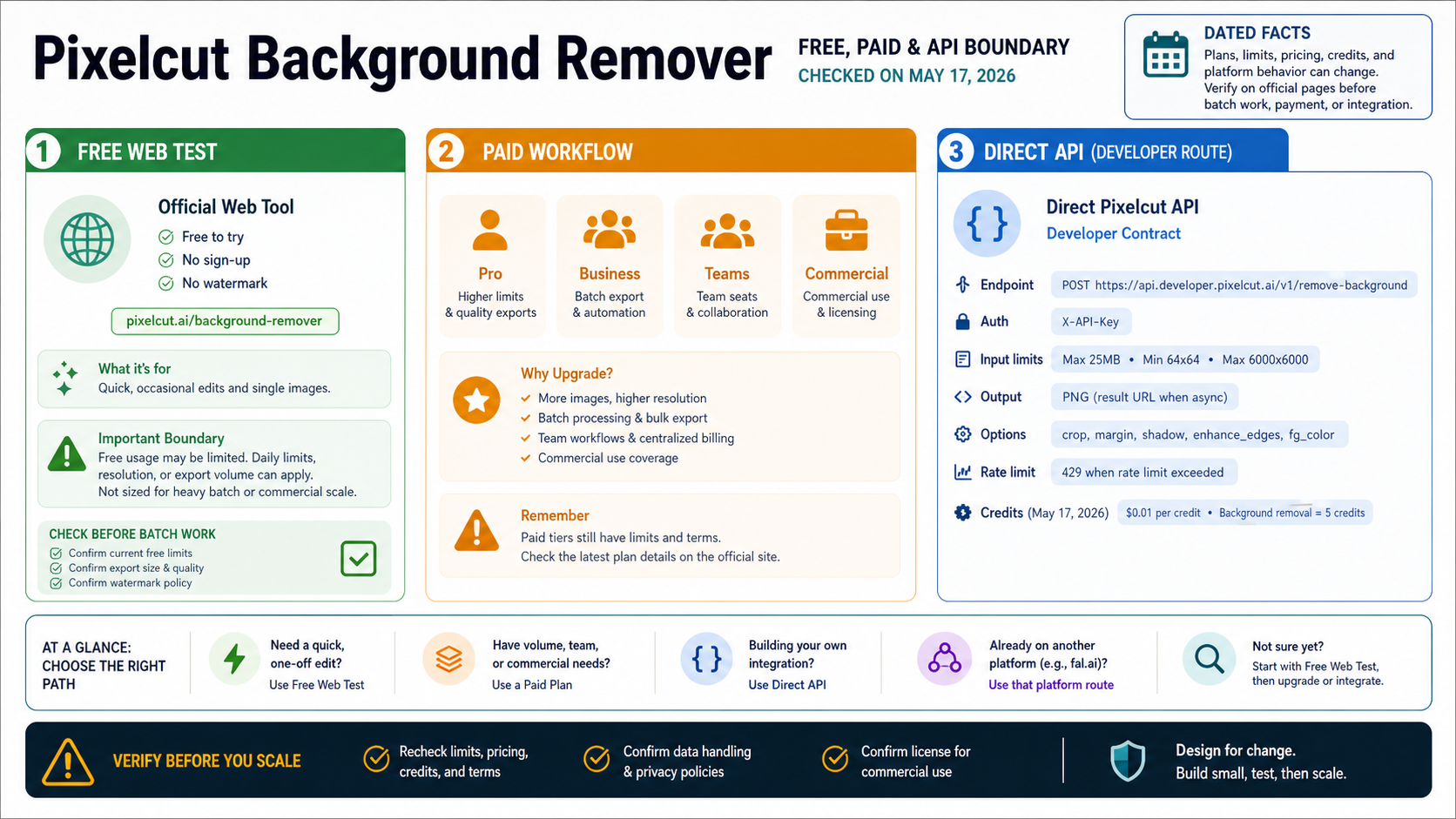
The safest way to read Pixelcut's free and paid claims is by route. On May 17, 2026, the official web page presented background removal as free, no-sign-up, and no-watermark. Pixelcut's pricing and help surfaces also described limited free access, paid subscriber usage, batch exports, team seats, commercial-license surfaces, and AI credits. Those facts do not necessarily contradict each other, but they do apply to different jobs.
For a one-off browser cutout, the practical question is whether the official web page lets you finish the image without an account, watermark, or paid step. For product work, the question changes: how many images, which export size, whether batch export is needed, whether team seats or commercial-license language matters, and whether the output has to stay consistent across a catalog. For API work, the question changes again: credits, endpoint behavior, rate-limit handling, and who supports the integration.
The direct Pixelcut API facts were also specific on May 17, 2026. Pixelcut's API material listed background removal at 5 credits per operation, with the API page listing $0.01 per credit. That makes the checked direct API math $0.05 per background-removal operation before any future pricing change, discount, plan change, or provider route is considered. Use that as a dated planning number, not an evergreen quote.
Do not mix that direct API math with fal.ai. fal.ai uses a different account, key, request flow, billing owner, and support path. If the number that matters to you comes from fal, use fal's current billing and model page, not Pixelcut's direct API credit math.
Separate phone-first work from batch and developer work
The official app route is useful when the source images already live on a phone, when the workflow is social content, or when a seller wants a small number of product images edited without building a desktop pipeline. App-store listings can confirm the product identity, app owner, in-app purchases, update state, and visible user friction, but they do not replace a plan or privacy review.
Mobile is not automatically worse than web. It is often better for quick product-social workflows: shoot the object, remove the background, replace or clean the backdrop, and publish from the same device. It becomes less attractive when you need repeatable naming, consistent crop margins, team review, bulk export, or a developer-controlled image pipeline.
Batch work needs a different threshold. Before paying for a plan or relying on app-side batch features, test the same kinds of images you will actually process: light products on white, dark products on dark, reflective products, hair or fabric, transparent glass, jewelry, and products with existing shadows. If the model handles easy samples but fails your real merchandise, a higher plan will not fix the underlying fit.
Commercial-use language also belongs to the route decision. Pixelcut's API page includes commercial-use and copyright-retention language for API use, while app and web workflows can have their own plan terms. If a client contract, marketplace policy, or brand agreement controls the output, read the relevant terms for the route you are actually using.
Keep direct Pixelcut API and fal.ai in separate lanes
Direct Pixelcut API is for developers who want Pixelcut to own the API contract. The documented endpoint is:
POST https://api.developer.pixelcut.ai/v1/remove-background
X-API-Key: <your_pixelcut_api_key>
On May 17, 2026, Pixelcut's API reference listed a 25MB maximum input image, 64x64 minimum resolution, 6000x6000 maximum resolution, PNG output, result URL behavior, crop, margin, shadow, foreground color, and edge-enhancement options. It also documented 429 as a rate-limit response. Those details are exactly the kind of facts that should shape integration code because they affect validation, retry behavior, storage, and support tickets.
Direct API is the better lane when you want your application to own preprocessing, queueing, naming, retries, storage, and post-processing. It lets you decide what images are accepted before upload, how failures are logged, whether a user can retry, and how output files are stored. It also means you are responsible for protecting the API key and handling rate limits correctly.
fal.ai is a different lane. The fal.ai pixelcut/background-removal model page documents FAL_KEY auth, fal client usage, queue/status/result behavior, input image URLs, output-format choices, and fal-hosted result files. That can be the right route if your team already builds on fal, wants fal's queue patterns, or uses fal for other models. It is not the direct Pixelcut API, and its current cost, availability, and support boundary should be checked on fal before production use.
The clean developer decision is simple: choose direct Pixelcut API when Pixelcut should own the developer contract; choose fal.ai when fal should own the provider layer. Avoid writing code that treats those two paths as interchangeable just because both can remove a background.
Put upload safety before client or private images
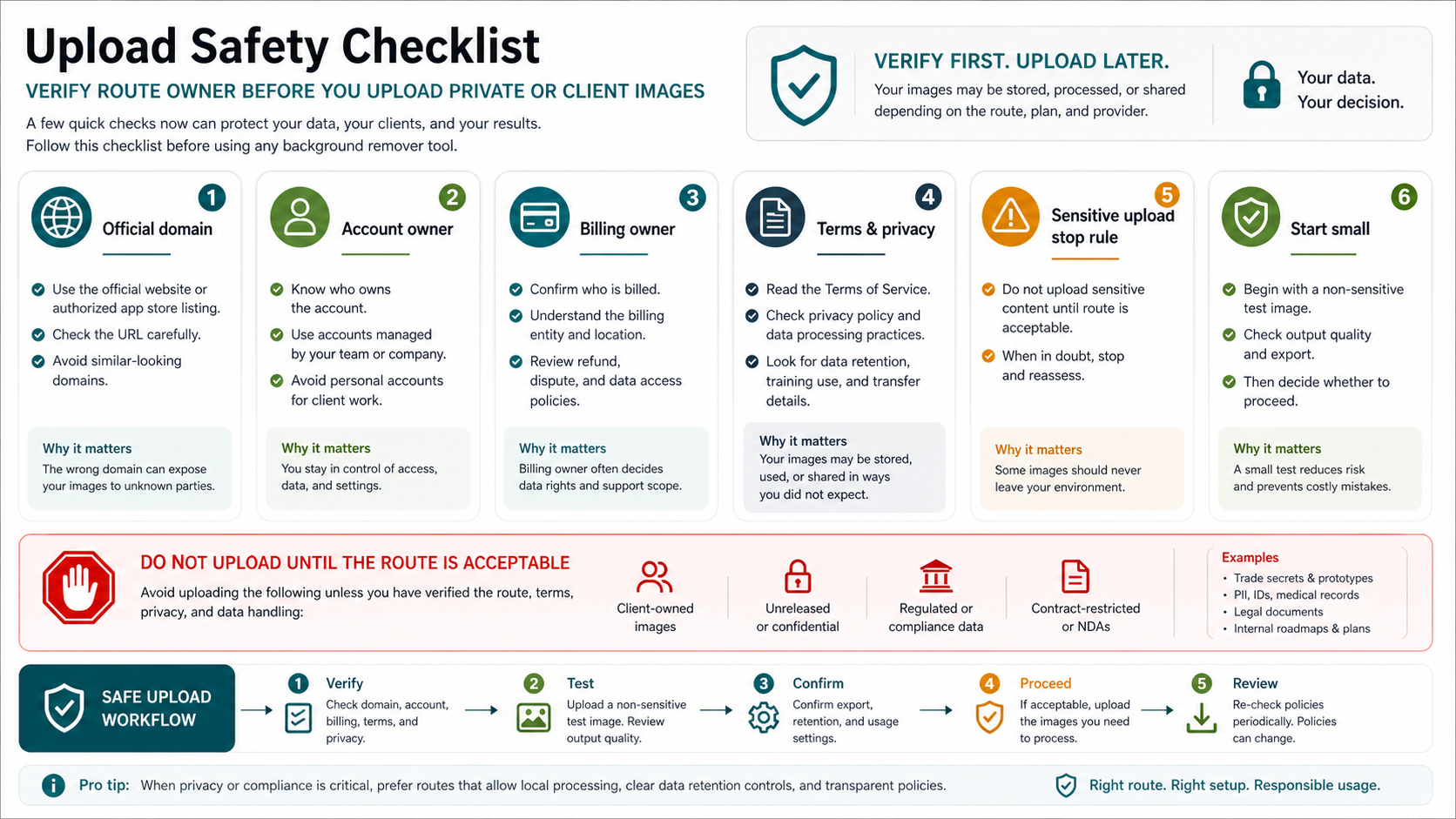
Background removal feels harmless because the output is visual, but the uploaded file can still contain private, client-owned, unreleased, regulated, or contract-restricted information. Product photos can reveal supplier details, prototypes, unreleased packaging, location clues, serial numbers, personal images, medical context, or confidential campaign assets.
Use a hard stop rule before any sensitive upload:
- Verify the domain or app-store owner.
- Confirm who owns the account used for the upload.
- Confirm who is billed and which legal entity controls the route.
- Read the terms, privacy policy, data retention language, and transfer language for the actual route.
- Test first with a non-sensitive image.
- Do not upload client-owned, unreleased, regulated, or contract-restricted files until that route is acceptable.
Similar-looking Pixelcut domains can appear in adjacent browsing. That does not prove wrongdoing by itself, but it does mean the official route should not be assumed from a name alone. For sensitive work, the name on the page matters less than the route owner, terms, privacy behavior, and billing/support owner.
If privacy or compliance is the first requirement, a browser remover may not be the right starting point. A route with clearer data controls, approved enterprise terms, internal review, local processing, or manual editing may be safer even if it is slower.
Inspect the cutout before scaling it
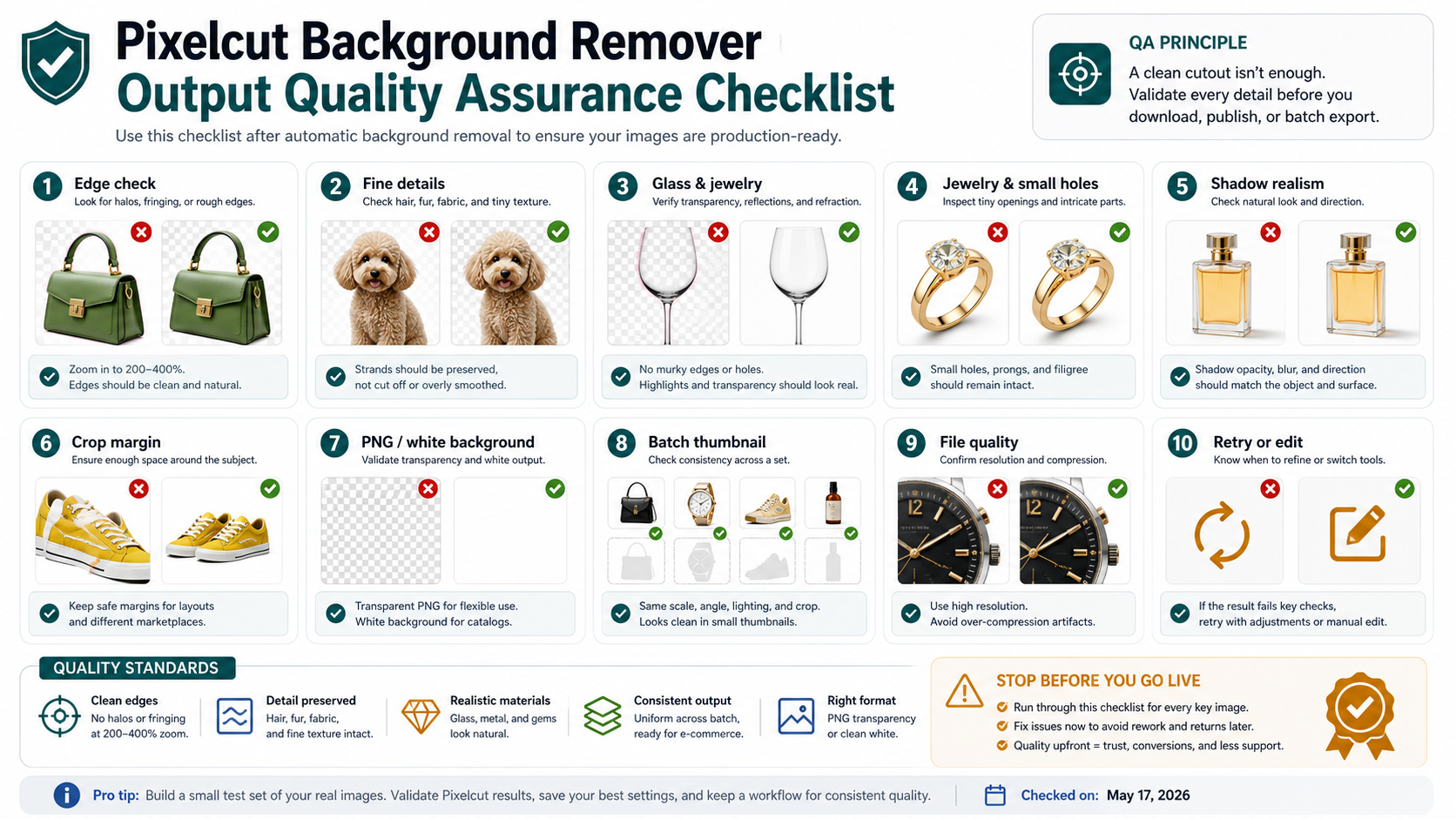
A background-removal result is not production-ready just because the background disappeared. The quality question is whether the output survives the place where it will be used: a marketplace thumbnail, a product detail page, a social ad, a slide deck, a white-background catalog, or an automated API pipeline.
Check the edge first. Zoom to 200-400% and look for halos, jagged edges, missing holes, and over-smoothed details. Handles, straps, fur, hair, shoe laces, fabric fringe, jewelry prongs, and bottle caps are common failure points. If the subject looks clipped in the editor, it will look worse after compression.
Then check material behavior. Glass, translucent plastic, jewelry, glossy packaging, reflective metal, and perfume bottles often need human review because the "background" can pass through the subject or define its edges. A remover can cut the outside contour but still leave unnatural transparency, missing reflections, or broken highlights.
Finally, check output consistency. Transparent PNG is useful when the image will be placed on varied backgrounds. White-background output is useful for catalog pages, but it can expose poor shadows or inconsistent crop margins. For batch work, place several outputs in a grid and inspect scale, angle, lighting, crop margin, and shadow direction together. Consistency across the set matters more than one impressive sample.
When the result fails, retry with a cleaner source image before blaming the tool. Increase contrast between subject and background, avoid heavy motion blur, keep the whole object in frame, and remove distracting props. If those changes still fail on important images, use manual editing or a specialist workflow instead of forcing a high-volume batch through weak inputs.
When another remover is the better fit
Pixelcut is a strong first stop when you need a fast official cutout and lightweight product-photo editing. It is not automatically the right route for every background-removal job.
Use remove.bg when you want a highly recognized specialist remover with established API and integration patterns around background removal. It is especially worth comparing when your team already has background-removal automation and wants a focused provider rather than a broader editing app.
Use Photoroom when the job is commerce-first: product listings, batch product photos, seller workflows, team editing, Shopify-style workflows, and repeatable catalog output. It is the stronger comparison when the question is not "can it remove a background?" but "can a team keep a product-image pipeline consistent?"
Use Adobe Express when the background removal task is only one step inside a broader design-suite workflow. If the next move is adding layout, brand assets, templates, or social creative, staying inside a design environment can save more time than optimizing the cutout tool alone.
Use manual editing when the image has high commercial value, difficult transparency, complex hair, jewelry, glass, legal sensitivity, or a client review standard. Automation can get you close; it should not be asked to carry work where every pixel matters.
The rule is to compare by job, not by brand. Pixelcut can be the fastest official start, remove.bg can be the specialist remover, Photoroom can be the commerce workflow, Adobe Express can be the design-suite route, and manual editing can be the quality-control route.
FAQ
Is Pixelcut Background Remover really free?
Pixelcut's official web page advertised free background removal with no sign-up and no watermark when checked on May 17, 2026. Pixelcut's pricing and help surfaces also used limited free access and paid subscriber language. Treat free use as useful for testing, but recheck limits before batch, commercial, or paid work.
Does Pixelcut add a watermark?
The official web page advertised no-watermark background removal when checked on May 17, 2026. Because watermark behavior can depend on route, plan, export size, and account state, confirm it with a non-sensitive test export before using the output in production.
Should I use Pixelcut web, app, direct API, or fal.ai?
Use the web route for quick browser tests, the app for phone-first editing, direct Pixelcut API for Pixelcut-owned integration control, and fal.ai only when you want fal to own the provider route. If batch, privacy, design-suite, or output-quality needs dominate, compare alternatives before committing.
Is fal.ai the same as Pixelcut's direct API?
No. Direct Pixelcut API uses Pixelcut's endpoint, X-API-Key auth, Pixelcut API limits, and Pixelcut API pricing facts. fal.ai uses FAL_KEY auth, fal queue and result behavior, and fal billing/support boundaries. Keep them separate in code, pricing, and support planning.
What are the direct Pixelcut API limits?
Pixelcut's API reference listed a 25MB maximum input image, 64x64 minimum resolution, 6000x6000 maximum resolution, PNG output, result URL behavior, options such as crop, margin, shadow, foreground color, and edge enhancement, plus 429 as a documented response when checked on May 17, 2026.
Can I upload client or private images?
Only after the route is acceptable for the sensitivity of the image. Verify the domain or app owner, account owner, billing owner, terms, privacy handling, data retention, and support owner first. For client-owned, unreleased, regulated, or contract-restricted files, test with non-sensitive images before any real upload.
Is Pixelcut good enough for product photos?
It can be enough for straightforward product cutouts, especially quick edits and small batches. Inspect halos, fine details, glass, jewelry, shadows, transparent PNG, white-background export, crop margin, and thumbnail consistency before using it for catalog or paid production work.
When should I choose remove.bg, Photoroom, or Adobe Express instead?
Choose remove.bg when you want a focused specialist remover or established remover API route, Photoroom when commerce batch workflow matters most, and Adobe Express when the cutout is part of a broader design-suite task. Choose manual editing when legal sensitivity or pixel-level quality matters more than speed.