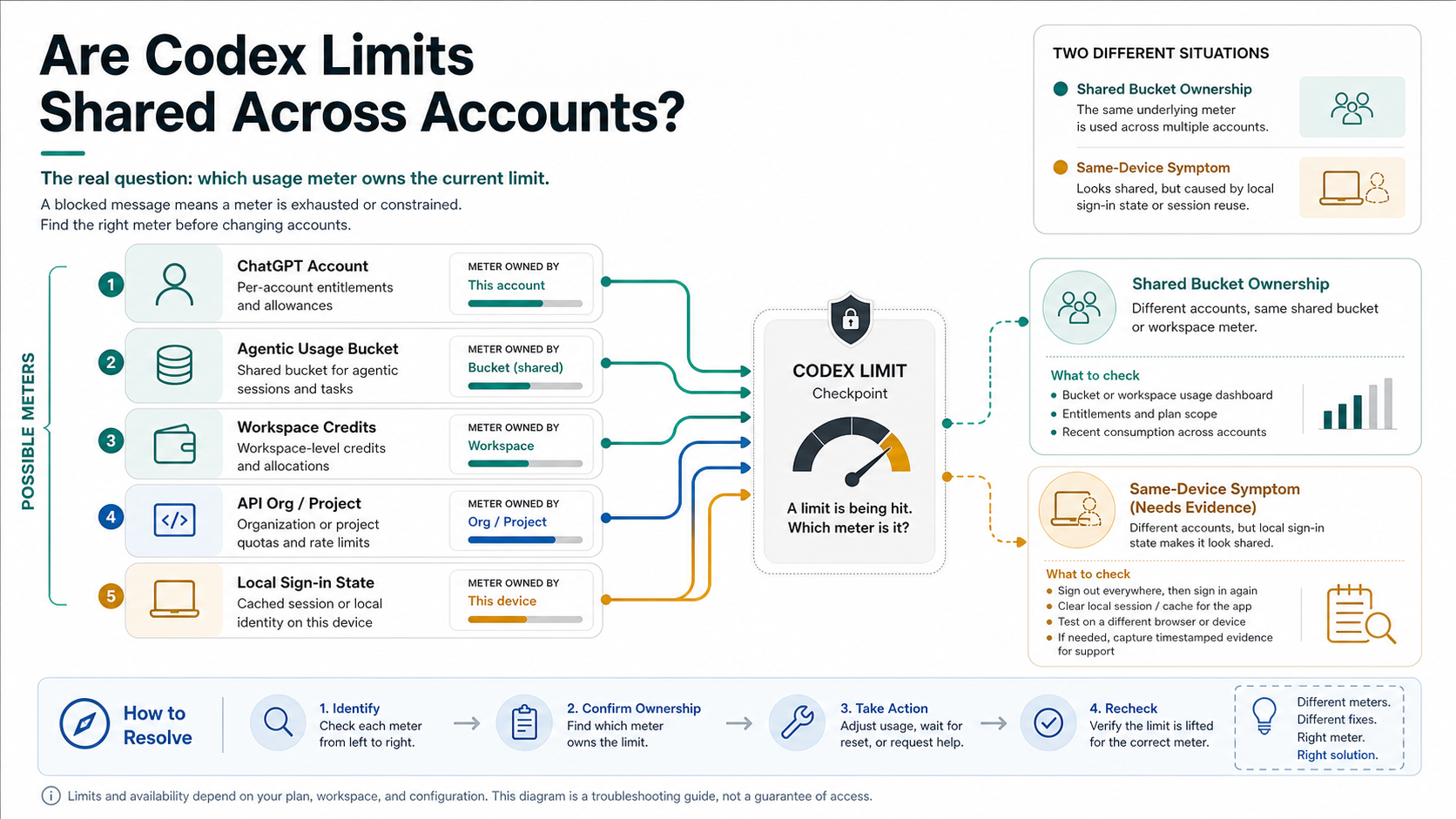
Usually, no: separate ChatGPT accounts should not be treated as one combined Codex allowance. But the limit you see can still be shared inside the active plan's agentic-usage bucket, a workspace credit arrangement, an API organization/project, or local sign-in state that is pointing Codex at the wrong account.
Start by checking the active account and auth mode, then compare the Codex usage page or /status with the workspace or API dashboard. Do not share credentials or rotate accounts to bypass a limit; if a clean Account B still shows Account A's limit in a separate browser, CLI, or IDE session, capture a redacted support packet instead of treating it as proof that every account is pooled.
| Current surface | Meter to check first | Safe next step |
|---|---|---|
| ChatGPT-plan Codex | active account and agentic usage | wait, use a smaller model, or add credits where available |
| Work or team workspace | workspace owner and seat/credit state | ask the owner before assuming a personal-account limit |
| API-key mode | API organization/project dashboard | handle it as API billing or rate limiting, not ChatGPT account switching |
| Same machine with Account A and Account B | browser, IDE, CLI, and cached sign-in state | reproduce cleanly, redact evidence, then contact support if it persists |
The short answer: which Codex meter owns the limit?
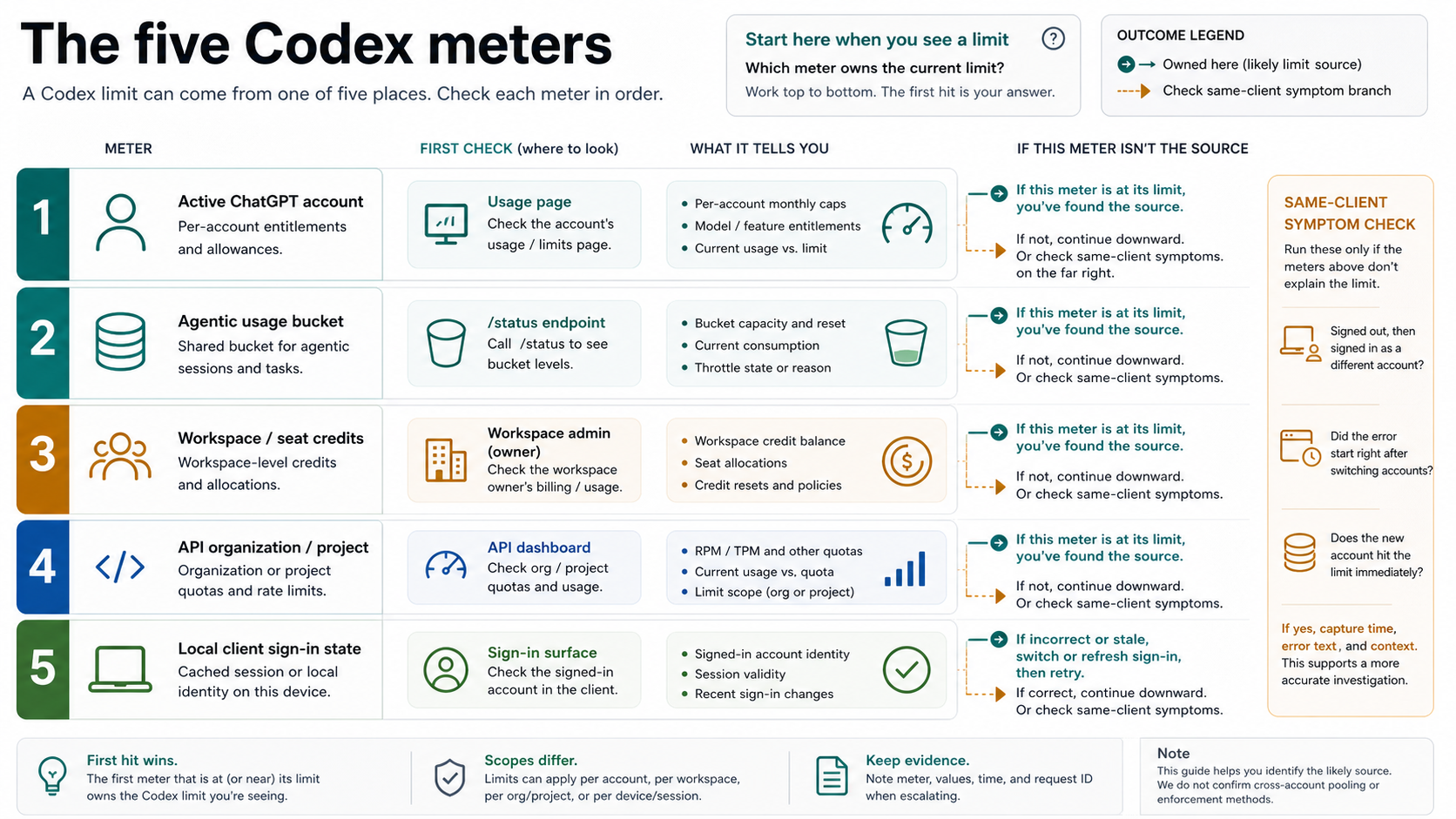
The useful answer starts with the meter, not the account count. A personal ChatGPT Plus account, a work workspace, and an API key can all open Codex-shaped work, but they do not necessarily spend from the same place. When Codex says you are limited, the first job is to identify the owner of that request.
For ordinary ChatGPT-plan Codex, the active signed-in account and its plan matter. OpenAI's Codex pricing page and Help Center guidance checked on May 25, 2026 say Codex usage depends on plan, model, task complexity, local or cloud execution, and available credits. They also say Codex usage can count toward an agentic usage limit that may be shared with other priced agentic features. That is shared usage inside the active plan's bucket, not evidence that every account on a laptop has been merged.
For API-key work, the owner changes. OpenAI's API documentation treats keys, usage, and rate limits through organization and project context. If your Codex CLI, SDK, or IDE route is using an API key, the right place to inspect is the API organization or project dashboard, not the ChatGPT account switcher.
For workspaces, ask who owns the seat or credit arrangement. Enterprise, Edu, Team, Business, and workspace-managed routes may have different controls from a personal account. The visible name in the browser is not enough; check the workspace, plan, and owner before deciding that a personal account has run out.
For a same-machine symptom, assume local evidence is needed. A browser profile, IDE extension, CLI cache, app session, or ~/.codex sign-in state can keep pointing Codex at the wrong identity. If the wrong account is active, a second paid account can look limited even though the account allowance itself is separate.
What OpenAI says can be shared
OpenAI's current Codex pricing and Help docs do not describe a single universal message quota. They describe plan-dependent usage, model-dependent consumption, local and cloud surfaces, five-hour windows in some plan rows, weekly limits where applicable, and credits in some paid plans. That makes a fixed "how many prompts do I get?" answer brittle.
The important shared item is agentic usage. OpenAI says Codex usage limits can count with other priced agentic features, currently including features such as ChatGPT for Excel and Workspace Agents on affected plans. If you used another agentic feature heavily, Codex can feel reduced even though you never opened a second Codex session.
The second shared item is the workspace or organization. A team workspace, API organization, or API project can make several users or tools spend from one administrative context. If the usage owner is the API org, then another person, key, script, or project can affect the available headroom. That is normal organization-level metering, not a mysterious device-wide Codex pool.
The third shared item is local auth state. OpenAI's Codex app server docs expose account-auth and rate-limit surfaces, including bucket and workspace limit states where available. That tells you Codex has to choose an authenticated identity before it can show a limit. If the local client has stale credentials, the visible account in one surface may not be the account Codex is using in another.
OpenAI's account-switching help says chats, memory, history, billing, and workspaces stay separate when multiple ChatGPT accounts are signed in. That supports the practical default: do not assume two legitimate accounts are meant to be one allowance. But the same help article is not a troubleshooting manual for every Codex client, cache, browser, IDE, or API-key combination.
Why another account can look limited on the same machine
The most common benign explanation is that the wrong identity is still active. A browser tab can show Account B while a Codex IDE extension, CLI, or app session still holds Account A. In that case the limit did not move across accounts; the request never left Account A's authenticated context.
A browser profile can create a similar mismatch. If two accounts are signed into one browser profile, the account switcher may preserve account data separately but still leave one surface on an older session. A cleaner test uses a separate browser profile, an incognito session, or a different device only for verification, not for bypass.
The CLI and IDE can add another layer. Codex may use ChatGPT login, API-key auth, or cached local credentials. If CODEX_API_KEY is set, the API organization may own the limit even while the user thinks they are checking a ChatGPT plan. If the CLI is logged in through ChatGPT, codex login status and /status are better starting points than guessing from browser tabs.
Workspace state can also explain the symptom. Account A might be personal, Account B might be work-managed, and the actual Codex session might still be inside a workspace with its own seat or credit rules. In that branch, ask the workspace owner or administrator which plan and limits apply.
There is also a real report pattern worth respecting. A current openai/codex GitHub issue from May 2026 describes a user switching between different paid accounts and seeing the same five-hour limit state. Treat that kind of case as reportable evidence, not as settled policy. The clean response is to reproduce carefully, redact sensitive data, and file a concise support packet.
The clean Account A / Account B check
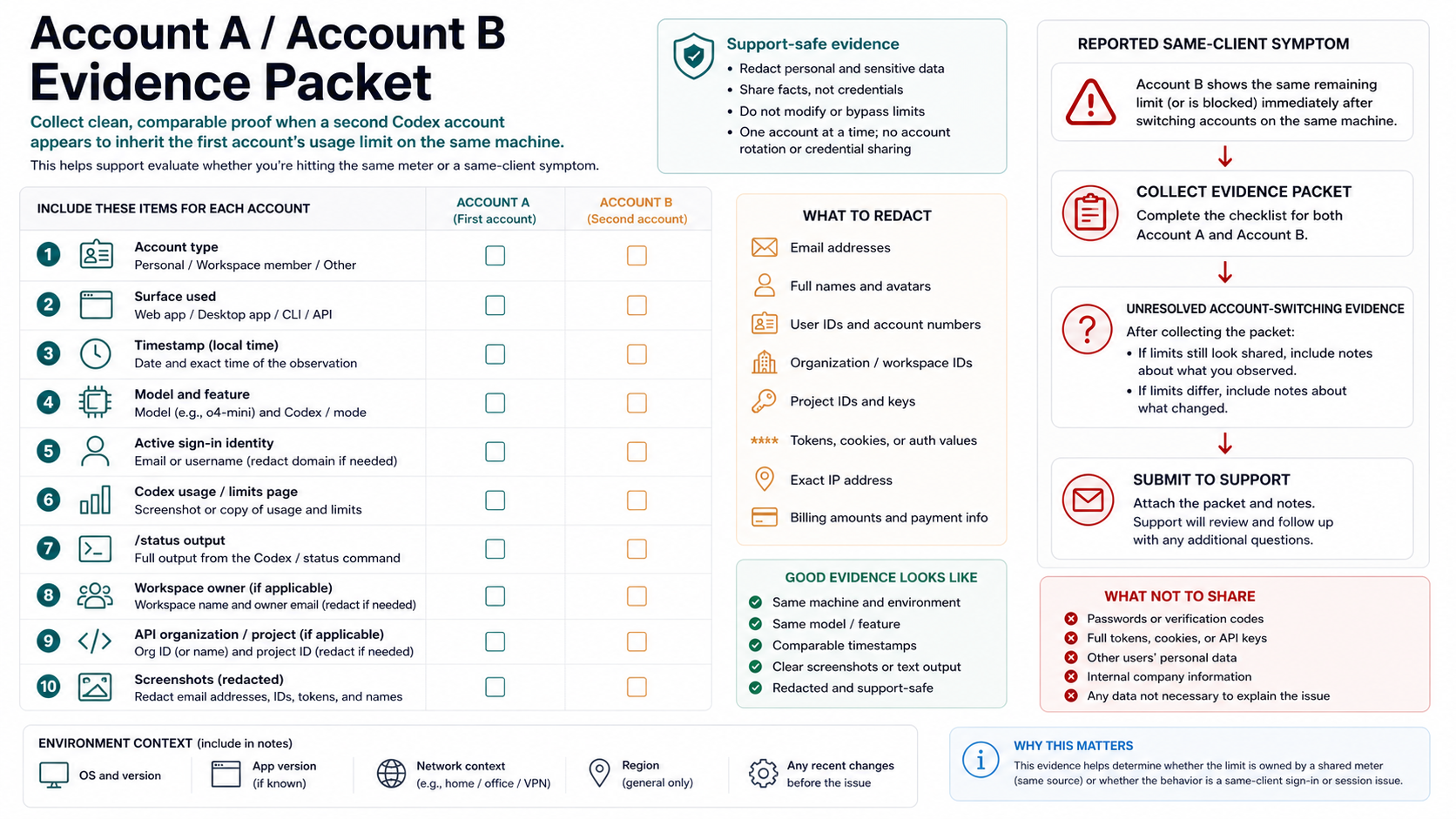
Only run this check with accounts you legitimately control. The goal is not to keep working by rotating accounts. The goal is to find out whether the current limit belongs to the active account, a workspace, an API organization, local auth state, or an unresolved same-client symptom.
Start with Account A. Record the date, time, timezone, surface, model if visible, plan or workspace label, and the exact limit wording. Take screenshots only after removing email addresses, phone numbers, billing details, tokens, API keys, and full workspace identifiers. If a usage dashboard is available, record the state without exposing account data.
Then sign out or isolate the client before checking Account B. In a browser, use a clean profile or private session. In an IDE, confirm which account the extension is using. In CLI, check whether ChatGPT login or API key mode is active. If an API key is present in the environment, record the organization/project owner because that can override your account assumption.
Use /status or the current Codex status/usage surface where available. The useful comparison is not "which account did I mean to use?" It is "which account, workspace, API org, or bucket did Codex say was active when the limit appeared?"
If Account B shows independent usage and can run normally, the first account hit its own limit. If Account B shows the same limit only in one local client, clear or refresh that client's sign-in state and retest once. If Account B shows the same limit across a clean browser, IDE, and CLI with no shared workspace or API key, preserve that as a support case.
Your support packet should be small: account types without full identifiers, surfaces, timestamps, model, limit text, active auth mode, workspace/API owner if relevant, and the clean reproduction sequence. Do not attach auth.json, access tokens, full screenshots, API keys, OTPs, billing pages, or account credentials.
Safe ways to continue after a Codex limit
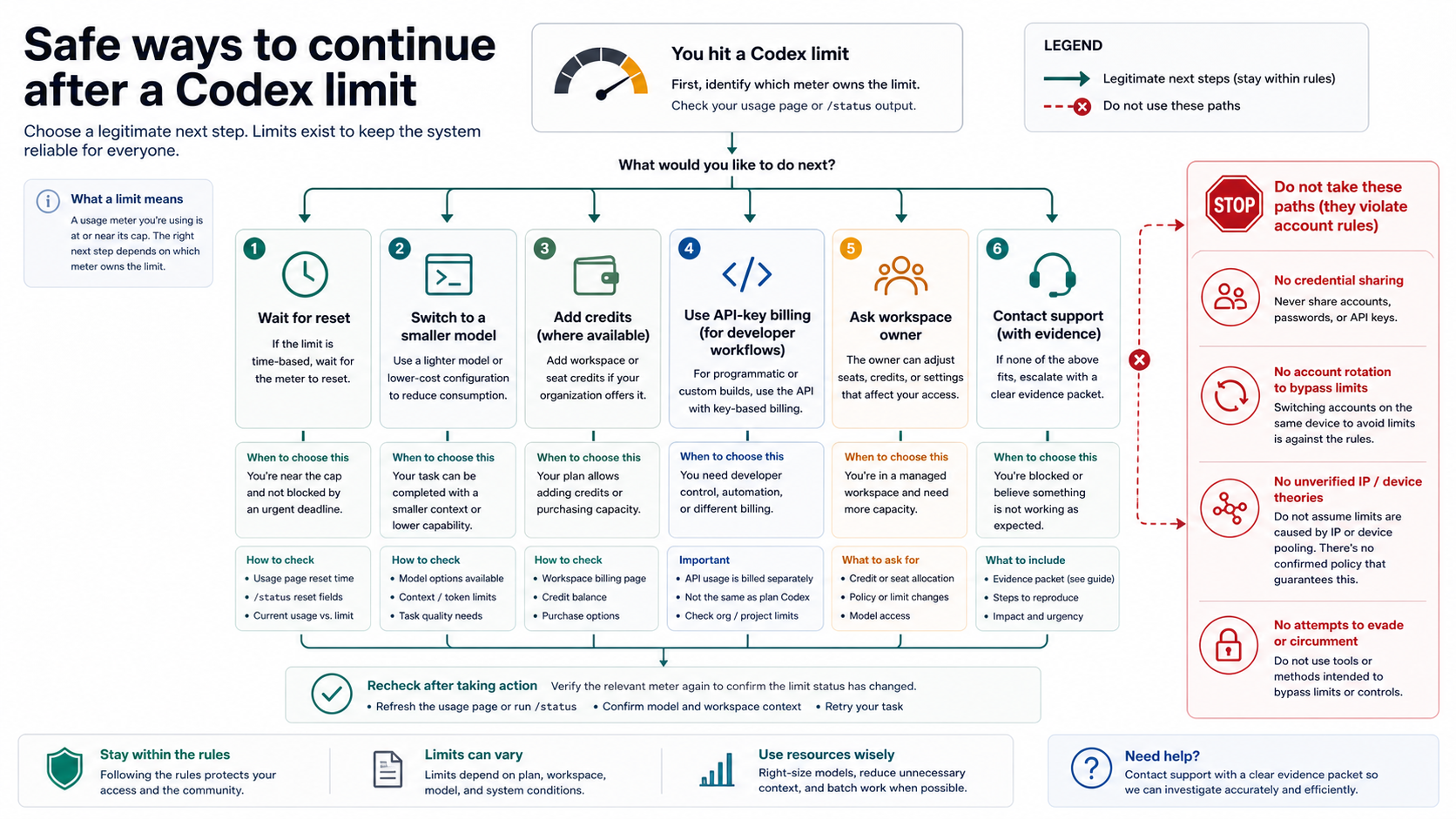
The safe continuation depends on the owner you just identified. If the active ChatGPT-plan bucket is exhausted, the clean choices are to wait for the relevant reset window, choose a smaller or less expensive model where available, reduce task size, or add credits if the plan supports that route. Do not build the article's decision around one fixed quota number because plan ranges and promotions can change quickly.
If the workspace owns the meter, the next step is not another personal account. Ask the workspace owner whether the seat, plan, credit pool, or admin policy is limiting the work. Team-managed and enterprise-managed contexts can have controls that an individual user cannot see from a personal account menu.
If an API organization or project owns the meter, handle it like API usage. Check the project limits, billing state, key owner, recent usage, and any rate-limit error. API-key Codex can be a legitimate developer continuation path when the job is CLI, SDK, or IDE work and cloud-only Codex features are not required. It is not a repair for ChatGPT-plan access, and it may not include cloud tasks, GitHub review, Slack, or other plan-bound features.
If the local client owns the confusion, refresh the client state deliberately. Sign out and back in, confirm the active account, check the IDE extension's account, inspect CLI login status, and remove stale environment assumptions one at a time. Do not change network, browser profile, workspace, account, API key, and model all at once; that makes the evidence useless.
If the symptom persists after a clean Account A / Account B reproduction, contact support or add evidence to the relevant issue channel. The strongest packet is short, dated, reproducible, and redacted. It explains what happened without asking for or revealing secrets.
Work, team, and API accounts are different meters
A work account can be separate from a personal account and still not behave like an unlimited second allowance. It may belong to a workspace, carry organization policy, use team credits, or route through enterprise controls. That is why the workspace label and owner matter as much as the email address.
Enterprise and Edu arrangements can also change the shape of limits. OpenAI's Codex pricing docs checked May 25, 2026 describe flexible pricing and credits for some enterprise/education contexts, while other contexts can follow per-seat style allowances. The article's action does not depend on memorizing every row; it depends on knowing whether the seat, workspace, or credit owner is the real meter.
API work is even more distinct. An API key can let a developer keep a CLI or SDK workflow moving when ChatGPT-plan Codex is limited, but it also changes billing, logs, permissions, model availability, and support ownership. If you need cloud-based Codex features, API-key mode may not replace them. If you only need a local CLI or IDE request and you control the API org, it can be a valid separate route.
This is also where existing route-choice context helps. For a broader workflow decision between local and delegated coding surfaces, see Claude Code vs Codex. For provider/API route boundaries, see Codex with Azure OpenAI. If the symptom is really account login or verification rather than usage, use Codex phone verification as the adjacent branch.
What not to do
Do not share credentials. OpenAI's Terms of Use effective January 1, 2026 prohibit sharing account credentials and circumventing rate limits or restrictions. Even if another account belongs to you, using account switching as a deliberate bypass can make the problem harder to explain and easier to mishandle.
Do not assume an IP or device-wide policy without evidence. Same-machine reports are real enough to diagnose, but a visible symptom is not proof that OpenAI intentionally pooled all accounts by IP, browser, device, or network. Present that branch as a reproducible support case until first-party guidance says otherwise.
Do not buy a second paid account before checking the meter. If the active session is still Account A, if the API key belongs to the same organization, or if the workspace owns the usage, another subscription may not change the immediate limit. Spend only after the owner is clear.
Do not publish or send raw secrets as evidence. A useful screenshot can show the surface, limit wording, date, and plan/workspace context with sensitive fields removed. It should never include OTPs, full emails, access tokens, API keys, billing details, or local credential files.
FAQ
Do separate ChatGPT accounts get one Codex allowance?
The safe default is no. Separate ChatGPT accounts should not be treated as one combined allowance. But the active Codex request may still belong to a shared agentic bucket, workspace, API organization/project, or cached local session, so you need to inspect the active meter before drawing a conclusion.
Is Codex usage shared with ChatGPT for Excel or Workspace Agents?
OpenAI's Codex pricing and Help guidance checked May 25, 2026 say Codex can count toward an agentic usage limit shared with other priced agentic features, currently including examples such as ChatGPT for Excel and Workspace Agents on affected plans. Treat that as sharing inside the plan's agentic meter, not cross-account pooling.
Can a Team, Business, Enterprise, or Edu workspace affect my limit?
Yes. A workspace can change the meter owner, plan rules, credit pool, admin policy, or support path. If Codex is running inside a work-managed context, ask the workspace owner before assuming the limit is personal.
Does API-key mode use the same Codex allowance as ChatGPT?
No. API-key mode should be treated as API usage through an organization/project with its own billing and limits. It can help developer CLI, SDK, or IDE work, but it does not automatically include cloud-based Codex features or repair ChatGPT-plan access.
What if Account B is clean but still shows Account A's limit?
First rule out shared workspace, shared API organization, and stale local sign-in state. Then reproduce in a clean browser profile, IDE, or CLI session. If the symptom survives that test, record the evidence and contact support or attach a concise, redacted reproduction to the relevant issue channel.
Is using multiple accounts allowed?
Legitimate separation between personal and work accounts is different from credential sharing or deliberate rate-limit circumvention. Keep credentials private, use accounts you control, follow workspace policy, and do not rotate accounts as a bypass tactic.
What should I check first when the limit appears?
Check the active account and auth mode first. Then check Codex usage or /status, workspace owner, API organization/project, and local client sign-in state. Most wrong conclusions come from checking those in the opposite order.