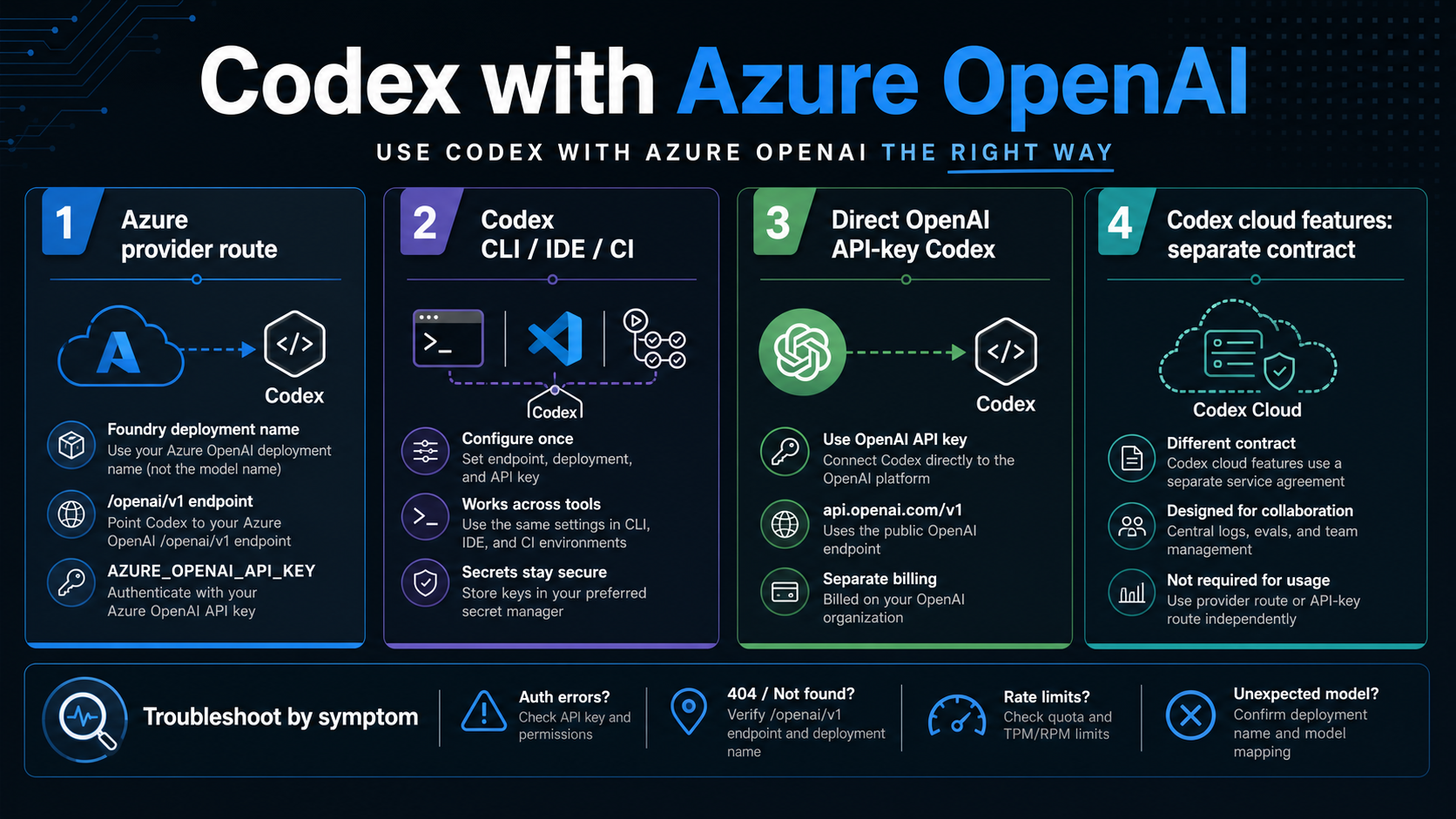
Codex can use Azure OpenAI in Microsoft Foundry, but the setup only works cleanly after you choose the Codex surface. Use the Azure provider route for the Codex CLI, IDE extension, or CI-style automation when your team needs Azure deployment and compliance control; use direct OpenAI API-key Codex when Azure is not the reason for the setup; treat Codex cloud tasks, GitHub code review, and Slack or team cloud features as separate contracts rather than features unlocked by an Azure API key.
The first setup rule is field-level: model should be the Foundry deployment name you created, base_url should point to the Azure resource path ending in /openai/v1, env_key should name the environment variable that holds the Azure OpenAI key, and the current route uses the Responses wire API. If those four pieces do not line up, the first Codex run will fail before the article's larger Azure-versus-OpenAI decision even matters.
Current auth caveat: Microsoft troubleshooting says Entra ID support is not currently available for Codex on this route, so the first proof step is whether the shell, IDE, or runner can actually read the API key. After that, debug by symptom: missing env var, 401 or 403, DNS or 404, model not found, provider ignored, or VS Code and WSL seeing different environments.
Quick Route Verdict
Use the Azure provider route when the job is to run Codex tooling against an Azure OpenAI deployment. Do not use it as a shortcut for moving every Codex product surface into Azure, and do not use a normal Azure OpenAI app-integration pattern when the thing you are configuring is Codex itself.
| Reader job | Correct route | Stop rule |
|---|---|---|
| Run Codex from terminal, the IDE extension, or a CI-style runner while using Azure OpenAI | Configure Codex with an Azure model provider | Continue only if the runtime can read the Azure OpenAI API key |
| Use Codex locally with the simplest OpenAI path | Use direct OpenAI API-key Codex | Do not add Azure unless Azure hosting, billing, compliance, or governance is the point |
| Use Codex cloud tasks, GitHub code review, Slack, or team cloud features | Treat these as separate Codex product contracts | An Azure API key does not automatically unlock these cloud features |
| Build an application that calls Azure OpenAI | Use the Azure OpenAI API for that app | Do not copy Codex CLI config into app runtime code |
| Decide between OpenAI API and Azure OpenAI as platforms | Compare platform tradeoffs first | The broader platform choice belongs before the Codex-specific setup |
Microsoft's current Azure how-to frames this as "Codex with Azure OpenAI in Microsoft Foundry Models" and shows Codex running on Azure infrastructure from terminal, VS Code, or GitHub Actions. OpenAI's Codex docs, meanwhile, describe Codex as multiple surfaces: app, IDE extension, CLI, and cloud. Those two facts fit together only if the route is scoped correctly: Azure is the provider path for supported Codex execution, not a universal feature merger.
If the real question is broader than Codex, start with the platform decision in OpenAI API Key vs Azure OpenAI. If the platform is already Azure and the task is Codex setup, stay on the route below.
Prerequisites Before Editing config.toml
The Azure route starts outside Codex. You need an Azure subscription and a Microsoft Foundry project with an Azure OpenAI resource that can deploy a model suitable for the Codex work you plan to run. As of May 18, 2026, Microsoft documents current Codex-oriented deployment examples such as gpt-5.3-codex, gpt-5.2-codex, gpt-5.1-codex, and related GPT-5 families, but model availability can vary by region, quota, subscription, and future rollout changes. Treat the exact list as a dated example, then confirm the available model family in your Foundry project before you write the Codex config.
The second prerequisite is a deployment name. Azure OpenAI separates the public model family from the deployment you create in Foundry. Codex needs the deployment name in the model field. If the deployment is named codex-prod-eastus, then model = "codex-prod-eastus" is the value Codex should use, even if the underlying model family is something like gpt-5.3-codex.
The third prerequisite is a key that the runtime can read. Microsoft examples use an environment variable such as AZURE_OPENAI_API_KEY; OpenAI's provider documentation also supports env-key based auth for custom providers. The important part is not the literal variable name by itself. The important part is that env_key in config.toml points to the same variable name that exists in the shell, IDE, WSL session, or runner environment where Codex starts.
Before writing the provider block, confirm these four facts:
- the Azure resource endpoint is known and reachable;
- a model deployment exists and the deployment name is copied exactly;
- the API key is available in the same environment that launches Codex;
- the Codex CLI or IDE extension is installed and can read
~/.codex/config.toml.
Missing any one of those will create a misleading Codex error. A 401 can look like a bad Codex setup when the real issue is the key. A model error can look like unsupported Azure routing when the real issue is a deployment-name mismatch.
The Codex Config Field Map
The configuration is small, but every field carries a specific proof obligation. Copying a block without understanding the field map is the fastest way to lose time on the first request.
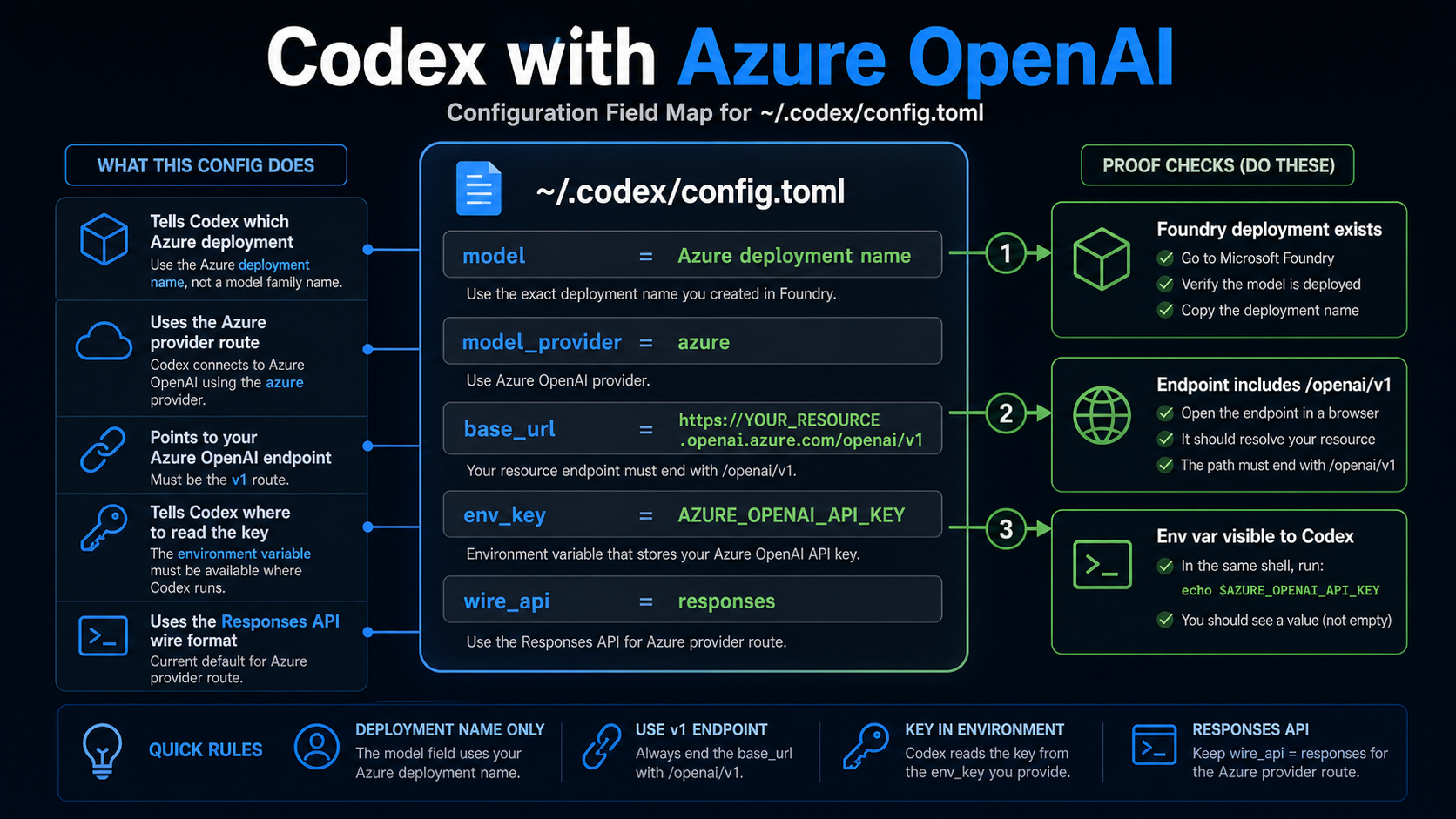
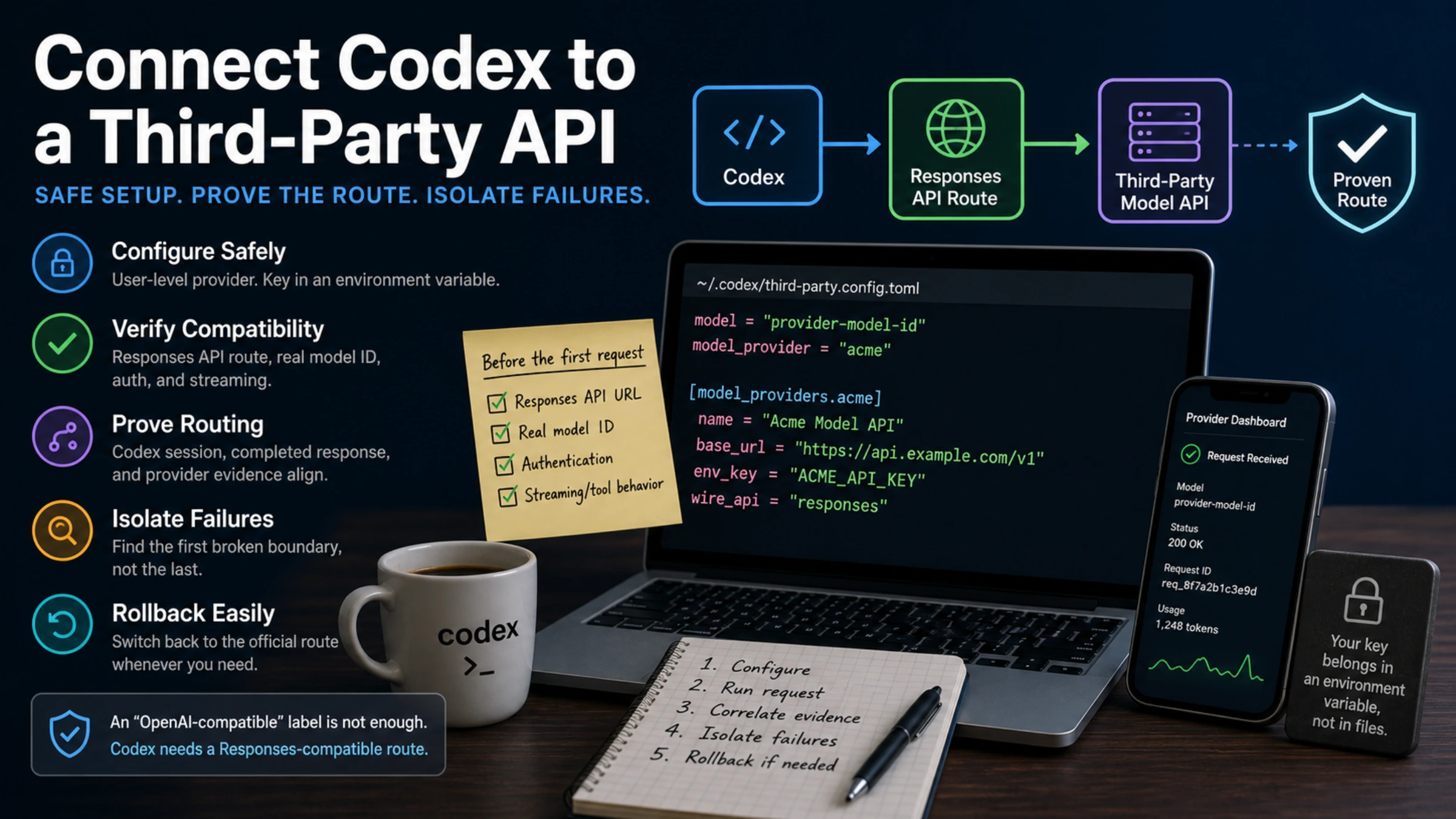
A current Azure provider setup follows this shape:
model = "YOUR_AZURE_DEPLOYMENT_NAME"
model_provider = "azure"

[model_providers.azure]
name = "Azure OpenAI"
base_url = "https://YOUR_RESOURCE_NAME.openai.azure.com/openai/v1"
env_key = "AZURE_OPENAI_API_KEY"
wire_api = "responses"
model is the Azure deployment name. This is the most common place to make a wrong assumption because OpenAI and Azure documentation often discuss model family names, while Codex needs the deployed name that your Azure resource exposes.
model_provider points Codex at the provider block. The provider id must match the table name under [model_providers.<id>]. In the example above, model_provider = "azure" connects to [model_providers.azure].
base_url points to the Azure OpenAI resource endpoint and includes /openai/v1. Microsoft says the current v1 Responses API path does not need an api-version query parameter when /v1 is included in the path. That matters because older Azure OpenAI examples often teach api-version as muscle memory. Do not mix older preview patterns into this route unless you are intentionally following a different documented path.
env_key names the environment variable that holds the Azure OpenAI key. If you prefer a different name for internal policy reasons, the config can point at that name, but the same name must exist in the runtime environment.
wire_api = "responses" tells Codex which API shape to use for this provider. OpenAI's Codex configuration docs describe provider entries as the place where base URL, wire API, authentication, and headers belong. Microsoft's current Codex with Azure OpenAI example uses the Responses wire API for the Azure route.
Where This Route Applies
The Azure provider route is strongest when the engineer wants Codex behavior but the organization needs Azure hosting, billing, governance, or compliance boundaries. That usually means local terminal work, IDE extension work, or automation that can run Codex with the same provider config and a secret supplied by the runner.
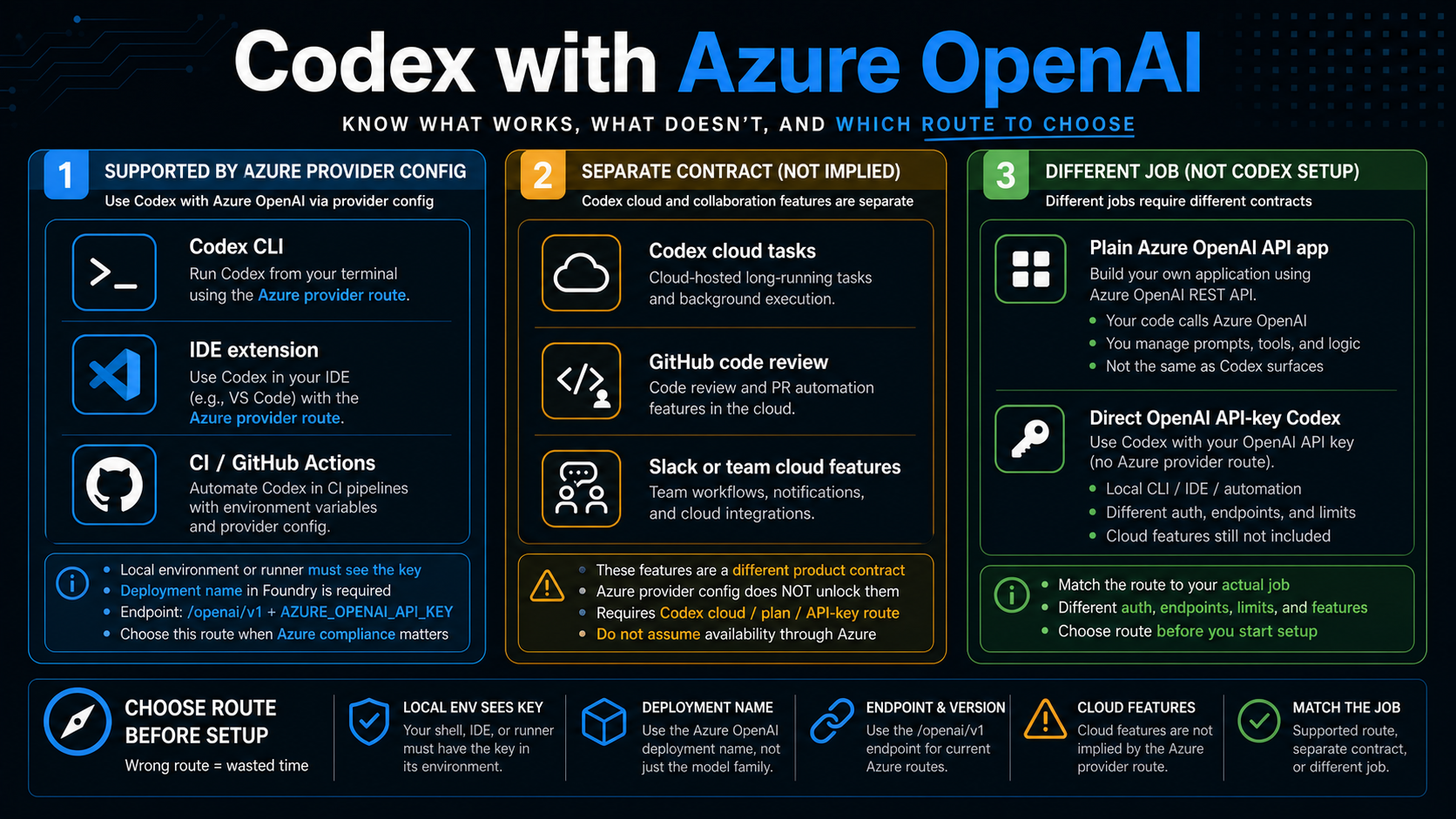
For terminal use, the proof step is simple: open the same shell where the key is exported, run Codex, and confirm the first request reaches the Azure deployment. If the provider block is correct, a failure after that is usually auth, endpoint, deployment, quota, or network, not "Codex cannot use Azure."
For VS Code or another IDE extension surface, environment visibility becomes the risk. The extension may reuse the CLI configuration, but it may not inherit the exact shell variables you exported in a terminal. Launching VS Code from a shell that has the key, setting the key in the extension's effective environment, or aligning WSL and Windows host variables can be the difference between a working CLI and a failing IDE.
For GitHub Actions or other CI-style automation, treat the provider route as a normal secret-management problem. Store the Azure key in the runner's secret store, expose it under the variable name referenced by env_key, and avoid printing it in logs. The deployment name and endpoint should be repo or environment configuration, while the API key belongs in the secret store.
This route does not prove that every Codex cloud capability can run under Azure. OpenAI's current Codex quickstart and pricing pages separate app, IDE extension, CLI, cloud, ChatGPT-plan usage, and API-key usage. The pricing page also describes API-key Codex as CLI, SDK, or IDE oriented and says it does not include cloud-based features such as GitHub code review or Slack. Keep those product contracts separate when deciding what to buy, configure, or promise internally.
What Not to Assume
Do not assume Microsoft Entra ID works just because Azure OpenAI broadly supports enterprise identity patterns. Microsoft troubleshooting for the Codex with Azure OpenAI route currently says Entra ID support is not available for Codex. That is a route-specific limitation, not a statement about every Azure OpenAI integration. For this Codex setup, start with API-key environment-variable proof.
Do not assume OPENAI_API_KEY and AZURE_OPENAI_API_KEY are interchangeable. Some examples in adjacent tooling may use OpenAI-shaped variable names, but Codex reads the environment variable named by env_key. If the config says env_key = "AZURE_OPENAI_API_KEY", then exporting only OPENAI_API_KEY will not satisfy that provider block.
Do not assume a public model name is enough. Azure deployments are named objects. The deployment can use a model family under the hood, but Codex calls the deployment. Use the deployment name, then separately track which model family that deployment maps to.
Do not assume the direct OpenAI API-key route and the Azure provider route have the same feature set. Direct API-key Codex is a valid path for local, CLI, SDK, or IDE work when Azure is not needed. It is also distinct from ChatGPT-plan Codex cloud features. If a team is choosing the path because of GitHub review, Slack, cloud tasks, or team management, validate that product surface directly instead of inferring it from provider config.
Troubleshooting by Symptom
When the first run fails, debug the symptom instead of rewriting the whole setup. Most failures prove one specific layer: key visibility, permission, endpoint, deployment, provider selection, or IDE environment split.
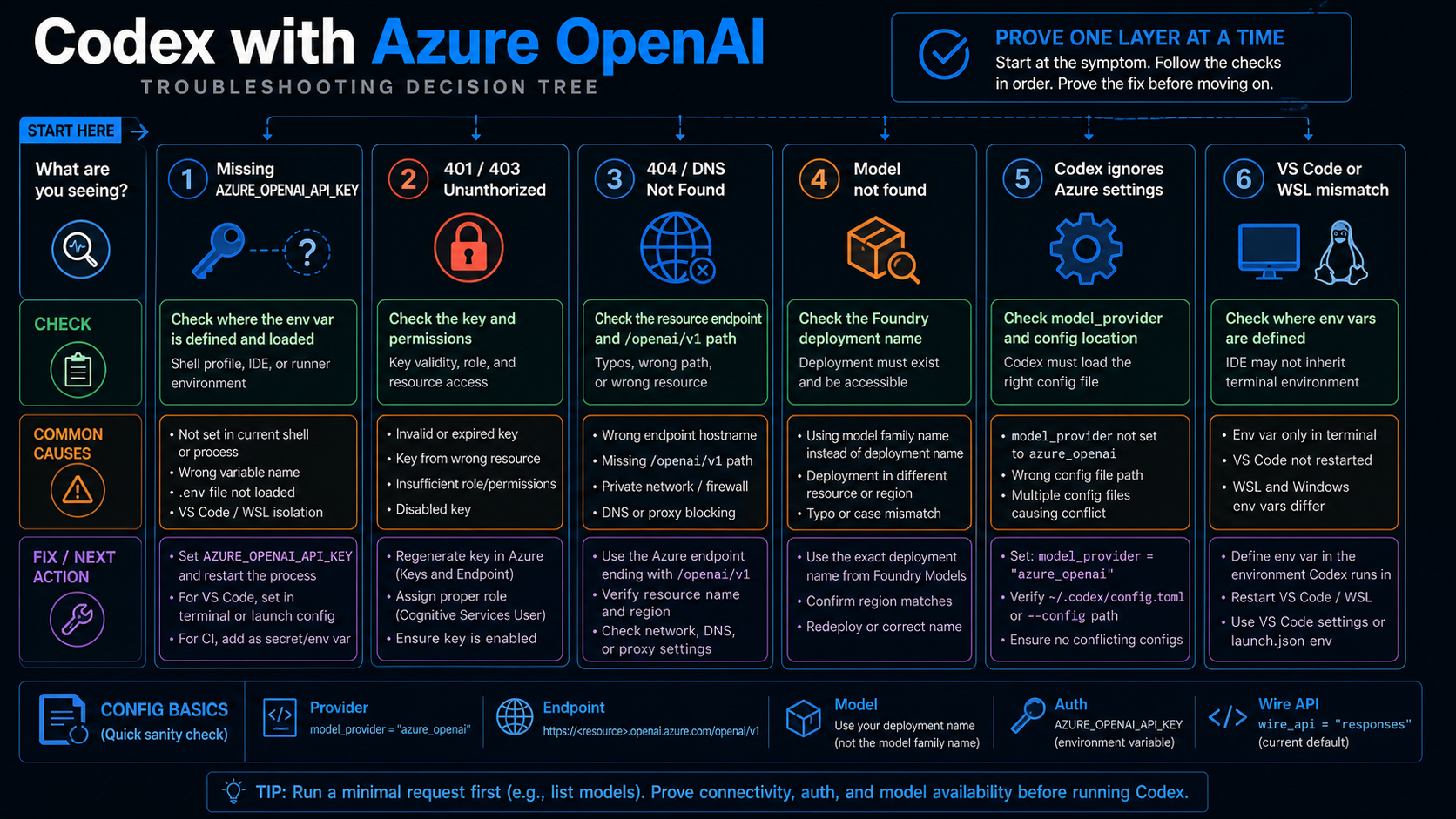
If Codex says the key is missing, inspect the environment visible to the process that launched Codex. In a terminal, print only whether the variable exists; do not print the secret. In an IDE, confirm whether the extension inherited the terminal environment. In CI, confirm the secret name is mapped to the exact variable named in env_key.
If the failure is 401 or 403, treat it as an authentication or authorization problem first. Confirm the key belongs to the Azure OpenAI resource in the endpoint, not a different resource. Confirm the key has not been rotated. Confirm the resource, project, subscription, and deployment permissions match the identity or secret used by the runtime. Do not fix a 401 by changing the deployment name before key and permission proof is done.
If the failure is DNS, connection, or 404, inspect the endpoint. The current v1 route should look like https://YOUR_RESOURCE_NAME.openai.azure.com/openai/v1. A typo in the resource name, missing /openai/v1, wrong Azure cloud domain, private network restriction, or corporate proxy can all produce failures that look like Codex provider problems.
If the failure is "model not found" or the model appears unavailable, inspect the Azure deployment. The model field should be the deployment name. Confirm the deployment is active, deployed in the expected Azure OpenAI resource, available in the region, and not blocked by quota. If the organization renamed deployments for environments such as dev, staging, and prod, verify which name the current config points to.
If Codex appears to ignore the Azure settings, inspect model_provider and the config location. model_provider = "azure" must match [model_providers.azure]. The file should live where the Codex surface reads it, usually ~/.codex/config.toml for the CLI. If multiple machines, containers, WSL sessions, or runners are involved, confirm you edited the config that the active Codex process actually loads.
If the CLI works but VS Code fails, treat it as an environment split. VS Code may have been launched before the variable existed, launched from a GUI context that does not inherit shell exports, or connected to a WSL environment where the Windows-side variable is not present. Restarting the IDE from a configured shell or setting the variable in the remote environment usually matters more than changing the provider block.
Azure Route or Direct OpenAI API-Key Codex?
Choose Azure when the organization needs Azure infrastructure, Azure billing, Microsoft support path, Azure governance, private networking expectations, or a compliance boundary that the direct OpenAI route does not satisfy. Azure can be the right answer even when setup is more complex, because the value is not setup speed. The value is operational fit inside an Azure estate.
Choose direct OpenAI API-key Codex when the team only needs local or IDE-oriented Codex access and does not need Azure as the provider. The direct route is simpler, avoids deployment-name indirection, and keeps the setup closer to OpenAI's default Codex documentation. It can be the better path for solo developers, prototypes, and teams that do not have Azure governance requirements.
Choose a ChatGPT-plan or Codex cloud path only when the desired product surface is actually cloud delegation, GitHub code review, Slack, or team workflow management. Those needs are not answered by changing a local provider block. They are product-surface choices first and provider choices second.
For teams still choosing the platform, split the decision this way:
| Decision | Azure provider route wins when | Direct OpenAI API-key Codex wins when |
|---|---|---|
| Governance | Azure policy, billing, or compliance is required | Simple local access matters more |
| Setup speed | Slower setup is acceptable for platform fit | Fastest path to a working Codex session matters |
| Model naming | Deployment names and region constraints are normal for the team | Public model names and direct provider defaults are easier |
| Troubleshooting | The team can debug Azure resource, endpoint, quota, and identity layers | The team wants fewer infrastructure layers |
| Cloud features | Feature needs are validated separately | Feature needs are validated separately |
The cleanest implementation plan is to decide the surface first, then the provider, then the deployment, then the runtime environment. Reversing that order leads to copied config blocks that work in one terminal and fail everywhere else.
FAQ
Can Codex use Azure OpenAI?
Yes. Microsoft has a current "Codex with Azure OpenAI in Microsoft Foundry Models" setup route, and OpenAI's Codex configuration system supports custom providers. The practical boundary is surface-specific: use this route for Codex CLI, IDE extension, or automation-style work that can read the Azure provider config.
Is Microsoft Entra ID supported for this Codex route?
Not currently, according to Microsoft's troubleshooting guidance checked on May 18, 2026. Treat that as a current route-specific limitation and start with API-key environment-variable proof. Do not generalize it to every Azure OpenAI integration.
Should model be the Azure model family or the deployment name?
Use the deployment name. The deployment may point to a model family such as a Codex-oriented GPT-5 family, but Codex should call the Azure deployment you created in Foundry.
Do I need an api-version query parameter?
For the current v1 route documented by Microsoft, the endpoint includes /openai/v1, and Microsoft says api-version is not needed for that path. Older Azure OpenAI examples may include api-version; do not mix those patterns into the current Codex provider example without a documented reason.
Does this unlock Codex cloud, GitHub code review, or Slack?
No. Those are separate Codex product surfaces. The Azure provider route configures where supported Codex execution sends model requests. It does not automatically turn an Azure API key into a Codex cloud subscription or a team feature bundle.
Why does Codex work in terminal but not in VS Code?
The usual cause is environment visibility. The terminal has the key, but the IDE extension was launched from a context that did not inherit it, or the extension runs in a different WSL, remote, or container environment. Confirm the variable named by env_key exists where the extension process runs.
Which Azure model should I deploy for Codex?
Deploy a currently available Codex-capable or reasoning model that your Azure region and quota can use. Microsoft model lists change, so treat examples such as gpt-5.3-codex or gpt-5.2-codex as dated examples from the May 18, 2026 check rather than permanent availability guarantees.
Where should I go for exact setup details?
Use Microsoft's Codex with Azure OpenAI in Microsoft Foundry Models page for the Azure route, OpenAI's custom model providers and config reference for Codex provider mechanics, OpenAI's Codex quickstart and pricing pages for surface boundaries, and Microsoft's Foundry model documentation for current Azure model context.