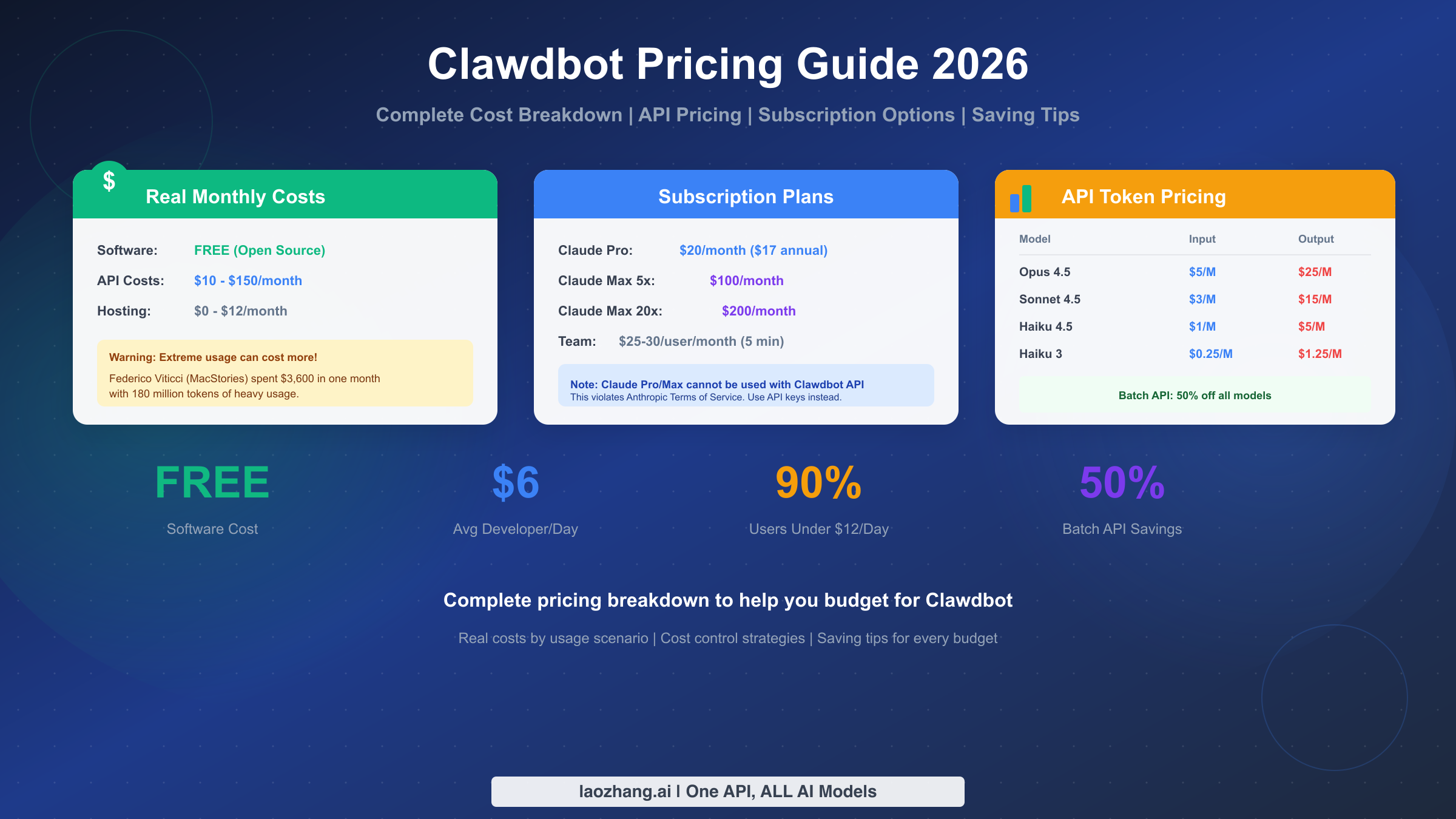
Clawdbot costs break down into three layers: the software itself is completely free (open source under MIT license), hosting ranges from $0 to $12/month depending on whether you run locally or on a VPS, and API usage—the main variable—typically costs $10 to $150 per month for most users. Extreme usage without spending limits can reach thousands of dollars, as one notable case demonstrated with a $3,600 monthly bill. This guide provides everything you need to estimate your costs, choose between subscription and API options, and implement strategies that can reduce your expenses by up to 80%.
Quick Cost Overview - What You'll Actually Pay
Before diving into the details, here's what you need to know about Clawdbot costs right now. The software that powers Clawdbot (now officially called OpenClaw) is completely free and open-source. You download it, install it, and use every feature without paying anything for the application itself. However, Clawdbot needs AI models to function, and accessing those models through APIs is where your costs come from.
The typical monthly cost range for most users falls between $10 and $150, with the exact amount depending entirely on how much you use the tool and which AI models you prefer. Light users who spend an hour or two daily on simple tasks can expect to pay around $10-30 per month. Regular users engaged in daily development work typically spend $40-80. Power users running complex automations and multi-step reasoning tasks often see bills in the $100-200 range.
Important Warning: These costs assume you set reasonable spending limits. Federico Viticci, a well-known tech journalist from MacStories, famously burned through 180 million tokens in his first month of heavy Clawdbot usage—resulting in approximately $3,600 in API charges. This extreme case illustrates why understanding costs and setting limits matters before you start using Clawdbot seriously.
One critical misconception to address immediately: you cannot use your Claude Pro or Claude Max subscription directly with Clawdbot's API features. Those subscriptions are for Anthropic's web interface only, and using them with third-party tools like Clawdbot violates Anthropic's Terms of Service. You must use pay-as-you-go API credits or consider alternative options covered later in this guide.
Understanding the Cost Structure
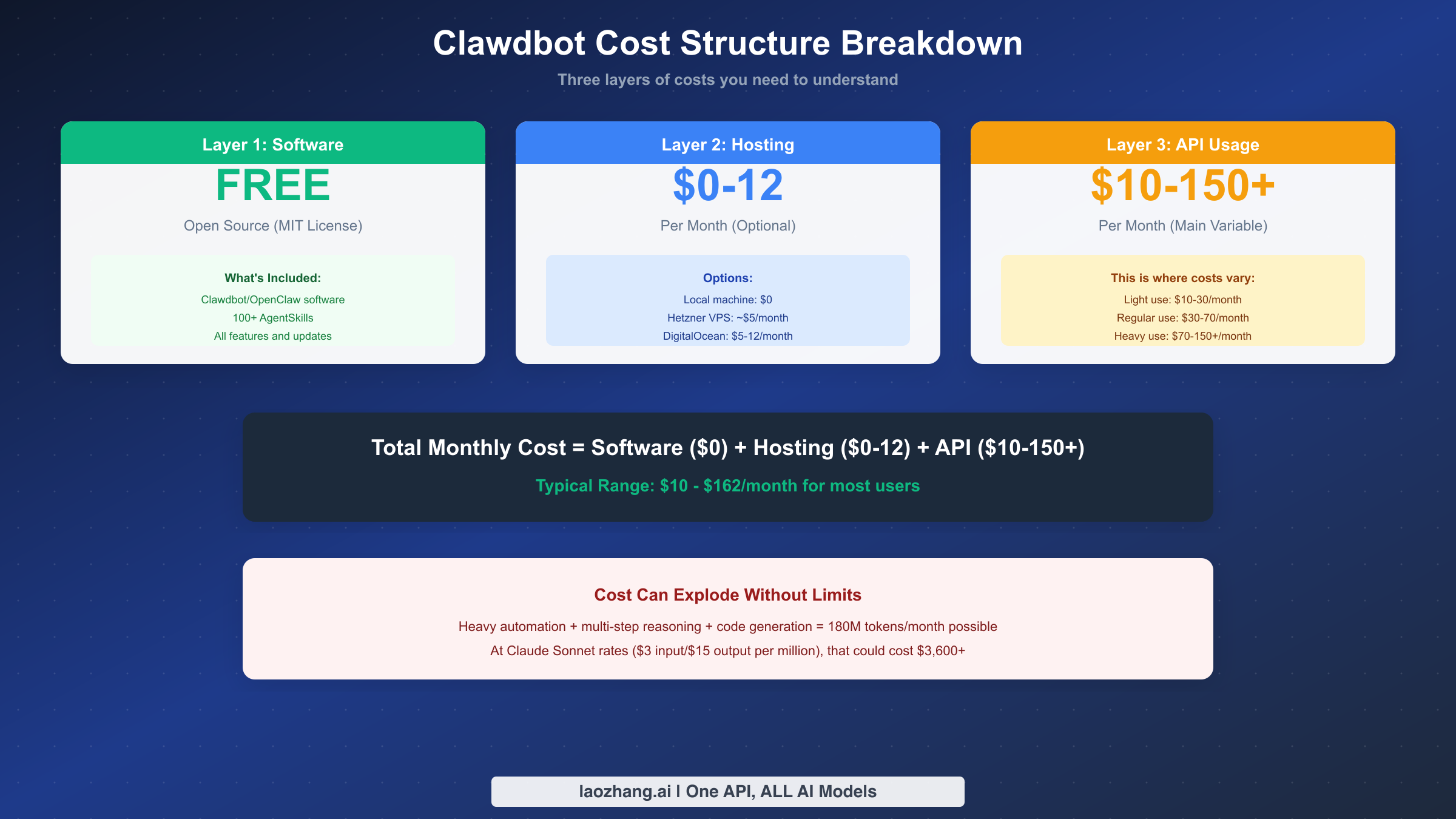
Clawdbot's costs follow a three-layer model that every user should understand before starting. Each layer contributes differently to your total monthly expenses, and knowing where your money goes helps you make better decisions about how to use the tool effectively while managing costs.
The first layer is the software itself, which carries zero cost. OpenClaw is distributed under the MIT license, meaning you can download, modify, and use it freely. This includes all features—the 100+ built-in AgentSkills, browser automation capabilities, messaging integrations (Discord, Slack, WhatsApp), and the entire infrastructure for running AI-powered automations. Unlike many developer tools that charge subscription fees for professional features, OpenClaw keeps everything open and accessible.
The second layer covers hosting, which ranges from $0 to approximately $12 per month. Running Clawdbot on your local machine (Mac, Windows, or Linux) costs nothing beyond your existing hardware and electricity. Many users choose this option for development and personal use. For always-on availability, cloud hosting on services like Hetzner (around $5/month), DigitalOcean ($5-12/month), or similar VPS providers offers reliable 24/7 operation. Some cloud platforms offer one-click deployment templates specifically for OpenClaw, simplifying the setup process.
The third layer—and the one that determines your actual monthly expenses—is API usage. Every time Clawdbot interacts with an AI model to process your requests, generate responses, or execute complex reasoning chains, you pay for the tokens consumed. This pay-per-use model means your costs directly correlate with usage volume and model choice. Choosing Claude Haiku 4.5 for simple tasks instead of Claude Opus 4.5 for everything can reduce costs by a factor of five to twenty-five, depending on the specific operation.
Understanding this structure reveals an important insight: Clawdbot's effective cost isn't a fixed subscription fee you pay regardless of usage—it's a variable expense you control through your choices about when to use it, which models to select, and how efficiently you structure your workflows. For those getting started with Clawdbot, the installation and deployment guide covers setup options that help you begin with minimal overhead.
Complete Claude API Pricing Reference
Accurate pricing information enables informed decision-making, so this section provides the complete official pricing for all Claude models available through the Anthropic API as of February 2026. These prices apply when using Clawdbot with direct Anthropic API access.
Claude Model Pricing (per million tokens)
| Model | Input Price | Output Price | Batch Input | Batch Output |
|---|---|---|---|---|
| Claude Opus 4.5 | $5 | $25 | $2.50 | $12.50 |
| Claude Opus 4.1 | $15 | $75 | $7.50 | $37.50 |
| Claude Opus 4 | $15 | $75 | $7.50 | $37.50 |
| Claude Sonnet 4.5 | $3 | $15 | $1.50 | $7.50 |
| Claude Sonnet 4 | $3 | $15 | $1.50 | $7.50 |
| Claude Haiku 4.5 | $1 | $5 | $0.50 | $2.50 |
| Claude Haiku 3.5 | $0.80 | $4 | $0.40 | $2 |
| Claude Haiku 3 | $0.25 | $1.25 | $0.125 | $0.625 |
Several features affect pricing beyond base token costs. Prompt caching offers significant savings when you reuse system prompts or conversation context. Writing to the 5-minute cache costs 1.25x the base input price, writing to the 1-hour cache costs 2x, but reading from cache costs only 0.1x—a 90% savings on cached content. For applications with repetitive context, this represents substantial cost reduction.
The Batch API provides a flat 50% discount on all models for non-urgent processing. Requests submitted to the batch endpoint process within 24 hours rather than immediately, making this ideal for background tasks, bulk operations, or any workflow where immediate response isn't critical.
Long context pricing applies when using the 1M token context window (currently in beta for Claude Sonnet 4/4.5). Requests exceeding 200K input tokens incur premium rates: input jumps from $3/MTok to $6/MTok, and output increases from $15/MTok to $22.50/MTok. This premium applies to the entire request, not just tokens beyond 200K.
For developers already working with Claude APIs, the complete Claude API pricing guide provides additional detail on calculating costs for specific use cases and comparing with alternative providers.
Real Costs by Usage Scenario
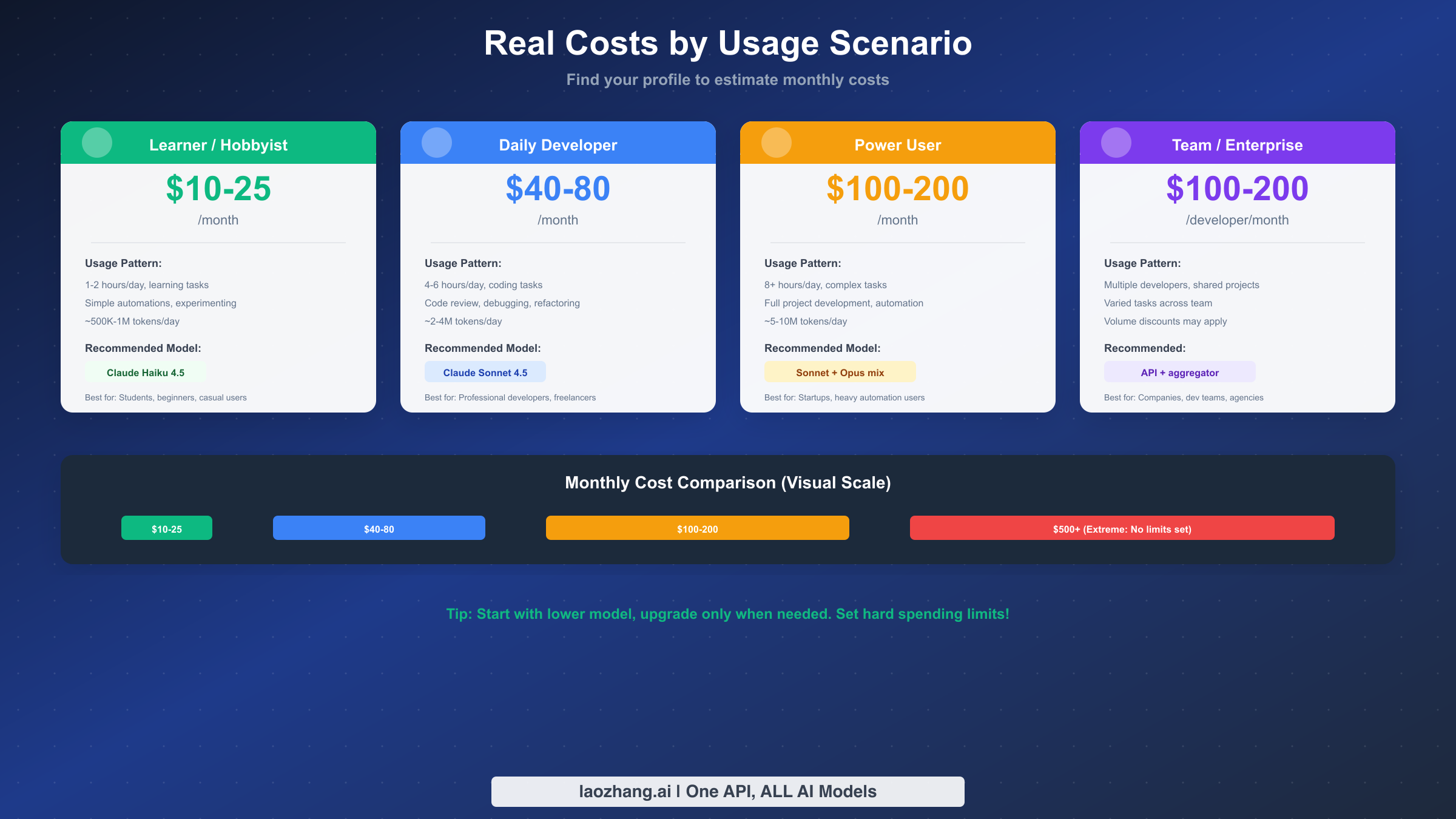
Abstract token prices don't translate easily into monthly budgets, so this section maps pricing to real-world usage patterns. Find the scenario that matches your expected use, and you'll have a reasonable estimate of what to budget.
Learner / Hobbyist: $10-25/month
This profile applies to users exploring Clawdbot's capabilities, learning AI-assisted development, or using it occasionally for personal projects. Typical usage involves 1-2 hours daily, primarily simple tasks like quick questions, basic code generation, or experimenting with automations. Token consumption runs approximately 500K-1M tokens per day.
At Claude Haiku 4.5 rates ($1 input/$5 output per million), a user consuming 750K tokens daily with a 60/40 input/output split would spend roughly $0.60 input plus $1.50 output = $2.10 per day, or about $65/month. However, learners often don't use Clawdbot every day, and usage typically clusters around specific learning sessions. Realistic monthly costs fall in the $10-25 range.
Daily Developer: $40-80/month
Professional developers using Clawdbot as a regular development tool fit this profile. Usage patterns include 4-6 hours of active work per day, focusing on code review, debugging, refactoring, and generating implementations. Token consumption ranges from 2-4 million tokens daily during active development.
Most developers in this category use Claude Sonnet 4.5 ($3/$15 per million) for its balance of capability and cost. A developer consuming 3M tokens daily (roughly 1.5M input, 1.5M output) spends approximately $4.50 input plus $22.50 output = $27 per day when working. Assuming 20 active working days per month, the monthly cost approaches $540. However, actual bills tend to be lower because not every day involves maximum usage, weekends typically see reduced activity, and some tasks only require lighter models. Real-world costs for this profile typically fall in the $40-80 range.
Power User: $100-200/month
Users in this category run Clawdbot extensively throughout the day for complex tasks: full project development, sophisticated automations, multi-step reasoning chains, and agentic workflows. Token consumption regularly exceeds 5-10 million per day.
These users often employ a mixed-model strategy: Claude Haiku for simple operations, Sonnet for most development work, and Opus for the most complex reasoning tasks. Even with optimization, monthly costs typically reach $100-200. Some power users report spending $150+ consistently.
Team / Enterprise: $100-200/developer/month
Teams multiply individual costs, though volume can unlock optimization opportunities. Anthropic's average developer cost statistic—$6/day average, with 90% of users under $12/day—provides a useful benchmark. Over a full working month, this translates to $120-240 per developer.
Enterprise customers can contact Anthropic for custom pricing arrangements, potentially including volume discounts, dedicated support, and custom rate limits. For teams with multiple developers, aggregator platforms that consolidate billing and offer unified access to multiple AI providers become increasingly attractive for cost management.
Subscription vs API - Which to Choose
The choice between Anthropic's subscription plans and direct API usage significantly impacts both cost and flexibility. Understanding when each option makes sense helps you optimize your Clawdbot experience.
Anthropic Subscription Plans
Claude Pro costs $20/month ($17 with annual billing) and provides access to Claude models through the web interface with 5x the usage limits of the free tier. Claude Max at $100/month offers 5x Pro's limits plus access to Claude Opus models. Claude Max at $200/month provides 20x Pro's limits—designed for users who want the best models with generous quotas.
Team plans start at $25-30 per user per month (5-user minimum) with administrative controls and unified billing. Enterprise customers negotiate custom terms with potentially higher limits and dedicated support.
Critical Limitation: These subscriptions work only through Anthropic's web interface and official applications. Using subscription access with Clawdbot's API features violates Anthropic's Terms of Service. If you want to use Clawdbot, you need API credits or an alternative access method.
API Usage Model
The API model charges purely based on consumption—you pay exactly for what you use, nothing more. This approach works well when usage is unpredictable, when you need programmatic access (which Clawdbot requires), or when you want fine-grained control over model selection per task.
API access also enables optimization strategies unavailable with subscriptions: batch processing for 50% discounts, prompt caching for up to 90% savings on repeated context, and dynamic model switching to use cheaper models for simpler tasks.
Decision Framework
Choose API access for Clawdbot if you need programmatic integration (you do, by definition), want to optimize costs through batching and caching, have variable usage patterns, or plan to use multiple AI providers. Choose subscriptions only for direct web interface usage separate from Clawdbot.
For users who want API access without managing Anthropic accounts directly, aggregator platforms like laozhang.ai provide unified access to multiple AI models through a single API endpoint, often with competitive per-token rates and simplified billing. The API key and OpenRouter integration guide covers configuration for alternative providers.
Hidden Costs You Should Know About
Beyond base token pricing, several cost factors can surprise users who don't read the fine print. Understanding these hidden costs helps you budget accurately and avoid unexpected bills.
Tool Use Overhead
When Clawdbot uses tools—file operations, web searches, browser automation—each tool invocation adds tokens to your request. The tool definitions themselves consume 300-700 tokens just to include in the request. The bash tool adds approximately 245 input tokens per call. Text editor operations add around 700 tokens. These overhead costs accumulate quickly in tool-heavy workflows.
Web Search Costs
The web search tool carries a separate fee of $10 per 1,000 searches, charged on top of token costs for the search results content. If your workflows involve frequent web searches, this can add meaningfully to your monthly bill. Web fetch (just retrieving a URL's content) has no additional fee beyond token costs for the fetched content.
Long Context Premium
Using the 1M token context window with Claude Sonnet 4/4.5 triggers premium pricing when input exceeds 200K tokens. The premium doubles input cost (from $3 to $6/MTok) and adds 50% to output cost (from $15 to $22.50/MTok). This premium applies to the entire request, making very long context operations substantially more expensive.
Code Execution
The code execution tool provides 1,550 free hours per organization per month. Beyond that, additional usage costs $0.05 per hour per container. For users running extensive code execution workflows, this can become a noticeable expense.
Computer Use
Computer use (visual browser automation) adds significant token overhead: 466-499 tokens for the system prompt and 735 tokens per tool definition. Screenshot processing adds further costs through vision pricing. Complex computer use workflows can consume tokens at rates that surprise users expecting simple task costs.
Agent Loops
Multi-step agent workflows multiply costs because each step consumes tokens for context, reasoning, and tool execution. A task that requires 10 steps doesn't just cost 10x a single interaction—the accumulating context makes each subsequent step progressively more expensive. One user reported spending $200 in a single day due to a runaway automation loop that kept executing without proper termination conditions.
Cost Control and Monitoring
Implementing cost controls before you start heavy usage prevents bill shock and enables sustainable Clawdbot adoption. Anthropic provides several tools for monitoring and limiting expenditure.
Setting Spending Limits
The Anthropic Console allows you to set hard spending caps at the organization level. When your usage approaches the limit, you receive warnings; when you hit the limit, API calls stop until the next billing period. This prevents runaway costs from unexpected usage spikes or automation bugs.
Set your limit conservatively when starting—you can always increase it. A new user might set a $50 monthly cap to explore safely, then adjust upward as usage patterns become clear. Teams should set limits per project or use case if possible, creating natural boundaries that prevent one runaway workflow from consuming the entire budget.
Real-Time Monitoring
The /cost command in Claude Code provides instant feedback on current session costs and token usage. Making this a habit—checking costs before and after significant operations—builds awareness of which tasks consume the most resources.
For programmatic monitoring, the API response includes usage statistics in every response. Tracking these metrics over time reveals patterns: which tasks cost most, when usage spikes occur, and where optimization would have the greatest impact.
Usage Alerts
Configure alerts at multiple threshold levels: perhaps 50% of your monthly budget as an early warning, 80% as a more serious alert, and 95% as a final warning before limits hit. These alerts provide time to adjust usage before hitting hard stops.
Some users implement automated responses to high usage: switching to cheaper models when daily spend exceeds thresholds, pausing non-critical automations during high-usage periods, or requiring manual approval for operations above certain token counts.
Daily Budget Practice
Dividing your monthly budget by working days gives a daily target. If your monthly budget is $150 and you work 20 days, that's $7.50/day. Checking your daily spend against this target keeps costs on track without requiring constant monitoring.
Anthropic's published statistics show average developer spend around $6/day with 90% of users under $12/day—useful benchmarks for comparing your own usage.
Cost Saving Strategies
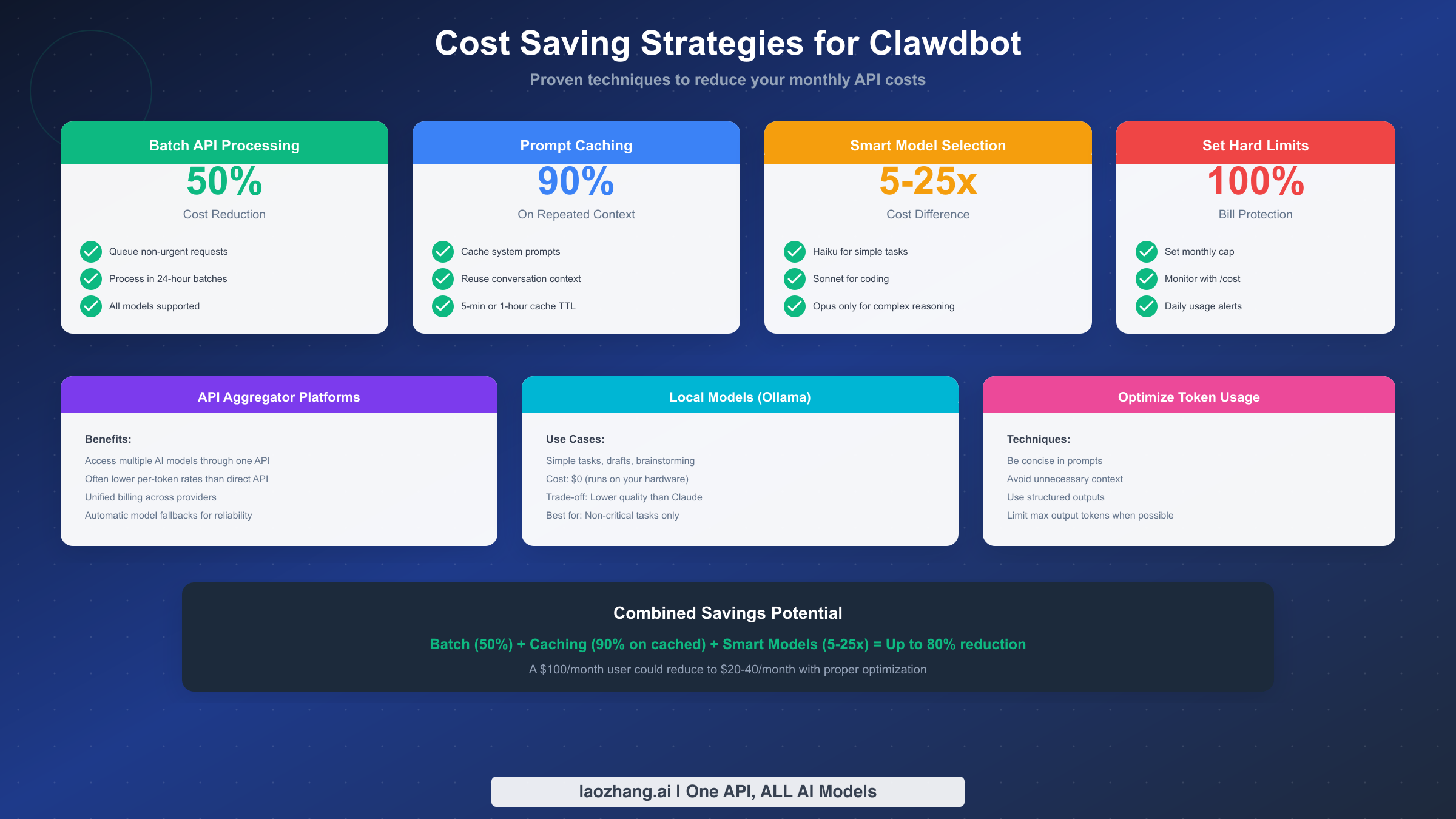
Multiple optimization techniques can reduce Clawdbot costs significantly. Combining these approaches enables some users to cut expenses by 50-80% compared to naive usage.
Batch Processing (50% Savings)
The Batch API processes requests at half the normal token cost but delivers results within 24 hours rather than immediately. For any task where immediate response isn't critical—background processing, bulk operations, scheduled tasks, overnight analysis—batching cuts costs in half with no quality reduction.
Identify operations in your workflow that don't need real-time results and queue them for batch processing. Report generation, large codebase analysis, documentation generation, and similar tasks are excellent batch candidates.
Prompt Caching (Up to 90% Savings)
Prompt caching stores frequently-used content so you pay write costs once and read costs repeatedly. Cache reads cost only 10% of base input price—a 90% savings on cached content.
Common caching candidates include system prompts that remain constant across conversations, project documentation referenced in many requests, coding style guides and conventions, and shared context for team workflows. The prompt caching guide provides implementation details and advanced patterns.
Smart Model Selection (5-25x Cost Difference)
Claude Haiku 3 costs $0.25/$1.25 per million tokens. Claude Opus 4.5 costs $5/$25. That's a 20x difference in input cost and 20x in output cost. Using Opus for everything when Haiku would suffice multiplies your costs by 20x.
Develop task-appropriate model selection: Haiku for simple questions, classification, and light editing. Sonnet for most development work, moderate reasoning, and code generation. Opus for complex reasoning, architectural decisions, and tasks requiring the highest capability. Implementing automatic model selection based on task complexity optimizes costs without requiring manual decisions for each request.
Aggregator Platforms
API aggregator platforms like laozhang.ai consolidate access to multiple AI providers through a single API endpoint. Benefits include unified billing across providers, often competitive per-token rates, automatic model fallbacks for reliability, and access to models from multiple providers without managing separate accounts.
For teams using multiple AI models or wanting simplified billing, aggregators can reduce both costs and administrative overhead. The trade-off is depending on a third party rather than direct provider access—acceptable for many use cases but requiring evaluation against your specific requirements.
Local Models
For truly cost-sensitive operations where quality can be lower, running local models through Ollama eliminates API costs entirely. Local models work well for drafts, brainstorming, simple questions, and tasks where the AI's output will be heavily edited anyway.
The trade-off is significant: local models produce lower-quality results than Claude, especially for complex reasoning and coding tasks. Use local models only for non-critical operations where cost savings outweigh quality requirements.
Token Optimization
Reducing token consumption at the prompt level compounds with all other savings. Write concise prompts that convey intent without unnecessary verbosity. Avoid including irrelevant context in requests. Use structured output formats to reduce output token counts. Set maximum output limits when full responses aren't needed.
These practices might save 10-20% of tokens individually, but combined with batching, caching, and model selection, they contribute to overall cost reduction that can reach 50-80% compared to unoptimized usage.
Conclusion and Quick Reference
Clawdbot's cost structure—free software, minimal hosting, and variable API usage—puts you in control of expenses. Most users can expect monthly costs between $10 and $150, scaling with usage intensity and model choices. Implementing the cost control and optimization strategies covered in this guide can reduce expenses significantly while maintaining productivity.
Quick Cost Reference
| User Type | Monthly Cost | Primary Model |
|---|---|---|
| Learner | $10-25 | Haiku 4.5 |
| Daily Developer | $40-80 | Sonnet 4.5 |
| Power User | $100-200 | Mixed |
| Team (per dev) | $100-200 | Mixed + Aggregator |
Cost Control Checklist
Set a spending limit in the Anthropic Console before starting serious usage. Use /cost regularly to track session expenses. Enable alerts at 50%, 80%, and 95% of monthly budget. Choose appropriate models for each task type rather than defaulting to the most expensive option.
Savings Quick Reference
Batch API provides 50% off all models for non-urgent work. Prompt caching saves up to 90% on repeated context. Model selection creates 5-25x cost differences between options. Combined optimization can reduce costs by 50-80%.
For users managing multiple API providers or seeking additional cost optimization options, aggregation platforms offer consolidated access with simplified billing and potentially competitive rates. Whatever approach you choose, the key principle remains: understand your costs, set limits, and implement the optimization strategies that match your usage patterns.