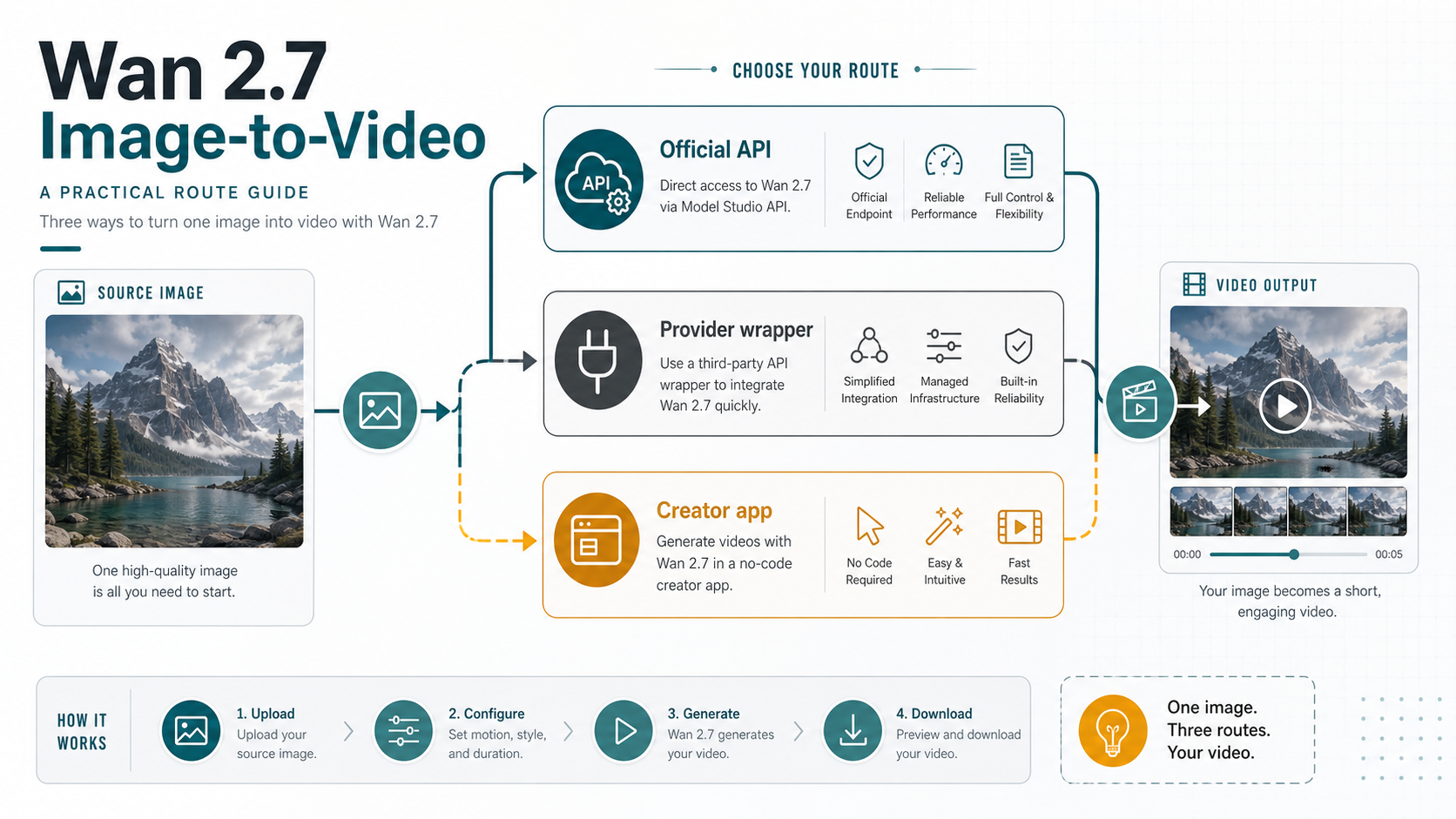
As of May 17, 2026, Wan 2.7 can animate a still image, but the first decision is where the job should run. Use Alibaba Cloud Model Studio when you need the official wan2.7-i2v contract, use a provider API wrapper when fast testing matters more than direct billing ownership, and use a no-code creator app only when its upload and credit rules fit your asset.
| Route | Best first use | Check before you upload |
|---|---|---|
| Official Model Studio API | direct developer control, official model contract, async integration | region, API key, model ID, media roles, duration, resolution, and billing rules |
| Provider API wrapper | quick tests, simpler integration, hosted examples | who owns pricing, rate limits, failed jobs, storage, support, and output URL retention |
| No-code creator app | visual experiments and creator workflows | upload rights, credits, export format, watermark policy, queue time, and account limits |
Do not treat a provider price, credit, queue, 4K promise, or upload policy as an official Wan 2.7 rule. The official API anchor is wan2.7-i2v; wrapper and creator-app claims are route-specific commitments that need their own checks.
After choosing the route, choose the input mode before tuning the prompt: one source image for first-frame image-to-video, start and end images when the ending must be controlled, driving audio when rhythm matters, or first_clip when continuity from an existing clip matters.
For model facts, rely on the current official documentation; for provider claims, treat each page as a separate route example rather than as the model owner's terms.
Choose the route before the model settings
The route decides what can go wrong. If you run the job through Model Studio, your first debugging questions are model ID, region, async task state, media input, duration, resolution, and account billing. If you run the same image through a wrapper, the first questions change to provider account limits, queue behavior, uploaded asset storage, failed-job policy, and how long the returned video URL remains available.
That split matters because the exact query often lands readers on provider pages before official Alibaba documentation. Those provider pages can be useful: a hosted playground is a faster way to see whether a source image has usable motion potential, and a wrapper API can remove some integration friction. The cost is contract ambiguity. A wrapper may expose a convenient endpoint, but it does not define Alibaba Cloud's official model terms.
Use the official API first when the output will enter a product workflow, customer job, or repeatable backend process. Use a wrapper when the team needs a quick prototype or a simpler integration surface and can accept provider-owned billing and support. Use a no-code app when the job is exploratory, manual, or creator-facing, and only after checking the rights and export terms for uploaded source images.
The useful mental model is route ownership before parameter tuning. A perfect prompt does not help if the wrong account owns the upload, the wrong region owns the API key, or the provider's limits are mistaken for Model Studio limits.
What official wan2.7-i2v supports
If you need the official contract, start with wan2.7-i2v, the Wan 2.7 image-to-video model ID listed in Alibaba Cloud Model Studio's current video model and image-to-video documentation. The current 2.7 route is not the same as older Wan image-to-video examples that point to earlier model IDs, so copy the 2.7 API reference rather than an older first-frame page.
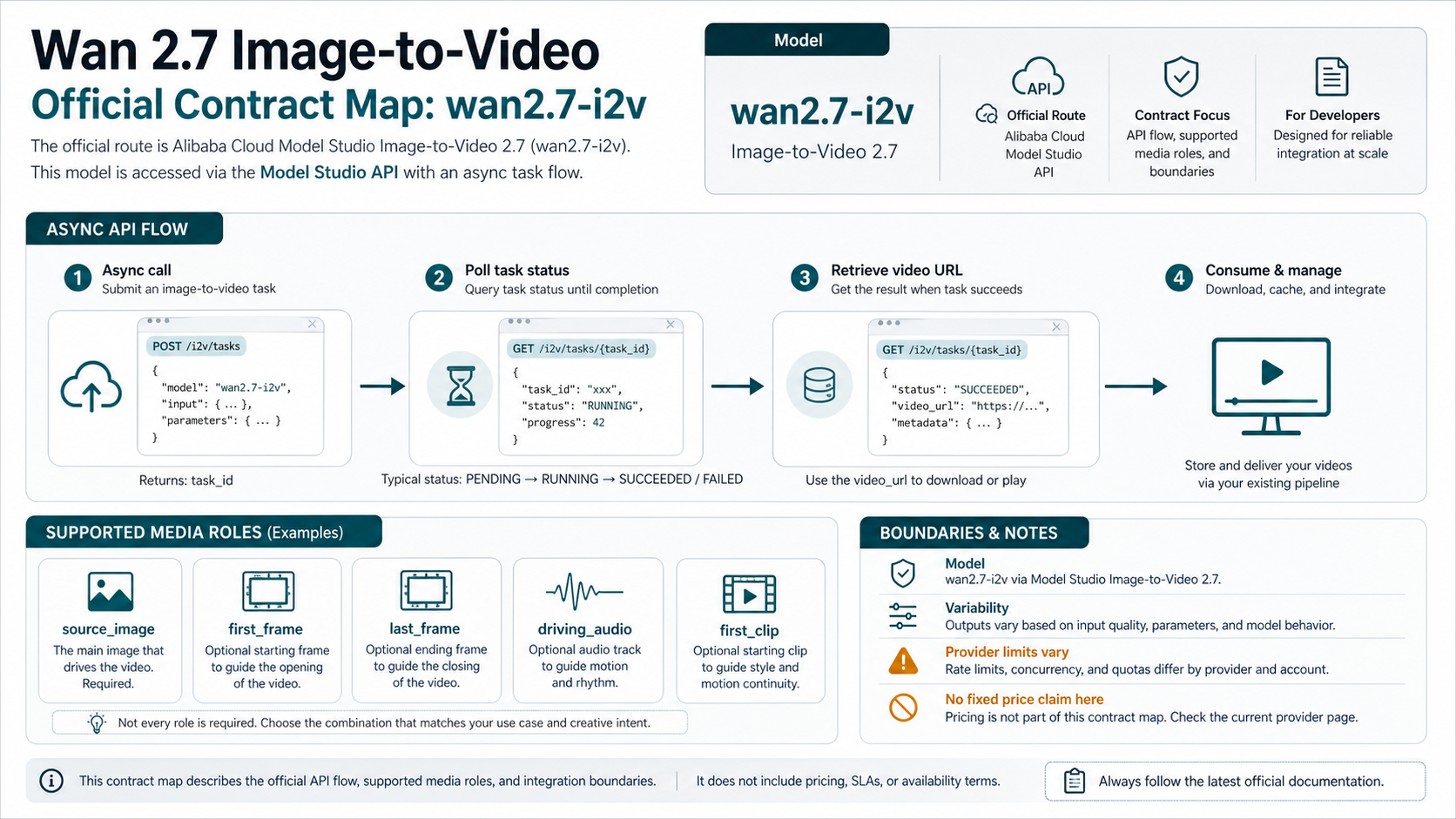
The official 2.7 image-to-video page describes three major tasks. First-frame video generation animates from a starting image. First-and-last-frame generation gives the model a start and an ending frame, which is better when the final pose, object placement, or scene destination matters. Video continuation uses an existing clip as the starting context so the new output can continue motion and style.
The API reference also changes the input mental model. For wan2.7-i2v, the request uses a media array with typed assets rather than a single generic image URL field. The important media roles are:
| Media role | Use it when | Practical caution |
|---|---|---|
first_frame | one image should start the video | keep the subject clear and avoid tiny details that must stay perfect |
last_frame | the output must arrive at a specific ending state | use a visually compatible end image, not a completely different scene |
driving_audio | speech, music, or rhythm should guide timing | keep the audio short, clean, and matched to the desired motion |
first_clip | an existing clip should continue | preserve aspect ratio and style so continuation does not feel like a hard reset |
For source images, the official reference accepts common image formats by URL, with image dimensions between 240 and 8000 pixels on each side, an aspect ratio from 1:8 to 8:1, and file size up to 20 MB. For driving audio, the guide accepts common audio formats such as WAV or MP3, with short duration and size limits. These numbers are still route facts, not universal wrapper facts; a provider can impose a stricter upload size or a different URL handling rule.
The official guide also supports 720P and 1080P-style output tiers and 2 to 15 second durations for the 2.7 I2V route. Output dimensions are adjusted around the input aspect ratio and to video-friendly multiples, so do not assume a provider's square, vertical, 4K, or long-duration marketing claim applies to the official API.
Billing is another boundary. Alibaba's current Model Studio guide says Wan 2.7 I2V is billed by successfully generated output video seconds and that failed model calls or processing errors do not incur fees. The exact official per-second price was not cleanly locked from the pricing page text checked on May 17, 2026, so a safe implementation should treat the current pricing page as the authority instead of copying a number from a wrapper listing.
Pick the input mode before writing the prompt
Prompt tuning comes after input-mode choice. If the mode is wrong, the prompt often compensates for a control problem that the model could have handled with a better asset combination.
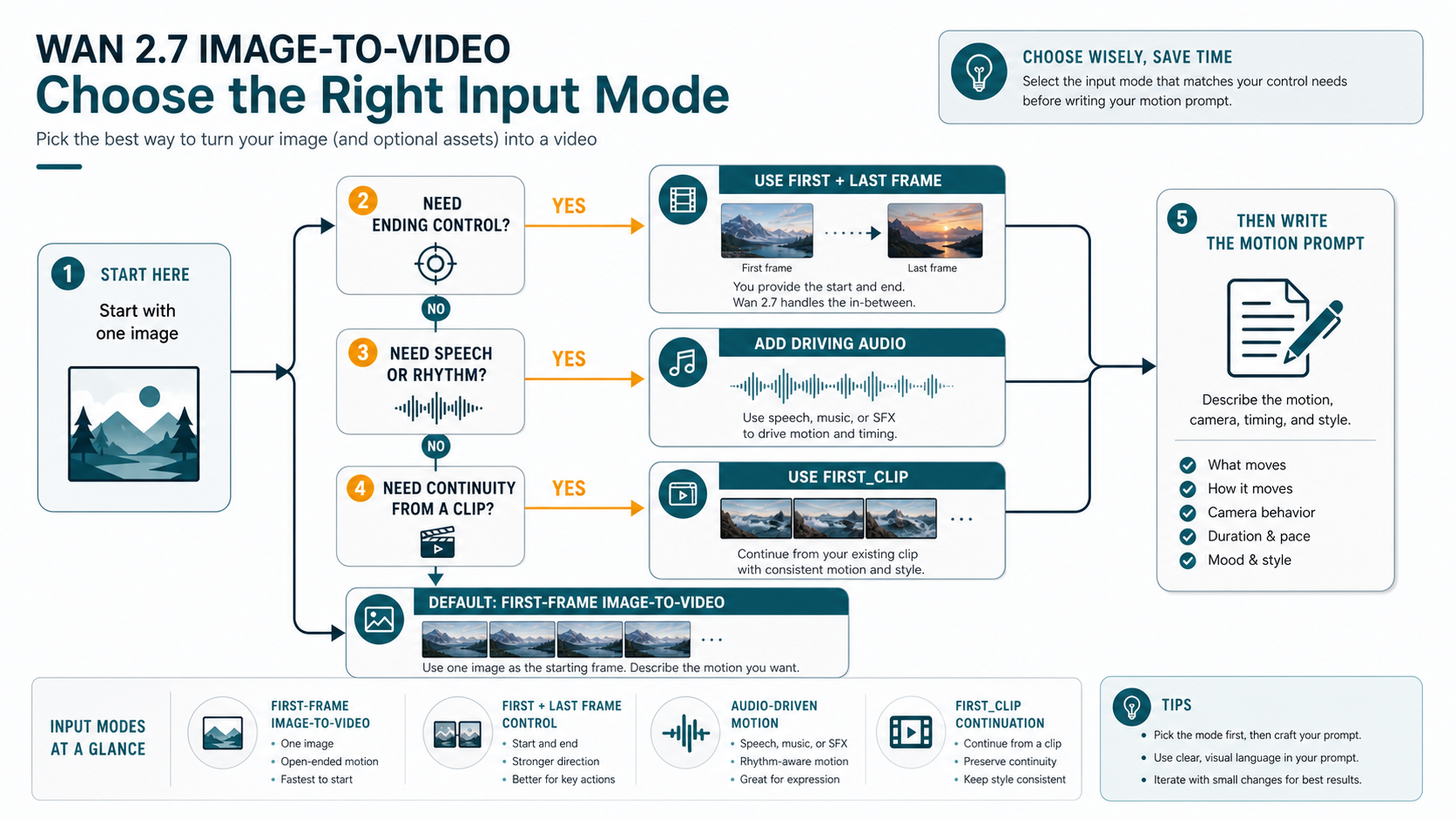
Use first-frame image-to-video when the reader only has one source image and wants open-ended motion. This is the fastest start, but it gives the model more freedom. It works best for simple camera moves, environmental motion, product reveals, atmospheric effects, and scenes where a slightly different ending is acceptable.
Use first-and-last-frame mode when the ending matters. This is the better branch for product placement, character pose, object transformation, or before-and-after movement. The start and end images should belong to the same visual world. If the lighting, angle, subject identity, or composition changes too much between frames, the model has to solve a scene jump instead of a motion path.
Use driving audio when timing is part of the video idea. Speech, beats, or sound effects can guide rhythm, but audio does not rescue an ambiguous image. Keep the visible subject and intended movement clear first, then add audio when the animation needs speech timing, musical emphasis, or sound-led pacing.
Use first_clip when continuity matters more than creating from a still. That branch is for extending an existing motion or preserving a visual style. It is not the best starting point for a simple product photo or a single portrait; first-frame mode is usually cleaner there.
The first prompt should name the subject, the action, the camera behavior, the pace, and the constraints. A useful starting shape is:
Animate the source image into a 5-second video.
Subject: the mountain lake and foreground trees remain visually stable.
Motion: soft wind moves the water and clouds; no major object appears.
Camera: slow push forward, smooth and natural.
Style: cinematic but realistic, no text, no logo, no warped subject.
That prompt is not magic. Its job is to prevent the common first-run failures: over-broad movement, unexpected object insertion, camera shake, and identity drift. Once the first result is stable, tune style and pace in smaller increments.
Implement the API as an async job, not a direct response
Video generation should be handled as an asynchronous job. A practical backend stores the task ID, polls status at a reasonable interval, records the final video URL, and preserves enough metadata to debug failures later.
The official Wan 2.7 I2V API reference requires asynchronous invocation with X-DashScope-Async: enable. Keep the exact endpoint, region, and authentication details tied to the current Model Studio documentation and console, especially if your account is in an international region. Alibaba's current international deployment guidance points to Singapore, while Chinese mainland deployment uses Beijing, so region and API key mismatches should be treated as first-class failure branches.
A minimal implementation shape looks like this:
const payload = {
  model: "wan2.7-i2v",
  input: {
    prompt: "A slow cinematic push forward over the lake; clouds drift softly.",
    media: [
      {
        type: "first_frame",
        url: "https://example.com/source-image.png"
      }
    ]
  },
  parameters: {
    resolution: "1080P",
    duration: 5
  }
};

// Submit with the current Model Studio I2V endpoint and async header:
// X-DashScope-Async: enable
// Authorization: Bearer <your Model Studio API key>
Do not ship this as a one-shot function that returns a video immediately. Store the submit response, poll the task state, and only expose the output when the task succeeds. A reliable task record should include:
| Field to log | Why it matters |
|---|---|
| route owner | separates official Model Studio from wrapper or app behavior |
| model ID | confirms the job used wan2.7-i2v, not an older Wan route |
| media roles | explains whether the job used first_frame, last_frame, driving_audio, or first_clip |
| source asset URL or storage key | lets you reproduce failed or low-quality results |
| region and endpoint family | catches account and endpoint mismatches |
| duration and resolution | explains cost and output shape |
| task ID and final status | supports retry, support tickets, and customer logs |
| output URL storage decision | prevents broken previews after temporary URLs expire |
When a job fails, do not immediately rewrite the prompt. First classify whether the failure came from route authentication, unsupported media, source URL access, region mismatch, queue timeout, model processing, or provider policy. Prompt edits only help after the request itself is valid.
Audit provider wrappers and no-code tools as separate routes
Provider wrappers are often the fastest way to try Wan 2.7 image-to-video. A playground can reveal whether a source image has useful motion potential in minutes. A wrapper API can also simplify auth, base URL shape, SDK compatibility, or payment handling. Those are real benefits, but they belong to the provider route, not to the official model contract.
Before paying or uploading private assets to a wrapper, answer these questions in writing:
| Question | Why it matters |
|---|---|
| Which model and version does the route claim to use? | prevents older Wan or non-2.7 routes from being sold as the same thing |
| Who owns the price and unit? | avoids copying a provider per-run or per-second rate as official Alibaba pricing |
| What happens to failed jobs? | failed-job billing and refunds vary by provider |
| Where are uploads stored? | private, client, and licensed images need explicit storage terms |
| How long is the output URL available? | temporary URLs can break later previews or CMS imports |
| What rate limit and concurrency apply? | a playground success may not match backend throughput |
| Can you export without watermark or compression? | creator tools can be acceptable for drafts but wrong for production |
No-code tools need the same discipline. They can be the right branch for creators who want to upload an image, adjust a prompt, preview a result, and export a short clip without touching an API. They are weaker for backend automation because the account, queue, export, rights, and repeatability terms are usually designed for manual creation rather than product integration.
Avoid universal "best" claims unless you have same-prompt outputs, identical source images, matching durations, matching resolution tiers, and a clear scoring rubric. For most readers, the useful comparison is not "Which Wan 2.7 page is best?" It is "Which route owns the constraint I actually have?"
Prepare the source image and prompt before spending credits
The source image is not just an input file. It is the first frame of the video contract. If it is noisy, compressed, over-cropped, full of small text, or visually ambiguous, the model has to invent stability before it can invent motion.
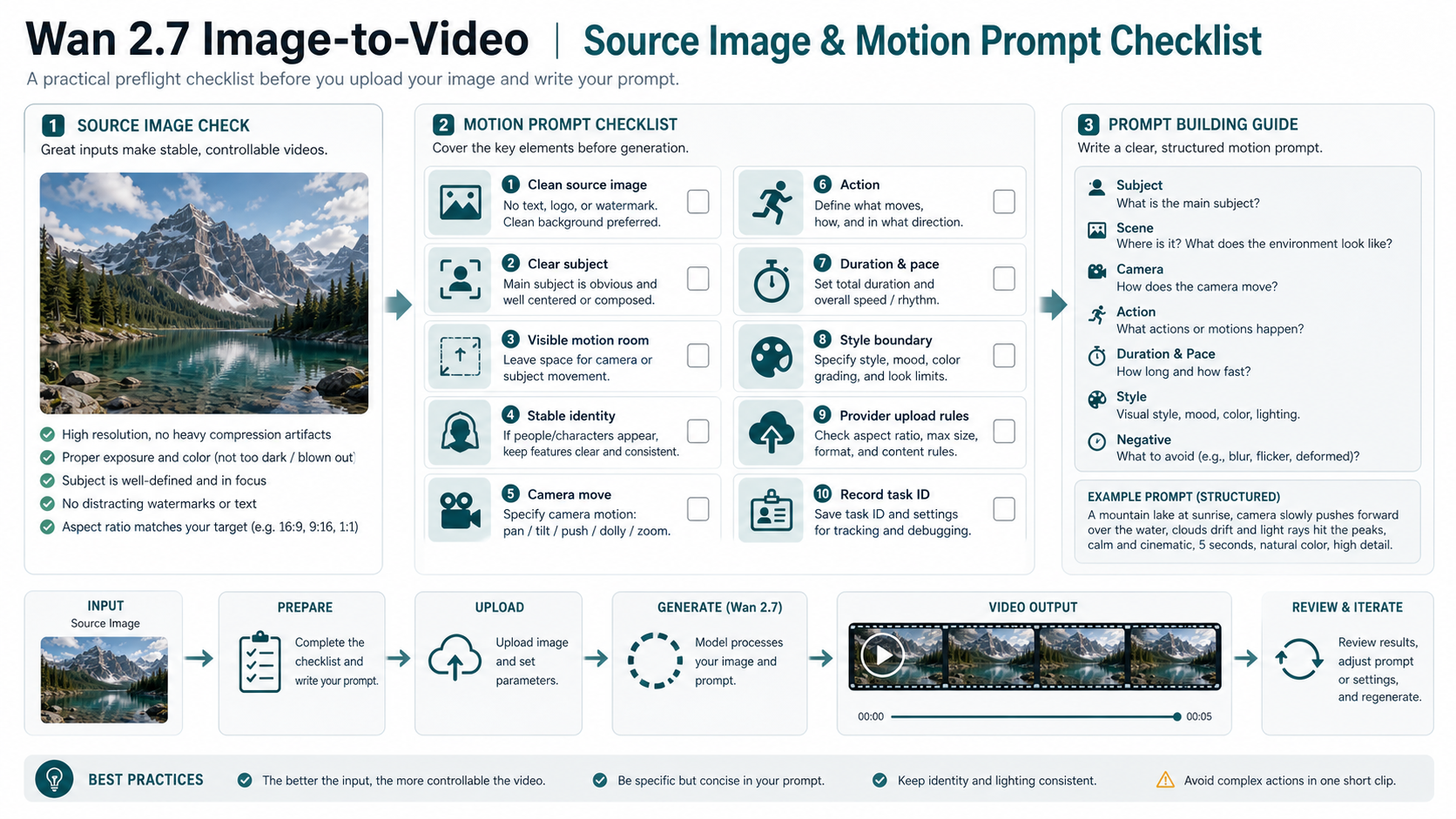
Use a source image with a clear subject, enough empty space for movement, stable lighting, and no watermark or embedded text that must remain perfect. If the subject is a person, product, or character, avoid tiny facial details and crowded backgrounds for the first test. If the scene is a landscape or product shot, leave room for a camera move and specify which parts should remain stable.
Then write the motion prompt as a set of decisions, not as a mood sentence. The prompt should answer:
- What is the main subject?
- What moves, and what should remain stable?
- How does the camera move?
- How long is the clip and how fast is the motion?
- What style or lighting should be preserved?
- What should be avoided?
Short clips reward restraint. A 5-second animation can handle a camera push, a product rotation, a slow gesture, drifting clouds, moving water, or a simple reveal. It is less reliable for multiple character actions, complex choreography, major scene transformations, or a prompt that asks for every object to move at once.
For production, add one more checklist item: record the task ID and source settings before you judge the visual result. Without those records, you cannot tell whether a later improvement came from a cleaner source image, a different mode, a changed prompt, a provider route change, or normal model variance.
Troubleshoot by branch, not by guesswork
When the output is bad, classify the problem before rerunning.
If the request fails before processing, inspect auth, endpoint, region, model ID, source URL accessibility, media role names, file size, image dimensions, duration, and resolution. A prompt rewrite cannot fix an API key from the wrong region or an inaccessible source image URL.
If the job runs but the motion is weak, simplify the prompt and source asset. Ask for one camera move or one subject action. Remove conflicting style instructions. If the scene needs a specific ending, switch from first-frame mode to first-and-last-frame mode instead of trying to describe the ending in prose.
If the subject identity drifts, reduce motion complexity and use a cleaner source frame. Human faces, hands, logos, and product text are harder than broad environmental motion. When identity matters commercially, test several prompts with the same route and keep the one that preserves the subject rather than the one with the most dramatic motion.
If the provider result differs from the official route, treat that as expected until proven otherwise. Providers may wrap different settings, queues, presets, upload handling, retries, or output processing. Match route, model, mode, duration, resolution, and source image before drawing quality conclusions.
If a video URL stops working, inspect retention and storage. Many video generation routes return an output URL that should be downloaded or copied into your own storage before it expires. A successful generation is not complete until the product owns the file location it will serve later.
When to use another image-to-video route
Wan 2.7 image-to-video is a strong branch when the reader specifically wants Alibaba's Wan 2.7 model family or a provider route built around it. It is not automatically the right branch for every image animation task.
Use another route when the constraint is a different ecosystem, output style, or access path. If the team is already evaluating Google video workflows, the Gemini image-to-video tutorial is a better adjacent branch. If the team is choosing a Kuaishou route, the Kling AI image-to-video API guide covers that model family separately.
The decision should stay practical. Keep Wan 2.7 when the route, account, and output fit. Switch when another model family has a clearer official contract, easier billing, better regional access, or stronger tested results for the exact source image.
FAQ
Is the Wan 2.7 I2V route official?
Yes. Current Alibaba Cloud Model Studio documentation lists wan2.7-i2v for Wan 2.7 image-to-video. Use that model ID for official API discussions, and keep provider wrapper claims separate.
Is the Wan 2.7 I2V route free?
Do not assume that. Provider pages may advertise credits, trials, or free tools, but those are provider-owned terms. Alibaba's official guide describes billing by successfully generated output seconds for the official route; check the current Model Studio pricing page before publishing any fixed price.
Does wan2.7-i2v support 4K video?
The official 2.7 I2V documentation checked on May 17, 2026 supports 720P and 1080P-style output tiers, not a general official 4K promise. Treat 4K claims as route-specific unless the current official API reference confirms them for your route.
Which input mode should I start with?
Start with first-frame image-to-video if you only have one image and want a simple test. Use first-and-last-frame mode when the ending matters, driving audio when timing matters, and first_clip when you need continuity from an existing clip.
Can I use a provider API wrapper instead of Model Studio?
Yes, if the provider route fits your constraint. It can be faster for testing or easier for integration. The tradeoff is that provider pricing, limits, upload policy, support, and output retention are provider terms, not official Alibaba terms.
Why did my Wan 2.7 output look worse than the demo?
The most common reasons are a weak source image, too much requested motion, unclear camera direction, a bad input mode, or a route-specific preset. First simplify the source image and prompt, then compare route, duration, resolution, and media roles before blaming the model.
Should I use Wan 2.7 or Kling for I2V work?
Use Wan 2.7 when the Wan route, account, and output style fit your job. Use Kling when your team needs the Kling model family or an existing Kling integration. A fair comparison needs the same source image, duration, aspect ratio, prompt, and output review criteria.