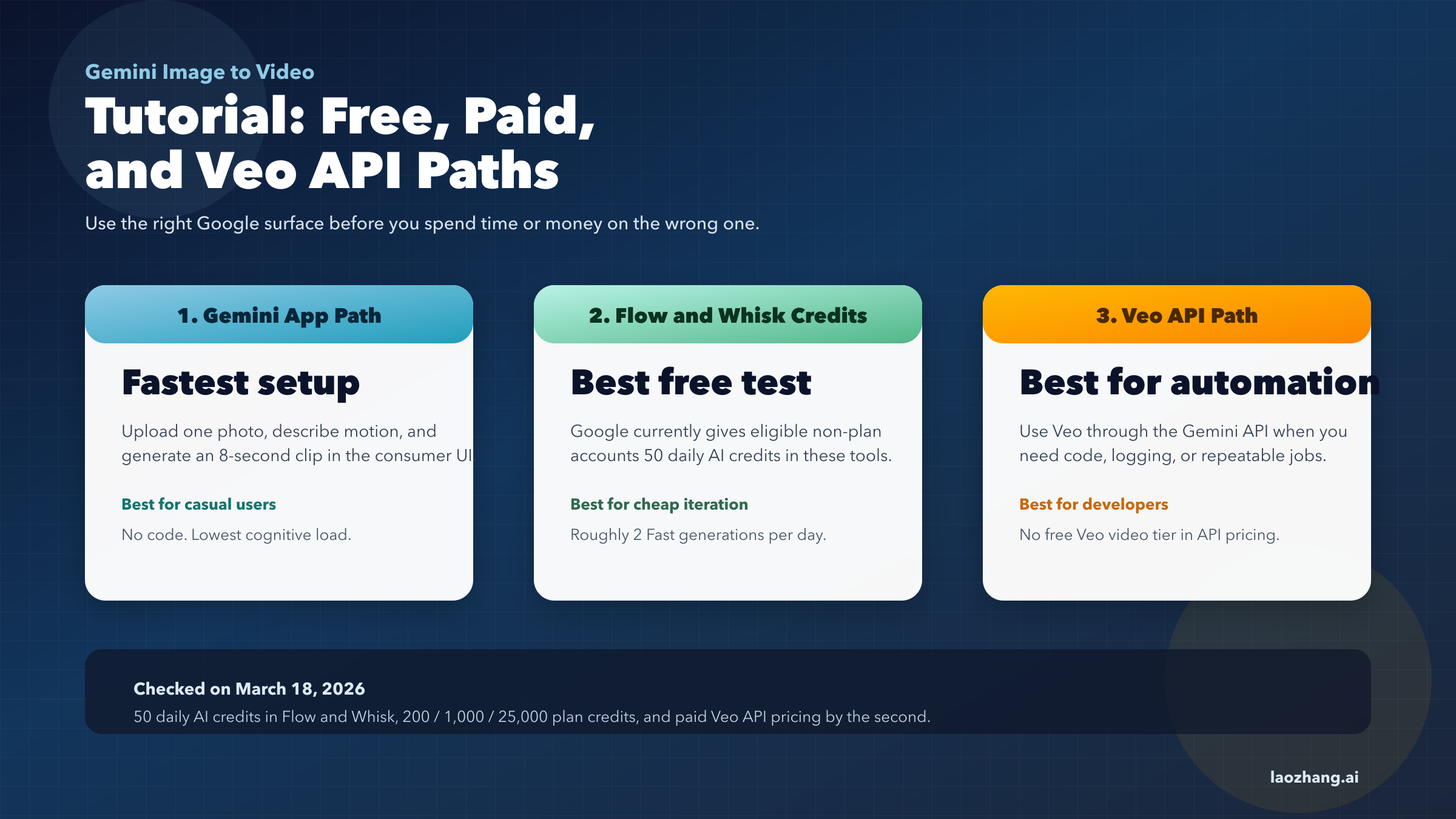
Short answer: yes, Google can turn an image into video today, but the product path depends on what you actually mean by "Gemini." As of March 18, 2026, casual users usually reach this through Gemini, Flow, Whisk, or Google Photos features powered by Veo, while developers use Veo through the Gemini API rather than a separate "Gemini image-to-video API."
The money answer is where most pages get sloppy. Google currently offers 50 daily AI credits to eligible personal accounts in Flow and Whisk with no Google AI membership plan, but the Gemini API pricing page shows no free Veo video tier. If you want no-code image animation, use the app surfaces first. If you want automation, cost control, or repeatable prompts, move to the API after you understand the per-generation math.
This guide is built around that split so you can decide quickly instead of bouncing between marketing pages, help articles, and API docs.
TL;DR
If you searched for gemini image to video, the cleanest current answer is that Google offers three real paths, and each one has different access rules, costs, and limitations.
| Goal | Best path | What it costs today | Best for |
|---|---|---|---|
| Animate one photo with the least setup | Gemini consumer surfaces | Usually tied to Google AI plan access and region rollout | Casual users |
| Test image-to-video without paying first | Flow or Whisk | Eligible non-plan personal accounts currently get 50 daily AI credits | Creators testing ideas |
| Build automation or an app | Veo in the Gemini API | No free Veo video tier; pay per second | Developers |
| Get higher generation limits | Google AI Plus / Pro / Ultra | 200 / 1,000 / 25,000 monthly AI credits in Flow and Whisk | Frequent users |
The key confusion is that Gemini is the surface, Veo is the video model, and Flow/Whisk are credit-based creation surfaces. Google itself says users can generate AI videos in Flow, Gemini, and Whisk, but it also separates consumer plan access from the developer pricing model in the Gemini API pricing docs.
If you only want to animate a vacation photo, you probably do not need the API. If you want to trigger image-to-video from code, batch jobs, or a workflow tool, you almost certainly do.
What "Gemini image to video" actually means in 2026
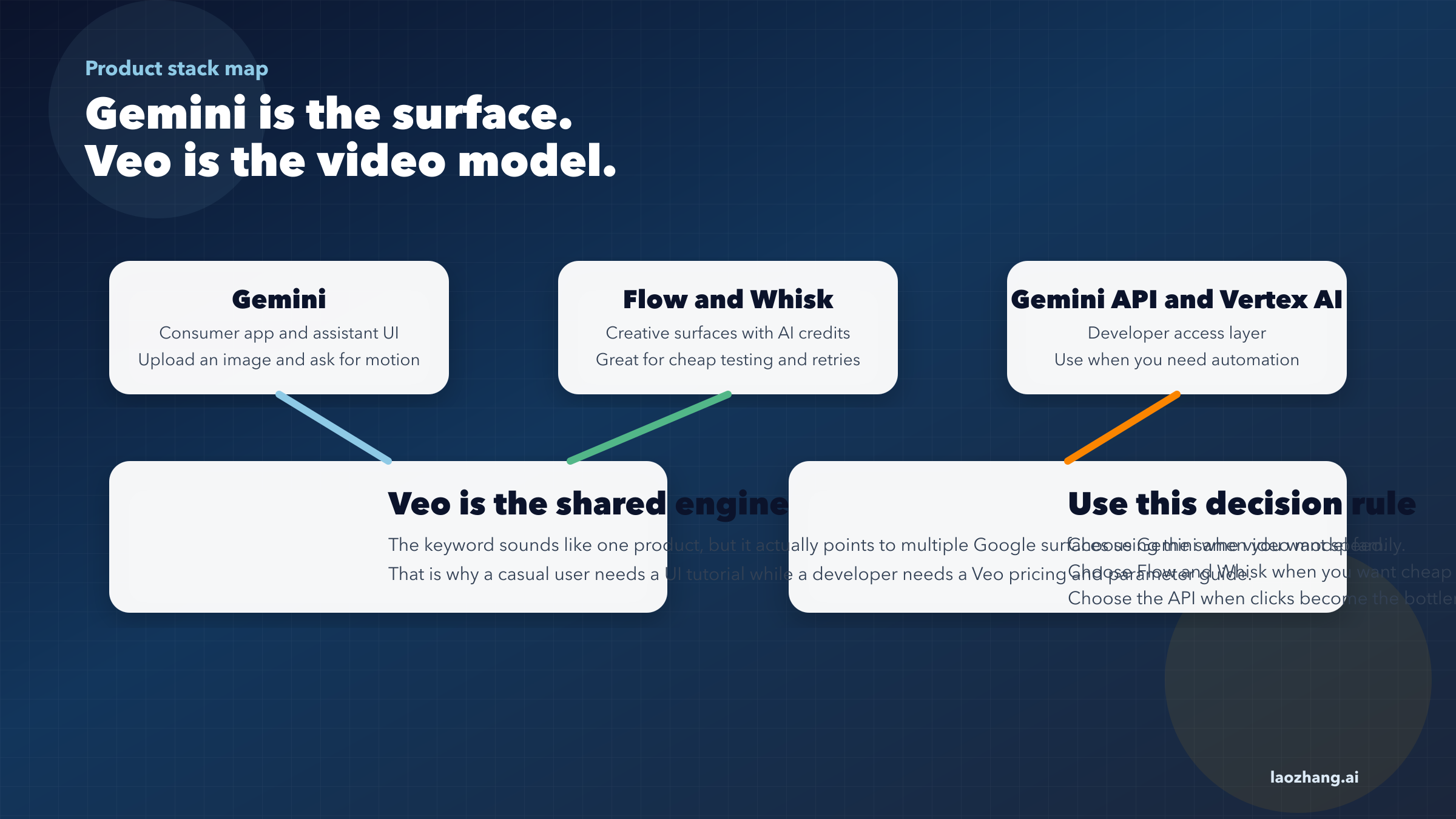
The phrase "Gemini image to video" sounds simple, but the stack underneath it is not. Google's own product pages use several names for different layers of the same experience, which is why beginners often think they are missing a menu or that they signed up for the wrong plan.
The easiest mental model is this:
| Layer | What it is | What you do there |
|---|---|---|
| Gemini | User-facing app and assistant surface | Upload, prompt, and generate in a consumer UI |
| Veo | Google's video generation model family | Actually creates the video |
| Flow | AI filmmaking surface | Create and edit videos with pooled AI credits |
| Whisk | Another creative surface | Turn images into videos with pooled AI credits |
| Gemini API / Vertex AI | Developer access layer | Generate and manage videos programmatically |
That split matters because searchers usually blend all of these into one keyword. A beginner searching for gemini image to video tutorial expects a no-code walkthrough. A developer searching the same phrase often wants a code sample and cost estimate. Google answers those two needs on different pages.
The official consumer launch post, "Turn your photos into videos in Gemini", says Gemini can transform photos into eight-second videos with sound using Veo 3. The same post says the consumer workflow is to select Videos, upload a photo, then describe the scene and the audio you want. That is the correct beginner path.
The official developer docs, however, live in "Generate videos with Veo 3.1 in Gemini API". That page documents image-to-video generation in the API, along with resolution settings like 720p, 1080p, and 4k, parameter rules, and generation constraints. In other words, the user-facing product is Gemini, but the programmable product is Veo.
This distinction is also why two people can both say "Gemini image to video" and mean very different things:
One user is asking, "How do I animate this photo inside Google's UI?"
Another is asking, "How do I send an image and prompt to a Google endpoint from JavaScript?"
The rest of this article answers both, but in that order. That is the most useful order for real users because the app path is simpler, cheaper to test, and easier to debug before you start paying API rates.
The easiest Gemini image-to-video tutorial for beginners
For most readers, this is the path that will get a result the fastest. You do not need to think about request polling, model IDs, or per-second billing. You need a supported Google account, a supported surface, and a decent input image.
Start with the official workflow Google published for Gemini photo-to-video:
- Open the supported Gemini surface and sign in with your personal Google account.
- Choose the Videos tool in the prompt area.
- Upload a still image.
- Describe the motion, scene change, and any audio you want.
- Generate, review the output, and retry if needed.
Google's launch post says the result is an eight-second video clip with sound. In practice, that means you should prompt for one compact movement instead of a whole story arc. A still portrait becoming a short head turn works. A photo of a city becoming a full 30-second cinematic montage does not.
The quality of your starting image matters more than most SEO tutorials admit. A clean image with one clear subject is easier for the model than a cluttered scene with three faces, background text, reflective surfaces, and contradictory lighting. If you are choosing between two photos, pick the one with:
- one obvious subject
- stronger lighting
- more empty space around the subject
- fewer small details competing for motion
Prompting is the second major lever. Do not describe the whole image again unless you are correcting the model's focus. Instead, describe the motion you want the still image to acquire. These prompt patterns usually work better than generic "make this cinematic" prompts:
| Input image type | Better prompt pattern | Why it works |
|---|---|---|
| Portrait | "The subject slowly turns toward camera, hair moves slightly in the breeze, soft ambient room tone." | Tells the model which motion to prioritize |
| Landscape | "Clouds drift from left to right, water ripples gently, slow camera push-in, natural wind sound." | Adds environmental movement without overloading the scene |
| Product shot | "The camera rotates slightly around the product, highlights glide across the surface, clean studio sound." | Keeps the product stable while adding controlled motion |
| Illustration | "The drawing gains subtle depth, the background layers separate, light particles move upward." | Helps the model treat a flat image as a layered scene |
You should also know what not to ask for in the first attempt. Large subject replacement, multiple new characters, dramatic scene swaps, and long dialogue cues all increase the odds of a broken result. The model is strongest when the image already contains the main subject and you are asking for motion, not a total rewrite.
One more detail from Google's consumer launch matters: generated videos include a visible watermark plus an invisible SynthID watermark. If you are testing for client work, marketing approvals, or education use, plan around that from the start instead of being surprised after generation.
If your only goal is to turn a still image into a short motion clip for social or presentation use, this consumer flow is almost always the right first stop. Save the API for cases where repeating the workflow manually would become the real cost.
Is Gemini image to video free?
This is the part where you need precision, because "free" means different things on different Google properties.
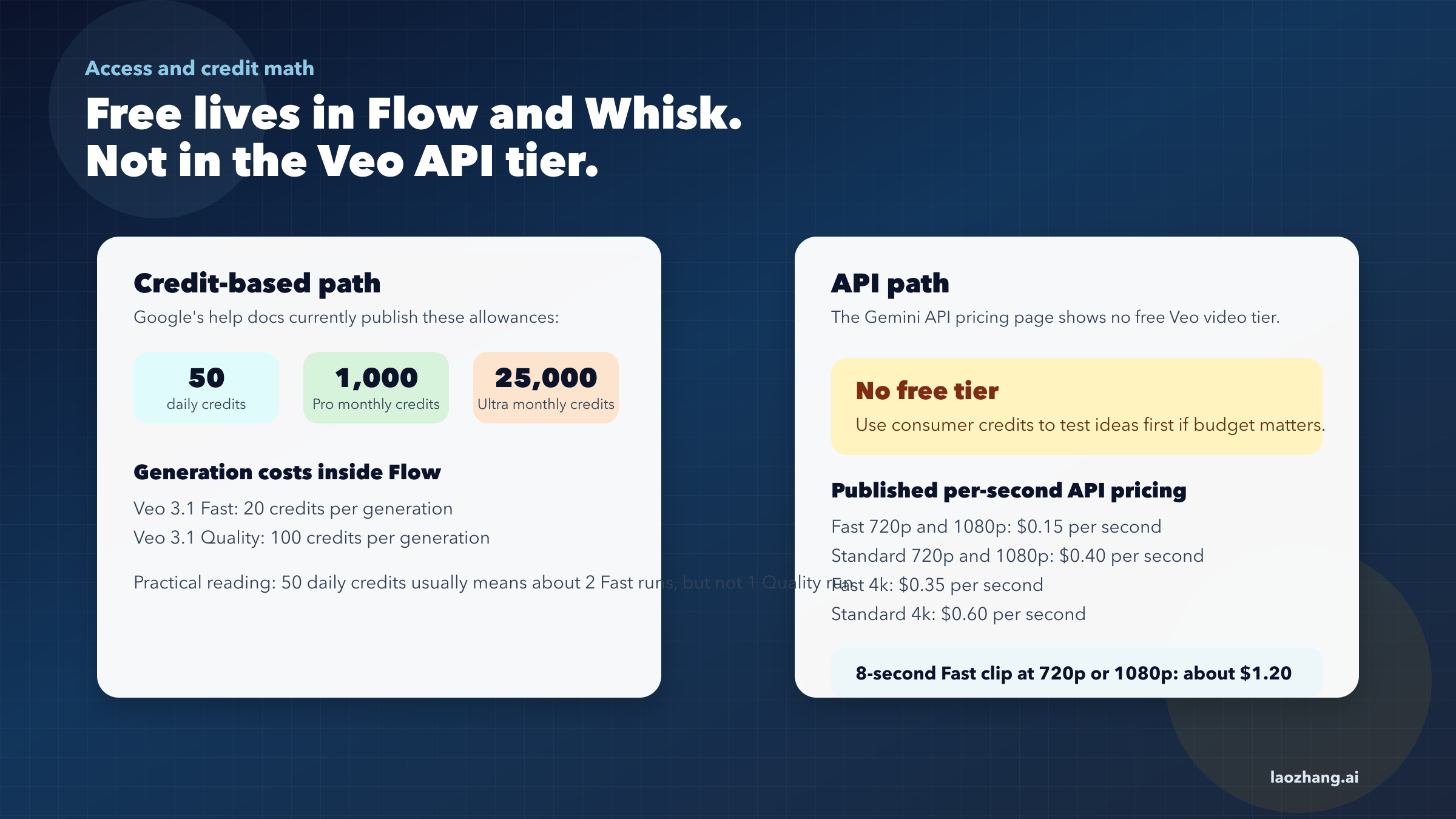
The strongest current official answer comes from Google's help article, "Manage your AI credits with Google One". As checked on March 18, 2026, Google says that any eligible personal Google Account without a Google AI membership plan gets 50 daily AI credits that can be used in Whisk and Flow to create videos.
That is real free usage, but it is not unlimited and it is not the same as "the Gemini API is free."
The same Google help page also lists the current paid credit ladder:
| Plan | Included AI credits | What that means for image-to-video |
|---|---|---|
| No Google AI plan | 50 daily credits | Small daily testing budget in Flow and Whisk |
| Google AI Plus | 200 monthly credits | Light monthly usage |
| Google AI Pro | 1,000 monthly credits | Regular creator workflow |
| Google AI Ultra | 25,000 monthly credits | Heavy usage and highest limits |
Google goes further and publishes per-generation credit costs for Flow:
| Flow video mode | Credit cost per generation | Practical reading |
|---|---|---|
| Veo 3.1 Fast | 20 credits | Cheap testing and drafts |
| Veo 3.1 Quality | 100 credits | Higher-end output, much smaller allowance |
| Video edits | 20 credits | Useful when you want revision instead of a full restart |
The quick math is straightforward. If you have 50 daily credits, you can usually afford about 2 Fast generations per day with 10 credits left over, but not a full Quality generation. If you have 1,000 monthly credits on Google AI Pro, that roughly covers 50 Fast generations or 10 Quality generations before the pool is empty. Those numbers are official-table math, not guesswork.
Now compare that with the developer side. Google's Gemini API pricing page shows no free tier for Veo 3.1 video generation. As checked on March 18, 2026, the published paid rates are:
| API model | 720p / 1080p price | 4k price |
|---|---|---|
| Veo 3.1 Standard | $0.40 per second | $0.60 per second |
| Veo 3.1 Fast | $0.15 per second | $0.35 per second |
That means an 8-second API generation has very different economics from the credit-based consumer path:
| API mode | Cost for an 8-second clip at 720p/1080p | Cost for an 8-second clip at 4k |
|---|---|---|
| Veo 3.1 Fast | $1.20 | $2.80 |
| Veo 3.1 Standard | $3.20 | $4.80 |
So the honest answer to "Is Gemini image to video free?" is:
Partly. The consumer credit path can be free in Flow and Whisk for eligible users. The API path is not.
There is one more nuance worth knowing. Google Cloud also offers a separate trial-credit program for eligible new customers. Google's Cloud pricing and trial pages market $300 in free credits for new accounts for a limited evaluation period. That can be a useful developer testing path, but it is a billing-credit program, not a native Veo free tier. You should treat it as a temporary budget cushion, not as proof that the API itself is free.
If you want the best low-risk workflow, start free where Google clearly says you can start free: Flow and Whisk. If you outgrow the daily or monthly credits, then decide whether a Google AI plan or the pay-as-you-go API fits your workload better. For a deeper developer-side cost breakdown, our Veo 3.1 pricing guide and Veo free access guide go into the exact tradeoffs.
Gemini API image-to-video tutorial with Veo
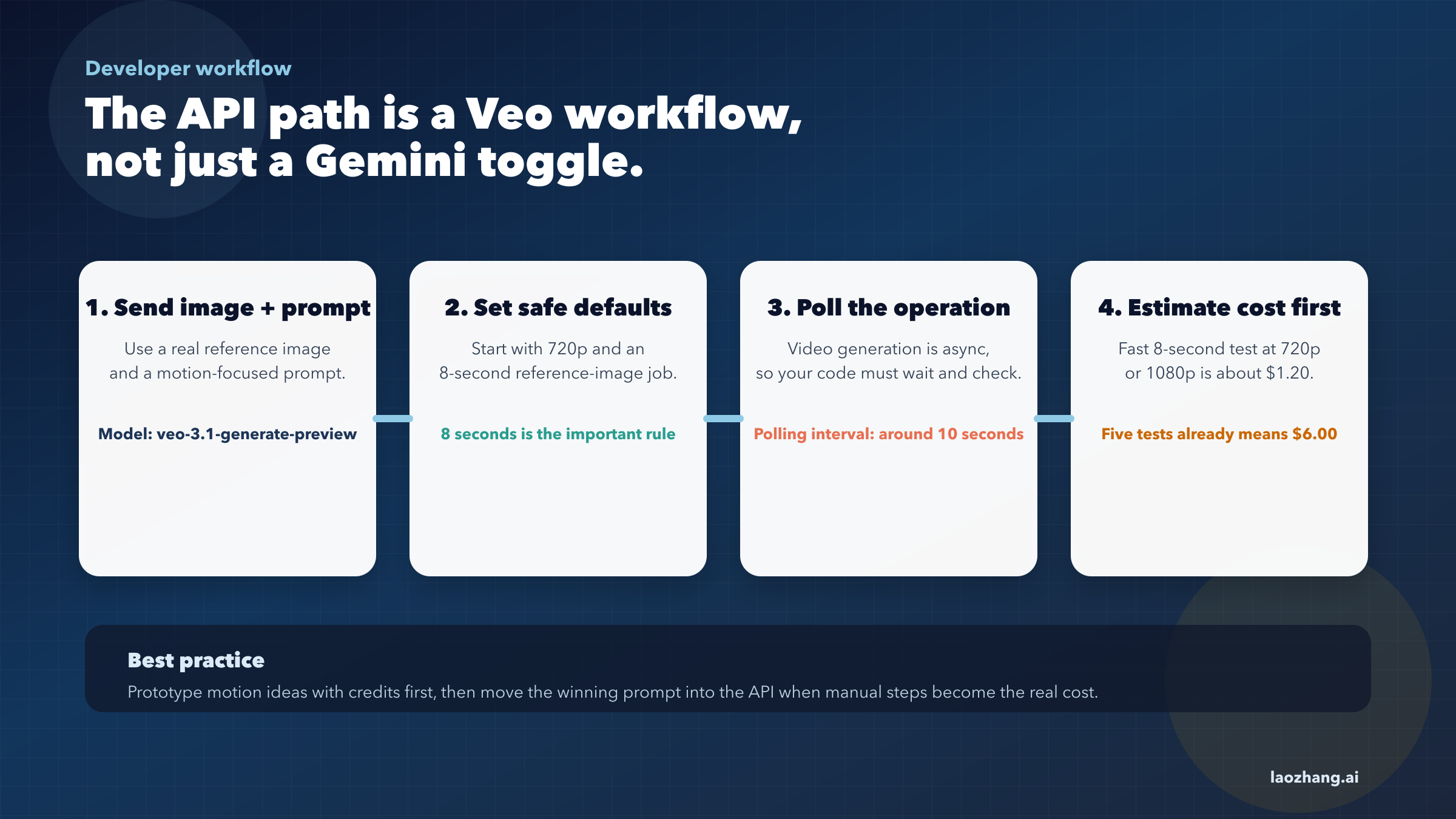
Use the API when you need repeatability, integration, logging, or automation. If you are building a content pipeline, a social tool, or a custom app, manual clicks in Gemini become the expensive part even before the model bill does.
The official documentation you actually need is the Google page called "Generate videos with Veo 3.1 in Gemini API". That page documents image-to-video generation and confirms that you can pass an initial image to animate.
At a practical level, the developer workflow looks like this:
- Create a Google AI / Cloud project with billing enabled.
- Get the correct API credentials.
- Send a prompt plus an input image to the Veo generation endpoint.
- Poll the operation until the video finishes.
- Download or store the generated result.
The most important beginner constraint is that Google's parameter table says 8-second duration is required when you are using reference images and also for 1080p or 4k output. That single rule explains a lot of "why did this request fail?" confusion.
The second important constraint is that your input image does not magically turn Veo into an unlimited storyboard engine. The image anchors the first frame or the scene reference. It does not guarantee perfect identity preservation, text preservation, or object geometry across every run. That is one more reason the no-code consumer path is often better for casual users.
Here is a compact JavaScript example that shows the logic rather than every SDK detail:
jsimport { GoogleGenAI } from "@google/genai";
import fs from "node:fs";

const ai = new GoogleGenAI({ apiKey: process.env.GEMINI_API_KEY });
const imageBytes = fs.readFileSync("./input.jpg");

let operation = await ai.models.generateVideos({
  model: "veo-3.1-generate-preview",
  prompt:
    "Animate this portrait with a slow head turn, gentle hair movement, and soft room tone.",
  image: {
    imageBytes: imageBytes.toString("base64"),
    mimeType: "image/jpeg",
  },
  config: {
    durationSeconds: 8,
    resolution: "720p",
    aspectRatio: "16:9",
  },
});

while (!operation.done) {
  await new Promise((resolve) => setTimeout(resolve, 10000));
  operation = await ai.operations.get(operation);
}
You do not need to memorize every field to benefit from the example. The important design choices are:
- use the Veo model, not a text-only Gemini model
- send an input image and a motion-focused prompt
- assume an asynchronous operation
- keep duration at 8 seconds when using a reference image
Resolution choice is the next practical decision. The docs say Veo 3.1 can directly generate 720p, 1080p, or 4k, but higher resolutions increase price and latency. For first attempts, 720p is the safest testing resolution because it keeps failure cost lower. Once the motion looks right, you can decide whether 1080p or 4k is worth the extra bill.
You should also estimate cost before you hit run:
| Scenario | Rough API cost today |
|---|---|
| 1 test clip at Fast 720p/1080p for 8 seconds | $1.20 |
| 5 test clips at Fast 720p/1080p for 8 seconds | $6.00 |
| 10 clips at Standard 720p/1080p for 8 seconds | $32.00 |
| 20 clips at Fast 4k for 8 seconds | $56.00 |
That is why many teams do ideation first in Flow or Whisk, then move winning prompts to the API. The credit surfaces are often a cheaper place to discover the right motion language. Once you know the prompt pattern works, the API becomes a reliable execution layer instead of an expensive brainstorming tool.
If you are new to the broader Gemini billing model, our Gemini API free tier guide helps separate free text/image access from the paid video path.
Troubleshooting
The biggest mistake beginners make is assuming every failure means the feature is broken. In reality, most failures fall into one of five buckets: missing access, missing credits, policy filtering, unsupported configuration, or cost mismatch.
| Problem | Most likely cause | What to try next |
|---|---|---|
| You cannot find image-to-video in Gemini | Region rollout or plan mismatch | Check current plan access and supported-country pages |
| Flow or Whisk says you are out of credits | Daily or monthly credit pool is empty | Wait for reset or upgrade to a larger pool |
| API request returns an error on a reference image job | Wrong duration or unsupported configuration | Force 8 seconds, simplify aspect ratio, test 720p first |
| Generation is blocked even though the image seems harmless | Safety or regional policy filters | Remove risky cues, reduce human-like edge cases, try a lower-risk image |
| The API feels too expensive | Wrong tool for the phase | Prototype in Flow/Whisk, automate later |
Plan and region confusion is still common enough that it deserves emphasis. Google's public plan matrix says Google AI plans and some associated creative benefits vary by country and product. The help-center pages also tie some features to personal Google Accounts, age thresholds like 18+, and supported regions. If you are troubleshooting availability, confirm access before rewriting prompts for an hour.
Credit confusion is the second recurring issue. Google's AI credits page says failed generations are re-credited, but there can be a delay before the credits reappear. That matters because users sometimes assume a temporary mismatch means they permanently lost a generation budget. Usually the right move is to wait a moment, refresh, and re-check the credit activity log instead of changing plans immediately.
On the API side, unsupported configurations cause a lot of preventable pain. The developer docs and community forum threads are especially useful here because edge cases show up there before they are obvious in marketing copy. One recurring example is reference-image support and aspect-ratio behavior. If your vertical or reference-image workflow behaves inconsistently, test a simpler 16:9, 720p, 8-second request first. Once that baseline works, expand to the more ambitious configuration.
Safety filters are the hardest class of failure because they often look arbitrary from the outside. Google's docs explicitly say generated videos and uploaded photos pass through safety filtering, and Google forum discussions show that some image-to-video requests can be blocked based on region or on the presence of human-like features. If a request keeps failing, reduce risk cues before you assume the platform is down:
- remove minors, medical scenes, injury, or weapon cues
- avoid celebrity likeness and copyrighted characters
- reduce explicit realism prompts for sensitive scenes
- swap to a cleaner image with one subject
- shorten the motion request
The last troubleshooting question is budget, not technology. If you are an absolute beginner, the best path is usually Gemini or Flow. If you are a creator testing ideas cheaply, the best path is the free or plan-credit route first. If you are a marketer or developer who needs repeatability, the API becomes the better fit once you have already learned what prompt pattern works.
FAQ
Can Gemini really turn a photo into a video now?
Yes. Google's official Gemini launch post says users can transform photos into eight-second videos with sound using Veo. The consumer workflow is upload plus prompt, not coding.
Is Gemini image to video free?
It can be partly free. Google's current Google One help documentation says eligible personal accounts without a Google AI membership plan get 50 daily AI credits for video creation in Flow and Whisk. That is not the same thing as the API being free.
Is the Gemini API free for image-to-video?
No for Veo video generation. Google's Gemini API pricing page currently shows no free tier for Veo 3.1 video generation.
Do I need Veo if I am using Gemini?
Under the hood, yes. In consumer terms you may never need to think about it, but the video model Google is exposing is Veo. That matters more once you move into pricing and API docs.
How long are Gemini image-to-video clips?
Google's consumer launch post frames the feature around eight-second videos. On the developer side, the docs also make 8 seconds especially important for reference-image jobs and higher-resolution output.
What is better for beginners: Gemini, Flow, Whisk, or the API?
For beginners, use Gemini or one of Google's no-code creation surfaces first. Use the API when you need batch generation, app integration, or repeatable automation.
What should I do if the feature is missing from my account?
Check plan access, country availability, account type, and age requirements before assuming a bug. Google's help pages repeatedly note that availability varies by region and product.
How should I decide between credits and API billing?
Use credits when you are still experimenting and the product UI already meets your needs. Use API billing when manual work, not model quality, has become the bottleneck.