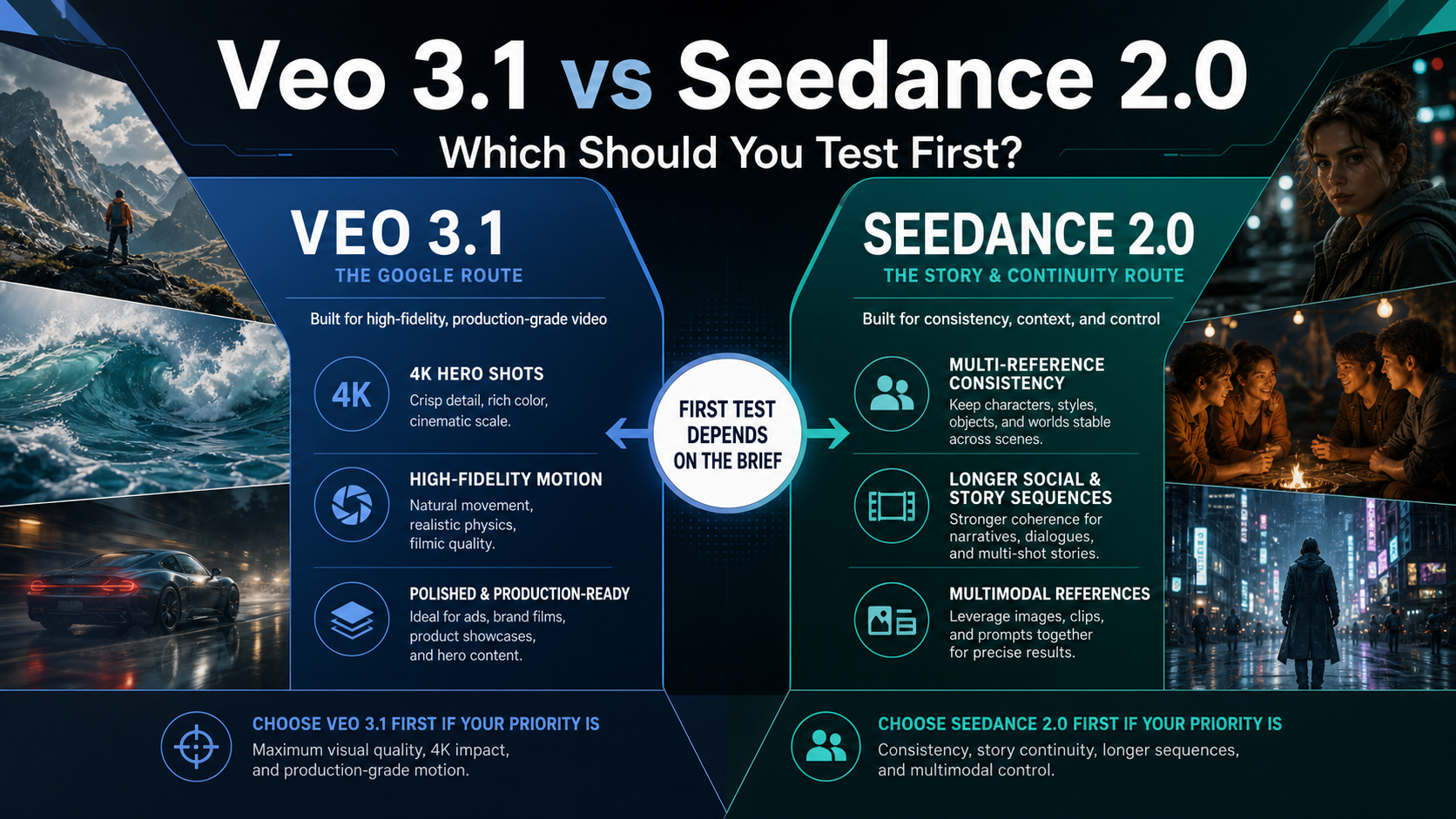
The useful question is not which model is better overall; it is which one deserves your first serious test. Test Seedance 2.0 first when the brief depends on character continuity, multiple reference inputs, longer social or story sequences, or multimodal scene control. Test Veo 3.1 first when the job needs a Google-controlled route, polished hero output, 4K delivery options, storyboard control, or high-fidelity motion.
Keep route facts separate before you spend generation budget. Veo 3.1 facts such as duration, resolution, audio, and price should be read from Google's current Gemini or Vertex AI route. Seedance 2.0 capability claims belong to ByteDance Seed and its model-card evidence, while API access, price, quota, and region claims depend on the provider route you will actually use.
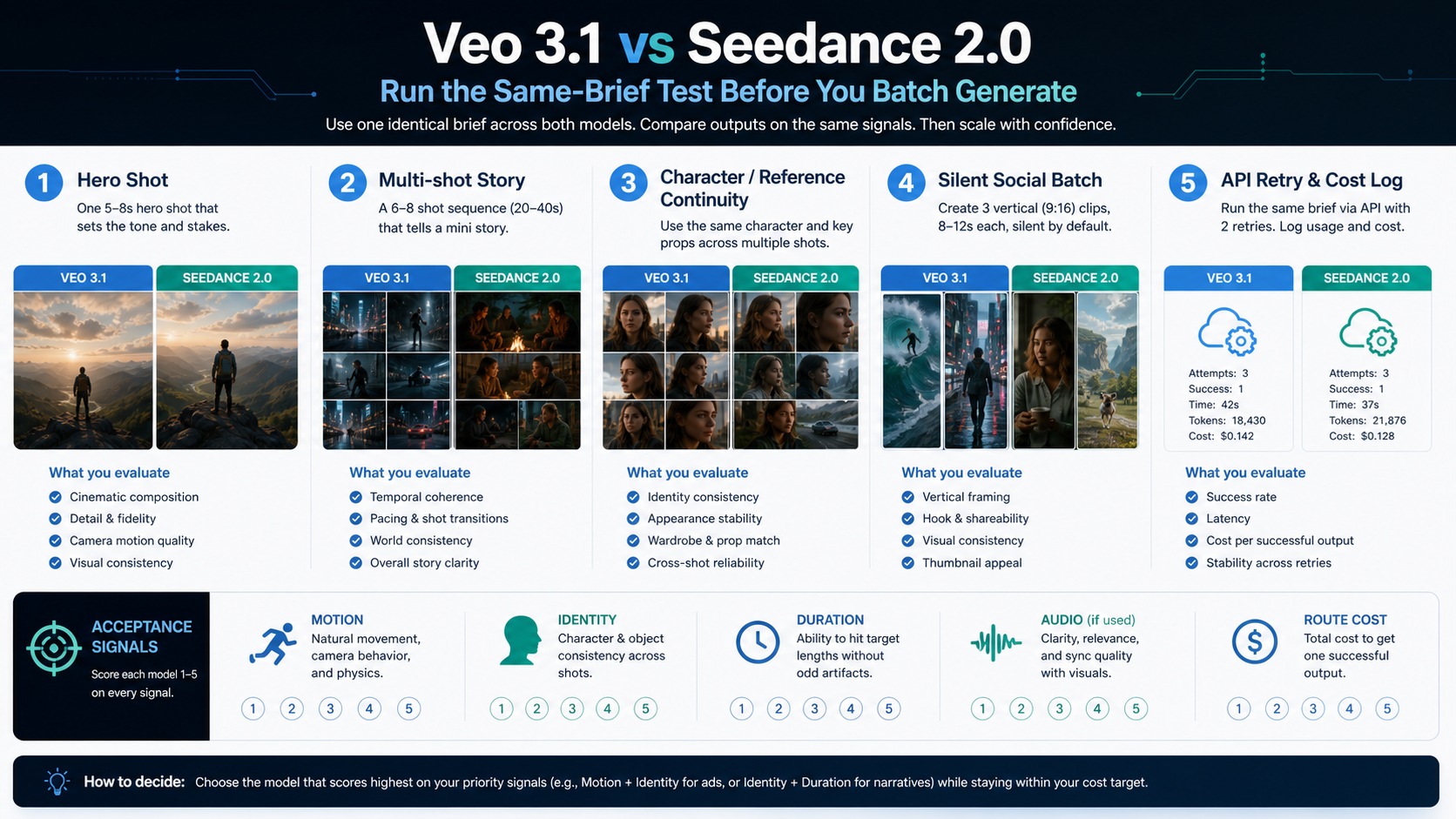
Before a batch run, give both finalists the same brief, reference assets, target duration, aspect ratio, audio expectation, success criteria, and cost owner. The model that wins that small test is the one to scale first.
Quick Verdict: Choose the First Test by the Job
If the deliverable is a polished hero clip, a product reveal, a cinematic brand shot, or a Google-hosted developer workflow, Veo 3.1 should usually get the first paid test. Google documents Veo 3.1 Generate and Veo 3.1 Fast Generate as GA model routes, with 4, 6, and 8 second durations, 16:9 and 9:16 output, 24 FPS, and 720p, 1080p, or 4K output options on those routes. That does not make Veo the winner for every clip, but it gives teams a clearer official route when high-fidelity output, 4K delivery, native audio choices, and Google billing ownership matter.
If the deliverable is a longer social sequence, a multi-reference character scene, a creator-style story cut, or a brief that needs image, video, and audio references to stay coherent, Seedance 2.0 should usually get the first test. ByteDance Seed presents Seedance 2.0 as a multimodal audio-video model, and its model-card evidence describes direct 4 to 15 second audio-video generation with text, image, audio, and video inputs. That makes it attractive when continuity and reference handling are more important than an official 4K Google route.
The practical split is simple:
| Brief type | Test first | Why |
|---|---|---|
| 4K hero shot, product close-up, polished cinematic motion | Veo 3.1 | Official Google route, higher documented resolution ceiling, strong fit for final-frame quality checks |
| Character continuity, reference-heavy scene, longer social or story clip | Seedance 2.0 | Multimodal references and longer direct generation window support continuity-first jobs |
| Developer prototype tied to Google Cloud billing, quota, and governance | Veo 3.1 | Official model IDs, pricing page, Vertex AI controls, and clearer account ownership |
| Provider-route API experiment where continuity matters more than official source route | Seedance 2.0 | Useful if the chosen provider exposes the right reference inputs, duration, and acceptable price |
| Unknown creative direction | Both, but only with the same brief | Public examples are not a substitute for your own prompt, assets, and pass/fail criteria |
Do not start with a benchmark table unless your team has its own benchmark clips. For most creators and developers, the first useful answer is the model that should receive the next $10, next afternoon, or next production slot.
The Route Facts That Actually Change the Decision
Veo 3.1 has the clearer official route story. Google's current Veo 3.1 model documentation names veo-3.1-generate-001 and veo-3.1-fast-generate-001 as GA routes, and it also lists veo-3.1-lite-generate-001 as Preview with a narrower capability surface. The same official docs are where you should confirm duration, aspect ratio, resolution, FPS, quota type, and whether the feature you plan to use is GA or preview-labeled. Google's generative AI pricing page is also the source for Veo cost math because price varies by model tier, audio inclusion, and resolution.
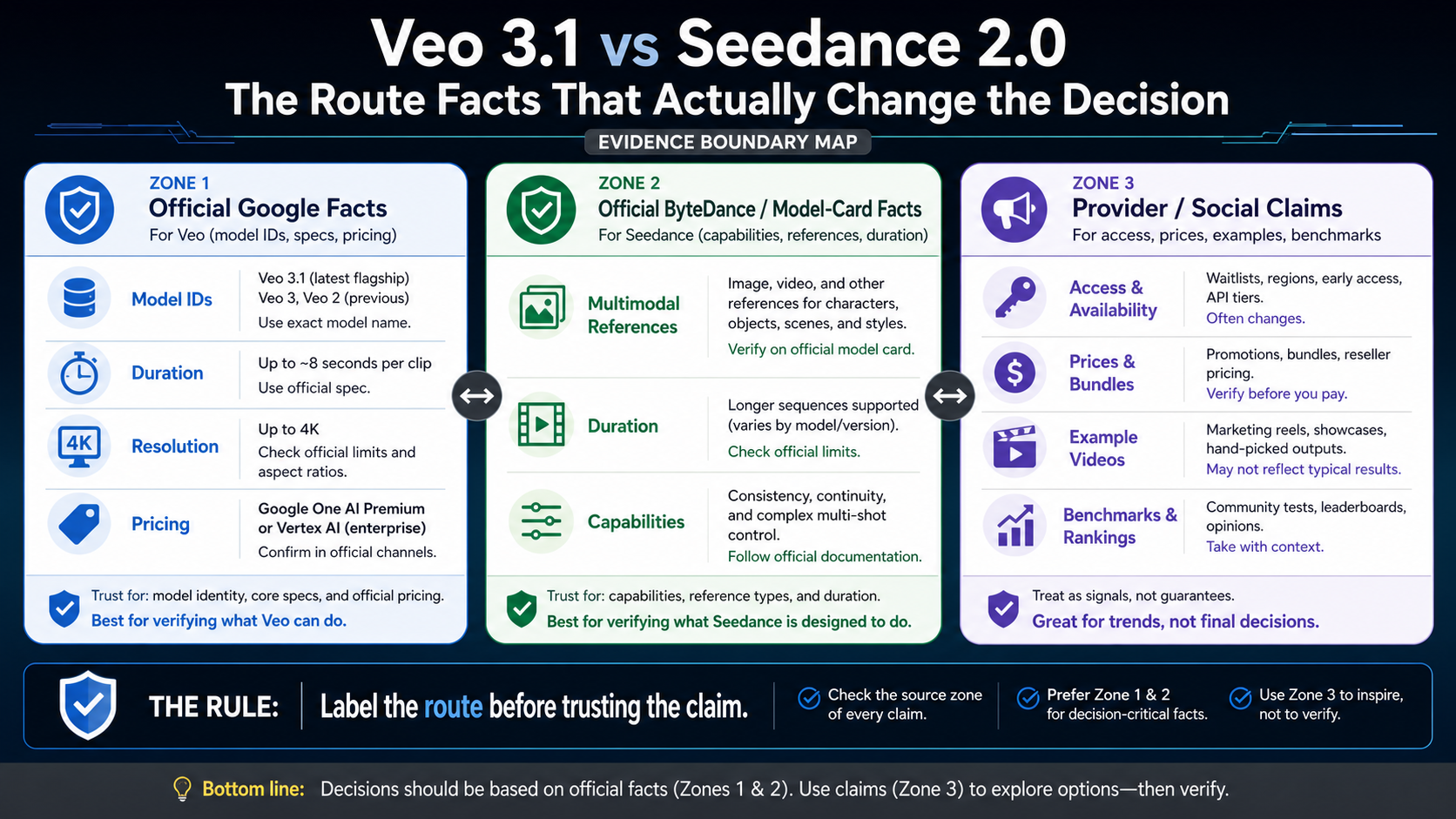
Seedance 2.0 has strong primary evidence for model capability, but its production route has to be labeled more carefully. The ByteDance Seed product page describes a unified audio-video architecture with text, image, audio, and video inputs, director-style reference control, and motion stability. The Seedance 2.0 model card describes a 4 to 15 second generation window, native 480p and 720p outputs, multiple reference input types, and a Fast variant. Those facts support a continuity-first article recommendation, but they do not automatically prove a specific API provider's price, region, quota, face-reference policy, or output setting.
That distinction matters because many buying mistakes happen when people compare one model's official facts to another model's provider route. A provider page can be useful, especially for prototyping, but it proves the provider's route on the date you checked it. It does not become official ByteDance pricing. Likewise, a Google AI consumer surface, Gemini API route, and Vertex AI route can expose different workflow details even when they share the Veo 3.1 name.
Use this evidence order before a real budget decision:
| Claim type | Safer source |
|---|---|
| Veo model ID, duration, aspect ratio, resolution, FPS, GA or Preview status | Google Gemini API or Vertex AI docs |
| Veo price per output second | Google Cloud pricing page for the exact route and mode |
| Seedance model identity, multimodal design, reference-input capability | ByteDance Seed official page and Seedance 2.0 model card |
| Seedance API price, account access, quota, region, input limits | The provider route you will actually use |
| "Better quality" or "winner" claims | Your same-brief output set, not a public sample alone |
Choose by Brief, Not by Leaderboard
The easiest way to make a wrong choice is to ask which model is "best" before naming the video job. A product hero shot, a talking character sequence, a social ad batch, and an API prototype all fail in different ways. The first test should attack the failure that would make the project unusable.
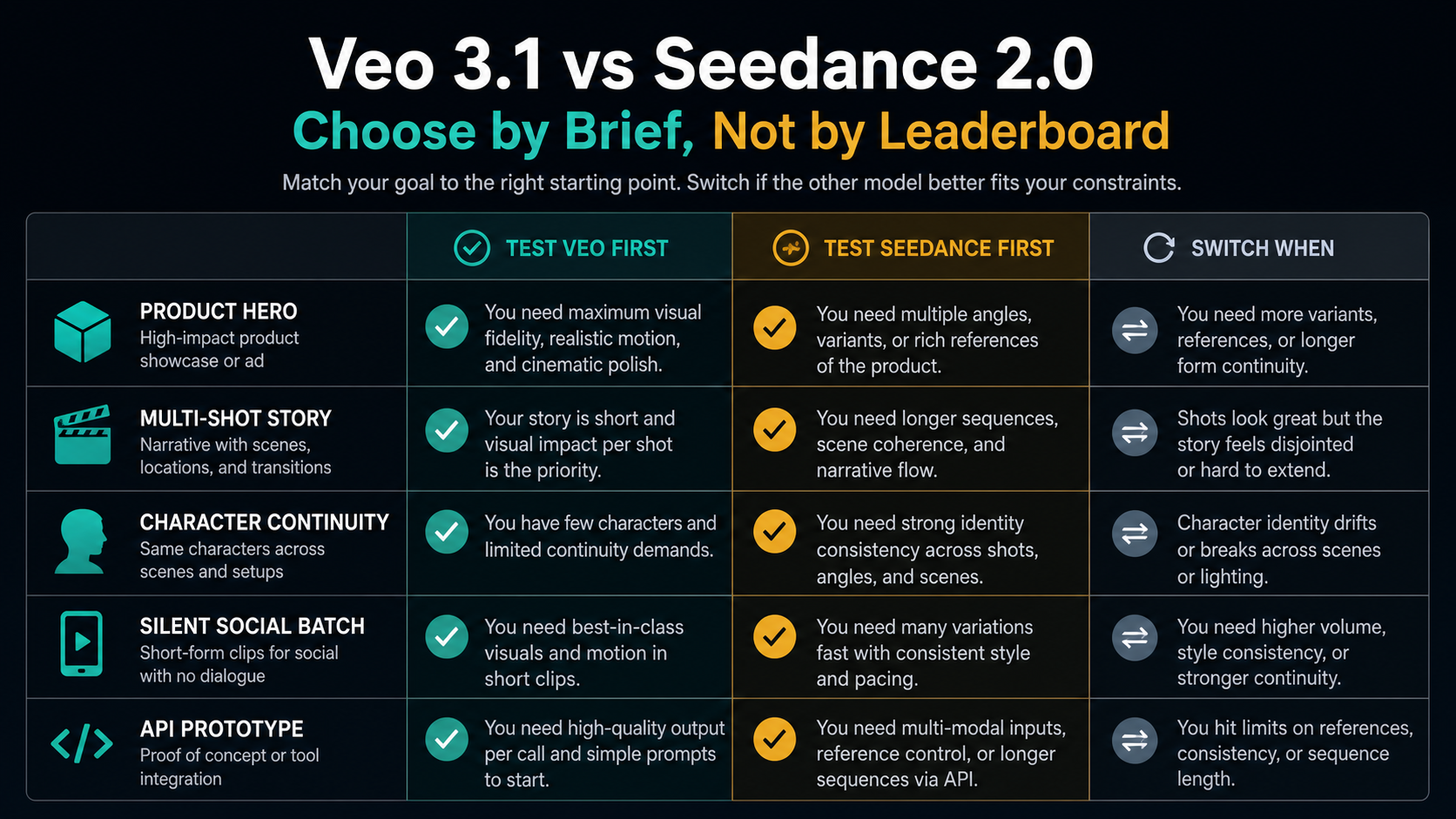
Choose Veo 3.1 first when the audience will judge the final frame quality before they judge narrative continuity. Product reveals, premium brand clips, architectural fly-throughs, food close-ups, and cinematic mood shots all punish weak lighting, distorted motion, or low-resolution output. For those jobs, Veo's official 4K-capable routes and Google-controlled API surface are worth testing before you chase longer sequence features.
Choose Seedance 2.0 first when the audience will notice continuity breaks before they notice a resolution ceiling. Character scenes, creator ads, short story sequences, and reference-heavy clips fail when faces, costumes, props, or scene logic drift from shot to shot. Seedance's model-card emphasis on multimodal references and longer direct audio-video generation makes it the more natural first test for that failure mode.
For developer teams, the route can outweigh the model's abstract quality. If your company already has Google Cloud billing, audit requirements, enterprise procurement, or Vertex AI quota planning, Veo 3.1 may be the lower-friction first prototype even when Seedance looks better for the creative brief. If your prototype is provider-agnostic and the job is continuity-heavy, a Seedance route may be worth testing first, but only after you confirm the provider's current input support, retry behavior, price, and rights terms.
The switch rule should be explicit. Start with Seedance if the first output must keep people, references, and story beats coherent. Switch to Veo if Seedance cannot deliver the visual finish, output format, route stability, or governance you need. Start with Veo if the first output must look polished, high-resolution, and route-controlled. Switch to Seedance if Veo cannot preserve continuity or create the longer sequence shape without too much manual stitching.
Run the Same-Brief Test Before You Batch Generate
A fair comparison is not a random Veo prompt against a random Seedance prompt. Use one brief, one asset set, and one scoring sheet. The goal is to produce a small evidence set that tells you which model deserves the next batch, not to prove a permanent market ranking.
Start with a brief that contains a real production constraint. "A futuristic city at sunset" is too vague because both models can look impressive. A useful brief says what must stay consistent, what motion must happen, what format will be delivered, and what would make the clip fail. For example: "A 7 second vertical product reveal for a matte-black wireless earbud case on a marble counter; camera pushes in slowly; brand color is teal; no extra logos; soft mechanical click; output must survive a mobile ad crop."
Run five small checks:
- Reference handling: give each route the same product image, character sheet, or style reference that your production brief will actually use.
- Motion pass: ask for the most important movement once, then score whether the model creates usable motion or only a pretty still image.
- Continuity pass: repeat the same prompt with a small variation and check whether identity, objects, and scene logic survive.
- Route pass: record duration, resolution, audio setting, generation time, retry behavior, provider or official route, and checked date.
- Cost-owner pass: calculate the price of the next 20 acceptable clips, not just the price of one successful sample.
The stop rule is part of the test. Stop testing Veo first if it cannot keep the required identity, reference, or story state across the sequence without heavy manual repair. Stop testing Seedance first if the provider route cannot meet your output format, reliability, rights, account, or budget requirements. Continue only when the winning route passes both the creative check and the operational check.
Keep the scoring rough but consistent:
| Criterion | What to score |
|---|---|
| Brief fidelity | Did the output obey the required subject, setting, format, and forbidden elements? |
| Motion | Did the action move naturally, or did the clip feel like a camera move over a still image? |
| Identity and references | Did faces, products, props, or style references remain stable enough for the use case? |
| Route readiness | Are duration, aspect ratio, resolution, audio, price, and quota acceptable on the actual route? |
| Repair cost | How much manual editing, rerolling, or route switching would be needed before delivery? |
Cost, Access, and Risk Checks Before Production
Cost is not just price per second. It is price per acceptable clip. If Veo costs more on the route you use but reaches acceptable quality in fewer attempts, it may be cheaper for a premium hero asset. If Seedance is cheaper on a provider route but needs more rerolls or manual fixes, the published price can understate the real cost. Count failed generations, rejected outputs, human review time, and post-production repair.
For Veo 3.1, check three route details before quoting a budget: the exact model ID, whether audio is included, and whether the chosen resolution changes the price. Google's price grid is output-second based and route-specific. A short 4K clip with audio belongs in a different budget bucket from a fast silent preview, even though both may be called Veo 3.1 in casual conversation.
For Seedance 2.0, check the provider route before quoting a budget. The model-card capability window does not answer whether your provider exposes the same input mix, the same duration range, the same output settings, the same content policy, or the same reliability. If the provider changes price, region access, or quota, your project economics change even if the model identity stays the same.
Risk also includes asset rights and privacy. Reference-heavy video work often involves faces, products, unreleased creative, client footage, or voice material. Before uploading those assets to any route, confirm who owns the account, how inputs are retained, whether outputs can be used commercially, whether sensitive subjects are allowed, and what support path exists if a job fails. The more valuable the source asset, the more important the route owner becomes.
When to Leave the Two-Way Choice
Veo 3.1 and Seedance 2.0 are not the whole video market. If neither route passes your same-brief test, the answer may be a broader model shortlist rather than more rerolls. Use a broader comparison when you also need open-source control, longer single-shot duration, different editing tools, or a third model's cost structure. The broader Seedance 2.0 vs LTX-2 vs Veo 3.1 vs Vidu Q3 comparison is the better next stop when the two-model shortlist no longer fits the job.
Use a pricing page when the creative choice is already made but the budget is not. For Veo route budgeting, start with the Veo 3.1 pricing breakdown and then confirm the current Google pricing page before committing spend. For Seedance route planning, use the Seedance video models and pricing guide and the Seedance 2 API integration guide as route-specific starting points, then verify the provider you will actually call.
Stay in the two-way choice only when the shortlist is real. If your next decision is "which of these two should I pay to test first," this comparison gives the right frame. If your decision is "which AI video model is best for everything," the frame is too narrow.
FAQ
Is Veo 3.1 better than Seedance 2.0?
Not in a universal sense. Veo 3.1 is the stronger first test when the job needs Google's official route, high-fidelity final output, 4K options, and clear price or quota ownership. Seedance 2.0 is the stronger first test when continuity, reference handling, longer direct generation, and multimodal scene control matter more than the Google route.
Which one should I test first for social video?
Test Seedance 2.0 first if the social video depends on characters, references, multi-shot pacing, or a longer story shape. Test Veo 3.1 first if the social video is a polished hero shot, product reveal, or short cinematic asset where final visual finish matters more than sequence length.
Which one should I test first for API development?
Test Veo 3.1 first when your production environment needs Google Cloud billing, Vertex AI controls, official model IDs, or a clearer enterprise route. Test Seedance 2.0 first when your provider route exposes the inputs and duration your continuity-heavy workflow needs, and when you have verified price, quota, region, and support terms for that route.
Does Veo 3.1 support longer videos than Seedance 2.0?
Google's Veo 3.1 docs list 4, 6, and 8 second generation durations for the main Generate and Fast Generate routes, with route-specific extension features for prior Veo-generated clips. Seedance 2.0 model-card evidence describes direct 4 to 15 second audio-video generation. The practical answer still depends on the route you will use, especially for API settings and provider limits.
Does Seedance 2.0 have official API pricing?
Use caution with that claim. ByteDance and model-card sources are stronger for model capability than for a universal self-serve API price. If you use a provider route, treat that provider's pricing as provider pricing, record the checked date, and do not describe it as official ByteDance pricing unless ByteDance itself provides the price for that route.
What is the safest first test prompt?
Use a real brief with one subject, one reference set, one target duration, one output format, one audio expectation, and a written failure definition. The safest prompt is not the prettiest prompt; it is the prompt that exposes the failure your project cannot accept.