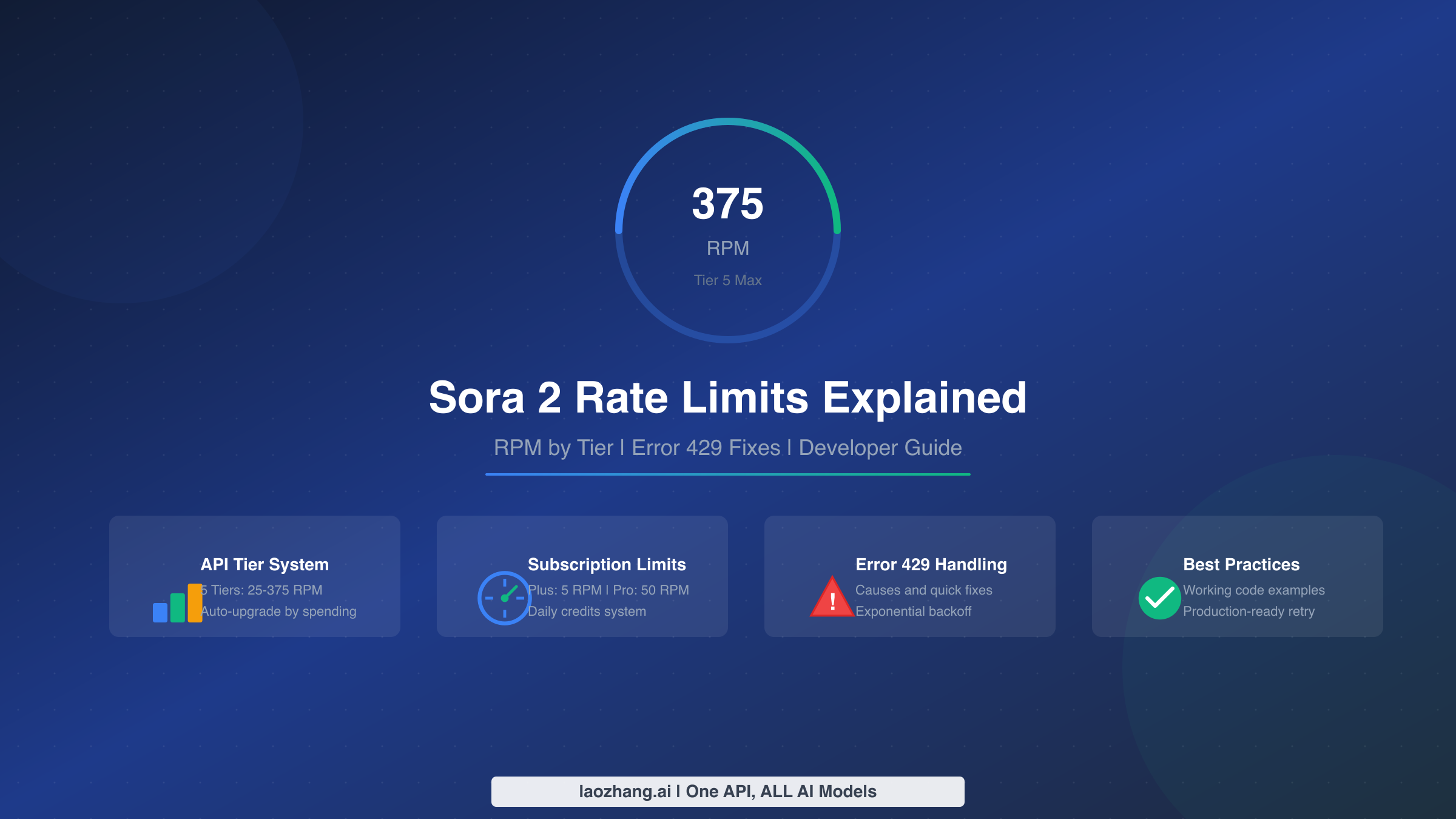
Sora 2 API rate limits determine how many video generation requests you can make per minute, and understanding them is crucial for building reliable applications. Whether you're hitting Error 429 for the first time or planning your API usage around tier limits, this guide provides the complete breakdown you need. As of January 2026, rate limits vary significantly based on your account tier and access method, ranging from 5 RPM for Plus subscribers to 375 RPM for Tier 5 API users.
TL;DR
Before diving deep, here's what you need to know about Sora 2 rate limits:
- API Tier Limits: Tier 1 starts at 25 RPM (sora-2) / 10 RPM (sora-2-pro), scaling to 375 RPM / 150 RPM at Tier 5
- Subscription Limits: Plus gets 5 RPM with 30 daily credits, Pro gets 50 RPM with 100+ credits
- Free Tier: Not supported for Sora 2 models—you need at least $10 top-up for Tier 1
- Critical Warning: Failed requests still count against your rate limit
- Tier Upgrades: Automatic based on spending history and time (7-30 days depending on tier)
API Rate Limits by Tier (Complete Breakdown)
Understanding the API tier system is essential for developers building video generation features. OpenAI uses a five-tier structure for API access, with each tier unlocking higher rate limits as you demonstrate consistent usage and spending. The free tier does not support Sora 2 models at all—you must have at least a Tier 1 account with a minimum $10 top-up to access video generation capabilities.
The rate limits differ significantly between the standard sora-2 model and the higher-quality sora-2-pro model. This distinction matters because many developers start with sora-2 for prototyping and then switch to sora-2-pro for production, only to discover their effective rate limit has dropped considerably. Planning for this from the beginning can save significant headaches during deployment.
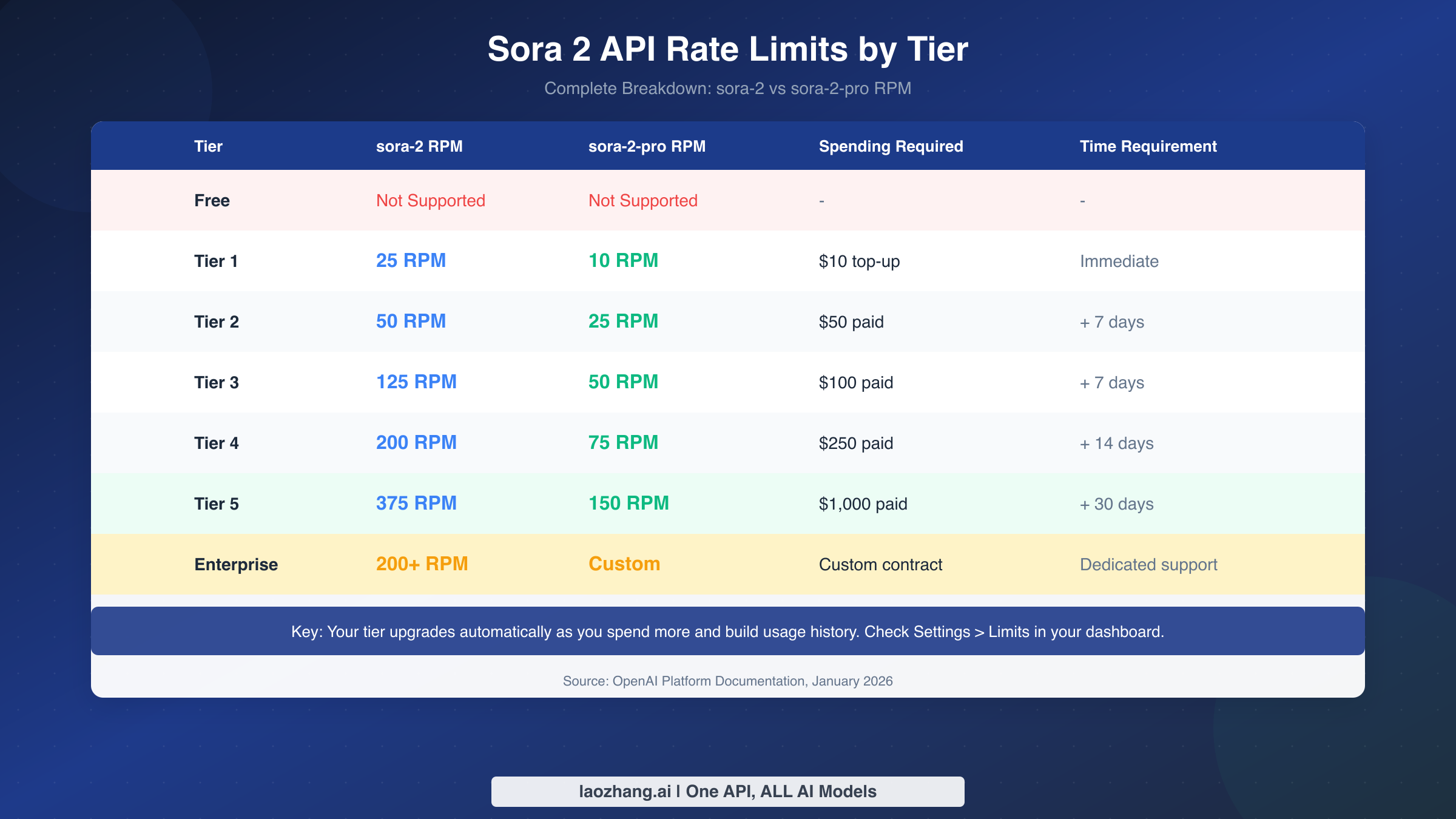
| Tier | sora-2 RPM | sora-2-pro RPM | Spending Required | Time Requirement |
|---|---|---|---|---|
| Free | Not Supported | Not Supported | - | - |
| Tier 1 | 25 RPM | 10 RPM | $10 top-up | Immediate |
| Tier 2 | 50 RPM | 25 RPM | $50 paid | + 7 days |
| Tier 3 | 125 RPM | 50 RPM | $100 paid | + 7 days |
| Tier 4 | 200 RPM | 75 RPM | $250 paid | + 14 days |
| Tier 5 | 375 RPM | 150 RPM | $1,000 paid | + 30 days |
| Enterprise | 200+ RPM | Custom | Custom contract | Dedicated support |
Your tier upgrades automatically as you meet the spending and time requirements. You can check your current tier and usage in the OpenAI dashboard under Settings > Limits. Note that these numbers represent the maximum requests per minute, but practical throughput depends on factors like video duration and resolution. A 12-second 1080p video generation takes significantly longer than a 4-second 720p clip, affecting how quickly you can submit your next request.
For many production applications, the rate limit becomes less about requests per minute and more about concurrent processing capacity. Each video generation can take several minutes to complete, so even at Tier 5 with 375 RPM, you're more likely to be bottlenecked by generation time than by the rate limit itself. Understanding this distinction helps you design more efficient video generation pipelines.
Subscription vs API Limits (What Applies to You)
One of the most confusing aspects of Sora 2 rate limits is the distinction between subscription-based access (through ChatGPT Plus or Pro) and API access. These are entirely separate systems with different pricing models, different limits, and—critically—different use cases. Choosing the right access method depends on whether you're a content creator making videos manually or a developer building automated systems.
Subscription access through ChatGPT Plus ($20/month) or Pro ($200/month) provides a simpler, UI-based experience with daily credit allocations. The credit system uses multipliers based on video duration and resolution: a standard 10-second clip costs 1 credit, while a 15-second clip costs 2 credits, and a 25-second Pro Storyboard video costs 4 credits. Credits operate on a rolling 24-hour window, not a midnight reset, meaning each credit becomes available exactly 24 hours after you use it.
API access, in contrast, uses per-second pricing with no monthly subscription required beyond maintaining your tier. The official Sora 2 API costs $0.10/second for standard 720p output and up to $0.50/second for 1080p sora-2-pro. This pay-as-you-go model often works out cheaper for consistent, high-volume usage but requires more technical implementation.
| Access Method | RPM Limit | Daily Quota | Pricing Model | Best For |
|---|---|---|---|---|
| Plus Subscription | 5 RPM | 30 credits/day | $20/month flat | Manual content creation |
| Pro Subscription | 50 RPM | 100+ credits/day | $200/month flat | Professional creators |
| API Tier 1-5 | 25-375 RPM | No daily cap | $0.10-0.50/second | Automated applications |
An important gotcha that frustrates many users: API usage and app usage share the same underlying quota in some cases. Several developers have reported that their API video generations counted against their ChatGPT app limits, causing the app to say they've "hit their limit" even though they're paying separately for API access. If you need both manual and automated access, consider maintaining separate accounts or carefully tracking your combined usage. For more details on subscription limit specifics, we've covered the daily generation calculations in depth.
Understanding Credits and Daily Quotas
The credit system for subscription users deserves special attention because it's often misunderstood. Unlike simple "X videos per day" limits, Sora 2 uses a multiplier system where different video configurations cost different amounts of credits. This means your actual daily video output varies significantly based on what you're generating.
For Plus subscribers with 30 daily credits, a typical usage pattern might look like this: you could generate 30 short clips under 10 seconds each (1 credit each), or 15 standard 15-second videos (2 credits each), or just 7-8 clips if you're using the Pro Storyboard 25-second mode (4 credits each). Resolution upgrades don't directly cost more credits, but they may trigger longer queue times during peak usage.
Pro subscribers get access to higher credit allocations (typically 100+ per day) plus exclusive features like the 25-second Storyboard mode and priority queue access. The "Relaxed mode" for Pro users offers unlimited off-peak generation at zero cost, though video quality and generation time may vary. Off-peak hours are generally 10 PM–6 AM PST, making this a viable option for batch processing overnight.
The rolling 24-hour window for credits means you can optimize your workflow around when credits regenerate. If you used 10 credits at 2 PM yesterday, those 10 credits become available at 2 PM today—not at midnight. This allows power users to strategically time their generations for maximum throughput. Keeping a simple log of when you generate videos helps predict when credits will become available again.
For developers comparing costs, the API often makes more economic sense despite appearing more expensive. At $0.10/second for sora-2, a 10-second video costs $1. With Plus subscription at $20/month giving you 30 credits/day (roughly 900 videos/month), that's about $0.022/video—but only if you actually use all 900 generations. Most users don't hit that volume, making the API's pay-per-use model more predictable for sporadic usage patterns.
Error 429: Causes, Hidden Gotchas, and Fixes
When you receive Error 429 from the Sora 2 API, it means you've hit a rate limit—but the specific cause and appropriate response depend on understanding what triggered it. This section covers the common causes, a critical hidden gotcha that makes the situation worse for many users, and the proper fix using exponential backoff.
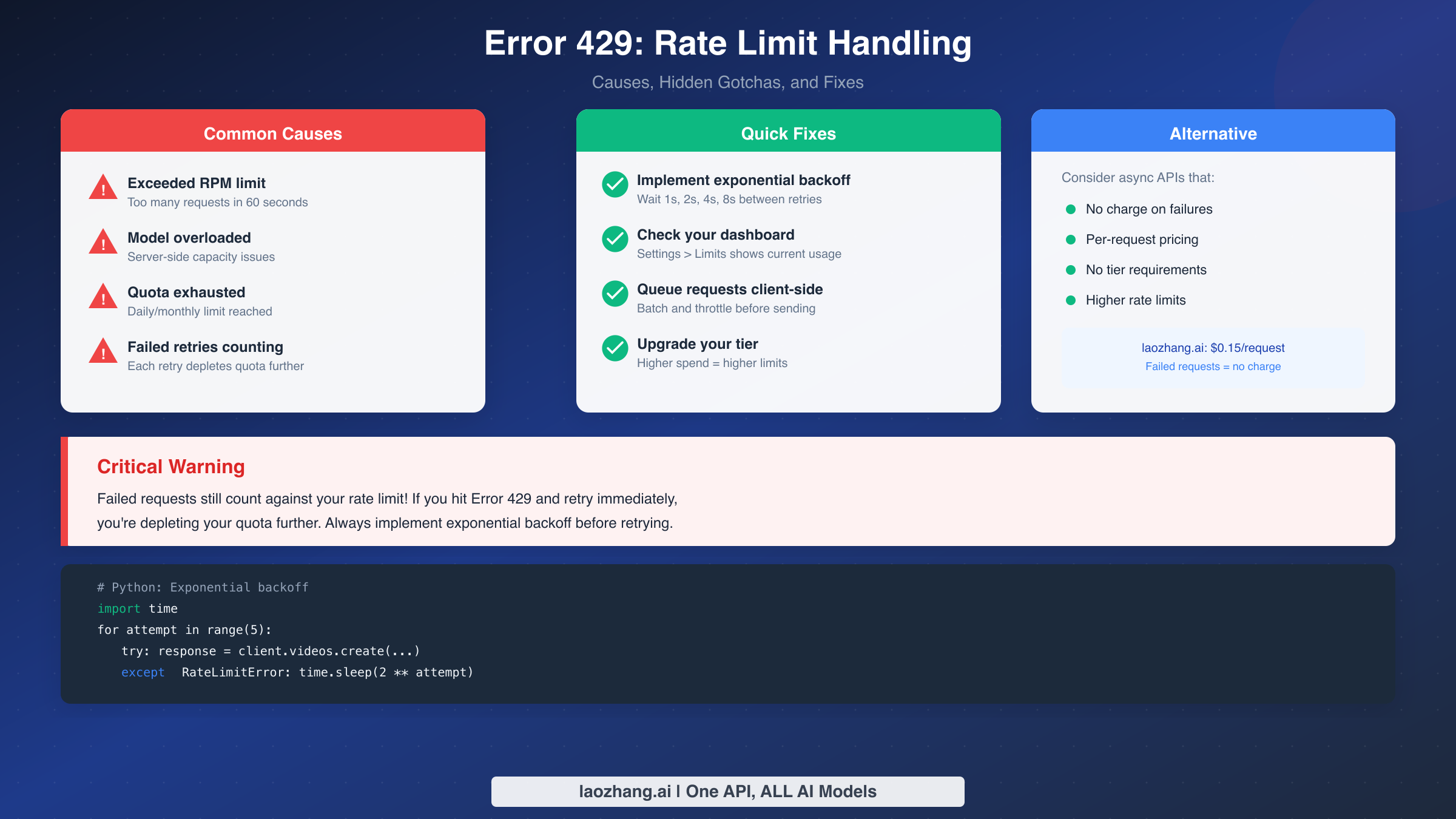
The most straightforward cause is simply exceeding your RPM limit. If you're on Tier 1 with a 25 RPM limit for sora-2, sending 30 requests within 60 seconds will trigger Error 429 on the excess requests. The solution is throttling your request rate to stay within your allocation. However, other causes aren't so obvious.
Server-side capacity issues can trigger 429 errors even when you haven't hit your personal limit. OpenAI's documentation notes that "the model is currently overloaded with other requests" is a valid 429 scenario. In this case, waiting and retrying is the correct response, but how you wait matters enormously.
Quota exhaustion occurs when you've used up your daily or monthly allocation, distinct from per-minute rate limits. The error message typically includes different text when this happens: "You exceeded your current quota, please check your plan and billing details." Adding credits or upgrading your tier resolves this.
The most critical gotcha that catches developers off-guard: failed requests still count against your rate limit. If you hit Error 429 and immediately retry, you're depleting your quota further with each failed attempt. This creates a death spiral where aggressive retry logic makes the situation progressively worse. Many developers learn this lesson the hard way after watching their applications hammer the API with retries, extending their rate limit lockout.
The proper solution is implementing exponential backoff:
pythonimport time
from openai import OpenAI, RateLimitError

client = OpenAI()

def generate_video_with_backoff(prompt, max_retries=5):
    for attempt in range(max_retries):
        try:
            response = client.videos.create(
                model="sora-2",
                prompt=prompt,
                size="1280x720",
                duration=8
            )
            return response
        except RateLimitError:
            wait_time = 2 ** attempt  # 1, 2, 4, 8, 16 seconds
            print(f"Rate limited. Waiting {wait_time}s before retry...")
            time.sleep(wait_time)
    raise Exception("Max retries exceeded")
This approach starts with a 1-second wait, then doubles it with each retry (2s, 4s, 8s, 16s). By the time you've waited 31 seconds total, your rate limit window has likely reset. The key insight is that patience costs you nothing, while aggressive retries actively harm your quota.
Another hidden issue that has frustrated developers: API and app limits can conflict. Some users report that their API video generations counted against their ChatGPT app limits, causing the app to claim they've hit their daily limit. If you're experiencing this, the workaround is maintaining separate accounts for API development and personal app use, or simply waiting 24 hours for the rolling window to reset.
How to Upgrade Your API Tier
Your API tier determines your rate limits, and upgrading is mostly automatic based on your usage patterns. OpenAI tracks both your cumulative spending and account age to determine tier eligibility. Understanding these requirements helps you plan for scaling your video generation applications.
To reach each tier, you need to meet both a spending threshold and a minimum time at the previous tier:
| Target Tier | Cumulative Spend | Time at Previous Tier | Typical Use Case |
|---|---|---|---|
| Tier 1 | $10 | Immediate | Development, testing |
| Tier 2 | $50 | 7 days at Tier 1 | Small applications |
| Tier 3 | $100 | 7 days at Tier 2 | Growing products |
| Tier 4 | $250 | 14 days at Tier 3 | Production apps |
| Tier 5 | $1,000 | 30 days at Tier 4 | High-volume platforms |
The time requirements exist to ensure account stability and prevent abuse. You can't simply deposit $1,000 on day one and immediately access Tier 5 limits. This graduated approach protects both OpenAI's infrastructure and legitimate users from bad actors who might flood the system.
For faster tier progression, focus on consistent usage rather than sporadic bursts. OpenAI's tier upgrade algorithm favors steady spending patterns over one-time large deposits. If you need higher limits immediately, Enterprise accounts offer custom arrangements with dedicated support, though these require direct sales engagement and typically suit organizations with significant video generation needs.
To check your current tier, navigate to Settings > Limits in your OpenAI dashboard. This page shows your current tier, usage against limits, and progress toward the next tier. Monitoring this regularly helps you anticipate when upgrades will occur and plan your application's scaling accordingly.
Alternative Access Methods
For developers who find official API rate limits restrictive or pricing prohibitive, several alternative access methods exist. These range from third-party API providers to self-hosted solutions, each with different tradeoffs in terms of cost, reliability, and features. The key is matching the access method to your specific use case and risk tolerance.
Third-party API providers like laozhang.ai offer Sora 2 access through aggregated endpoints, often at significant discounts compared to official pricing. The per-request pricing model (starting at $0.15/request for sora-2) simplifies cost prediction compared to per-second billing. More importantly for rate-limited developers, these async APIs typically don't charge for failed requests—if content moderation fails or generation times out, you're not billed. This stands in contrast to official API behavior where request attempts consume quota regardless of success.
For high-volume production needs, the async API model offers distinct advantages. Instead of synchronous request-response cycles that tie up connections, you submit requests and poll for completion. This pattern naturally handles rate limiting more gracefully, as you're not waiting on connection limits while generation occurs. The typical workflow:
- POST request to create video generation task
- Receive task ID immediately
- GET request to poll status (every 10-15 seconds)
- Download video when status shows "completed"
For a complete pricing comparison, we've analyzed official versus third-party costs across different usage patterns. Generally, third-party providers become more cost-effective at higher volumes where their bulk discounts and no-charge-on-failure policies compound savings. For more free access methods, we've documented over 10 approaches including promotional credits and community resources.
If you're considering alternatives primarily due to rate limits rather than cost, the cheapest Sora 2 API options comparison includes rate limit information alongside pricing. Some providers offer higher effective throughput by processing requests through distributed infrastructure, though this comes with less predictable latency compared to direct OpenAI API access.
Developer Best Practices
Building reliable video generation applications requires more than just understanding rate limits—it requires designing systems that gracefully handle the inherent unpredictability of AI video generation. These best practices emerge from production experience and community learning.
Request queuing is essential for any application generating multiple videos. Rather than firing requests directly when users submit prompts, queue them client-side and release them at a controlled rate. This prevents burst traffic from triggering rate limits and provides a smoother user experience since they can see queue position rather than cryptic error messages.
pythonimport asyncio
from collections import deque

class VideoGenerationQueue:
    def __init__(self, requests_per_minute=20):
        self.queue = deque()
        self.rpm_limit = requests_per_minute
        self.requests_this_minute = 0

    async def add_request(self, prompt):
        self.queue.append(prompt)
        await self.process_queue()

    async def process_queue(self):
        while self.queue and self.requests_this_minute < self.rpm_limit:
            prompt = self.queue.popleft()
            self.requests_this_minute += 1
            # Submit to API with exponential backoff
            await self.generate_video(prompt)

        # Reset counter every minute
        await asyncio.sleep(60)
        self.requests_this_minute = 0
Resolution stepping saves both cost and quota. Start with lower resolutions (720p) for draft previews, and only generate full 1080p versions after user approval. This approach is especially valuable when users iterate on prompts, as each iteration at lower resolution costs less against both budget and rate limits.
Off-peak scheduling for non-urgent work takes advantage of lower contention. Server-side capacity issues triggering 429 errors are more common during business hours in US time zones. Scheduling batch processing for 10 PM–6 AM PST reduces rate limit hits from server overload as opposed to quota exhaustion.
Monitoring and alerting catches rate limit issues before they cascade. Track your API usage programmatically and set alerts at 70% and 90% of your tier limits. This early warning gives you time to adjust application behavior or request tier upgrades before hitting hard limits.
For async APIs, implementing proper status polling avoids both under-polling (missing completed videos) and over-polling (wasting requests). A 10-15 second interval works well for most video generation tasks, which typically take 2-5 minutes to complete. Use exponential backoff if a task seems stuck—if it hasn't completed after 10 minutes, it's likely failed silently.
FAQ
What is the RPM limit for Sora 2?
Sora 2 API rate limits depend on your account tier. Tier 1 provides 25 RPM for sora-2 and 10 RPM for sora-2-pro. This scales up to 375 RPM and 150 RPM respectively at Tier 5. Subscription users (ChatGPT Plus/Pro) have separate limits: Plus gets 5 RPM and Pro gets 50 RPM. Free tier accounts cannot access Sora 2 at all—minimum $10 top-up required.
How many videos can I generate per day with Sora 2?
Daily limits depend on your access method. Plus subscribers get 30 credits per day (roughly 15-30 videos depending on duration), Pro subscribers get 100+ credits. API users have no daily cap—only per-minute rate limits apply. However, practical daily output is also limited by generation time (2-5 minutes per video) and cost considerations.
Do failed requests count against my Sora 2 rate limit?
Yes, and this is a critical gotcha many developers miss. Failed requests—including rate limit errors—still count against your quota. If you hit Error 429 and immediately retry, you're depleting your quota further. Always implement exponential backoff (wait 1s, 2s, 4s, etc.) before retrying to avoid making the situation worse.
Why am I getting Error 429 when I haven't hit my limit?
Several causes: (1) Server-side overload—the model is busy with other requests; (2) Short-term burst detection—sending many requests in seconds even if under minute quota; (3) API-app limit sharing—some users report API usage affecting their ChatGPT app quota. Check Settings > Limits in your dashboard for accurate current usage.
How can I increase my Sora 2 rate limit?
Tier upgrades happen automatically based on cumulative spending and account age. Tier 2 requires $50 spent plus 7 days at Tier 1. Tier 5 requires $1,000 spent plus 30 days at Tier 4. For immediate higher limits, Enterprise accounts offer custom arrangements but require direct sales contact. Third-party APIs like laozhang.ai offer alternative access with different (often higher) limits.
What's the difference between API and subscription rate limits?
API limits are per-minute and tier-based (25-375 RPM), with per-second pricing ($0.10-0.50/second). Subscription limits are per-minute plus daily credits: Plus gets 5 RPM with 30 credits/day ($20/month), Pro gets 50 RPM with 100+ credits ($200/month). API suits automated applications; subscriptions suit manual content creation.
Understanding Sora 2 rate limits is the foundation for building reliable video generation applications. The key takeaways: know your tier and its limits, implement proper exponential backoff for Error 429, remember that failed requests count against your quota, and consider alternative access methods if official limits prove restrictive. With these principles in mind, you can design systems that maximize throughput while staying within the boundaries OpenAI has established for fair and reliable API access.