ChatGPT Plus subscribers gained access to OpenAI's revolutionary Sora video generator in late 2024, but the limits on this access have caused significant confusion. With OpenAI announcing "unlimited Sora access" for Plus users in early 2025, many subscribers expected unrestricted video generation—only to discover that meaningful limits still apply. Understanding exactly what you can and cannot do with Sora as a Plus subscriber is essential for planning your creative workflow and avoiding mid-month disappointment when credits run out.
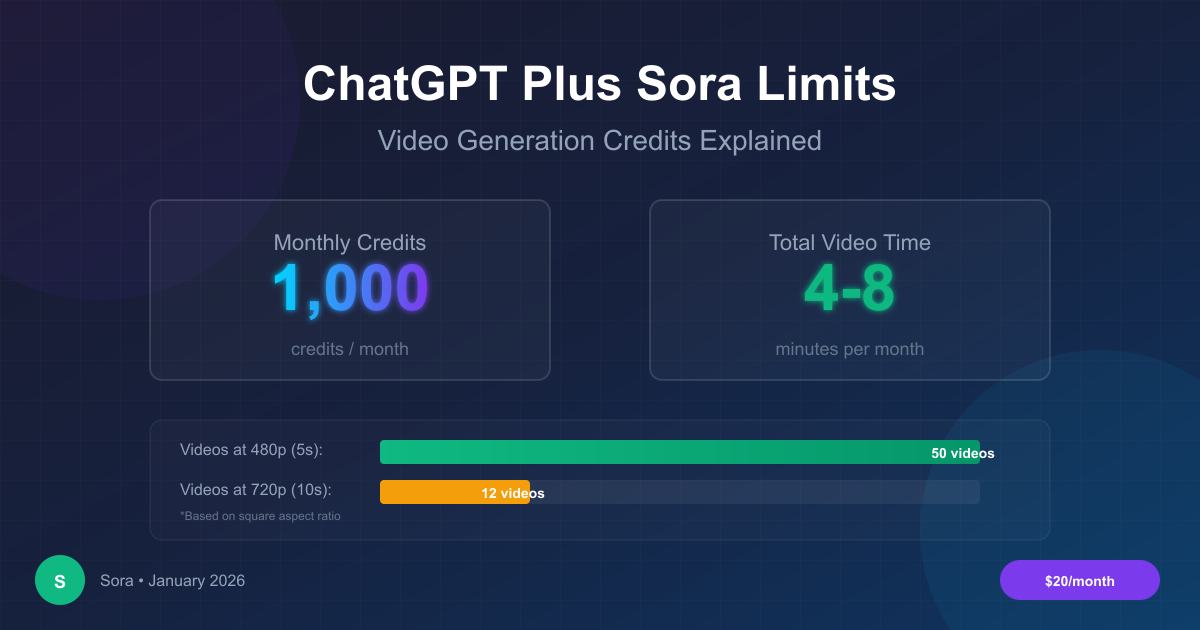
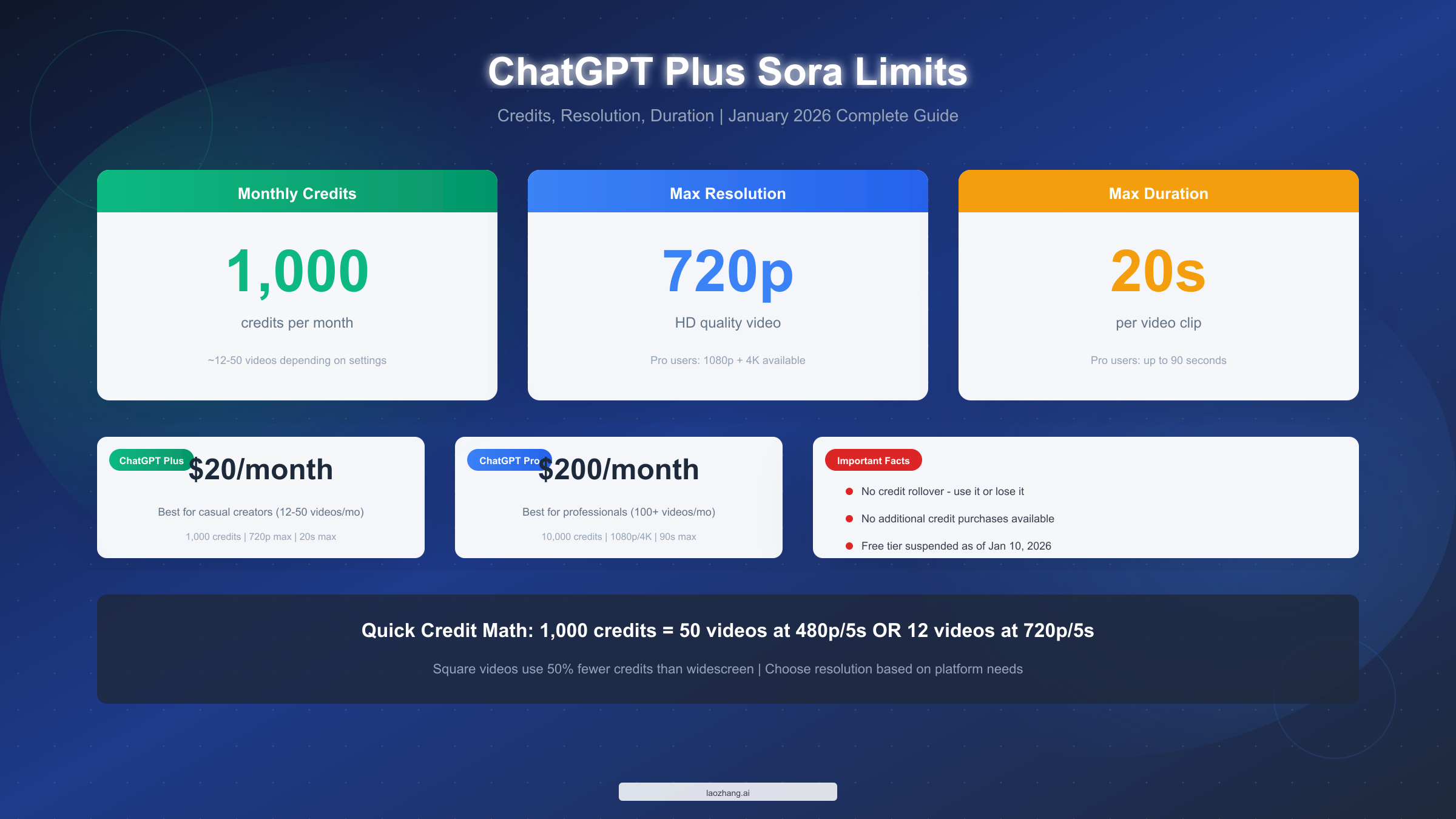
The core numbers you need to know right now: ChatGPT Plus subscribers receive 1,000 Sora credits monthly, can generate videos up to 720p resolution, and are limited to 20-second maximum duration per clip. These credits translate to approximately 12-50 videos per month depending on your chosen settings. The "unlimited" announcement refers to the removal of per-session caps, not the monthly credit allocation—a distinction that catches many users off guard.
This comprehensive guide breaks down every aspect of ChatGPT Plus Sora limits as of January 2026. You'll learn how the credit system actually works, what each resolution and duration combination costs, what happened to the free tier, how Plus compares to Pro, and what your alternatives are when limits become restrictive. By the end, you'll have complete clarity on whether Plus meets your video generation needs.
The landscape has shifted dramatically since Sora's initial launch. What started as a carefully controlled research preview has evolved into a consumer product with clearly defined tiers. The January 2026 changes—most notably the complete removal of free tier access on January 10th—signal OpenAI's commitment to monetizing this computationally expensive technology. For Plus subscribers, this means understanding the boundaries of your subscription becomes more important than ever, as there's no longer a free fallback option for overflow demand.
Key Takeaways
Before diving into the details, here are the essential facts every ChatGPT Plus subscriber needs to know about Sora limits:
Monthly allocation: ChatGPT Plus provides exactly 1,000 Sora credits per month. These credits refresh on your billing date, not on a calendar month basis. At typical mixed settings, this allows for 12-25 videos monthly. The credits are shared across all Sora features including text-to-video, image-to-video, and video editing functions.
Resolution ceiling: Plus users are capped at 720p (HD) resolution. Higher resolutions like 1080p and 4K require ChatGPT Pro at $200/month. While 720p sounds limiting in an era of 4K smartphones, it remains perfectly adequate for most social media platforms, which often compress uploads anyway.
Duration restriction: Maximum video length is 20 seconds per clip. Pro subscribers can generate videos up to 90 seconds. This limitation has significant creative implications—you'll need to think in terms of short-form content or plan to stitch clips together externally.
No rollover policy: Unused credits expire when your subscription renews. There is no accumulation mechanism—use it or lose it. This makes end-of-month planning crucial; you might as well experiment with remaining credits rather than letting them disappear.
Free tier status: As of January 10, 2026, free ChatGPT users have completely lost access to Sora for video generation. The feature now requires at minimum a Plus subscription. This change affects millions of users who previously had limited daily access for experimentation.
Daily rolling limit: Beyond monthly credits, a ~30 credit daily rolling limit prevents burning through your entire allocation in one session. This mechanism ensures consistent availability throughout the month but can frustrate users who prefer concentrated creative sessions.
Generation queue priority: Plus users share generation queue priority below Pro subscribers. During peak hours, you may experience longer wait times as Pro users' requests take precedence. Late-night generation typically yields faster results.
The January 2026 Changes: What Happened to Free Access
The most significant shift in Sora's accessibility came on January 10, 2026, when OpenAI completely removed free tier access to video generation. This change deserves dedicated attention because it fundamentally altered the Sora landscape and affects how Plus users should think about their subscription value.
Before January 10, 2026, free ChatGPT users received a modest daily allocation of Sora credits—typically enough for 2-3 short videos per day. This allowed curious users to experiment without financial commitment, content creators to occasionally overflow their paid allocations, and the broader AI community to develop familiarity with Sora's capabilities. Many Plus subscribers viewed their 1,000 monthly credits as a supplement to free tier access rather than their sole Sora budget.
After January 10, 2026, Sora became exclusively a paid feature. Free ChatGPT accounts can no longer generate any video content through Sora. The feature simply doesn't appear in the interface for non-subscribers. This change affects an estimated tens of millions of users globally who previously had at least minimal access.
The implications for Plus subscribers are significant. Your 1,000 monthly credits now represent your entire Sora capacity—there's no free backup. This makes credit management more critical than before. Users who previously experimented on free tier before "committing" credits from their paid allocation now must use Plus credits for all experimentation.
Why OpenAI made this change likely relates to the extraordinary computational costs of video generation. Running Sora requires significant GPU resources that scale with usage. The free tier, while modest per user, represented substantial aggregate infrastructure costs. OpenAI's shift to paid-only access aligns with their broader monetization strategy as they work toward sustainable AI deployment.
Regional impact varies significantly. Users in regions where Plus subscriptions are expensive relative to local income face a higher barrier than before. The free tier provided global access; the paid-only model concentrates access among users in wealthier markets. This equity consideration influences ongoing discussions about AI accessibility.
For current Plus subscribers, the practical takeaway is straightforward: treat your 1,000 credits as a finite monthly resource with no overflow options. Plan your usage accordingly, and consider whether your typical monthly video generation needs justify maintaining the subscription.
The Credit System Explained
The Sora credit system operates differently from what many users expect based on other AI tools. Unlike ChatGPT's message-based limits or DALL-E's straightforward per-image pricing, Sora uses a multi-factor calculation that considers duration, resolution, and aspect ratio simultaneously. Understanding these mechanics prevents the common frustration of unexpectedly depleting credits mid-project.
OpenAI designed this system around computational intensity. Generating a longer video requires exponentially more processing power than a short clip. Higher resolutions demand more detailed frame-by-frame rendering. Wider aspect ratios contain more visual information per frame. Each factor multiplies together, which explains why a 20-second 720p widescreen video costs 16 times more than a 5-second 480p square video.
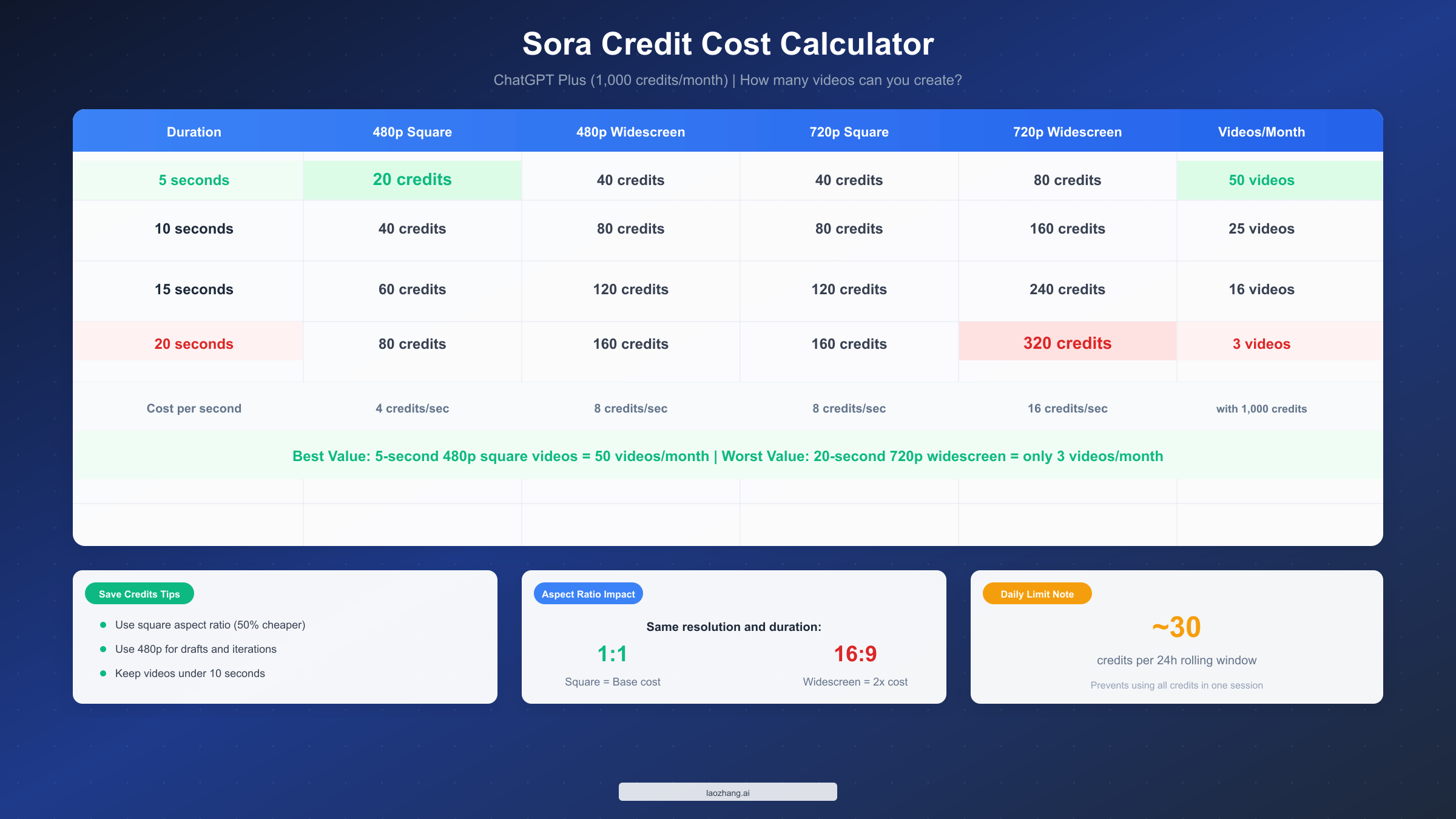
The base cost structure follows predictable patterns once understood. A 5-second 480p square video costs 20 credits—this represents the minimum expenditure for any Sora generation. From this baseline, duration doubles costs every 5 seconds (10 seconds costs 2x, 20 seconds costs 4x). Resolution similarly doubles the cost when jumping from 480p to 720p. Finally, widescreen (16:9) format costs exactly twice what square (1:1) format costs at equivalent settings.
Here's the complete credit cost matrix for ChatGPT Plus users:
| Duration | 480p Square | 480p Wide | 720p Square | 720p Wide | Videos/Month |
|---|---|---|---|---|---|
| 5 sec | 20 credits | 40 credits | 40 credits | 80 credits | 12-50 |
| 10 sec | 40 credits | 80 credits | 80 credits | 160 credits | 6-25 |
| 15 sec | 60 credits | 120 credits | 120 credits | 240 credits | 4-16 |
| 20 sec | 80 credits | 160 credits | 160 credits | 320 credits | 3-12 |
The cost-per-second breakdown reveals important patterns. At 480p square, you're spending 4 credits per second of video. At 720p widescreen, that jumps to 16 credits per second—a 4x multiplier. This explains why professionals often iterate at low settings before committing to high-quality finals.
The rolling daily limit adds another layer of complexity. Beyond your 1,000 monthly credits, Sora implements approximately 30 credits per 24-hour rolling window. This isn't a midnight reset—each credit becomes available exactly 24 hours after being spent. If you use 20 credits at 3 PM on Monday, those 20 credits become available again at 3 PM Tuesday. This mechanism prevents burst generation where users exhaust their entire monthly allocation in a single afternoon session.
The practical implication is significant: consistent daily usage yields higher total monthly output than sporadic intensive sessions. A user generating 2-3 videos daily will create more content over a month than someone attempting 50 videos in one weekend, even with identical credit allocations.
Failed generations and credit handling deserve special attention. When Sora fails to generate a video due to content policy violations or technical errors, credits are not deducted. However, if you receive a completed video that doesn't match your expectations, there's no refund—the credits are spent. This makes prompt clarity crucial; vague or ambiguous prompts that produce usable but unwanted results still consume your allocation.
Credit visibility and tracking within ChatGPT shows your remaining monthly balance and estimated usage per generation before you confirm. Always check this preview—it's easy to accidentally select 720p widescreen out of habit and spend 4x what you intended. The interface also shows your daily rolling limit status, though this information is less prominently displayed.
Resolution and Duration: What You Can Actually Create
Understanding the relationship between settings and credit costs helps you make informed decisions about quality versus quantity tradeoffs. The differences are substantial enough that choosing wisely can double or triple your effective monthly video output.
Duration options for Plus users include 5 seconds, 10 seconds, 15 seconds, and 20 seconds. The cost scaling is linear—10 seconds costs exactly double 5 seconds at the same resolution. This predictability makes mental calculations straightforward: if you know your preferred 5-second configuration costs 40 credits, the 20-second version costs 160 credits.
The 20-second maximum often surprises users expecting longer-form content. For context, most TikTok videos run 15-60 seconds, YouTube Shorts allows up to 60 seconds, and Instagram Reels can extend to 90 seconds. This means Plus users cannot generate complete content for these platforms in a single generation—you'll need to either work within 20-second constraints or plan multi-clip projects edited together externally.
Resolution choices for ChatGPT Plus are limited to 480p (standard definition) and 720p (HD). While 480p might seem outdated when your phone shoots 4K video, it remains perfectly adequate for social media platforms, creative exploration, and draft iterations. Many professional creators use 480p for all experimentation, reserving 720p only for final outputs that will be publicly shared. This workflow dramatically extends effective credit capacity.
Consider these resolution use cases:
| Resolution | Best For | Limitations |
|---|---|---|
| 480p Square | Social media drafts, concept testing, storyboarding | Pixelation visible on large screens |
| 480p Wide | YouTube draft previews, quick content ideas | Not suitable for final publication |
| 720p Square | Instagram posts, Twitter content, final social | Good balance of quality and cost |
| 720p Wide | YouTube thumbnails-in-motion, hero content | Highest Plus-tier cost per video |
Aspect ratio impact is often underestimated. Square videos (1:1) cost exactly half what widescreen (16:9) costs at the same duration and resolution. Portrait (9:16) falls between these, though exact pricing varies. Before automatically choosing widescreen out of habit, consider whether your distribution platform actually requires it. Instagram feeds, Twitter cards, and many other platforms display square content attractively.
Platform-specific aspect ratio recommendations reveal interesting patterns. TikTok and Instagram Stories favor 9:16 portrait. YouTube prefers 16:9 widescreen. Twitter, LinkedIn, and Instagram feeds work well with 1:1 square. If you're creating for a specific platform, matching the native aspect ratio eliminates the need for cropping—and choosing square when acceptable saves significant credits.
Practical monthly capacity varies dramatically based on choices. At the most economical settings (5 seconds, 480p, square), your 1,000 credits yield 50 videos totaling about 4 minutes of content. At the most expensive Plus-tier combination (20 seconds, 720p, widescreen), you get just 3 videos totaling 1 minute. Most users land somewhere in between, typically producing 15-25 videos at mixed settings.
The strategic approach combines both extremes: use economical settings for iteration and experimentation, then deploy premium settings only for final outputs. This hybrid workflow maximizes both creative exploration and final output quality.
Quality perception reality check: The difference between 480p and 720p is less noticeable than you might expect on mobile devices, which dominate social media consumption. Videos displayed in small frames or viewed on phones compress both resolutions to similar perceived quality. Save 720p for content that will be viewed on desktop or large displays, or for archival purposes where future upscaling might be applied.
What "Unlimited Sora" Really Means
In March 2025, OpenAI announced "unlimited Sora access" for Plus and Pro subscribers. This announcement created immediate confusion, as many users interpreted it as removing all generation caps. The reality is more nuanced, and understanding the distinction prevents frustration.
The "unlimited" designation specifically refers to the removal of per-session generation caps that previously existed. Before this update, Plus users faced not only monthly credit limits but also restrictions on how many videos they could generate in a single session. The March update eliminated these session barriers while preserving the monthly credit allocation.
What actually changed: You can now generate continuously during a session without artificial pauses or "come back later" messages, as long as you have credits remaining. The system no longer forces breaks between generations. Previously, you might generate 3-4 videos and then see a message like "You've reached your session limit. Please return in 2 hours." That friction has been removed.
What did not change: Your monthly 1,000 credit allocation remains fixed. Resolution caps (720p for Plus) remain unchanged. Duration limits (20 seconds for Plus) remain unchanged. The daily rolling limit (~30 credits per 24 hours) remains in effect.
Here's a clear breakdown of the "unlimited" reality:
| Feature | Before March 2025 | After March 2025 |
|---|---|---|
| Monthly credits | 1,000 | 1,000 (unchanged) |
| Session limit | 3-5 videos, then wait | No session limit |
| Daily rolling cap | ~30 credits/24h | ~30 credits/24h (unchanged) |
| Max resolution | 720p | 720p (unchanged) |
| Max duration | 20 seconds | 20 seconds (unchanged) |
This distinction matters because many users subscribed to Plus specifically after hearing about "unlimited" access, expecting to generate hundreds of videos. The marketing language, while technically accurate, created expectations that the underlying system cannot fulfill. If you need genuinely high-volume video generation, the "unlimited" announcement doesn't change the fundamental economics—you still face the same credit constraints.
The December 2024 holiday period saw a temporary actual unlimited promotion where credit limits were suspended, but this was explicitly temporary. The standard credit system resumed in January 2025 and remains in effect as of January 2026.
Community reaction to the "unlimited" announcement was mixed. Social media discussions revealed widespread confusion, with many users feeling misled. The lesson: always read the fine print. OpenAI's announcement technically described the change accurately—unlimited session access—but the headline-level messaging created broader expectations. When evaluating future announcements, examine exactly what's changing rather than relying on marketing summaries.
Pro subscribers and Relaxed Mode: For context, Pro users at $200/month did receive genuinely expanded capacity through Relaxed Mode. This feature allows unlimited off-peak generation after exhausting priority credits. Plus subscribers do not have access to Relaxed Mode, which creates significant practical differences in monthly capacity between the two tiers beyond the raw credit numbers.
When You Hit the Limit: All Your Options
Running out of Sora credits mid-month is a common experience, especially for users who haven't yet internalized the credit consumption rates. When this happens, you have several options depending on your needs and budget.
Wait for renewal represents the zero-cost option. Your credits reset to 1,000 on your billing date. Check your ChatGPT subscription settings to confirm your specific renewal date. If you're only a few days from renewal and your need isn't urgent, patience costs nothing. To find your renewal date: open ChatGPT, navigate to Settings, then Subscription—your next billing date appears prominently.
Upgrade to ChatGPT Pro at $200/month provides 10,000 credits—a 10x increase. Pro also unlocks 1080p and 4K resolution, extends maximum duration to 90 seconds, and includes "Relaxed Mode" for unlimited off-peak generation. The economics work if you consistently need more than 2,000-3,000 credits monthly, where Relaxed Mode effectively provides additional capacity. For comprehensive comparison, see our ChatGPT Plus usage limits guide.
The Pro upgrade path makes sense in specific scenarios:
- You've exhausted Plus credits in the first two weeks for multiple consecutive months
- Your content requires 1080p or 4K resolution (broadcast, professional client work)
- You need videos longer than 20 seconds without external editing
- Your workflow benefits from off-peak Relaxed Mode generation
API access offers pay-per-use pricing without subscription constraints. OpenAI's Sora API charges approximately $0.10-0.50 per second depending on resolution, translating to roughly $0.50-$5.00 per video. This option makes sense for variable needs where you don't want to commit to monthly fees but occasionally need burst capacity. Third-party API services like laozhang.ai offer Sora access at approximately 16% below official rates, which compounds to meaningful savings at volume. For detailed API pricing analysis, see our Sora 2 API pricing guide.
API access particularly benefits developers building applications on top of Sora, users with unpredictable monthly needs, and those who prefer OpEx (operational expense) over subscription commitments. The lack of monthly minimums means you pay only for what you use.
Alternative video generators provide another pathway when Sora credits are exhausted. Competitors like Runway Gen-3, Pika Labs, and Google Veo offer different pricing models and aesthetic styles. Maintaining accounts across multiple platforms provides redundancy—if one platform is exhausted or experiencing issues, alternatives remain available. For comprehensive comparison, see our AI video models comparison.
Quick alternative comparison for Plus users who've hit limits:
| Platform | Monthly Cost | Key Strength | Limitation |
|---|---|---|---|
| Runway Gen-3 | $15-76/mo | Motion quality, creative control | Higher price for comparable output |
| Pika Labs | $8-58/mo | Stylized content, unique aesthetic | Less photorealistic than Sora |
| Google Veo | Varies | Integrated with Google ecosystem | Limited availability, waitlist |
| Kling AI | Free tier available | Accessible, improving quality | Less consistent than Sora |
Hybrid approaches combine subscription and API access strategically. Many power users maintain Plus subscription for integrated ChatGPT experience and casual generation, while routing high-volume or automated workflows through API access. Monthly costs stay predictable while capacity expands when needed.
Timing your usage can prevent hitting limits prematurely. If you know a project deadline falls in the last week of your billing cycle, front-load experimentation in the first two weeks. Track your credits weekly rather than discovering depletion unexpectedly. Some users maintain a simple spreadsheet logging each generation's credit cost to predict when they'll exhaust their allocation.
Plus vs Pro: Making the Right Choice
The decision between ChatGPT Plus at $20/month and ChatGPT Pro at $200/month involves more than simple arithmetic. Pro offers 10x the credits, but the value proposition depends heavily on your specific usage patterns and requirements.
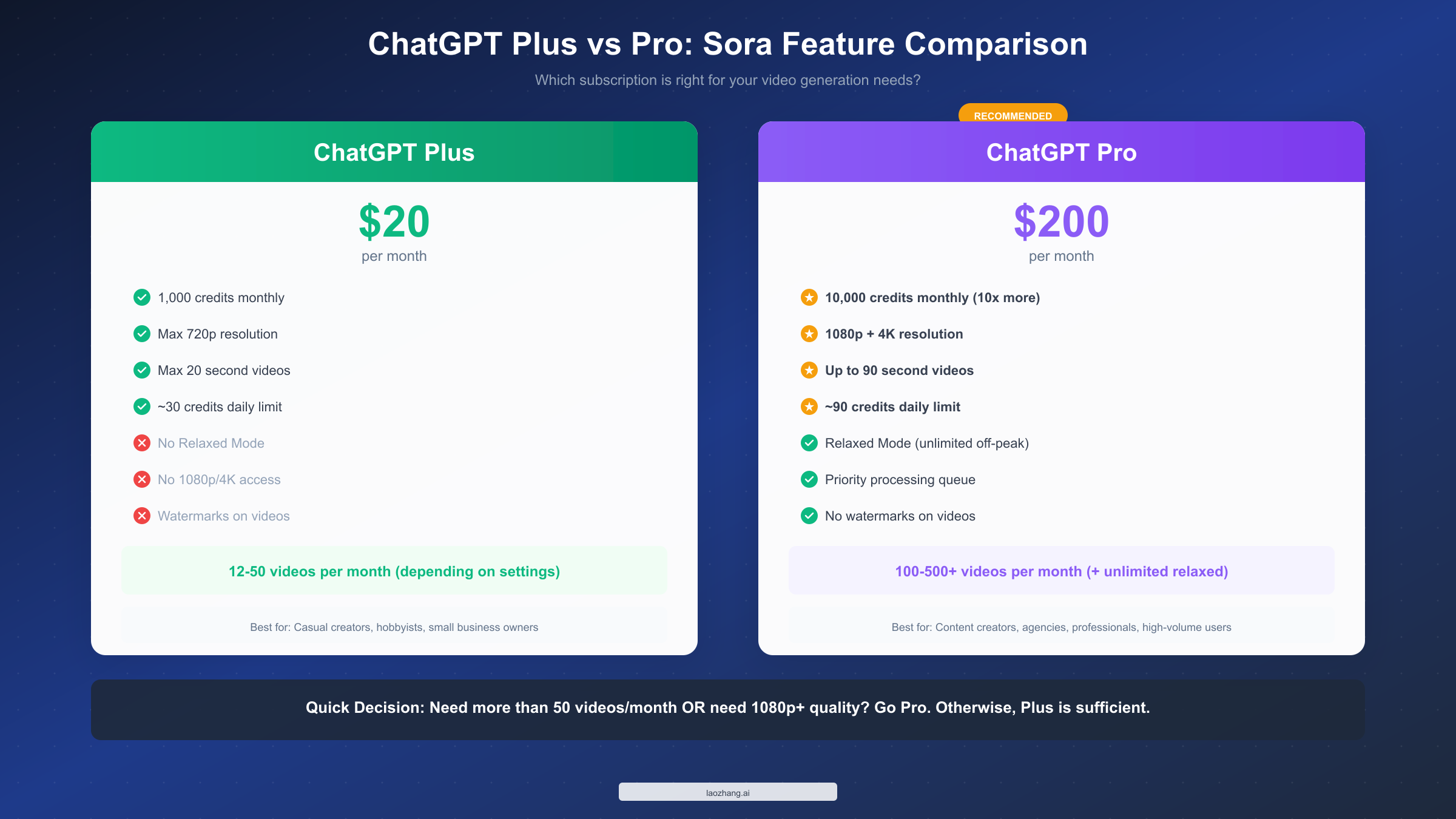
Credit allocation differences are significant: 1,000 monthly for Plus versus 10,000 for Pro. At face value, Pro costs 10x more for 10x the credits—seemingly neutral. However, Pro's Relaxed Mode provides unlimited off-peak generation after exhausting priority credits, effectively increasing capacity beyond the nominal 10x multiple.
Resolution and duration differences create capability gaps. Plus users max out at 720p and 20-second videos. Pro unlocks 1080p, 4K, and extends duration to 90 seconds. If your content requires broadcast-quality resolution or longer-form clips, these differences may be decisive regardless of credit economics.
Complete feature comparison:
| Feature | ChatGPT Plus ($20/mo) | ChatGPT Pro ($200/mo) |
|---|---|---|
| Monthly Credits | 1,000 | 10,000 |
| Max Resolution | 720p HD | 4K UHD |
| Max Duration | 20 seconds | 90 seconds |
| Daily Rolling Limit | ~30 credits | ~90 credits |
| Relaxed Mode | Not available | Unlimited off-peak |
| Queue Priority | Standard | Priority |
| Watermarks | Yes, on videos | No watermarks |
| Video Downloads | Standard quality | High quality |
Daily limits also differ: approximately 30 credits per 24-hour window for Plus versus approximately 90 for Pro. Power users who prefer concentrated work sessions may find Plus's daily limit more constraining than the monthly allocation.
Who should stay on Plus: Casual creators producing fewer than 15-20 videos monthly, users still learning Sora's capabilities, creators whose workflows fit comfortably within 720p and 20-second constraints, and anyone for whom $200/month represents significant budget strain. Plus provides genuine value for these use cases.
Who should consider Pro: Professional creators with consistent high-volume needs, anyone requiring 1080p+ resolution or videos longer than 20 seconds, users who would consistently exceed 2,000-3,000 effective credits monthly (accounting for Relaxed Mode), and agencies serving clients with professional quality expectations.
The switch test: If you consistently exhaust your Plus credits before month-end and find yourself compromising on quality or quantity, Pro's economics become favorable. If you regularly finish months with unused credits, Plus remains the right choice.
Trial recommendation: Before committing to Pro, push Plus to its limits for a full billing cycle. Document exactly how many credits you use, what resolution constraints you encounter, and whether the 20-second limit affects your workflow. This data-driven approach prevents both premature upgrades and prolonged frustration with insufficient capacity.
Downgrade considerations: OpenAI allows tier switching at any time. If you upgrade to Pro and find you're not using the capacity, you can downgrade back to Plus. However, credits don't transfer between tiers or billing periods, so time your switches to minimize waste.
Frequently Asked Questions
Can I buy additional Sora credits without upgrading to Pro?
As of January 2026, OpenAI does not offer à la carte credit purchases for Sora. Your options are the fixed allocations at each subscription tier. If you need more than Plus provides but less than Pro's full allocation, consider supplementing with API access rather than overpaying for a tier you won't fully utilize. OpenAI has hinted at potential future credit packs, but nothing has been officially announced.
Do unused Sora credits roll over to the next month?
No. Credits reset to your tier's full allocation on each billing date, regardless of remaining balance. If you have 400 credits remaining when your subscription renews, those credits are lost. This use-it-or-lose-it policy makes strategic planning important—near month's end, consider using remaining credits for experimental projects rather than letting them expire.
When did free users lose Sora access?
Free ChatGPT users lost Sora video generation access on January 10, 2026. Before this date, free users had limited daily credits for experimentation. The change was part of OpenAI's restructuring of Sora access tiers. Currently, Sora requires at minimum a ChatGPT Plus subscription for any video generation capability.
Is Sora available in all regions?
No. Sora is unavailable in the United Kingdom, Switzerland, and the European Economic Area (EEA) due to regulatory restrictions related to the EU AI Act. Users in these regions see access errors regardless of subscription tier. Some users report success using VPN services, though this approach may violate OpenAI's terms of service.
Can I use Sora-generated videos commercially?
Yes. OpenAI's terms of service grant users rights to use generated content commercially for both Plus and Pro tiers. You own the output and can use it in marketing materials, social media, client work, and products for sale. The main restrictions involve content policy compliance and disclosure requirements in certain contexts where AI-generated content must be identified as such.
Why do my credits seem to deplete faster than expected?
Common causes include accidentally selecting higher-than-needed resolution or widescreen aspect ratio, forgetting that duration scales linearly (20 seconds costs 4x what 5 seconds costs), and not accounting for failed generations that still consume credits when you retry. Review your generation history in ChatGPT to identify patterns—many users discover they've been defaulting to expensive settings unnecessarily.
Can I share my Sora credits with team members?
ChatGPT subscriptions are individual accounts. There's no team pool or credit sharing mechanism for Sora. If you need multiple team members generating video content, each person requires their own subscription. Some organizations maintain a shared account for video generation, though this may conflict with OpenAI's terms regarding account sharing.
What happens if I cancel my Plus subscription mid-month?
Your access continues until the end of your current billing period. You can use remaining credits until that date. After your subscription lapses, you lose Sora access entirely—there's no reduced-functionality mode. If you resubscribe later, you start fresh with 1,000 credits; there's no restoration of previously unused credits.
Are there any hidden limits beyond credits?
Beyond the documented monthly and daily rolling limits, users report occasional rate limiting during peak usage periods. This manifests as longer generation times rather than explicit blocks. Some users also report soft limits on consecutive generations of similar content, though OpenAI hasn't officially documented this behavior.
How do Sora limits compare to competitors?
Runway Gen-3 Alpha offers comparable quality at tiered pricing: Standard plan ($15/month) provides 625 credits, Pro ($35/month) offers 2,250 credits. Pika Labs provides 250 credits daily on free tier, with paid plans starting at $8/month for 700 monthly credits. Google Veo remains invitation-only with undisclosed limits. In the current landscape, ChatGPT Plus offers competitive credit allocation for the price, though the 720p and 20-second caps are more restrictive than some alternatives. The integrated ChatGPT experience and prompt conversational interface provide unique value that pure video generators don't match.
Will limits change in the future?
OpenAI has historically adjusted limits based on infrastructure capacity and business considerations. Credits have both increased and decreased for various features over time. The March 2025 "unlimited" announcement demonstrated willingness to modify access patterns. Future changes could expand or restrict current limits. Planning based on current documented limits while monitoring official announcements represents the prudent approach. Speculation about future changes shouldn't drive immediate subscription decisions.
Getting the Most from Your Credits
Understanding limits is only valuable when paired with strategies for maximizing value within those constraints. These approaches help Plus users extract maximum creative output from their 1,000 monthly credits.
Use 480p for all exploration and iteration. When developing a new concept, you might generate 5-10 versions before finding the right approach. At 720p widescreen, those iterations could cost 800+ credits. At 480p square, the same exploration costs under 200 credits. The quality difference doesn't impact your ability to evaluate concepts, timing, and composition.
A practical workflow: Generate your first 3-4 concept variations at 480p square (80 credits total). Once you identify the winning direction, generate 2-3 refinements at the same settings (60 credits). Only then generate the final version at 720p in your target aspect ratio (80-320 credits depending on settings). Total cost: 220-460 credits versus 800+ credits if you'd started at high settings.
Embrace square aspect ratios unless your platform specifically requires widescreen. Square videos cost half as much at identical duration and resolution. Instagram feeds, Twitter, LinkedIn, and even TikTok accommodate square content well.
Master storyboard mode before committing credits to full generation. Sora's storyboarding feature lets you plan keyframes and preview compositions without spending full generation credits. Users who invest time in storyboarding report significantly higher first-attempt success rates.
Batch similar content into focused sessions. When creating a series of related videos, the learning from each generation improves subsequent attempts. Your fifth video in a product series will typically require fewer iterations than your first.
Write precise prompts to reduce iteration cycles. Vague prompts produce unpredictable results that may require multiple attempts. Specific prompts with clear descriptions of action, style, lighting, and camera movement yield closer-to-intention results on the first try. Spending an extra minute crafting your prompt can save 3-4 wasted generations.
Prompt elements that reduce iterations:
- Specific camera movement ("slow pan left," "tracking shot following subject")
- Defined lighting ("golden hour backlight," "overcast soft lighting")
- Clear action description ("woman walks toward camera, stops, smiles")
- Style references ("cinematic," "documentary style," "anime aesthetic")
- Duration-appropriate scope (don't try to fit a 60-second narrative into 5 seconds)
Time your generations strategically. OpenAI's infrastructure handles variable load throughout the day. Generation during off-peak hours (typically late night in US time zones) often completes faster, and some users report better quality consistency. While this isn't officially documented, the community consensus suggests timing matters.
Keep a prompt library of successful generations. When a prompt produces excellent results, save it verbatim. Future projects with similar requirements can start from proven prompts rather than experimenting from scratch. Many power users maintain a personal database of prompts organized by style, subject matter, and technical parameters.
For those new to AI video generation, we recommend starting with our Sora text-to-video tutorial to build foundational skills before diving into production workflows.
Real-World Credit Budgeting Examples
Abstract credit calculations become tangible through concrete examples. Here's how three different creator types might approach their 1,000 monthly Plus credits:
The Social Media Manager: Creates content for a small business Instagram account. Monthly goal: 15 product showcase videos and 5 behind-the-scenes clips. Strategy: All videos at 10-second duration, 480p square format. Cost: 15×40 + 5×40 = 800 credits. Result: 20 videos with 200 credits remaining for experiments or reshoots. This leaves comfortable margin for iteration and unexpected needs.
The Independent Content Creator: Produces weekly YouTube shorts and Instagram Reels. Monthly goal: 8 polished 15-second videos. Strategy: Create 3 draft iterations at 480p square (3×60=180 credits each batch), then one final at 720p widescreen (240 credits). Total per video: 180+240=420 credits... which exceeds budget for 8 videos. Adjustment: Reduce to 5 polished videos monthly at 420 credits each (2,100 credits needed—still over budget). Further adjustment: Use 480p for more iterations and 720p only for top 2 videos monthly. This creator likely needs to either upgrade to Pro or supplement with API access.
The Hobbyist Experimenter: No production goals, just exploring Sora's capabilities. Strategy: All exploration at minimum settings (5 seconds, 480p, square = 20 credits each). Result: 50 experimental videos monthly. This user can thoroughly learn Sora's capabilities without ever worrying about credit constraints.
These examples illustrate why the same 1,000-credit allocation feels abundant to some users and constraining to others. Your specific workflow determines whether Plus suffices.
Tracking spreadsheet template: Consider maintaining a simple log with columns for Date, Prompt Description, Duration, Resolution, Aspect Ratio, Credits Spent, and Cumulative Total. This visibility prevents month-end surprises and helps identify patterns—you might discover you're habitually selecting widescreen when square would serve equally well.
Final Thoughts
ChatGPT Plus Sora limits in January 2026 provide meaningful video generation capability within defined constraints. The 1,000 monthly credits, 720p resolution ceiling, and 20-second duration cap create boundaries that casual creators can comfortably work within, while power users may need to explore Pro subscription or API alternatives.
The "unlimited" marketing created confusion that this guide hopefully clarifies. You have unlimited session generation, but limited monthly credits. Understanding this distinction prevents disappointment and enables realistic planning.
For most users discovering AI video generation, Plus represents an accessible entry point. The constraints encourage creative efficiency—learning to achieve more with less. As your needs grow, the ecosystem offers clear upgrade paths through Pro subscription, API access, or alternative platforms.
The January 2026 landscape differs meaningfully from even six months ago. The removal of free tier access on January 10th eliminated the fallback many users relied on for overflow generation. The continued enforcement of the credit system, despite "unlimited" announcements, demonstrates OpenAI's commitment to sustainable resource allocation. And the growing gap between Plus and Pro capabilities suggests intentional tier differentiation designed to push serious creators toward the higher-priced option.
Looking ahead, expect continued evolution of these limits. OpenAI has shown willingness to adjust pricing and capabilities based on infrastructure costs and competitive pressure. The credit pack purchases hinted at in various announcements may eventually materialize. Competition from Runway, Pika, and Google's Veo may force adjustments. Stay informed, but plan based on current realities rather than speculation about future changes.
Your immediate next step: generate your first video. Theory only takes you so far. Start with economical settings, experiment with prompts, and develop intuition for what Sora can deliver. Your first month is a learning investment; subsequent months will yield increasingly efficient returns as you internalize the credit system and optimize your workflow.
Remember the core efficiency principle: 480p square for experimentation, 720p only for finals. Square formats for credit savings unless platform requirements dictate otherwise. Precise prompts to reduce iteration. Batch similar content. Track your usage weekly. These practices transform 1,000 credits from a tight constraint into ample creative capacity for most use cases.