OpenAI's Sora 2 represents a breakthrough in AI video generation, capable of creating stunning 1080p videos up to 20 seconds long from simple text prompts. Since its official API release in December 2025, developers and content creators have been searching for ways to access this powerful technology without breaking the bank. The reality is nuanced: while there's no truly unlimited free Sora 2 API, several legitimate pathways exist for free or highly affordable access.
This comprehensive guide cuts through the marketing noise to present verified December 2025 data on every access method available. Whether you're a hobbyist exploring AI video generation, a startup building video-powered applications, or an enterprise evaluating production solutions, you'll find actionable guidance based on real pricing and genuine limitations.
Understanding Free Sora 2 API Access: The Reality Check
Before diving into specific methods, let's address the elephant in the room: many articles claiming "free Sora 2 API access" are misleading at best. A quick search reveals dozens of guides promising unlimited free access that ultimately redirect to paid subscriptions or affiliate links. This guide takes a different approach by being upfront about what "free" actually means in December 2025.
The Honest Truth About Free Access
OpenAI's official Sora 2 API does not offer a free tier. The minimum entry point is a $50 credit purchase for API access, with video generation costing $0.10-$0.50 per second depending on resolution and model variant. ChatGPT Plus at $20/month includes limited Sora access, but this isn't API access—you're using a web interface with strict quotas.
However, genuine free options do exist if you're willing to explore alternatives. Open-source models like Open-Sora 2.0 and HunyuanVideo provide Sora-like capabilities at zero cost for those who can self-host. Third-party platforms offer limited free credits for testing. And for developers, some academic and research programs provide substantial free API credits.
What This Guide Covers
We categorize Sora 2 access into four tiers based on cost and capability. First, truly free options include self-hosted open-source models and platform free trials—no payment required, though with limitations. Second, subscription access through ChatGPT Plus ($20/month) or Pro ($200/month) provides web-based generation with monthly quotas. Third, official API access requires minimum $50 credit purchase with per-second billing. Fourth, third-party APIs offer lower pricing than official rates, typically $0.08-$0.15 per second.
Understanding these tiers helps you make an informed decision based on your actual needs rather than marketing promises.
Quick Comparison: All Access Methods at a Glance
The following comparison table summarizes every verified Sora 2 access method available in December 2025. Use this as a reference when evaluating options, then read the detailed sections below for implementation guidance.
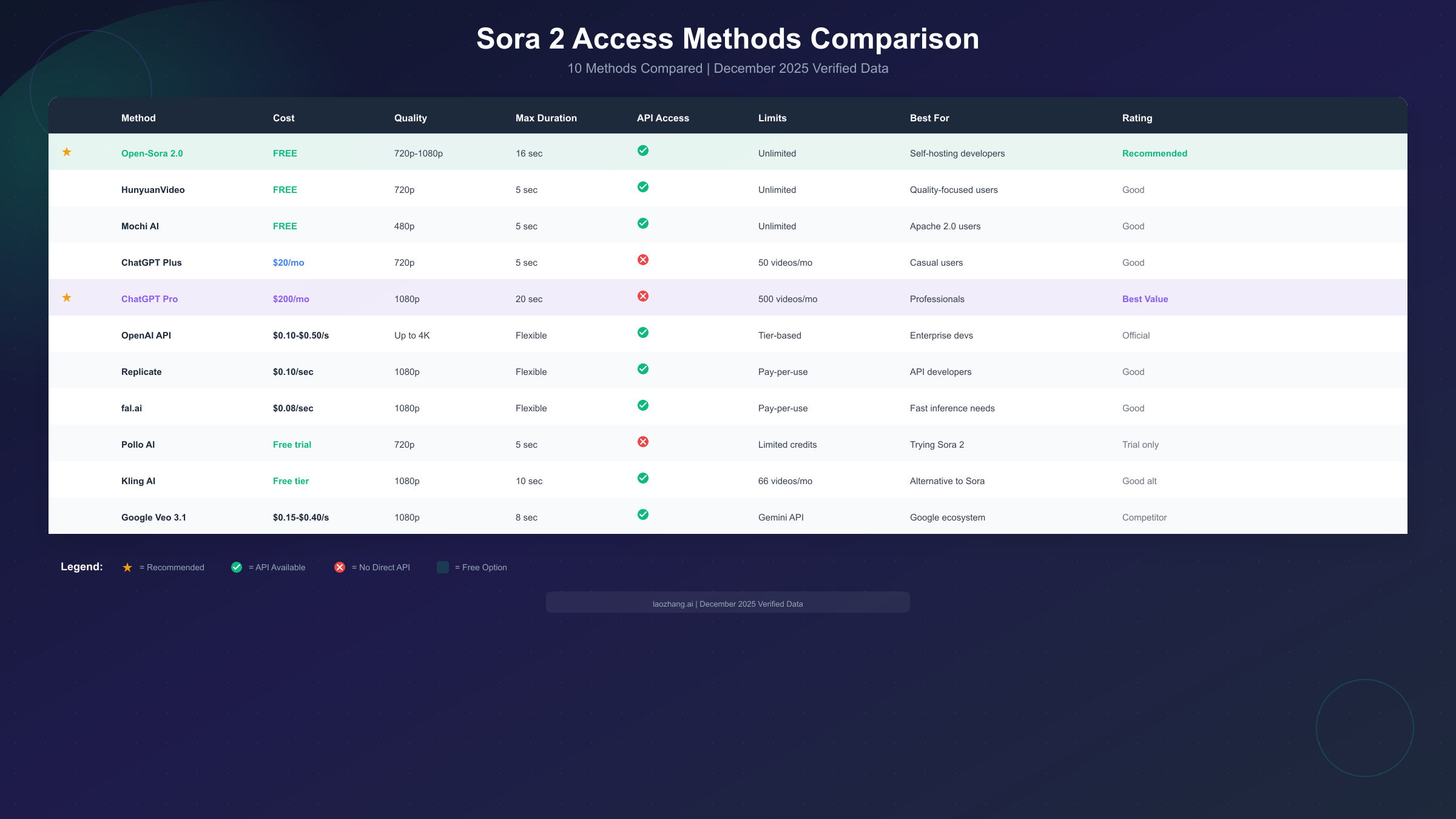
Method Comparison Overview
| Method | Cost | Max Quality | Duration | API Access | Monthly Limit | Best For |
|---|---|---|---|---|---|---|
| Open-Sora 2.0 | Free | 1080p | 16 sec | Yes | Unlimited | Self-hosting developers |
| HunyuanVideo | Free | 720p | 5 sec | Yes | Unlimited | Quality-focused users |
| Mochi AI | Free | 480p | 5 sec | Yes | Unlimited | Apache 2.0 projects |
| Pollo AI | Free trial | 720p | 5 sec | No | Limited credits | Testing Sora 2 |
| Kling AI | Free tier | 1080p | 10 sec | Yes | 66 videos | Sora alternative |
| ChatGPT Plus | $20/mo | 720p | 5 sec | No | 50 videos | Casual users |
| ChatGPT Pro | $200/mo | 1080p | 20 sec | No | 500 videos | Professionals |
| OpenAI API | $0.10-$0.50/s | 4K | Flexible | Yes | Tier-based | Enterprise developers |
| Replicate | $0.10/sec | 1080p | Flexible | Yes | Pay-per-use | API developers |
| fal.ai | $0.08/sec | 1080p | Flexible | Yes | Pay-per-use | Fast inference needs |
This table reveals important patterns. Free options exist but require either self-hosting capability or accepting significant limitations. For most users, the decision comes down to whether you need API access for programmatic generation or if web-based interfaces suffice.
Official OpenAI Access Tiers
OpenAI provides three primary pathways to Sora 2: ChatGPT subscription tiers and direct API access. Each serves different use cases with distinct pricing and capabilities. Understanding these official options establishes a baseline for evaluating alternatives.
ChatGPT Plus Subscription
The $20/month ChatGPT Plus subscription includes access to Sora 2 through the ChatGPT web interface. This represents the lowest official entry point for trying Sora 2, though with significant constraints that make it unsuitable for production use.
Plus subscribers receive 50 video generations per month at 720p resolution with a maximum duration of 5 seconds per clip. There's no API access—all generation happens through the chat interface. While this limitation frustrates developers, it works well for individual content creators experimenting with AI video.
The generation process involves typing a prompt in ChatGPT and waiting for the video to render. Queue times vary based on server load, ranging from 30 seconds to several minutes during peak hours. Downloaded videos include an OpenAI watermark, which cannot be removed at this tier.
For casual exploration, ChatGPT Plus offers genuine value. You get 50 videos monthly, which allows substantial experimentation with prompts and styles. The integrated experience means no separate API key management or code writing. However, anyone needing consistent output, higher quality, or programmatic access must look elsewhere.
ChatGPT Pro Subscription
At $200/month, ChatGPT Pro targets professionals who need substantial video generation capacity without building custom API integrations. The tier offers 500 videos monthly at 1080p resolution with up to 20-second duration—a 10x increase in quota and 4x increase in duration compared to Plus.
Pro subscribers also receive priority queue access, meaning faster generation times even during peak hours. OpenAI claims average generation time of under 60 seconds for Pro users versus 3-5 minutes for Plus during high-demand periods. The watermark remains, though Pro users can request watermark-free downloads for commercial projects.
The value proposition depends heavily on usage patterns. At 500 videos monthly, the effective cost drops to $0.40 per video—competitive with API pricing for short clips. Professionals producing regular social media content or marketing materials often find Pro more cost-effective than managing API credits.
However, the lack of API access remains a significant limitation. Pro is designed for human-in-the-loop workflows where someone manually creates each video. Automated pipelines, batch processing, and application integration require direct API access.
Direct API Access
OpenAI's Sora 2 API became available to developers in October 2025 following the model's announcement at DevDays. The API provides programmatic access to both sora-2 (standard) and sora-2-pro model variants with flexible resolution and duration options.
Pricing follows a per-second model that scales with resolution and model choice. Standard Sora 2 costs $0.10/second for 720p, $0.20/second for 1080p, and $0.50/second for 4K resolution. Sora 2 Pro doubles these rates but produces higher-quality output with better motion coherence and detail preservation.
API access requires a minimum $50 credit purchase through the OpenAI platform. Rate limits depend on your account tier, starting at 2 RPM (requests per minute) for Tier 1 accounts and scaling to 20 RPM at Tier 5. New accounts typically begin at Tier 1, with automatic upgrades based on spending history.
The API supports both text-to-video and image-to-video generation. The POST /v1/videos endpoint accepts prompts, resolution specifications, and duration parameters. Video generation is asynchronous—you submit a request, receive a job ID, and poll for completion or configure webhook notifications.
For developers building video-enabled applications, the official API provides the most reliable and feature-complete experience. The tradeoff is cost: a 10-second 1080p video costs $2, making high-volume generation expensive. This pricing drives many developers toward alternatives covered in the following sections.
If you're new to OpenAI's API ecosystem, check out our guide on obtaining free OpenAI API keys for options that may provide initial credits.
Free Open-Source Alternatives: Self-Hosted Solutions
The open-source community has developed several Sora-like video generation models that provide genuine free access for those willing to self-host. These alternatives don't match Sora 2's absolute quality, but they've closed the gap significantly and offer unlimited generation with no per-video costs.
Open-Sora 2.0
Developed by the Colossal-AI team, Open-Sora 2.0 represents the most capable open-source alternative to Sora 2. The model generates videos up to 16 seconds at 720p or 1080p resolution with motion quality approaching commercial offerings.
Running Open-Sora requires substantial GPU resources. The recommended setup includes an NVIDIA GPU with at least 24GB VRAM (RTX 4090 or A100). Generation time averages 2-3 minutes for a 10-second 720p video on consumer hardware, scaling significantly faster on data center GPUs.
Installation follows standard PyTorch workflows. Clone the repository from GitHub, install dependencies via pip, and download the pretrained weights (approximately 15GB). The provided inference script accepts text prompts and outputs MP4 files directly.
# Open-Sora 2.0 basic generation example
from opensora import OpenSoraPipeline

pipeline = OpenSoraPipeline.from_pretrained("hpcai-tech/OpenSora-v2")
pipeline = pipeline.to("cuda")

video = pipeline(
    prompt="A golden retriever playing in autumn leaves",
    num_frames=64,  # ~5 seconds at 12fps
    height=720,
    width=1280,
    num_inference_steps=50
)
video.save("output.mp4")
The primary limitation is hardware requirements. Running Open-Sora on consumer GPUs produces acceptable results but with longer generation times—expect 3-5 minutes for a 10-second 720p video on an RTX 4090, compared to under 60 seconds on an A100. Cloud GPU instances (AWS, GCP, Lambda Labs) offer a middle ground—pay for compute only during generation rather than per-video.
Cloud hosting options vary significantly in cost-effectiveness. Lambda Labs offers A100 instances at approximately $1.10/hour, making a 10-second video cost roughly $0.03-$0.05 in compute—dramatically cheaper than any API option. AWS and GCP charge higher rates but offer better availability and enterprise support. For occasional use, Google Colab Pro ($10/month) provides access to A100 GPUs sufficient for Open-Sora generation.
For teams generating hundreds of videos monthly, self-hosting Open-Sora can reduce costs by 90%+ compared to official API pricing. The tradeoff is operational complexity: you're responsible for infrastructure, updates, and troubleshooting. Model updates require manual intervention—Open-Sora has released multiple versions, each improving quality but requiring setup changes.
Consider the total cost of ownership beyond raw compute. Development time for integration, ongoing maintenance, and debugging add hidden costs. For teams without existing GPU infrastructure experience, the learning curve can be substantial. Start with cloud GPU instances before investing in on-premise hardware to validate your workflow.
HunyuanVideo by Tencent
Tencent's HunyuanVideo offers another strong open-source option with a focus on visual quality over duration. The model excels at generating photorealistic 5-second clips that often surpass Sora 2 in texture detail and lighting accuracy. For workflows prioritizing visual fidelity over length, HunyuanVideo represents the strongest open-source option available.
HunyuanVideo uses a DiT (Diffusion Transformer) architecture similar to Sora but with optimizations for quality over length. Professional evaluations rate it at 95.7% visual quality—competitive with or exceeding Runway Gen-3 and Luma 1.6 in blind comparisons. The model particularly excels at human faces, natural landscapes, and product shots where detail matters most.
The model runs on similar hardware to Open-Sora, requiring 24GB+ VRAM for optimal performance. Tencent provides both full-precision and quantized model variants, with the latter running on 16GB GPUs at slightly reduced quality. The quantized version sacrifices approximately 5-8% visual quality in exchange for broader hardware compatibility—a worthwhile tradeoff for many use cases.
Installation follows Tencent's official repository on GitHub. The setup process is more streamlined than Open-Sora, with fewer dependencies and better documentation in both English and Chinese. Tencent actively maintains the project with regular updates and community support.
For our comprehensive comparison of all major AI video generation models, including benchmark results and API availability, see our AI video models comparison guide.
Other Notable Open-Source Options
Several additional open-source models deserve consideration depending on your specific requirements. Each offers unique strengths that may align better with particular use cases.
Mochi AI is released under Apache 2.0 license, making it ideal for commercial projects requiring permissive licensing. Quality approaches HunyuanVideo for short clips with simpler motion. The permissive license removes legal uncertainty that sometimes accompanies other open-source models with more restrictive terms.
Wan has emerged as the most popular self-hosted alternative on AlternativeTo, supporting text-to-video, image conversion, and video editing workflows. It runs on consumer GPUs (480p/720p) while producing acceptable quality. The broad feature set makes it particularly valuable for teams needing more than just text-to-video generation—the editing and conversion capabilities reduce tool-switching overhead.
CogVideoX-1.5 specializes in image-to-video transformation, converting static images into video sequences. This capability proves valuable for workflows starting from generated or real images rather than pure text prompts. Many content creators use this approach: generate a perfect still image using tools like DALL-E or Midjourney, then animate it with CogVideoX for the final video output.
The open-source ecosystem continues evolving rapidly. Models releasing in early 2025 may offer substantial improvements over current options. Community benchmarks and model comparisons help track these developments. For regularly updated guidance on image-to-video capabilities, see our free image-to-video tools guide.
Third-Party API Platforms
Between official OpenAI pricing and self-hosting complexity lies a middle ground: third-party platforms offering Sora 2 access at reduced costs. These services handle infrastructure while passing savings to developers through lower per-second rates.
Replicate
Replicate emerged as a leading platform for running AI models via API, including Sora 2. Their pricing structure offers meaningful savings compared to OpenAI direct access while maintaining API compatibility.
Sora 2 on Replicate costs $0.10/second for the standard model—matching OpenAI's 720p rate but available without minimum credit purchases. You pay only for what you generate, making it ideal for experimentation and low-volume production use.
The Replicate API follows a simple pattern: submit a prediction request, poll for completion, download the result. Their Python client streamlines integration:
import replicate

output = replicate.run(
    "openai/sora-2:latest",
    input={
        "prompt": "A serene Japanese garden with koi fish swimming",
        "seconds": 8,
        "aspect_ratio": "16:9"
    }
)

# output contains the video URL
print(output)
Replicate's value proposition includes simplified billing (no minimum purchase), extensive model catalog beyond Sora, and reliable infrastructure. The tradeoff is slightly higher latency compared to direct OpenAI access due to the additional routing layer.
fal.ai
fal.ai positions itself as the fastest inference platform for generative AI, with Sora 2 access at $0.08/second—20% below Replicate's pricing. Their infrastructure optimizes for low-latency generation, which matters for real-time applications.
The platform supports both synchronous and asynchronous generation patterns. For short videos (under 5 seconds), synchronous requests complete quickly enough for interactive use cases. Longer videos benefit from webhook notifications upon completion.
fal.ai's queue management proves particularly effective during high-demand periods. While official OpenAI endpoints sometimes experience significant delays, fal.ai's distributed architecture maintains consistent generation times by routing requests across multiple GPU clusters.
Platform Comparison and Recommendations
Choosing between third-party platforms involves tradeoffs between cost, reliability, and features:
| Platform | Price/Second | Min Purchase | Latency | Best For |
|---|---|---|---|---|
| Replicate | $0.10 | None | Medium | General development |
| fal.ai | $0.08 | None | Low | Real-time applications |
| Pollo AI | Free trial | Credits | High | Testing/evaluation |
For most developers, starting with Replicate or fal.ai makes sense. Both offer transparent pricing without commitments, making them ideal for development and testing. As volume increases, evaluating official OpenAI API access may become worthwhile for reliability guarantees and support.
Third-party platforms operate by aggregating demand and negotiating bulk rates with infrastructure providers. This arbitrage creates genuine savings but introduces counterparty risk. Evaluate each platform's track record, especially for production-critical applications.
Cost Optimization Strategies
Whether using official APIs or third-party platforms, several strategies can significantly reduce Sora 2 generation costs. These approaches combine technical optimizations with workflow adjustments to maximize value from every dollar spent.
Draft-First Workflow
The most impactful cost optimization involves generating low-resolution drafts before committing to final renders. Sora 2's standard model at 720p costs half as much as 1080p and a fifth of 4K rates. Use lower resolutions for prompt iteration and style exploration, then generate final outputs only when satisfied.
This approach typically reduces total costs by 60-70% compared to generating everything at maximum quality. Most prompt adjustments become apparent at lower resolutions, making high-resolution early drafts wasteful.
Optimal Duration Selection
Sora 2 pricing scales linearly with duration, but content value often doesn't. A compelling 5-second clip may serve your purpose better than a meandering 15-second video that costs 3x more. Analyze your actual duration requirements before defaulting to longer clips.
For social media content, platform-specific optimal lengths guide decisions. TikTok and Instagram Reels perform best at 7-15 seconds. YouTube Shorts allows up to 60 seconds but engagement peaks around 30 seconds. Match your generation duration to platform requirements.
Prompt Caching and Reuse
When generating variations on similar themes, cache successful prompts and build from them. Sora 2's output varies with each generation, so running the same prompt multiple times produces different videos. This behavior enables creating varied content libraries from a single well-crafted prompt.
Document which prompts produce your best results. Over time, this prompt library becomes a valuable asset that reduces experimentation costs on future projects.
Hybrid Approach: Open-Source for Drafts
Combine open-source models with commercial APIs for maximum cost efficiency. Use Open-Sora or HunyuanVideo for rapid prototyping and prompt development. Once you've refined your approach, switch to Sora 2 for final renders requiring commercial quality.
This hybrid workflow captures benefits from both worlds: unlimited iterations during development and polished output for production. The initial self-hosting investment pays off quickly for teams generating substantial video content.
For related AI services beyond video generation, platforms like laozhang.ai offer API access to image generation models at competitive rates—often 50% or more below official pricing. Combining optimized video generation with cost-effective image services creates efficient multimodal content pipelines.
Complete Integration Guide with Production Code
Moving from experimentation to production requires robust code that handles errors, respects rate limits, and processes results reliably. The following examples provide production-ready patterns for Sora 2 API integration.
Python Implementation
import os
import time
import logging
from typing import Optional
from openai import OpenAI
from tenacity import retry, stop_after_attempt, wait_exponential

logging.basicConfig(level=logging.INFO)
logger = logging.getLogger(__name__)

class Sora2VideoGenerator:
    """Production-ready Sora 2 video generation client."""

    def __init__(self, api_key: Optional[str] = None):
        self.client = OpenAI(api_key=api_key or os.getenv("OPENAI_API_KEY"))
        self.model = "sora-2"
        self.max_poll_attempts = 120
        self.poll_interval = 5

    @retry(
        stop=stop_after_attempt(3),
        wait=wait_exponential(multiplier=1, min=4, max=60)
    )
    def generate(
        self,
        prompt: str,
        duration_seconds: int = 8,
        resolution: str = "1080p",
        aspect_ratio: str = "16:9"
    ) -> dict:
        """Generate a video with automatic retry on transient failures."""

        logger.info(f"Starting video generation: {prompt[:50]}...")

        # Map resolution to size parameter
        size_map = {
            "720p": "1280x720",
            "1080p": "1920x1080",
            "4k": "3840x2160"
        }
        size = size_map.get(resolution, "1920x1080")

        # Submit generation request
        response = self.client.videos.create(
            model=self.model,
            prompt=prompt,
            size=size,
            duration=str(duration_seconds)
        )

        video_id = response.id
        logger.info(f"Video job submitted: {video_id}")

        # Poll for completion
        return self._wait_for_completion(video_id)

    def _wait_for_completion(self, video_id: str) -> dict:
        """Poll until video generation completes or fails."""

        for attempt in range(self.max_poll_attempts):
            status = self.client.videos.retrieve(video_id)

            if status.status == "completed":
                logger.info(f"Video completed: {video_id}")
                return {
                    "id": video_id,
                    "status": "completed",
                    "url": status.url,
                    "duration": status.duration
                }

            if status.status == "failed":
                raise Exception(f"Video generation failed: {status.error}")

            logger.debug(f"Polling attempt {attempt + 1}, status: {status.status}")
            time.sleep(self.poll_interval)

        raise TimeoutError(f"Video generation timed out after {self.max_poll_attempts * self.poll_interval} seconds")

    def estimate_cost(self, duration_seconds: int, resolution: str = "1080p") -> float:
        """Estimate generation cost before submitting."""

        rates = {
            "720p": 0.10,
            "1080p": 0.20,
            "4k": 0.50
        }
        rate = rates.get(resolution, 0.20)
        return duration_seconds * rate


# Usage example
if __name__ == "__main__":
    generator = Sora2VideoGenerator()

    # Check cost first
    cost = generator.estimate_cost(duration_seconds=10, resolution="1080p")
    print(f"Estimated cost: ${cost:.2f}")

    # Generate video
    result = generator.generate(
        prompt="A cozy coffee shop on a rainy afternoon, steam rising from cups",
        duration_seconds=10,
        resolution="1080p"
    )

    print(f"Video URL: {result['url']}")
JavaScript/Node.js Implementation
import OpenAI from 'openai';

class Sora2VideoGenerator {
  constructor(apiKey = process.env.OPENAI_API_KEY) {
    this.client = new OpenAI({ apiKey });
    this.model = 'sora-2';
    this.maxPollAttempts = 120;
    this.pollInterval = 5000;
  }

  async generate(prompt, options = {}) {
    const {
      durationSeconds = 8,
      resolution = '1080p',
      aspectRatio = '16:9'
    } = options;

    const sizeMap = {
      '720p': '1280x720',
      '1080p': '1920x1080',
      '4k': '3840x2160'
    };

    console.log(`Starting generation: ${prompt.slice(0, 50)}...`);

    const response = await this.client.videos.create({
      model: this.model,
      prompt,
      size: sizeMap[resolution] || '1920x1080',
      duration: String(durationSeconds)
    });

    console.log(`Job submitted: ${response.id}`);
    return this.waitForCompletion(response.id);
  }

  async waitForCompletion(videoId) {
    for (let attempt = 0; attempt < this.maxPollAttempts; attempt++) {
      const status = await this.client.videos.retrieve(videoId);

      if (status.status === 'completed') {
        return {
          id: videoId,
          status: 'completed',
          url: status.url,
          duration: status.duration
        };
      }

      if (status.status === 'failed') {
        throw new Error(`Generation failed: ${status.error}`);
      }

      await this.sleep(this.pollInterval);
    }

    throw new Error('Generation timed out');
  }

  sleep(ms) {
    return new Promise(resolve => setTimeout(resolve, ms));
  }

  estimateCost(durationSeconds, resolution = '1080p') {
    const rates = { '720p': 0.10, '1080p': 0.20, '4k': 0.50 };
    return durationSeconds * (rates[resolution] || 0.20);
  }
}

// Usage
const generator = new Sora2VideoGenerator();
const result = await generator.generate(
  'Northern lights dancing over snow-covered mountains',
  { durationSeconds: 12, resolution: '1080p' }
);
console.log(`Video ready: ${result.url}`);
These implementations include retry logic for transient failures, proper error handling, and cost estimation. The polling mechanism handles Sora 2's asynchronous generation pattern, waiting for completion without blocking indefinitely.
For additional context on working with OpenAI's video API, our Sora 2 video API guide covers advanced features including image-to-video generation and remix capabilities.
Recommendations by User Type
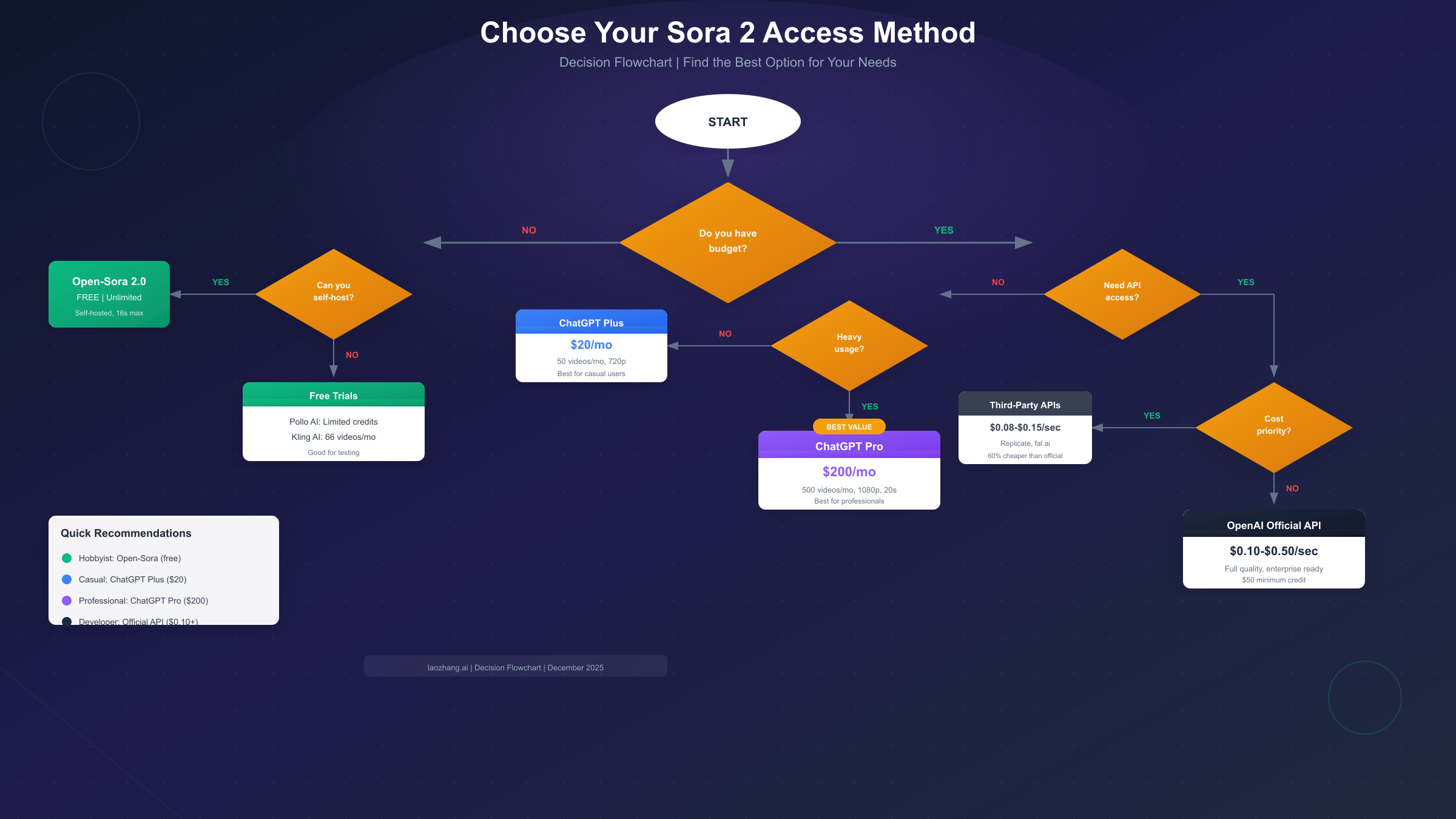
Different users have different priorities. The following recommendations match access methods to specific use cases and constraints.
Hobbyist/Experimenter
If you're exploring AI video generation for personal projects or learning, start with free options before committing funds.
Recommended path: Begin with Open-Sora 2.0 if you have GPU access, or use Kling AI's free tier (66 videos/month) for a cloud-based experience. Pollo AI's free trial provides actual Sora 2 output for comparison, helping you understand quality differences.
Budget: $0/month achievable with open-source tools. If quality matters, ChatGPT Plus at $20/month provides legitimate Sora 2 access with 50 videos monthly.
Independent Developer
For developers building applications or testing video integration, API access matters more than volume.
Recommended path: Use Replicate or fal.ai for development, as neither requires minimum purchases. Their pay-per-use model lets you iterate without commitment. Once your application design stabilizes, evaluate whether official OpenAI API access provides benefits worth the $50 minimum and slightly higher pricing.
Budget: $20-$100/month typical for development phases. Production costs depend entirely on usage volume.
Content Creator/Marketing Team
Marketing teams generating regular social media or advertising content need consistent quality and reasonable volume.
Recommended path: ChatGPT Pro at $200/month makes sense if you'll use most of the 500 video quota. The per-video cost of $0.40 is competitive with API pricing for short clips. For teams needing both video and image generation, combining ChatGPT Pro with affordable image APIs from services like laozhang.ai creates a comprehensive content pipeline at predictable monthly cost.
Budget: $200-$500/month for active content programs. Evaluate whether API access provides better economics at your specific volume.
Startup/Enterprise
Production applications require API access for automation, custom integration, and scaling.
Recommended path: Start with third-party platforms during development, then establish direct OpenAI API access for production. The official API provides better SLAs, support, and long-term reliability than third-party alternatives.
Budget: Variable based on volume. At significant scale, negotiate enterprise agreements directly with OpenAI for better pricing and dedicated support.
Student/Researcher
Academic users often qualify for special programs providing free or reduced-cost access.
Recommended path: Apply for OpenAI's Research Access Program if your work involves AI safety, alignment, or beneficial applications. Approved researchers receive $500-$2,000 in quarterly API credits. For coursework, use open-source models to learn fundamentals before applying to credit-based programs.
Budget: $0 through research programs or open-source tools. ChatGPT Plus through educational discounts where available.
Troubleshooting Common Issues
Even with correct implementation, Sora 2 generation can encounter problems. Understanding common issues and solutions accelerates debugging and prevents costly troubleshooting cycles. The following sections address the most frequently encountered problems based on developer community reports and official documentation.
Rate Limit Errors (429)
Rate limits vary by account tier and can trigger unexpectedly during high-demand periods. OpenAI's tier system starts at Tier 1 with 2 requests per minute (RPM) and scales to Tier 5 with 20 RPM based on your spending history. When encountering 429 errors, implement exponential backoff as shown in the code examples above. Check your current tier in the OpenAI dashboard under Settings > Limits and ensure you're not exceeding documented limits.
If rate limits consistently block your workflow, consider spreading generation across multiple time periods or upgrading your account tier through increased spending history. Account tiers upgrade automatically as you accumulate spending—there's no manual application process. Alternatively, batch your requests strategically: queue video generation jobs during off-peak hours (typically 2-6 AM in your timezone) when server load is lower.
For applications requiring consistent high throughput, third-party platforms like Replicate distribute requests across multiple infrastructure providers, effectively bypassing single-provider rate limits. This approach adds a small cost premium but ensures production reliability.
Content Policy Rejections
Sora 2 enforces strict content policies that reject certain prompts. Common rejection triggers include real people's names (living or deceased public figures), copyrighted characters (Disney, Marvel, anime), violence or adult content, and potentially misleading political content. The system also rejects prompts that could generate deepfakes or deceptive media.
When prompts get rejected, rephrase to remove specific entity references. Instead of "Barack Obama giving a speech," try "a distinguished speaker at a podium." Instead of "Iron Man flying through New York," try "a red and gold armored superhero flying through a city skyline." The model generates appropriate content without triggering identity-based restrictions.
Understanding the rejection categories helps craft compliant prompts. Brand references trigger rejections—"Nike sneakers" fails but "white athletic sneakers with a swoosh design" may work. Geographic specificity around sensitive locations (government buildings, religious sites) can also trigger review. When in doubt, test prompts with shorter durations first to minimize costs on rejected generations.
Quality Issues
Sometimes generated videos don't match expectations despite reasonable prompts. Common quality problems include motion artifacts (flickering, unnatural movements), temporal inconsistency (objects changing between frames), detail loss in complex scenes, and physics violations (objects passing through each other, unrealistic gravity).
For better results, use specific, concrete descriptions rather than abstract concepts. Include lighting and atmosphere details—"golden hour sunlight" produces more consistent results than "nice lighting." Specify camera movement if desired: "static shot," "slow pan left," or "tracking shot following the subject." Include physical context: "indoors," "on a beach," "in a forest clearing."
Prompt structure matters significantly. Leading with the primary subject yields better results than burying it in descriptive text. Compare "A golden retriever playing in autumn leaves, sunlit afternoon, slow motion" versus "Sunlit afternoon in slow motion with autumn leaves where a golden retriever is playing"—the former consistently produces higher-quality output.
Multiple generations from the same prompt produce varied results—generate 3-5 variations and select the best. Each generation costs the same, so variation sampling remains an effective quality optimization strategy. For critical projects, budget for 3x the final video count to ensure selection options.
Generation Timeouts
Long generation times occur during high-demand periods. If your implementation times out, increase polling duration or switch to webhook-based notifications. During known high-traffic times (US business hours, major announcements), expect 2-3x normal generation times.
Third-party platforms often maintain more consistent timing by distributing load across multiple providers.
Download Failures
Generated video URLs expire after a period (typically 24-48 hours). If downloads fail, ensure you're accessing recent URLs. Implement immediate download upon completion rather than storing URLs for later use.
Frequently Asked Questions
Is there a completely free Sora 2 API?
No. OpenAI does not offer free API access to Sora 2. Free options exist through open-source alternatives (Open-Sora, HunyuanVideo) that require self-hosting, or limited free trials on third-party platforms. ChatGPT Plus at $20/month includes limited web-based access but not API access.
How much does a 10-second Sora 2 video cost?
Through OpenAI's official API: $1.00 at 720p, $2.00 at 1080p, or $5.00 at 4K using the standard model. Sora 2 Pro doubles these rates. Third-party platforms like fal.ai offer 720p at approximately $0.80 for 10 seconds.
Can I use Sora 2 for commercial projects?
Yes, with appropriate access. API-generated videos and ChatGPT Pro outputs can be used commercially. ChatGPT Plus videos include watermarks that may limit commercial use. Open-source alternatives have their own licensing terms—check each project's license before commercial deployment.
What hardware do I need for Open-Sora?
Minimum: NVIDIA GPU with 16GB VRAM (RTX 4080 or equivalent) for 480p generation. Recommended: 24GB+ VRAM (RTX 4090, A100) for 720p-1080p at reasonable speeds. Cloud GPU instances provide an alternative to local hardware investment.
How does Sora 2 compare to alternatives like Runway or Kling?
Sora 2 generally produces more coherent motion and better prompt adherence than competitors. However, Kling AI offers a generous free tier, and Runway provides unique editing features. Quality differences are narrowing, making cost and specific features increasingly important selection criteria.
Can I remove the watermark from generated videos?
ChatGPT Pro subscribers can request watermark-free downloads. API-generated videos have no watermark by default. Third-party platform policies vary—check before assuming watermark-free output.
What's the maximum video duration?
Through ChatGPT Plus: 5 seconds. ChatGPT Pro: 20 seconds. API: Theoretically flexible, though generations beyond 20 seconds may have quality degradation. Open-Sora supports up to 16 seconds at reasonable quality. For longer content, consider generating multiple clips and editing them together using traditional video editing software.
How long does video generation take?
Generation time varies significantly by platform and demand. Official OpenAI API typically completes in 30-120 seconds for standard resolutions during normal hours, but can extend to 5+ minutes during peak periods. Third-party platforms often maintain more consistent timing by distributing load. Open-source models running on local hardware take 2-5 minutes for a 10-second video on consumer GPUs, scaling faster on data center hardware.
Are there any geographic restrictions?
ChatGPT Plus and Pro are available in most countries, though some regions have delayed access. The API has fewer restrictions but still excludes certain sanctioned countries. Open-source alternatives have no geographic restrictions—you can run them anywhere with appropriate hardware. Third-party platforms may have their own regional limitations depending on their infrastructure and business operations.
Can I fine-tune Sora 2 for specific styles?
Neither the official API nor third-party platforms offer fine-tuning capabilities for Sora 2 as of December 2025. OpenAI may introduce this feature in the future, but no timeline has been announced. Open-source alternatives like Open-Sora theoretically support fine-tuning, though this requires significant expertise and compute resources. For consistent style, focus on detailed prompting rather than model customization.
The Sora 2 landscape continues evolving with new access methods, pricing changes, and competing models. This guide reflects verified December 2025 information, but specific details may change. For production implementations, always verify current pricing and availability through official documentation.
Whether you choose free open-source alternatives, subscription tiers, or API access, the key is matching your access method to actual requirements rather than chasing theoretical capabilities. Start with the lowest-cost option that meets your needs, then upgrade as your usage patterns clarify what matters most for your specific applications.
The most important takeaway: genuine free access exists through open-source models for those willing to self-host, and affordable access exists through third-party platforms for those prioritizing convenience. Don't fall for misleading marketing—approach Sora 2 access with realistic expectations about costs and capabilities, and you'll find an option that genuinely fits your needs.