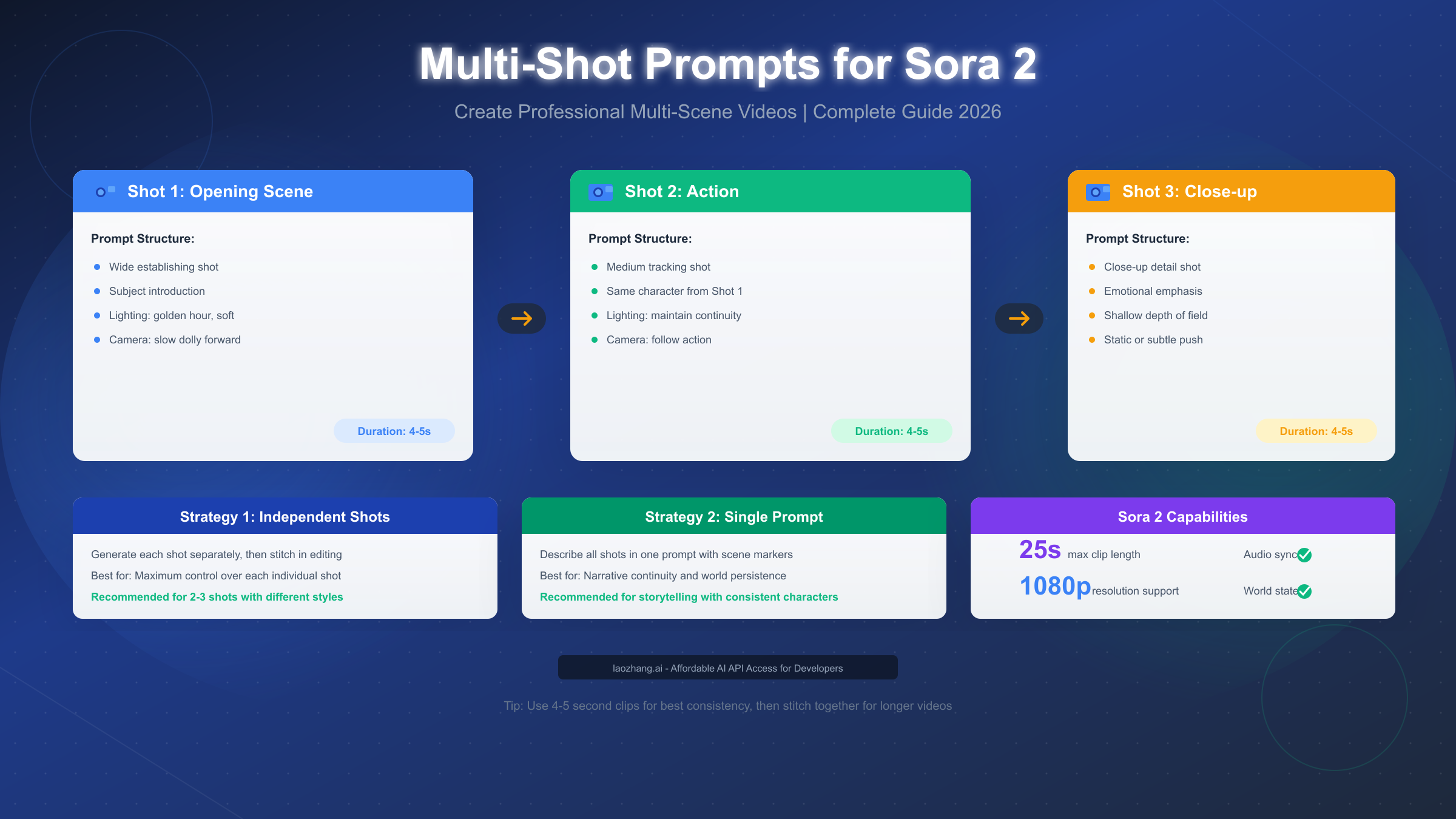
Multi-shot prompts in Sora 2 enable you to create videos with multiple camera angles, scene transitions, and narrative sequences through two distinct strategies: generating shots independently for maximum creative control, or combining multiple shots within a single prompt to leverage Sora 2's world state persistence. As of January 2026, OpenAI's video generation model supports clips up to 25 seconds with synchronized audio, making professional multi-scene content achievable through structured prompt design. This guide provides the decision frameworks, templates, and troubleshooting techniques you need to master multi-shot video creation.
What Are Multi-Shot Prompts in Sora 2?
Multi-shot prompts represent a fundamental shift in how creators approach AI video generation. Rather than treating each video as an isolated clip, multi-shot prompting allows you to think cinematically—planning sequences of connected shots that tell a coherent story or present information from multiple perspectives.
The concept draws directly from traditional filmmaking, where directors plan sequences of shots that flow together naturally. When you watch any professionally produced video, you're seeing the result of careful shot planning: an establishing wide shot sets the scene, medium shots capture action and dialogue, and close-ups emphasize emotion or detail. Sora 2 now enables creators to replicate this cinematic language through carefully structured prompts.
Understanding the technical foundation helps explain why multi-shot prompting works. According to OpenAI's official documentation (https://cookbook.openai.com/examples/sora/sora2_prompting_guide ), Sora 2 maintains what they call "world state persistence"—the model remembers the visual elements, lighting conditions, and character appearances established in earlier portions of your prompt. This persistence mechanism is what makes true multi-shot sequences possible within a single generation, though it comes with specific requirements and limitations that we'll explore throughout this guide.
The practical applications extend across nearly every use case for AI-generated video. Marketing teams use multi-shot sequences to create product demonstrations that show items from multiple angles. Content creators build narrative shorts with proper dramatic structure. Educators develop explanatory videos that move smoothly between overview and detail shots. If you're already comfortable with basic Sora 2 text-to-video creation, multi-shot prompting represents the natural next step toward professional-quality output.
What distinguishes multi-shot prompting from simply generating multiple separate videos? The answer lies in continuity and efficiency. When you generate shots independently and edit them together afterward, you're responsible for maintaining visual consistency manually—matching color grades, ensuring character appearances remain stable, and creating seamless transitions. Multi-shot prompting, when executed correctly, allows Sora 2 to handle much of this consistency work automatically, though the trade-off is reduced control over individual shot elements.
Understanding the Two Core Strategies
Sora 2 offers two fundamentally different approaches to creating multi-shot videos, each with distinct advantages depending on your project requirements. Understanding both strategies deeply—not just superficially—enables you to make informed decisions that save time and improve output quality.
Strategy 1: Independent Shot Generation involves creating each shot as a completely separate video clip, then combining them in post-production using video editing software. You write individual prompts for each shot, generate them separately, and maintain creative control over every element. This approach treats Sora 2 as a tool for generating raw footage rather than as a complete production pipeline.
The independent approach excels when your shots require significantly different visual treatments. Consider a product video that needs a dramatic close-up with shallow depth of field, followed by an action sequence with motion blur, followed by a static beauty shot. Each of these shots might benefit from completely different prompting strategies, making independent generation more practical than attempting to describe all three in a single prompt.
Strategy 2: Single-Prompt Multi-Shot Sequences describes all your shots within one comprehensive prompt, using scene markers like "Shot 1:", "Scene 2:", or "Cut to:" to delineate transitions. Sora 2 interprets these markers and attempts to generate a cohesive video that includes all specified shots while maintaining visual continuity.
This approach leverages Sora 2's world state persistence most effectively. When you describe a character in your first shot—their appearance, clothing, and positioning—that information carries forward to subsequent shots automatically. The model maintains consistent lighting, color grading, and environmental elements without requiring explicit repetition in each shot description.
| Aspect | Strategy 1: Independent Shots | Strategy 2: Single Prompt |
|---|---|---|
| Control Level | Maximum control per shot | Less individual control |
| Consistency | Manual management required | Automatic persistence |
| Editing Required | Significant post-production | Minimal editing |
| Best Shot Count | 2-3 shots | 2-4 shots |
| Flexibility | High (different styles possible) | Medium (unified style) |
| Generation Time | Multiple API calls | Single API call |
| Error Recovery | Easy (regenerate one shot) | Difficult (regenerate all) |
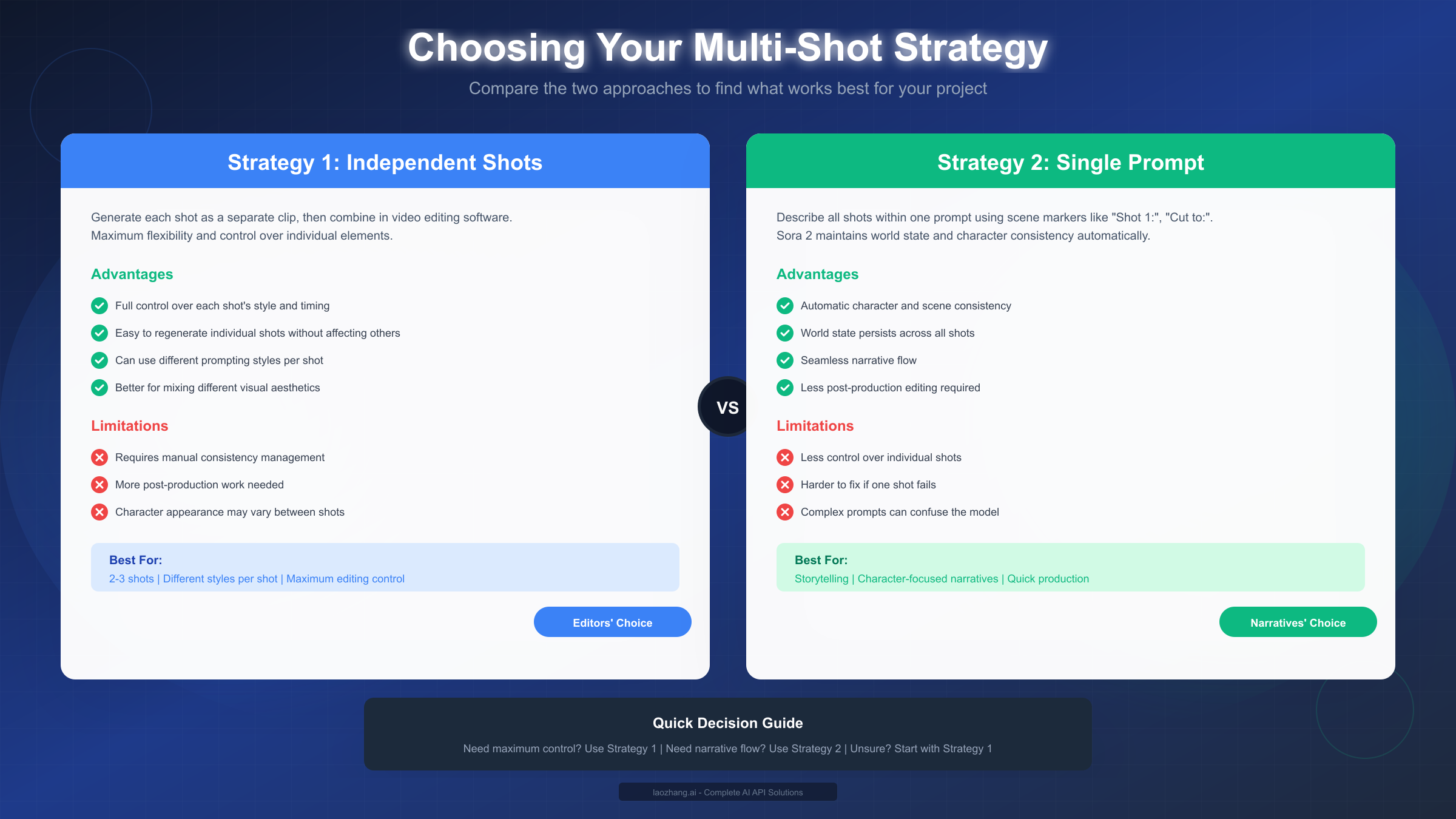
The choice between strategies often comes down to the specific nature of your project. Documentary-style content with consistent subjects benefits from single-prompt sequences. Creative projects mixing multiple visual aesthetics work better with independent generation. Most professional workflows eventually incorporate both strategies depending on project requirements.
Choosing the Right Strategy for Your Project
Selecting the optimal strategy before you begin prompting prevents wasted generation time and frustrating results. The decision framework below provides concrete criteria for making this choice confidently.
Use Strategy 1 (Independent Shots) when any of these conditions apply:
Your project requires distinctly different visual styles between shots. Perhaps your opening establishes a moody, desaturated aesthetic while your middle section needs vibrant, saturated colors. Independent generation allows you to optimize each prompt for its specific visual requirements without compromise.
You need precise control over individual shot timing and composition. While Sora 2 follows timing instructions reasonably well, complex multi-shot prompts sometimes result in unexpected timing distributions between scenes. Independent generation guarantees each shot receives exactly the duration you specify.
Character or spatial consistency isn't critical to your project. Abstract product showcases, montage-style content, or videos where visual discontinuity is acceptable or even intentional work perfectly well with independent generation.
You anticipate needing multiple iterations on specific shots. When one shot in a sequence consistently fails to meet expectations, independent generation allows you to regenerate just that problematic element rather than starting the entire sequence from scratch.
Use Strategy 2 (Single Prompt) when these conditions apply:
Your narrative requires strong continuity between shots. Story-driven content where characters appear across multiple scenes benefits enormously from Sora 2's world state persistence. The model maintains character appearances, environmental details, and overall visual coherence automatically.
You're working with simple shot sequences of 2-4 shots. Single-prompt sequences become increasingly unreliable beyond four shots. The model may begin dropping shots, combining them unexpectedly, or losing consistency as prompt complexity increases.
Time efficiency matters more than individual shot control. Single-prompt generation requires one API call versus multiple calls for independent generation, reducing both generation time and API costs.
Your shots share a unified visual style and lighting approach. When all shots need the same color palette, lighting direction, and overall aesthetic, single-prompt generation ensures consistency without requiring explicit repetition of style specifications.
Decision Flowchart for Strategy Selection:
Start by asking: "Do my shots require different visual styles?" If yes, use Strategy 1. If no, proceed to the next question.
Next: "Is character or environmental consistency critical?" If yes, lean toward Strategy 2. If no, either strategy works.
Then: "Am I creating more than 4 shots?" If yes, use Strategy 1 and stitch in editing. If no, Strategy 2 remains viable.
Finally: "Do I need precise control over individual shot timing?" If yes, Strategy 1 provides better guarantees. If no, Strategy 2 offers efficiency benefits.
For beginners uncertain about which approach to take, Strategy 1 provides a more forgiving learning experience. You can focus on perfecting one shot at a time, building skills progressively before attempting complex multi-shot sequences.
Multi-Shot Prompt Templates You Can Copy
The templates below provide ready-to-use starting points for common multi-shot scenarios. Each template follows the structured format that produces consistent results with Sora 2, and includes annotations explaining the purpose of each element.
Template 1: Two-Shot Narrative Sequence
Shot 1: Wide establishing shot of a modern coffee shop interior.
A young woman in a blue sweater, mid-20s, brown hair in a ponytail,
sits alone at a window table. Afternoon light streams through large
windows. Camera slowly pushes in. Ambient cafe sounds.

Shot 2: Medium close-up of the same woman from Shot 1.
She looks up from her laptop, expression shifting from focus to
surprise. Same lighting as previous shot. Slight camera movement,
handheld feel. Sound of notification chime.
This template establishes character description in Shot 1 and references it in Shot 2 with "same woman from Shot 1" to ensure consistency. The lighting reference maintains visual continuity while allowing for natural variation.
Template 2: Three-Shot Product Showcase
Scene 1: Close-up of wireless earbuds on a white marble surface.
Studio lighting with soft shadows. Camera circles slowly around
the product, 360-degree rotation. Clean, minimal aesthetic.
Duration: 4 seconds.

Scene 2: Medium shot showing hands picking up the earbuds.
Same lighting setup and marble surface. Fingers place earbud
into ear. Shallow depth of field. Duration: 3 seconds.

Scene 3: Wide shot of person jogging in urban park, wearing
the earbuds. Golden hour lighting, slight lens flare.
Music playing, natural city ambience. Duration: 4 seconds.
Product sequences benefit from explicit duration specifications to ensure proper emphasis on key product moments.
Template 3: Tutorial/Explainer Multi-Shot
Shot 1: Screen recording style - computer interface visible.
Cursor moves to click the "New Project" button. Clean UI,
minimal distractions. Soft keyboard clicks audible.

Cut to Shot 2: Over-the-shoulder perspective of someone
working at the computer. Same interface visible on screen.
Hands type on keyboard. Natural room lighting.

Cut to Shot 3: Close-up of the screen showing the completed
project preview. Same interface design. Satisfied "ding"
sound effect. Camera slowly zooms out.
Tutorial content benefits from consistent interface representation across shots, which single-prompt sequences handle well.
Template 4: Cinematic Storytelling (Advanced)
Opening shot: Extreme wide angle of desert highway at dusk.
A lone motorcycle approaches from the horizon. 35mm film grain,
warm color grading with orange highlights and teal shadows.
Engine rumble grows louder. Duration: 5 seconds.

Cut to: Medium tracking shot following the motorcycle.
Same rider visible - leather jacket, helmet with reflective visor.
Camera moves parallel to the road. Wind and engine sounds.
Same color grading as opening. Duration: 4 seconds.

Cut to: Close-up of rider's gloved hands gripping handlebars.
Shallow depth of field, blurred road surface visible.
Same warm color grading maintained. Engine vibration audible.
Duration: 3 seconds.

Final shot: Wide shot as motorcycle crests a hill, city lights
visible in distance below. Camera static. Music begins -
ambient electronic. Sun just below horizon. Duration: 4 seconds.
Cinematic sequences require explicit color grading references in each shot to maintain the unified look that distinguishes professional content.
Template 5: Interview/Talking Head Multi-Angle
Shot A: Medium shot of speaker facing camera. Professional
studio lighting, neutral gray background. Speaker begins
addressing camera directly. Clear audio, minimal room reverb.

Cut to Shot B: Wide shot establishing the interview setting.
Same person visible, now with full desk and equipment visible.
Same lighting setup. Brief pause in dialogue.

Cut back to Shot A: Return to medium shot for continued
dialogue. Same framing as initial Shot A. Speaker concludes
point with hand gesture.
Interview formats often alternate between two established shots, which single-prompt sequences handle efficiently with clear A/B shot designations.
When adapting these templates, maintain the explicit references to consistency ("same lighting," "same character from Shot 1") while customizing the specific content for your needs. These references aren't optional decorations—they're critical instructions that help Sora 2 maintain visual coherence.
Mastering Consistency Across Shots
Consistency represents the most challenging aspect of multi-shot video creation, and the most visible indicator of professional versus amateur results. Even small discontinuities—a character's hair color shifting slightly, lighting direction changing between cuts—undermine the cohesiveness that makes multi-shot sequences effective.
Character Consistency Techniques
The most reliable method for maintaining character appearance involves detailed description in your first shot, followed by explicit references in subsequent shots. Avoid vague references like "the woman" or "he"—instead use "the same woman from Shot 1" or "the man with the red jacket established in the opening."
Physical details that warrant explicit mention include: age range, hair color and style, clothing items and colors, accessories, and any distinctive features. When these details appear in your first shot description, Sora 2's world state persistence carries them forward, but you strengthen that persistence by briefly referencing the connection in later shots.
For multi-session projects where you're generating shots across separate API calls (Strategy 1), create a "character bible" document that lists every physical detail. Reference this document when writing each shot's prompt to ensure consistent descriptions. Human memory proves unreliable across complex projects—documentation prevents drift.
Environmental Consistency Checklist
Before generating your multi-shot sequence, verify that your prompt addresses these environmental elements consistently:
- Time of day (morning light differs significantly from afternoon or evening)
- Weather conditions (overcast versus direct sunlight creates different shadows)
- Interior/exterior and specific location references
- Camera distance from subject (maintaining similar framing feels cohesive)
- Color palette and grading style (specify color temperatures and mood)
Visual Style Consistency
Style consistency extends beyond lighting to include camera movement patterns, depth of field preferences, film stock or digital characteristics, and aspect ratio considerations. A sequence that begins with smooth dolly movements shouldn't suddenly switch to handheld shaky-cam without narrative justification.
Specify your style references in the first shot, then abbreviate in subsequent shots: "Same cinematic style as Shot 1" works if your initial description was sufficiently detailed. This approach reduces prompt length while maintaining consistency instructions.
Pre-Generation Consistency Checklist
Before submitting your multi-shot prompt, verify:
- Character descriptions include specific physical details
- Later shots reference earlier character descriptions explicitly
- Lighting direction and quality are specified consistently
- Color grading or mood references appear in each shot
- Camera style (handheld, tripod, gimbal) remains appropriate
- Environmental elements match across transitions
- Audio elements maintain appropriate continuity
This checklist catches inconsistencies before generation, saving time and API costs compared to fixing problems afterward.
Troubleshooting Common Multi-Shot Problems
Even well-crafted prompts sometimes produce unexpected results. The diagnostic table below maps common symptoms to their likely causes and provides specific remediation strategies.
| Problem | Likely Cause | Solution |
|---|---|---|
| Character appearance changes between shots | Vague or missing references | Add "same [character] from Shot 1" explicitly |
| Shots get merged or skipped | Too many shots in one prompt | Reduce to 2-3 shots, or use Strategy 1 |
| Lighting inconsistent | No lighting references in later shots | Specify "same lighting setup" in each shot |
| Unexpected camera movements | Conflicting or vague camera instructions | Specify exactly one camera movement per shot |
| Wrong shot durations | Duration not specified, or too complex | Add explicit "Duration: X seconds" per shot |
| Style drift across sequence | Style only defined in first shot | Reference "same visual style" in each shot |
| Random objects appearing | Too many objects listed in prompt | Focus on 2-3 key objects per shot |
| Audio doesn't match video | Audio cues not specified | Add explicit audio descriptions per shot |
Deep Dive: Fixing Character Consistency Issues
Character drift represents the most frustrating consistency problem because it's highly visible and difficult to correct without regeneration. When characters change appearance unexpectedly, the prompt structure usually bears responsibility.
Common failing pattern:
Shot 1: A woman walks down the street.
Shot 2: She enters a coffee shop.
This prompt provides almost no character anchoring. "A woman" could be anyone, and "She" in Shot 2 may or may not reference the Shot 1 character in Sora 2's interpretation.
Improved pattern:
Shot 1: Emma, a 28-year-old woman with shoulder-length auburn hair,
wearing a sage green coat and white sneakers, walks down a rain-slicked
city street. She carries a brown leather messenger bag.

Shot 2: Emma from the previous shot enters a warmly lit coffee shop,
the same green coat now slightly damp from rain. She adjusts the
strap of her brown messenger bag while scanning the room.
The improved version anchors the character with a name (which helps consistency even though Sora 2 doesn't understand names semantically), provides extensive physical description, and explicitly links Shot 2 to the established character.
When Problems Persist: Strategic Regeneration
If your multi-shot sequence consistently fails despite prompt improvements, consider these escalation strategies:
First, try reducing shot count. A three-shot sequence that fails might succeed as two separate two-shot sequences that you combine in editing.
Second, increase specificity rather than reducing it. Counter-intuitively, longer prompts with more detail often produce better results than minimal prompts, because they provide more anchoring for the model's interpretation.
Third, use Strategy 1 for problematic shots. When one specific shot consistently fails within a larger sequence, generate it independently and composite later. This hybrid approach combines the efficiency of single-prompt generation with the reliability of independent generation where needed.
For teams doing batch video generation, services like laozhang.ai offer API aggregation with automatic retry logic, which can help manage the iteration required when troubleshooting complex multi-shot sequences.
Creating Longer Multi-Shot Videos
Sora 2's maximum clip duration of 25 seconds requires strategic approaches when creating longer content. The techniques below enable you to produce videos of any length while maintaining the quality and consistency that define professional output.
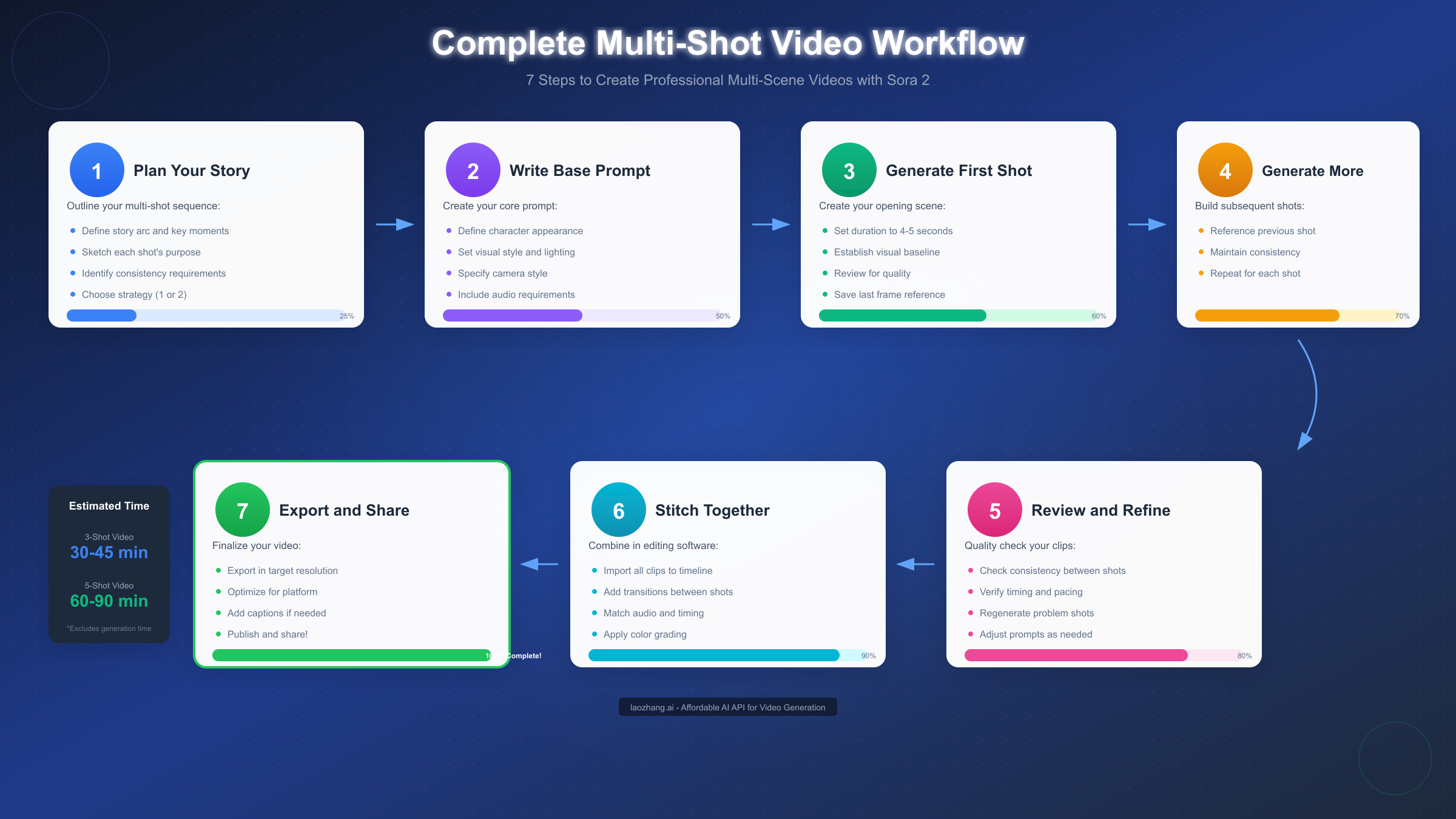
The Last-Frame Stitching Technique
The most reliable method for extending beyond single-clip limits uses the final frame of each clip as the starting reference for the next. This approach maintains visual continuity even across separately generated clips.
The workflow proceeds as follows:
- Generate your first clip with careful attention to where it ends
- Extract the final frame of that clip as a still image
- Use Sora 2's image-to-video capability with that frame as input for the next clip
- Describe the continuation of action in your prompt, referencing the starting frame
This technique works because Sora 2's image input provides concrete visual reference that anchors the generation, creating seamless transitions that single-prompt approaches struggle to achieve for longer content.
For detailed guidance on using images as generation inputs, see our image-to-video workflows guide.
Optimal Clip Duration Strategy
According to OpenAI's prompting guide, Sora 2 follows instructions more reliably in shorter clips. For maximum consistency, generate clips of 4-5 seconds each and composite them, rather than pushing for maximum 25-second clips.
This counter-intuitive recommendation reflects how the model's temporal attention works. Shorter clips allow the model to maintain focus on your specific instructions throughout generation, while longer clips introduce more opportunity for drift from your intended output.
Complete Extended Video Workflow
For a 60-second video consisting of approximately 12-15 shots:
Pre-Production (15-30 minutes)
- Write complete shot list with all prompt details
- Create character and environment reference documents
- Decide which shots use Strategy 1 vs Strategy 2
- Plan transitions between clips
Generation Phase (45-90 minutes)
- Generate clips in sequence, reviewing each before proceeding
- Extract reference frames for stitching where needed
- Regenerate problematic clips immediately rather than batching
Post-Production (30-60 minutes)
- Import all clips to editing software
- Trim transitions and adjust timing
- Apply consistent color grading across clips
- Add music, sound effects, and final audio mixing
- Export in target resolution and format
For teams generating multiple clips, understanding Sora 2's API pricing and quotas helps budget appropriately for iteration.
Cost Optimization for Extended Projects
Extended video projects require multiple API calls, which can accumulate significant costs. Strategies for managing generation expenses include:
Batch similar shots together. If several shots share identical visual requirements, generate them in sequence while your prompt refinement is fresh, reducing the iteration needed per shot.
Use lower resolution for drafts. Generate initial versions at lower resolution to validate prompt approaches before committing to high-resolution final renders.
Plan thoroughly before generating. Each regeneration attempt costs money. Investing time in thorough prompt development before the first generation reduces total spend significantly.
Summary and Next Steps
Multi-shot prompting transforms Sora 2 from a simple video generation tool into a genuine creative production platform. The techniques covered in this guide—from strategy selection through troubleshooting and extended video creation—provide the foundation for professional multi-scene content.
Key Principles to Remember:
Strategy selection matters more than prompt perfection. Choosing the right approach (independent vs. single-prompt) for your specific project prevents fundamental problems that no amount of prompt refinement can fix.
Consistency requires explicit attention at every step. Never assume Sora 2 will maintain continuity automatically—build consistency references into every shot description.
Shorter clips composite better than long single generations. The 4-5 second sweet spot for individual clips provides the best balance of reliability and generation efficiency.
Iteration is normal and expected. Professional results require regeneration and refinement. Build time for iteration into your production schedule rather than expecting first-attempt success.
Recommended Learning Path:
If you're new to Sora 2, start with single-shot generation to understand the model's capabilities and limitations before attempting multi-shot sequences. Once comfortable, practice two-shot sequences using both strategies to develop intuition for when each approach excels.
For exploring how Sora 2 compares to alternatives like Veo 3 for your specific use cases, our comprehensive AI video models comparison provides detailed analysis across multiple evaluation criteria.
Production Resources:
Maintain a personal library of successful prompts as templates for future projects. Document what works for your specific use cases—the templates in this guide provide starting points, but your refined versions based on actual production experience will serve you better over time.
For developers integrating Sora 2 into automated workflows, API access through aggregation services can provide cost advantages and improved reliability for batch generation projects. Visit https://docs.laozhang.ai/ for documentation on available endpoints and pricing structures.
The multi-shot prompting techniques covered here represent current best practices as of January 2026, based on extensive testing and community-shared learnings. As OpenAI continues developing Sora 2, new capabilities will emerge—but the fundamental principles of structured prompting, explicit consistency management, and strategic approach selection will remain relevant for effective video creation.