Google's Nano Banana Pro represents one of the most capable image generation models available today, offering exceptional text rendering accuracy that competitors struggle to match. However, understanding its usage limits has become increasingly important as Google has tightened restrictions on free access due to overwhelming demand. Whether you're a casual user wondering why you hit your daily cap after just two images, a professional evaluating the Pro tier's value proposition, or a developer integrating the API into production applications, knowing exactly what limits apply to your situation can save hours of frustration and potentially significant costs.
The landscape of Nano Banana Pro limits changed dramatically in November 2025 when Google reduced free tier access from 3 images per day to just 2, citing "high demand" as the primary driver. This reduction, coupled with the introduction of dynamic limit adjustments based on server load, has created confusion among users who report inconsistent experiences. Some find themselves locked out after 20 generations on Pro tier, while others claim to generate 100+ images without issue. This guide aims to cut through the confusion with verified data, practical cost analysis, and actionable strategies for maximizing your image generation capacity regardless of which tier you're on.
What Are Nano Banana Pro Limits?
Nano Banana Pro limits refer to the restrictions Google places on how many images you can generate within specific time periods. These limits exist across multiple dimensions—daily caps on consumer applications, rate limits for API access, and token-based allocations that affect resolution options. Understanding the interplay between these different limit types is essential for anyone serious about using this tool effectively.
The fundamental reason behind these limits traces back to computational economics. Each image generation request consumes significant GPU resources on Google's infrastructure, and without limits, a small percentage of heavy users would monopolize capacity at the expense of the broader user base. According to Google's official documentation (https://blog.google/technology/ai/nano-banana-pro/ ), the company designed its tiered system to balance accessibility for casual users with reliable service for paying subscribers who depend on the tool for professional work.
How the limit system works in practice involves multiple checkpoints that your requests must pass through. When you submit an image generation prompt, the system first verifies your daily quota hasn't been exhausted. It then checks your per-minute rate limit to prevent rapid-fire requests that could overwhelm servers. Finally, for API users, it evaluates your billing tier to determine whether you have access to higher resolution outputs that consume additional quota. This multi-layered approach means users sometimes encounter limits at unexpected points—you might have daily quota remaining but hit rate limits during a burst of activity.
The relationship between resolution and quota consumption deserves special attention because it's often misunderstood. Higher resolution outputs don't simply count as "one image" against your daily limit. According to community testing reported on Google's AI Developers Forum (https://discuss.ai.google.dev/t/clarification-needed-nano-banana-3-pro-restrictions/109951 ), generating a 4K image consumes approximately 1.5-2x the quota of a 1K image. This multiplier effect means Pro users generating exclusively at 4K resolution may only achieve 50-70 images daily rather than the advertised 100, a distinction that significantly impacts cost-per-image calculations.
For developers building applications around Nano Banana Pro, understanding these limits becomes even more critical because your users inherit these constraints. If you're building a consumer app that relies on Google's API without implementing proper quota management, your users will face cryptic "rate limit exceeded" errors that damage trust and usability. The most successful integrations implement graceful degradation—automatically reducing resolution or queuing requests when limits approach—rather than failing abruptly.
Complete Tier Limits Breakdown (December 2025)
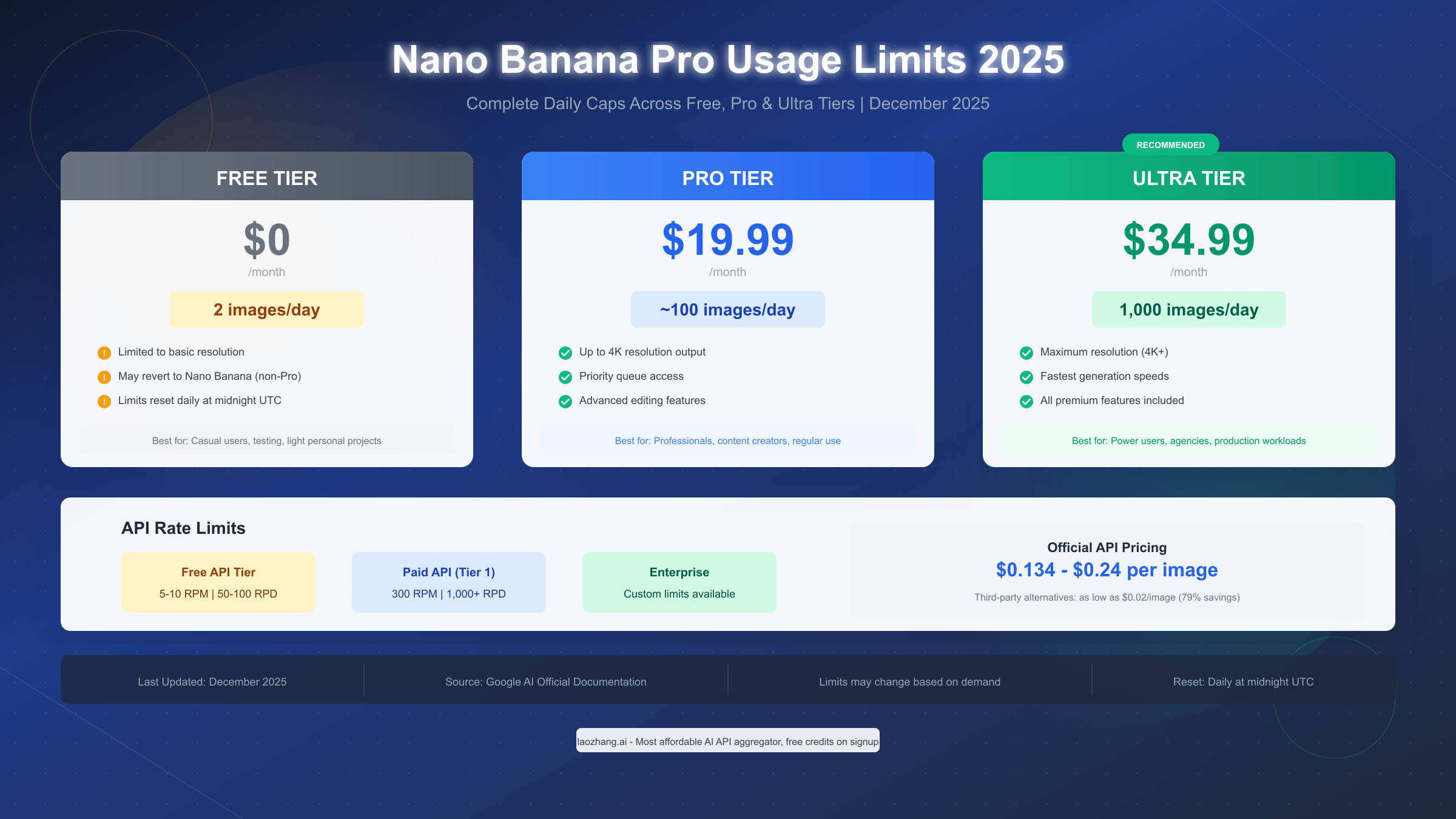
The current tier structure for Nano Banana Pro reflects Google's strategy of making the technology accessible while incentivizing paid subscriptions for serious users. As of December 2025, three primary consumer tiers exist alongside the API access tiers, each with distinct limit profiles that merit detailed examination.
Free Tier: The Bare Essentials
Free users currently receive 2 images per day, a reduction from the 3-image limit that existed before November 2025. According to Engadget's coverage (https://www.engadget.com/ai/google-limits-free-nano-banana-pro-image-generation-usage-due-to-high-demand-223442929.html ), Google explicitly stated that "image generation and editing is in high demand" and that "limits may change frequently." This volatility means free tier users cannot rely on consistent access—some days the system may allow additional generations during off-peak hours, while other days you might find yourself locked out earlier than expected.
The free tier also imposes resolution restrictions that aren't always clearly communicated. Maximum output resolution is capped at approximately 1K (1024x1024), and when the free quota depletes, users report being automatically downgraded to the older Nano Banana model (non-Pro variant) which produces noticeably lower quality results. This degradation affects both the image quality and the model's signature strength: accurate text rendering. Free users attempting to generate images with embedded text should expect significantly worse legibility compared to paid tiers.
Pro Tier ($19.99/month): The Professional Standard
Pro subscribers receive approximately 100 image generations daily, though user reports suggest significant variance. Posts on the Gemini Apps Community (https://support.google.com/gemini/thread/394308823/ ) describe hitting limits after as few as 20 images, while others report generating 100+ without restriction. This inconsistency likely stems from Google's dynamic load balancing system, which may temporarily reduce allocations during high-demand periods.
The Pro tier unlocks meaningful feature improvements beyond raw quota. Resolution extends to 4K output, though as noted earlier, higher resolutions consume proportionally more quota. Priority queue access means faster generation times during peak usage, and advanced editing features like image-to-image transformation and style transfer become available. For content creators and designers who rely on the tool regularly, the $19.99 monthly investment typically pays for itself in time savings alone—generating comparable images with free alternatives often requires multiple attempts and significant prompt engineering.
Ultra Tier ($34.99/month): Maximum Capacity
The Ultra tier represents Google's premium offering, advertising up to 1,000 images daily. This 10x increase over Pro tier makes it suitable for agencies, high-volume content operations, and production workloads that would quickly exhaust lower tiers. Ultra subscribers also receive guaranteed access during high-demand periods when Pro users might experience temporary throttling.
When evaluating whether Ultra makes sense for your needs, consider the cost-per-image economics. At $34.99/month for 1,000 daily images, you're paying approximately $0.0012 per image if you fully utilize your quota (assuming 30-day months). However, most users won't generate 30,000 images monthly. A more realistic scenario where you generate 500 images daily (15,000/month) brings the effective cost to about $0.0023 per image—still extremely competitive but requiring consistent high-volume usage to justify the premium over Pro tier.
| Tier | Monthly Cost | Daily Limit | Max Resolution | Cost/Image (Full Use) |
|---|---|---|---|---|
| Free | $0 | 2 | ~1K | N/A |
| Pro | $19.99 | ~100 | 4K | $0.0067 |
| Ultra | $34.99 | 1,000 | 4K+ | $0.0012 |
API Rate Limits Explained
Developers accessing Nano Banana Pro through Google's API face a distinct set of limitations that operate independently from consumer tier quotas. Understanding these limits is essential for building reliable applications, as exceeding them results in HTTP 429 errors that can break user experiences if not handled properly.
Free API Tier Constraints
The free API tier, available through Google AI Studio (aistudio.google.com), provides limited but useful access for development and prototyping. Current limits hover around 5-10 requests per minute (RPM) with a daily cap of 50-100 requests per day (RPD). These numbers fluctuate based on overall system demand, and Google reserves the right to adjust them without notice.
Despite billing not being required for free tier API access, the limitations make it unsuitable for anything beyond testing. Production applications with even modest user bases would exhaust the daily quota within minutes of deployment. However, the free tier proves valuable for prompt development and proof-of-concept work before committing to paid access.
Paid API Tiers
Enabling billing on your Google Cloud account automatically upgrades you to Tier 1 access, which significantly expands your capabilities: 300 requests per minute and 1,000+ requests per day. Higher tiers exist for enterprise customers with negotiated limits reaching into the tens of thousands of daily requests.
The pricing structure for API access differs from consumer subscriptions. Rather than paying a flat monthly fee, API users pay per image generated. Official rates from Google's API documentation range from $0.134 for 1K resolution images to $0.24 for 4K outputs. Text prompt processing incurs additional charges at $2.00 per million input tokens.
For developers seeking more cost-effective API access, third-party providers offer significant savings. Platforms like laozhang.ai provide Nano Banana Pro access at approximately $0.05 per image—roughly 63-79% cheaper than official Google rates. These services work by aggregating demand across multiple customers to negotiate volume pricing, passing savings to individual developers. If you're building applications where image generation costs significantly impact unit economics, exploring these alternatives is worth the minor integration effort. For comprehensive Gemini API pricing details, our dedicated guide provides deeper analysis.
Handling Rate Limit Errors in Production
When you exceed rate limits, the API returns HTTP 429 status codes. Properly handling these errors prevents user-facing failures:
import time
import random
from google import generativeai as genai

def generate_with_backoff(prompt, max_retries=5):
    """Generate image with exponential backoff for rate limits"""
    for attempt in range(max_retries):
        try:
            response = genai.ImageGenerationModel("nano-banana-pro").generate(prompt)
            return response
        except Exception as e:
            if "429" in str(e) or "rate limit" in str(e).lower():
                # Exponential backoff with jitter
                wait_time = (2 ** attempt) + random.uniform(0, 1)
                print(f"Rate limited. Waiting {wait_time:.1f}s before retry...")
                time.sleep(wait_time)
            else:
                raise e
    raise Exception("Max retries exceeded for rate limit")
This pattern implements exponential backoff—doubling wait times between retries—combined with random jitter to prevent synchronized retry storms when multiple clients hit limits simultaneously. Production applications should also implement circuit breakers that temporarily halt requests to the API when error rates spike, preventing cascading failures.
Is Upgrading Worth It? Cost Analysis
The decision to upgrade from free tier or choose between Pro and Ultra involves more than comparing advertised limits. A thorough cost-benefit analysis must account for your actual usage patterns, the value of time saved, and alternative options that might better serve your needs.
Calculating True Cost Per Image
Let's build a framework for evaluating tier economics based on realistic usage scenarios:
Scenario 1: Light Personal Use (10-20 images/month) Free tier technically covers this if you spread generations across days, but the 2-image daily cap means working around arbitrary restrictions. Pro tier at $19.99/month yields a cost of $1.00-2.00 per image—expensive for casual use. For this scenario, staying on free tier or using free Gemini image generation alternatives likely makes more sense.
Scenario 2: Regular Creator (100-200 images/month) Pro tier becomes economically sensible here. At 150 images monthly, you're paying $0.13 per image—competitive with API pricing while getting the convenience of consumer app access. The daily cap of ~100 images provides headroom for busier days.
Scenario 3: Professional/Agency (500+ images/month) Ultra tier unlocks its value at this scale. With 500 monthly generations, cost per image drops to $0.07. For agencies generating 1000+ images monthly, this plummets to $0.03 or less per image. At these volumes, Ultra provides not just better economics but also the consistency guarantees that professional workflows require.
The Third-Party Alternative
For users who don't need the consumer app interface and can work with API access, third-party providers present compelling economics. Through services like laozhang.ai, you can access Nano Banana Pro at approximately $0.05 per image with no monthly commitment—just pay for what you use starting from a $5 minimum.
This approach particularly benefits users whose needs don't fit neatly into monthly subscription models. A freelance designer who intensively uses image generation during active projects but goes weeks without generating anything pays only for actual usage rather than maintaining subscriptions through idle periods. The trade-off involves giving up the polished consumer experience for API-style access, but for technically comfortable users, the savings justify the learning curve.
| Usage Level | Best Option | Monthly Cost | Effective $/Image |
|---|---|---|---|
| <30 images | Free Tier | $0 | $0 |
| 30-100 images | laozhang.ai API | ~$5 | $0.05 |
| 100-300 images | Pro Tier | $19.99 | $0.07-0.20 |
| 300-1000 images | Ultra Tier | $34.99 | $0.03-0.12 |
| 1000+ images | laozhang.ai API | Variable | $0.05 |
How to Check Your Remaining Limits
Knowing your current quota status prevents the frustration of discovering limits mid-workflow. Google provides several methods for checking remaining capacity, each suited to different use cases.
Method 1: Gemini App (Consumer Users)
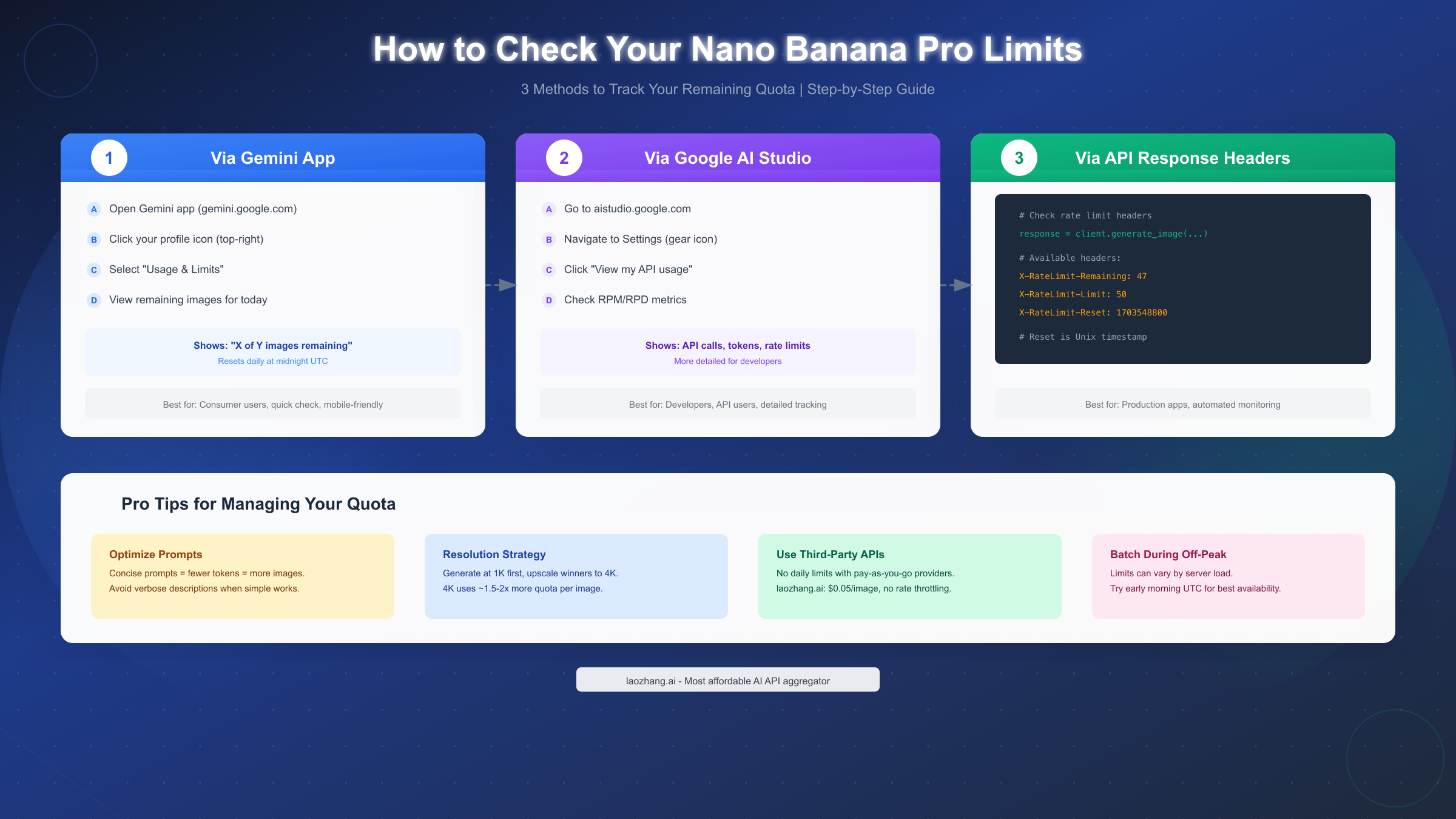
The quickest method for consumer app users involves navigating to your profile within the Gemini app. Click your profile icon in the top-right corner, then select "Usage & Limits" from the dropdown menu. This displays your remaining image generations for the current day along with the reset time. The interface shows a simple "X of Y images remaining" format, updating in real-time as you generate content.
Note that this method only works for consumer tier limits. If you're accessing Nano Banana Pro through API or third-party services, the Gemini app won't reflect that usage.
Method 2: Google AI Studio (Developers)
Developers using API access should monitor limits through Google AI Studio at aistudio.google.com. Navigate to Settings (gear icon), then click "View my API usage." This dashboard provides more granular metrics including requests per minute consumption, daily request counts, and token usage breakdowns.
The AI Studio dashboard also displays your current tier and any billing alerts. For production applications, setting up usage alerts that trigger before hitting limits helps prevent unexpected service interruptions.
Method 3: Programmatic Checking (Production Apps)
Applications integrating the API can monitor limits through response headers. Each successful API call returns headers indicating remaining quota:
X-RateLimit-Remaining: 47
X-RateLimit-Limit: 50
X-RateLimit-Reset: 1703548800
Parsing these headers allows your application to implement proactive quota management—slowing request rates or queuing generations when approaching limits rather than waiting for 429 errors.
Third-Party Alternatives with Higher Limits
When Google's official limits constrain your workflow, third-party API providers offer alternatives worth considering. These services typically access the same underlying Nano Banana Pro model through aggregated accounts, passing volume discounts to customers.
Understanding Third-Party Access
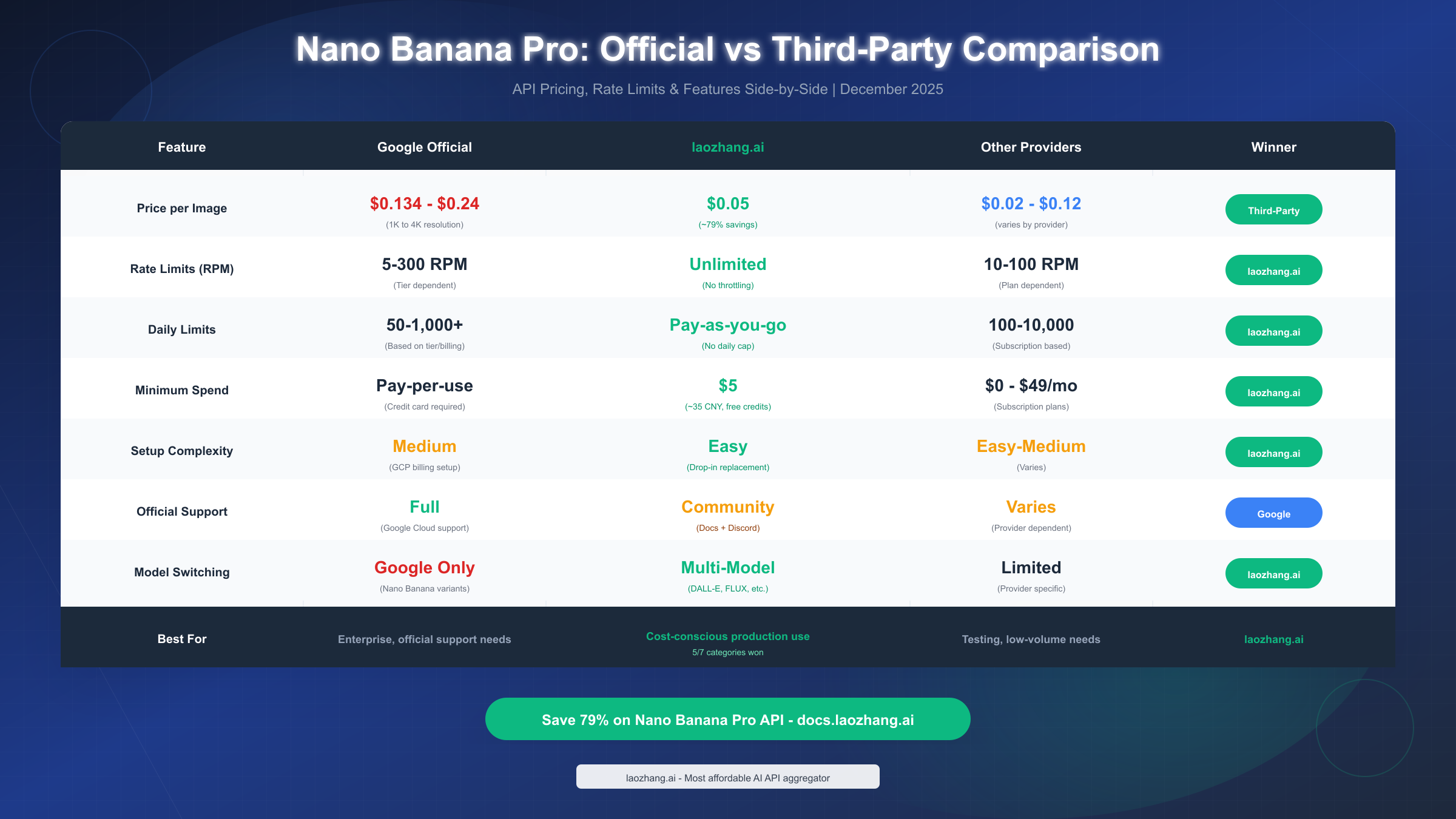
Third-party providers don't offer a "different" Nano Banana Pro—they provide access to the same Google model through their infrastructure. The key differences involve pricing, rate limits, and the convenience features each provider wraps around the core API. Because these providers aggregate demand across many customers, they can negotiate volume pricing that individual developers couldn't access directly.
laozhang.ai stands out as a particularly cost-effective option for users who need reliable access without Google's per-tier restrictions. At $0.05 per image (approximately 79% savings versus official rates), with no rate throttling and pay-as-you-go billing starting at just $5, it removes many friction points that limit Google's official API. The platform aggregates multiple AI models beyond just Nano Banana Pro, allowing you to switch between different image generators through a unified API—useful for workflows that might benefit from trying different models for different use cases.
Setup typically involves three simple steps: creating an account, generating an API key, and updating your code's base URL to point to the third-party endpoint rather than Google's. Most providers maintain API compatibility, meaning existing code requires minimal changes.
Provider Comparison Considerations
When evaluating third-party options, consider these factors:
Pricing Structure: Some charge per-image while others use token-based pricing. Calculate your expected costs under each model based on realistic usage projections.
Rate Limits: Third-party providers often have more generous rate limits than Google's free tier but may still impose some restrictions. Verify that limits accommodate your peak usage patterns.
Latency: Requests route through additional infrastructure, potentially adding latency. For real-time applications, test actual response times before committing.
Support and Reliability: Evaluate the provider's track record for uptime and their responsiveness to issues. Enterprise applications need providers with SLA guarantees.
For comprehensive documentation on cost-effective image generation APIs and detailed setup instructions, check https://docs.laozhang.ai/ which provides integration guides for multiple programming languages.
Troubleshooting: When You Hit the Limit
Encountering limits is frustrating but manageable with the right approach. This section covers common scenarios and practical solutions.
Error 429: Rate Limit Exceeded
The HTTP 429 error indicates you've exceeded either per-minute or per-day limits. The response body typically includes details about which limit was hit and when it resets:
{
  "error": {
    "code": 429,
    "message": "Resource has been exhausted (e.g. check quota).",
    "status": "RESOURCE_EXHAUSTED"
  }
}
Immediate Solutions:
- Wait for the reset period (check X-RateLimit-Reset header for exact time)
- Reduce request frequency if hitting per-minute limits
- Switch to a higher tier or third-party provider for urgent needs
Hidden Caps and Dynamic Limits
Some users report hitting limits well below advertised quotas. This typically results from Google's dynamic load balancing, which temporarily reduces individual allocations during peak demand periods. These reductions aren't bugs—they're intentional demand management.
If you consistently hit limits below your tier's advertised cap, try generating during off-peak hours (early morning or late night UTC). Server load variations mean the same tier may provide different practical capacity at different times. For guidance on handling similar rate limit issues with other AI image APIs, our detailed troubleshooting guide offers additional strategies.
Resolution-Related Quota Drain
Remember that high-resolution outputs consume more quota. If you're exhausting limits faster than expected, check whether you're generating at 4K when 1K would suffice. For workflows that don't require print-quality resolution, generating at 1K and selectively upscaling only the best results stretches your quota significantly further.
Account-Level Issues
Occasionally, limit problems trace to account configuration rather than actual usage:
- Billing verification pending: Even with payment method added, verification delays can restrict access
- Quota inheritance: Organization accounts may have admin-set limits below tier maximums
- Regional restrictions: Some regions face additional limitations; VPN usage may trigger security restrictions
For persistent issues not resolved by waiting for resets, Google's support channels through AI Studio provide escalation paths for paying customers.
Tips to Maximize Your Quota
Extracting maximum value from your allocated limits requires strategic thinking about how you use Nano Banana Pro. These practical techniques help stretch quotas without sacrificing output quality.
Optimize Prompt Efficiency
Verbose prompts consume more tokens, leaving less capacity for actual image generation. Compare these approaches:
❌ Inefficient: "Please create a beautiful, stunning, high-quality photograph of a majestic golden retriever dog sitting in a sun-drenched meadow full of colorful wildflowers during golden hour with dramatic lighting and shallow depth of field, professional photography style, magazine cover quality"
✅ Efficient: "Golden retriever in wildflower meadow, golden hour, shallow DOF, magazine photography style"
The efficient prompt conveys the same creative intent in roughly one-quarter the tokens. Across hundreds of generations, this efficiency compounds into meaningful quota savings.
Use Resolution Strategically
Generate at the lowest acceptable resolution for your use case, then selectively upscale only the images you intend to use. If you're exploring concepts or iterating on prompts, 1K resolution provides sufficient detail for evaluation while consuming less quota than 4K.
Batch Similar Requests
When generating variations on a theme, structure your workflow to minimize context-switching. The model processes related prompts more efficiently when they share common elements, and your own review process becomes faster when comparing similar outputs.
Leverage Free Tier for Exploration
Reserve paid tier quota for final production work. Use free tier access for initial concept exploration and prompt refinement, switching to higher tiers only when you've identified the specific outputs you need at full quality.
Consider Hybrid Approaches
For workloads mixing different quality requirements, splitting between providers makes sense. Use laozhang.ai's cost-effective API for high-volume experimental work, reserving Google's official access for final production outputs where official support matters.
Summary and FAQ
Navigating Nano Banana Pro's limits requires understanding the tiered system Google has implemented across consumer and API access paths. The key takeaways from this guide include:
- Free tier provides 2 images daily (reduced from 3 in November 2025), with dynamic adjustments based on demand
- Pro tier ($19.99/month) offers approximately 100 daily images with 4K resolution support and priority access
- Ultra tier ($34.99/month) provides up to 1,000 daily images for production workloads
- API access operates independently with 5-10 RPM free tier expanding to 300+ RPM with billing
- Third-party alternatives like laozhang.ai offer significant savings at roughly $0.05/image versus $0.13-0.24 official rates
- Resolution choices impact quota consumption—4K uses 1.5-2x the quota of 1K outputs
Frequently Asked Questions
How do limits reset? Daily limits reset at midnight UTC. Per-minute rate limits reset rolling within 60-second windows. Token-based allocations may have different reset schedules depending on your tier.
Can I purchase additional quota without upgrading tiers? Google's consumer tiers don't support a la carte quota purchases. For flexible usage without tier commitment, API access through third-party providers offers pay-as-you-go alternatives.
Why do my limits seem lower than advertised? Dynamic load balancing may temporarily reduce allocations during high-demand periods. Additionally, high-resolution generations consume proportionally more quota than the simple "image count" suggests.
Do limits carry over if unused? No, daily limits do not roll over. Unused quota expires at each reset period. This makes consistent daily usage more efficient than sporadic heavy usage for subscription tiers.
Are there student or educational discounts? Google offers educational pricing through Google Workspace for Education, though specific Nano Banana Pro allocations vary by institution. Contact your institution's IT department to verify available quotas.
For the latest pricing updates and detailed API integration guidance, the official documentation at docs.laozhang.ai provides regularly updated information covering Nano Banana Pro alongside other image generation models available through the platform.


