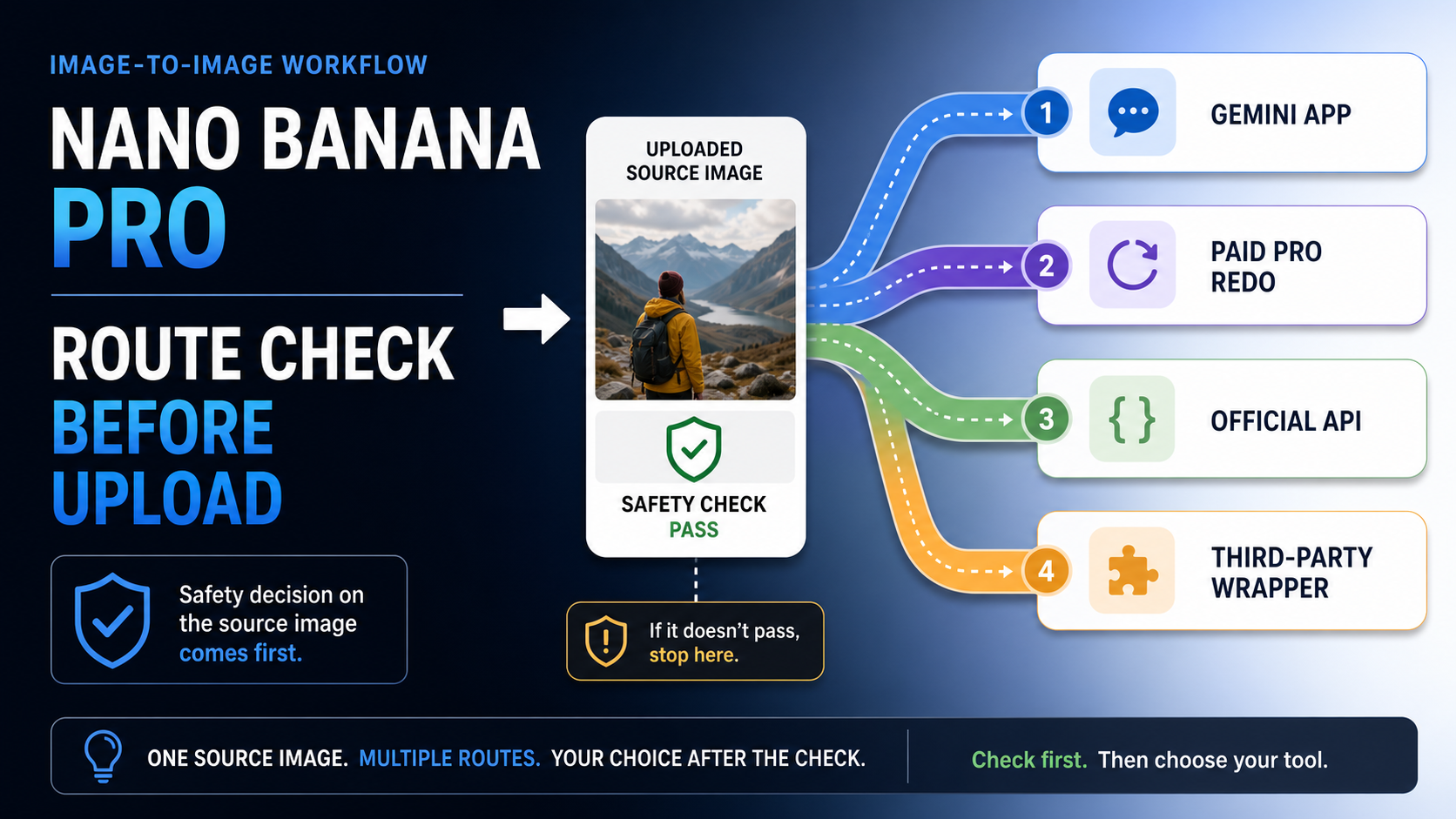
If the source image is private, client-owned, regulated, or expensive to recreate, do not start in an unverified "free Nano Banana Pro" editor. Use Gemini app editing for low-risk casual tests, use a paid Pro redo or the official Gemini API when you need Pro-grade output or automation, and treat third-party wrapper credits as disposable tests until the provider proves who owns the route and how it handles uploads.
Checked on May 14, 2026, Google's public Gemini API pricing does not make gemini-3-pro-image-preview a free image-to-image API route. The free-looking choices are separate contracts: app-side editing, paid-subscriber redo, official paid API calls, or provider-owned wrapper trials.
| Route | Best first use | Boundary |
|---|---|---|
| Gemini app editing | Low-risk casual edits from uploaded images | App limits and model routing are not the same as API access. |
| Paid Pro redo | Higher-quality redo inside the Gemini app experience | It depends on paid app entitlement, not a free developer API. |
| Official Gemini API | Automation, logging, repeat workflows, and production integration | The Pro image-preview route is paid in the checked public pricing. |
| Third-party wrapper | Disposable tests when the source image is not sensitive | Credits are provider-owned and need a trust check before upload. |
The route matters more than the nickname
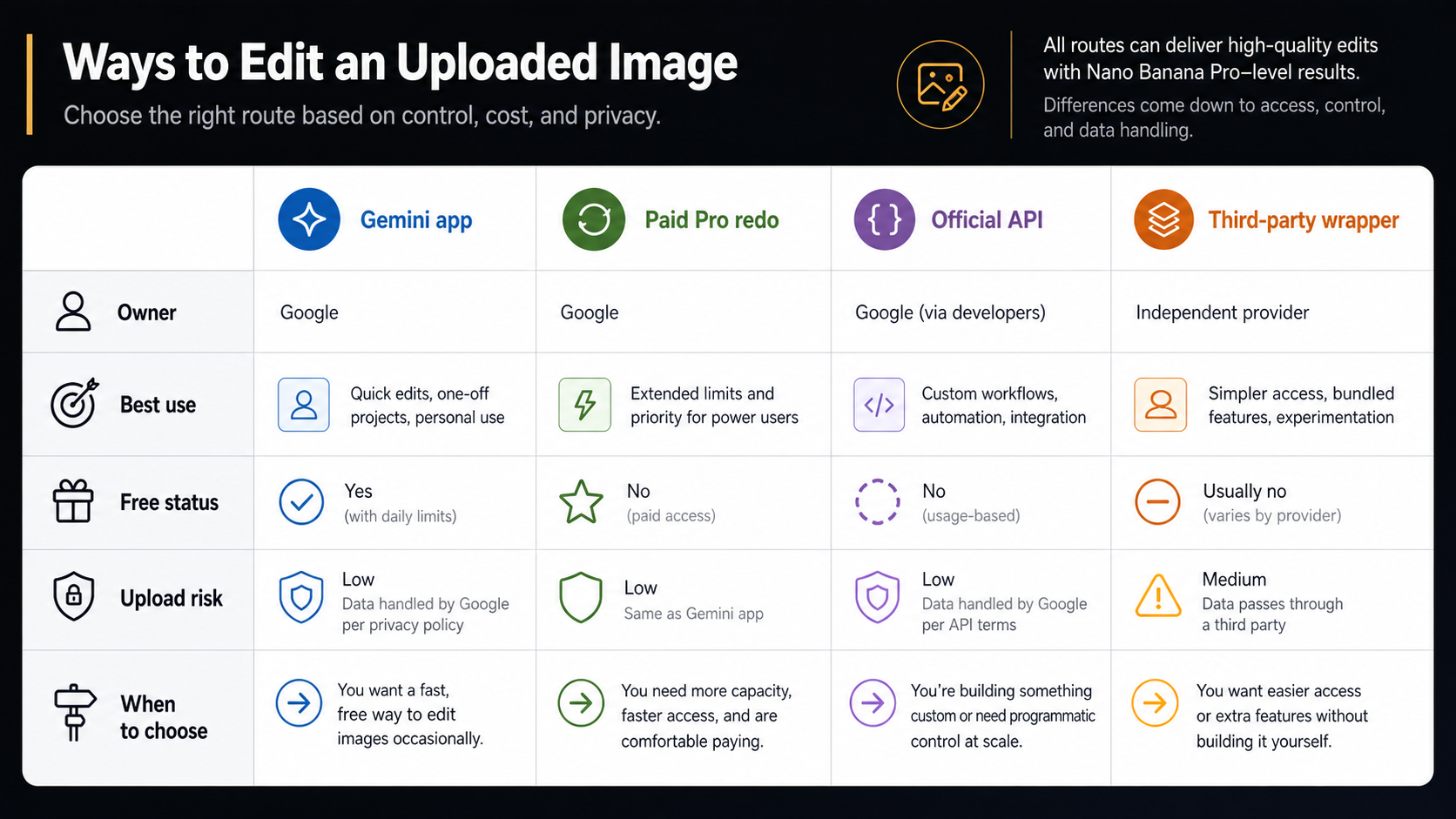
"Nano Banana Pro image-to-image free" sounds like one product feature, but it usually hides three separate questions. The reader may want to upload a source image, may want the more capable Pro result, and may want the route to cost nothing. Those questions do not collapse into one official entitlement.
Google's public image documentation describes Gemini image workflows that can use text, images, or mixed inputs for generation and editing. That confirms the workflow itself is real: an uploaded image can be changed by a prompt. The access question is different. Google's image docs and pricing page separate model choice, API use, and paid output pricing, while Gemini app help describes app-side generation and editing with its own limits and subscription behavior.
That is why the safest first decision is not "which free site should I click?" It is "who owns this route after I upload the image?" If Google owns the app session, you are in a consumer product with app terms, account limits, and app behavior. If Google owns the API call, you are in a developer contract with model IDs, billable output, logs, and quota tiers. If a wrapper owns the interface, the wrapper owns the first trust problem, even when it ultimately calls a Google model behind the scenes.
For the broader access landscape, the companion article on free Nano Banana Pro access is the better starting point. For the general editing workflow across Gemini models, use the Gemini image-to-image editing guide. The narrow decision here is upload safety plus route ownership.
Use the Gemini app for low-risk casual edits
The Gemini app is the shortest route when the image is ordinary, personal, and low-risk: room ideas, outfit experiments, social mockups, simple background changes, or visual brainstorming where a failed or stored upload would not create a business problem. In that setting, the app gives a fast no-code editing loop. You upload, describe the change, inspect the result, and refine the request in another turn.
Google's Gemini help pages currently frame consumer image generation and editing around the app experience, including uploaded-image edits and plan-dependent behavior. That app-side route is useful because it does not require a developer setup and because the interface is designed for normal iteration rather than API orchestration.
The app route is not the same as a free Pro API route. A casual user may experience some app-side generation or editing at no direct payment, but that does not mean gemini-3-pro-image-preview is available as free developer infrastructure. It also does not mean every account, country, language, plan, or usage level receives the same behavior. Treat app availability as an app entitlement, not a portable pricing promise.
Use the app when the image can tolerate consumer-product limits. Do not use it as the first stop for unreleased client assets, regulated documents, private identity photos, source files from a paid campaign, or images where audit trails and deletion procedures matter. Those jobs need either a formal API contract or a stricter internal approval path before upload.
Paid Pro redo is an app-side upgrade, not a free API
Paid Pro redo is useful because many image edits become valuable only after the first draft exists. A fast model or ordinary app edit may solve the composition, pose, or layout, and a Pro redo can then be used for a stronger final version. That is a reasonable consumer workflow: quick draft first, premium redo second.
The mistake is treating that redo path as proof that a free public Pro API exists. The app and the API have different contracts. The app can expose a paid-subscriber action inside its interface without making the same model free for developers. The API needs a model name, a pricing page, request behavior, output handling, and quota rules. Those details live in Google's developer documentation, not in the app's button labels.
When a job needs repeatability, the app route can become awkward. You cannot easily version prompts, preserve request logs in your own system, add retry policy, integrate uploads into a product flow, or track per-user cost from a consumer UI. That is the point where paid API use starts to make sense even when the app feels cheaper for one-off edits.
The official Gemini API is the automation route, and Pro is paid
The official API route is the right route when the upload is part of a product, internal tool, batch workflow, creative pipeline, or repeatable client process. Google's image generation documentation describes image generation and editing with Gemini models, including mixed text-and-image inputs. That is the contract a developer can build around.
As of May 14, 2026, Google's Gemini API pricing page lists paid image output pricing for gemini-3-pro-image-preview. The exact bill can change with model, output size, and pricing updates, so the durable rule is simpler than any one number: do not plan a production Pro image-to-image workflow around "free official API" unless Google's current pricing page explicitly says that route is free for your account and use case.
The current model map also matters. Google's image documentation positions gemini-3.1-flash-image-preview as the current all-around image model and gemini-3-pro-image-preview as the more complex or professional lane. Google's deprecations page also lists gemini-2.5-flash-image as scheduled for shutdown on October 2, 2026. That makes older free-tier or cheap-route advice risky if it tells you to build new work around the old model without a migration plan.
For a cost-focused breakdown, use the dedicated Nano Banana Pro cost per image guide. The upload decision here is more basic: if you need automation, logs, repeatability, or a production contract, the API is the clean route; if you specifically need Pro quality through that API, treat it as paid unless current official pricing says otherwise.
Audit third-party wrappers before sending the image
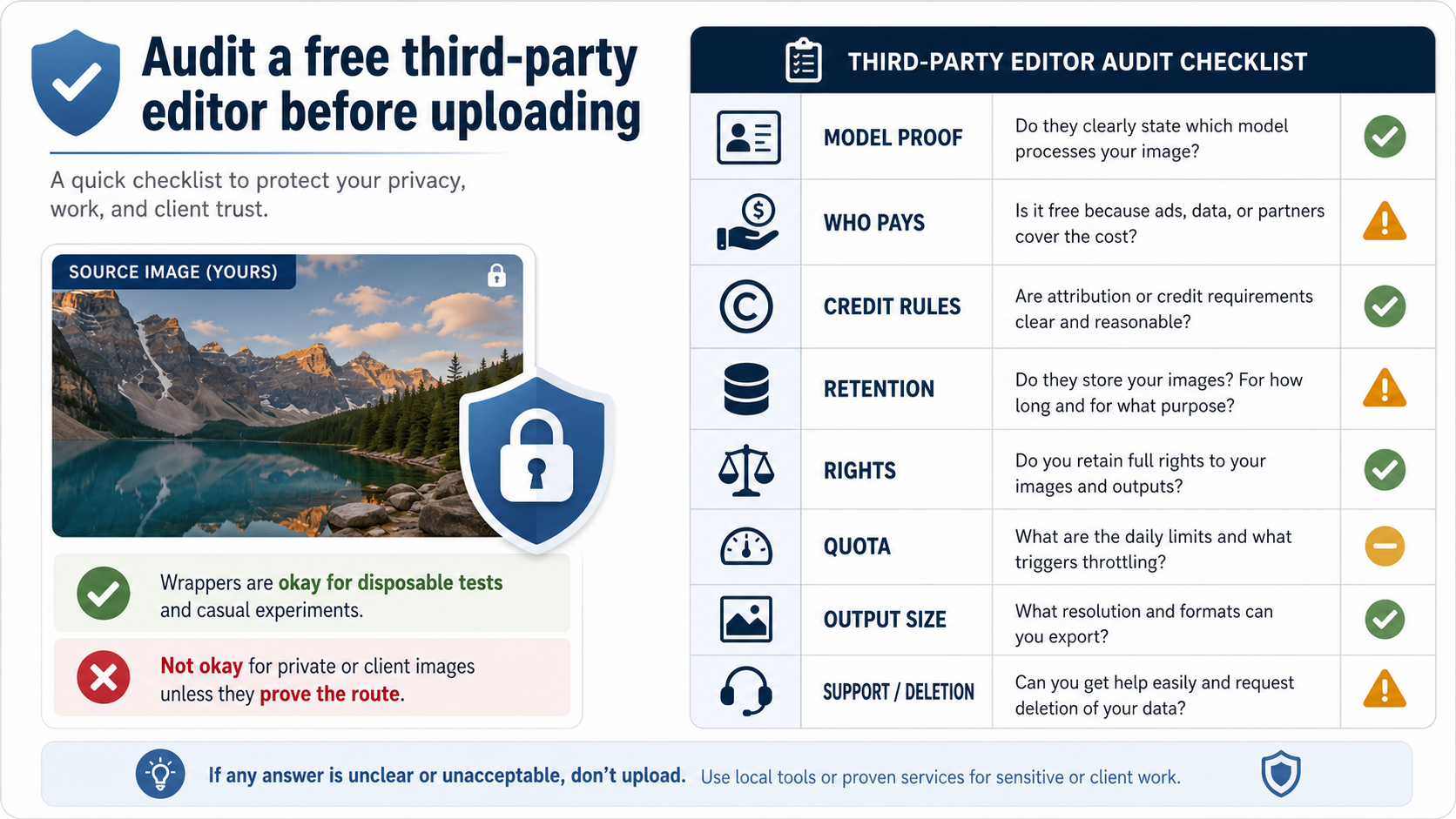
Third-party editors can be useful for disposable tests. They may offer trial credits, a no-login interface, a quick demo surface, or a route that hides API complexity. That does not make them unsafe by definition. It does mean the wrapper must earn the upload before it receives the source image.
Start with model proof. A wrapper that says "Nano Banana Pro" should explain what model or route it uses, whether the output is app-like, API-like, or an internal approximation, and whether the feature is always Pro or only Pro under some conditions. Vague model claims are enough reason to use a harmless stock image first.
Then ask who pays for the generation. If the wrapper covers the API bill, the free credits are the wrapper's promotional budget, not Google's free API access. That difference matters because the wrapper can change limits, downgrade routes, queue requests, or stop the free tier without Google changing anything.
The upload terms matter more than the free button. Look for retention language, deletion controls, whether uploaded images may be used for improvement or analytics, who can access failed jobs, and whether the output license is clear enough for your use. If the source image includes a face, client product, unreleased design, private document, medical context, financial context, or paid campaign asset, the absence of clear terms should stop the upload.
Also test output size and support before trusting the workflow. Some wrappers are fine for a visual sketch but weak for production because they compress output, hide model parameters, provide no stable job history, or have no practical support path when a paid credit fails. A free wrapper is most useful when the input is replaceable and the output only needs to prove whether a prompt direction is worth pursuing.
Pay for Pro when the source image is already valuable
The cheapest route is not always the lowest-cost route. A free attempt becomes expensive when it risks an unreleased product shot, a client's face, a licensed illustration, a campaign key visual, or an image that took hours to create. In those cases, the cost of losing control over the source image is larger than the model bill.
Paying for the official route makes sense when four conditions appear together. The source image matters. The edit needs to be repeated or audited. The output quality affects revenue, client approval, or production time. And the team needs a predictable contract for upload, storage, access, billing, and support.
Pro is also easier to justify when the edit is text-heavy or brand-sensitive. Infographics, menu boards, product labels, UI mockups, diagrams, poster text, and multi-object layouts can punish weaker models because one garbled detail can invalidate the whole asset. If a low-quality pass forces repeated manual cleanup, a paid Pro route can be cheaper than spending staff time on failed free attempts.
Use a lower route when the image is low-risk, the output is exploratory, or the prompt is still rough. Use Pro when the brief is already real and a weak output has a material cost.
Prompt patterns for uploaded-image edits
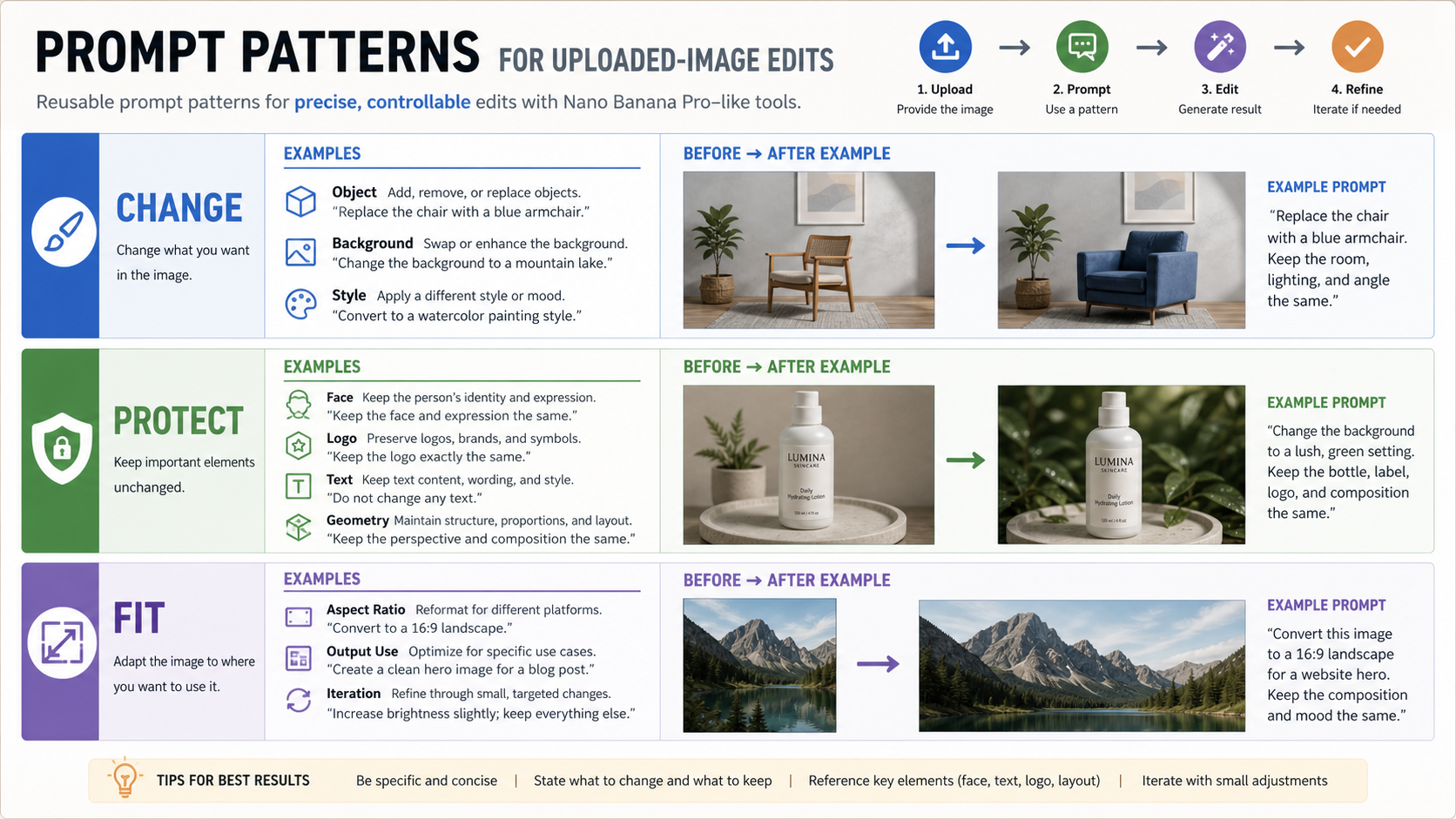
Image-to-image prompts work best when they split the job into three parts: what changes, what stays protected, and where the output will be used. Without that split, the model may improve the whole scene when you only wanted the background changed, or it may rewrite details that needed to remain stable.
Use a change clause for the visible edit. For example: "Change the background to a bright studio kitchen" or "Replace the jacket with a navy blazer." The more local the change, the more explicit the instruction should be.
Use a protect clause for identity, geometry, text, logos, layout, or product details. For example: "Keep the person's face, pose, camera angle, and product label unchanged." If those elements matter, say so directly. Do not assume the model knows which details are sacred.
Use a fit clause for the destination. For example: "Make the final image suitable for a 16:9 landing-page hero" or "Preserve enough blank space on the right for headline text." The output use changes the edit: a social crop, product card, print poster, and documentation diagram all need different composition.
A good uploaded-image prompt can be as simple as:
Using the uploaded image, change only the background to a clean daylight studio.
Keep the person's face, pose, clothing texture, and camera angle unchanged.
Fit the final image for a 16:9 website hero with extra negative space on the left.
For multi-turn editing, keep each turn narrow. First solve the large composition problem, then refine lighting, then refine text or product details, then choose the final size. If you ask for every change at once, it becomes harder to know which instruction caused a bad result.
A practical route decision
For most readers, the best path is not complicated. If the image is disposable and the edit is casual, use the Gemini app or a wrapper after a basic trust check. If the source image is private, client-owned, or hard to recreate, skip unverified wrappers. If the workflow needs logs, repeatability, or integration, use the official API. If the edit needs Pro-level detail, treat Pro as a paid route unless current official pricing says otherwise.
That decision keeps the market phrase useful without letting it mislead you. "Nano Banana Pro image-to-image free" is a starting question, not a complete contract. The answer depends on upload risk, route owner, and whether "free" means app access, paid-subscriber redo, wrapper credit, or official API pricing.
FAQ
What free route can I use for an uploaded-image edit?
Not as one universal route. Low-risk app-side image editing may be available without a separate API bill, paid subscribers may see a Pro redo path in the Gemini app, and wrappers may offer trial credits. Google's public API pricing checked on May 14, 2026 does not make gemini-3-pro-image-preview a free official image-to-image API route.
Can I edit an uploaded image in the Gemini app?
Yes, Gemini app image editing supports uploaded-image workflows, but app behavior depends on account, plan, availability, and Google's current app limits. Use it for low-risk casual edits, not for source images that require a formal upload contract.
Which official API model should I use for uploaded-image edits?
For most new API workflows, start by checking Google's current image documentation and pricing for gemini-3.1-flash-image-preview and gemini-3-pro-image-preview. The 3.1 Flash image model is the current all-around lane, while the Pro image-preview model is the premium route for more demanding work.
Are free third-party Nano Banana Pro editors safe?
They can be acceptable for disposable tests, but they should not receive private, client-owned, regulated, or hard-to-recreate source images until the provider explains model routing, credit rules, retention, deletion, rights, output limits, and support. A free button is not a privacy contract.
When should I pay for the official route?
Pay when the source image is valuable, the output will be reused, the workflow needs logs or automation, or a weak edit costs more than the model call. Official API usage is also the cleaner route when the image edit becomes part of a product or client workflow.
Is Nano Banana 2 enough for image-to-image editing?
Often, yes. Nano Banana 2 or the current all-around Gemini image lane is usually enough for casual edits, fast iteration, and lower-risk work. Move to Pro when text-heavy output, brand-sensitive detail, premium polish, or production repeatability justifies the higher route.


