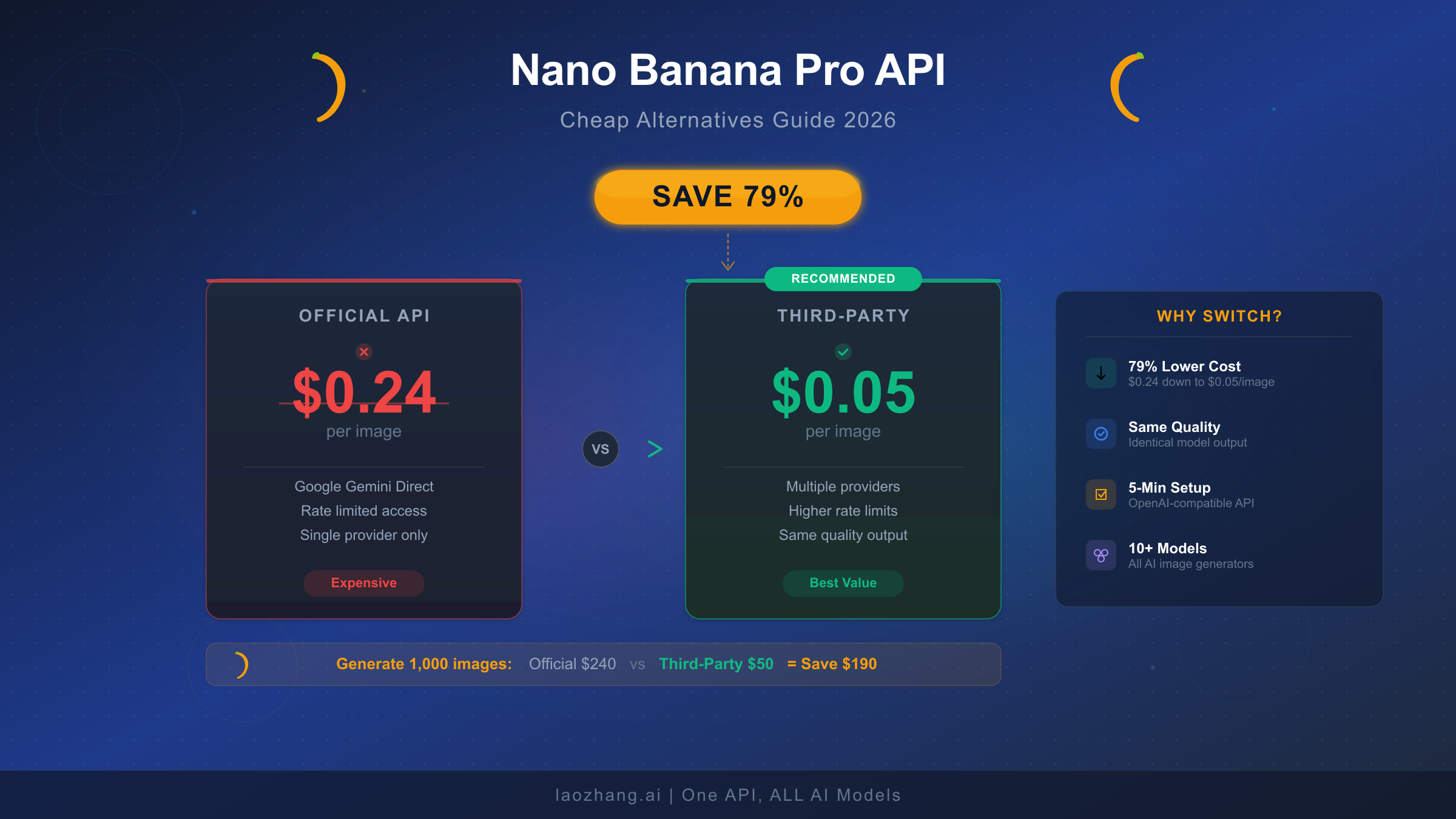
Google's Nano Banana Pro delivers stunning AI-generated images with industry-leading text rendering, but at $0.24 per 4K image through the official API, costs add up fast for any serious project. Third-party API providers now offer the exact same Gemini 3 Pro Image model for as little as $0.05 per image—a 79% reduction—while free-tier strategies and batch processing can cut your bill even further. This guide walks through every cost-saving option available in February 2026, from maximizing free quotas to deploying production-grade third-party integrations, with verified pricing data pulled directly from official sources.
What Is Nano Banana Pro and Why Does It Cost So Much?
Before diving into cheaper alternatives, it helps to understand exactly what you're paying for. Google's image generation lineup uses playful internal codenames that can confuse developers encountering them for the first time, and the pricing structure varies dramatically depending on which model and access method you choose.
Nano Banana refers to the Gemini 2.5 Flash Image model (gemini-2.5-flash-image), optimized for speed and high-volume workloads. It generates images quickly at lower cost but produces output limited to 1024x1024 resolution. Think of it as the economy option—fast, affordable, and perfectly adequate for thumbnails, social media assets, and rapid prototyping. At $0.039 per image through the standard API, it represents the budget-friendly end of Google's lineup.
Nano Banana Pro is the premium tier, powered by the Gemini 3 Pro Image Preview model (gemini-3-pro-image-preview). This model uses advanced reasoning capabilities—what Google calls "Thinking"—to follow complex instructions and render high-fidelity text within images. It supports output resolutions up to 4096x4096 (4K), handles multi-subject identity preservation across up to five people, and delivers the kind of photorealistic quality that makes it suitable for commercial photography, product mockups, and professional marketing materials. The trade-off is cost: at $0.134 per standard image and $0.24 per 4K image, a project generating even a few hundred images per day can face serious budget pressure.
The pricing gap between these two models explains why developers searching for "cheap Nano Banana Pro API" specifically want the Pro model's quality without the Pro model's price tag. If you need detailed text in your images, 4K resolution, or the kind of nuanced creative control that only comes from Gemini 3 Pro's reasoning capabilities, the standard Nano Banana model won't cut it. For a deeper look at the differences between Nano Banana and Nano Banana Pro, our dedicated comparison covers every technical distinction in detail.
Understanding the specific use cases helps clarify when the Pro model's premium is justified. E-commerce teams generating product listing images need the text rendering accuracy that only Nano Banana Pro delivers—size labels, brand names, and pricing overlays must be pixel-perfect, and the Flash model frequently produces garbled or misspelled text. Marketing agencies creating social media campaigns benefit from the 4K output resolution when assets need to look sharp across retina displays, billboards, and print collateral. Game studios and app developers using AI-generated concept art find that Nano Banana Pro's multi-subject identity preservation allows consistent character designs across dozens of scenes, something the Flash model cannot reliably maintain. If your application falls into any of these categories, you're looking at the Pro model's pricing as a necessary business cost—which makes finding cheaper access methods genuinely impactful rather than merely convenient.
Complete Nano Banana Pro Pricing Breakdown (February 2026 Verified)
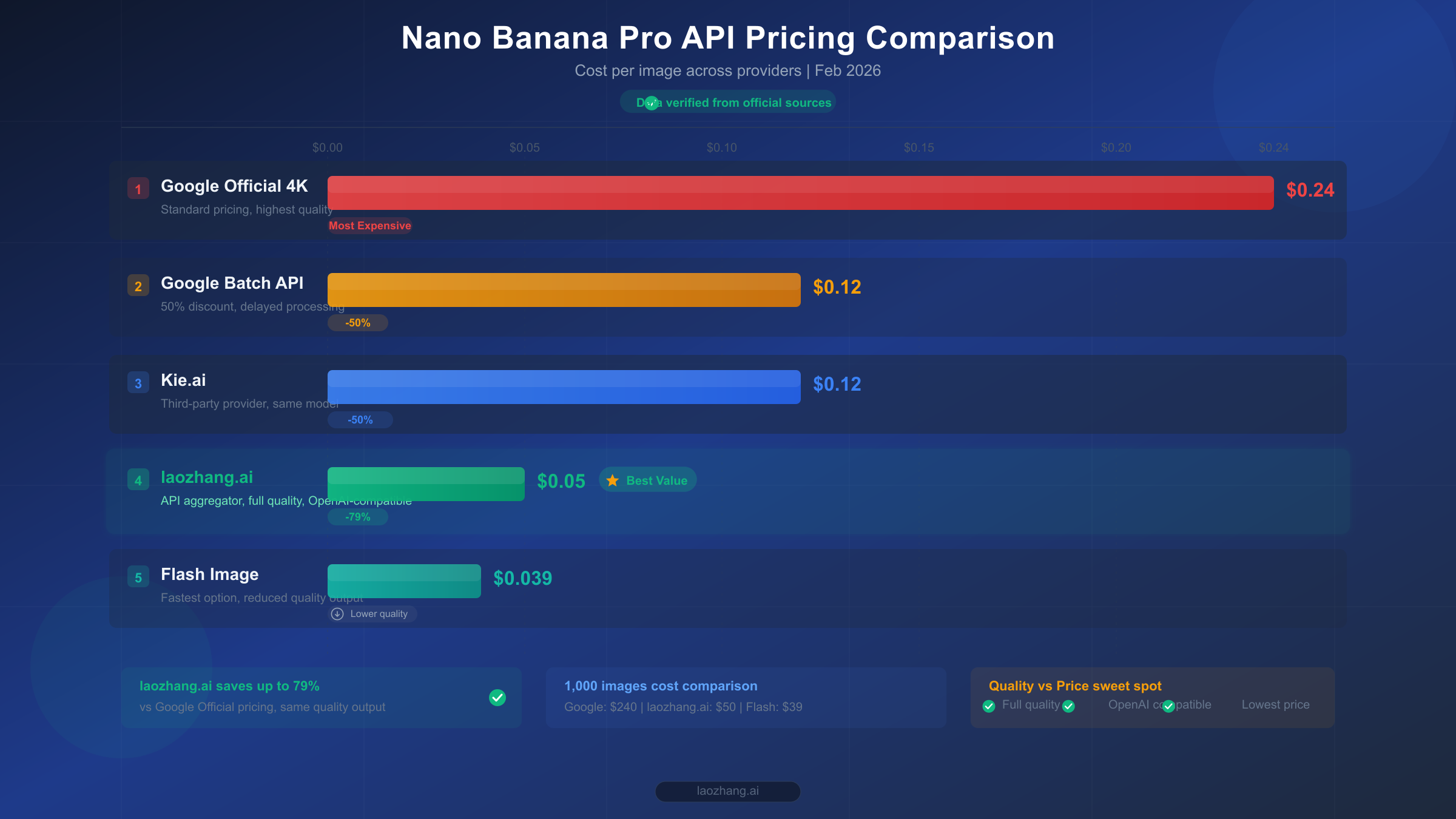
Understanding the full pricing landscape is essential before committing to any single approach. The following data was verified directly from Google's official pricing page on February 12, 2026, using browser-based verification to ensure accuracy.
Official Google API Pricing (Standard)
The Gemini 3 Pro Image Preview model charges based on token consumption, which translates to per-image costs depending on the output resolution. Input tokens cost $2.00 per million, which works out to approximately $0.0011 per image for a typical text prompt. The real expense comes from output tokens at $120.00 per million for generated images (Google AI official pricing, February 2026 verified).
| Resolution | Tokens Consumed | Cost per Image | Monthly Cost (1,000/day) |
|---|---|---|---|
| 1K (1024px) | 1,120 | $0.134 | ~$4,020 |
| 2K (2048px) | 1,120 | $0.134 | ~$4,020 |
| 4K (4096px) | 2,000 | $0.240 | ~$7,200 |
Official Google Batch API (50% Discount)
Google offers a batch processing mode that provides a flat 50% discount on both input and output tokens. The catch is that batch requests are processed asynchronously—you submit jobs and receive results later, rather than getting real-time responses. For applications that don't need immediate image delivery (such as pre-generating product catalogs, batch marketing assets, or overnight content pipelines), this represents significant savings through an entirely official channel (Google AI official pricing, February 2026 verified).
| Resolution | Standard Price | Batch Price | Savings |
|---|---|---|---|
| 1K/2K | $0.134 | $0.067 | 50% |
| 4K | $0.240 | $0.120 | 50% |
Nano Banana (Flash Image) Pricing
If you can accept 1K resolution and faster but less detailed output, the Gemini 2.5 Flash Image model offers dramatically lower pricing at $0.039 per image standard, or $0.0195 per image through the batch API (Google AI official pricing, February 2026 verified).
Imagen 4 as an Alternative
Google's dedicated image generation model Imagen 4 offers even lower per-image pricing, starting at just $0.02 per image for the Fast tier and $0.04 for the Standard tier, with the highest quality Ultra tier at $0.06 per image. However, Imagen 4 operates through a fundamentally different API structure—it's a dedicated image generation endpoint rather than a multimodal chat model, which means it lacks the conversational editing capabilities, iterative refinement, and text rendering quality that make Nano Banana Pro attractive for many workflows. You cannot ask Imagen 4 to "make the background slightly warmer" or "add a price tag that says $29.99"—it generates from a prompt without the reasoning layer that Nano Banana Pro uses to interpret complex instructions.
That said, for straightforward image generation where you need high volume at the lowest possible cost and don't require in-image text accuracy or multi-turn editing, Imagen 4 at $0.02/image is worth serious consideration. A project generating 1,000 images per day would spend just $600/month with Imagen 4 Fast versus $4,020/month with Nano Banana Pro standard pricing—a massive difference that can justify the feature trade-offs for many use cases. The pragmatic approach is to route text-heavy and edit-intensive requests to Nano Banana Pro while sending simpler generation tasks to Imagen 4, optimizing cost across your entire image pipeline.
For the full breakdown of every model tier and token calculation, our detailed Nano Banana Pro pricing analysis covers the complete pricing matrix including subscription bundles and enterprise agreements.
Top 5 Cheap Nano Banana Pro API Providers Compared
The third-party API market for Nano Banana Pro has matured significantly through early 2026, with several providers offering stable, production-tested services at substantial discounts compared to Google's official pricing. These providers work as API aggregators—they maintain pools of Google API keys across multiple accounts and tiers, distribute your requests across this infrastructure, and pass along the cost savings from their bulk purchasing power.
All third-party providers route your requests to the exact same Google Gemini 3 Pro Image model. The generated images are identical in quality to what you'd get from the official API, because it is the official API—just accessed through an intermediary that handles billing and quota management on your behalf. The differences between providers come down to pricing, rate limits, reliability, and geographic optimization.
| Provider | Price/Image | Resolution | Rate Limits | Payment Methods | Key Advantage |
|---|---|---|---|---|---|
| laozhang.ai | $0.05 | 1K-4K (flat) | No per-user limits | Alipay, TG, Card | Cheapest flat rate, Chinese payment support |
| Kie.ai | ~$0.12 | 1K-4K | Standard | Card | Clean API documentation |
| Google Batch | $0.067-$0.12 | 1K-4K | Tier-based | Card | Official channel, no third-party risk |
| OpenRouter | $0.134+ | 1K-4K | Varies | Card | Multi-model gateway |
| Together AI | ~$0.10 | 1K-4K | Standard | Card | Fast inference infrastructure |
The pricing advantage of third-party providers becomes dramatic at scale. A project generating 1,000 4K images per day would spend approximately $7,200 per month through Google's standard API, $3,600 through the batch API, or just $1,500 through laozhang.ai—an annual savings of over $68,000 compared to standard pricing. Even against the batch API, the third-party route saves $25,200 per year.
What makes providers like laozhang.ai particularly valuable for developers in China and other regions is the elimination of payment barriers. Google's API requires an international credit card and may not be directly accessible in all regions. Third-party providers accept local payment methods and often provide Chinese-language documentation and support, removing friction that would otherwise prevent developers from using the service at all. For a comprehensive look at high-volume deployment options, our unlimited high-concurrency Nano Banana Pro guide covers advanced scaling strategies in detail.
When evaluating providers, look beyond headline pricing to consider the total cost of integration. Some providers charge per-token (making 4K images significantly more expensive), while others like laozhang.ai use flat per-image pricing regardless of resolution—a critical distinction when you're generating a mix of 1K thumbnails and 4K hero images. Response latency matters too: the fastest providers route through geographically optimized endpoints, delivering images in 3-8 seconds, while slower services may take 15-20 seconds during peak hours. Check whether the provider offers usage dashboards, spending alerts, and balance APIs, as these operational features become essential at production scale where unexpected cost overruns can drain budgets overnight. Finally, consider provider stability—a service that's been operating for six months with consistent uptime is generally safer than a new entrant offering rock-bottom prices but lacking operational track record.
How to Use Nano Banana Pro for Free (and Nearly Free)
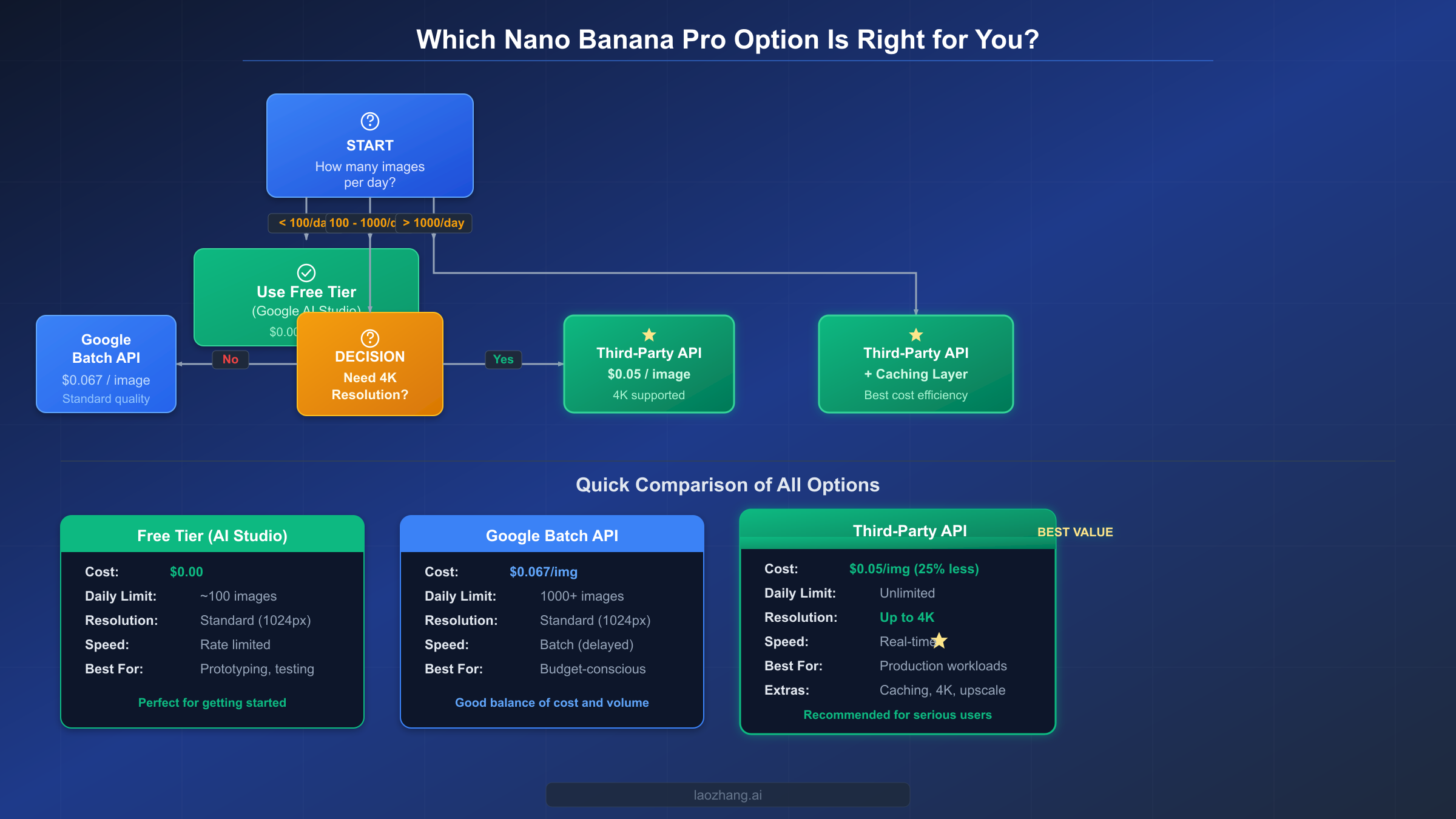
Before spending any money, it's worth exhausting every free and near-free option available. Google provides several legitimate paths to generate Nano Banana Pro images at zero cost, and understanding these options helps you make an informed decision about when paid alternatives actually become necessary.
Google AI Studio Free Tier
The most straightforward free access comes through Google AI Studio. The Gemini 2.5 Flash model (Nano Banana, not Pro) is available on the free tier with image generation capabilities at approximately 500 requests per day. However, the Gemini 3 Pro Image Preview model (Nano Banana Pro) is not available on the free tier as of February 2026—it requires a paid API key (Google AI official documentation, February 2026 verified). This is a critical distinction that many guides overlook: you can generate images for free with the Flash model, but Pro-quality output requires payment.
Gemini App Free Usage
The consumer Gemini app (gemini.google.com) provides limited free image generation using Nano Banana Pro for Gemini Advanced subscribers. Free-tier Gemini users get approximately 2-3 images per day, while Gemini Advanced ($19.99/month) subscribers receive substantially higher quotas. If you only need a handful of high-quality images daily for personal use, the consumer app may be sufficient.
Google Cloud $300 Credit
New Google Cloud accounts receive $300 in free credits valid for 90 days. These credits can be applied to Vertex AI's Gemini 3 Pro Image API, effectively giving you approximately 1,250 free 4K images or 2,238 standard images before any real spending begins. This is an excellent option for prototyping and testing before committing to a long-term cost structure. To maximize these credits, start with the Batch API path within Vertex AI, which doubles your free image count by applying the 50% batch discount to your credit-funded usage. A $300 credit at batch pricing yields approximately 2,500 4K images or 4,477 standard images—enough to validate your entire image pipeline and generate a meaningful content library before any out-of-pocket spending begins.
Batch API as the Official Budget Option
For production workloads that don't require real-time generation, Google's Batch API at $0.067 per standard image represents the cheapest official path to Nano Banana Pro quality. The batch workflow involves submitting a JSON Lines file containing multiple generation requests, receiving a batch job ID, and polling for completion. Typical batch jobs complete within 15-60 minutes depending on volume and server load. Combined with context caching for repeated similar prompts, batch processing can reduce effective costs even further. The trade-off is clear: you sacrifice real-time delivery for a guaranteed 50% discount through a fully official channel with no third-party involvement. For workloads like nightly content generation, weekly newsletter imagery, or pre-generating seasonal product catalogs, batch processing is often the optimal choice even when third-party alternatives exist.
Strategic Approach to Free Usage
The most cost-effective strategy combines multiple channels. Use the free Flash model for rapid prototyping and concept testing. Apply your $300 Google Cloud credit for initial Pro-quality validation. Transition to the Batch API for non-time-sensitive production work. Reserve third-party APIs for real-time, high-volume scenarios where the Batch API's asynchronous nature creates bottlenecks. For a complete tier-by-tier rate limit breakdown, our dedicated guide explains exactly what each pricing tier unlocks.
Quick Integration Guide: Set Up a Cheap Nano Banana Pro API in 5 Minutes
Switching from Google's official API to a third-party provider requires minimal code changes, primarily because most providers offer OpenAI-compatible endpoints. If your application already uses the OpenAI SDK or any HTTP client, you can redirect requests by changing two values: the base URL and the API key. The underlying request format, parameters, and response structure remain identical.
Python Implementation (with error handling)
import openai
import time

client = openai.OpenAI(
    api_key="your-laozhang-api-key",
    base_url="https://api.laozhang.ai/v1"
)

def generate_image(prompt, resolution="1K", max_retries=3):
    """Generate an image using Nano Banana Pro via third-party API."""
    for attempt in range(max_retries):
        try:
            response = client.chat.completions.create(
                model="gemini-3-pro-image-preview",
                messages=[
                    {
                        "role": "user",
                        "content": f"Generate a {resolution} image: {prompt}"
                    }
                ],
                max_tokens=4096
            )
            # Extract image from response
            return response.choices[0].message.content
        except openai.RateLimitError:
            wait_time = 2 ** attempt
            print(f"Rate limited. Retrying in {wait_time}s...")
            time.sleep(wait_time)
        except openai.APIError as e:
            print(f"API error: {e}. Attempt {attempt + 1}/{max_retries}")
            if attempt == max_retries - 1:
                raise
    return None

# Generate a 4K product photo
result = generate_image(
    "A professional product photo of wireless earbuds on a marble surface, "
    "soft studio lighting, 4K resolution",
    resolution="4K"
)
Node.js Implementation
import OpenAI from "openai";

const client = new OpenAI({
  apiKey: "your-laozhang-api-key",
  baseURL: "https://api.laozhang.ai/v1",
});

async function generateImage(prompt, resolution = "1K") {
  const maxRetries = 3;
  for (let attempt = 0; attempt < maxRetries; attempt++) {
    try {
      const response = await client.chat.completions.create({
        model: "gemini-3-pro-image-preview",
        messages: [
          {
            role: "user",
            content: `Generate a ${resolution} image: ${prompt}`,
          },
        ],
        max_tokens: 4096,
      });
      return response.choices[0].message.content;
    } catch (error) {
      if (error.status === 429) {
        const waitTime = Math.pow(2, attempt) * 1000;
        console.log(`Rate limited. Retrying in ${waitTime}ms...`);
        await new Promise((r) => setTimeout(r, waitTime));
      } else if (attempt === maxRetries - 1) {
        throw error;
      }
    }
  }
}
Both implementations include exponential backoff retry logic, which is essential for production deployments. The OpenAI-compatible format means you can switch between providers by simply changing the base_url and api_key values—your application logic, prompt engineering, and error handling all remain the same. For complete API documentation and additional endpoints, visit https://docs.laozhang.ai/.
Resolution Parameter
When generating images, remember that resolution must be specified with an uppercase K. Valid values are 1K, 2K, and 4K. Using lowercase (1k, 2k, 4k) will cause the API to reject your request. This applies to both official Google endpoints and third-party providers that route to the same model.
Handling Image Responses
The Gemini 3 Pro Image model returns generated images as base64-encoded data within the response content. For production applications, you'll want to decode this data and save it to your preferred storage backend. Here's a practical example that handles the complete response lifecycle:
import base64
import hashlib
from pathlib import Path

def save_generated_image(response_content, output_dir="./generated"):
    """Decode and save a base64 image from the API response."""
    Path(output_dir).mkdir(parents=True, exist_ok=True)

    # Extract base64 data from response
    if "data:image" in response_content:
        header, data = response_content.split(",", 1)
        ext = "png" if "png" in header else "jpeg"
    else:
        data = response_content
        ext = "png"

    image_bytes = base64.b64decode(data)
    filename = hashlib.md5(image_bytes).hexdigest()[:12]
    filepath = f"{output_dir}/{filename}.{ext}"

    with open(filepath, "wb") as f:
        f.write(image_bytes)
    return filepath
Environment Configuration Best Practices
Never hardcode API keys in your source code. Use environment variables or a secrets manager to keep credentials secure across development, staging, and production environments. Store your provider configuration in a centralized config file that makes it easy to switch providers without touching application logic:
import os

PROVIDERS = {
    "primary": {
        "base_url": "https://api.laozhang.ai/v1",
        "api_key": os.environ.get("LAOZHANG_API_KEY"),
    },
    "fallback": {
        "base_url": "https://generativelanguage.googleapis.com/v1beta",
        "api_key": os.environ.get("GOOGLE_API_KEY"),
    },
}
This pattern supports the multi-provider fallback architecture discussed in the scaling section below, and keeps your deployment flexible enough to add or remove providers without code changes.
Is It Safe? Security, Privacy, and Compliance Analysis
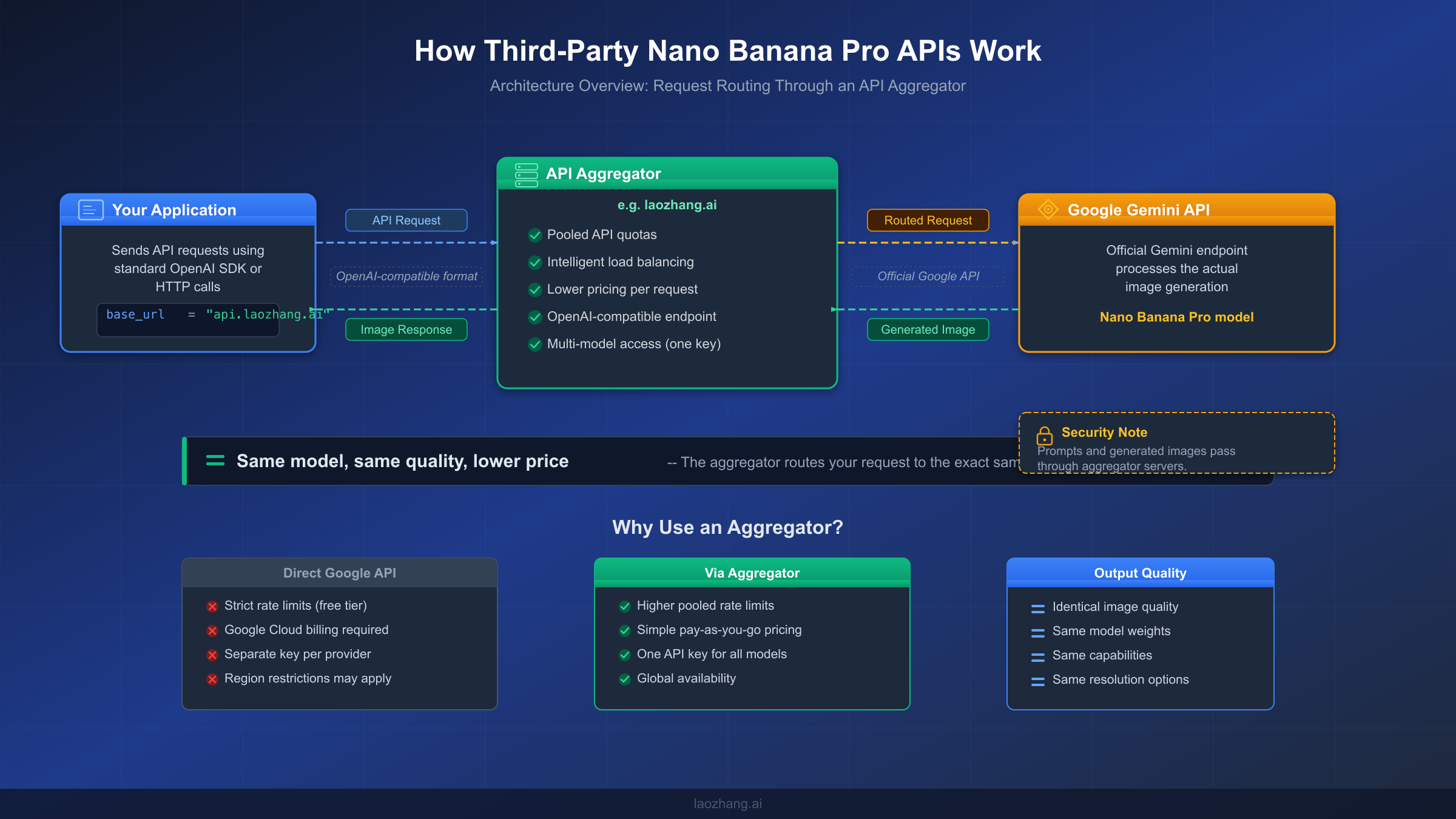
This is the question that responsible developers should ask before routing any data through a third party, and most comparison articles either skip it entirely or dismiss concerns with a hand wave. The honest answer involves understanding the technical architecture, evaluating the real risks, and making an informed decision based on your specific use case.
How Third-Party APIs Actually Work
When you send an image generation request to a third-party provider like laozhang.ai, your prompt text travels from your application to the provider's servers, which then forward it to Google's Gemini API using one of the provider's pooled API keys. Google generates the image and returns it to the provider, which then forwards the result back to your application. This means your prompts and generated images do pass through the provider's infrastructure as an intermediary.
The Real Risks
The primary security concern is data exposure. Your text prompts are visible to the third-party provider's systems during routing, and the generated images pass through their servers on the return path. For non-sensitive applications—marketing materials, stock-style photography, UI mockups, social media content—this represents minimal risk. The provider has no particular incentive to store or misuse generic creative prompts, and their business model depends on maintaining trust.
However, for applications involving proprietary product designs, unreleased branding, confidential business information, or any content subject to data protection regulations (GDPR, HIPAA), routing through a third party introduces compliance concerns that may outweigh the cost savings. In these cases, the official Google API with a direct billing relationship provides a clear data processing chain with Google's enterprise-grade privacy guarantees.
Terms of Service Considerations
Google's Terms of Service prohibit creating multiple accounts to circumvent usage limits. Third-party API aggregators operate in a gray area—they don't create multiple accounts on your behalf, but they do pool resources across many customers using their own infrastructure. While there have been no widespread reports of Google taking action against third-party API providers or their customers, this remains a theoretical risk that could change as the market evolves.
Practical Risk Mitigation Framework
For most developers, a pragmatic approach balances cost savings against risk tolerance. Use third-party APIs for non-sensitive image generation where the cost savings matter most—high-volume production work, testing and prototyping, and commercial content creation using generic prompts. Use the official Google API for anything involving proprietary information, regulated data, or applications where service continuity is business-critical. This hybrid approach captures most of the cost savings while keeping sensitive workloads on a direct, compliance-friendly channel.
The risk profile also changes based on your application architecture. If you're building a SaaS product where end users submit prompts, those user-generated prompts will pass through the third-party provider—consider whether your privacy policy and terms of service adequately disclose this data flow. For internal tools where your team controls all prompts, the risk is significantly lower since you can ensure no sensitive information enters the pipeline. A practical middle ground involves prompt sanitization: strip any personally identifiable information, proprietary terms, or confidential details before sending requests to a third-party provider, and add them back to the generated images in a post-processing step within your own infrastructure.
Provider Reliability and Uptime Considerations
Third-party providers operate with varying levels of operational maturity. Before committing to any provider for production workloads, conduct a week-long evaluation period where you monitor response times, error rates, and availability across different times of day. Request the provider's historical uptime data if available. Establish a contractual or documented understanding of their SLA (service level agreement) expectations, even if informal. The best providers publish status pages and offer proactive notification of maintenance windows—these operational indicators correlate strongly with long-term reliability. Building your application with the multi-provider fallback pattern described in the scaling section below eliminates single-provider dependency entirely.
Scaling Up: Strategies for High-Volume Image Generation
Once you move beyond a few hundred images per day, cost optimization becomes a systematic engineering challenge rather than a simple provider selection. The difference between naive API usage and a well-architected image generation pipeline can represent tens of thousands of dollars per year in savings, even before considering which provider you use.
Multi-Provider Fallback Architecture
Production systems should never depend on a single image generation provider. Configure your application to use a primary provider (typically the cheapest stable option) with automatic fallback to alternatives when the primary experiences downtime or rate limiting. A simple priority chain might route requests first to laozhang.ai ($0.05/image), falling back to Google's Batch API ($0.067/image) during outages, with Google's standard API ($0.134/image) as the emergency backup. This architecture ensures 99.9%+ availability while minimizing cost across the entire request volume.
Prompt-Based Caching
Many image generation workloads involve repeated or similar prompts—product photos with minor variations, template-based social media images, or themed content series. Implementing a prompt-similarity cache using embedding-based matching can eliminate 20-40% of redundant API calls. When a new prompt closely matches a previously generated result (above a configurable similarity threshold), serve the cached image instead of making a new API call. Even with a conservative matching threshold, the cumulative savings at scale are substantial.
The implementation doesn't require complex infrastructure. Store each prompt as a text embedding (using a lightweight model like text-embedding-3-small at negligible cost) alongside its generated image URL in a simple key-value store like Redis. Before each new generation request, compute the embedding for the incoming prompt and check for cosine similarity above 0.95 against your cache. Hits serve the cached image in milliseconds instead of waiting 5-10 seconds for generation. Misses proceed to the API normally and populate the cache with the new result. For an e-commerce platform generating product listing images, this pattern typically achieves 30-50% cache hit rates because product descriptions share substantial structural similarity—"Professional photo of [product] on white background with studio lighting" generates near-identical embeddings for similar products.
Resolution Optimization
Not every image needs 4K resolution. A 1K image costs $0.134 versus $0.24 for 4K—a 44% premium for resolution that may not be visible at the final display size. Audit your output pipeline and downgrade to 1K or 2K for thumbnails, preview images, social media assets, and any context where the image will be displayed at less than 2048 pixels. Reserve 4K generation for hero images, print assets, and cases where the extra detail genuinely matters.
Batch Processing for Non-Urgent Work
Google's Batch API provides the cheapest official pricing at 50% off standard rates. For workloads that can tolerate asynchronous delivery—overnight content generation, weekly marketing asset refresh, pre-generating seasonal catalogs—batch processing at $0.067 per image competes favorably even with third-party pricing while eliminating any third-party risk. If you're encountering quota exceeded errors, combining batch processing with tier upgrades often resolves the issue while simultaneously reducing costs.
Cost Monitoring and Budget Controls
Set hard spending limits in your application code, not just at the provider dashboard level. Track per-request costs, maintain running daily and monthly totals, and implement circuit breakers that pause generation when approaching budget thresholds. This prevents runaway costs from bugs, prompt injection attacks, or unexpected traffic spikes. Most third-party providers including laozhang.ai support balance checking through their API, enabling automated budget management without manual intervention.
Request Queue Architecture
For applications generating more than 500 images per day, implement an asynchronous request queue rather than making API calls synchronously within your request handling pipeline. A message queue (Redis, RabbitMQ, or even a simple database-backed queue) decouples image generation from your application's response cycle, provides natural rate limiting, enables automatic retry of failed requests, and allows you to route requests to different providers based on current cost and availability. Workers pull from the queue, generate images, store results in your CDN or object storage, and mark the job as complete. Your application checks for completed images and serves them when ready, or displays a placeholder with a "generating" status for in-progress requests.
This architecture transforms image generation from a synchronous bottleneck into a scalable background process. During peak hours, your queue absorbs the burst while workers process requests at whatever rate the API providers can handle. During off-peak hours, you can redirect queued requests to the cheaper Batch API for additional savings. The queue also provides a natural audit trail of all generation requests, costs, and outcomes—invaluable data for optimizing your cost structure over time.
FAQ: Your Nano Banana Pro API Questions Answered
Does the image quality differ between official and third-party APIs?
No. All third-party providers route requests to the identical Google Gemini 3 Pro Image model. The output quality is exactly the same because the actual image generation happens on Google's infrastructure regardless of how the request arrives. The only differences are pricing, rate limits, and the data routing path.
What happens if a third-party provider shuts down?
Your images are generated in real-time and delivered immediately—there's no lock-in or stored assets at risk. If a provider shuts down, you change two lines of code (base URL and API key) to switch to an alternative. The OpenAI-compatible API format used by most providers means your application code, prompts, and logic all transfer directly.
Can I use third-party APIs for commercial projects?
Yes. The images are generated by Google's model and include the standard SynthID watermark. Your commercial usage rights are determined by Google's Terms of Service for the Gemini API, which permit commercial use of generated images. The third-party provider is a billing intermediary, not the content creator.
How does $0.05/image compare to other AI image generators?
At $0.05 per image, third-party Nano Banana Pro access is competitive with most alternatives. OpenAI's GPT Image 1 costs approximately $0.02-$0.08 per image depending on resolution. Imagen 4 ranges from $0.02-$0.06. DALL-E 3 via API costs $0.04-$0.12. The key differentiator for Nano Banana Pro is its superior text rendering and conversational editing capabilities—features that justify a premium for specific use cases.
Is my data safe with third-party providers?
Your prompts and generated images pass through the provider's servers during routing. For non-sensitive content (marketing, social media, generic creative work), this is generally acceptable. For proprietary designs, regulated data, or confidential business information, use the official Google API. See the security section above for a detailed risk framework.
What's the cheapest possible way to use Nano Banana Pro?
For the absolute lowest cost: use Google Cloud's $300 free credit first (covers ~1,250 4K images), then transition to the Batch API at $0.067/image for non-urgent work, and use a third-party provider at $0.05/image for real-time generation. Combine this with prompt caching and resolution optimization to push effective per-image costs even lower.
How do I handle rate limits when using third-party APIs?
Third-party providers typically impose higher rate limits than Google's free tier, but limits still exist. The most effective strategy combines exponential backoff retry logic (shown in the code examples above) with multi-provider fallback routing. If your primary provider returns a 429 (rate limited) response, automatically route the request to your secondary provider. At enterprise scale, distribute requests across multiple providers using weighted round-robin based on each provider's current response time and error rate. This approach effectively multiplies your available throughput while maintaining cost optimization.
Can I mix official Google API and third-party providers in the same application?
Absolutely, and this is actually the recommended architecture for production systems. Use the official Google API for sensitive workloads requiring compliance guarantees, and route non-sensitive high-volume requests through cheaper third-party providers. The OpenAI-compatible API format used by most providers makes this trivial—both endpoints accept the same request format and return compatible responses. Your application simply selects the appropriate provider based on request metadata, sensitivity classification, or cost optimization rules.