Google's Nano Banana Pro represents the cutting edge of AI image generation technology, offering developers and creators access to the powerful Gemini 3 Pro image generation capabilities through a simple API. Whether you're building a creative application, automating design workflows, or experimenting with AI-generated imagery, getting your API key set up correctly is the essential first step. This comprehensive guide walks you through every option available in December 2025, from the official Google AI Studio method to cost-effective third-party alternatives that can save you over 60% on every image generated.
What Is Nano Banana Pro and Why Do You Need an API Key?
Nano Banana Pro is Google's official name for the Gemini 3 Pro image generation model, representing the most advanced image generation capabilities in Google's AI lineup. Released in late 2025, this model significantly outperforms its predecessor Nano Banana (based on Gemini 2.5 Flash) in terms of image quality, text rendering accuracy, and creative control.
Understanding the model hierarchy is essential for choosing the right approach. Google's image generation offerings include three tiers: Nano Banana (Flash-based, fastest but lower quality), Nano Banana Pro (Pro-based, balanced performance), and the experimental models available only through the Gemini app. The API version specifically refers to the programmatic access you get through Google AI Studio or compatible third-party services.
The API key serves as your authentication credential for accessing Nano Banana Pro's capabilities. Without a valid API key, you cannot make programmatic requests to generate images. This key is tied to your billing account and usage quotas, making proper setup crucial for both functionality and cost management.
Key capabilities you unlock with a Nano Banana Pro API key include: text-to-image generation at resolutions up to 4K, image editing and inpainting, style transfer capabilities, batch processing for high-volume workflows, and integration with existing applications through standard REST API calls. The model excels particularly at rendering text within images, a historically challenging task for AI image generators, and provides fine-grained creative controls that professional users require.
For developers building production applications, the API approach offers significant advantages over using the consumer-facing Gemini app. You get higher rate limits, no daily caps on paid tiers, programmatic control over every parameter, and the ability to integrate image generation seamlessly into automated workflows. The following sections detail exactly how to obtain and configure your API key for maximum effectiveness.
Method 1: Getting Your API Key from Google AI Studio (Official)
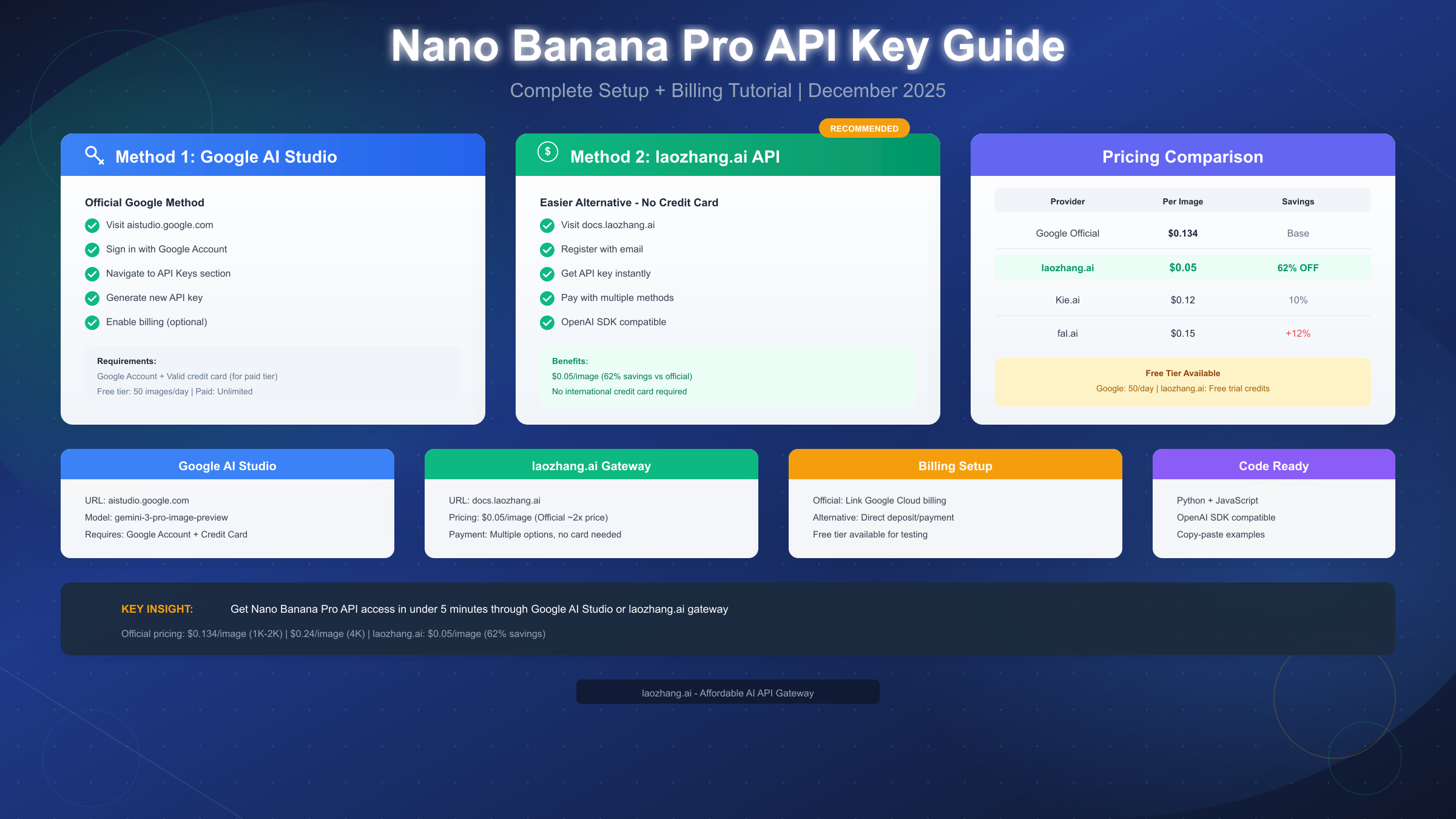
The official method for obtaining a Nano Banana Pro API key involves Google AI Studio, the centralized platform for accessing all of Google's generative AI capabilities. This approach provides direct access to Google's infrastructure and the most current model versions, though it requires a valid payment method for production usage.
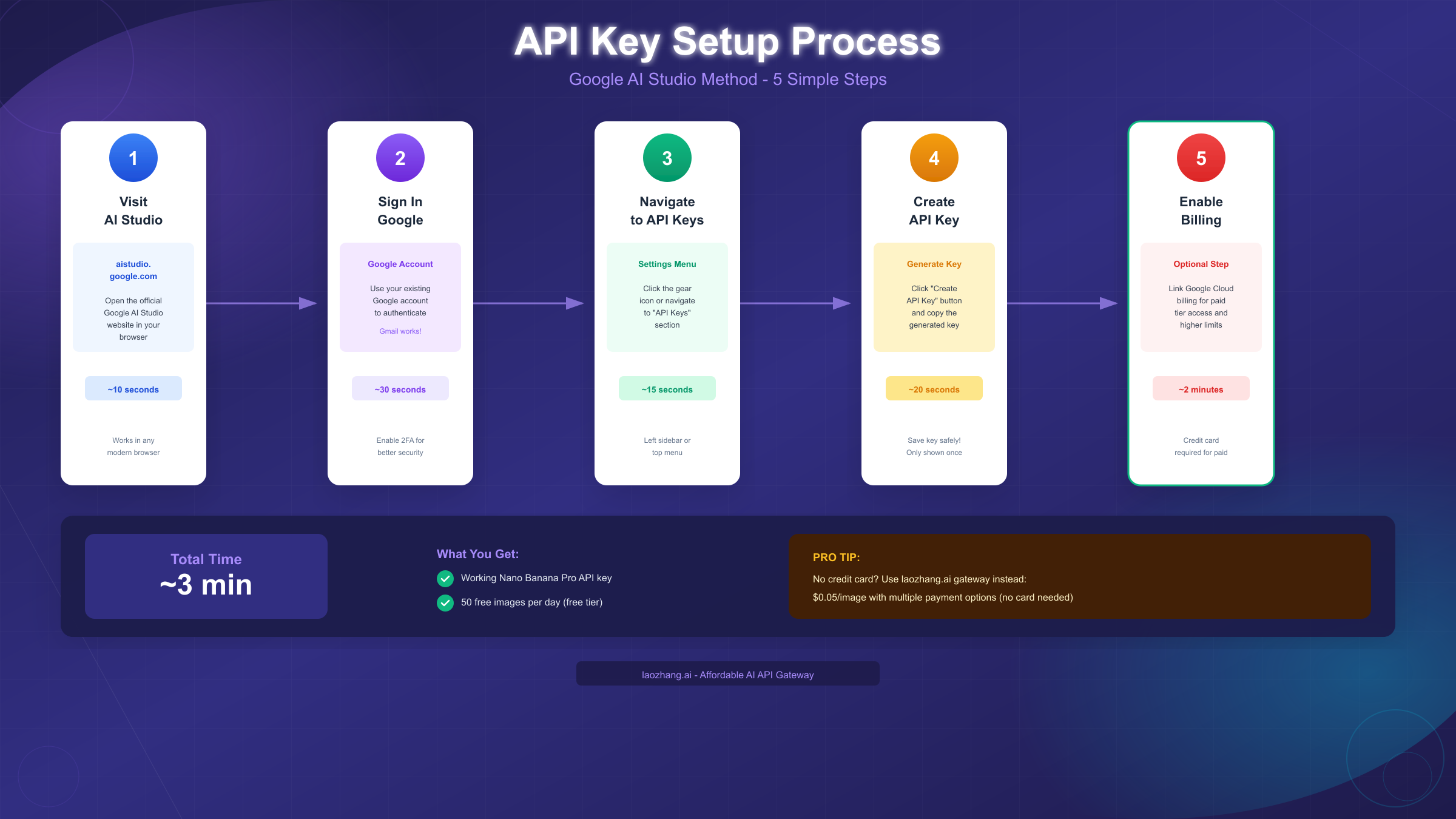
Step 1: Access Google AI Studio. Navigate to aistudio.google.com in your web browser. This is Google's dedicated platform for AI development, separate from the regular Google Cloud Console. The interface is specifically designed for generative AI projects and provides a streamlined experience compared to the full cloud console.
Step 2: Sign in with your Google account. You can use any existing Google account, including personal Gmail accounts. For production applications, consider using a dedicated service account or organization account to maintain clear separation between personal and business usage. If you plan to enable billing, ensure the account has appropriate payment methods associated with it.
Step 3: Navigate to the API Keys section. Once signed in, look for the "Get API Key" or "API Keys" option in the left sidebar or top navigation menu. Google AI Studio organizes its interface around projects, so you may need to create or select a project first before accessing API key management.
Step 4: Generate your new API key. Click the "Create API Key" button to generate a new key. You'll have options to create a key for a new project or an existing Google Cloud project. For most users starting fresh, creating a new project is the simplest approach. The key generation is instant, and your new API key will be displayed on screen.
Critical security note: Copy your API key immediately and store it securely. Google AI Studio only shows the full key once at creation time. If you lose it, you'll need to create a new key. Store the key in a secure location such as a password manager or encrypted environment variables file. Never commit API keys directly to source control or expose them in client-side code.
Step 5: Verify your API key works. Before proceeding to billing setup, test your key with a simple API call. The free tier allows limited daily requests, enough to confirm everything is configured correctly. A simple curl command or Python script can verify your key is active and properly associated with your account.
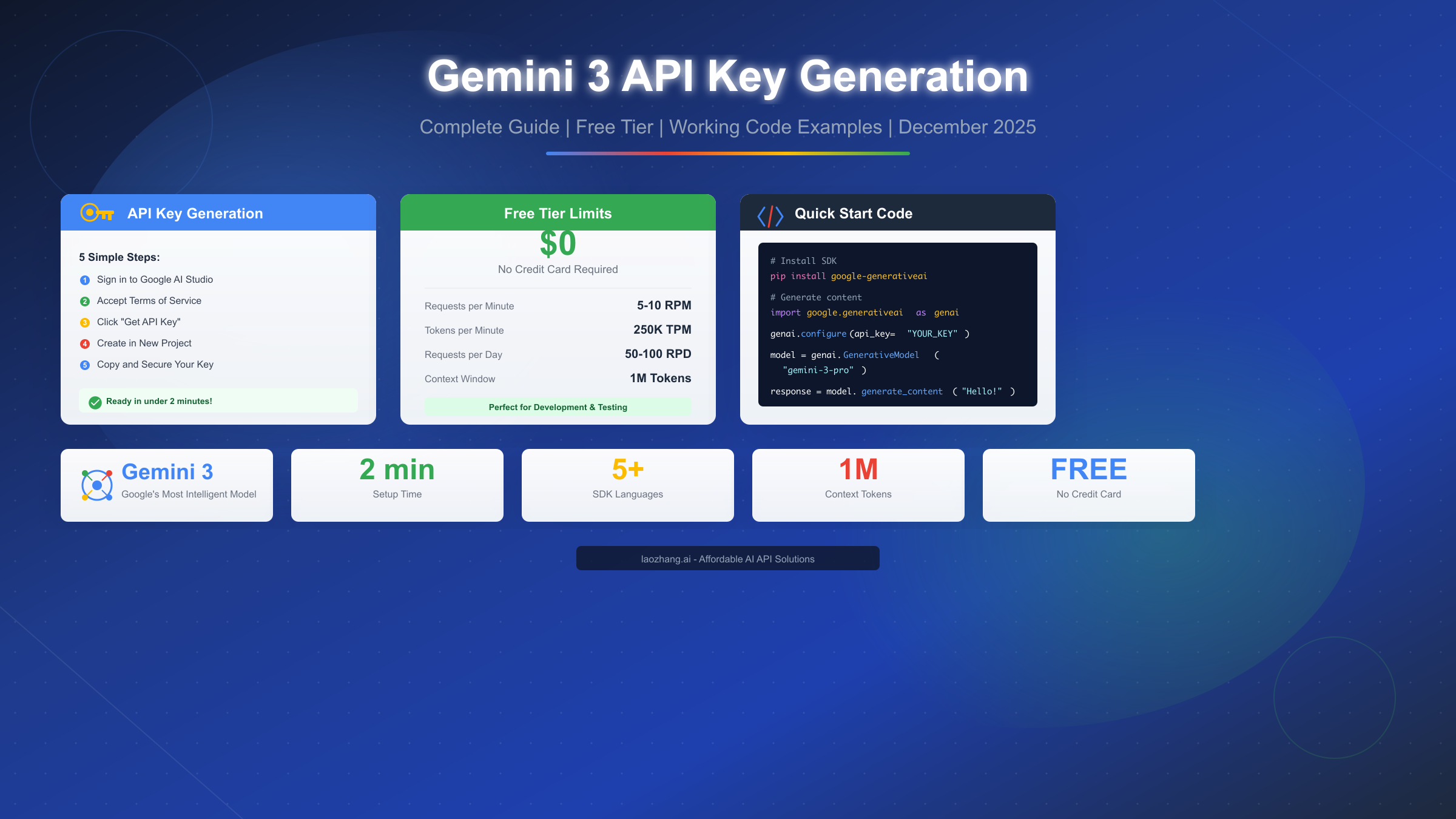
The free tier on Google AI Studio provides approximately 50 image generations per day, sufficient for development and testing. For production workloads exceeding this limit, you'll need to enable billing as described in the billing section below. The API key itself remains the same whether you're on the free tier or a paid plan; billing enablement simply removes the daily quota restrictions.
Method 2: Using laozhang.ai API Gateway (Recommended for Cost Savings)
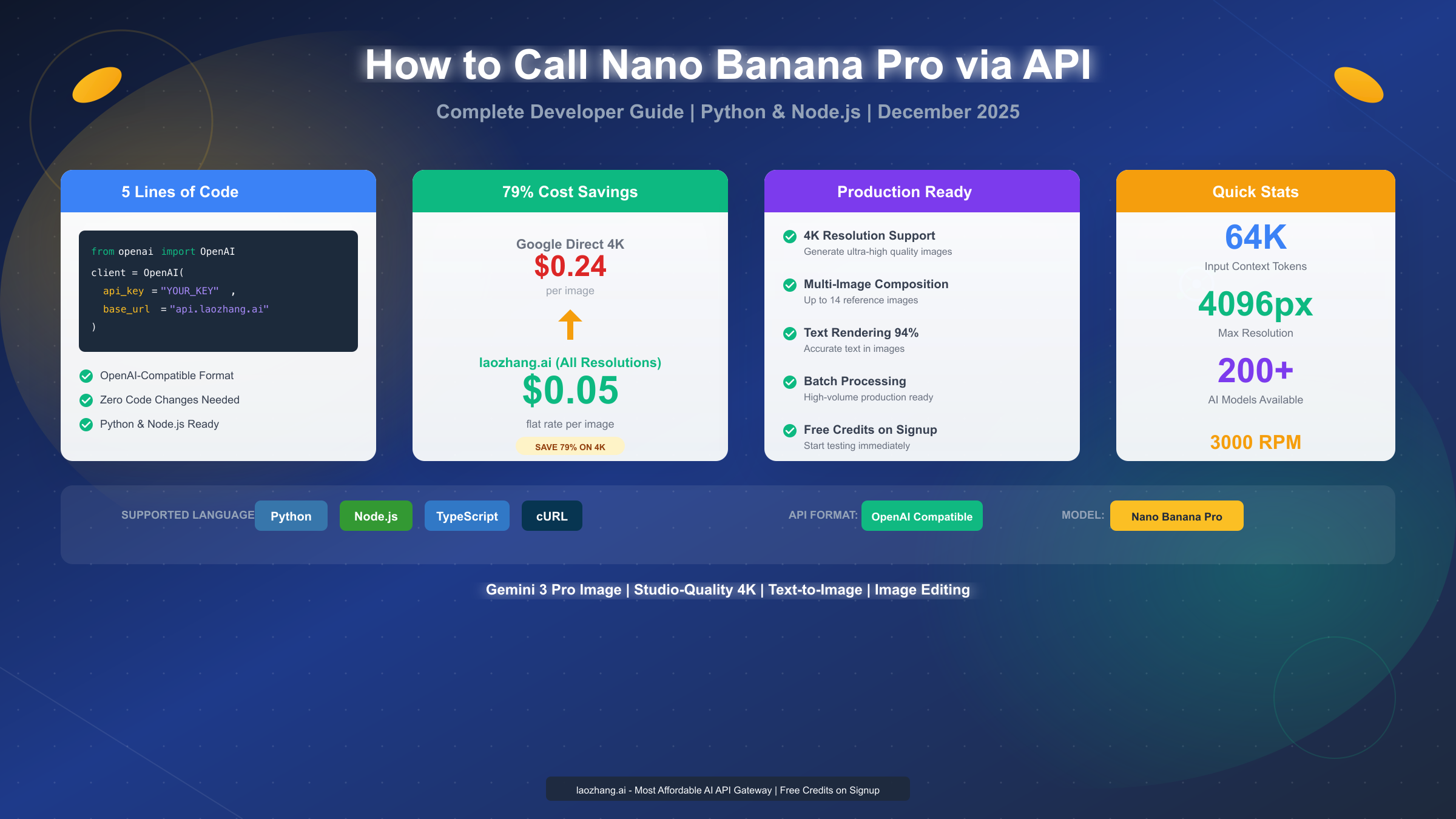
For developers seeking significant cost savings or facing challenges with international payment methods, third-party API gateways offer an attractive alternative. Among available options, laozhang.ai stands out as a particularly cost-effective solution, offering Nano Banana Pro access at approximately $0.05 per image, representing a 62% savings compared to Google's official pricing.
Why consider a third-party gateway? Beyond cost savings, API gateways solve several practical challenges. Users without international credit cards can access Nano Banana Pro through alternative payment methods including Alipay, TG Pay, and USDT. The simplified setup process eliminates Google Cloud billing complexity. Additionally, gateways often provide unified access to multiple AI models through a single API key, streamlining development when you need capabilities from different providers.
Getting started with laozhang.ai follows a straightforward process. First, visit docs.laozhang.ai to access the registration page. The signup process requires only an email address, with no credit card required upfront. After email verification, you receive immediate access to your dashboard where you can generate API keys.
Key advantages specific to laozhang.ai include: OpenAI SDK compatibility, meaning you can use familiar libraries and code patterns; access to 200+ AI models beyond just Nano Banana Pro; multiple payment options without international card requirements; and free trial credits to test functionality before committing funds. The $0.1 free trial credit is sufficient for approximately 2 test images, allowing you to verify the service meets your needs.
The technical integration is remarkably simple because laozhang.ai maintains OpenAI SDK compatibility. Rather than learning a new API format, you simply change the base URL and API key in your existing code. This compatibility extends to popular libraries in Python, JavaScript, and other languages, meaning migration from direct OpenAI access requires minimal code changes.
For users in regions where Google's services face restrictions or payment processing challenges, gateway services provide a practical workaround while maintaining full access to Nano Banana Pro's capabilities. The trade-off is slightly higher latency (typically 100-200ms additional) compared to direct Google access, though for most image generation use cases this difference is negligible given the multi-second generation times for images.
Enabling Billing and Payment Setup
Understanding billing setup is crucial whether you're using Google AI Studio directly or a third-party gateway. Each approach has distinct requirements and considerations that affect both functionality and cost management.
Google AI Studio Billing Setup
To enable billing on Google AI Studio, you need to link a Google Cloud billing account to your project. Navigate to the "Usage and Billing" section within AI Studio, then follow the prompts to create or connect a billing account. Google requires a valid credit or debit card for billing account creation, with supported card types including Visa, Mastercard, and American Express.
The billing setup process involves several verification steps. Google may place a small temporary authorization charge to verify card validity. For new accounts, there may be a brief review period before full access is granted. Organizations using invoice billing need to establish a separate relationship with Google Cloud sales.
Once billing is enabled, you gain access to pay-as-you-go pricing without daily quotas. Usage is charged based on image generation counts and resolution. Google bills monthly, with detailed usage breakdowns available in the billing console. Setting up budget alerts is strongly recommended to avoid unexpected charges, particularly during development when testing might generate more requests than anticipated.
Third-Party Gateway Payment Options
Gateways like laozhang.ai typically offer more flexible payment arrangements. Instead of monthly billing, most operate on a prepaid credit model. You purchase credits upfront and consume them as you generate images. This approach provides clearer cost control since you can only spend what you've deposited.
Payment methods vary by provider but commonly include: credit and debit cards, PayPal, cryptocurrency (USDT being most common), and regional payment systems like Alipay and TG Pay. The prepaid model means no surprise bills, though it requires maintaining a positive balance to avoid service interruption.
Minimum deposit amounts are typically low, often $5-10, making it easy to start small and scale up as needs grow. For the Gemini API pricing structure, understanding the cost per image helps you estimate required deposit amounts based on projected usage.
Payment Method Comparison
| Method | Card Required | Minimum | Billing Type | Best For |
|---|---|---|---|---|
| Google Direct | Yes | N/A | Monthly | Enterprise, US-based |
| laozhang.ai | No | $5 | Prepaid | Cost-conscious, Global |
| Kie.ai | Optional | $10 | Prepaid | PayPal users |
| fal.ai | Yes | N/A | Monthly | Developer-focused |
Complete Pricing Breakdown
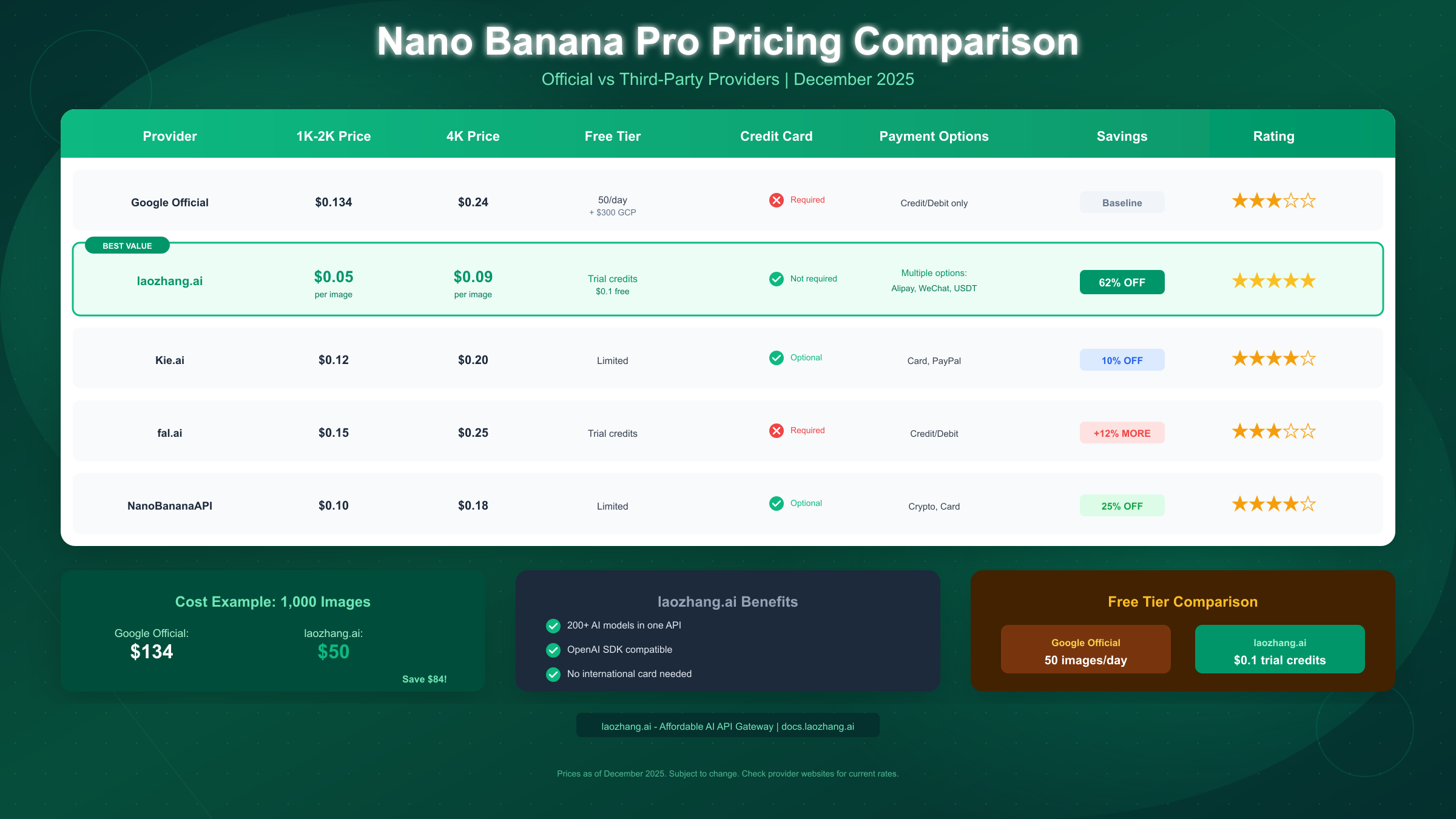
Understanding the full pricing landscape helps you make informed decisions about where to obtain your Nano Banana Pro access. Prices as of December 2025 vary significantly across providers, with potential savings exceeding 60% when choosing third-party options.
Google Official Pricing (AI Studio/Vertex AI)
Google's official pricing for Nano Banana Pro follows a tiered structure based on output resolution:
| Resolution | Price per Image | Notes |
|---|---|---|
| 1K (1024x1024) | $0.134 | Standard quality |
| 2K (2048x2048) | $0.134 | Same as 1K |
| 4K (4096x4096) | $0.24 | Highest quality |
| Batch API | 50% off | 24-hour delivery |
The free tier provides 50 images per day, refreshing at midnight Pacific Time. For understanding how Nano Banana Pro free limits work, including reset times across global timezones, see our dedicated limits guide.
Third-Party Provider Pricing
Third-party gateways offer substantial savings by aggregating demand and optimizing infrastructure. Here's how major providers compare:
| Provider | 1K-2K Price | 4K Price | Savings vs Official |
|---|---|---|---|
| laozhang.ai | $0.05 | $0.09 | 62% |
| Kie.ai | $0.12 | $0.20 | 10% |
| NanoBananaAPI | $0.10 | $0.18 | 25% |
| fal.ai | $0.15 | $0.25 | -12% (more expensive) |
Cost Example: 1,000 Images at Standard Resolution
To illustrate real-world impact, consider generating 1,000 standard resolution images:
- Google Official: 1,000 × $0.134 = $134.00
- laozhang.ai: 1,000 × $0.05 = $50.00
- Savings: $84.00 (62.7%)
For high-volume users generating tens of thousands of images monthly, these savings compound significantly. A production application generating 50,000 images monthly would save over $4,000 by using laozhang.ai versus direct Google access.
Hidden Cost Considerations
Beyond per-image pricing, consider these factors affecting total cost:
Failed generation attempts still consume quota on most platforms. If an image fails quality validation and you regenerate, you're charged twice. Building retry logic with proper validation helps minimize wasted generations.
Upscaling costs apply when increasing resolution after initial generation. Starting at the target resolution is typically more cost-effective than generating at lower resolution and upscaling.
API call overhead for non-generation requests (status checks, model info queries) is typically free but contributes to rate limit consumption. Efficient polling strategies minimize unnecessary API calls.
Working Code Examples
Practical implementation requires working code. The following examples demonstrate Nano Banana Pro integration using both Google's direct API and the laozhang.ai gateway, with proper error handling and best practices.
Python Example (Direct Google AI Studio)
import google.generativeai as genai
from PIL import Image
import io

# Configure with your API key
genai.configure(api_key="YOUR_GOOGLE_API_KEY")

def generate_image(prompt: str, output_path: str = "output.png"):
    """Generate an image using Nano Banana Pro."""
    try:
        # Use the Gemini 3 Pro image model
        model = genai.GenerativeModel("gemini-3-pro-image-preview")

        response = model.generate_content(
            prompt,
            generation_config={
                "response_mime_type": "image/png"
            }
        )

        # Extract and save image
        if response.parts:
            image_data = response.parts[0].inline_data.data
            image = Image.open(io.BytesIO(image_data))
            image.save(output_path)
            print(f"Image saved to {output_path}")
            return True

    except Exception as e:
        print(f"Generation failed: {e}")
        return False

# Usage
generate_image("A serene mountain lake at sunset with reflection")
Python Example (laozhang.ai Gateway)
from openai import OpenAI
import base64

# Configure laozhang.ai endpoint
client = OpenAI(
    api_key="YOUR_LAOZHANG_API_KEY",
    base_url="https://api.laozhang.ai/v1"
)

def generate_image_laozhang(prompt: str, output_path: str = "output.png"):
    """Generate image via laozhang.ai gateway."""
    try:
        response = client.images.generate(
            model="gemini-3-pro-image",
            prompt=prompt,
            n=1,
            size="1024x1024"
        )

        # Handle base64 response
        if response.data[0].b64_json:
            image_data = base64.b64decode(response.data[0].b64_json)
            with open(output_path, "wb") as f:
                f.write(image_data)
            print(f"Image saved to {output_path}")
            return True

    except Exception as e:
        print(f"Generation failed: {e}")
        return False

# Usage
generate_image_laozhang("A cozy coffee shop interior with warm lighting")
JavaScript/Node.js Example
import OpenAI from 'openai';
import fs from 'fs';

// Works with both Google and laozhang.ai
const client = new OpenAI({
  apiKey: process.env.LAOZHANG_API_KEY,
  baseURL: 'https://api.laozhang.ai/v1'
});

async function generateImage(prompt) {
  try {
    const response = await client.images.generate({
      model: 'gemini-3-pro-image',
      prompt: prompt,
      n: 1,
      size: '1024x1024',
      response_format: 'b64_json'
    });

    const imageData = Buffer.from(response.data[0].b64_json, 'base64');
    fs.writeFileSync('output.png', imageData);
    console.log('Image saved successfully');

  } catch (error) {
    console.error('Generation failed:', error.message);
  }
}

generateImage('A futuristic cityscape at night with neon lights');
Error Handling Best Practices
Robust production code requires comprehensive error handling:
import time
from typing import Optional

def generate_with_retry(
    prompt: str,
    max_retries: int = 3,
    backoff_base: float = 2.0
) -> Optional[bytes]:
    """Generate image with exponential backoff retry."""

    for attempt in range(max_retries):
        try:
            # Your generation code here
            response = client.images.generate(
                model="gemini-3-pro-image",
                prompt=prompt,
                n=1
            )
            return response.data[0].b64_json

        except RateLimitError:
            wait_time = backoff_base ** attempt
            print(f"Rate limited, waiting {wait_time}s...")
            time.sleep(wait_time)

        except APIError as e:
            if e.status_code >= 500:
                # Server error, retry
                time.sleep(1)
            else:
                # Client error, don't retry
                raise

    return None
For more details on obtaining and managing API keys for Google's AI services, see our Gemini API key guide.
Best Practices and Cost Optimization
Maximizing value from your Nano Banana Pro access requires thoughtful implementation. These best practices address common pitfalls and optimization opportunities.
Prompt Engineering for Efficiency
Well-crafted prompts generate usable images on the first attempt, avoiding costly regeneration. Key principles include: being specific about desired elements, specifying style explicitly (photorealistic, illustration, etc.), including composition guidance (close-up, wide shot, centered), and avoiding ambiguous language that could be interpreted multiple ways.
Effective prompt structure example:
"Professional product photography of a modern smartwatch,
centered composition, white studio background,
soft shadows, high detail, 8K quality"
Ineffective prompt example:
"A watch"The first prompt guides the model precisely, while the second leaves too much to interpretation, likely requiring multiple attempts to achieve the desired result.
Caching and Deduplication
For applications where similar images might be requested multiple times, implementing a caching layer provides significant savings. Before making an API call, check if an identical or sufficiently similar prompt has been processed recently. Simple hash-based caching can eliminate redundant generations entirely.
import hashlib
import json
from pathlib import Path

class ImageCache:
    def __init__(self, cache_dir: str = "./image_cache"):
        self.cache_dir = Path(cache_dir)
        self.cache_dir.mkdir(exist_ok=True)

    def get_cache_key(self, prompt: str, params: dict) -> str:
        """Generate deterministic cache key."""
        content = json.dumps({"prompt": prompt, **params}, sort_keys=True)
        return hashlib.sha256(content.encode()).hexdigest()

    def get(self, prompt: str, params: dict) -> Optional[bytes]:
        """Retrieve cached image if exists."""
        key = self.get_cache_key(prompt, params)
        cache_path = self.cache_dir / f"{key}.png"
        if cache_path.exists():
            return cache_path.read_bytes()
        return None
Batch Processing Optimization
When generating multiple images, batch processing reduces overhead and can unlock volume discounts. Google's Batch API provides 50% cost reduction for jobs that can tolerate 24-hour delivery windows. For time-sensitive applications, even synchronous batch requests benefit from connection reuse and optimized request scheduling.
Resolution Optimization
Generate images at the minimum resolution that meets your requirements. The cost difference between 1K and 4K is significant ($0.134 vs $0.24 on Google). For web thumbnails or social media previews, 1K resolution is typically sufficient. Reserve 4K for hero images, print materials, or cases where maximum quality justifies the premium.
Usage Monitoring
Implement comprehensive usage tracking from day one. Track: requests per day/hour, success vs failure rates, average generation time, cost per image, and cost by prompt category. This data enables informed optimization decisions and early detection of anomalies that might indicate issues or abuse.
For applications requiring high volumes, consider the API aggregation approach provided by services like laozhang.ai, which can provide access to multiple models through a single integration. Documentation is available at https://docs.laozhang.ai/ for detailed implementation guidance.
Frequently Asked Questions
Is Nano Banana Pro API free to use?
Nano Banana Pro offers a limited free tier through Google AI Studio, providing approximately 50 images per day. This free quota resets daily at midnight Pacific Time. For production usage exceeding this limit, paid access is required either through Google directly or third-party providers. The free tier is sufficient for development, testing, and light personal use.
What payment methods does Google AI Studio accept?
Google AI Studio requires a credit or debit card for billing account creation. Accepted cards include Visa, Mastercard, American Express, and Discover. Google does not currently accept PayPal, cryptocurrency, or bank transfers for AI Studio billing. For users without supported cards, third-party gateways offer alternative payment options.
How do I check my remaining API quota?
In Google AI Studio, navigate to the "Usage and Billing" section to view current consumption against your quota or spending limits. For third-party services, check your dashboard for remaining credits. Programmatically, API responses often include headers indicating remaining requests, though implementation varies by provider.
Can I use Nano Banana Pro API without a credit card?
Yes, through third-party API gateways. Services like laozhang.ai accept alternative payment methods including Alipay, TG Pay, and cryptocurrency (USDT). The free tier on Google AI Studio also works without payment information, though you're limited to the daily free quota until billing is enabled.
What's the difference between Nano Banana and Nano Banana Pro?
Nano Banana uses the Gemini 2.5 Flash model, optimized for speed over quality. Nano Banana Pro uses Gemini 3 Pro, offering higher quality output, better text rendering, and more creative control options. Pro generates at higher resolutions (up to 4K) and produces more photorealistic results. The Pro version costs more but delivers noticeably superior output for professional applications.
How long does image generation take?
Generation time varies by resolution and server load. Typical times: 1K resolution: 3-8 seconds, 2K resolution: 5-12 seconds, 4K resolution: 10-25 seconds. Third-party gateways may add 100-200ms latency. Batch API jobs can take up to 24 hours but offer 50% cost savings for non-time-sensitive workloads.
What happens if I exceed my quota?
On the free tier, requests beyond the daily quota will be rejected with a rate limit error. On paid tiers, you continue to be charged per image until you hit any configured spending limits. Setting up budget alerts in Google Cloud is recommended to avoid unexpected charges during development or in case of runaway processes.
Can I use my API key with multiple applications?
Yes, a single API key works across multiple applications. However, for security and usage tracking purposes, creating separate keys per application is recommended. This allows for granular access control and makes it easier to identify the source of unusual usage patterns.
What error codes should I handle?
Common error codes include: 400 (invalid request, usually prompt issues), 401 (authentication failed, check API key), 403 (access denied, billing or quota issues), 429 (rate limit exceeded, implement backoff), 500 (server error, retry with exponential backoff). Robust applications should handle all these cases gracefully.
Is there a rate limit beyond the daily quota?
Yes, even with billing enabled, there are per-minute and per-second rate limits to prevent abuse. Typical limits are around 60 requests per minute for standard accounts, with higher limits available for enterprise accounts. Implementing proper request queuing and backoff handling is essential for high-volume applications.
Summary
Getting your Nano Banana Pro API key is straightforward whether you choose the official Google AI Studio route or a third-party gateway. The official method provides direct access to Google's infrastructure with the free tier offering 50 images daily, while third-party options like laozhang.ai offer significant cost savings (up to 62%) and alternative payment methods for users without international credit cards.
For production applications, the key considerations are cost optimization, proper error handling, and usage monitoring. Implementing caching, using appropriate resolutions, and choosing the right provider for your needs can substantially reduce costs while maintaining quality output.
The code examples provided give you a working foundation for both Python and JavaScript implementations, with proper error handling patterns that will serve you well in production environments. Whether you're building a creative tool, automating design workflows, or experimenting with AI image generation, you now have everything needed to get started with Nano Banana Pro's powerful capabilities.