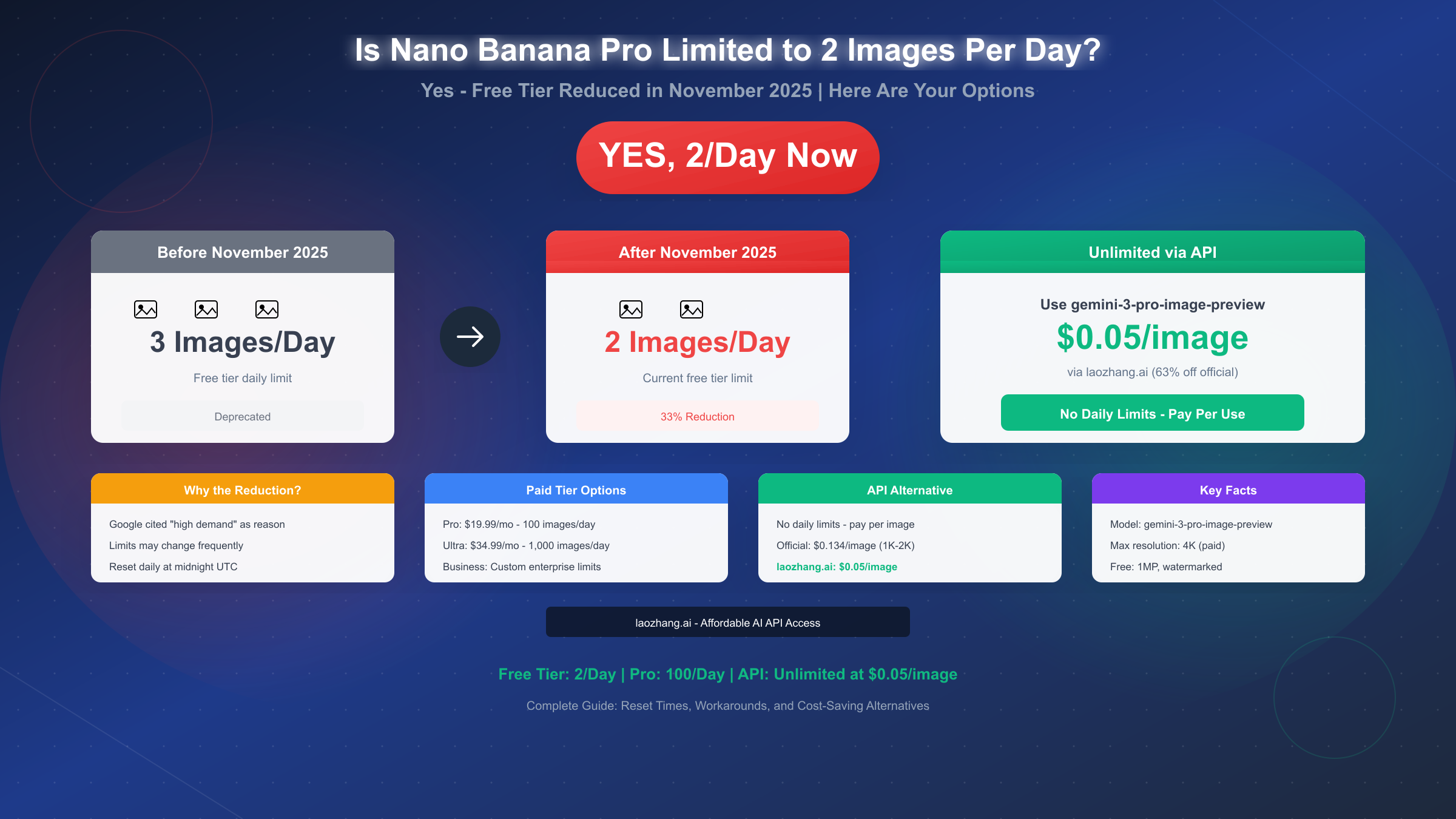
Google has indeed reduced the free tier limit for Nano Banana Pro to 2 images per day, down from the previous 3 images per day. This change took effect in November 2025, with Google citing "high demand" as the primary reason for the reduction. The limit resets daily at midnight UTC for consumer accounts, and free tier images are restricted to approximately 1 megapixel resolution with a visible watermark. For users who need more than 2 images daily, options include upgrading to a paid subscription (Pro at $19.99/month for ~100 images, or Ultra at $34.99/month for 1,000 images) or accessing the same model through API providers where you pay per image with no daily caps.
The Short Answer: Yes, 2 Images Per Day
The limit reduction is real and affects all free Gemini users accessing Nano Banana Pro. Google's support documentation now states that free users can generate "up to 2 images per day" for image generation and editing, with a caveat that "limits may change frequently and will reset daily."
What exactly changed? Before November 2025, free tier users could generate 3 images daily using Nano Banana Pro (the consumer-facing name for Gemini 3 Pro Image). After the reduction, that number dropped to 2 images—a 33% decrease in free allocation. Google's reasoning, according to their announcement reported by Engadget, is straightforward: the service experienced such high demand that capacity constraints required limiting free access to ensure system stability.
Why this matters for users: If you were previously relying on Nano Banana Pro for regular image generation tasks—creating social media graphics, generating concept art, or producing marketing visuals—this reduction significantly impacts your workflow. Two images per day is barely enough for experimentation, let alone consistent creative output.
The timing coincided with broader industry trends. OpenAI similarly restricted free Sora access around the same period, suggesting that AI companies are collectively tightening free tier offerings as demand outpaces infrastructure capacity. For context on how Nano Banana Pro relates to the underlying model architecture, you can explore our detailed explanation of Nano Banana Pro vs Gemini 3 Pro Image naming, which clarifies that these are the same model accessed through different interfaces.
Complete Tier Limits Breakdown
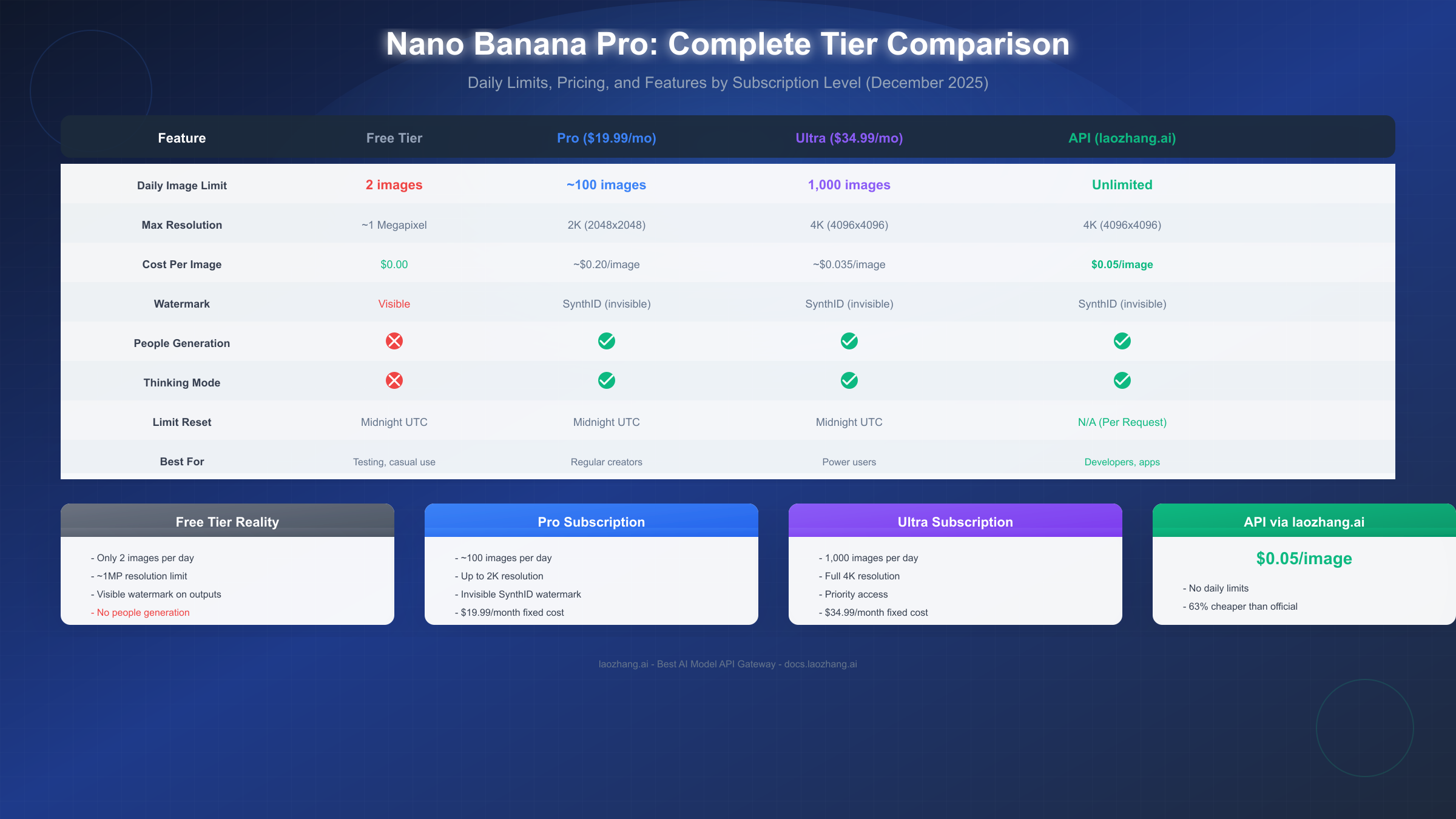
Understanding what each tier offers helps you decide whether upgrading makes sense for your use case. The following breakdown reflects current limits as of December 2025, though Google notes these may change based on demand.
Free Tier Specifications:
The free tier provides minimal access designed primarily for evaluation rather than production use. Beyond the 2 images per day limit, free users face several additional restrictions. Resolution caps at approximately 1 megapixel (roughly 1024×1024 pixels), significantly lower than paid tier options. All generated images include a visible watermark, which makes them unsuitable for commercial or professional applications. Perhaps most critically, people generation is disabled entirely on the free tier—attempts to create images containing human subjects will be rejected or produce placeholder results.
Pro Tier ($19.99/month):
The Pro subscription dramatically increases your allocation to approximately 100 images per day. Resolution capabilities extend to 2K (2048×2048 pixels), providing significantly more detail for high-fidelity work. The visible watermark is replaced with SynthID—an invisible digital watermark that doesn't affect image appearance but allows verification of AI-generated content. People generation unlocks fully, enabling portrait work, character design, and human-inclusive scenes. Pro subscribers also gain access to the Thinking mode, where the model reasons through complex prompts before generating, producing more accurate results for multi-step instructions.
Ultra Tier ($34.99/month):
For power users, Ultra provides up to 1,000 images daily—effectively unlimited for most workflows. Resolution extends to full 4K (4096×4096 pixels), supporting print-quality outputs and large-format displays. Priority processing means faster generation times during peak demand periods. All Pro features are included, plus additional enterprise-grade benefits for business accounts.
Cost Efficiency Analysis:
At Pro pricing, if you generate 100 images monthly, you're paying approximately $0.20 per image. If you generate the full daily allocation (3,000 images/month), that drops to about $0.007 per image. Ultra tier at 1,000 images daily means 30,000 potential monthly images, bringing per-image cost to roughly $0.001 if maximized. However, most users don't approach these limits, making subscription economics less favorable for moderate usage.
When Do Nano Banana Pro Limits Reset?
Reset timing causes significant confusion because Google uses different reset schedules for different access methods. Understanding when your limits refresh helps you plan generation sessions effectively.
Consumer Accounts (Gemini App):
For users accessing Nano Banana Pro through the Gemini mobile app or web interface, daily limits reset at midnight UTC. This translates to specific local times depending on your timezone: 4:00 PM PST / 7:00 PM EST for users in the United States, 12:00 AM GMT for UK users, 8:00 AM China Standard Time, and 9:00 AM Japan Standard Time. The UTC reset means users in Asian timezones often experience reset during morning hours, while North American users see reset in late afternoon or evening.
API Users:
If you're accessing the model programmatically through Google AI Studio or the Gemini API, limits reset at midnight Pacific Time (PT). This 8-hour difference from consumer resets occasionally confuses developers who switch between testing in the web interface and API calls. For API access specifically, the free tier allows 500 requests per day with 5-10 requests per minute rate limiting. Paid API tiers (with billing enabled) increase to 300 requests per minute and effectively unlimited daily requests, billed at $0.134 per image for 1K-2K resolution or $0.24 per image for 4K.
Strategic Generation Timing:
If you're working within free tier constraints, time your generation sessions immediately after reset when your full quota is available. Server load is typically lower outside US business hours (roughly 6:00 PM - 6:00 AM Pacific), which can mean faster processing and lower likelihood of hitting undocumented dynamic throttling. Some users report receiving slightly more lenient limits during off-peak periods, though this isn't officially documented and may vary.
Limits Don't Roll Over:
Unused daily allocation expires at each reset. There's no accumulation mechanism—if you generate 0 images today, you still only have 2 available tomorrow, not 4. This prevents users from "banking" quota for burst usage.
What Happens When You Hit the Limit
Encountering the daily limit triggers specific behaviors that you should understand to avoid wasted prompts and manage expectations.
Immediate Effects:
When you reach your 2-image daily cap, subsequent generation attempts don't fail silently. The Gemini interface displays a message indicating you've reached your limit with a suggestion to try again after the reset or upgrade to a paid plan. Behind the scenes, Google's rate limiting system returns an HTTP 429 "Too Many Requests" response to API calls, with headers indicating when the limit will reset.
Fallback Behavior:
Rather than blocking generation entirely, the system may fall back to the standard Nano Banana model (Gemini 2.5 Flash Image) once you exhaust your Pro quota. This older model produces lower-quality results without the Thinking mode capabilities, lower resolution caps, and generally less sophisticated outputs. The fallback happens automatically and may not be immediately obvious in the interface, so if your results suddenly seem less impressive, you've likely been switched to the fallback model.
Error 429 for Developers:
API users receive specific error responses when limits are exceeded. The response includes a retry-after header indicating seconds until the limit resets, and the error message specifies whether it's a per-minute rate limit (which resets in 60 seconds) or a daily limit (which requires waiting until midnight). Proper handling involves implementing exponential backoff—waiting progressively longer between retry attempts rather than hammering the API repeatedly.
Checking Your Remaining Quota:
In the Gemini App, navigate to Profile → Usage & Limits to see your current consumption against daily allocation. For API usage, you can query the limits endpoint or check the response headers which include remaining quota information. Third-party wrappers and tools may not accurately reflect your true remaining quota, especially if multiple applications share the same Google account.
Resolution Impact on Quota:
Higher resolution outputs consume more computational resources and may count more heavily against your limit. While not officially documented, community testing suggests generating a 4K image might consume 1.5-2x the quota of a 1K image. For free tier users already limited to 2 images, this effectively reduces your capacity if you're requesting maximum resolution outputs.
How to Get Unlimited Nano Banana Pro Access
For users who need more than what subscription tiers offer—or who prefer pay-per-use economics over monthly commitments—API access provides effectively unlimited generation without daily caps.
Official Google API Route:
Google AI Studio provides direct API access to the gemini-3-pro-image-preview model. The free API tier offers 500 requests per day, significantly more generous than the 2-image consumer limit. Setting up requires creating a project in Google AI Studio, enabling billing (though the free tier doesn't charge), and generating an API key. The official pricing with billing enabled is $0.134 per image at 1K-2K resolution and $0.24 per image at 4K resolution. For detailed setup instructions, our Nano Banana Pro API key and billing guide walks through each step.
Third-Party API Providers:
Alternative providers like laozhang.ai offer access to the same underlying model at reduced rates. Pricing at approximately $0.05 per image represents about 63% savings compared to official 1K-2K pricing and nearly 80% savings compared to 4K pricing. These services maintain API compatibility, meaning the same code works with minimal modifications—typically just changing the base URL and API key. For teams managing costs across multiple projects or developers in regions where Google Cloud billing is complicated, third-party providers offer a practical alternative.
API Integration Example:
Integrating via the Google Gen AI SDK is straightforward for Python developers:
from google import genai

client = genai.Client(api_key="YOUR_API_KEY")

response = client.models.generate_images(
    model="gemini-3-pro-image-preview",
    prompt="A professional product photo of wireless earbuds on marble",
    config={"number_of_images": 1, "output_options": {"mime_type": "image/png"}}
)

image = response.generated_images[0].image
For third-party providers, you typically change only the base URL and API key while keeping the same method calls. This allows switching between providers without rewriting application logic.
When API Makes More Sense Than Subscription:
The subscription model favors consistent, high-volume usage. Pro at $19.99/month makes economic sense if you generate more than 150 images monthly (at which point API cost at $0.134 would exceed subscription). However, if your usage varies significantly—heavy some weeks, minimal others—the API's pay-per-use model eliminates waste. Development and testing workflows particularly benefit from API access, where you might need 500 test generations during active development but near-zero during maintenance periods.
Tips to Maximize Your Daily Quota
When working within free tier constraints, efficiency becomes critical. These strategies help extract maximum value from your limited daily allocation.
Prompt Engineering for First-Attempt Success:
Failed attempts count against your quota. Investing time in crafting precise, detailed prompts reduces regeneration needs. Specify style (photorealistic, illustration, anime), composition (centered subject, rule of thirds), lighting (studio lighting, golden hour, dramatic shadows), and technical parameters (aspect ratio, no text) upfront rather than iterating through multiple attempts. The Thinking mode in paid tiers helps with complex prompts, but free tier users must front-load prompt quality since they can't rely on the model's reasoning capabilities.
Resolution Awareness:
Higher resolution outputs may consume more quota resources. If you're just testing concepts or generating reference images, request the minimum resolution sufficient for your purpose. Scale up to higher resolutions only for final deliverables. For web use, 1K resolution (1024×1024) is typically sufficient; 4K is only necessary for print materials or large displays.
Batch Planning:
Rather than generating images spontaneously throughout the day, plan your generation session for right after reset when your full quota is available. This concentrated approach forces more thoughtful prompt preparation and reduces the temptation to waste generations on casual experimentation.
Multiple Account Considerations:
While technically possible to create multiple Google accounts for additional free quota, this approach violates Google's terms of service regarding quota circumvention. Google's systems detect patterns suggesting quota abuse and may suspend all associated accounts. The risk isn't worth the marginal benefit—if you need more than 2 images daily, upgrading or using API access is both more reliable and compliant.
Hybrid Approach:
For the most cost-effective workflow, use free tier for initial concept exploration (2 images to test prompt directions), then switch to API for production generation (pay-per-image for polished outputs). This hybrid approach costs nothing for experimentation while keeping production costs minimal through per-image billing rather than subscription overhead.
Frequently Asked Questions
Can I increase my free tier limit by using different devices?
No, limits are tied to your Google account, not devices. Accessing Gemini from your phone, tablet, and computer all share the same daily allocation. Switching devices doesn't reset or increase your quota.
Does editing an existing image count against my daily limit?
Yes, both generation and editing operations consume quota. Attempting to modify an uploaded image using Nano Banana Pro's editing capabilities counts as one image toward your daily limit. Plan editing sessions accordingly.
What's the difference between Nano Banana and Nano Banana Pro limits?
Nano Banana (the standard model based on Gemini 2.5 Flash Image) has different, generally more generous free tier limits since it's a faster, less resource-intensive model. Nano Banana Pro (Gemini 3 Pro Image) applies the stricter 2-image daily cap specifically. For detailed comparison between the two models, check our Nano Banana vs Nano Banana Pro comparison guide.
Will limits increase again in the future?
Google's documentation explicitly states that "limits may change frequently." They've reduced limits in response to demand but could theoretically increase them as infrastructure capacity expands. However, the trend across AI services has been toward tighter free tier restrictions, so expecting increases would be optimistic.
Do failed generations count against my limit?
Yes, any generation attempt—successful, failed due to safety filters, or errored due to technical issues—counts against your quota. This makes prompt quality particularly important for free tier users with only 2 attempts per day.
Is there a hidden cap even for paid subscribers?
Some Pro subscribers have reported hitting limits earlier than the advertised ~100 images, particularly during high-demand periods. Google appears to implement dynamic throttling that adjusts limits based on server load. Ultra tier is more reliable for hitting the full 1,000-image allocation.
This article has confirmed that yes, Nano Banana Pro free tier is indeed limited to 2 images per day as of November 2025, explained when limits reset (midnight UTC for consumers), covered all subscription tier options, and provided practical alternatives through API access. Whether you upgrade to a paid plan or switch to API-based access depends on your usage patterns, but the free tier's 2-image daily cap is unlikely to suffice for regular creative work.


