Google's Nano Banana family has rapidly become the go-to choice for AI image generation, powering everything from Gemini chatbot visuals to enterprise marketing pipelines. Nano Banana 2 and Nano Banana Pro deliver some of the best AI-generated images available today, but their API costs add up fast when you move beyond casual use. At Google's standard rates, generating 10,000 images per month at 1K resolution costs $670 with Nano Banana 2 or $1,340 with Nano Banana Pro. The good news is that you don't have to pay those prices. By combining Batch API discounts, third-party providers, and smart model selection, you can cut your per-image cost by 50% to 79% without sacrificing output quality. This guide walks through every pricing tier, compares five proven cost-cutting strategies, and gives you the exact numbers to make the right decision for your budget.
TL;DR
Here is the fastest summary of how to save on Nano Banana 2 and Pro API costs in 2026:
| Strategy | Savings | Best For | Trade-off |
|---|---|---|---|
| Batch API | 50% off all tiers | Non-real-time workloads | 24-hour processing window |
| Third-party providers | 50-79% on high-res | Production volume users | Extra dependency layer |
| Use NB2 instead of Pro | 37-50% per image | Speed-priority projects | Slightly lower quality ceiling |
| Mix resolutions | 30-60% average savings | Variable-quality needs | More complex pipeline |
| Free tier + paid hybrid | Varies | Low-volume testing | Rate limits on free tier |
All prices in this guide are verified against Google's official pricing page as of March 31, 2026. Since Google occasionally adjusts API rates, always confirm current pricing at ai.google.dev/pricing before committing to a cost optimization strategy.
The single biggest savings comes from combining the Batch API (automatic 50% discount) with Nano Banana 2 instead of Pro. At 4K resolution, this drops your per-image cost from $0.240 (Pro Standard) to $0.076 (NB2 Batch), a 68% reduction with no extra setup required beyond switching to batch processing.
Official Pricing Decoded — Every Resolution, Every Tier
Understanding the full pricing matrix is the foundation of any cost-saving strategy. Google prices Nano Banana image generation based on two variables: the model you choose and the output resolution. Both Nano Banana 2 and Nano Banana Pro offer Standard and Batch pricing tiers, and the differences between them are substantial.
Nano Banana 2 runs on the gemini-3.1-flash-image-preview model and targets developers who need fast, high-volume image generation. It was launched on February 26, 2026, and combines the visual quality of Nano Banana Pro with the speed characteristics of Gemini Flash. The pricing structure reflects this speed-first positioning, coming in significantly cheaper than Pro at every resolution level.
Nano Banana Pro uses the gemini-3-pro-image-preview model and is designed for professional asset production. It leverages advanced reasoning capabilities to handle complex compositions, precise text rendering, and multi-object scenes. The premium quality comes with premium pricing, roughly double what Nano Banana 2 charges at equivalent resolutions.
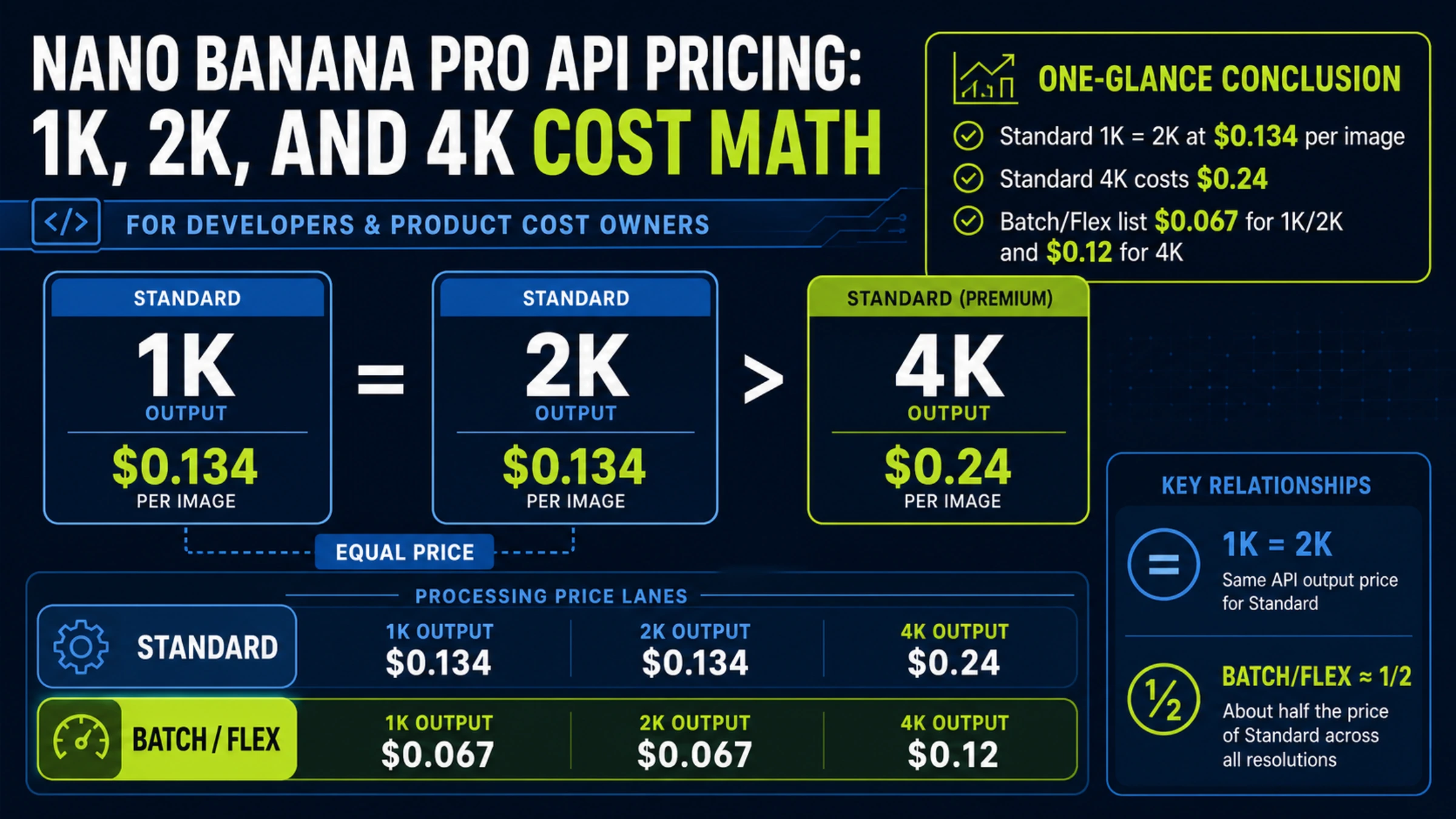
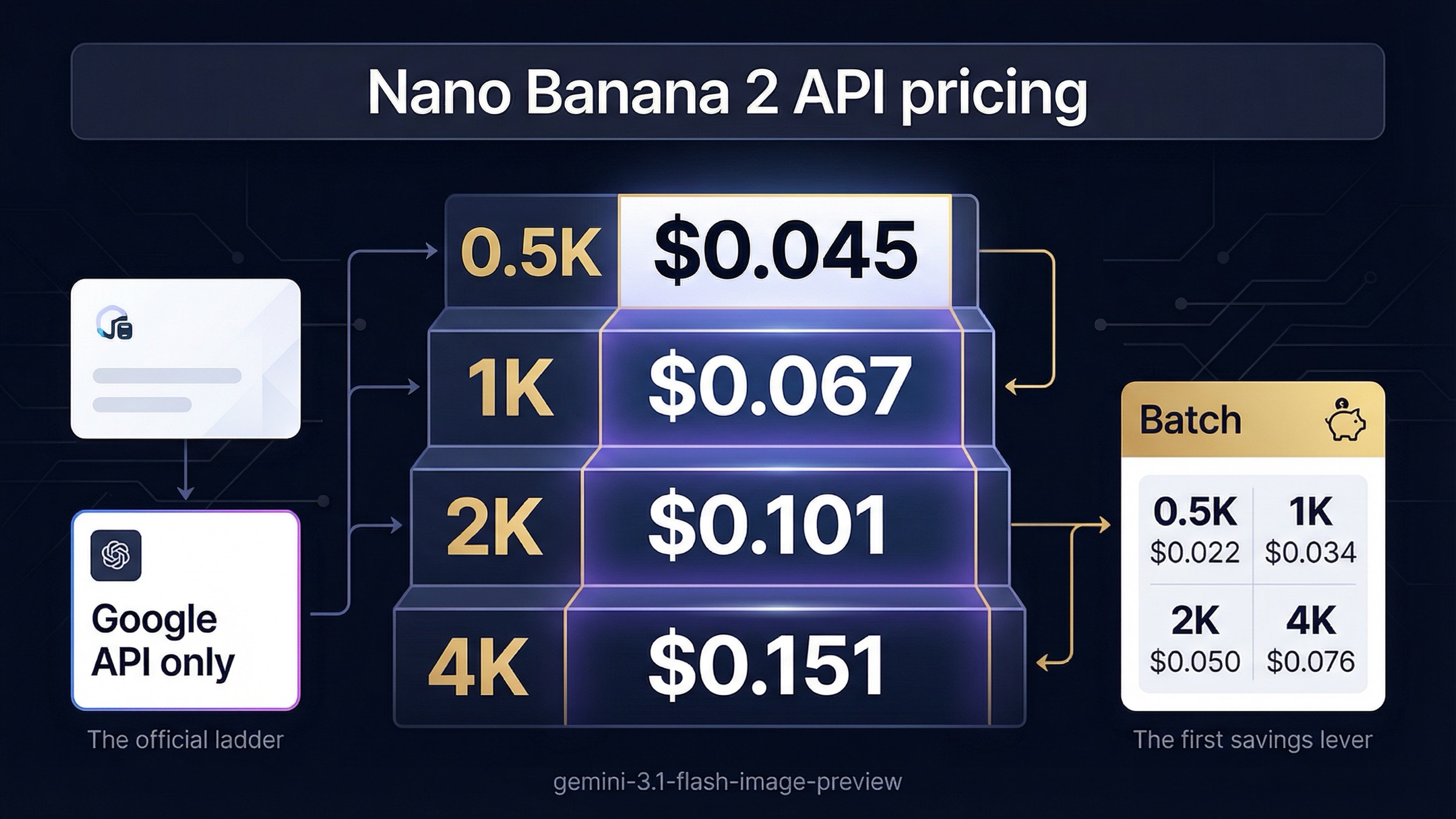
Here is the complete pricing matrix with every resolution tier, verified directly from Google's official pricing page (ai.google.dev/pricing, March 31, 2026):
| Resolution | NB2 Standard | NB2 Batch | NB Pro Standard | NB Pro Batch |
|---|---|---|---|---|
| 0.5K (512px) | $0.045 | $0.022 | $0.039 | ~$0.020 |
| 1K (1024px) | $0.067 | $0.034 | $0.134 | $0.067 |
| 2K (2048px) | $0.101 | $0.050 | $0.134 | $0.067 |
| 4K (4096px) | $0.151 | $0.076 | $0.240 | $0.120 |
Several patterns emerge from this table that directly inform your cost-saving strategy. First, the Batch API consistently cuts prices by exactly 50% across every model and resolution combination. Second, Nano Banana 2 is cheaper than Nano Banana Pro at 1K and above, with the gap widening at higher resolutions. Third, an interesting crossover happens at low resolution: NB Pro actually costs less than NB2 at 0.5K ($0.039 vs $0.045), making it the better value for thumbnail-quality images.
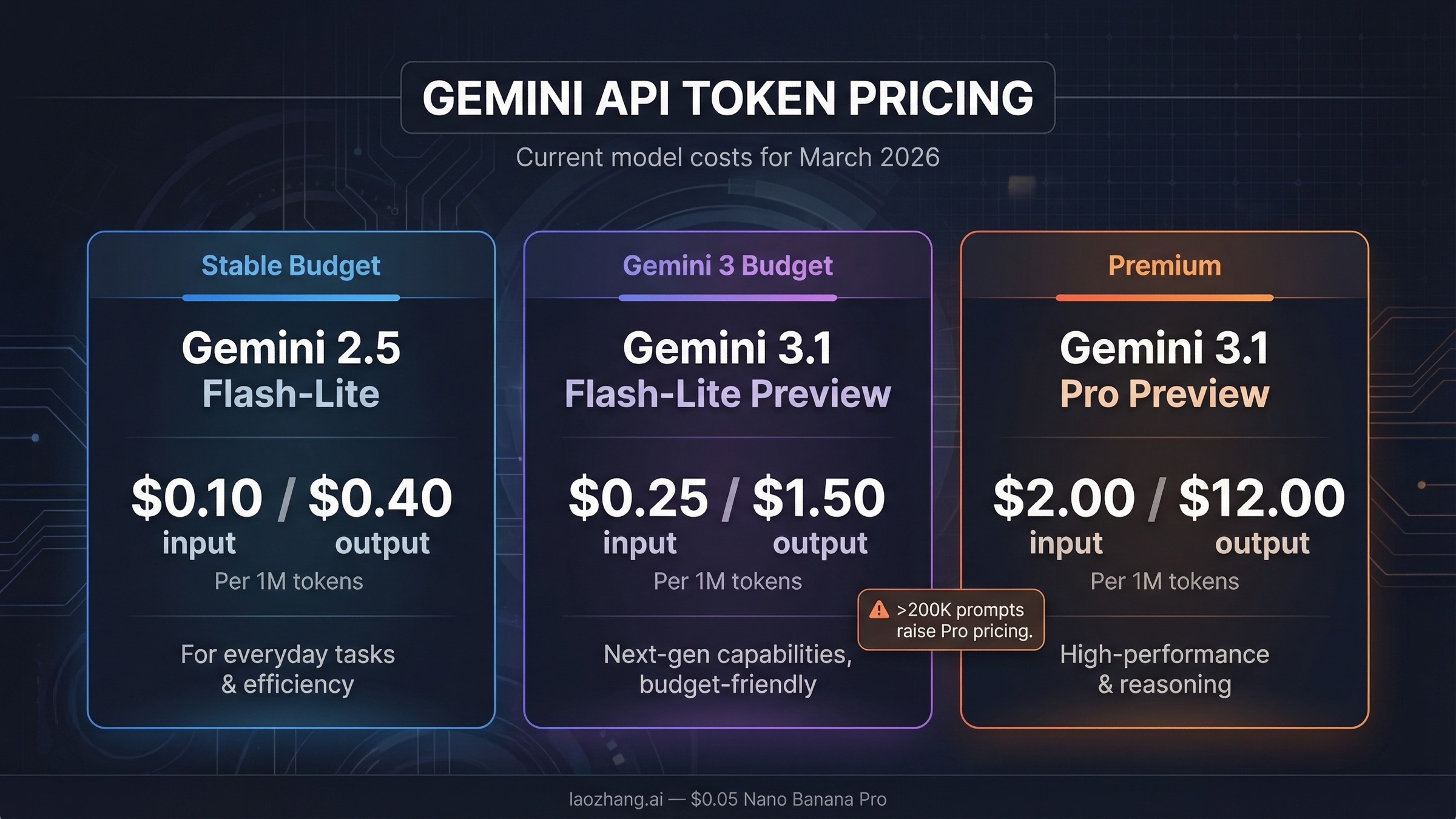
It is worth noting that these prices are based on token consumption under the hood. Nano Banana 2 uses the Gemini 3.1 Flash token pricing structure at $0.50 per million input tokens and $60.00 per million output tokens, where image outputs consume varying numbers of tokens depending on resolution. At 1K resolution, a single generated image consumes approximately 1,117 output tokens, which translates to the $0.067 per-image price. Understanding this token-based pricing model helps when estimating costs for requests that include both text and image outputs, since the text portion is billed at the much lower text token rate while only the image output triggers the higher image pricing.
Google also imposes tier-based rate limits that affect how quickly you can generate images. Starting April 1, 2026, spend caps are being enforced across all tiers. Tier 1 accounts (billing enabled, no spending history) have a $250 monthly cap. Tier 2 accounts (cumulative $100+ spending over 3+ days) can spend up to $2,000 per month. Tier 3 accounts (cumulative $1,000+ over 30+ days) have higher limits suitable for production workloads. If you are scaling up image generation volume, ensure your account tier matches your expected monthly spend to avoid hitting caps unexpectedly.
For a deeper breakdown of individual model pricing, see our complete Nano Banana 2 pricing breakdown and the NB Pro API pricing guide.
Nano Banana 2 vs Pro — Which Model Saves You More?
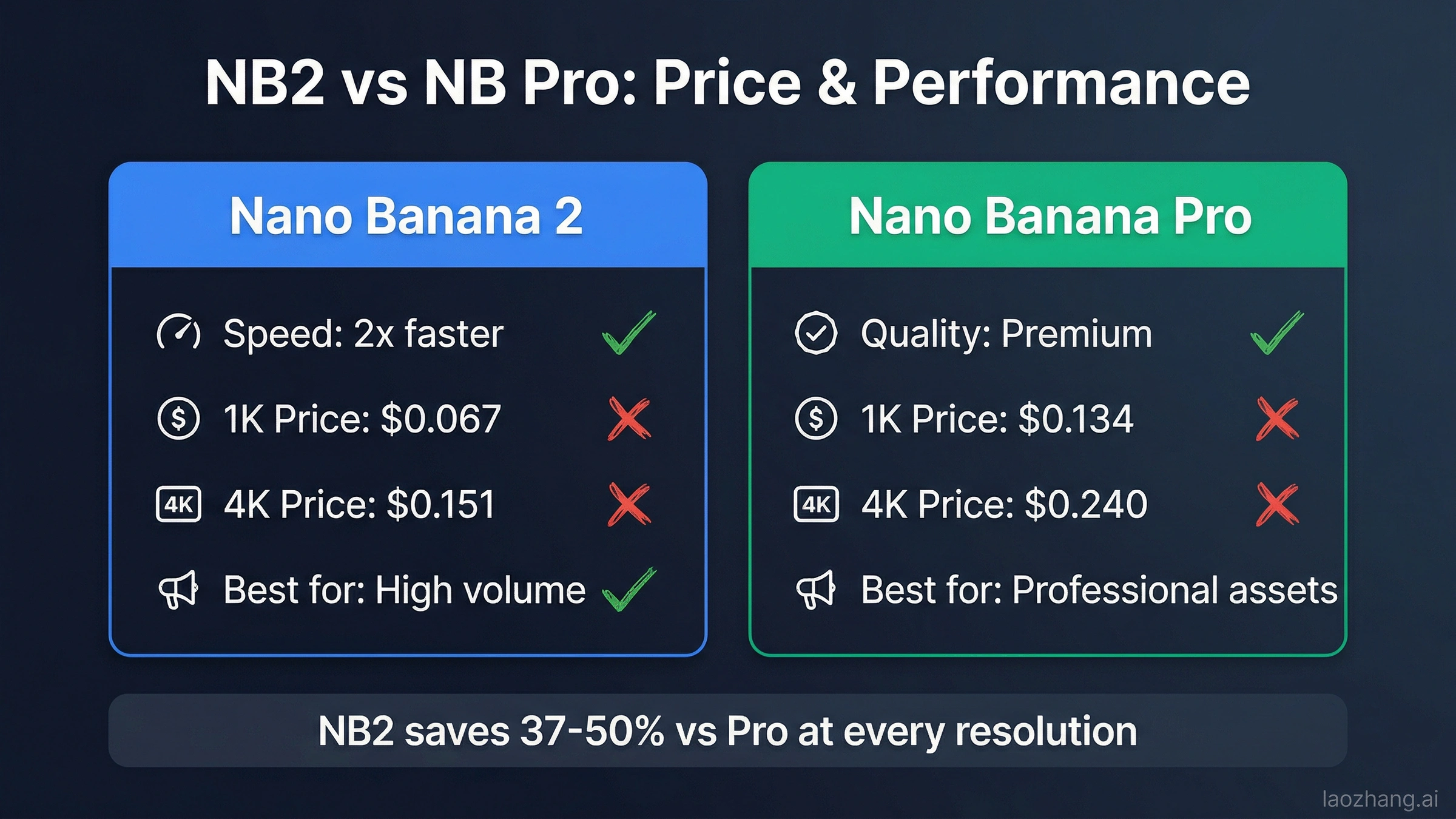
Choosing between Nano Banana 2 and Nano Banana Pro is the first and most impactful cost decision you will make. The price difference between these two models ranges from 37% to 50% depending on the resolution, and for many use cases, the output quality difference is negligible. Understanding exactly when each model shines helps you avoid overpaying for capabilities you don't need.
Nano Banana 2 generates images roughly twice as fast as Nano Banana Pro while maintaining strong visual quality. It supports all the same resolutions (512px to 4K), the same aspect ratios (including wide formats like 4:1 and 8:1), and the same search-grounded generation that reduces hallucinations. Where it falls short compared to Pro is in handling extremely complex multi-object compositions and achieving the absolute highest fidelity in professional photography-style outputs. For the vast majority of developer use cases — product mockups, marketing visuals, social media content, UI placeholder images — Nano Banana 2 delivers results that are visually indistinguishable from Pro.
The cost implications are significant across volume. Consider a team generating 5,000 images per month at 1K resolution. With Nano Banana Pro Standard, the monthly bill would be $670. Switching to Nano Banana 2 Standard drops that to $335, an instant 50% savings. Add the Batch API on top, and the same 5,000 images cost just $170 per month, representing a 75% reduction from the original Pro Standard price with no quality difference that most end users would notice.
The feature differences between the two models are worth examining beyond just price and speed. Nano Banana 2 supports up to 14 reference images (10 objects or 4 characters), while Nano Banana Pro supports 6 objects or 5 characters. Both models include Google Search grounding for factual accuracy in generated images, advanced text rendering for marketing mockups and infographics, and thinking mode with configurable intensity levels for complex prompts. The key differentiator is that Pro uses advanced reasoning to handle spatial relationships and compositional logic that Flash-based models occasionally struggle with, particularly in scenes involving three or more distinct objects interacting.
A practical decision framework for choosing between the two models depends on your primary output type. For e-commerce product images, social media graphics, blog illustrations, and UI mockups, Nano Banana 2 at 1K or 2K resolution provides excellent results at 37-50% lower cost. For advertising campaigns, editorial photography, detailed character illustrations, and any output where a client will scrutinize image quality at full zoom, Nano Banana Pro justifies its premium. Many production teams adopt a hybrid approach: draft and iterate with NB2, then regenerate final approved concepts with NB Pro for maximum quality.
When to choose Nano Banana Pro over NB2: Professional photography and fine art where maximum fidelity matters, complex multi-character scenes requiring advanced reasoning, and enterprise clients who need the best possible output regardless of cost. For everything else, Nano Banana 2 is the smarter financial choice. Our detailed NB2 vs NB Pro comparison covers the quality differences in depth with side-by-side samples.
Strategy 1 — Batch API Saves 50% Automatically
Google's Batch API is the simplest cost-saving mechanism available, and it requires almost no changes to your existing workflow. Every image generated through the Batch API endpoint costs exactly half the standard price, regardless of model or resolution. The only requirement is that you accept a processing window of up to 24 hours instead of real-time results.
The way the Batch API works is straightforward. Instead of sending individual image generation requests to the standard endpoint, you compile your requests into a JSONL file where each line represents one generation task. You upload this file to Google's batch processing system, and it returns all completed images within 24 hours. In practice, most batch jobs complete significantly faster than the 24-hour window, often within 2-4 hours for batches under 1,000 images.
Here is a minimal Python example showing how to submit a batch image generation job:
import google.generativeai as genai
import json

genai.configure(api_key="YOUR_API_KEY")

# Prepare batch requests
requests = []
for i, prompt in enumerate(your_prompts):
    requests.append({
        "model": "gemini-3.1-flash-image-preview",
        "contents": [{"parts": [{"text": prompt}]}],
        "generationConfig": {
            "responseModalities": ["IMAGE"],
            "imageGenerationConfig": {"aspectRatio": "16:9"}
        }
    })

# Write JSONL file
with open("batch_input.jsonl", "w") as f:
    for req in requests:
        f.write(json.dumps(req) + "\n")

# Submit batch job
batch_job = genai.batches.create(
    model="gemini-3.1-flash-image-preview",
    src="batch_input.jsonl",
    dest="batch_output/"
)
print(f"Job ID: {batch_job.name}, Status: {batch_job.state}")
The Batch API is ideal for any workflow where images don't need to appear instantly: content pipelines, scheduled marketing asset generation, bulk product image creation, or dataset preparation. For real-time applications like interactive image editors or chatbot-driven generation, you will need the standard API, but even then you can route non-urgent requests to the batch endpoint to reduce overall costs.
One critical consideration that many developers overlook is the effective cost when accounting for generation failures. Nano Banana image generation has a realistic first-try success rate of approximately 70-90% depending on prompt complexity, based on community testing and reports from developer forums. When a generation fails due to safety filters, content policy restrictions, or model capacity issues, you are not charged for the failed attempt. However, you do need to factor in the retry overhead. With a 80% success rate, generating 1,000 successful images actually requires approximately 1,250 API calls. At NB2 Standard pricing, that is $83.75 effective cost versus the theoretical $67.00. The Batch API mitigates this somewhat because batch jobs tend to have higher success rates due to automatic retry handling within the batch processing pipeline, and the 50% discount applies per successful output rather than per attempt.
Another batch optimization technique worth implementing is intelligent job sizing. Rather than submitting one massive batch of 100,000 images, break your workload into batches of 1,000-5,000 images each. Smaller batches complete faster (often under 1 hour instead of the full 24-hour window), allow you to catch prompt issues early and adjust before wasting credits on a large batch of suboptimal outputs, and provide more granular cost tracking per campaign or project. For a complete walkthrough of batch processing optimization, see our Batch API pricing deep dive.
Strategy 2 — Third-Party Providers Save 50-79%
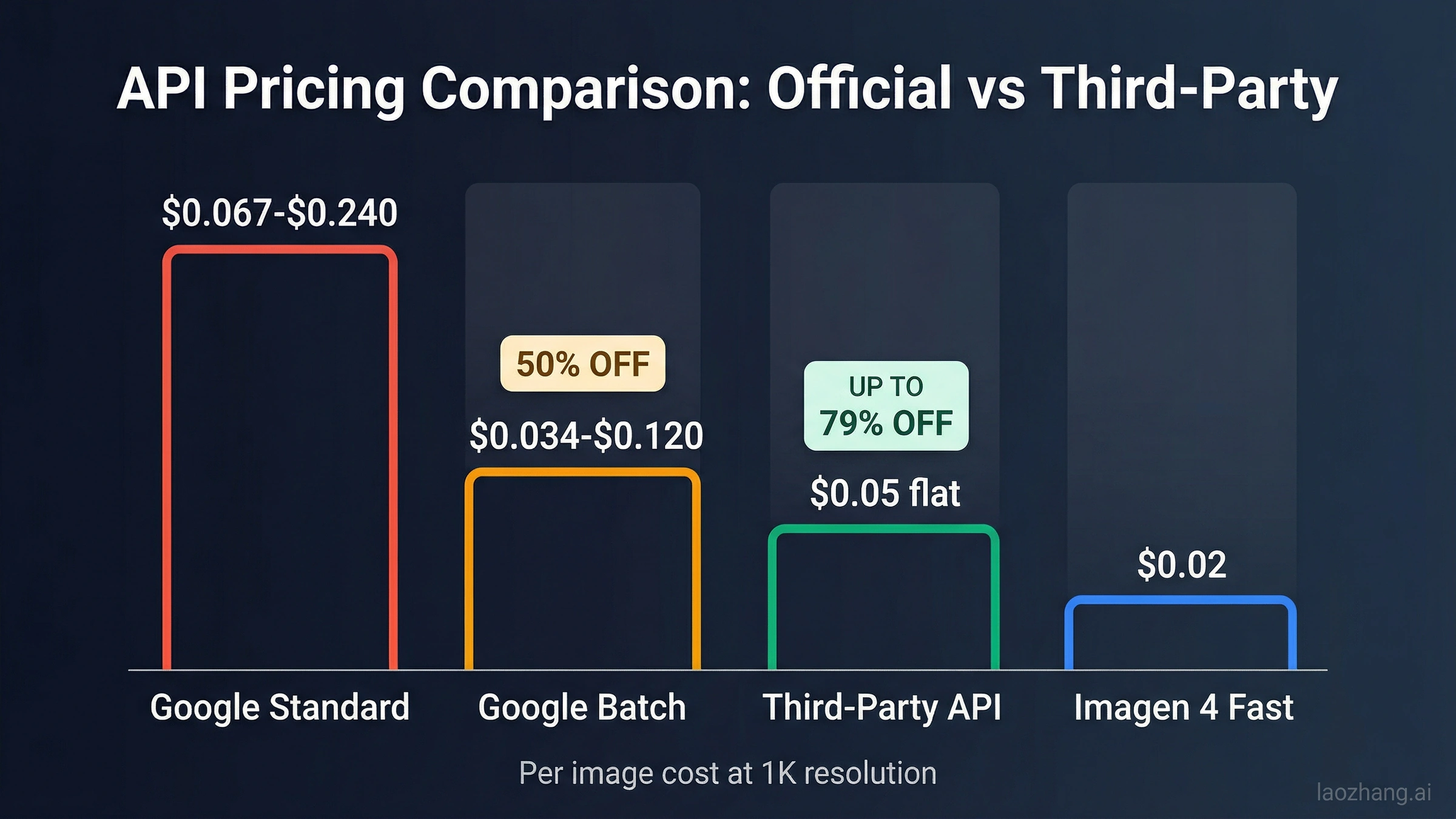
Beyond Google's own pricing tiers, a growing ecosystem of third-party API providers offers access to the same Nano Banana 2 and Pro models at substantially lower prices. These providers operate as API proxies, routing your requests through their own Google Cloud infrastructure and passing the volume-based savings on to customers. The cost reductions can be dramatic: while Google charges $0.151 per 4K image on the standard NB2 tier, some third-party providers offer the same generation for as little as $0.02-$0.05 per image.
The most reliable third-party providers in the current market include platforms that aggregate multiple AI models behind a single API endpoint. This approach benefits developers by providing a single billing relationship, unified API format, and automatic failover between providers. For Nano Banana specifically, the pricing advantage is most pronounced at higher resolutions where Google's per-image cost is highest.
One such platform, laozhang.ai, offers Nano Banana Pro and NB2 access at approximately $0.05 per image regardless of resolution. At 4K resolution, that represents a 67% savings compared to Google's NB2 Standard rate ($0.151) and a 79% savings versus NB Pro Standard ($0.240). The platform supports the standard OpenAI-compatible API format, which means most existing code can switch providers by changing just the base URL and API key. You can explore cheapest Nano Banana 2 API options for additional provider comparisons.
Here is a comparison of the most established third-party providers as of March 2026, based on publicly available pricing and developer community feedback:
| Provider | NB2 Price | NB Pro Price | API Format | Notable Features |
|---|---|---|---|---|
| laozhang.ai | ~$0.05/image | ~$0.05/image | OpenAI-compatible | Flat rate all resolutions, multi-model |
| fal.ai | $0.04-$0.08 | $0.06-$0.12 | REST API | Serverless, auto-scaling |
| Kie AI | $0.04/image | Varies | REST API | NB2 4K from $0.04 |
| OpenRouter | Market rate | Market rate | OpenAI-compatible | Model marketplace, multiple providers |
The flat-rate pricing model used by some providers deserves special attention. When a provider charges $0.05 per image regardless of resolution, the savings percentage changes dramatically based on your output size. At 0.5K resolution, you actually pay more than Google's NB2 Standard rate ($0.05 vs $0.045), making it a poor choice for thumbnail generation. At 1K, the provider is slightly cheaper ($0.05 vs $0.067, a 25% saving). But at 4K, the same flat rate saves you 67% compared to NB2 Standard ($0.05 vs $0.151) and 79% compared to NB Pro Standard ($0.05 vs $0.240). This resolution-dependent value proposition means third-party providers are most cost-effective for teams that primarily generate high-resolution images.
There are legitimate trade-offs to consider with third-party providers. Response times may vary slightly depending on the provider's infrastructure and current load. You are adding a dependency layer between your application and the underlying Google model, which introduces a small additional point of failure. Data privacy policies differ between providers, so you should review each platform's terms regarding image storage and retention. Some providers cache generated images temporarily for delivery optimization, which may not align with privacy requirements for sensitive content. However, for cost-sensitive production workloads where the absolute lowest per-image price matters more than guaranteed sub-second latency, third-party providers represent the single largest cost-saving opportunity in the Nano Banana ecosystem.
Strategy 3 — Smart Resolution and Model Selection
The most overlooked cost-saving strategy requires no third-party services and no batch processing delays. It simply involves choosing the right resolution and model combination for each specific use case, rather than defaulting to maximum settings for every request. Many developers set their API to generate 4K images for all outputs, even when the final display size is a 300px thumbnail or a 1080p social media post, wasting up to 70% of their budget on unnecessary resolution.
A practical resolution selection framework starts with understanding where the generated images will actually appear. Social media posts, blog thumbnails, and chat interfaces rarely display images larger than 1024px. For these use cases, the 1K tier at $0.067 per image (NB2 Standard) or $0.034 (NB2 Batch) is more than sufficient. Only images destined for print materials, large-format displays, or detail-critical professional applications genuinely benefit from 2K or 4K generation.
Combining this resolution awareness with strategic model selection creates a powerful optimization matrix. Consider routing all high-volume, standard-quality requests through Nano Banana 2 at 1K resolution while reserving Nano Banana Pro at 2K or 4K only for hero images and premium content. A content platform generating 10,000 images monthly might break this down as: 8,000 standard images via NB2 at 1K ($0.067 each = $536), plus 2,000 premium images via NB Pro at 2K ($0.134 each = $268), totaling $804. Compare that to generating all 10,000 at NB Pro 2K Standard: $1,340. The mixed approach saves 40% while maintaining premium quality where it matters most.
This mixed-strategy approach works because most applications have natural quality tiers built into their user experience. A SaaS product might generate quick preview thumbnails at 512px resolution using NB2 ($0.045 each), display selected images at 1K in the main interface ($0.067 each), and only render the final downloaded output at 4K using NB Pro Batch ($0.120 each) when the user explicitly requests a high-resolution export. By aligning your API resolution with the actual display context, you avoid the common trap of generating every image at maximum quality when 80% of generated images will only ever be viewed at reduced size.
Another dimension of smart selection involves Gemini's aspect ratio support. Both NB2 and NB Pro support 14 different aspect ratios, from square (1:1) to ultra-wide (8:1). Generating images in the correct aspect ratio from the start eliminates the need for post-processing cropping or resizing, which can degrade quality and adds processing overhead. For vertical mobile content, use 9:16 directly rather than generating 1:1 and cropping. For cinematic hero banners, use 21:9 instead of generating 16:9 and letterboxing. This attention to aspect ratio selection does not directly reduce per-image API cost, but it eliminates wasted generations caused by images that need to be regenerated in the correct format.
For teams exploring free options to supplement paid usage, our free Nano Banana 2 access guide covers the available no-cost tiers and their limitations.
Monthly Cost Calculator — What Will You Actually Spend?
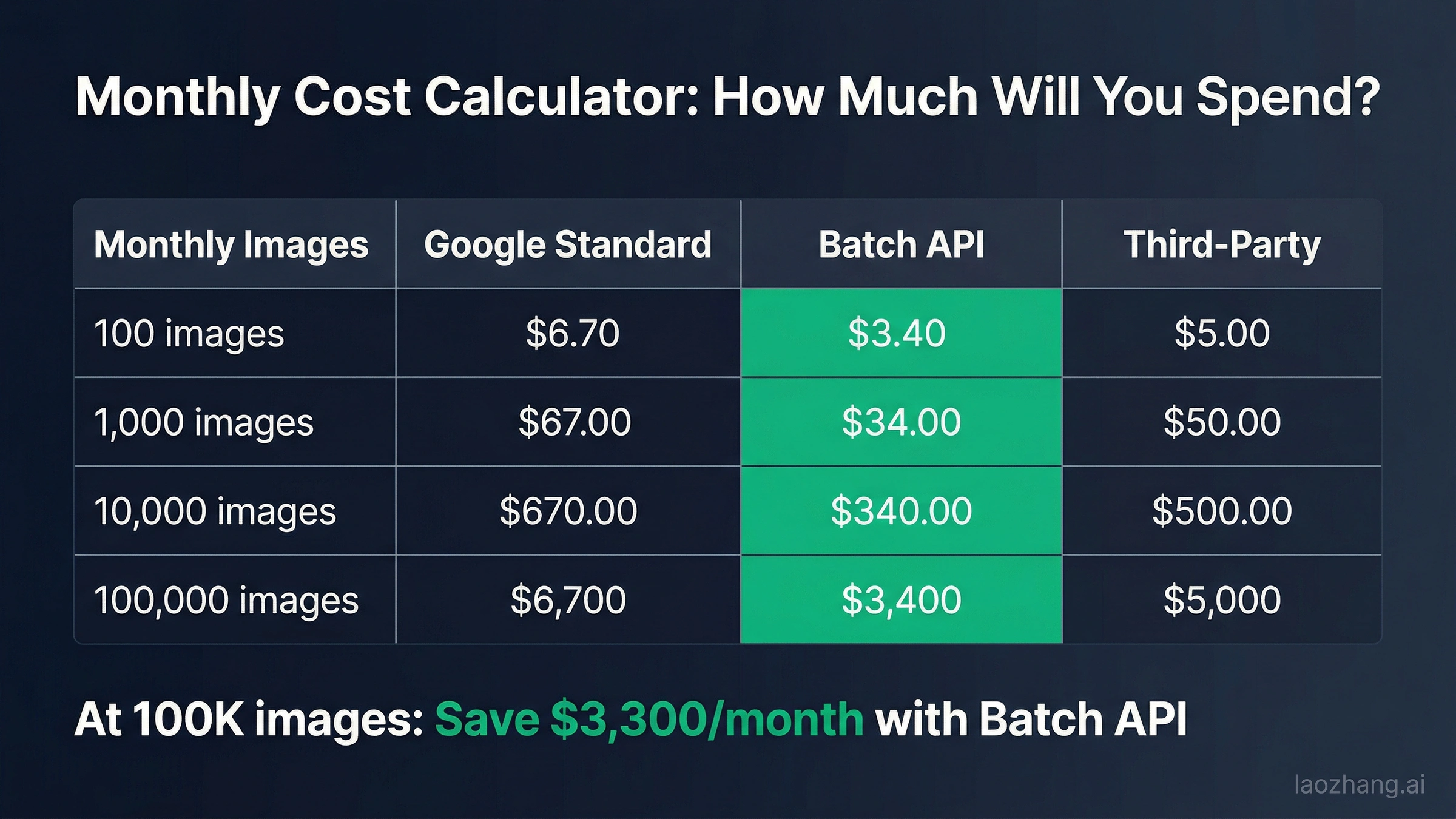
The abstract per-image prices in the sections above become much more concrete when you project them across realistic monthly volumes. The following calculator uses Nano Banana 2 at 1K resolution as the baseline, since this represents the most common configuration for production applications. Costs scale linearly, so you can interpolate for any volume between these benchmarks.
| Monthly Images | NB2 Standard | NB2 Batch | NB Pro Standard | NB Pro Batch | Third-Party (~$0.05) |
|---|---|---|---|---|---|
| 100 | $6.70 | $3.40 | $13.40 | $6.70 | $5.00 |
| 500 | $33.50 | $17.00 | $67.00 | $33.50 | $25.00 |
| 1,000 | $67.00 | $34.00 | $134.00 | $67.00 | $50.00 |
| 5,000 | $335.00 | $170.00 | $670.00 | $335.00 | $250.00 |
| 10,000 | $670.00 | $340.00 | $1,340.00 | $670.00 | $500.00 |
| 50,000 | $3,350.00 | $1,700.00 | $6,700.00 | $3,350.00 | $2,500.00 |
| 100,000 | $6,700.00 | $3,400.00 | $13,400.00 | $6,700.00 | $5,000.00 |
These numbers reveal clear decision points at different volume ranges. For low-volume use (under 500 images per month), the cost differences between approaches are measured in tens of dollars, so convenience and real-time availability should drive your choice rather than pure cost optimization. The NB2 Standard API at $33.50 per month for 500 images is reasonable for most individual developers and small teams.
At medium volume (1,000 to 10,000 images), the Batch API becomes a compelling default choice. Saving $33 per month at 1,000 images might not justify restructuring your pipeline, but saving $330 at 10,000 images certainly does. This is also the volume range where third-party providers start offering meaningful savings, since their flat-rate pricing ($0.05 per image, or $500 for 10,000 images) beats NB2 Standard ($670) while matching the convenience of real-time API access.
At high volume (50,000+ images), every fraction of a cent matters. The spread between the cheapest option (NB2 Batch at $1,700 for 50K images) and the most expensive (NB Pro Standard at $6,700) is $5,000 per month. At this scale, investing engineering time in batch processing pipelines, multi-provider failover, and resolution optimization delivers returns measured in thousands of dollars monthly. Some teams at this volume also negotiate custom pricing directly with Google Cloud through Vertex AI enterprise agreements, which can unlock additional discounts beyond the published rates.
To illustrate the combined savings potential, consider a real-world scenario for a mid-size e-commerce platform. The team generates approximately 15,000 images per month: 10,000 product thumbnails (1K resolution), 4,000 lifestyle images (2K resolution), and 1,000 hero images (4K resolution). Here is the cost breakdown under different strategies, all using Nano Banana 2:
| Image Type | Volume | Standard | Batch | Third-Party ($0.05) |
|---|---|---|---|---|
| Thumbnails (1K) | 10,000 | $670 | $340 | $500 |
| Lifestyle (2K) | 4,000 | $404 | $200 | $200 |
| Hero (4K) | 1,000 | $151 | $76 | $50 |
| Total | 15,000 | $1,225 | $616 | $750 |
| Annual Cost | $14,700 | $7,392 | $9,000 |
The Batch API delivers the lowest annual cost at $7,392, saving $7,308 per year (50%) compared to Standard pricing. The third-party provider lands in the middle at $9,000 annually but offers the advantage of real-time generation without the 24-hour batch window. The optimal strategy for this team would be routing thumbnails and lifestyle images through the Batch API (since these are pre-generated during content setup, not on-demand) while using a third-party provider for hero images that need immediate turnaround during editorial workflows. This hybrid approach would cost approximately $540 per month (Batch for 14K images + third-party for 1K hero images), saving 56% versus all-Standard pricing.
Quick Setup Guide — Start Saving in 5 Minutes
Getting started with cost-optimized Nano Banana image generation takes just a few steps, regardless of which savings strategy you choose. The process begins with obtaining an API key, then adjusting your code to target the most cost-effective endpoint for your use case.
Step 1: Get your Google AI Studio API key. Visit aistudio.google.com, sign in with your Google account, and navigate to the API keys section. Generate a new key. This key provides access to both Nano Banana 2 and Nano Banana Pro through the Gemini API. No billing setup is required for the free tier, but you will need to enable billing for production-volume usage.
Step 2: Choose your model and tier. Based on the cost analysis above, select your primary model. For most developers, gemini-3.1-flash-image-preview (Nano Banana 2) at 1K resolution offers the best balance of quality, speed, and cost at $0.067 per image standard or $0.034 via batch.
Step 3: Generate your first image. Here is a minimal working example:
import google.generativeai as genai
from PIL import Image
import io, base64

genai.configure(api_key="YOUR_API_KEY")
model = genai.GenerativeModel("gemini-3.1-flash-image-preview")

response = model.generate_content(
    "A professional product photo of wireless headphones on a marble surface",
    generation_config=genai.GenerationConfig(
        response_modalities=["IMAGE"],
        image_generation_config={"aspectRatio": "16:9"}
    )
)

# Save the generated image
for part in response.candidates[0].content.parts:
    if part.inline_data:
        img = Image.open(io.BytesIO(base64.b64decode(part.inline_data.data)))
        img.save("output.png")
Step 4 (Optional): Connect a third-party provider for additional savings. If you are using an OpenAI-compatible provider like laozhang.ai, the switch requires only changing the base URL:
from openai import OpenAI

client = OpenAI(
    api_key="YOUR_PROVIDER_KEY",
    base_url="https://api.laozhang.ai/v1"
)

response = client.images.generate(
    model="gemini-3.1-flash-image-preview",
    prompt="A professional product photo of wireless headphones",
    size="1024x1024"
)
Both approaches produce identical image output since the underlying model is the same. The difference is purely in routing and billing. Test both paths with your specific prompts to verify consistent quality before committing to a provider for production traffic.
Step 5: Optimize your prompts for cost efficiency. Beyond infrastructure choices, the quality and specificity of your prompts directly impacts your effective cost. Vague prompts produce more failed generations and more images that need to be regenerated, increasing your actual per-successful-image cost. Specific, well-structured prompts with clear subject descriptions, composition guidance, and style references achieve higher first-try success rates, often above 90%. Include the desired aspect ratio in the API call rather than relying on the model to guess, and specify the output resolution explicitly to avoid defaulting to a tier higher than you need.
Step 6: Monitor and track your spending. Set up billing alerts in your Google Cloud Console or your third-party provider's dashboard to catch unexpected cost spikes before they become budget problems. Track your per-image cost and success rate over time to identify prompt categories that consistently require more retries, and invest time in refining those prompts to reduce waste. Most providers offer usage dashboards that break down spending by model, resolution, and time period, making it straightforward to verify that your cost optimization strategies are delivering the expected savings.
Frequently Asked Questions
Is Nano Banana 2 the same quality as Nano Banana Pro?
Nano Banana 2 matches Nano Banana Pro in most standard use cases, including product photos, marketing visuals, and social media content. The quality gap only becomes noticeable in complex multi-character compositions and ultra-fine detail work. For 90% of developer use cases, NB2 output is visually indistinguishable from Pro, making it the clear value choice at 37-50% lower cost per image (ai.google.dev, March 2026).
Does the Batch API affect image quality?
No. The Batch API generates identical images to the Standard API, using the same model weights and inference pipeline. The only difference is processing time: batch jobs complete within 24 hours (often 2-4 hours in practice) instead of real-time. Quality, resolution, and all other output characteristics remain exactly the same, while the price drops by 50% across all models and resolutions.
Are third-party API providers safe to use?
Reputable third-party providers route requests through their own Google Cloud accounts, meaning the actual image generation happens on Google's infrastructure. The primary considerations are data privacy (review the provider's data retention policy), reliability (check uptime guarantees and support options), and terms compliance. Most established providers like laozhang.ai have been operating for over a year with documented uptime records. Always test with non-sensitive content first and review the provider's terms of service before routing production traffic.
What is the cheapest way to generate Nano Banana images?
The absolute cheapest per-image option is Imagen 4 Fast at $0.02 per image, but it uses a different model (not Nano Banana). For Nano Banana specifically, the cheapest official option is NB2 Batch at 0.5K resolution ($0.022/image). For practical 1K resolution, NB2 Batch at $0.034 per image is the cheapest official route. Third-party providers may offer even lower rates, with some starting around $0.02 per image for NB2 access.
Can I switch between NB2 and Pro mid-project?
Yes. Both models accept the same API request format, the same resolution parameters, and the same aspect ratio options. You can switch between gemini-3.1-flash-image-preview (NB2) and gemini-3-pro-image-preview (Pro) by changing only the model parameter in your API call. This makes it practical to use NB2 for drafting and iteration, then switch to Pro for final production renders, optimizing cost at every stage of your creative pipeline.
How do Nano Banana API costs compare to Midjourney or DALL-E?
At 1K resolution using the Batch API, Nano Banana 2 costs $0.034 per image, which is significantly cheaper than Midjourney's subscription model (approximately $0.04-$0.10 per image depending on plan) and DALL-E 3's API rate of $0.040 per image at 1024x1024. Nano Banana Pro Batch at $0.067 per 1K image remains competitive with these alternatives while offering native 4K support that neither Midjourney nor DALL-E currently provides through their APIs. The key advantage of the Nano Banana ecosystem is resolution flexibility: you can generate images from 512px thumbnails to 4K print-ready assets through a single API, whereas competitors typically lock you into a fixed output size or charge significant premiums for upscaling. When factoring in the full range of output sizes and the Batch API discount, Nano Banana consistently offers the lowest cost-per-pixel among the major image generation platforms available in 2026.
How does search-grounded generation affect pricing?
Nano Banana 2 includes a feature called search-grounded generation that allows the model to reference real-time information and images from Google Search when creating visuals. This feature improves factual accuracy, particularly for generating images of specific products, landmarks, or current events. Search grounding does not add a separate per-request charge, but it does slightly increase the input token count because the grounding context is included in the prompt processing. In practice, the additional cost is negligible, typically adding less than $0.001 per image. The quality improvement from reduced hallucinations often means fewer regeneration attempts, which can actually lower your effective per-successful-image cost despite the marginally higher input token usage.