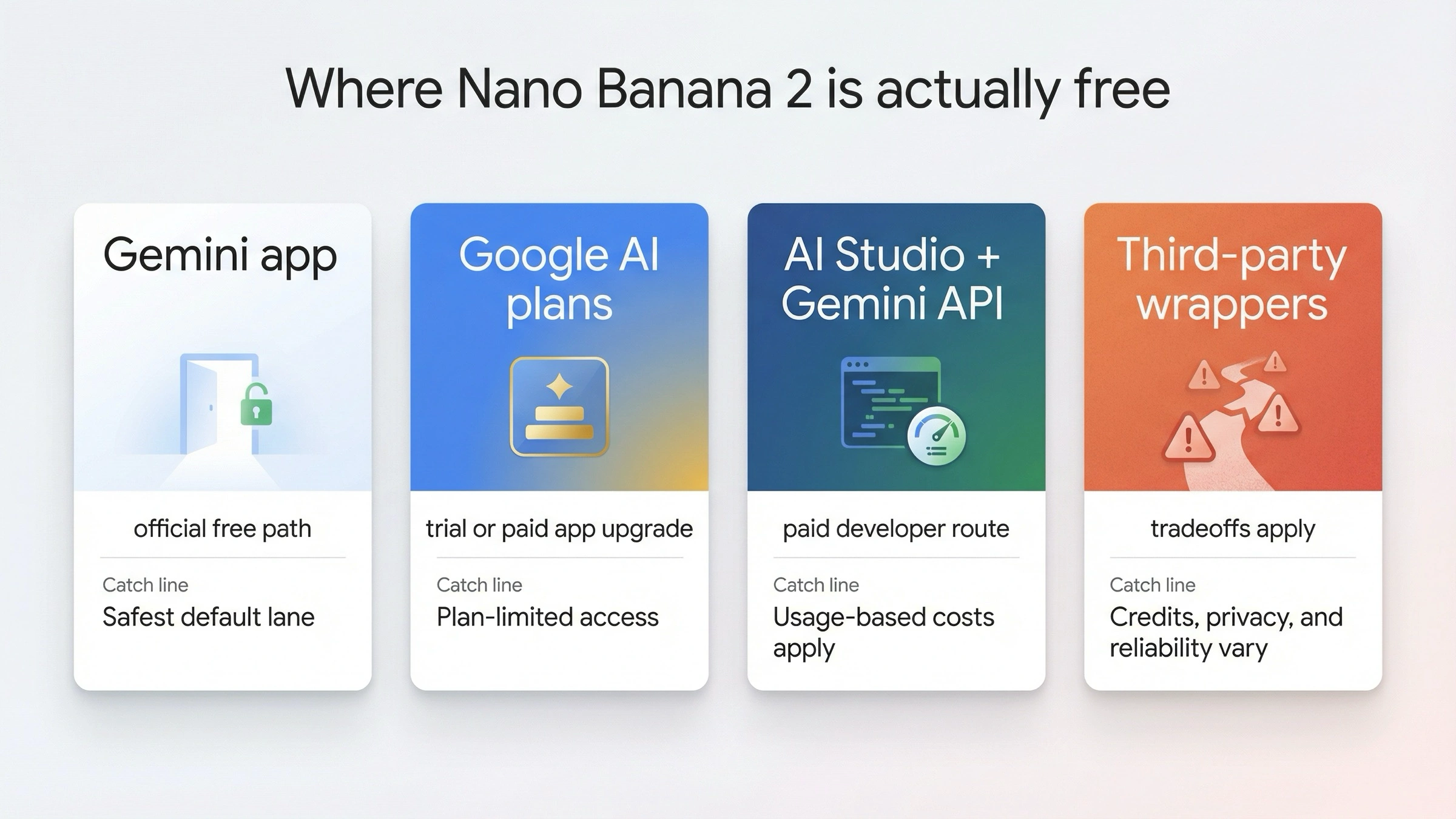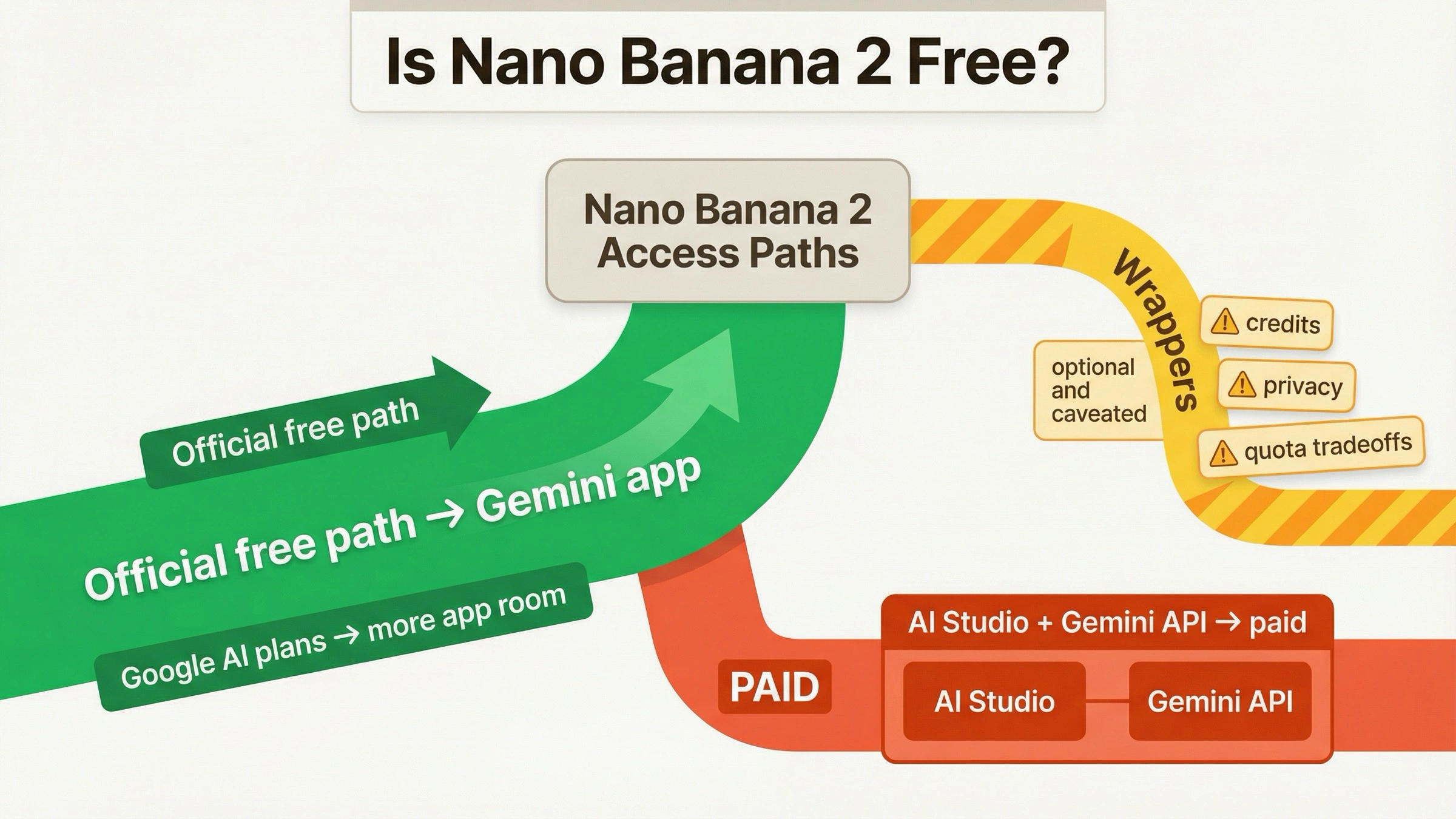
Nano Banana 2, Google's latest AI image generation model also known as Gemini 3.1 Flash Image, is genuinely free to use through the official Gemini app with a daily generation cap of approximately 20 to 100 images depending on your account tier and usage patterns. While several third-party platforms advertise "free unlimited" access, the reality is more nuanced—most operate on credit systems, ad-supported models, or fair-use policies that effectively limit output. For truly unlimited generation without daily caps, the Gemini API offers pay-per-image pricing starting at $0.045 per image at 512px resolution (Google AI official pricing, verified February 28, 2026).
TL;DR
Nano Banana 2 launched on February 26, 2026, and quickly became one of the most searched-for AI image generators because it combines near-Pro-level quality with dramatically faster generation and lower costs. The free access landscape breaks down into three tiers: the official Gemini app provides the best quality with daily limits, third-party platforms offer easier access with variable quality, and developer tools like Puter.js provide programmatic access. No option is truly "unlimited" without cost—the word "unlimited" in this context is primarily marketing language. If you need high-volume generation, the API at $0.045 to $0.151 per image (depending on resolution) is the most reliable and cost-effective path once you exceed free tier limits.
What Is Nano Banana 2 and Why Is Everyone Talking About It?
Google launched Nano Banana 2 on February 26, 2026, as a significant upgrade in their AI image generation lineup. Understanding what NB2 actually is requires cutting through considerable naming confusion, because Google uses several overlapping names for essentially the same technology. Nano Banana 2 is the consumer-facing brand name for the model that developers know as Gemini 3.1 Flash Image, with the technical model ID gemini-3.1-flash-image-preview. This distinction matters because when you search for free access methods, you will encounter both names referring to the same underlying model, and knowing this prevents you from thinking they are different products with different access paths.
The technical architecture behind NB2 explains both its impressive capabilities and why it is generating so much excitement. Built on the Gemini 3.1 Flash foundation—a model designed for speed and efficiency rather than raw computational depth—NB2 achieves approximately 95% of the quality delivered by the more expensive Nano Banana Pro model while generating images three to five times faster. The key capabilities that set NB2 apart from previous models include native 4K resolution output, character consistency across multiple generations for up to five characters, object fidelity for up to fourteen distinct objects in a single scene, real-time web grounding that can reference current visual styles and trends, and significantly cleaner text rendering within generated images. For a detailed comparison between Nano Banana 2 and Nano Banana Pro, the differences in quality, speed, and pricing break down to a straightforward trade-off where NB2 wins on cost and speed while Pro maintains an edge in maximum fidelity.
The reason "Nano Banana 2 free unlimited" has become one of the most searched AI-related terms in February 2026 is that NB2 represents the first time a model with this level of image generation quality has been offered with any free tier at all. Previous high-end image generators like Midjourney, DALL-E 3, and even Google's own Nano Banana Pro either require paid subscriptions or offer extremely limited free trials. NB2 democratizes access to near-professional-quality AI image generation, which has created enormous demand from casual users, content creators, marketers, and developers who previously could not justify the cost of premium image generation tools.
How to Use Nano Banana 2 for Free — The Official Way

The most reliable and highest-quality free access to Nano Banana 2 comes directly from Google through the Gemini app at gemini.google.com. This is the official consumer-facing path, and it delivers the genuine NB2 model without any wrapper, proxy, or quality degradation. To access it, you simply sign in with your Google account, navigate to the image generation mode, and start creating. The process requires no API key, no credit card, and no special developer account—just a standard Google account that most people already have. Google has made NB2 available as a replacement for Nano Banana Pro in the Gemini app, meaning you get access to the newer, faster model at no cost for personal use.
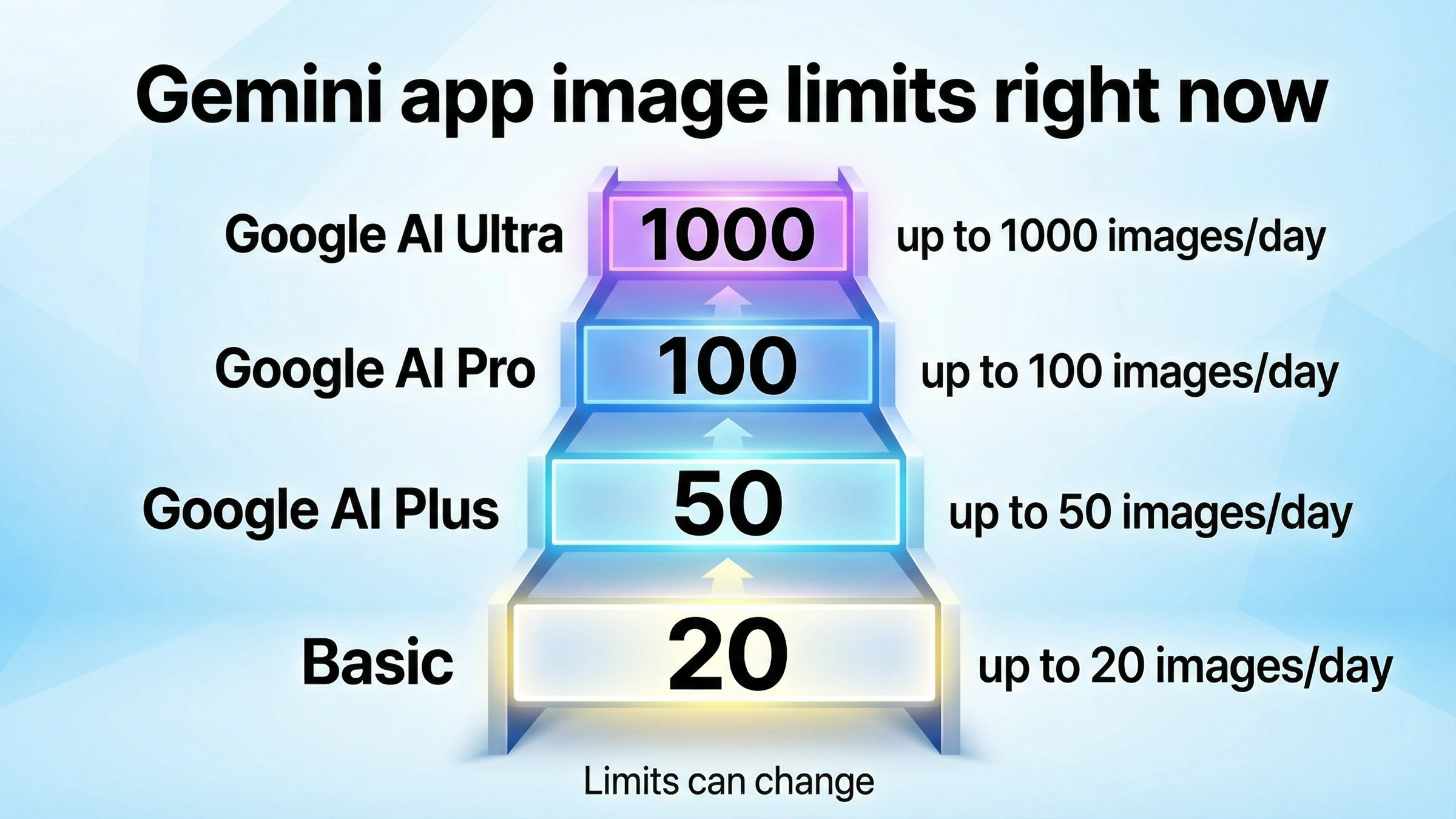
The daily limits on Gemini app usage are real but variable. Based on extensive testing and community reports verified as of February 28, 2026, free-tier users can typically generate between 20 and 100 images per day. The exact number depends on several factors including your Google account tier, regional availability, current server load, and the complexity of your generation requests. Higher-complexity prompts that require more computational resources—such as those involving multiple characters, detailed text rendering, or high-resolution output—appear to count more heavily against daily limits. Google has not published official daily limit numbers, which means the 20-100 range represents the consensus from user reports rather than guaranteed minimums. If you need predictable, guaranteed limits, the API tier system offers more transparency.
Beyond the basic generation workflow, the Gemini app offers several features that enhance the free experience for attentive users. Image editing capabilities allow you to modify generated images with follow-up text prompts, making targeted adjustments without consuming an entirely new generation slot in some cases. The conversation-based interface also means you can iteratively refine images through natural language feedback—telling the model to "make the background darker," "add more detail to the foreground," or "change the color palette to warmer tones"—which produces better results than starting from scratch with each attempt. These interactive refinement capabilities are not available through most third-party platforms, making the official app particularly valuable for creative professionals who need fine control over their output.
Google AI Studio provides a second official path, though it functions differently from the Gemini app. AI Studio at aistudio.google.com is designed for developers who want to experiment with Google's AI models before integrating them into applications. While AI Studio provides free access to many Gemini models, it is important to understand a critical limitation: as of February 28, 2026, the free tier for the NB2 model (gemini-3.1-flash-image-preview) is marked as "not available" on the official pricing page at ai.google.dev/pricing. This means you cannot make free API calls to NB2 through AI Studio in the same way you can with text-only Gemini models. The consumer Gemini app remains the only official method for zero-cost NB2 image generation, while API access requires a paid tier starting at Tier 1 (Google AI official documentation, verified February 28, 2026).
7 Best Free Nano Banana 2 Platforms Compared (February 2026)

The third-party platform landscape for free Nano Banana 2 access has exploded since the model launched just two days ago, with dozens of wrappers, tools, and aggregators appearing almost overnight. After testing seven of the most prominent platforms, the picture that emerges is a mixed bag of genuine free access with significant caveats. No third-party platform delivers the same quality and reliability as the official Gemini app, but several offer unique advantages like no-sign-up access or specialized editing features that the official app lacks. The comparison below reflects hands-on testing and verification conducted on February 28, 2026, though the landscape is changing rapidly enough that some details may shift in the coming weeks.
| Platform | Daily Limit | Max Resolution | Sign-up | Quality | Best For | Reliability |
|---|---|---|---|---|---|---|
| Gemini App | 20-100 images | Up to 4K | Google account | Best | General use | Official |
| EaseMate AI | "Unlimited" | 1K-2K | None | Good | Quick testing | New |
| CreateVision AI | 80 credits/day | 1K-2K | Good | Batch work | Stable | |
| InVideo AI | "Unlimited"* | 1K | Account | Good | Video creators | Stable |
| NanoBananaFree | Limited free | 1K | None | OK | Casual use | New |
| Puter.js SDK | Dev: Free | Varies | npm install | Best | Developers | Stable |
| NanoBananas.ai | 2 free credits | 1K-2K | Login | Good | Image editing | New |
The standout among third-party options is EaseMate AI, which offers the unusual combination of no sign-up requirement and claims of unlimited generation. In practice, EaseMate appears to implement soft rate limiting—you can generate freely for a period, but extended heavy use triggers slower generation times and occasional timeouts. The quality is noticeably good for a wrapper service, suggesting it connects directly to the Gemini API rather than using a downgraded model. CreateVision AI offers a more transparent model with a fixed daily credit allocation of 80 credits (roughly equivalent to 80 images), which makes it easier to plan your usage. For users who want to explore best platforms for unlimited Nano Banana Pro access, many of these same platforms also offer Pro-tier generation at higher price points.
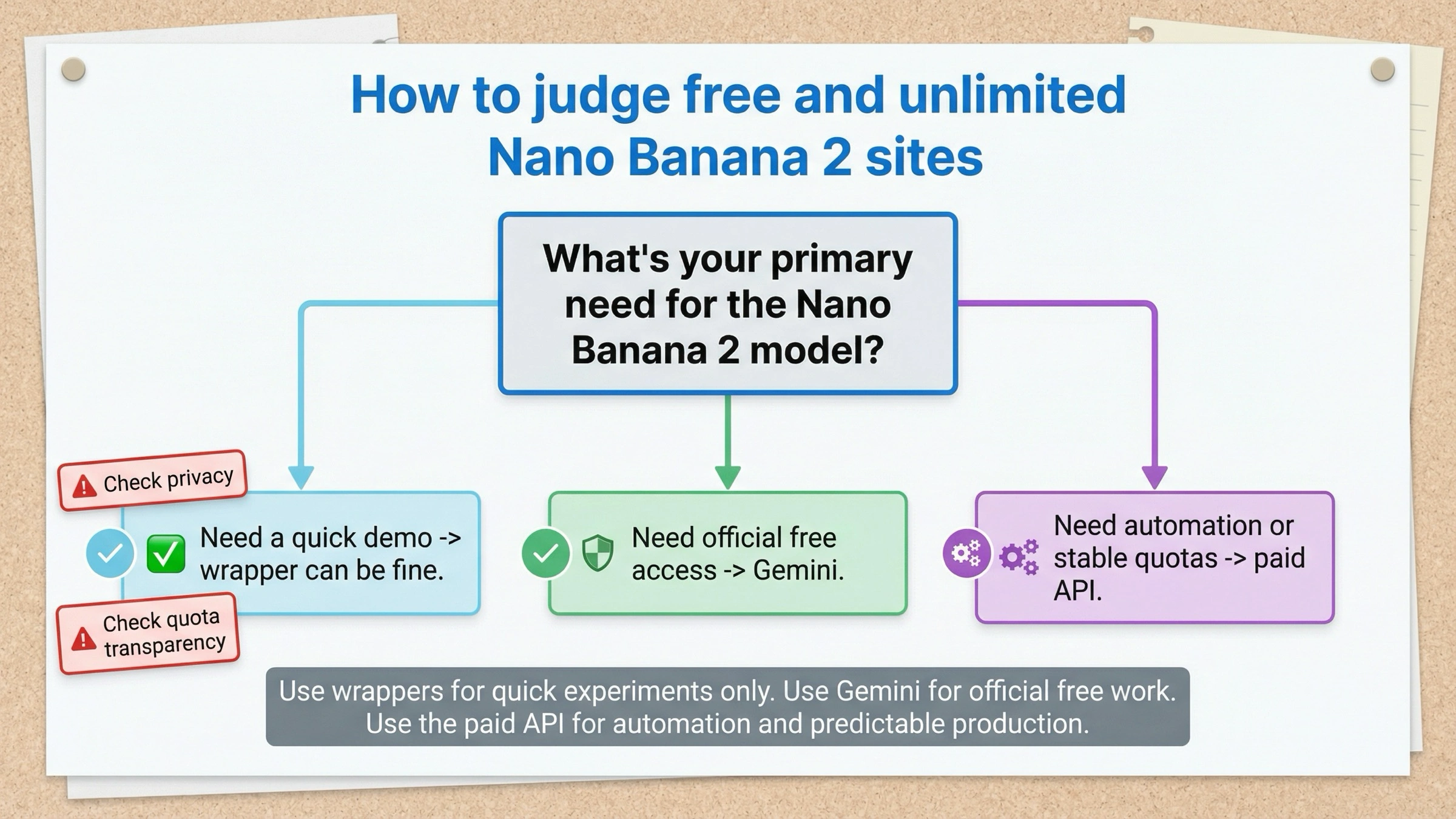
The critical insight when evaluating these platforms is that "unlimited" is almost always a marketing claim rather than a technical reality. Every platform has computational costs for each image generated—someone is paying for the API calls to Google's servers. Third-party platforms monetize through advertising, premium tier upsells, data collection, or venture capital subsidies that fund free usage as a growth strategy. None of these business models sustainably support truly unlimited high-quality image generation at zero cost to the user. This does not mean the free tiers are not valuable—they absolutely are for testing, casual use, and low-volume needs—but users who require predictable high-volume access should plan for eventual paid usage rather than building workflows around "unlimited" promises that may not persist.
Security and privacy considerations should also factor into your platform selection, especially for business or professional use. When you use the official Gemini app or API, your data is handled under Google's well-documented privacy policies, and you have clear Terms of Service governing how your prompts and generated images are used. Third-party platforms operate under their own privacy frameworks, which may be less transparent and may include clauses allowing them to use your prompts for model training, marketing, or data analysis. Some free platforms require OAuth login through Google or Discord, which grants them varying levels of access to your account information. For professional workflows involving proprietary concepts, unreleased product designs, or client work, the risk of prompt data exposure through a third-party platform is a legitimate concern that the convenience of free access may not justify. The safest approach for sensitive work is using the official Gemini app for free-tier generation or the direct API for paid access, where you maintain full control over your data pipeline and have contractual guarantees about data handling.
Platform reliability and longevity are additional factors that many users overlook when choosing a free NB2 access method. The Gemini app has Google's infrastructure and business commitment behind it, making it the most likely to remain available and stable long-term. Third-party platforms, especially those that launched within days of NB2's release, have uncertain futures—some may scale successfully into sustainable businesses, while others may exhaust their funding, get cease-and-desist notices from Google, or simply shut down without warning. Building a workflow dependency on a platform that might disappear next month creates real business risk. If you choose to use third-party platforms, treat them as supplements to your primary access method rather than as your only path to NB2, and maintain the ability to switch to the official app or API if your preferred platform becomes unavailable.
Free vs Paid — What Quality and Resolution Do You Actually Get?
One of the most important and least discussed aspects of "free Nano Banana 2" access is the significant quality gap between what free tiers actually deliver and what the model is theoretically capable of producing. The NB2 model supports output resolutions from 512px up to 4K (4096px), and at its best, it produces images with remarkable detail, accurate text rendering, and consistent character features. However, most free access methods—both official and third-party—do not deliver maximum quality output, and understanding where the quality boundaries fall helps you set realistic expectations and plan your workflow accordingly.
Through the official Gemini app, the image quality you receive is genuinely excellent—this is the full NB2 model running without degradation. However, the output resolution in the consumer app is typically capped at 1K to 2K rather than the full 4K that the API can deliver. This means free Gemini app users get the same model quality but at lower resolution than what paid API users can access. For most consumer use cases—social media posts, blog illustrations, presentation graphics—1K to 2K resolution is more than adequate, but for professional applications like print materials, large-format displays, or product photography where every pixel matters, the resolution limitation of the free tier becomes meaningful.
Third-party platforms generally deliver even lower quality than the official app, though the degree varies significantly. Some platforms like EaseMate appear to pass requests directly to the Gemini API with minimal modification, resulting in quality nearly identical to the official experience. Others use optimization techniques like prompt modification, resolution downscaling, or model substitution that can noticeably degrade output quality. The most common quality reduction comes from automatic downscaling: a platform might advertise "4K support" but actually generate images at 512px and then upscale them using a separate algorithm, producing results that look acceptable in thumbnails but fall apart under closer inspection. If image quality is a primary concern for your use case, the official Gemini app remains the best free option, and the API with explicit resolution control remains the gold standard for professional-grade output.
One area where the quality gap between free and paid becomes especially pronounced is text rendering within images. NB2's text generation capability is one of its headline features, and at full resolution through the API, it can produce remarkably clean and readable text—signs, labels, book covers, and UI mockups with legible lettering that requires minimal post-processing. Through the free Gemini app, text rendering is still good but occasionally produces minor character errors or spacing inconsistencies at lower resolutions. Through third-party platforms, text quality degrades further and becomes unreliable enough that you should not depend on it for production work. If your use case requires accurate text within generated images—product mockups, social media graphics with overlaid text, or signage—you should either use the official app with careful prompt engineering or invest in API access where you can control resolution and generation parameters directly.
Character consistency is another dimension where free versus paid access creates meaningful differences in practical output. NB2 supports consistent character appearance across multiple image generations for up to five characters, which is valuable for creating illustration series, storyboards, or marketing campaigns featuring recurring characters. This feature works best through the API where you have full control over generation parameters and can maintain detailed character descriptions across requests. Through the Gemini app, character consistency is available but somewhat less reliable because you have less control over the generation pipeline. Third-party platforms rarely expose character consistency controls at all, which means each generation produces effectively independent character designs even when you use identical descriptions. For projects requiring consistent character appearance across multiple images, planning your workflow around the official app or API access will save significant time compared to trying to achieve consistency through third-party free tiers.
Developer Guide — Free Nano Banana 2 API Access
For developers who want to integrate NB2 image generation into applications, bots, or automated workflows, the access path looks different from the consumer experience. The most important fact to establish upfront is that the official Gemini API does not offer a free tier for the NB2 model. While many Gemini text models include generous free quotas, the image generation endpoint for gemini-3.1-flash-image-preview requires a paid API tier starting at Tier 1 (Google AI official rate limits page, verified February 28, 2026). This means the common advice to "just use Google AI Studio for free" does not apply to NB2 image generation. For more details on accessing the Gemini 3.1 Flash Image API for free, the available workarounds involve alternative access methods rather than official free API endpoints.
Puter.js: The Developer-Free Option
The most genuinely free path for developers is the Puter.js SDK, which implements a "user-pays" model. With Puter.js, your application can generate images using the NB2 model at zero cost to you as the developer—the end user's own account covers the computational cost. This architecture makes Puter.js ideal for building tools, demos, and applications where users bring their own capacity. The integration is straightforward:
javascriptimport Puter from 'puter-sdk'; const puter = new Puter(); const response = await puter.ai.generateImage({ prompt: "A futuristic cityscape at sunset with flying vehicles", model: "nano-banana-2" }); // response contains the generated image data
Direct API Access (Paid)
For applications that need to control the generation process directly and bear the cost themselves, the Gemini API provides the most flexible and reliable access. The API supports all four resolution tiers, batch processing, and consistent quality guarantees:
pythonimport google.generativeai as genai genai.configure(api_key="YOUR_API_KEY") model = genai.GenerativeModel("gemini-3.1-flash-image-preview") response = model.generate_content( "Generate an image: A professional product photo of a modern smartwatch" ) with open("output.png", "wb") as f: f.write(response.parts[0].data)
When working with the API directly, error handling and rate limit management become essential for production applications. The Gemini API enforces rate limits based on your tier level, and exceeding these limits returns HTTP 429 errors that your application must handle gracefully. A robust integration should implement exponential backoff with jitter, queue management for batch generation requests, and fallback strategies for when the primary endpoint is unavailable. The Gemini API also returns different response codes for content policy violations versus technical errors, and your application should distinguish between these to provide appropriate user feedback rather than generic error messages.
For developers building production applications that need cost-effective access to NB2 and other AI models, API aggregation services like laozhang.ai offer a practical middle ground. These services provide unified API endpoints that can route requests across multiple providers, often at reduced rates compared to direct API access. The benefit for developers is simplified billing, a single integration point for multiple models, and potentially lower per-image costs through volume aggregation. Additionally, aggregation services often handle rate limiting and failover automatically, reducing the operational complexity of maintaining direct API integrations with multiple providers. You can explore the available models and pricing at docs.laozhang.ai.
When Free Runs Out — Smart Scaling Beyond Daily Limits

At some point, free access will either not be enough for your volume needs or will prove too unpredictable for production workflows. Understanding the pricing structure helps you plan for this transition and make cost-effective decisions about resolution, volume, and platform choice. The official NB2 API pricing is token-based, with image output charged at $60 per 1 million tokens. Since each resolution tier uses a specific number of tokens per image, the practical per-image costs are straightforward to calculate (all pricing from Google AI official pricing page at ai.google.dev/pricing, verified February 28, 2026).
| Resolution | Tokens per Image | Cost per Image | 100 Images/Day | Monthly Cost |
|---|---|---|---|---|
| 512px | 747 tokens | $0.045 | $4.50 | $135 |
| 1024px | 1,120 tokens | $0.067 | $6.70 | $201 |
| 2048px | 1,680 tokens | $0.101 | $10.10 | $303 |
| 4096px | 2,520 tokens | $0.151 | $15.10 | $453 |
The pricing math reveals important optimization strategies for different use cases. If you are generating images for social media, where most platforms compress and resize images anyway, 512px at $0.045 per image delivers excellent value—you could generate over 2,200 images for just $100, which is less than many monthly subscription plans for alternative image generators. For blog and web content where 1K resolution is standard, $0.067 per image translates to roughly 1,500 images per $100. Only for print production or high-resolution applications does the 4K tier at $0.151 become necessary, and even then, the per-image cost compares favorably to both stock photography licensing and competing AI generators at similar quality levels.
Comparing NB2 API costs against alternative image generation services puts the pricing into useful context. Midjourney's Basic plan costs $10 per month for approximately 200 images, working out to roughly $0.05 per image—comparable to NB2's 512px pricing but without the flexibility of pay-per-use or resolution control. DALL-E 3 through OpenAI's API charges approximately $0.04 to $0.08 per image depending on resolution, putting it in a similar cost range to NB2 but with generally lower quality benchmarks in independent comparisons. NB2's closest competitor in quality, its own sibling model Nano Banana Pro, costs roughly $0.134 per image at 1K and $0.240 at 4K—approximately double NB2's pricing across all resolution tiers. This means NB2 effectively halves the cost of near-Pro-quality image generation, which is the fundamental reason it has generated such intense interest since launch. For users who want to compare these pricing differences in detail, the Nano Banana pricing calculator provides interactive cost modeling across different usage scenarios and resolution combinations.
For users who find that even the lowest API pricing exceeds their budget, or who want to access both NB2 and other models through a single billing system, API relay services provide meaningful cost reduction. Services like laozhang.ai aggregate demand across multiple users, negotiate volume pricing with providers, and pass savings through to individual developers. For finding the cheapest Nano Banana 2 API access, the combination of choosing the right resolution tier and using an efficient relay service can reduce effective per-image costs significantly below official list prices. You can also use the Nano Banana pricing calculator to model exact costs for your specific usage pattern, factoring in resolution mix, daily volume, and batch processing discounts.
Pro Tips — Getting the Most from Free Nano Banana 2
Maximizing the value of your free NB2 allocation comes down to reducing wasted generations through better prompting and strategic platform use. Since every free method has some form of daily limit, treating each generation as a finite resource encourages more thoughtful prompt construction and reduces the frustrating cycle of generating, discarding, and regenerating that can burn through daily quotas quickly. The most effective approach starts with spending more time on prompt engineering before your first generation attempt, because a well-constructed prompt that produces a usable result on the first try is worth more than five quick prompts that each require iteration.
Prompt optimization for NB2 follows several principles that differ slightly from other image generators. First, NB2 responds exceptionally well to specific composition instructions—rather than "a cat sitting on a table," try "a tabby cat sitting in the center of a wooden dining table, natural lighting from the left, shallow depth of field, lifestyle photography style." The additional specificity dramatically improves first-attempt success rates. Second, NB2's web grounding capability means you can reference current visual trends and styles by name—"in the style of 2026 editorial fashion photography" or "Brutalist architecture trending aesthetic"—and the model will incorporate contemporary visual references. Third, for character consistency across multiple images, establish your character with detailed physical descriptions in the first generation and then reference those same descriptions in subsequent prompts, maintaining the same descriptive anchor points for consistent results.
A practical strategy for extending your free allocation involves using multiple platforms strategically rather than exhausting a single source. Start your daily workflow with the Gemini app for your most important generations where quality matters most, then move to third-party platforms like EaseMate or CreateVision for exploratory work, concept iteration, and less critical outputs. This tiered approach lets you reserve your highest-quality free access for final production images while using lower-stakes platforms for the creative discovery phase where you are still figuring out the right prompt and composition. If you are working on a project that spans multiple days, spread your generation requests across days rather than trying to produce everything in a single session, since daily limits reset every 24 hours.
Resolution selection is another lever for optimizing your free and paid usage. Many users default to the highest available resolution without considering whether their end use case actually requires it. For social media content destined for platforms like Instagram, Twitter, or LinkedIn, 512px or 1K resolution is typically sufficient because the platforms compress and resize uploads anyway. Blog post illustrations and email marketing graphics work well at 1K resolution. Only print materials, large-format displays, and product photography portfolios genuinely benefit from 2K or 4K output. By matching resolution to actual need rather than defaulting to maximum, you can effectively double or triple the number of useful images you generate within the same free allocation or budget. This resolution-aware approach is especially valuable when using the paid API, where choosing 512px over 4K reduces your per-image cost from $0.151 to $0.045—a savings of more than 70% per image that compounds quickly at production volumes.
Batch processing and template-based generation offer additional efficiency gains for users who regularly create similar types of images. If you generate product photography for an e-commerce store, for example, creating a master prompt template with placeholders for the product description allows you to produce consistent-looking images across your catalog with minimal prompt iteration. Similarly, content creators who need weekly social media graphics can develop a library of prompt templates for different content types—quote cards, announcement graphics, behind-the-scenes imagery—and swap in new text or descriptions each week. This template approach dramatically reduces wasted generations because you are starting from proven prompt structures rather than experimenting from scratch each time.
FAQ — Nano Banana 2 Free Access Questions Answered
Is Nano Banana 2 really free?
Yes, but with important caveats. Nano Banana 2 is genuinely free to use through Google's Gemini app at gemini.google.com, where you can generate images with just a Google account and no credit card required. The free access comes with daily generation caps that typically fall between 20 and 100 images per day, varying based on your account tier and server load. The official API for developers does not include a free tier for NB2—the free tier on Google AI Studio is marked as "not available" for the image generation model as of February 28, 2026. Third-party platforms offer additional free access through credit systems and ad-supported models, but none provide genuinely unlimited generation without some form of cap or cost.
How many images can I generate per day for free?
The daily free limit varies by platform and method. Through the official Gemini app, you can expect 20 to 100 images per day based on community testing and reports as of February 2026—Google has not published exact numbers. Third-party platform limits range from 2 free credits on NanoBananas.ai to 80 daily credits on CreateVision AI, with EaseMate AI claiming "unlimited" access subject to soft rate limiting. For developers using Puter.js, the limit depends on end-user accounts rather than developer quotas. If you need guaranteed daily volumes above 100 images, the paid API is the only reliable option.
What's the difference between NB2 and NB Pro?
Nano Banana 2 (model ID: gemini-3.1-flash-image-preview) is built on the Gemini 3.1 Flash architecture, prioritizing speed and cost efficiency. Nano Banana Pro (model ID: gemini-3-pro-image-preview) uses the Gemini 3 Pro architecture, prioritizing maximum image quality. NB2 generates images 3-5x faster at roughly half the cost, achieving approximately 95% of Pro's quality. For most use cases, NB2 is the better choice. Pro is recommended only for brand-critical work requiring absolute maximum fidelity in character consistency and text rendering.
Can I use NB2 free images commercially?
Google's terms for Gemini-generated images allow commercial use of output created through the Gemini app, provided the usage complies with their content policies and Acceptable Use Policy. Images generated through the API are also available for commercial use under the API Terms of Service. Third-party platforms may have their own additional restrictions, so check individual platform terms before using their output commercially. All NB2-generated images include SynthID digital watermarking for provenance tracking, which does not restrict commercial use but does allow the images to be identified as AI-generated.
Is there a free Nano Banana 2 API?
No. As of February 28, 2026, the official Gemini API does not offer a free tier for the NB2 image generation model (gemini-3.1-flash-image-preview). The free tier on Google AI Studio is explicitly marked as "not available" for this model. Paid API access starts at Tier 1, with per-image costs ranging from $0.045 (512px) to $0.151 (4K). The only way to access NB2 programmatically at zero cost is through the Puter.js SDK using its "user-pays" model, where end users bear the computational cost rather than the developer. For cost-efficient API access, API aggregation services can reduce effective per-image costs below official list prices through volume aggregation.