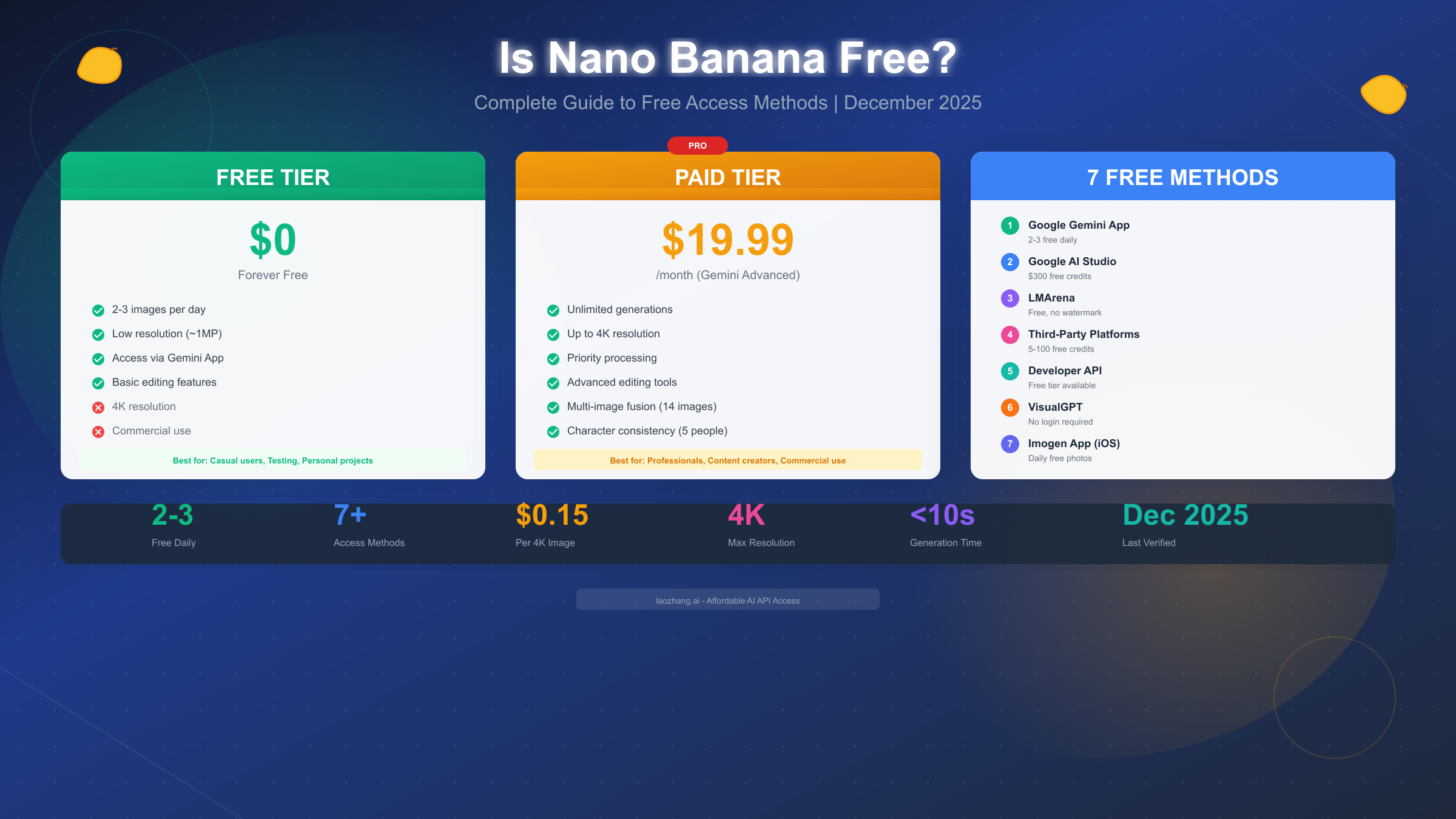
Google's Nano Banana has taken the AI image generation world by storm, becoming one of the most talked-about tools for creating and editing images with artificial intelligence. Whether you've seen the viral Wong Kar-wai style portraits flooding social media or heard about its impressive text rendering capabilities, you're probably wondering the same thing everyone else is: can you actually use Nano Banana without paying anything? The short answer is yes—Nano Banana is free with certain limitations—but the full picture involves understanding exactly what you get for free, how to access it, and when you might need to consider paid options.
As of December 2025, Google offers free access to Nano Banana through multiple channels, with the most straightforward being the Gemini app where free users can generate 2-3 low-resolution images daily. However, this barely scratches the surface of what's possible. Through third-party platforms, developer APIs, and alternative access methods, you can significantly extend your free usage—and this guide will show you exactly how to do it with 7 verified methods.
Quick Answer: Is Nano Banana Free in 2025?
Before diving into the details, let me give you the direct answer you came here for: Nano Banana is available for free, but with significant limitations that you need to understand before deciding if the free tier meets your needs.
The core free offering through Google Gemini includes 2-3 image generations per day at approximately 1 megapixel resolution. This quota resets roughly every 8 hours rather than on a daily schedule, which many users don't realize. The free tier includes both the original Nano Banana (Gemini 2.5 Flash Image) and limited access to Nano Banana Pro (Gemini 3 Pro Image), though Pro usage is capped at just 3 generations before the system reverts you to the standard model.
Understanding what "free" actually means requires looking at several factors. The resolution limitation is significant—1 megapixel produces images around 1024x1024 pixels, which is perfectly fine for social media posts, thumbnails, and personal projects, but falls short for professional print work or high-resolution displays. The daily limit of 2-3 images sounds restrictive until you realize you can use multiple free methods simultaneously, effectively multiplying your available generations.
The free tier does include access to Nano Banana's core features: text-to-image generation, basic photo editing, and the new draw-to-edit functionality that launched in December 2025. What you won't get without paying includes unlimited generations, 4K resolution output, advanced multi-image fusion (beyond 2-3 images), character consistency across multiple generations, and priority processing during peak times.
For context, Nano Banana competes with tools like DALL-E 3, Midjourney, and Stable Diffusion. Unlike Midjourney's subscription-only model, Nano Banana's free tier is genuinely usable for casual users. Compared to ChatGPT's image generation limits (which you can learn more about in our ChatGPT image limits guide), Nano Banana offers comparable free access with faster generation speeds—typically under 10 seconds compared to ChatGPT's often minute-long waits.
Nano Banana vs Nano Banana Pro: Understanding the Versions
One source of confusion for many users is the relationship between "Nano Banana" and "Nano Banana Pro." These aren't competing products—they're different modes of the same tool, each built on different underlying Gemini models with distinct capabilities.
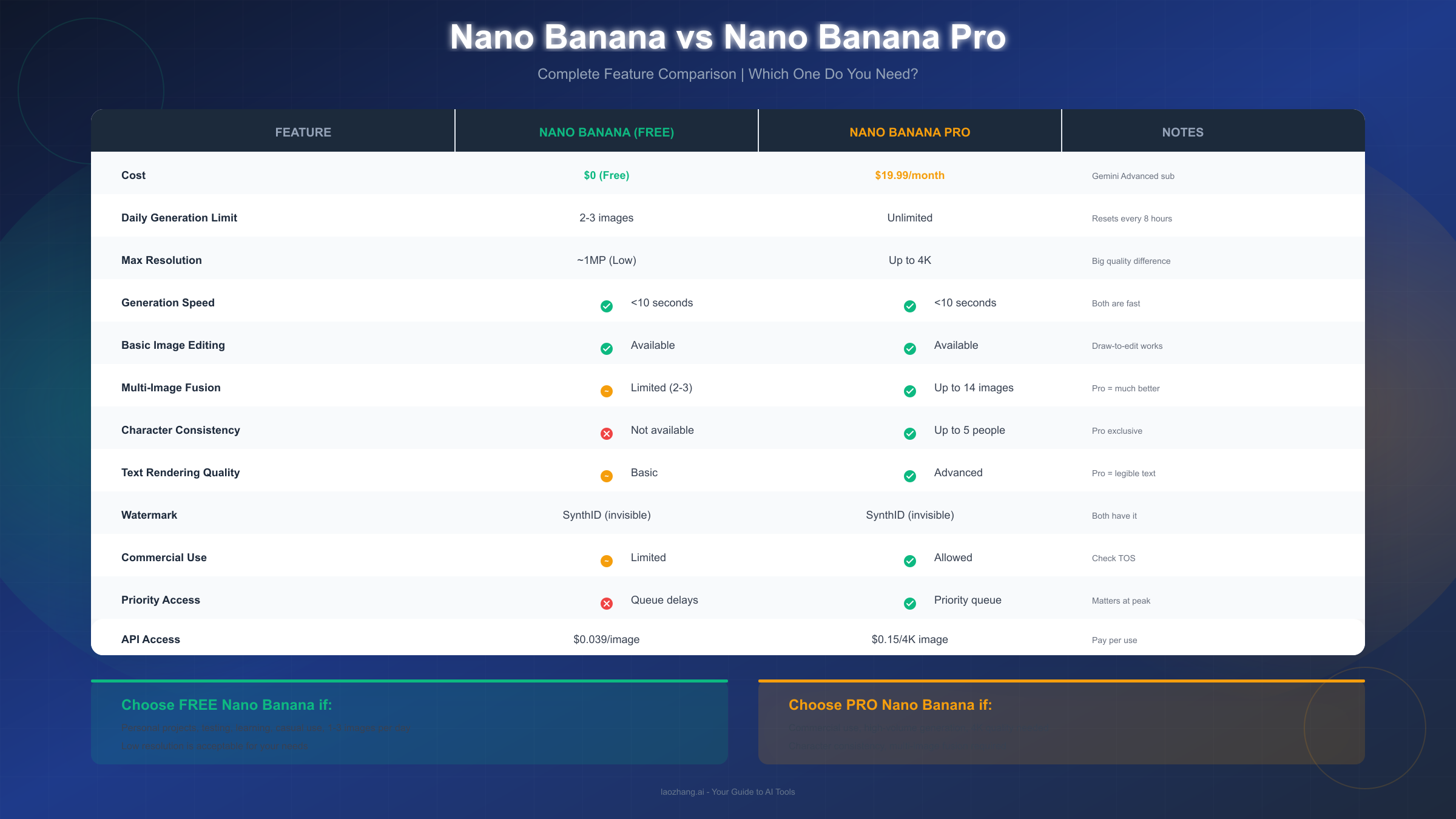
Nano Banana (Original) runs on Gemini 2.5 Flash Image, Google's faster, lighter model optimized for quick iterations. It excels at rapid generation speeds, basic image editing, and handles most casual use cases admirably. When you access Nano Banana through the Gemini app and select "Fast" mode, this is what you're using. The model prioritizes speed over absolute quality, generating images in under 10 seconds in most cases.
Nano Banana Pro runs on Gemini 3 Pro Image, Google's more sophisticated model with enhanced reasoning capabilities. Selecting "Thinking" mode in the Gemini app activates this version. Pro introduces a "think before draw" approach where the model plans the scene composition before generating, resulting in better spatial relationships, more accurate text rendering, and superior handling of complex prompts. It supports up to 14-image fusion (compared to 2-3 for the standard version), maintains character consistency across up to 5 people, and outputs in resolutions up to 4K.
The naming originates from LMArena, where Google tested these models anonymously. "Nano Banana" was the codename for Gemini 2.5 Flash Image during blind testing, and the community adopted it so enthusiastically that Google embraced it for marketing. Nano Banana Pro followed the same pattern when Gemini 3 Pro Image launched in November 2025.
For free users, the practical difference is that standard Nano Banana remains available after your Pro quota expires, ensuring you're never completely locked out. Understanding this distinction helps you strategize: use your 3 Pro generations for complex projects requiring quality, save standard generations for simpler tasks.
Method 1: Google Gemini App (Easiest Free Access)
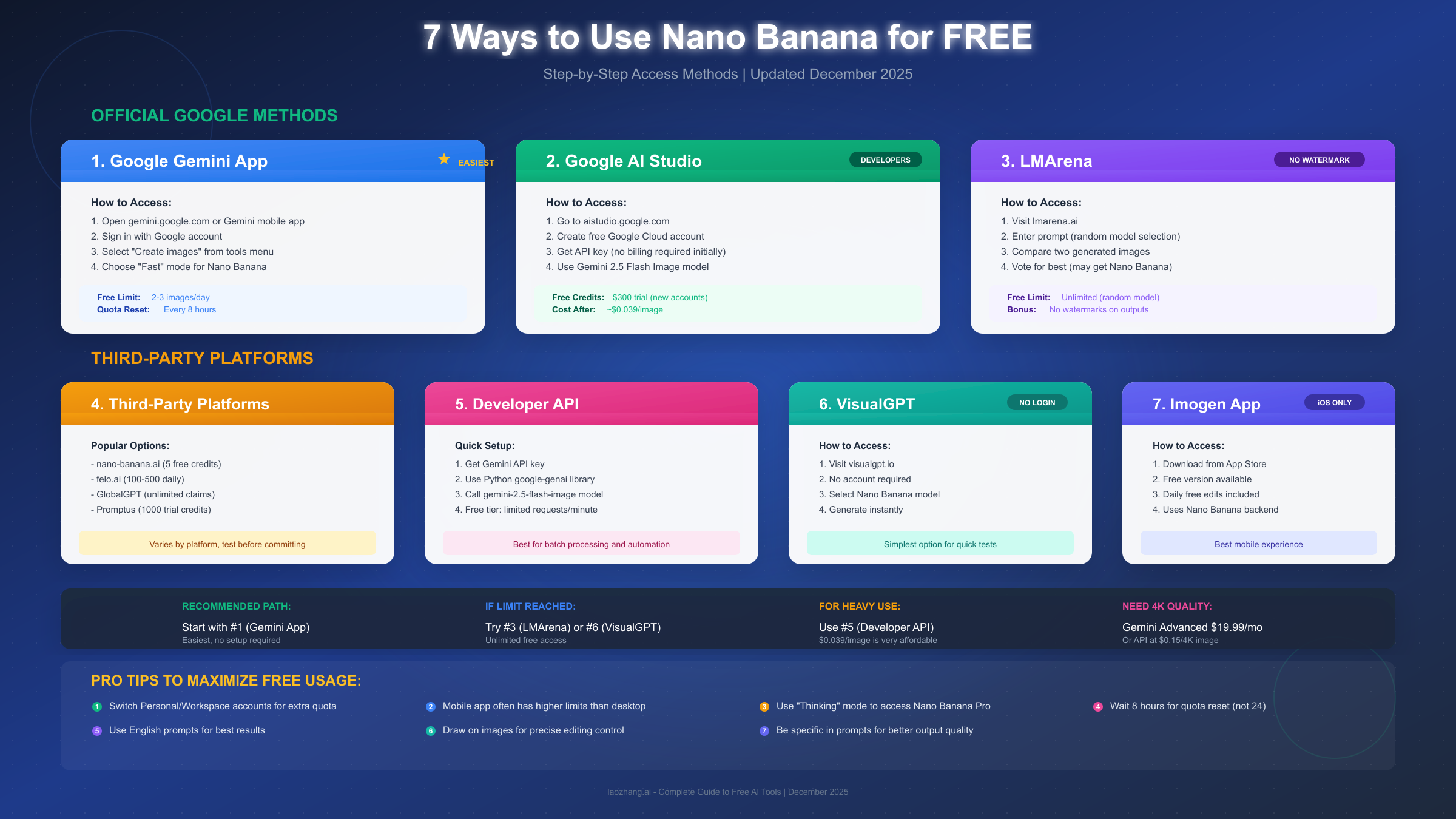
The most straightforward path to free Nano Banana access is through Google's official Gemini app, available on web browsers, Android, and iOS. This method requires nothing more than a Google account and takes less than two minutes to set up.
Getting started is remarkably simple. Navigate to gemini.google.com in your browser or download the Gemini app from your device's app store. Sign in with any Google account—personal Gmail accounts work fine, and you don't need Google Workspace or any special subscription. Once logged in, you'll see the standard Gemini chat interface with a tools menu at the top or side of the screen.
To access Nano Banana specifically, look for the "Create images" option (sometimes displayed with a banana emoji 🍌) in the tools menu. Before generating, check the model selector. Choose "Fast" for standard Nano Banana or "Thinking" for Nano Banana Pro. Remember that Thinking mode's Pro access is limited to 3 generations for free users, so save it for when you truly need higher quality.
Your free quota works as follows. Free users receive 2-3 image generations per session, with the quota resetting approximately every 8 hours rather than at midnight. Many users report that mobile apps sometimes offer slightly higher limits than desktop browsers, though this varies and may change. When your quota runs out, Gemini doesn't lock you out entirely—it simply reverts to the standard Nano Banana model with reduced quality and features.
A few tips maximize your free experience here. First, try switching between your personal Google account and any Workspace account you might have access to—each account maintains separate quotas. Second, if generation quality seems lower than expected, explicitly request higher quality in your prompt with phrases like "high-detail" or "professional quality." Third, the new draw-to-edit feature (launched December 2025) lets you draw directly on uploaded images to guide edits, providing more precise control than text prompts alone.
The Gemini app approach suits casual users, first-time experimenters, and anyone wanting the most direct access to Nano Banana without technical setup. For heavier usage, you'll want to combine this with other methods described below.
Method 2: Google AI Studio (For Developers and Power Users)
Google AI Studio provides a more technical but potentially more generous path to free Nano Banana access. This platform is designed for developers building AI-powered applications, but anyone comfortable with basic web interfaces can use it for image generation.
Setting up AI Studio access involves a few more steps than the Gemini app, but unlocks additional capabilities. Start by visiting aistudio.google.com and signing in with your Google account. You'll need to create a Google Cloud account if you don't have one—this is free and doesn't require a credit card initially. Once in AI Studio, navigate to the model catalog and look for "Gemini 2.5 Flash Image" (Nano Banana) or "Gemini 3 Pro Image" (Nano Banana Pro).
The free tier structure here differs from the Gemini app. New Google Cloud accounts receive $300 in trial credits that can be applied toward API usage. At approximately $0.039 per standard image generation or $0.15 per 4K generation, those credits stretch quite far—enough for thousands of images if you're strategic. Even after credits expire, Google maintains a free tier with limited requests per minute that can satisfy light usage needs.
For those comfortable with code, the Python integration offers the most flexibility. Install Google's google-genai library via pip, configure your API key (available free from AI Studio), and you can generate images programmatically. This approach excels for batch processing, automation, and integration into larger workflows. A basic script to generate an image requires just 5-10 lines of code, and our Gemini API key guide walks through the complete setup process.
Critical safety note: never enable billing unless you fully understand API pricing and have set up budget alerts. While the free tier is genuinely free, enabling billing without limits could result in unexpected charges. AI Studio allows you to set hard spending caps—use them. The platform displays clear usage metrics so you can monitor consumption before approaching any limits.
AI Studio works best for developers, technically-inclined users wanting more control, and anyone needing batch generation capabilities. The learning curve is steeper than the Gemini app, but the flexibility and potential volume make it worthwhile for serious users.
Method 3: Third-Party Platforms (Extended Free Options)
Beyond Google's official channels, numerous third-party platforms have integrated Nano Banana, often offering more generous free tiers or unique features. These platforms typically access the same underlying Google API but add their own interfaces, pricing models, and value-additions.
Several platforms stand out for their free offerings. LMArena (lmarena.ai) deserves special mention as a completely free option with an interesting twist—it runs blind comparison tests where you evaluate two AI-generated images without knowing which models produced them. Nano Banana frequently appears in these comparisons, and since it's completely free with no watermarks, users can accumulate Nano Banana outputs simply by participating in model evaluations. The catch is that you can't specifically select Nano Banana; you get whatever models the system chooses.
For more direct access, VisualGPT (visualgpt.io) offers a beginner-friendly interface where you can use Nano Banana instantly without creating an account. Simply visit the site, select the Nano Banana model, enter your prompt, and generate. This no-login approach is perfect for quick tests or one-off generations, though tracking your usage across sessions becomes impossible.
Platforms like nano-banana.ai, felo.ai, and GlobalGPT offer signup-based free tiers with varying credit systems. Nano-banana.ai provides 5 free credits to new users. Felo.ai claims 100-500 free daily generations depending on the account type. GlobalGPT positions itself as offering "unlimited" free access, though terms and availability should be verified before relying on it for production use.
When using third-party platforms, exercise appropriate caution. Verify that platforms are legitimate before uploading sensitive images or entering personal information. Check terms of service regarding image ownership and commercial use rights. Some platforms may inject their own watermarks or impose usage restrictions not present in Google's direct offerings. Platform availability can be inconsistent—free offerings sometimes disappear without notice, so don't build critical workflows around any single third-party option.
For users seeking variety or higher volume than official channels permit, API aggregators like laozhang.ai can provide access to multiple AI models including Nano Banana at reduced rates compared to direct Google API pricing. These services bundle access to various AI tools through a single interface, which can simplify workflows for users regularly switching between different AI image generators.
Method 4: Additional Free Access Methods
Beyond the primary methods, several lesser-known options provide legitimate free Nano Banana access for specific use cases or user groups.
The Imogen app for iOS and macOS offers a polished mobile experience with Nano Banana integration. While the app follows a freemium model, the free tier includes several daily image edits and generations. Imogen's interface is particularly well-designed for creative professionals, offering precise controls that the standard Gemini app lacks. If you primarily work on Apple devices and prefer native apps over web interfaces, Imogen represents an excellent free starting point.
Educational and student access programs sometimes provide expanded free tiers. Google's AI for Education initiatives occasionally include enhanced Gemini access for verified students and educators. If you're affiliated with an educational institution, check whether your school email unlocks additional benefits through Google Workspace for Education. Some universities have negotiated institutional access that includes premium AI tool features.
Creative software integrations offer yet another avenue. Plugins for Photoshop, Krita, and other image editors increasingly incorporate Nano Banana through the API. While these often require setup and may consume API credits, the integration with professional workflows can justify the effort. The Aescripts Nano Banana Generative Fill plugin for Photoshop, for example, brings Nano Banana's editing capabilities directly into Adobe's ecosystem.
Developer beta programs frequently include free access to experimental features. Following Google AI's official channels (blog, Twitter/X, Discord communities) can alert you to beta opportunities with expanded access. Early adopters of new features often receive extended free periods as Google gathers feedback.
For those willing to invest setup time, combining multiple methods—say, daily Gemini app quota plus LMArena comparisons plus educational access—can yield substantial free usage that rivals or exceeds what competitors offer in paid tiers.
Free vs Paid: Is Free Nano Banana Good Enough?
The central question for most users isn't whether free access exists, but whether it's sufficient for their actual needs. This requires honestly assessing what you're trying to accomplish and where the free tier's limitations become problematic.
Resolution represents the most tangible difference. Free tier outputs at approximately 1 megapixel (roughly 1024x1024 pixels) work beautifully for social media posts, blog thumbnails, presentation slides, and screen-based content. They fall short for professional print materials requiring 300 DPI at larger sizes, marketing collateral destined for physical production, or any use case where viewers will scrutinize image details closely. If you're creating art for Instagram, free resolution is probably fine. If you're designing billboard graphics, it's not.
Generation volume affects different users differently. A casual user creating occasional images for personal projects won't exhaust 2-3 daily generations plus the methods outlined above. A professional content creator producing multiple pieces daily, a marketer running A/B tests across dozens of variations, or a developer building an AI-powered application will find free limits restrictive regardless of how many methods they combine. Consider your actual weekly generation count honestly—if it regularly exceeds 20-30 images, you'll likely need paid access for sustainable workflows.
Quality differences beyond resolution matter for certain projects. Nano Banana Pro's character consistency feature—maintaining recognizable faces across multiple images—has no free equivalent. Multi-image fusion beyond 2-3 sources requires Pro. Text rendering quality, while acceptable in free tier for short phrases, achieves publication-ready legibility primarily in Pro. If your projects depend on these specific capabilities, free tier fundamentally cannot deliver what you need.
Commercial use considerations add another dimension. Google's free tier terms permit personal and limited commercial use but may restrict high-volume commercial applications. If you're building a business around AI-generated imagery, carefully review terms and consider whether paid access with clearer commercial rights makes more sense from a legal and reliability standpoint.
For users who find free limitations constraining, the cost-benefit calculation usually favors one of two paths: the $19.99/month Gemini Advanced subscription for heavy individual users, or API access at per-image rates for developers and businesses. API pricing through services like laozhang.ai can reduce costs by 30-50% compared to direct Google pricing while offering higher rate limits—worth exploring for anyone generating more than a hundred images monthly.
When to Upgrade: Decision Framework
Making the right choice between free and paid Nano Banana access depends on honestly evaluating your needs across several dimensions. Here's a structured framework to guide your decision.
Stay with free access if you identify with these characteristics. You generate fewer than 20 images per week. Your primary use cases are personal projects, social media content, or experimentation. Resolution of 1024x1024 meets your needs. You don't require character consistency across multiple images. Speed and priority access during peak hours aren't critical. You're comfortable combining multiple free methods to extend your quota. Commercial use is limited or non-existent.
Consider paid access (Gemini Advanced at $19.99/month) if these apply. You regularly generate more than 30 images weekly. Output resolution of 2K or 4K is necessary for your use cases. Character consistency for recurring figures is important. Multi-image fusion beyond 3 images would benefit your projects. Priority access during Google's peak hours matters for your workflow. You want a single, reliable source without juggling multiple platforms. Commercial use is a significant part of your work.
Consider API access (direct or through resellers) if these describe your situation. You need to integrate image generation into applications or automated workflows. Batch processing is a regular requirement. You want precise control over generation parameters. Cost-per-image pricing makes more sense than subscription for your volume. You're comfortable with technical implementation or have development resources available.
For most individual users, the honest calculation often reveals that free access suffices for current needs while keeping paid options available for future scaling. There's no penalty for starting free and upgrading later—your skills and prompting techniques transfer directly to paid tiers.
Common Issues and How to Fix Them
Even with legitimate access, users encounter various issues when using Nano Banana. Here are the most common problems and their solutions, based on reports from the user community and testing.
"Quota exceeded" errors appear before you've used your expected limit. This typically indicates the quota reset happened at a different time than expected. Remember that Gemini quotas reset approximately every 8 hours, not daily. If you used generations 7 hours ago, your quota might have reset without you noticing. Solution: wait 1-2 hours and try again, or switch to an alternative method while waiting.
Generation quality seems lower than expected. Several factors affect output quality. First, check which mode you're using—"Fast" mode (standard Nano Banana) produces lower resolution than "Thinking" mode (Pro). Second, prompt specificity matters enormously; vague prompts yield generic results. Third, during peak hours, Google may throttle quality for free users. Solution: explicitly request quality in prompts ("high-detail, professional photography quality"), try generating during off-peak hours, and ensure you're in the correct mode.
Text rendering appears garbled or illegible. Standard Nano Banana's text rendering is adequate for short phrases but struggles with longer text, small fonts, or unusual typefaces. Nano Banana Pro handles text significantly better. Solution: limit text to essential words, use common fonts and larger sizes in your prompts, or use Pro mode for text-heavy generations.
Images include unexpected elements or ignore prompt instructions. This usually stems from prompt construction issues. Nano Banana interprets prompts differently than some other AI models. Solution: be more explicit about what you want and what you don't want ("no text," "single subject," "clean background"), use English prompts even if you prefer other languages (results tend to be better), and break complex requests into simpler generations that you combine afterward.
Third-party platform access stops working. Platform availability for Nano Banana can be inconsistent, especially for free tiers. Solution: don't rely exclusively on any single third-party platform, maintain Google Gemini app access as a reliable fallback, and check platform status pages or community forums when experiencing issues.
Regional access restrictions apply. Some Gemini features aren't available in all countries. Solution: verify your region supports the features you need through Google's official documentation, and be aware that third-party platforms may have different regional availability than direct Google access.
Frequently Asked Questions
Does Nano Banana have watermarks?
All Nano Banana outputs include SynthID, Google's invisible digital watermark that embeds provenance information without visibly altering the image. There's no visible "Gemini" or "Google" watermark on free tier images. The SynthID watermark is imperceptible to humans and designed to be detectable by scanning tools, allowing verification of AI-generated content without affecting visual quality.
Can I use Nano Banana for commercial projects?
Google's terms permit limited commercial use of Gemini-generated content, but specific restrictions apply depending on your access method and volume. For significant commercial use, reviewing Google's current terms of service and potentially opting for paid access with clearer commercial licensing is advisable. Some third-party platforms may have their own commercial use restrictions that differ from Google's.
How does Nano Banana compare to ChatGPT's image generation?
Both tools produce high-quality images, but they excel in different areas. Nano Banana generates images significantly faster (under 10 seconds versus often a minute for ChatGPT). ChatGPT currently has an edge in following complex, nuanced instructions. Nano Banana's draw-to-edit feature provides more intuitive editing control. For a detailed comparison of ChatGPT's image capabilities and limitations, see our ChatGPT image generation guide.
What happens when my free quota runs out?
When you exhaust your free quota on the Gemini app, the system reverts you to the standard Nano Banana model with lower quality rather than locking you out completely. You can still generate images, just at reduced resolution and without Pro features. Alternatively, switching to one of the other free methods described in this guide can extend your daily usage.
Is there a completely unlimited free option?
No legitimate service offers truly unlimited free Nano Banana access. Claims of "unlimited free" should be viewed skeptically, as API costs mean someone pays for each generation. Combining multiple free methods (Gemini app + LMArena + third-party platforms) can yield substantial free volume, but each method has its own limits. For genuinely high-volume needs, paid options are the sustainable path.
Can I remove the SynthID watermark?
SynthID is designed to be robust against common image manipulations including resizing, cropping, and compression. While technically possible to degrade the watermark through extreme manipulations, these would also significantly damage image quality. The watermark doesn't affect visual appearance or commercial viability—it's simply metadata for provenance verification.
Will my free quota increase over time?
Google hasn't committed to specific free tier evolutions. Historically, Google has sometimes expanded free offerings for AI products to drive adoption, but has also reduced them when demand exceeded infrastructure capacity (as happened briefly with Nano Banana Pro in late 2025). Free users should expect fluctuations and maintain flexibility in their access strategies.
Conclusion: Making the Most of Free Nano Banana
Nano Banana represents one of the most accessible entries into high-quality AI image generation, with a genuinely usable free tier that competitors like Midjourney don't match. By understanding the free tier's actual capabilities—2-3 daily generations at approximately 1MP resolution through Google Gemini, plus extended access through LMArena, AI Studio, third-party platforms, and other methods—you can accomplish significant creative work without spending money.
The 7 free access methods covered in this guide, from the straightforward Gemini app to developer-focused AI Studio to community platforms like LMArena, provide multiple paths to Nano Banana based on your technical comfort level and use case requirements. Combining methods strategically—using Gemini for convenience, LMArena for watermark-free outputs, and AI Studio for any programmatic needs—maximizes free availability.
Whether free access suffices for you depends on volume, quality requirements, and commercial needs. For personal projects, social media content, and creative experimentation, free Nano Banana delivers genuine value. For professional workflows demanding high resolution, guaranteed availability, or advanced features like character consistency, paid options through Gemini Advanced ($19.99/month) or API access provide necessary capabilities at reasonable costs—especially through aggregators like laozhang.ai that reduce per-image expenses.
The AI image generation landscape evolves rapidly. Nano Banana's capabilities and pricing may shift as Google competes with OpenAI, Midjourney, and emerging players. Staying informed through official Google AI channels and trusted tech news ensures you can adapt your strategy as the ecosystem develops. For now, Nano Banana offers an exceptional combination of quality, speed, and accessibility that makes it worth exploring—starting with the free methods that cost nothing but your time.


