
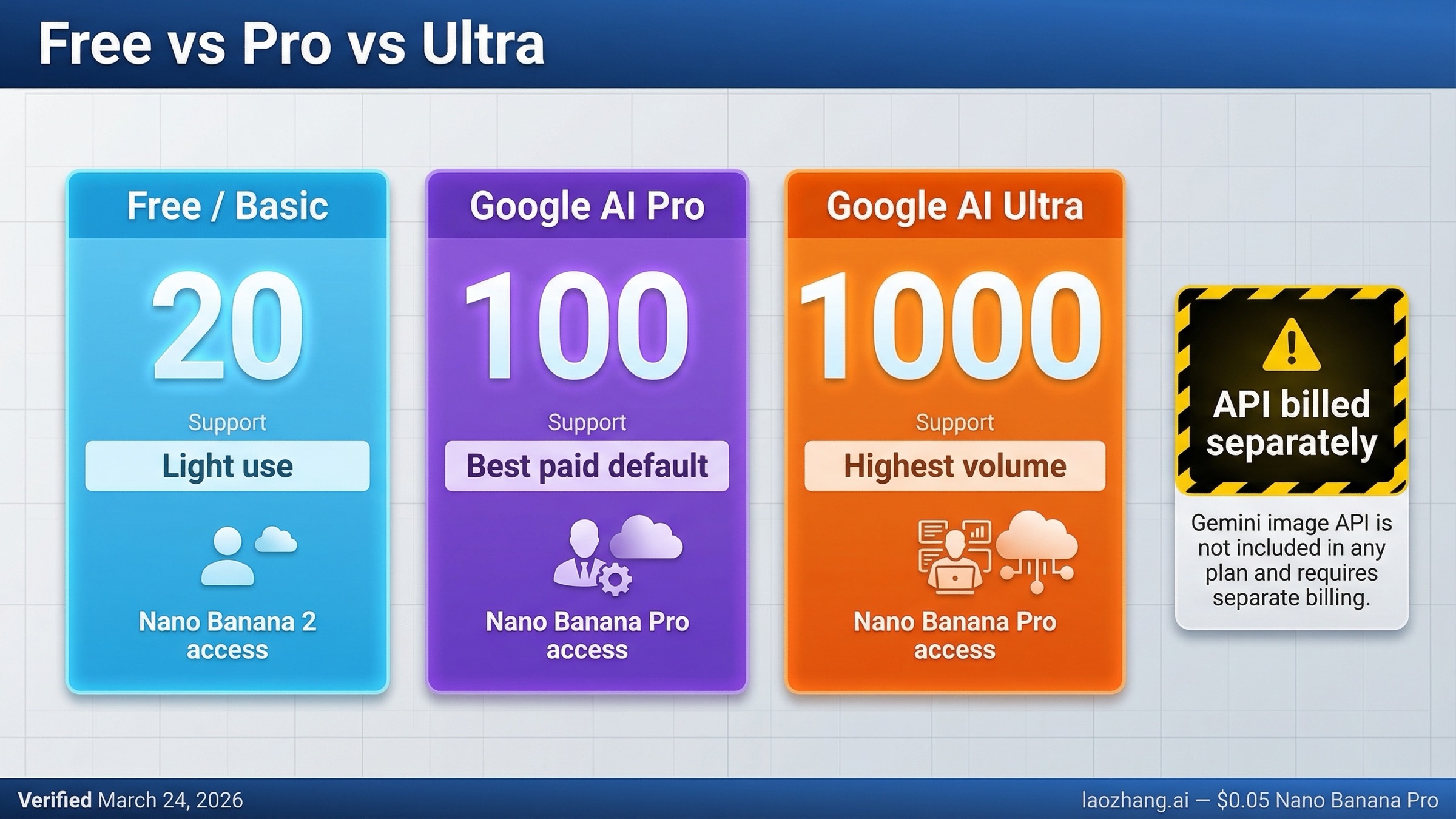
As of March 24, 2026, Gemini Free is still enough for light image generation, Google AI Pro is the default paid upgrade for most people, and Google AI Ultra is only worth it if you routinely need very high daily image volume. Google's current help table lists up to 20 Nano Banana 2 images per day on Basic, up to 100 on Google AI Pro, and up to 1,000 on Google AI Ultra.
The important nuance is that paying does not just mean "more images." Google's current product pages split the experience across Nano Banana 2 image generation, Nano Banana Pro redo or higher-access lanes, and extra access in surfaces like Search. The other easy mistake is treating a Google AI subscription like a Gemini API bundle. It is not. The app-plan upgrade and the image API bill are separate decisions.
TL;DR
If you only need the short version, use this table first.
| Plan | Current Gemini app image allowance | Nano Banana Pro access | Best fit |
|---|---|---|---|
| Free / Basic | Up to 20 Nano Banana 2 images per day | None in the current help table | Casual manual image generation |
| Google AI Plus | Up to 50 Nano Banana 2 images per day | Up to 50 Nano Banana Pro redo actions per day | Middle paid lane where available |
| Google AI Pro | Up to 100 Nano Banana 2 images per day | Up to 100 Nano Banana Pro redo actions per day, plus higher access to Nano Banana Pro in Gemini and Search | Best paid default for most serious users |
| Google AI Ultra | Up to 1,000 Nano Banana 2 images per day | Up to 1,000 Nano Banana Pro redo actions per day and the highest access across Google AI surfaces | Heavy daily image use and power users |
That table already tells most readers what to do.
- Stay on Free if 20 daily images and no Pro redo path are enough.
- Upgrade to Google AI Pro if you regularly hit the free cap and want a real jump without paying for Ultra-scale headroom.
- Pay for Google AI Ultra only if you routinely burn through very high daily volume or you know you want Google's highest AI access across multiple surfaces, not just Gemini image generation.
Two caveats keep this page from becoming just another quota dump. First, the official help page also shows Google AI Plus at 50 images per day, so the real live plan ladder is Free, Plus, Pro, Ultra even if many searchers only ask "free vs pro vs ultra." Second, Google's help page says image limits are in high demand, may change frequently, are distributed throughout the day, and reset daily. So treat these rows as the current official picture, not as a forever promise.
Current Free vs Pro vs Ultra Image Limits
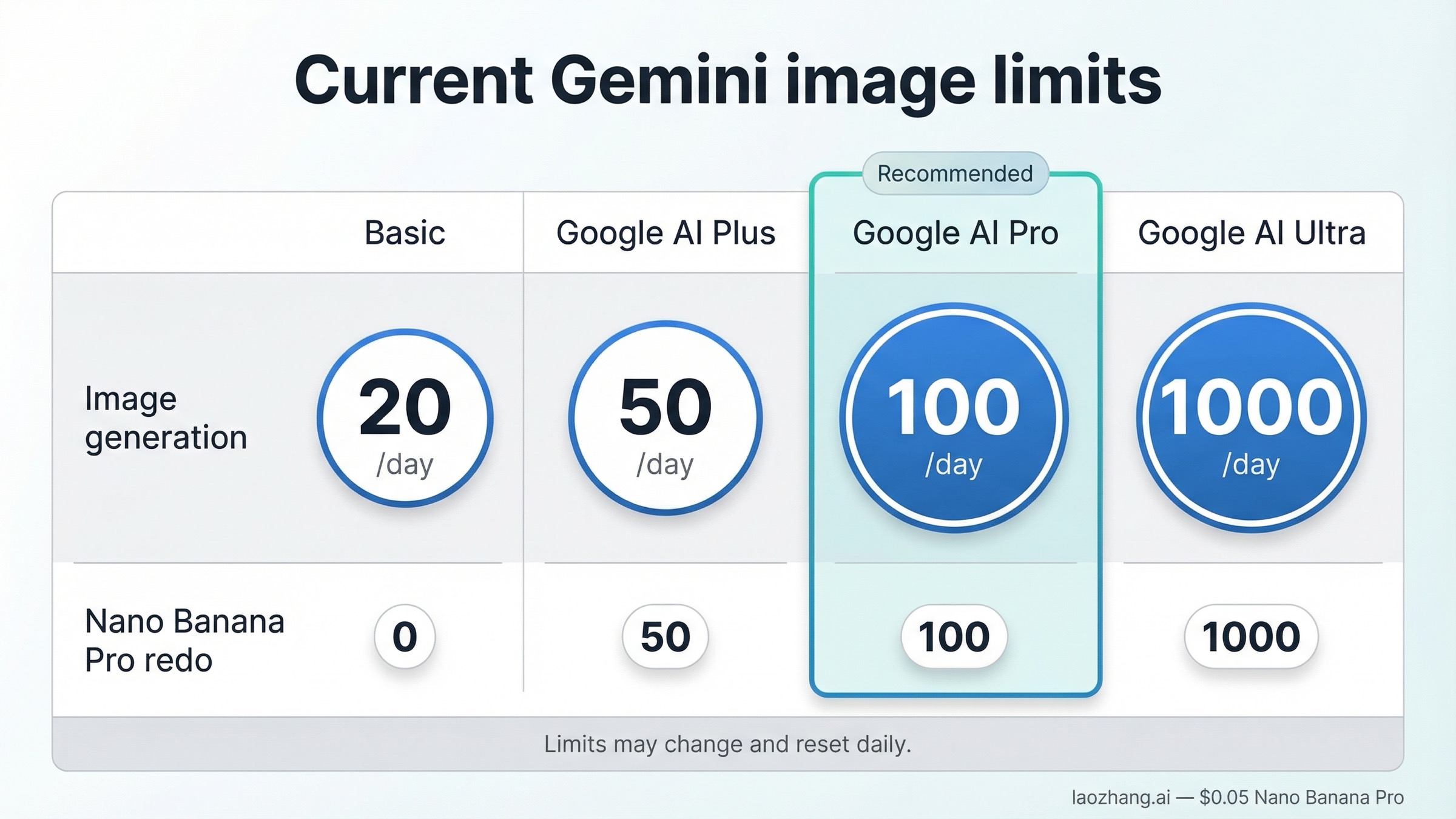
The cleanest source for the current answer is Google's live Gemini Apps limits and upgrades page, not a recycled roundup.
As checked on March 24, 2026, Google currently lists the following under "Image generation and editing with Nano Banana 2":
- Basic: up to 20 images per day
- Google AI Plus: up to 50 images per day
- Google AI Pro: up to 100 images per day
- Google AI Ultra: up to 1,000 images per day
The same page also has a separate line for "Redo images with Nano Banana Pro." That row is easy to miss, but it matters because it changes how you should interpret the paid upgrade. The current help table shows:
- Google AI Plus: up to 50 Nano Banana Pro redo actions per day
- Google AI Pro: up to 100 per day
- Google AI Ultra: up to 1,000 per day
That split is more useful than a vague "Pro gets more" summary. Google's current app experience is still centered on Nano Banana 2 as the default image-generation lane. The paid difference is not simply "pay and everything becomes Nano Banana Pro all the time." The more accurate reading is:
- free gives you a real Nano Banana 2 image path
- paid plans raise that daily ceiling
- paid plans also add a separate Nano Banana Pro lane through redo or higher-access experiences
This is why many older pages now feel half-right. A lot of late-2025 coverage focused on tiny free Nano Banana Pro caps. Google's current March 2026 help table tells a different story: the practical free answer is now a Nano Banana 2 allowance story first, with Nano Banana Pro framed more clearly as a paid enhancement.
If you only wanted to know whether free image generation still exists in Gemini, the answer is yes. If you wanted to know whether paying meaningfully changes the experience, the answer is also yes, but mostly through higher daily room and better access to the Pro lane, not through a magic rewrite of the whole app.
What Actually Changes When You Pay
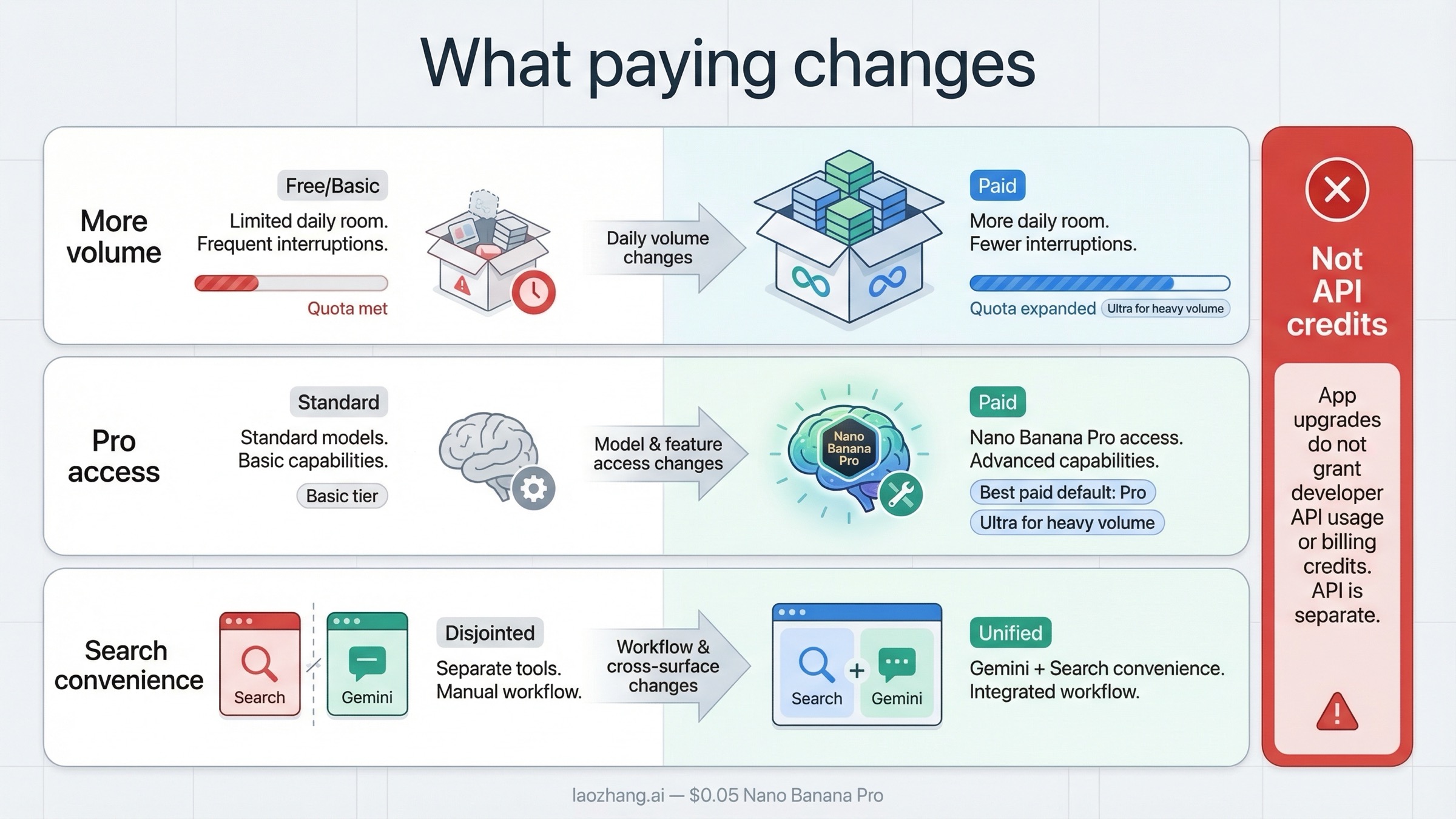
The current Google AI plan pages are better at marketing the upgrade than at explaining it. The practical change falls into three buckets.
The first is simple volume. If you are hitting the free cap often, moving from 20 daily images to 100 with Google AI Pro is a real quality-of-life upgrade. That is the clearest reason most people would pay. The jump from 100 on Pro to 1,000 on Ultra is also real, but it matters to a much narrower slice of users.
The second is Nano Banana Pro access. Google's Google AI plans page says Google AI Pro gives higher access to Nano Banana Pro image generation in the Gemini app and Search, while Google AI Ultra gives the highest access. Google's Nano Banana Pro product posts reinforce the same basic message: free-tier users get limits, and paid subscribers get higher quotas. In other words, paying is not only about generating more Nano Banana 2 images. It is also about getting more room in the premium image lane.
The third is cross-surface convenience. Google's plan page and Search announcements do not frame Pro and Ultra as single-feature image purchases. They frame them as higher access across Gemini, Search, and related AI tools. That matters because some users do not actually want "more image generations" in isolation. They want fewer interruptions as they move between Gemini chat, Search, and other Google AI surfaces. If that is your real goal, Pro or Ultra can make more sense than the raw table alone suggests.
What paying does not do is erase every tradeoff.
- It does not turn Ultra into the right answer for everyone.
- It does not mean the free tier becomes useless.
- It does not bundle Gemini API usage into your app subscription.
That is why the right comparison is not just "which plan is bigger?" The right comparison is "which plan solves my actual image workflow without paying for headroom I will never use?"
When Free Is Enough, When Pro Is Right, and When Ultra Is Worth It
Most readers do not need a buyer's guide. They need a default recommendation.
Stay on Free if your image use is occasional and manual
If you use Gemini image generation for mockups, social images, visual brainstorming, image edits, or the occasional design concept, Free is still viable. Twenty daily Nano Banana 2 images is not nothing. For many casual users it is enough, especially if your work is still manual inside the Gemini interface rather than part of a team workflow.
The free tier stops being attractive when your usage is frequent enough that you are thinking about the cap every day. If your real problem is "I keep running out before I finish today's work," then Free has probably already told you it is not the right long-term plan.
Google AI Pro is the default paid upgrade for most people
Google AI Pro is the easiest plan to recommend because it is where the upgrade becomes materially useful without becoming excessive. Going from 20 to 100 daily images is a real jump, and the matching 100-per-day Nano Banana Pro redo allowance means the paid lane starts feeling like a tool you can actually lean on instead of a limited novelty.
That is why Pro is the most sensible answer for:
- people who create images almost every day
- marketers and creators who need iterative retries
- users who want paid access without jumping all the way to Ultra
- anyone who is already confident that 20 daily images is too tight
It also fits the way Google itself frames the plan. The official plan page uses "higher access" language for Nano Banana Pro rather than a niche or specialist-only promise. That is exactly how a default paid tier should behave.
Google AI Ultra is mainly for heavy daily image volume
Ultra becomes rational when you already know that 100 images per day is not enough, or when you care about the highest access across Google's AI surfaces more broadly. If your work genuinely involves large daily image batches, the 1,000-per-day ceiling is obviously different from Pro's 100.
But that is also why Ultra is easy to overspend on.
For a lot of users, Ultra sounds safer than Pro because the cap is so much larger. In practice, that safety is wasted money if you are never going to use it. If your typical day is 10, 20, or even 50 images, the difference between Pro and Ultra is mostly theoretical. The right question is not "Would more headroom be nice?" It is "Will I routinely use enough volume to justify paying for the biggest bucket?"
If the honest answer is no, Ultra is overkill.
The API Catch: Google AI Plans Are Not Gemini Image API Credits
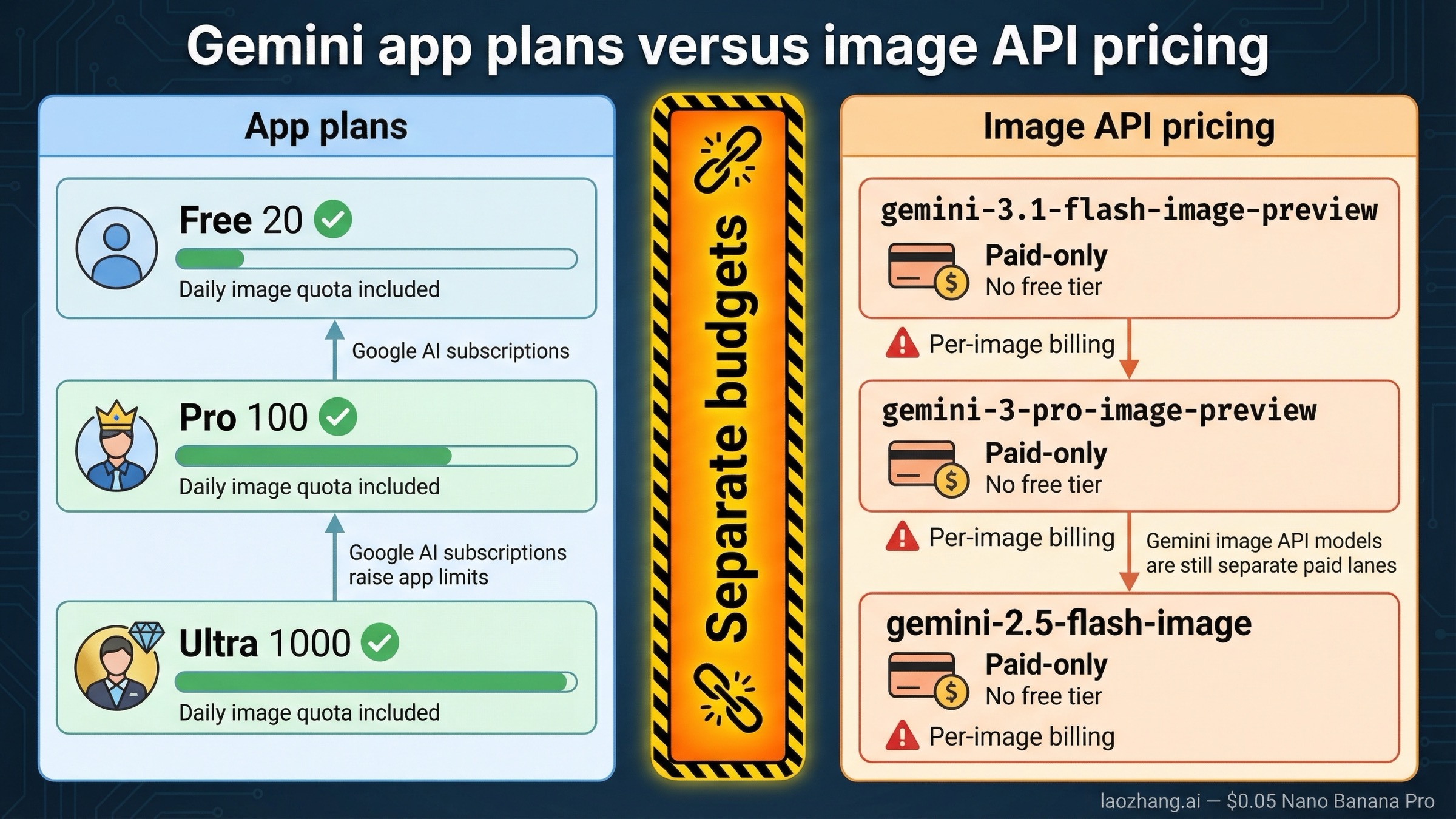
This is the most expensive misunderstanding in the keyword family.
Google AI subscriptions are about Gemini app and related Google AI surface access. They are not the same thing as Gemini API billing. If you upgrade from Free to Pro or Ultra, you are buying more room in the app experience and higher access to certain Google AI features. You are not buying a free Gemini image API lane.
Google's current Gemini image-generation documentation maps the image model names like this:
- Nano Banana 2 =
gemini-3.1-flash-image-preview - Nano Banana Pro =
gemini-3-pro-image-preview - Nano Banana =
gemini-2.5-flash-image
On the current Gemini pricing page, all three of those live image-capable API models still show no free tier. The current official prices are roughly:
| Gemini image API model | Free tier on pricing page | Current paid pricing signal |
|---|---|---|
gemini-3.1-flash-image-preview | Not available | About $0.045 per 0.5K image, $0.067 per 1K, $0.101 per 2K, $0.151 per 4K |
gemini-3-pro-image-preview | Not available | About $0.134 per 1K or 2K image, $0.24 per 4K |
gemini-2.5-flash-image | Not available | About $0.039 per image standard or $0.0195 per image in batch |
So if your real job is automation, scripting, batching, or product integration, your next step is not "Which consumer plan should I buy?" It is "Which paid image API lane should I budget for?" That is a different decision with a different answer. If that is your situation, read Gemini image generation API pricing next, not just another consumer plan roundup.
The same split also explains why nearby pages can sound contradictory while still each contain part of the truth. One page is talking about app entitlements. Another is talking about API billing. Unless a page separates those two surfaces cleanly, it will keep sounding clearer than it actually is.
Best Choice by Use Case
If you want the shortest recommendation by situation, use this:
| Your situation | Best current choice | Why |
|---|---|---|
| You only make a handful of images in Gemini each day | Free / Basic | 20 daily Nano Banana 2 images is still enough for many manual users |
| You create images frequently and want the most sensible paid upgrade | Google AI Pro | 100 daily images plus 100 Nano Banana Pro redo actions is the most practical upgrade step |
| You routinely need very high daily volume or want Google's highest access across multiple AI surfaces | Google AI Ultra | 1,000 daily images is only useful when you will actually use that headroom |
| You need API automation, product integration, or predictable pay-as-you-go scaling | Paid Gemini image API, not a Google AI app plan | Consumer subscriptions do not replace Gemini image API billing |
That routing is the real value missing from a lot of current results. Too many pages try to stay neutral between the plans, as if every reader is equally likely to need Ultra. They are not.
For most people, the right answer is one of these:
- Free if your image work is light and occasional
- Pro if you need a meaningful daily upgrade
- Ultra only if you already know Pro-level volume will not be enough
If your real question is closer to "How do the daily caps refill?" then the better next read is Gemini image generation limit reset time. If your question is broader than the plan comparison and you want the full app-vs-AI-Studio-vs-API split, read Gemini image generation free tier.
FAQ
Does Google AI Pro make Gemini images higher quality, or just give me more of them?
The clearest current official difference is access and limit size, not a promise that every ordinary generation becomes a different model tier by default. Google's current help table still centers Nano Banana 2 for image generation, while paid plans add higher limits and Nano Banana Pro redo or higher-access paths.
Does Google AI Ultra include Gemini image API credits?
No. Google's app-plan upgrades and Gemini API pricing are separate. The current Gemini pricing page still shows no free tier for the live Gemini image API models.
What about Google AI Plus?
Google AI Plus still appears on the current help table at up to 50 Nano Banana 2 images per day with up to 50 Nano Banana Pro redo actions per day. This article focuses on Free vs Pro vs Ultra because that is how most searchers phrase the comparison, but Plus is a live middle tier and worth checking if it is available in your region.
When do Gemini image limits reset?
For the Gemini app, Google's current help page says limits may change frequently, are distributed throughout the day, and reset daily. For the Gemini API, requests-per-day quotas reset at midnight Pacific time.
Should I upgrade to Pro or just start paying for the Gemini image API?
Upgrade to Pro if your work is still mostly manual inside Gemini and the free cap is the only thing holding you back. Move to the paid API if your real need is automation, batch generation, or product integration.
Bottom Line
The honest March 24, 2026 answer is simple.
Free is still good enough for light Gemini image generation. Google AI Pro is the default paid upgrade for most people because 100 daily images plus paid Pro-lane access is a real step up. Google AI Ultra only starts making sense when you genuinely need very high daily volume or the highest limits across Google's AI surfaces. Just do not confuse that app-plan decision with Gemini API pricing, because Google's current image API remains a separate paid lane.


