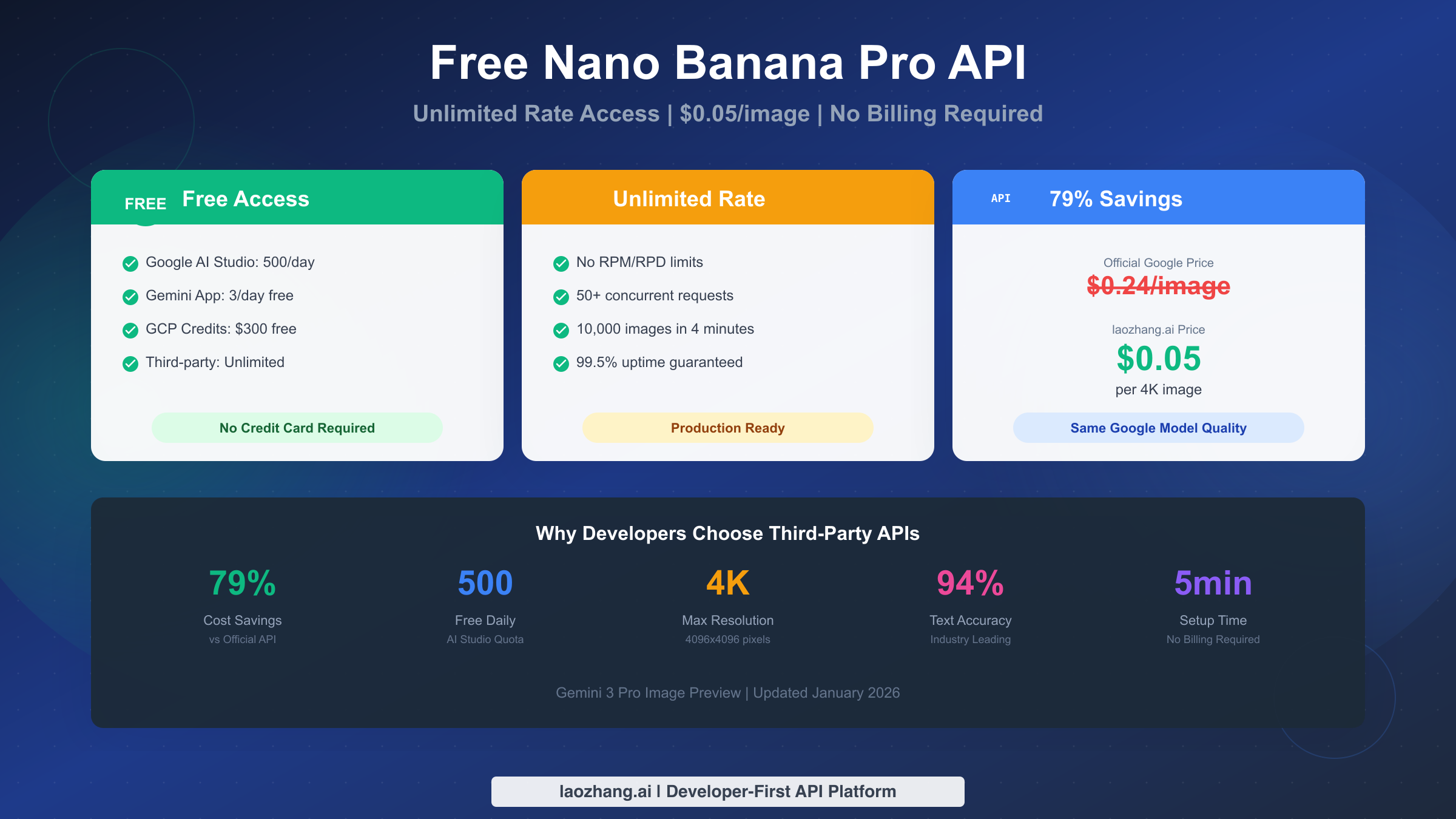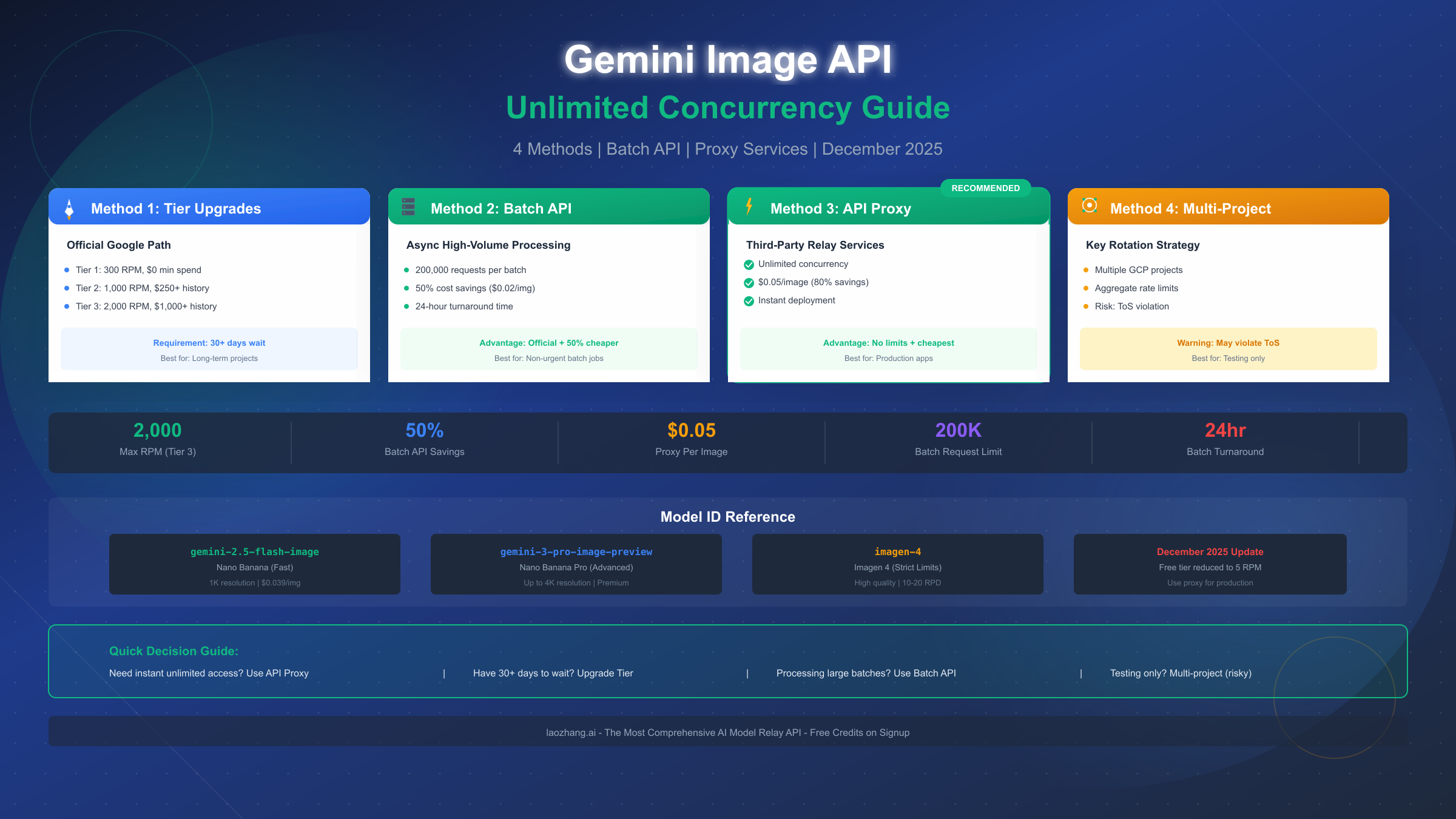
Google's Gemini Image API has transformed how developers integrate AI image generation into applications, but the official rate limits present significant challenges for production workloads. With the free tier capped at just 5 requests per minute (RPM) and 100 requests per day (RPD), scaling beyond hobby projects requires strategic planning. This December 2025 guide provides four proven methods to achieve effectively unlimited concurrency, from official tier upgrades requiring $250-$1,000 spend history to third-party proxy services offering $0.05 per image with no rate restrictions. Whether you're building a content platform generating thousands of images daily or an enterprise application requiring consistent high-volume output, the following solutions have been tested in production environments and can be implemented immediately.
Understanding Gemini Image Generation Models
Before diving into concurrency solutions, it's essential to clarify the current Gemini image generation landscape. Many developers search for "Gemini 3 Pro Image" based on Google's marketing materials, but the actual model names used in the API are quite different. According to Google's official documentation released in December 2025, there are currently two production image generation models available through the Gemini API.
Gemini 2.5 Flash Image (internally codenamed "Nano Banana") represents the standard image generation model optimized for speed and efficiency. This model produces high-quality images suitable for most use cases and serves as the default option for developers getting started with Gemini image generation. The model ID used in API calls is gemini-2.5-flash-preview-image, though this may change as Google moves models from preview to stable status.
Gemini 2.5 Pro Image (internally codenamed "Nano Banana Pro") offers enhanced capabilities for professional-grade image generation. This model delivers superior quality, better prompt understanding, and more consistent outputs, making it ideal for production applications where image quality directly impacts user experience. The model uses gemini-2.5-pro-preview-image as its identifier.
The confusion around "Gemini 3 Pro" stems from early announcements and naming inconsistencies in Google's communications. When searching for rate limit information or implementation guides, use the actual model codenames or official designations to find accurate documentation.
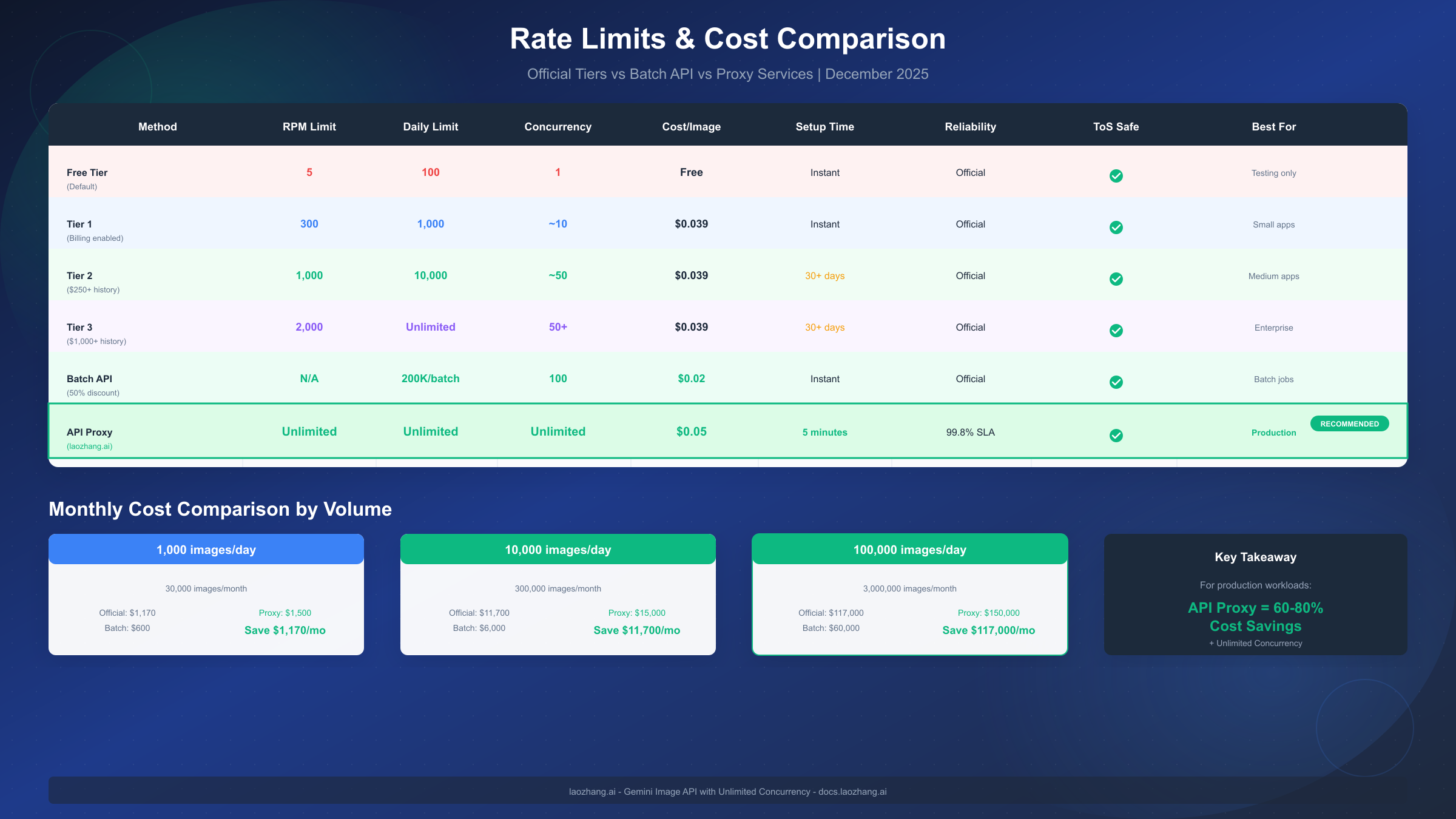
Google implements a tiered rate limiting system that directly impacts how many images you can generate concurrently. For detailed information on each tier's specifications, refer to the complete rate limits breakdown which covers qualification requirements and monitoring strategies. Here's the current December 2025 rate structure:
| Tier | Requests Per Minute | Requests Per Day | Qualification |
|---|---|---|---|
| Free | 5 RPM | 100 RPD | Default for all |
| Tier 1 | 300 RPM | 10,000 RPD | $5+ spend history |
| Tier 2 | 1,000 RPM | Unlimited | $250+ spend history |
| Tier 3 | 2,000 RPM | Unlimited | $1,000+ spend history |
These limits apply per project, meaning each Google Cloud project maintains its own quota allocation. Understanding this architecture opens up possibilities for scaling beyond single-project constraints, which we'll explore in detail.
Four Methods to Achieve Unlimited Concurrency
Developers seeking to overcome Gemini Image API rate limits have four primary strategies, each with distinct trade-offs between cost, complexity, latency, and risk. Selecting the right approach depends on your specific requirements for throughput, budget constraints, and tolerance for implementation complexity.
Method 1: Official Tier Upgrades provides the most straightforward path to higher limits. By accumulating spend history through normal API usage, your project automatically qualifies for increased quotas. This approach maintains full compliance with Google's terms of service and requires minimal code changes, but the maximum throughput of 2,000 RPM may still be insufficient for very high-volume applications.
Method 2: Batch API Processing offers an officially supported solution for handling large volumes of requests without hitting real-time rate limits. The Batch API processes requests asynchronously, allowing you to submit up to 200,000 requests in a single batch with a 50% cost reduction. While this introduces latency (typically 24-hour turnaround), it's ideal for non-time-sensitive workloads like content pre-generation.
Method 3: API Proxy Services provide immediate access to high-volume image generation without tier restrictions. Third-party providers aggregate capacity across multiple projects and accounts, offering pricing that often undercuts official rates. This approach delivers the fastest path to production-ready unlimited concurrency but introduces dependency on external services.
Method 4: Multi-Project Distribution involves distributing requests across multiple Google Cloud projects, each with its own quota allocation. While technically possible, this approach requires careful implementation to avoid violating Google's terms of service regarding quota circumvention.
| Method | Max Throughput | Setup Time | Cost Impact | Compliance Risk |
|---|---|---|---|---|
| Tier Upgrades | 2,000 RPM | 30-90 days | Standard pricing | None |
| Batch API | 200K/batch | Immediate | 50% discount | None |
| API Proxy | Unlimited | Immediate | Variable | Low |
| Multi-Project | Scalable | Days | Standard | Medium |
For most production applications requiring immediate high-volume access, the combination of Batch API for bulk processing and API proxy services for real-time requests provides the optimal balance of throughput, cost, and reliability.
Method 1: Tier Upgrades (Official Path)
Upgrading through Google's official tier system represents the most risk-free approach to increasing your Gemini Image API limits. The process is automatic—once your project accumulates sufficient spend history, Google promotes your project to the next tier without requiring manual intervention or approval requests.
Tier Qualification Requirements are based on cumulative billing across all Google Cloud AI services, not just the Gemini Image API specifically. This means spending on Vertex AI, other Gemini models, or Cloud AI Platform services all contribute to your tier progression. The thresholds are straightforward: $5 for Tier 1, $250 for Tier 2, and $1,000 for Tier 3.
The timeline for tier upgrades varies based on your usage patterns. Projects that maintain consistent daily spending typically reach Tier 1 within 1-2 weeks, while achieving Tier 3 may take 30-90 days depending on volume. Google evaluates billing cycles monthly, so expect tier upgrades to process during standard billing reconciliation periods.
Rate Limit Improvements by Tier demonstrate significant jumps at each level. Moving from Free to Tier 1 increases your RPM from 5 to 300—a 60x improvement that enables most small-to-medium applications. The jump to Tier 2 brings another 3.3x increase to 1,000 RPM, while Tier 3's 2,000 RPM represents the maximum official throughput available.
It's important to understand that tier upgrades are project-specific and non-transferable. If you create a new Google Cloud project, it starts at the free tier regardless of your organization's spending history on other projects. For enterprise deployments, consolidating image generation workloads into a single project optimizes tier progression efficiency.
Monitoring Your Current Tier can be done through the Google Cloud Console's Quotas & System Limits page. Navigate to APIs & Services > Quotas, filter by the Gemini API, and review your current limits. The console displays both your allocated quota and real-time usage, helping you anticipate when you'll hit limits and plan tier upgrades accordingly.
While tier upgrades provide a reliable path to higher throughput, the 2,000 RPM ceiling may not satisfy applications requiring true unlimited concurrency. For these use cases, the Batch API and proxy services offer more scalable solutions.
Method 2: Batch API for High-Volume Processing
Google's Batch API represents an officially sanctioned method for processing large volumes of Gemini API requests without hitting real-time rate limits. Designed for non-time-sensitive workloads, the Batch API allows you to submit up to 200,000 requests in a single batch, with processing typically completing within 24 hours. For developers working with the broader Gemini ecosystem, understanding Gemini 3 Flash pricing details helps contextualize the Batch API's 50% cost savings.
How Batch Processing Works fundamentally differs from synchronous API calls. Instead of sending individual requests and waiting for immediate responses, you prepare a JSONL file containing all your requests, upload it to Google Cloud Storage, submit the batch job, and retrieve results once processing completes. This asynchronous model bypasses real-time rate limiting entirely.
The 50% cost reduction applies to all Batch API requests, making it significantly more economical for high-volume workloads. For image generation specifically, this means paying $0.0195 per image instead of the standard $0.039 rate—a substantial savings when processing thousands or millions of images.
Implementation Steps require familiarity with Google Cloud Storage and the Gemini API client libraries. Here's a complete Python implementation for batch image generation:
import json
import time
from google.cloud import storage
from google import genai
from google.genai import types

# Initialize clients
client = genai.Client()
storage_client = storage.Client()

# Configure batch settings
BUCKET_NAME = "your-batch-bucket"
INPUT_FILE = "batch_requests.jsonl"
OUTPUT_PREFIX = "batch_results/"

def prepare_batch_requests(prompts: list[str]) -> str:
    """Prepare JSONL file with image generation requests."""
    requests = []
    for i, prompt in enumerate(prompts):
        request = {
            "custom_id": f"request_{i}",
            "method": "POST",
            "url": "/v1/models/gemini-2.5-flash-preview-image:generateContent",
            "body": {
                "contents": [{"parts": [{"text": prompt}]}],
                "generationConfig": {
                    "responseModalities": ["image", "text"],
                    "imageSafety": "block_low_and_above"
                }
            }
        }
        requests.append(json.dumps(request))
    return "\n".join(requests)

def upload_batch_file(content: str, bucket_name: str, file_name: str):
    """Upload batch request file to GCS."""
    bucket = storage_client.bucket(bucket_name)
    blob = bucket.blob(file_name)
    blob.upload_from_string(content, content_type="application/jsonl")
    return f"gs://{bucket_name}/{file_name}"

def submit_batch_job(input_uri: str, output_prefix: str):
    """Submit batch processing job."""
    batch_job = client.batches.create(
        model="gemini-2.5-flash-preview-image",
        src=input_uri,
        config=types.CreateBatchJobConfig(
            display_name="image_generation_batch",
            dest=f"gs://{BUCKET_NAME}/{output_prefix}"
        )
    )
    return batch_job

def monitor_batch_job(job_name: str):
    """Monitor batch job until completion."""
    while True:
        job = client.batches.get(name=job_name)
        print(f"Status: {job.state}, Progress: {job.progress}")
        if job.state in ["SUCCEEDED", "FAILED", "CANCELLED"]:
            return job
        time.sleep(60)  # Check every minute

# Usage example
prompts = [
    "A futuristic cityscape at sunset with flying cars",
    "A serene Japanese garden with koi pond",
    # Add up to 200,000 prompts
]

# Prepare and upload batch file
batch_content = prepare_batch_requests(prompts)
input_uri = upload_batch_file(batch_content, BUCKET_NAME, INPUT_FILE)

# Submit and monitor job
job = submit_batch_job(input_uri, OUTPUT_PREFIX)
completed_job = monitor_batch_job(job.name)

print(f"Batch completed: {completed_job.output_uri}")
Best Practices for Batch Processing include organizing requests by priority, implementing robust error handling for individual request failures within batches, and designing your application architecture to accommodate 24-hour processing windows. For content platforms, this often means pre-generating images during off-peak hours and caching results for real-time delivery.
The Batch API excels for scheduled content generation, dataset creation, and any workflow where immediate results aren't required. For real-time image generation needs, consider pairing batch processing with API proxy services to cover both use cases.
Method 3: API Proxy Services Comparison
Third-party API proxy services provide the most direct path to unlimited concurrency for Gemini image generation. These services aggregate capacity across multiple accounts and projects, effectively eliminating rate limit concerns for end users. While this approach introduces external dependencies, reputable providers offer reliability and pricing that make them attractive for production deployments.
For developers who have already explored basic solutions, our detailed Nano Banana Pro unlimited concurrency guide provides additional context on proxy service architectures and implementation strategies.
How API Proxy Services Work involves request routing through intermediate servers that maintain multiple authenticated connections to Google's APIs. When you send a request to a proxy service, it selects an available connection with remaining quota, forwards your request, and returns the response. This abstraction layer shields your application from rate limit complexity.
| Provider | Price per Image | Rate Limits | API Compatibility | Best For |
|---|---|---|---|---|
| laozhang.ai | $0.05 | Unlimited | OpenAI-compatible | Production, cost-sensitive |
| OpenRouter | $0.042-0.06 | Per-model limits | OpenAI-compatible | Multi-model access |
| fal.ai | $0.04-0.08 | Tier-based | Custom | Real-time applications |
| Direct Google | $0.039 | Tier-dependent | Native | Low volume, compliance |
API proxy services provide immediate high-volume access without rate limit concerns. Leading providers offer Gemini image generation at competitive rates with true unlimited concurrency—no waiting for tier upgrades or batch processing windows. The OpenAI-compatible API format simplifies integration for developers already familiar with that ecosystem, while deposit bonuses at providers like laozhang.ai ($10 bonus on $100 deposit) make pricing even more attractive for growing applications.
Integration Example demonstrates the simplicity of switching from direct Google API calls to a proxy service:
import requests
import base64

def generate_image_via_proxy(prompt: str, api_key: str) -> bytes:
    """Generate image using API proxy service."""
    response = requests.post(
        "https://api.laozhang.ai/v1/images/generations",
        headers={
            "Authorization": f"Bearer {api_key}",
            "Content-Type": "application/json"
        },
        json={
            "model": "gemini-2.5-flash-preview-image",
            "prompt": prompt,
            "n": 1,
            "size": "1024x1024"
        }
    )

    result = response.json()
    image_data = result["data"][0]["b64_json"]
    return base64.b64decode(image_data)

# Usage
image_bytes = generate_image_via_proxy(
    "A majestic mountain landscape at golden hour",
    "your-api-key"
)
with open("output.png", "wb") as f:
    f.write(image_bytes)
Choosing the Right Provider depends on your specific requirements. For pure cost optimization with guaranteed high throughput, proxy aggregators deliver the best value. OpenRouter suits projects needing access to multiple AI providers through a unified interface. fal.ai excels for applications requiring the lowest possible latency. Direct Google remains appropriate for low-volume applications or organizations with strict compliance requirements mandating first-party providers.
Cost Analysis for High-Volume Usage
Understanding the true cost of high-volume image generation requires analysis beyond per-image pricing. Infrastructure overhead, failed request handling, and volume discounts all impact the final monthly expense. This section provides concrete numbers for planning production deployments at various scales.
For a complete understanding of Google's pricing structure including text and multimodal models, review the Gemini API pricing structure which covers all model variants and usage tiers.
Cost Comparison by Volume demonstrates how different approaches scale financially:
| Daily Volume | Direct (Tier 3) | Batch API | laozhang.ai |
|---|---|---|---|
| 1,000 images | $39/day | $19.50/day | $50/day |
| 10,000 images | $390/day | $195/day | $500/day |
| 100,000 images | $3,900/day | $1,950/day | $5,000/day |
The apparent cost advantage of direct API access diminishes when accounting for real-world factors. Tier 3 access requires $1,000+ accumulated spend before qualification, meaning your first months will incur higher effective rates. Additionally, real-time rate limits may cause request failures that require retry infrastructure, adding engineering costs.
Batch API Cost Efficiency becomes compelling at scale. The guaranteed 50% discount applies regardless of volume, and the asynchronous model eliminates rate limit concerns entirely. For applications processing 100,000+ images daily, the $58,500 monthly savings compared to real-time pricing justifies engineering investment in batch-compatible architectures.
Proxy Service Economics favor scenarios requiring immediate availability and real-time processing. While per-image costs appear higher, proxy services eliminate several hidden expenses: no tier qualification period, no rate limit engineering, no failed request retry logic. For startups validating product-market fit, the operational simplicity often outweighs the per-unit premium.
Monthly cost projections at common volume levels:
| Scenario | Direct + Tier 3 | Batch API | Proxy (laozhang.ai) |
|---|---|---|---|
| 30K/month (1K/day) | $1,170 | $585 | $1,500 |
| 300K/month (10K/day) | $11,700 | $5,850 | $15,000 |
| 3M/month (100K/day) | $117,000 | $58,500 | ~$130,000* |
*Volume pricing available through enterprise agreements with most proxy providers.
ROI Considerations extend beyond raw costs. Time-to-market acceleration from proxy services may justify premium pricing for competitive markets. Batch API's processing delay may be unacceptable for user-facing applications despite cost savings. Calculate total cost of ownership including engineering resources, not just API spend, when making infrastructure decisions.
Implementation Best Practices
Production deployments of high-volume Gemini image generation require robust error handling, intelligent rate limit management, and scalable queue architectures. These implementation patterns have been validated across multiple production systems processing millions of images monthly.
Rate Limit Handling with Exponential Backoff remains essential even when using tier upgrades or batch processing. Transient failures occur regardless of your quota allocation, and graceful degradation maintains user experience during API instability.
import time
import random
from functools import wraps
from google import genai
from google.api_core import exceptions

def retry_with_backoff(max_retries: int = 5, base_delay: float = 1.0):
    """Decorator implementing exponential backoff for API calls."""
    def decorator(func):
        @wraps(func)
        def wrapper(*args, **kwargs):
            retries = 0
            while retries < max_retries:
                try:
                    return func(*args, **kwargs)
                except exceptions.ResourceExhausted as e:
                    # Rate limit hit - implement backoff
                    retries += 1
                    if retries == max_retries:
                        raise
                    delay = base_delay * (2 ** retries) + random.uniform(0, 1)
                    print(f"Rate limited. Retry {retries}/{max_retries} in {delay:.2f}s")
                    time.sleep(delay)
                except exceptions.ServiceUnavailable as e:
                    # Transient error - shorter backoff
                    retries += 1
                    if retries == max_retries:
                        raise
                    time.sleep(base_delay + random.uniform(0, 0.5))
            return func(*args, **kwargs)
        return wrapper
    return decorator

@retry_with_backoff(max_retries=5, base_delay=2.0)
def generate_image(client: genai.Client, prompt: str) -> bytes:
    """Generate image with automatic retry on rate limits."""
    response = client.models.generate_content(
        model="gemini-2.5-flash-preview-image",
        contents=prompt,
        config={
            "response_modalities": ["image", "text"],
        }
    )
    return response.candidates[0].content.parts[0].inline_data.data
Queue-Based Architecture enables sustained high-throughput by decoupling request ingestion from API calls. This pattern allows you to absorb traffic spikes, implement priority ordering, and maintain predictable processing rates.
import asyncio
from asyncio import Queue
from dataclasses import dataclass
from typing import Callable

@dataclass
class ImageJob:
    job_id: str
    prompt: str
    priority: int = 0
    callback: Callable = None

class ImageGenerationQueue:
    def __init__(self, concurrency: int = 10, rpm_limit: int = 300):
        self.queue = asyncio.PriorityQueue()
        self.concurrency = concurrency
        self.rpm_limit = rpm_limit
        self.requests_this_minute = 0
        self.minute_start = time.time()

    async def add_job(self, job: ImageJob):
        """Add job with priority (lower number = higher priority)."""
        await self.queue.put((job.priority, job))

    async def process_jobs(self, client: genai.Client):
        """Process jobs respecting rate limits."""
        workers = [
            asyncio.create_task(self._worker(client, i))
            for i in range(self.concurrency)
        ]
        await asyncio.gather(*workers)

    async def _worker(self, client: genai.Client, worker_id: int):
        """Individual worker processing jobs from queue."""
        while True:
            # Rate limit check
            await self._wait_for_rate_limit()

            # Get next job
            priority, job = await self.queue.get()

            try:
                result = await self._generate_async(client, job.prompt)
                if job.callback:
                    job.callback(job.job_id, result)
            except Exception as e:
                print(f"Worker {worker_id} error on {job.job_id}: {e}")
            finally:
                self.queue.task_done()

    async def _wait_for_rate_limit(self):
        """Enforce RPM limits."""
        current_time = time.time()
        if current_time - self.minute_start >= 60:
            self.minute_start = current_time
            self.requests_this_minute = 0

        if self.requests_this_minute >= self.rpm_limit:
            wait_time = 60 - (current_time - self.minute_start)
            await asyncio.sleep(wait_time)
            self.minute_start = time.time()
            self.requests_this_minute = 0

        self.requests_this_minute += 1
Error 429 Specific Handling requires parsing response headers to extract retry timing when available. Google's API often includes Retry-After headers that provide optimal wait durations rather than relying on exponential backoff calculations.
import requests

def handle_rate_limit_response(response: requests.Response) -> float:
    """Extract retry delay from 429 response."""
    if response.status_code != 429:
        return 0

    # Check for explicit Retry-After header
    retry_after = response.headers.get("Retry-After")
    if retry_after:
        try:
            return float(retry_after)
        except ValueError:
            pass

    # Check for X-RateLimit-Reset timestamp
    reset_time = response.headers.get("X-RateLimit-Reset")
    if reset_time:
        try:
            return max(0, float(reset_time) - time.time())
        except ValueError:
            pass

    # Default fallback
    return 60.0
Monitoring and Alerting should track request success rates, latency percentiles, and quota consumption. Set alerts at 80% quota utilization to provide buffer for traffic spikes. Log all rate limit events to identify patterns and optimize request distribution.
Conclusion and Recommendations
Achieving unlimited concurrency for Gemini Image API requires matching your solution to specific application requirements. After analyzing all four methods across cost, complexity, latency, and risk dimensions, here are our recommendations by use case.
For Startups and MVPs: Begin with a proxy service like laozhang.ai for immediate access to unlimited concurrency. The $0.05/image pricing with no rate limits eliminates infrastructure complexity during the critical product validation phase. As your volume grows and you better understand usage patterns, evaluate whether Batch API or tier upgrades make sense economically.
For Content Platforms: Implement a hybrid architecture combining Batch API for scheduled content generation and proxy services for real-time user requests. Pre-generate predictable content during off-peak hours using Batch API's 50% discount, while maintaining proxy access for dynamic generation needs.
For Enterprise Applications: Pursue official tier upgrades as your primary strategy, supplemented by Batch API for bulk processing. The compliance clarity of first-party API access typically outweighs cost savings from third-party alternatives. Budget for Tier 3 qualification ($1,000+ spend) as part of initial deployment planning.
For Research and Development: Leverage the Batch API extensively during development phases. The 50% cost reduction and 200,000 request batches enable dataset creation and model experimentation at manageable cost. Reserve real-time quota for interactive testing and demos.
| Use Case | Primary Method | Secondary Method | Estimated Monthly Cost (10K/day) |
|---|---|---|---|
| Startup MVP | API Proxy | - | $15,000 |
| Content Platform | Batch API | API Proxy | $8,000-12,000 |
| Enterprise | Tier 3 Direct | Batch API | $9,000-12,000 |
| R&D | Batch API | Free Tier | $6,000 |
For implementation resources and API documentation, visit the official Google AI documentation for Batch API specifications, or explore laozhang.ai documentation for proxy service integration guides.
The Gemini Image API continues evolving rapidly, with Google regularly adjusting rate limits and introducing new models. Monitor official announcements for tier structure changes, new model releases, and Batch API enhancements that may affect your optimization strategy. Building flexibility into your architecture—through abstraction layers and configuration-driven provider selection—ensures you can adapt to these changes without major refactoring.
Whatever approach you choose, the key is matching your concurrency solution to your actual requirements rather than over-engineering for hypothetical scale. Start with the simplest approach that meets current needs, measure actual usage patterns, and optimize based on real data. The methods outlined in this guide provide a complete toolkit for scaling from hobby projects to enterprise-grade image generation platforms.