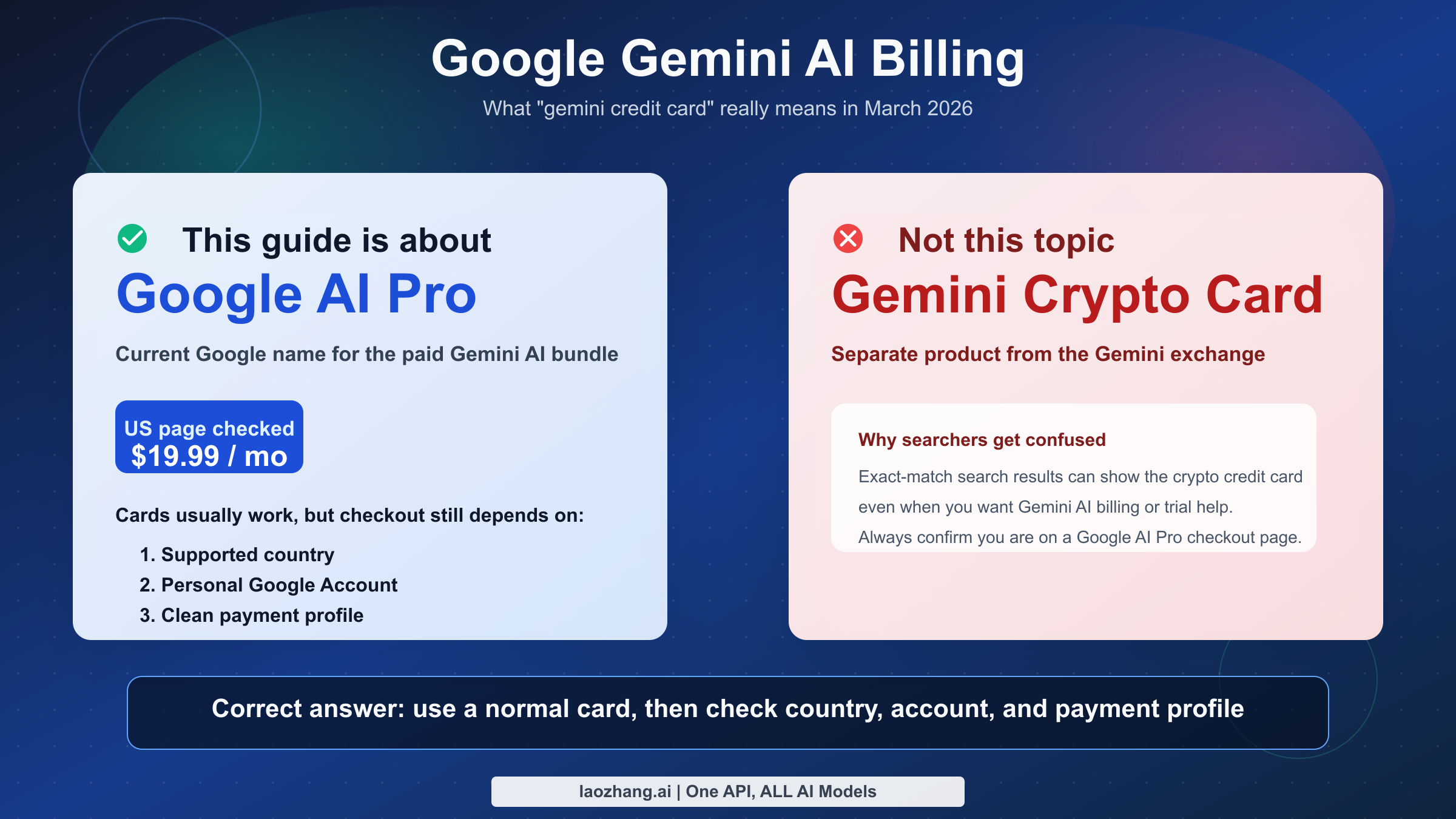
Yes, you can usually pay for Google's Gemini subscription with a credit card, but the product is now called Google AI Pro on current Google billing pages, and whether your card works depends on your country, your Google payment profile, and Google's fraud checks. As of March 13, 2026, Google's US subscription page shows Google AI Pro at $19.99 per month, with a one-month introductory offer at $0 in the US experience we checked. The same billing stack also exposes monthly or annual billing options through Google One help pages, but Google does not promise that every country gets the same plans or card types.
The first trap is the keyword itself. "Gemini credit card" can mean two completely different things: Google's Gemini AI subscription, or the separate Gemini crypto credit card from the cryptocurrency exchange. If you want Gemini AI in Gmail, Docs, Gemini 3.1 Pro access, or Google's current AI bundle, this article is about the Google product, not the crypto card.
The second trap is naming drift. Search results, YouTube videos, Reddit threads, and even some app surfaces still say Gemini Advanced or Google One AI Premium, while current Google subscription pages use Google AI Pro, Google AI Plus, and Google AI Ultra. That naming mismatch is exactly why many users are unsure whether the same credit-card and renewal rules still apply.
TL;DR
If your goal is to subscribe to Google's Gemini AI features, the short answer is straightforward: a normal credit card is usually fine, but Google processes the purchase inside its own billing system, so a valid card by itself is not enough. Google also checks whether you are using a personal Google Account, whether your country is supported, whether your billing address matches, and whether your payments profile needs verification at payments.google.com.
In the US payment-method page we checked on March 13, 2026, Google lists American Express, Discover, JCB, Mastercard, and Visa as supported card brands for Google Play billing. The same US page also lists Virtual Credit Cards (VCC) and Health Savings Account (HSA) cards as unsupported. That does not mean every country uses the exact same list. It means the safe answer is country-specific: cards work, but the supported set changes by market and billing channel.
The other practical point is that Google AI Pro is not just "Gemini on a card." The current Google AI Pro package bundles AI access with 2 TB of storage and related Google One benefits, which is why subscription help lives partly under Google One and partly under Google Play and Google Payments. If you hit an error, the fix is often about the account and payment profile, not the card network.
| Question | Short answer |
|---|---|
| Can you pay for Google's Gemini AI subscription by credit card? | Yes, usually. |
| Current consumer plan name | Google AI Pro |
| Old names you may still see | Gemini Advanced, Google One AI Premium |
| Current US monthly price checked March 13, 2026 | $19.99/month |
| Trial shown on the US subscriptions page checked March 13, 2026 | $0 for one month |
| US card brands listed by Google | AmEx, Discover, JCB, Mastercard, Visa |
| Common reasons payment fails | Wrong account type, unsupported country, address mismatch, fraud review, stale payment profile |
| Biggest search confusion | Gemini crypto credit card is a different product |
Gemini Advanced vs Google AI Pro: What Changed
Google's branding is the biggest source of confusion around this topic. The subscription people used to call Gemini Advanced was tied to Google One AI Premium for a long time. On current subscription pages, Google now markets the consumer bundle as Google AI Pro, with adjacent tiers such as Google AI Plus and Google AI Ultra. In other words, the AI product evolved, the branding changed, but the user intent did not: people still want to know how to pay for the higher-end Gemini experience.
That naming shift matters because older tutorials can still be directionally right while using outdated labels. A 2025 video telling you to buy Gemini Advanced might still be pointing to the same consumer-grade AI subscription path, but the current checkout page can show Google AI Pro instead. If you compare multiple sources without realizing that, it looks like Google has three or four different subscriptions when, in practice, you are mostly dealing with the same purchase journey under newer branding.
The Google-managed billing path also explains why users often see three different surfaces during research. The product discovery page may live on gemini.google, pricing can appear on one.google.com, and troubleshooting may send you to payments.google.com or the Google Play payment help pages. These are not contradictory systems. They are different layers of the same purchase stack.
For SEO purposes, this article intentionally uses all three labels where they help the reader: Gemini Advanced for the old search habit, Google One AI Premium for legacy billing references, and Google AI Pro for the current purchase path. That is the only way to match what users actually search and what Google currently displays.
| Label you may see | What it means in practice | Why it matters |
|---|---|---|
| Gemini Advanced | Older user-facing name for the premium Gemini experience | Still common in search, community threads, and app language |
| Google One AI Premium | Older billing bundle name | Appears in older pricing explainers and upgrade tutorials |
| Google AI Pro | Current mainstream consumer plan name | This is the name on current Google subscription pages |
| Google AI Plus | Lower current AI tier | Can confuse readers comparing prices |
| Google AI Ultra | Higher current AI tier | Relevant if you see a much higher price than $19.99 |
Which Credit Cards and Payment Methods Actually Work?
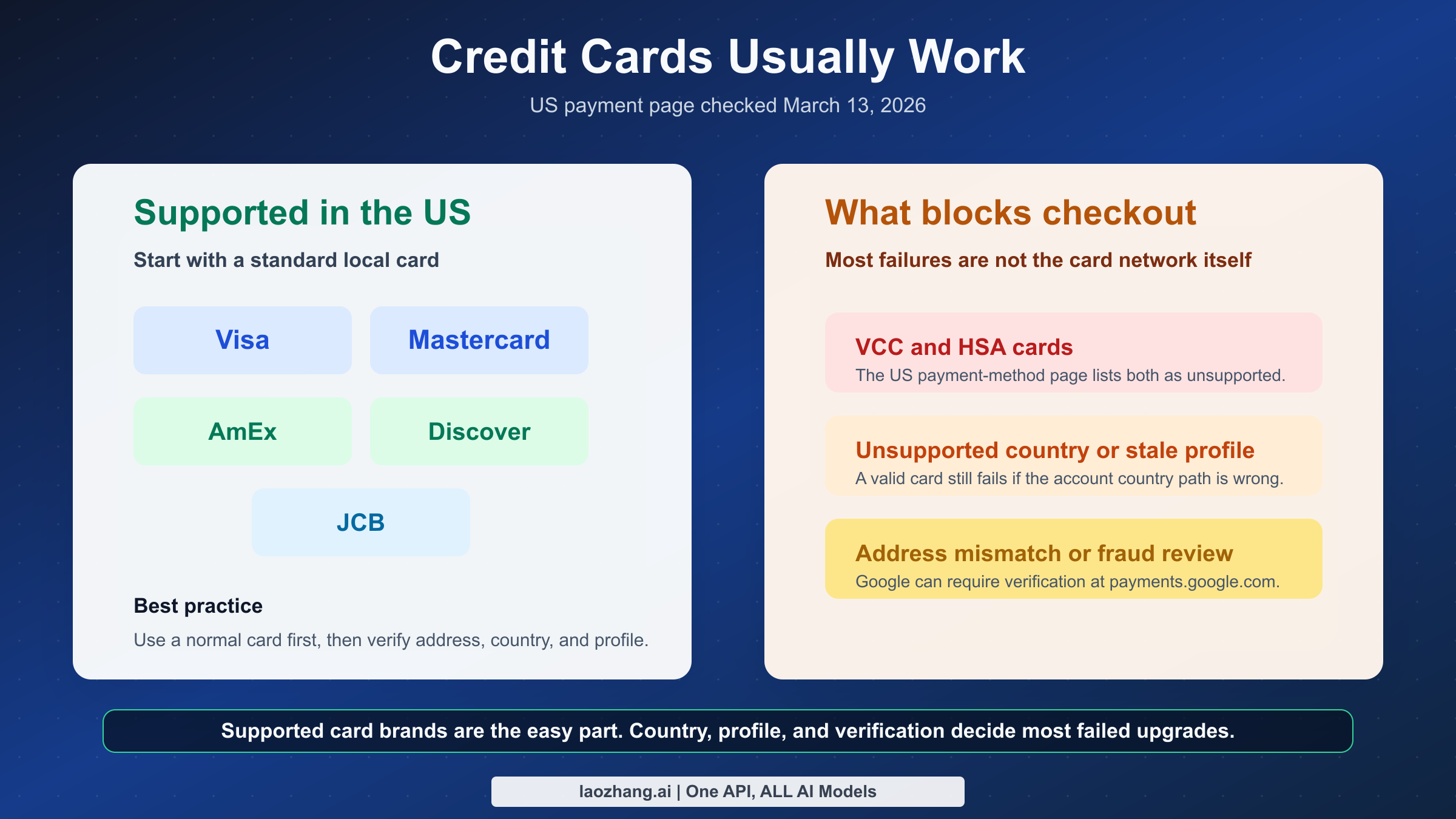
The best direct answer is this: credit cards are supported, but Google support is country-specific, not global and uniform. In the US payment-method page checked on March 13, 2026, Google lists American Express, Discover, JCB, Mastercard, and Visa. That is more useful than a generic "major credit cards accepted" statement because it tells you what Google itself currently names in one important market.
Just as important are the exclusions. The same US payment-method page lists Virtual Credit Cards (VCC) and HSA cards as unsupported. That matters because a lot of users trying to solve AI-subscription problems reach for temporary virtual cards first. In practice, that can create more friction, not less. If you are chasing a billing failure, switching from a normal Visa or Mastercard to a virtual card is often the wrong direction.
The next layer is billing channel. Google AI Pro is discovered through Gemini and Google One pages, but the accepted-card guidance comes from Google Play and Google Payments infrastructure. That does not necessarily mean every purchase behaves exactly like an in-app Play Store transaction. It does mean Google wants the payment method to live inside your Google billing environment and pass the same identity, address, and risk checks.
The safe rule is to think in this order: first check whether your country supports the plan, then use a standard local credit card, then verify the billing address, then confirm the payment profile is clean. Users often reverse that order and waste time testing five different cards when the real problem is a stale or mismatched payments profile.
| Payment method or condition | What we found | Practical takeaway |
|---|---|---|
| Visa | Supported on the US Google payment-method page | Safe first choice in the US |
| Mastercard | Supported on the US page | Safe first choice in the US |
| American Express | Supported on the US page | Usually fine if your country page supports it |
| Discover | Supported on the US page | Useful for US-only readers |
| JCB | Supported on the US page | Relevant in markets where JCB is common |
| Virtual Credit Card (VCC) | Listed as unsupported on the US page | Do not rely on it for this subscription |
| HSA card | Listed as unsupported on the US page | Not suitable for Google AI Pro billing |
| Unsupported country | Card may still fail even if the card itself is valid | Country support comes before card support |
| Old payment profile | Can block entitlement or trigger wrong billing behavior | Clean up outdated payment profiles if needed |
Two more details matter here. First, Google says on its Google One help page that third-party integrated billing providers are not yet available for this purchase. That means some users who are used to paying subscriptions through a carrier bundle, third-party marketplace, or other billing wrapper will not get the path they expect. Second, Google says you can choose monthly or annual subscriptions for Google AI Pro, which means your card decision is not only about passing checkout today; it also affects renewal reliability later.
How to Subscribe Without Getting Stuck at Checkout
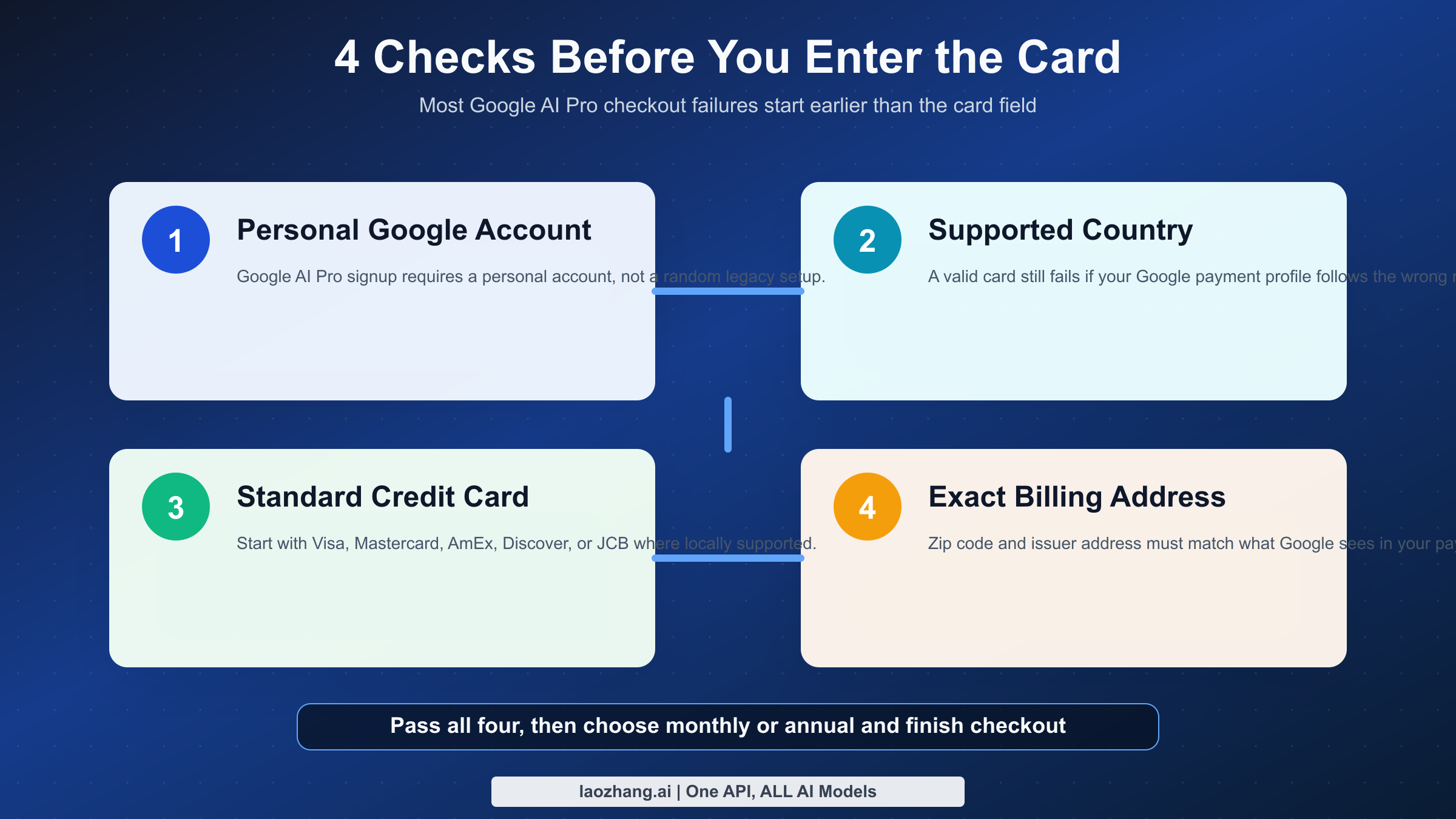
If you want the cleanest path, start from the current Gemini subscription page or the Google One AI Pro membership help page. Sign in with the Google account you actually plan to keep using. Google explicitly says you need a personal Google Account for Google AI Pro. That one sentence explains a surprising number of "my card is fine, but the upgrade fails" cases.
Once you are on the right account, check four things before you hit the payment screen. Make sure the country shown in your billing environment matches where you are allowed to buy the plan. Make sure the card address matches the issuer's billing address exactly, including ZIP or postal code. Make sure you are not relying on an unsupported card type like a virtual credit card. Then make sure you are comfortable with the billing cadence, because Google AI Pro currently offers both monthly and annual subscriptions according to Google One help.
The current US subscription page checked on March 13, 2026 showed a $19.99 monthly price and a one-month introductory $0 offer. That does not mean you can sign up without a real payment method. In most subscription systems, a trial still requires a valid payment method because renewal starts automatically unless you cancel before the trial ends. If your real question is "Can I use Gemini Advanced for free without entering a card?" this is exactly where many readers get disappointed: the presence of a trial is not the same thing as a no-card signup.
Another detail that users miss is that the post-purchase benefits are larger than just the Gemini chat app. The current plan messaging also mentions 2 TB storage, access to Gemini 3.1 Pro, Deep Research, NotebookLM enhancements, and integrations in Gmail, Docs, and more. That broader bundle is why it is worth confirming you are using the right Google account before you pay. If you subscribe with the wrong account, "fixing the card" does not fix the real problem.
| Step | What to do | Why it matters |
|---|---|---|
| 1 | Use your personal Google Account | Google requires it for Google AI Pro signup |
| 2 | Start from the current Gemini or Google One page | Avoid outdated Gemini Advanced tutorials |
| 3 | Confirm country support | A valid card cannot override unsupported geography |
| 4 | Use a standard local credit card | Reduces risk compared with unsupported VCCs |
| 5 | Match billing address exactly | Address mismatches are a common decline reason |
| 6 | Choose monthly or annual carefully | Renewal reliability matters after trial end |
| 7 | Check benefits after purchase | Confirms the right account received entitlement |
If you are comparing this with other AI subscriptions, the structure is closer to a general productivity bundle than to a pure developer subscription. That is why it often helps to compare Google's consumer limits and subscription logic with our guide to Gemini web vs API limits rather than assuming this behaves like a pure API plan.
Why Google Says Your Card or Account Is Not Eligible
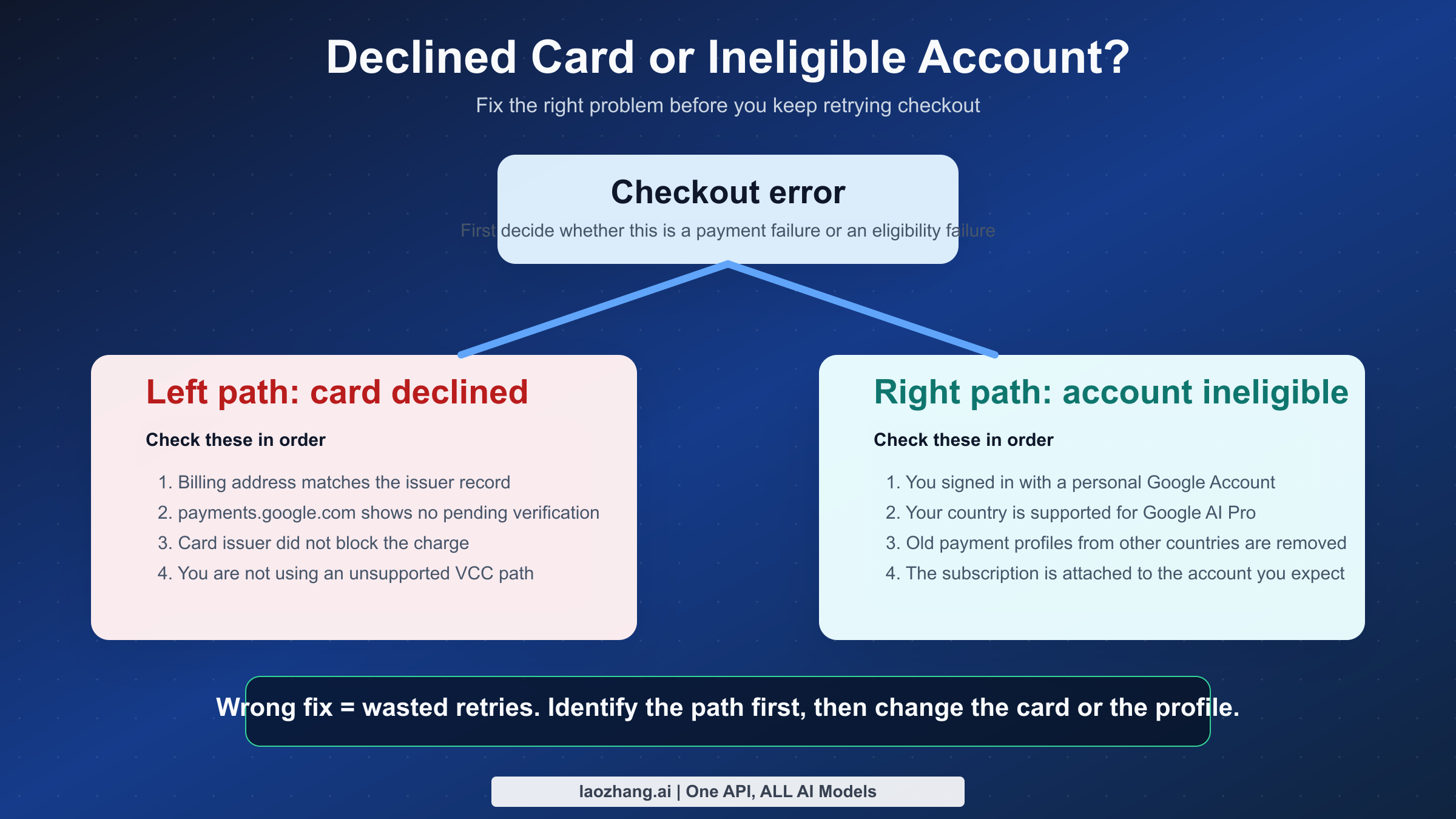
When a purchase fails, users tend to assume "my card was rejected." That is often incomplete. Google has at least two major failure buckets here: payment-method failures and account-eligibility failures. They can feel identical at checkout, but the fixes are different.
The account-eligibility bucket includes things like using the wrong account type, living in an unsupported country, having an old payments profile from a different country, or hitting a product rule that is separate from your card network. Community threads are useful here because they show what official help pages imply but do not spell out in one place. In one December 2025 developers-forum thread, a Google AI Pro subscription was not recognized correctly until an old payment profile from an unsupported country was removed. In another, a user reported being in the US with a US payment profile and still seeing an ineligible-account message.
The payment-method bucket is more conventional. Google's own payment-help page says charges can fail because of a billing-address mismatch, insufficient funds, card restrictions, suspicious transactions, or extra fraud-protection checks. In those cases, swapping cards blindly is usually less effective than checking payments.google.com first and verifying the details Google is using.
This distinction matters because readers often try the wrong repair sequence. They call the bank when the real problem is an unsupported-country profile, or they delete payment profiles when the actual problem is a postal code typo. A good Gemini billing guide has to separate these paths clearly.
| Symptom | Most likely category | What to check first | Fastest next move |
|---|---|---|---|
| Card gets declined immediately | Payment-method issue | Billing address and card restrictions | Check payments.google.com and call issuer if needed |
| Google asks for more info or verification | Risk / fraud review | Google Payments verification prompts | Complete verification before retrying |
| Account looks ineligible despite valid card | Account-eligibility issue | Country support and account type | Review personal account and payment-profile country |
| Subscription paid but benefits do not appear | Entitlement/profile issue | Which Google account owns the subscription | Remove stale profiles and confirm active account |
| New card added but old card still gets charged | Renewal-management issue | Active subscription funding source | Update billing method and confirm renewal path |
How to Fix Payment Failures and Change the Card on File
The most efficient fix order is simple. First, go to payments.google.com and inspect the payment method attached to the Google account that is actually buying the plan. Second, confirm the billing address exactly matches the issuer's record. Third, check whether Google is requesting verification. Fourth, only after those checks should you decide whether to contact the card issuer or try a different card.
Google's payment-help page is especially clear on two points. One, a card can fail because the registered card address and the address in Google Payments do not match. Two, Google may flag a transaction as suspicious or ask for more information to protect the account against fraud. Those are not exotic edge cases; they are ordinary reasons AI-plan purchases fail.
Community reports add one more pattern worth taking seriously: old or duplicate payment profiles can cause upgrade or entitlement problems even when the card itself is fine. If you previously used a different country profile, moved regions, or created multiple Google payment profiles over time, clean that up before you keep retrying. Google AI subscriptions are more sensitive to account-state consistency than many users expect.
If your problem is specifically that a new card is not replacing the old one, treat that as a subscription-management problem, not just a card-input problem. Check the payment method linked to the active subscription renewal path, not only the list of cards saved to your account. A recent March 8, 2026 Reddit report described Google continuing to charge an old card even after a new card had been selected. That is not official policy, but it is a useful warning that the renewal source and the stored-card list can drift apart in user experience.
The final rule is not to churn retries. Repeated failed charges can deepen fraud suspicion. Make one clean correction, retry once, then pause and verify whether the issue is on Google's side or the issuer's side. If your use case is actually developer-oriented rather than consumer-oriented, it may be worth comparing whether you need a subscription at all or whether an API-oriented route is better, especially if you are already dealing with Gemini rate limits.
Is Google AI Pro Worth Paying for by Card?
For most individual users, the answer depends less on whether the card works and more on whether you will actually use the included bundle. The current Google AI Pro positioning combines Gemini 3.1 Pro, Deep Research, 2 TB of storage, and other Google AI features in one subscription. If you already live inside Gmail, Docs, Drive, and NotebookLM, paying $19.99 per month by card can make sense because you are buying a workflow layer, not just a chatbot.
If you only want occasional chatbot access, the answer is weaker. A card-enabled subscription is most rational when you use the product enough to justify renewal friction, trial tracking, and the higher-tier features. For light use, the free Gemini experience or a lower tier may be enough. For heavy multi-user scenarios, the relevant question is whether family or team distribution actually matches the work. Google's help pages show that some benefit limits operate per person in a family group, but the purchase still needs to happen correctly through a compatible personal account and supported billing path.
The best buying rule is pragmatic: if your need is clear, use a mainstream local credit card, subscribe from the current Google AI Pro page, and verify the payment profile before checkout. If your need is unclear, do not over-optimize the payment method first. Decide whether the product bundle is worth recurring billing in the first place.
FAQ
Does Gemini Advanced still exist?
The name still appears in some app surfaces, old articles, and community threads, but current Google subscription pages are centered on Google AI Pro, with Google AI Plus and Google AI Ultra as adjacent tiers. If you are shopping today, treat Google AI Pro as the current consumer target unless Google shows a different local label in your region.
Do you need a credit card even if Google shows a free trial?
Usually, yes. A trial offer and a no-payment signup are not the same thing. As of March 13, 2026, the US Gemini subscriptions page showed $0 for one month for Google AI Pro, but Google still routes the purchase through its billing system, which means a valid payment method is typically part of the signup path.
What if I searched for "Gemini credit card" and meant the crypto card?
Then you want the exchange product from Gemini, not Google's AI subscription. The ambiguity is real, and it is one reason so many search results feel off-topic. This article is only about paying for Google's Gemini AI subscription, not the crypto rewards card.
Final answer: As of March 13, 2026, Google's Gemini AI subscription can usually be paid with a normal credit card, but the current plan is called Google AI Pro, and successful checkout depends on country support, a personal Google Account, a clean payment profile, and passing Google's billing checks. If your card fails, start with payments.google.com and your billing address before you start testing random backup cards.
For the official current references used in this guide, start with Google's Gemini subscriptions page, the Google AI Pro membership help page, and Google's payment troubleshooting page.