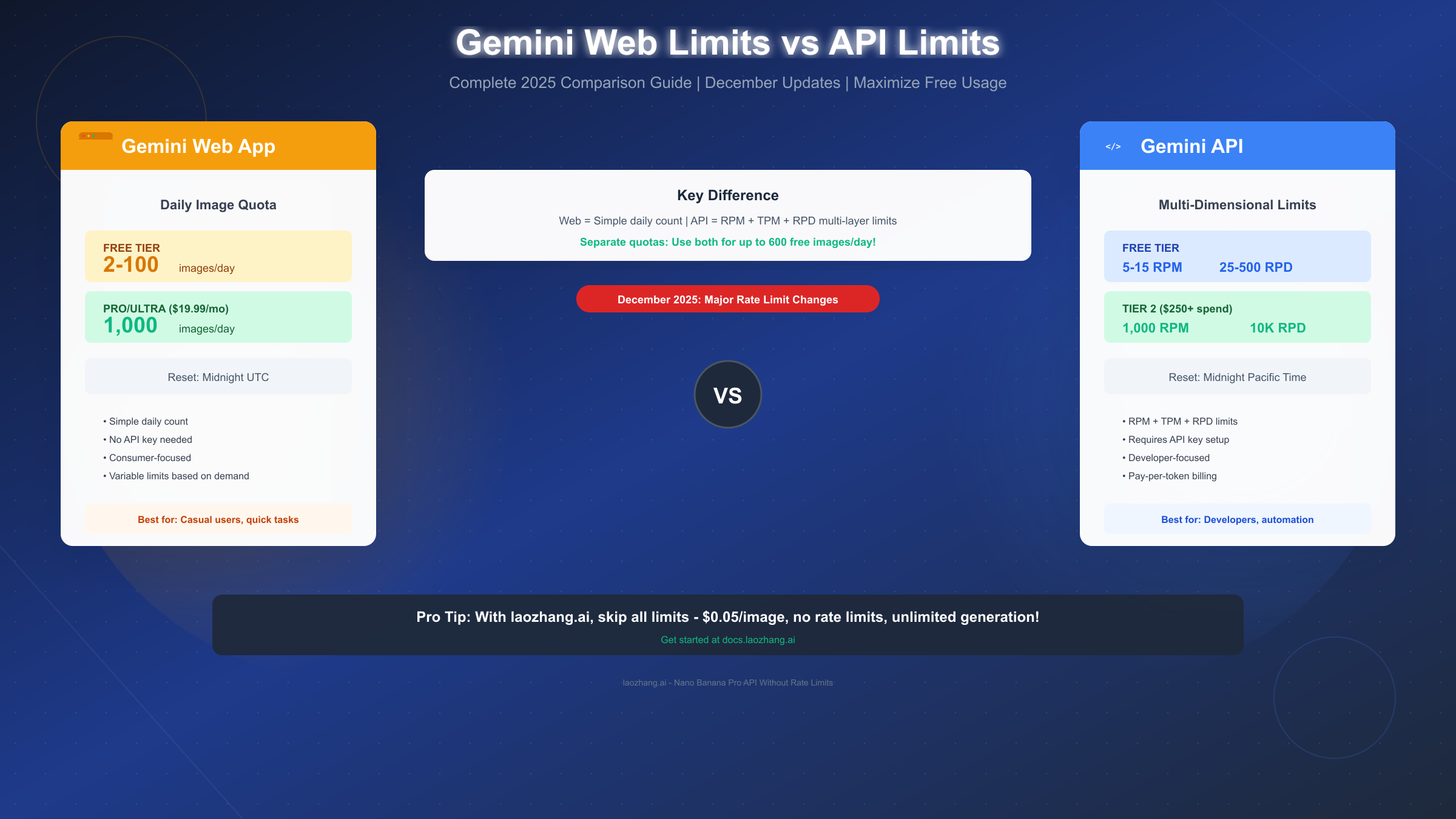
Google's Gemini offers two fundamentally different ways to generate images: the consumer web app and the developer API. What many users don't realize is that these systems operate on completely separate quota systems—meaning you can potentially leverage both for maximum free usage. As of December 2025, understanding these differences has become even more critical following significant rate limit reductions.
The core distinction is straightforward: the Gemini web app (accessed at gemini.google.com) tracks simple daily image counts, while the Gemini API uses a multi-dimensional system measuring requests per minute (RPM), tokens per minute (TPM), and requests per day (RPD). These quotas reset at different times (midnight UTC for web, midnight Pacific Time for API) and serve different user bases.
Quick Answer: The Fundamental Difference
For users hitting confusing limits and wondering which system to use, here's the essential breakdown that will save you hours of frustration.
The Gemini web app is designed for consumers who want to generate images through a browser interface. You don't need any technical setup—just log into your Google account and start creating. The limits are simple: free users can generate between 2 to 100 images per day (the exact number varies based on demand), while Google AI Pro subscribers ($19.99/month) get up to 1,000 images daily.
The Gemini API, on the other hand, is built for developers building applications. It requires setting up an API key through Google AI Studio and writing code to make requests. The limits are more complex, measured across multiple dimensions: requests per minute, tokens per minute, and requests per day.
| Aspect | Web App | API |
|---|---|---|
| Primary User | Consumers | Developers |
| Setup Required | None (browser) | API key + code |
| Limit Type | Daily image count | RPM + TPM + RPD |
| Free Tier | 2-100 images/day | 25-500 RPD |
| Reset Time | Midnight UTC | Midnight PT |
| Billing | Subscription ($19.99/mo) | Pay-per-token |
The critical insight many users miss: these are separate quota pools. Using 50 images in the web app doesn't reduce your API quota, and vice versa. This opens up a powerful strategy for maximizing free image generation.
Complete Comparison Table
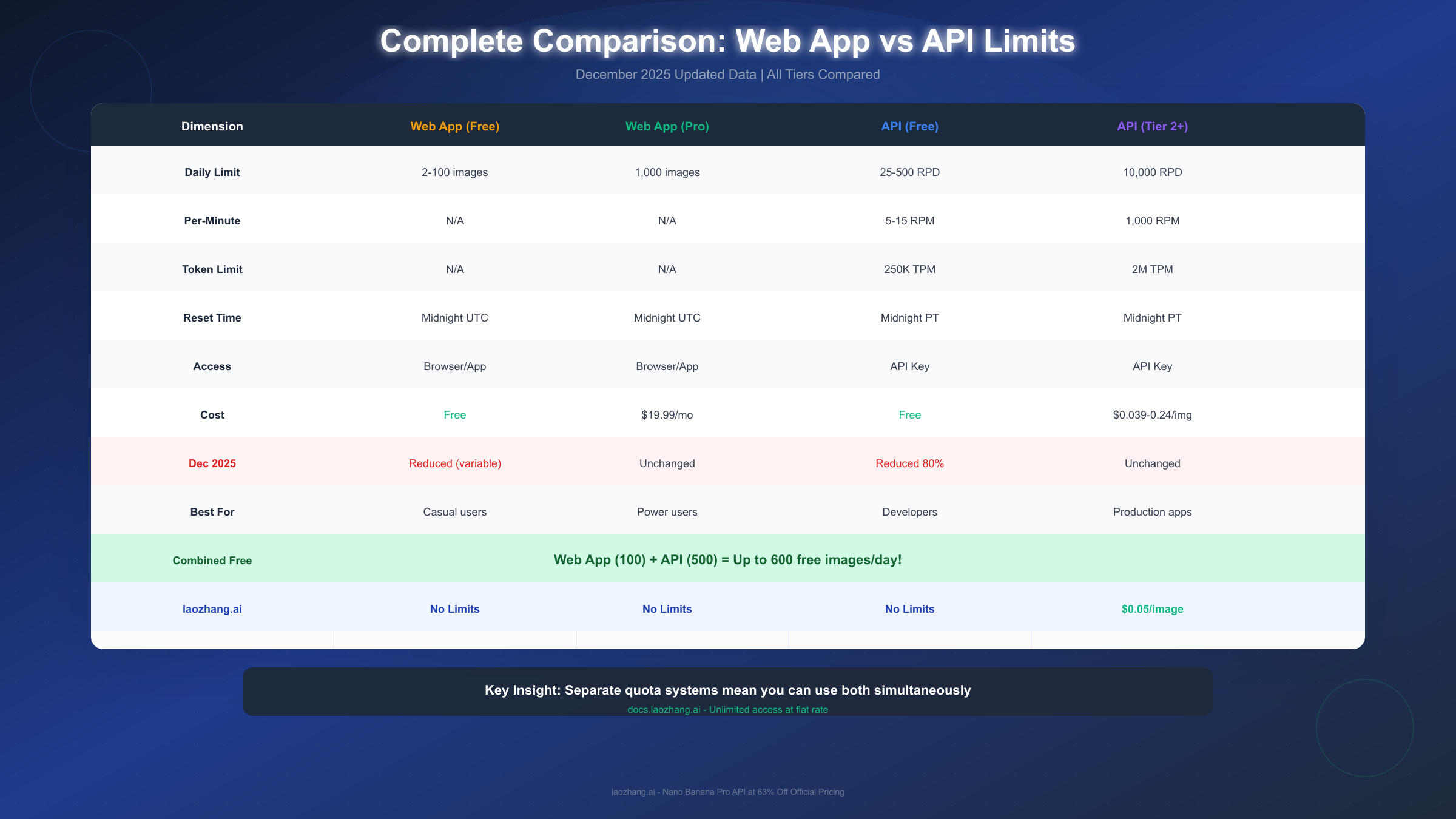
Understanding the full scope of differences between web app and API limits requires examining every dimension. The following analysis covers all tiers and access methods based on December 2025 data.
Web App Limit Tiers
The consumer Gemini app operates on a tiered subscription model. Free users face variable daily limits—Google explicitly states "Image generation & editing is in high demand. Limits may change frequently." In practice, free tier users report generating anywhere from 2 to 100 images before hitting the daily cap.
Google AI Pro subscribers ($19.99/month) enjoy significantly higher limits at 1,000 images per day. This tier also unlocks higher-resolution outputs, priority processing, and additional features like Thinking mode. The Ultra tier shares the same image limits but provides access to more advanced text models.
API Rate Limit Dimensions
The API system is considerably more complex, operating across four measurement dimensions:
- RPM (Requests Per Minute): How many API calls you can make each minute
- TPM (Tokens Per Minute): Total token throughput per minute
- RPD (Requests Per Day): Daily request allocation
- IPM (Images Per Minute): Specific limit for image generation models
For free tier API users, the limits stand at 5-15 RPM and 25-500 RPD depending on the model. Paid Tier 1 increases these substantially, while Tier 2 (requiring $250+ cumulative spending) unlocks 1,000 RPM, 2 million TPM, and 10,000 RPD.
Understanding the Separate Quota Systems
This is the most important point for power users: web app limits and API limits are entirely independent. According to Google's documentation, "Subscription plans currently apply only to the use of Gemini web-based products... These plans do not apply to API usage."
This means a free user could theoretically generate:
- 100 images via the web app (consumer quota)
- Plus 500 images via the API (developer quota)
- Total: 600 free images per day
December 2025 Rate Limit Changes
Google implemented significant changes to Gemini API rate limits starting December 7, 2025. These adjustments caught many developers off guard, causing unexpected HTTP 429 "quota exceeded" errors. Understanding what changed is essential for anyone relying on Gemini's free tier.
What Changed in December 2025
The most dramatic reduction hit the free API tier. Flash model requests dropped from approximately 250 RPD to around 20 per day—an 80% reduction. Pro model limits also decreased significantly, now sitting at just 5 RPM and 25 RPD for free users.
Google attributed these changes to "high demand" and "ensuring fair usage." The company noted that limits "may change frequently" and encouraged developers to implement proper error handling for rate limit scenarios.
Before vs After Comparison
| Model | Before Dec 2025 | After Dec 2025 | Change |
|---|---|---|---|
| Gemini 2.5 Pro (Free) | 25 RPM, 250 RPD | 5 RPM, 25 RPD | -80% |
| Gemini Flash (Free) | 15 RPM, 500 RPD | 15 RPM, ~200 RPD | -60% |
| Tier 2+ | 1,000 RPM, 10K RPD | Unchanged | 0% |
Paid tier limits remained largely unchanged, which Google explicitly positioned as an incentive for developers to upgrade. If you're building a production application, the December changes essentially forced many developers to either pay or find alternative providers.
For the consumer web app, changes were less dramatic but still notable. Free tier availability became more variable, with some users reporting limits as low as 2 images during peak demand periods.
Maximizing Free Image Generation
With both systems operating independently, savvy users can maximize their free allocation by strategically using both access methods. Here's how to set up and optimize each system for maximum output.
Setting Up Web App Access
The web app requires no technical setup:
- Visit gemini.google.com and sign in with your Google account
- Navigate to the image generation feature
- Start generating—your quota refreshes at midnight UTC
For users outside the UTC timezone, knowing your local reset time helps plan generation sessions. If you're in New York (EST), your web app quota resets at 7:00 PM local time. Los Angeles users see resets at 4:00 PM PT.
Setting Up API Access
API access requires more setup but offers automation capabilities:
- Go to Google AI Studio (aistudio.google.com)
- Create or select a project
- Generate an API key in the "API keys" section
- Use the key in your application
A minimal Python implementation looks like this:
import google.generativeai as genai

genai.configure(api_key='YOUR_API_KEY')
model = genai.ImageGenerationModel('gemini-2.5-flash')
response = model.generate_image(prompt='A sunset over mountains')
Your API quota resets at midnight Pacific Time—8:00 AM GMT, 4:00 PM Beijing Time, or 5:00 PM Tokyo Time.
Combined Strategy for 600 Daily Images
To maximize free generation, use both systems strategically throughout the day:
- Morning (your time): Use the API for automated tasks (500 requests)
- After web app reset: Use the consumer app for interactive work (100 images)
- Track usage: Monitor both quotas to avoid hitting limits unexpectedly
This combined approach gives you access to significantly more free images than either system alone. For users in time zones where both resets happen during waking hours, this becomes particularly powerful.
Which Should You Choose?
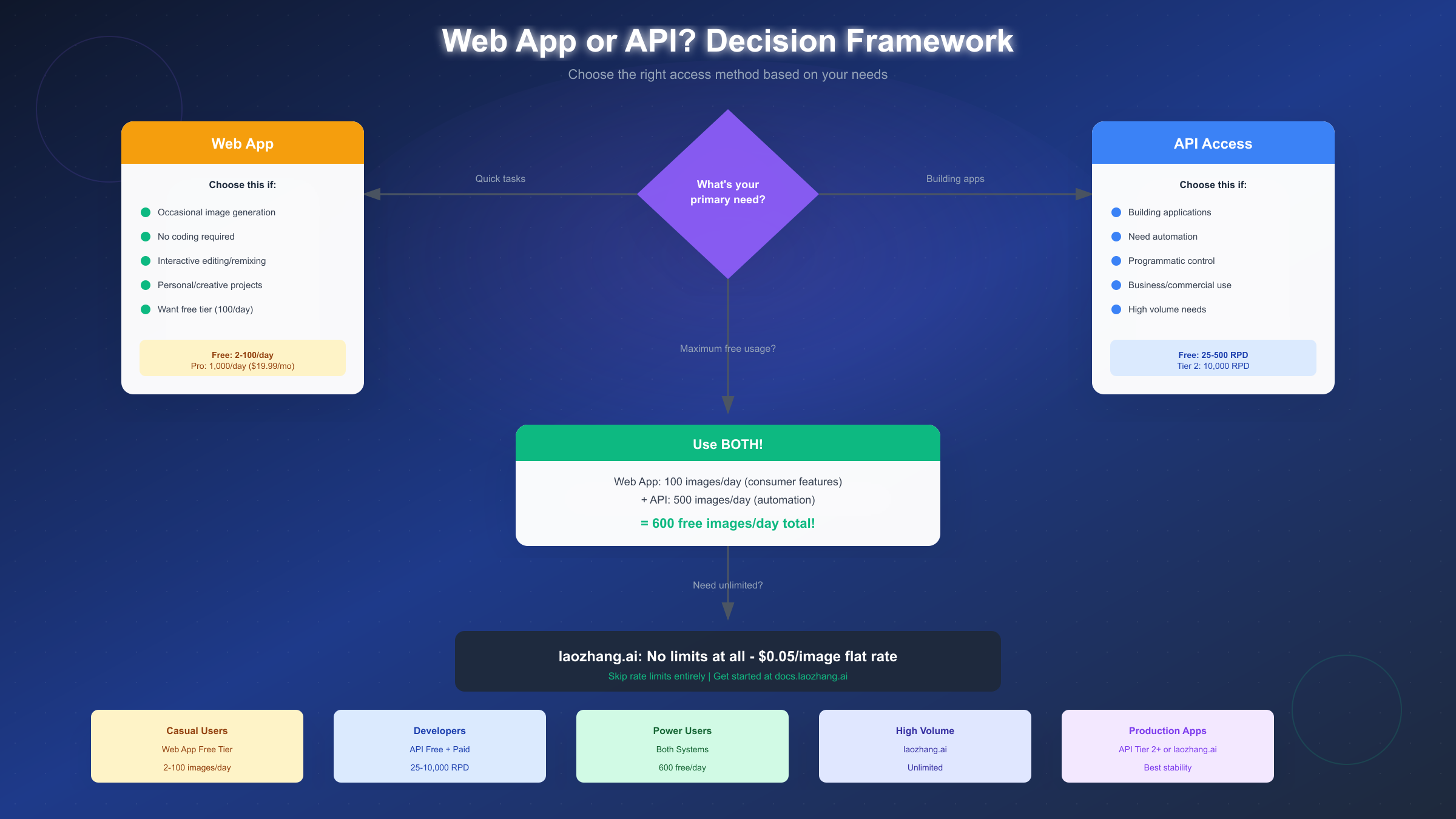
Selecting between web app and API access depends on your specific use case. Rather than one being universally "better," each serves distinct needs effectively.
Choose Web App If:
You're generating images for personal or creative projects, don't want to write code, need interactive editing and remixing features, or simply want the most straightforward experience. The web app excels at quick, one-off generations where you want to iterate on prompts interactively.
The consumer interface also provides features unavailable via API, including real-time image editing, style suggestions, and integrated conversation about your images. For creative exploration, these features add significant value.
Choose API If:
You're building an application, need automation, want programmatic control over generation, or require integration with other systems. The API shines when you need to generate images as part of a larger workflow—e-commerce product images, automated content creation, or batch processing.
API access also enables more precise control over parameters and allows you to build custom interfaces tailored to specific needs.
Choose Both If:
You want to maximize free tier usage or have different needs at different times. Many power users run automated API processes while also using the web app for interactive creative work. Since quotas are separate, there's no penalty for using both.
Consider Third-Party Providers If:
Your needs exceed what free tiers offer but you want to avoid Google's complex tier system. Third-party API aggregators like laozhang.ai provide access to Gemini image generation (marketed as "Nano Banana Pro") at flat rates without per-minute restrictions. At $0.05 per image with no rate limits, this option makes sense for users generating more than 600 images daily or needing consistent availability without quota worries.
Third-Party Alternatives
When official Gemini limits don't meet your needs, third-party providers offer an alternative path. Understanding when these make sense—and what tradeoffs they involve—helps you make informed decisions.
When to Consider Alternatives
Third-party access makes sense in several scenarios:
- You need more than 600 free images daily
- Rate limits (RPM) constrain your workflow
- December 2025 reductions made free tier insufficient
- You want predictable pricing without tier complexity
The key tradeoff is cost versus convenience. Official free tiers cost nothing but impose limits. Paid official tiers require navigating complex spending thresholds. Third-party providers typically offer simpler pricing but add a layer between you and Google's systems.
Provider Comparison
| Provider | Model Access | Rate Limits | Per-Image Cost |
|---|---|---|---|
| Google Free | Gemini 2.5 Flash | 15 RPM, ~200 RPD | Free |
| Google Tier 2 | All models | 1,000 RPM, 10K RPD | ~$0.039-0.24 |
| laozhang.ai | Nano Banana Pro | None | $0.05 flat |
For the Gemini API pricing structure at official rates, costs range from $0.039 per image at 1024x1024 to $0.24 at 4K resolution. Third-party providers often offer flat rates regardless of resolution.
laozhang.ai Nano Banana Pro
laozhang.ai offers Gemini image generation under their "Nano Banana Pro" product name at a flat $0.05 per image. Key differentiators include:
- No rate limits (no RPM/RPD restrictions)
- Flat pricing regardless of resolution
- Standard REST API compatible with existing code
- 63% savings compared to Google Tier 2 at 4K resolution
For production applications generating thousands of images, the cost savings and elimination of rate limit management can significantly reduce both expenses and development complexity. The platform also aggregates multiple models, allowing you to switch between providers without code changes.
Troubleshooting and Best Practices
Encountering rate limits and errors is inevitable when working with API quotas. Understanding how to handle these situations gracefully keeps your applications running smoothly.
Handling HTTP 429 Errors
When you exceed any rate limit dimension, the Gemini API returns HTTP 429 (Too Many Requests). The response includes headers indicating when you can retry. Proper error handling should:
- Catch the 429 status code specifically
- Read the
Retry-Afterheader for wait time - Implement exponential backoff for retries
- Log the occurrence for capacity planning
A basic Python implementation:
import time
import requests

def generate_with_retry(prompt, max_retries=3):
    for attempt in range(max_retries):
        response = make_request(prompt)
        if response.status_code == 429:
            wait_time = int(response.headers.get('Retry-After', 60))
            time.sleep(wait_time * (2 ** attempt))
            continue
        return response
    raise Exception("Max retries exceeded")
Quota Monitoring Best Practices
Rather than hitting limits unexpectedly, proactive monitoring helps you stay within bounds:
- Track daily usage against known limits
- Set alerts at 80% consumption
- Spread requests throughout the day rather than bursting
- Cache successful generations to avoid redundant requests
- Use lower resolutions (512x512) for previews before final generation
Understanding When Quotas Don't Roll Over
Unlike some services, Gemini quotas do not accumulate. If you don't use your 500 daily API requests, they expire at midnight PT—not saved for tomorrow. This means you should plan usage to maximize each day's allocation if you're operating near limits.
Similarly, upgrading tiers mid-day doesn't grant retroactive quota. Your increased limits apply only to future requests within that billing period.
Summary and Next Steps
Navigating Gemini's dual-limit system—web app versus API—requires understanding their fundamental differences while leveraging their independence for maximum benefit.
Key Takeaways
The essential facts to remember:
- Separate systems: Web app and API quotas are completely independent
- Different reset times: UTC for web app, Pacific Time for API
- Combined free tier: Up to 600 images daily using both methods
- December 2025 reductions: API free tier reduced by 60-80%
- Paid tiers unchanged: Tier 2+ limits remain stable
Recommendations by User Type
For casual users generating a few images daily, the web app free tier suffices. No setup required, interactive features included.
For developers building applications, the API is essential. Start with the free tier, implement proper error handling, and upgrade to Tier 2 if you hit consistent limits.
For power users wanting maximum free access, use both systems. That's 100 web app images plus 500 API requests daily.
For production applications requiring reliability, consider either Google's Tier 2+ ($250 spending threshold) or third-party providers like laozhang.ai for simpler pricing without rate limit complexity.
Getting Started
If you're ready to begin:
- Web app: Visit gemini.google.com and start generating
- API: Set up a key at aistudio.google.com
- Third-party: Explore docs.laozhang.ai for no-limit access
Understanding the distinction between Gemini's web and API limits—and how to use both effectively—puts you in control of your image generation workflow. Whether you're a casual creator or building production systems, the right access method (or combination) exists for your needs.


