
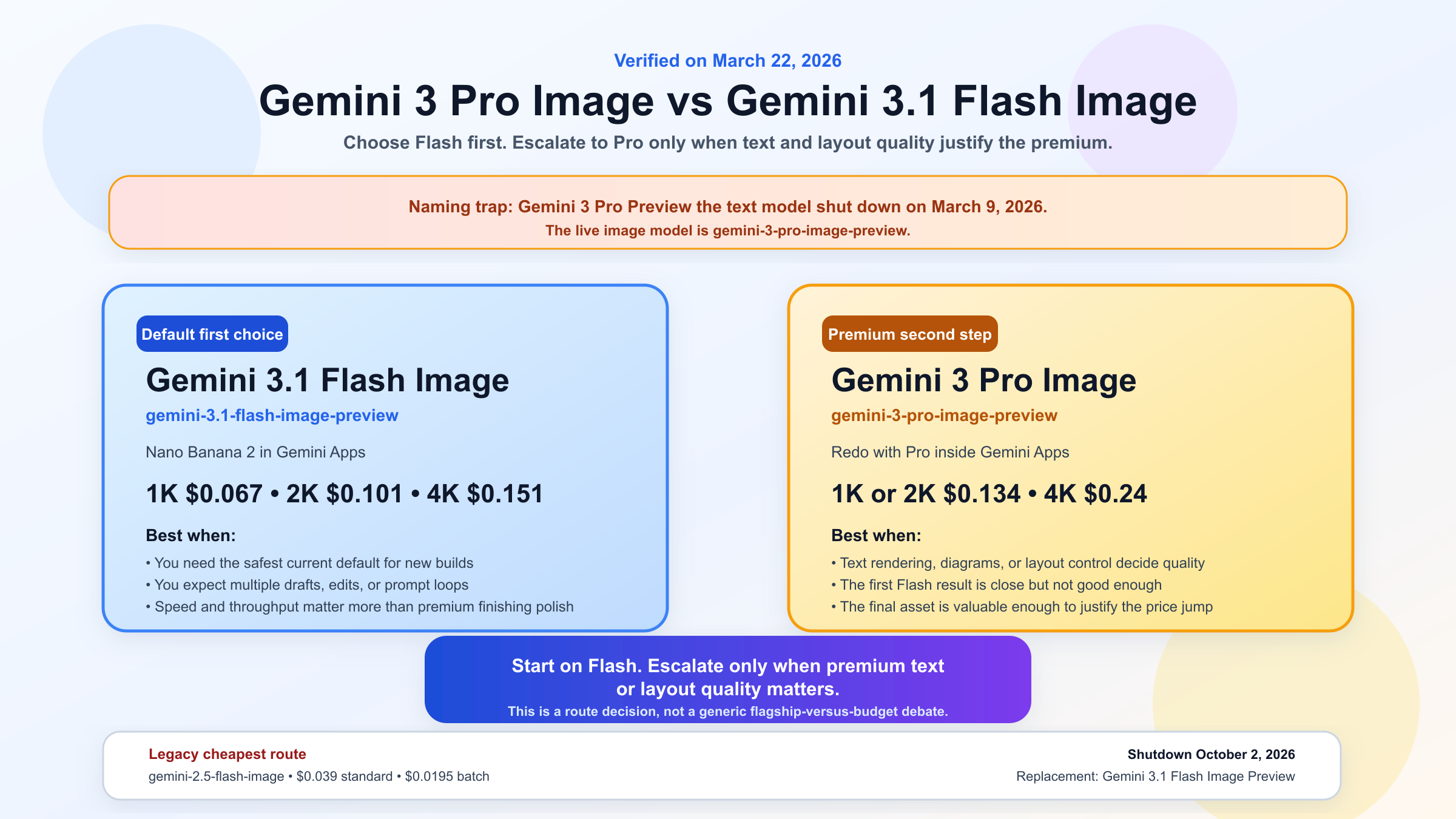
If you want the short answer first, start with Gemini 3.1 Flash Image Preview. It is the better current default for most new Gemini image-generation and image-editing workflows because Google positions it as the high-efficiency lane, it is much cheaper than Pro, and the current Gemini app flow also starts with that same model family under the Nano Banana 2 label.
Use Gemini 3 Pro Image Preview only when the job itself is expensive enough that better text rendering, cleaner infographic-like layouts, or tighter high-fidelity control will save you more than the extra model cost. That is the real split. This is not one of those comparisons where both choices deserve equal billing for most readers.
One more clarification matters before anything else: Gemini 3 Pro and Gemini 3 Pro Image are not the same model. Google's current models page says the text model Gemini 3 Pro Preview shut down on March 9, 2026. The live image model is gemini-3-pro-image-preview, which is a different product lane entirely. If you skip that naming cleanup, the rest of the topic stays confusing.
TL;DR
| If your real need is... | Better current choice | Why |
|---|---|---|
| Best default for most new image jobs | gemini-3.1-flash-image-preview | Lower cost, Flash-speed positioning, current Google default image lane |
| Gemini app image creation | Nano Banana 2 first | Gemini Apps create and edit images with Nano Banana 2, then paid users can redo with Pro |
| Text-heavy posters, diagrams, or infographic-style output | gemini-3-pro-image-preview | Google positions Pro for clearer text, studio-quality control, and more complex layouts |
| Cheapest older official Gemini lane | gemini-2.5-flash-image | Still cheaper, but legacy and scheduled to shut down on October 2, 2026 |
| Premium final pass after Flash gets you close | Pro Image | Better fit when the first draft is almost right and quality matters more than throughput |
The pricing gap is what keeps this comparison honest. As of March 22, 2026, Google's pricing page lists Gemini 3.1 Flash Image Preview at about $0.067 per 1K image, $0.101 per 2K, and $0.151 per 4K. The same page lists Gemini 3 Pro Image Preview at about $0.134 per 1K or 2K image and $0.24 per 4K. So Pro is not a small upgrade. It is a meaningful price jump that needs a real reason behind it.
Gemini 3.1 Flash Image vs Gemini 3 Pro Image: which should you choose first?
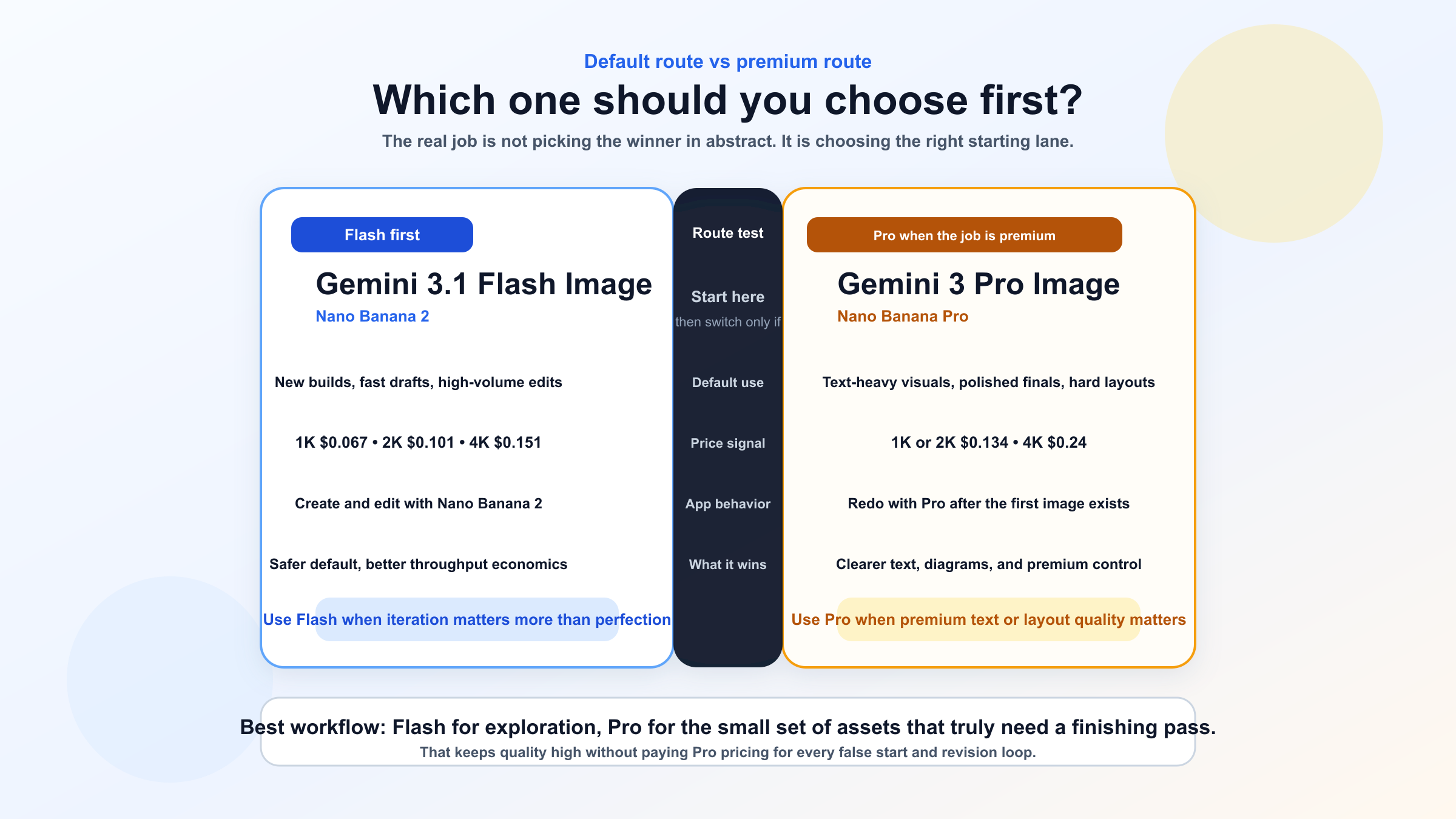
For most readers, the fastest correct rule is simple: choose Flash Image first, and promote the job to Pro Image only when the output itself gives you a specific reason to spend more.
That rule is stronger than "Flash is cheaper, Pro is better." Google's own current materials are more specific than that. The Gemini image-generation docs describe Nano Banana 2 as the high-efficiency counterpart to Pro Image, optimized for speed and high-volume developer workflows. Google's Pro Image page describes Nano Banana Pro as the studio-quality branch for precise control, clearer text, and more polished design-heavy output. That is not a generic flagship-versus-budget story. It is a workflow split.
If your team is generating lots of exploratory drafts, editing images conversationally, or building a product where throughput matters, Flash Image is the smarter place to start. If you are generating a smaller number of images where typography, diagram clarity, or layout precision matter enough that a weak result would force a second round of design work anyway, Pro starts making sense.
The easiest mistake is to treat this like a benchmark shootout and stop there. In practice, readers are rarely asking "which model is coolest?" They are asking one of four more practical questions:
- Which model should I wire into a new product first?
- Which model should I use in Gemini Apps when I just want a good result fast?
- Which model should I pick for text-heavy graphics, posters, or diagrams?
- When is the premium price actually justified?
Those are route questions, not scoreboard questions. The answer to all four is more useful when you start with the default and then name the exceptions.
Why Flash Image is the better default for most new Gemini image workflows
Flash Image wins the default recommendation because it aligns better with how most readers actually work: they need a strong first pass, reasonable cost, and enough speed to iterate. Google's current product language supports that reading from several angles at once.
First, the official Gemini image-generation guide maps Nano Banana 2 to gemini-3.1-flash-image-preview and calls it the high-efficiency counterpart to Pro. That is already a strong hint about intended use. Google is not hiding Flash Image as the lesser lane you settle for only when budgets are tight. It is presenting Flash as the lane designed for speed and volume.
Second, the current DeepMind Flash Image page pushes the same story harder. Google describes Gemini 3.1 Flash Image as powerful image generation with advanced intelligence and the speed you expect from Flash. The current performance section also presents Flash Image as the top image-editing Elo point in the displayed chart with latency under 20 seconds, with Gemini 3 Pro Image close behind but slightly slower. You do not have to treat that like a perfect neutral benchmark to see the editorial signal: Google is telling users that Flash is not merely the cheaper route. It is the speed-first current-line route that still holds up on quality.
Third, the pricing gap matters enough to change behavior. Flash Image at roughly $0.067 per 1K and $0.101 per 2K is far easier to justify as the default in an exploratory or iterative workflow than Pro Image at $0.134 per 1K or 2K. That difference gets material quickly when you are generating multiple drafts, editing over several turns, or testing several prompt directions per asset. A model that is only sometimes better is not the right default when it costs materially more every time.
Fourth, Flash fits the current Gemini app story. Google's help pages now tell users to create and edit images with Nano Banana 2, not with Pro. That does not prove Flash is always superior. It does prove Google sees Flash as the broadest current entry point, which is a useful reality check for anyone choosing a starting lane.
This is why Flash Image is the right recommendation for:
- new product integrations
- fast draft generation
- conversational image editing
- high-volume experimentation
- teams that want one current default before layering in premium exceptions
If you still need the shortest possible rule, it is this: use Flash when the work benefits from iteration more than from perfection on the first try.
When Pro Image is actually worth the extra money
Pro Image becomes the better answer when the output needs to survive closer inspection.
Google's current Pro Image page makes the use case surprisingly explicit. It highlights clear text, studio-quality control, and real-world-knowledge-driven diagrams and infographics. That is exactly where Pro stops feeling like a luxury add-on and starts feeling like the right tool.
The premium is usually worth it in four situations.
The first is text-heavy visuals. If you are generating posters, menus, product cards, packaging mockups, signage, or infographic-style images where text quality changes whether the asset is usable, Pro has a better reason to exist. The DeepMind comparison visuals on the Flash page also lean in this direction: Flash performs well, but Pro is shown as the stronger model on the text-rendering heatmaps. That is a narrower but very real advantage.
The second is layout-heavy assets. If the job is not just "make a nice image" but "make a controlled composition with several labeled regions, a specific visual hierarchy, and readable on-image copy," Pro is easier to justify. That is especially true when the asset will be reviewed by clients, sales teams, or stakeholders who care less about generation speed and more about whether the composition feels finished.
The third is high-value final outputs. If your image is already expensive in downstream terms, the model price should not be the only variable. A campaign hero, a polished pitch-slide graphic, a client-facing ecommerce asset, or a diagram that sits on a high-traffic landing page can justify Pro if a weak result would cost more in redesign time than the model premium itself.
The fourth is a two-stage workflow. This is where Pro often makes the most sense operationally. Use Flash first to get the structure, direction, and rough composition right. Then use Pro only for the subset of images that are already close and need a stronger final pass. That matches Google's own current app flow, where you generate with Nano Banana 2 first and then use Redo with Pro if you are on a paid tier and want the upgraded version.
This two-stage route is also the easiest way to keep model costs sane. If you ask Pro to do every exploratory prompt, every false start, and every revision loop, you pay the premium when the work still belongs in the draft stage. If you let Flash absorb the trial-and-error stage first, Pro becomes a finishing tool instead of a default tax.
In other words, Pro is not the best starting point for every job. It is the better finishing lane for the jobs that deserve it.
How this split looks inside Gemini Apps
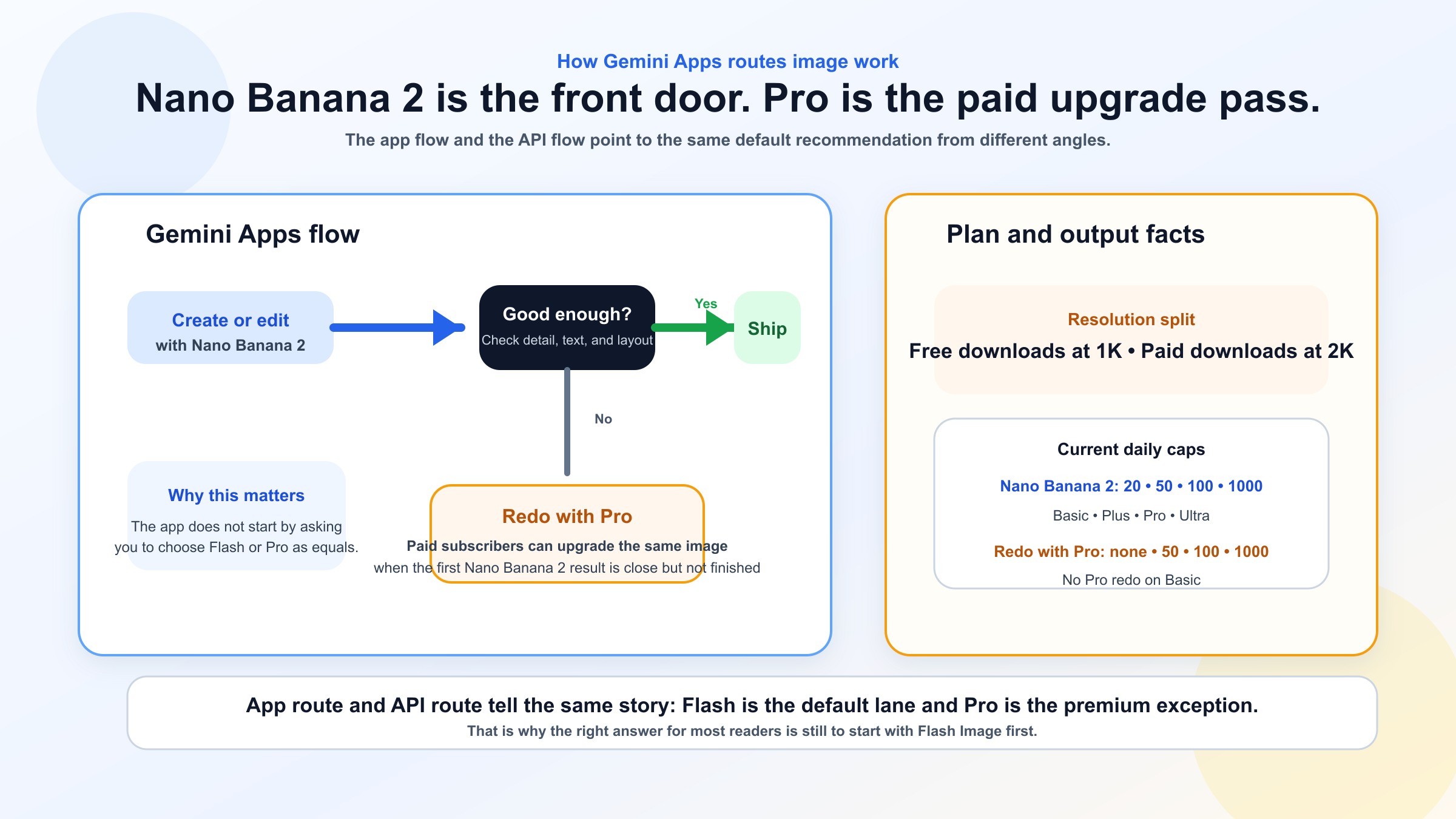
The app route is simpler than the API route, which is exactly why many comparison pages should talk about it earlier than they do.
Google's current Gemini Apps help page says users can create and edit images with Nano Banana 2, and that paid subscribers can redo an image with Nano Banana Pro. That is a much cleaner product story than most search results give you. The app does not start by asking you to choose between two equally prominent image engines. It starts with Nano Banana 2 as the mainline path and exposes Pro as the premium rerender path.
That detail matters because it tells you how Google expects ordinary users to work:
- create with Nano Banana 2
- decide whether the output is already good enough
- use Pro only when the image needs a more polished second pass
The limits page reinforces the same idea. Google currently lists Nano Banana 2 image caps of 20, 50, 100, and 1000 images per day for Basic, Plus, Pro, and Ultra. It lists Redo with Pro as unavailable on Basic, then capped at 50, 100, and 1000 on Plus, Pro, and Ultra. That is not just pricing trivia. It tells you Pro is being positioned as a more selective, higher-value action.
The same help page also says paid subscriptions can download at 2K while free users download at 1K. That matters because some readers think the app difference is only about quotas. It is also about what kind of final output the app is prepared to treat as a paid premium action.
So if your real question is, "Which one should I use in Gemini itself?" the answer is even sharper than the API answer:
- start with Nano Banana 2
- use Redo with Pro only when the first result is already close but not good enough
That also explains why support and community confusion keep surfacing. Users see older screenshots, expect Pro to be a top-level always-visible mode, then assume something is broken when Google routes them through Nano Banana 2 first. The current product flow is not broken. It is just different from the older mental model.
If that app-side confusion is the main problem you are trying to solve, the closest follow-up in this repo is why Nano Banana Pro is not showing in Gemini.
The naming trap: Gemini 3 Pro is not Gemini 3 Pro Image
This is the part many articles still handle badly.
Google's current models page warns that Gemini 3 Pro Preview shut down on March 9, 2026. That is the text model. It is not the same thing as Gemini 3 Pro Image Preview, which remains a live image model. If you search the forum or older tutorials, you can still find people trying to generate images with "Gemini 3 Pro" and assuming the platform is broken when the result does not work the way they expect.
The Google AI Developers Forum has a good example of that confusion. In one thread, a user tried to generate images with Gemini 3 Pro in AI Studio and got an image action payload but no usable image. A Google forum reply later clarified that the specific Gemini 3 Pro model the user had selected was not designed for image generation and recommended dedicated image models instead. That is exactly the kind of problem a good comparison article should prevent before the reader wastes time.
The clean naming map looks like this:
| Name users say | Current meaning | What to do with it |
|---|---|---|
| Gemini 3 Pro | Usually the retired text-model phrase | Do not use this as your image-model choice |
| Gemini 3 Pro Image / Nano Banana Pro | gemini-3-pro-image-preview | Use for premium text-heavy or design-heavy image work |
| Gemini 3 Flash Image / Nano Banana 2 | gemini-3.1-flash-image-preview | Use as the default current Gemini image lane |
| Nano Banana | gemini-2.5-flash-image | Treat as a legacy cheaper lane, not the current default |
This naming cleanup is not optional SEO garnish. It changes what model readers actually pick. Without it, people compare the wrong things.
The price, lifecycle, and routing table most pages still bury
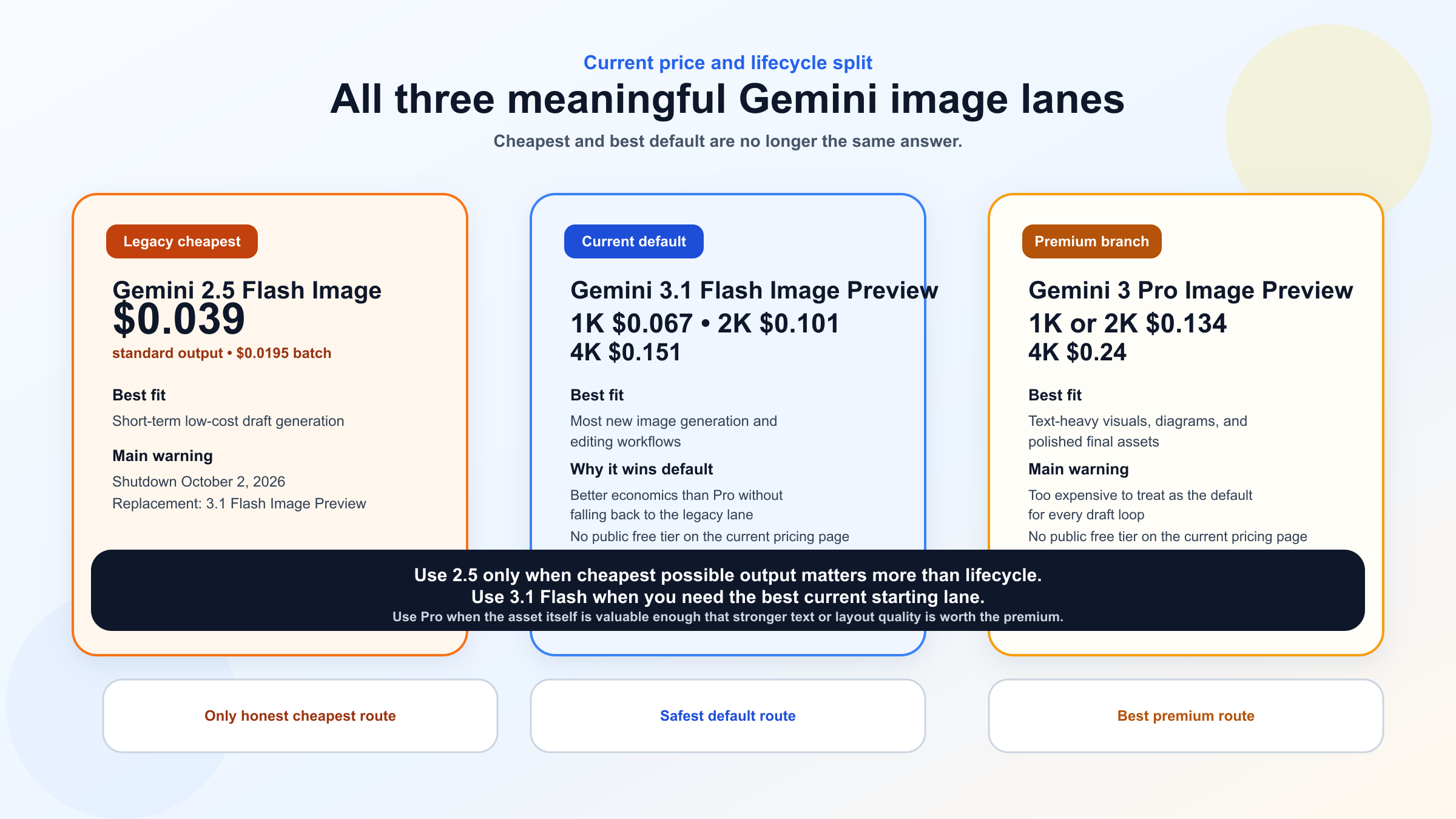
If you want one table to keep open while you decide, this is the one.
| Model | Current price signal | Lifecycle signal | Best fit | Main warning |
|---|---|---|---|---|
gemini-3.1-flash-image-preview | About $0.067 / 1K, $0.101 / 2K, $0.151 / 4K | Current Flash Image lane, no shutdown date listed on the current deprecations page | Best default for most new work, editing, and higher-volume generation | Still preview pricing and preview limits |
gemini-3-pro-image-preview | About $0.134 / 1K-2K, $0.24 / 4K | Current Pro Image lane, no shutdown date listed | Text-heavy visuals, diagrams, layout-sensitive premium assets | Much higher cost, so use it selectively |
gemini-2.5-flash-image | About $0.039 standard or $0.0195 batch | Scheduled shutdown October 2, 2026 | Cheapest short-term official Gemini lane | Legacy route, not the current default |
That last row matters because many "Flash image" comparisons silently drift into the older gemini-2.5-flash-image lane. That model is still relevant if your question is purely about the absolute cheapest official Gemini image endpoint. It is not the same thing as the current Gemini 3.1 Flash Image Preview lane that Google now maps to Nano Banana 2. Mixing those two models leads to bad advice.
The legacy lane still has one honest use case: low-cost short-term batch-heavy draft generation. Google's pricing page lists batch output at about $0.0195 per image for gemini-2.5-flash-image, which is meaningfully cheaper than the newer Flash Image line. But that savings comes with two costs: you are staying on a lane with an announced retirement date, and you are choosing the old model family when Google's own deprecations page already points you toward gemini-3.1-flash-image-preview as the replacement. That is why I would treat 2.5 Flash Image as a deliberate exception, not the default branch in a Pro-versus-Flash article.
So the right comparison is usually not just Pro vs Flash. It is:
- current Flash default
- current Pro premium branch
- legacy cheap Flash holdover
Once you frame it that way, the current model choice becomes much easier.
What I would choose in four common scenarios
If you only need the practical answer, use these routes.
1. I am building a new image feature and want one safe current default. Use gemini-3.1-flash-image-preview. It gives you the strongest current balance of price, speed, and product direction. It also lines up with the app-side Nano Banana 2 story, which means your internal and external explanations stay consistent.
2. I mostly use Gemini Apps and just want the best workflow. Start with Nano Banana 2, then use Redo with Pro only when the first result is already close but not good enough. That is the path Google's own help pages now teach, and it usually matches how real people work with image tools anyway.
3. I need posters, diagrams, menus, or assets where text quality actually matters. Use gemini-3-pro-image-preview. This is the cleanest case for Pro. If text clarity or layout structure is central to the job, Pro has the strongest reason to exist.
4. I only care about the cheapest official Gemini route today. Use gemini-2.5-flash-image only if you understand that it is the legacy lane and already has an announced shutdown date of October 2, 2026. That can still be a valid short-term cost choice. It is just not the route I would start a new project on if I wanted to avoid an avoidable migration later.
FAQ
Is Gemini 3 Pro Image always better than Gemini 3.1 Flash Image?
No. Pro is better for narrower premium cases, especially clearer text and more controlled layouts. Flash is the better default for most new work because it is much cheaper and officially positioned for speed and high-volume use.
Is Nano Banana 2 the same thing as Gemini 3.1 Flash Image Preview?
Yes. Google's current Gemini image docs map Nano Banana 2 to gemini-3.1-flash-image-preview.
Is Gemini 3 Pro the same thing as Gemini 3 Pro Image?
No. Gemini 3 Pro Preview was a text model and Google's current models page says it shut down on March 9, 2026. The live image model is gemini-3-pro-image-preview.
Why does Gemini Apps start with Nano Banana 2 instead of Pro?
Because Google's current app workflow is designed that way. The help page says users create and edit images with Nano Banana 2 first, then paid subscribers can use Redo with Pro for a better rerender.
Should I still care about gemini-2.5-flash-image?
Only if your main goal is short-term cost minimization. It remains the cheapest official Gemini image lane, but Google lists an October 2, 2026 shutdown date and recommends Gemini 3.1 Flash Image Preview as the replacement.
Bottom Line
The best default answer today is Gemini 3.1 Flash Image Preview, not Gemini 3 Pro Image Preview.
Choose Flash when you want the smartest current default for most new work. Choose Pro when the image itself is valuable enough that stronger text rendering, cleaner infographic behavior, or more polished visual control justifies the higher spend. And if you are reading older discussions, do not let Gemini 3 Pro the retired text model get mixed up with Gemini 3 Pro Image the live image model.
If your next question is broader model selection rather than this exact split, the most useful follow-ups are Gemini image generator in 2026: Nano Banana 2, Pro, or Imagen 4?, Gemini image-to-image editing guide, and Nano Banana AI image generator: official 2026 guide.


