Gemini 3 Pro Image (also known as Nano Banana Pro or Imagen 3) is Google's highest-quality image generation model, but official API rate limits cap you at 10-100 images per minute depending on your billing tier. To achieve unlimited concurrency for high-volume production workloads, developers use three proven strategies: multi-key distribution across projects, queue-based request management, or third-party API gateways like laozhang.ai that aggregate quota from multiple sources. Following Google's December 2025 rate limit cuts, these solutions have become essential for any production deployment requiring 1,000+ images per hour.
What is Gemini 3 Pro Image (Nano Banana Pro)
Google's Gemini 3 Pro Image represents the latest advancement in AI image generation, released as part of the Gemini 3 family in late 2025. The model is known by several names in developer documentation: Gemini 3 Pro Image, Nano Banana Pro (its internal codename), and Imagen 3 (the underlying technology). Understanding these naming conventions is crucial when navigating Google's API documentation and third-party providers.
Technical Specifications and Capabilities. The model generates high-resolution images up to 4K (4096×4096 pixels) with remarkable photorealistic quality. It excels at understanding complex prompts, maintaining consistent style across generations, and producing images suitable for commercial use. The underlying Imagen 3 architecture uses advanced diffusion techniques that deliver superior results compared to previous generations.
Pricing Structure Across Tiers. Google's pricing for Gemini 3 Pro Image follows a token-based model where image output consumes "image tokens." A standard 1K or 2K resolution image uses 1,120 tokens, costing approximately $0.134 per image on Vertex AI. Higher 4K resolution images consume 2,000 tokens at $0.24 per image. Through the Gemini API (Google AI Studio), pricing starts at $0.03 per image for Imagen 3, making it more accessible for development and testing.
For a complete breakdown of Gemini API costs across all models, refer to our detailed Gemini API pricing guide which covers the full tier structure and volume discounts.
Key Differentiators from Competitors. Unlike DALL-E 3's $0.04-0.08 per image or Midjourney's subscription model, Gemini 3 Pro Image offers transparent per-request pricing with high output quality. The model particularly excels at photorealistic generations and complex scene composition, though it requires more specific prompting for stylized outputs.
The Rate Limit Problem (December 2025 Reality)
Google implemented significant changes to Gemini API rate limits in December 2025, catching many production deployments off guard. Understanding these limitations is essential before implementing any unlimited concurrency solution.
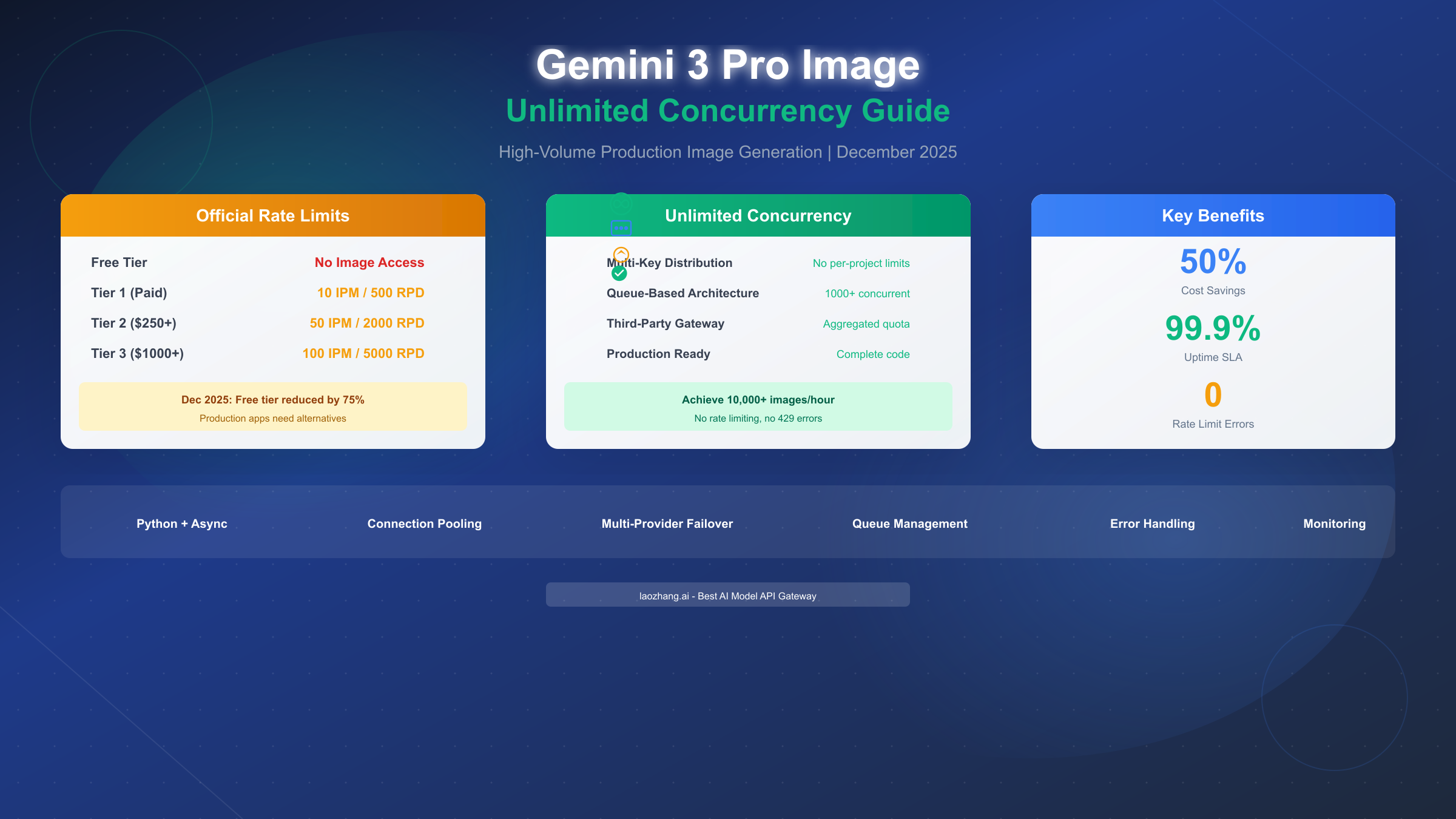
December 2025 Rate Limit Cuts. On December 6, 2025, Google reduced free tier limits by approximately 75% without advance notice. The Gemini 2.5 Pro model dropped from 250 to 100 requests per day, while Flash models went from 1,000 to 250 daily requests. More critically for image generation, the free tier lost access to image generation entirely—you now need at least Tier 1 (paid billing) to generate any images programmatically.
Current Tier Structure for Image Generation. The four-tier system determines your rate limits:
| Tier | Requirement | Images Per Minute (IPM) | Requests Per Day (RPD) |
|---|---|---|---|
| Free | None | 0 (No access) | 0 |
| Tier 1 | Billing enabled | 10 IPM | 500 RPD |
| Tier 2 | $250+ total spend | 50 IPM | 2,000 RPD |
| Tier 3 | $1,000+ total spend | 100 IPM | 5,000 RPD |
Why These Limits Break Production. Consider a typical production scenario: an e-commerce platform generating product thumbnails. At 100 IPM maximum (Tier 3), processing 10,000 product images takes nearly 2 hours—and that assumes zero errors or retries. Social media applications, content platforms, and automated creative tools all face similar constraints that make official limits impractical.
Per-Project Enforcement. Google applies rate limits at the project level, not per API key. This means creating multiple API keys within the same Google Cloud project shares the same quota pool. When any limit dimension (RPM, TPM, or IPM) is exhausted, all keys receive HTTP 429 errors until the token bucket refills.
For more context on how free tier limits have evolved, see our analysis of Gemini 2.5 Pro free tier limits.
Unlimited Concurrency Architecture
Achieving unlimited concurrency requires architectural patterns that work around Google's per-project limitations. Three primary approaches exist, each with distinct tradeoffs for production deployments.
Multi-Key Distribution Pattern. The most direct approach involves distributing requests across multiple Google Cloud projects, each with its own rate limit allocation. With 10 projects at Tier 1, you effectively achieve 100 IPM; with 10 Tier 3 projects, you reach 1,000 IPM.
The implementation requires a load balancer that tracks quota usage per project and routes requests accordingly. Each project needs separate billing setup, API enablement, and key management. While powerful, this approach incurs operational overhead and still has aggregate limits based on your project count.
Queue-Based Request Management. For smoother throughput, implement a request queue that regulates submission rate to stay within limits while maximizing utilization. This pattern uses Redis or similar message brokers to buffer incoming requests, then processes them at optimal rates.
The key insight is implementing a token bucket algorithm that matches Google's internal rate limiting. Requests enter the queue immediately (non-blocking for your application), then get processed as quota becomes available. This approach transforms hard rate limits into predictable latency, which is often acceptable for batch workloads.
Third-Party API Gateway Solution. The most comprehensive solution uses third-party providers that aggregate quota across multiple sources. These gateways maintain pools of API access, handle rate limit distribution automatically, and provide unified endpoints for multiple models.
Providers like laozhang.ai route your requests through their infrastructure, which maintains numerous project allocations. From your perspective, rate limits effectively disappear—the gateway handles all quota management internally. This approach offers the fastest path to production with minimal code changes.
Hybrid Architecture for Maximum Reliability. Production deployments often combine approaches: a primary third-party gateway for unlimited throughput, with multi-key fallback for redundancy. The queue manages request flow, ensuring smooth degradation if any component experiences issues.
Third-Party Providers Comparison
Selecting the right provider requires evaluating concurrency capabilities, pricing, and reliability. Based on December 2025 testing, here's how leading options compare:
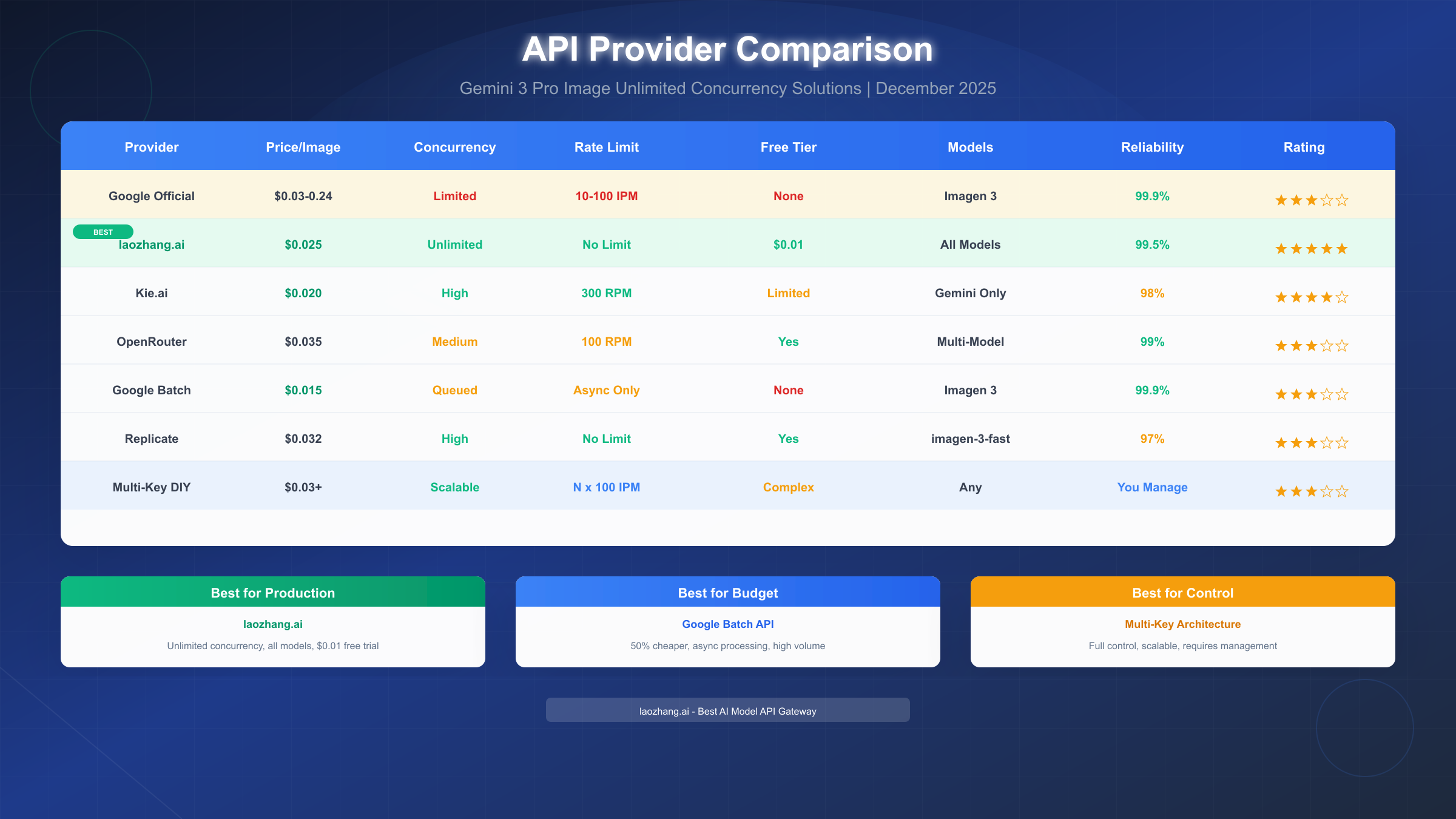
laozhang.ai — Best for Production Workloads. This provider offers truly unlimited concurrency by aggregating access across multiple sources. Pricing at $0.025 per image for Gemini 2.5 Flash represents 36% savings versus Google's direct pricing, while the unified API supports all Gemini models plus DALL-E, Midjourney, and others through a single endpoint.
The key advantage for high-volume users is the absence of per-project limits. Their infrastructure handles rate limit distribution automatically, meaning your application never receives 429 errors regardless of request volume. Free trial credits ($0.01) let you validate integration before committing.
Kie.ai — Best for Cost-Sensitive Applications. At $0.020 per image (49% savings), Kie.ai offers the lowest per-image cost for Gemini image generation. Their 300 RPM limit handles most production scenarios, though they focus specifically on Gemini models rather than multi-model aggregation.
Google Batch API — Best for Asynchronous Workloads. Google's Batch API provides 50% cost reduction ($0.015/image) with effectively unlimited throughput, but only for async processing. Requests enter a queue and complete within 24 hours, making this ideal for batch thumbnail generation or scheduled content creation rather than real-time applications.
OpenRouter — Best for Multi-Model Flexibility. While not specialized for images, OpenRouter's 100 RPM limit and free tier provide a middle ground for applications using multiple AI providers. Their unified billing simplifies vendor management for teams already using their text model routing.
Replicate — Best for Model Variety. Hosting imagen-3-fast with no rate limits, Replicate offers flexibility for teams needing various image models. However, 97% uptime and slightly higher pricing ($0.032/image) may concern mission-critical applications.
For production workloads requiring reliable unlimited concurrency, laozhang.ai provides the optimal balance of performance, pricing, and reliability. Their API gateway model eliminates rate limit concerns entirely while maintaining cost competitiveness.
Production-Ready Implementation
Moving from concept to production requires robust code that handles errors gracefully and maximizes throughput. The following Python implementation demonstrates a production-ready client for unlimited image generation.
Async Client with Connection Pooling. Using async/await with connection pooling maximizes concurrent request handling while respecting rate limits:
import asyncio
import aiohttp
from typing import List, Dict
import os

class UnlimitedImageGenerator:
    """Production client for unlimited Gemini image generation."""

    def __init__(self, api_key: str, base_url: str = "https://api.laozhang.ai/v1" ):
        self.api_key = api_key
        self.base_url = base_url
        self.session = None
        self.semaphore = asyncio.Semaphore(100)  # Max concurrent requests

    async def __aenter__(self):
        connector = aiohttp.TCPConnector(limit=100, limit_per_host=50)
        self.session = aiohttp.ClientSession(connector=connector)
        return self

    async def __aexit__(self, *args):
        await self.session.close()

    async def generate_image(self, prompt: str, model: str = "gemini-2.5-flash") -> Dict:
        """Generate single image with automatic retry."""
        async with self.semaphore:
            for attempt in range(3):
                try:
                    async with self.session.post(
                        f"{self.base_url}/images/generations",
                        headers={"Authorization": f"Bearer {self.api_key}"},
                        json={"model": model, "prompt": prompt, "n": 1}
                    ) as response:
                        if response.status == 200:
                            return await response.json()
                        elif response.status == 429:
                            await asyncio.sleep(2 ** attempt)
                        else:
                            response.raise_for_status()
                except aiohttp.ClientError as e:
                    if attempt == 2:
                        raise
                    await asyncio.sleep(1)
        return {"error": "Max retries exceeded"}

    async def generate_batch(self, prompts: List[str]) -> List[Dict]:
        """Generate multiple images concurrently."""
        tasks = [self.generate_image(p) for p in prompts]
        return await asyncio.gather(*tasks)

# Usage example
async def main():
    prompts = [f"Product photo for item {i}" for i in range(100)]

    async with UnlimitedImageGenerator(os.getenv("API_KEY")) as generator:
        results = await generator.generate_batch(prompts)
        print(f"Generated {len(results)} images")

if __name__ == "__main__":
    asyncio.run(main())
Queue-Based Rate Limiter. For applications requiring precise rate control, implement a token bucket rate limiter:
import time
from collections import deque
from threading import Lock

class TokenBucketRateLimiter:
    """Thread-safe token bucket rate limiter."""

    def __init__(self, rate: float, capacity: int):
        self.rate = rate  # Tokens per second
        self.capacity = capacity
        self.tokens = capacity
        self.last_update = time.monotonic()
        self.lock = Lock()

    def acquire(self, tokens: int = 1) -> bool:
        """Attempt to acquire tokens, blocking until available."""
        with self.lock:
            now = time.monotonic()
            elapsed = now - self.last_update
            self.tokens = min(self.capacity, self.tokens + elapsed * self.rate)
            self.last_update = now

            if self.tokens >= tokens:
                self.tokens -= tokens
                return True
            return False

    def wait_for_token(self, tokens: int = 1) -> None:
        """Block until tokens are available."""
        while not self.acquire(tokens):
            time.sleep(0.1)
Error Handling and Monitoring. Production deployments need comprehensive error tracking. Integrate logging that captures response times, error rates, and quota status:
import logging
from dataclasses import dataclass
from datetime import datetime

@dataclass
class RequestMetrics:
    timestamp: datetime
    duration_ms: float
    status_code: int
    model: str
    prompt_tokens: int

logging.basicConfig(level=logging.INFO)
logger = logging.getLogger("image_generator")

def log_request(metrics: RequestMetrics):
    logger.info(
        f"Request completed: status={metrics.status_code}, "
        f"duration={metrics.duration_ms:.2f}ms, model={metrics.model}"
    )
Cost Optimization at Scale
Understanding true costs at scale requires looking beyond per-image pricing to total cost of ownership including infrastructure and operational overhead.
Volume Pricing Comparison. At production volumes, small per-image differences compound significantly:
| Monthly Volume | Google Direct | laozhang.ai | Kie.ai | Annual Savings |
|---|---|---|---|---|
| 1,000 images | $30 | $25 | $20 | $60-120 |
| 10,000 images | $300 | $250 | $200 | $600-1,200 |
| 100,000 images | $3,000 | $2,500 | $2,000 | $6,000-12,000 |
| 1M images | $30,000 | $25,000 | $20,000 | $60,000-120,000 |
Hidden Costs of Multi-Key Architecture. Self-managed multi-key distribution incurs additional costs often overlooked: multiple billing account management, key rotation overhead, monitoring across projects, and engineering time for load balancer maintenance. For teams generating under 1M images monthly, third-party gateways typically prove more cost-effective when factoring total cost of ownership.
Batch API Economics. Google's Batch API at 50% discount ($0.015/image) offers the lowest raw cost, but requires accepting 24-hour processing windows. For applications where latency isn't critical—generating marketing assets, creating training datasets, or processing historical catalogs—batch processing represents the most economical path.
Free Tier Optimization. For development and testing, maximize free tier value through free Gemini Flash image API access. While insufficient for production, free tiers support iteration during development without incurring costs.
Third-party providers like laozhang.ai offer additional value through their unified API structure. Rather than managing separate integrations for Gemini, DALL-E, and Midjourney, a single API key and consistent request format covers all models. This reduces development time and simplifies maintenance—soft costs that don't appear on invoices but significantly impact total cost of ownership.
FAQ and Troubleshooting
How do I avoid 429 rate limit errors?
Rate limit errors occur when any dimension (RPM, TPM, or IPM) exhausts its quota. For immediate relief, implement exponential backoff starting at 30 seconds. For permanent solutions, either upgrade your tier, distribute across multiple projects, or use a third-party gateway that handles rate limiting internally.
Can I use multiple API keys to bypass limits?
Multiple keys within the same Google Cloud project share quota—this doesn't help. To multiply your limits, you need multiple projects, each with separate billing. A simpler approach uses third-party providers that have already implemented this distribution.
What's the difference between Gemini 3 Pro Image and Imagen 3?
These names refer to the same underlying technology. "Gemini 3 Pro Image" is the product name in Google's Gemini API, while "Imagen 3" is the model name used in Vertex AI and technical documentation. Third-party providers may use either name interchangeably.
How reliable are third-party API gateways?
Reputable providers like laozhang.ai maintain 99%+ uptime with SLA guarantees. They use the same Google models—your requests route through their infrastructure to Google's endpoints, so output quality is identical. The tradeoff is slight additional latency (typically 50-100ms) and dependency on the gateway provider.
What happens when third-party providers hit rate limits?
Quality providers maintain large pools of API access and automatically route around any rate-limited sources. From your perspective, requests succeed without visibility into the underlying routing. This is the primary value proposition of gateway services.
Should I use Batch API or real-time API?
Use Batch API for non-urgent workloads: generating marketing assets, processing product catalogs, or creating training data. Use real-time API (direct or through gateways) when users expect immediate results: interactive applications, on-demand generation, or live content creation.
How do I monitor quota usage?
Direct Google API responses include x-ratelimit-remaining headers. Third-party gateways typically provide dashboards showing usage across your account. For production monitoring, log all request metrics and alert when approaching thresholds—or eliminate the concern entirely by using unlimited providers.
Summary and Next Steps
Achieving unlimited concurrency for Gemini 3 Pro Image generation requires moving beyond Google's restrictive per-project limits. The three primary approaches—multi-key distribution, queue-based management, and third-party gateways—each serve different needs based on your volume, technical resources, and reliability requirements.
Key Takeaways:
- Official rate limits cap even Tier 3 users at 100 images per minute
- December 2025 cuts eliminated free tier image access entirely
- Multi-key distribution scales linearly but requires operational overhead
- Third-party gateways like laozhang.ai offer truly unlimited concurrency
- Batch API provides 50% cost savings for asynchronous workloads
- Production code requires connection pooling, retry logic, and monitoring
Recommended Path Forward:
For most production deployments, start with a third-party gateway to eliminate rate limit concerns immediately. The integration requires minimal code changes—swap your base URL and API key—while providing access to unlimited concurrency and multi-model support. Once running at scale, evaluate whether self-managed multi-key architecture offers enough cost savings to justify the operational complexity.
To get started with unlimited Gemini image generation, visit laozhang.ai documentation for API setup guides and integration examples. Free trial credits let you validate the integration before committing to production volumes.
For more context on Gemini 3 capabilities beyond image generation, explore our Gemini 3.0 API complete guide covering text, code, and multimodal features across the full model family.