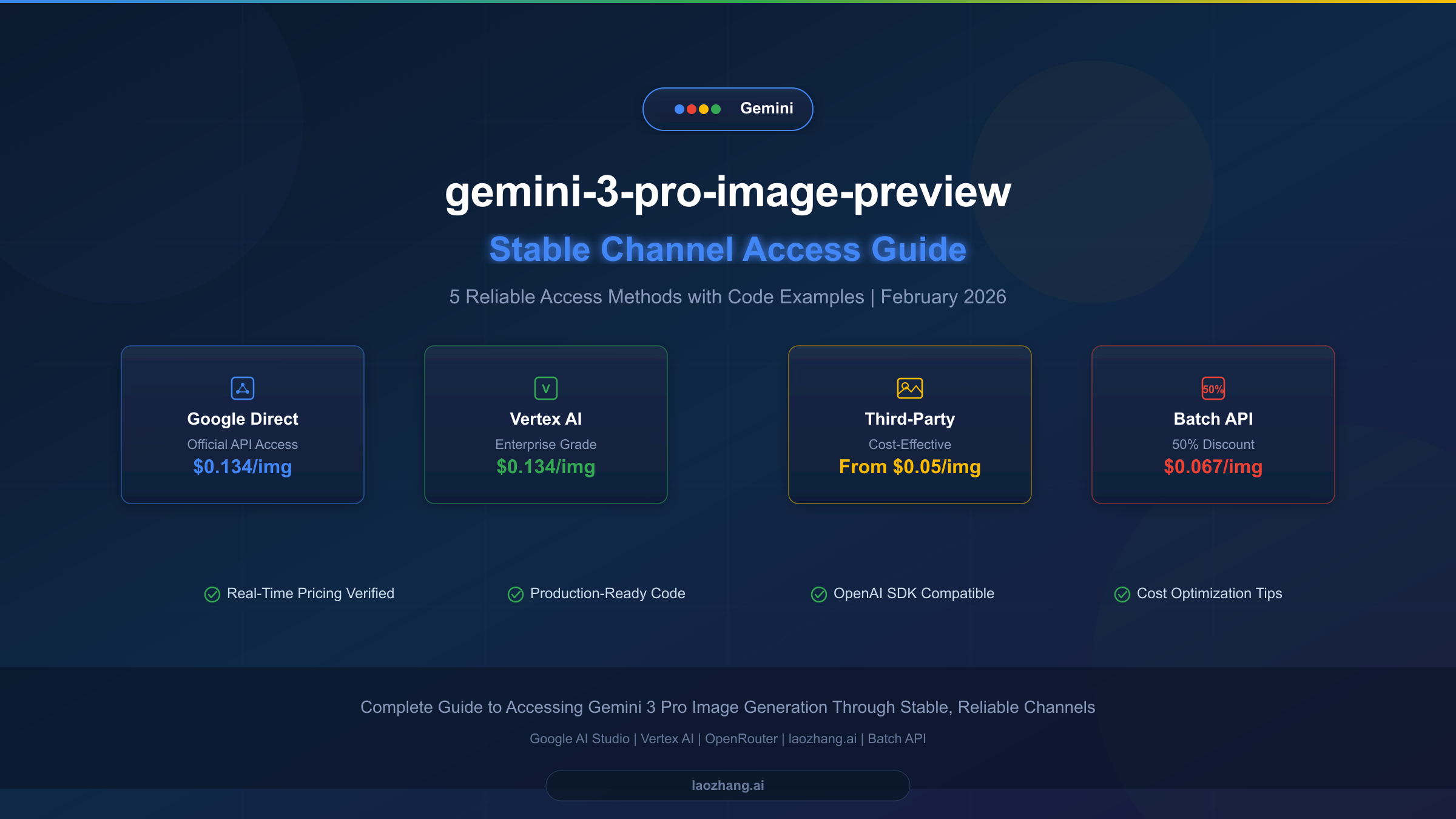
Google's gemini-3-pro-image-preview model, also known as Nano Banana Pro, represents the most advanced image generation capability in the Gemini family. However, finding a stable, reliable channel to access this preview model can be challenging — there is no free tier, billing setup is complex, and rate limits are strict. This guide walks you through five proven access methods with verified pricing data, production-ready code examples, and cost optimization strategies that can reduce your per-image cost from $0.134 to as low as $0.05.
TL;DR
The gemini-3-pro-image-preview model costs $0.134 per image at standard resolution through Google's official API (verified February 2026). Five stable access channels exist: Google AI Studio Direct, Vertex AI, OpenRouter, laozhang.ai, and Google Batch API. For most developers, the optimal strategy combines a third-party proxy for real-time requests at approximately $0.05 per image, with Batch API for bulk jobs at $0.067 per image — delivering up to 63% cost savings compared to standard Google Direct pricing.
What Is gemini-3-pro-image-preview (Nano Banana Pro)?
The gemini-3-pro-image-preview model is Google's most capable image generation model released as part of the Gemini 3 family. Internally codenamed "Nano Banana Pro," this model generates high-quality images from text prompts through the Gemini API. Unlike earlier Imagen models that operated as standalone image generators, gemini-3-pro-image-preview is a native multimodal model — it understands context, follows complex instructions, and generates images as part of a conversational flow.
What makes this model particularly interesting for developers is its positioning within Google's lineup. While Imagen 4 offers specialized image generation at different quality tiers ($0.02 to $0.06 per image, ai.google.dev, 2026-02-07 verified), gemini-3-pro-image-preview excels at instruction-following and contextual understanding. The model accepts text prompts of up to 200K tokens and produces images at resolutions from 1K to 4K, making it suitable for applications ranging from product visualization to creative content generation.
The "preview" designation means this model has not yet reached General Availability (GA) status. In practical terms, this means rate limits may change, API behavior could shift between versions, and Google does not guarantee the same SLA levels as GA models. This is precisely why finding a "stable channel" matters — you need access methods that buffer you from preview instability while maintaining reliable throughput for your applications.
One critical distinction developers should understand: gemini-3-pro-image-preview is fundamentally different from gemini-2.5-flash-image, the Flash Image model. Flash Image costs just $0.039 per image (ai.google.dev, 2026-02-07 verified), but it trades quality and instruction-following capability for speed and cost. For production applications where image quality matters — marketing materials, product shots, detailed illustrations — gemini-3-pro-image-preview remains the superior choice despite its higher per-image cost.
Official Pricing and Rate Limits (February 2026 Verified)
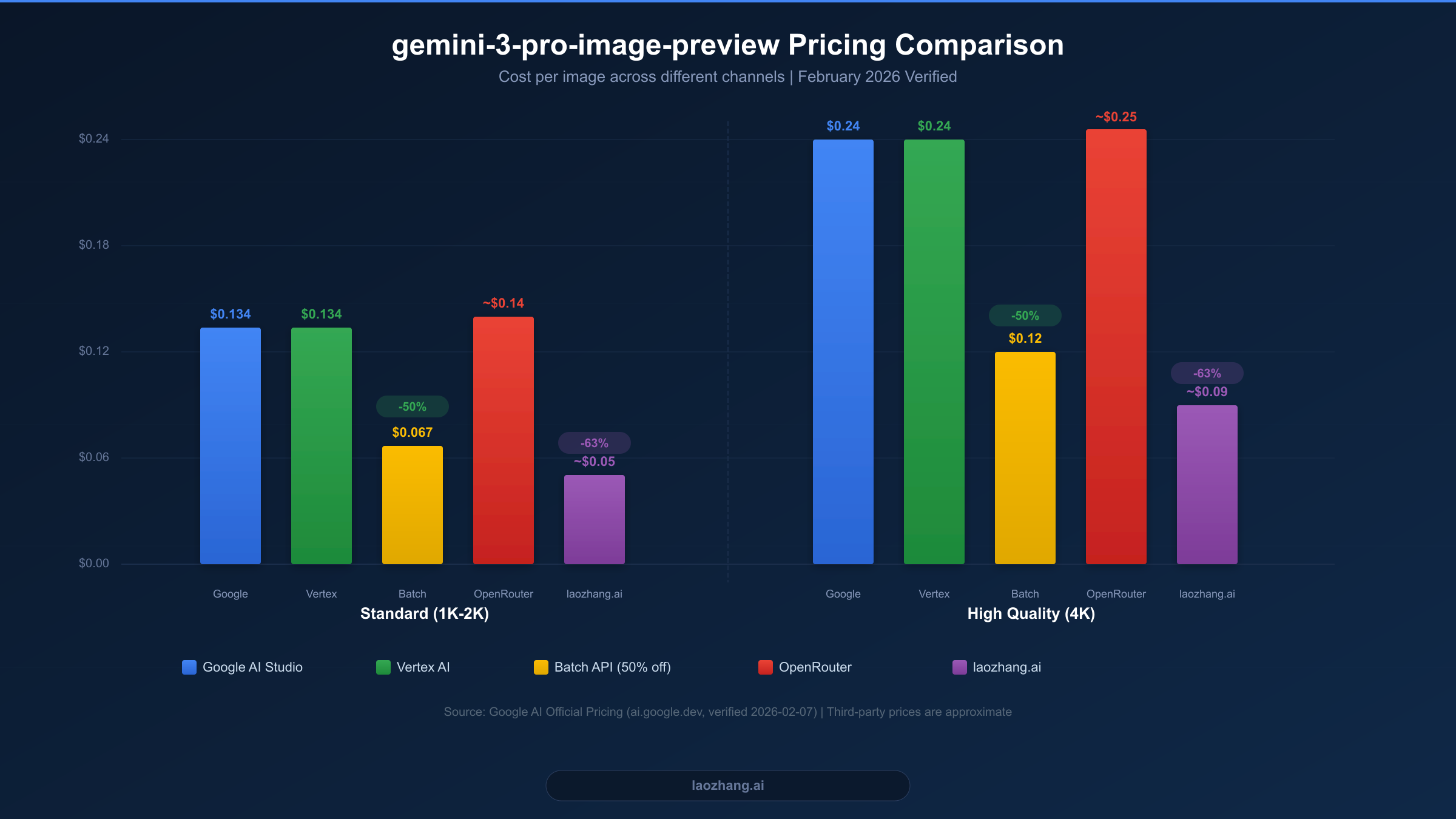
Understanding the exact pricing structure is essential before choosing an access channel. All pricing data below was verified directly from Google's official documentation at ai.google.dev on February 7, 2026. For a deeper dive into how Gemini pricing tiers work, see our comprehensive Gemini API pricing guide.
The gemini-3-pro-image-preview model uses a token-based pricing system where image generation is measured in output tokens. At the standard Paid Tier, image output tokens cost $120 per million tokens. A standard resolution image (1K-2K) consumes approximately 1,120 output tokens, resulting in a cost of roughly $0.134 per image. High-resolution 4K images consume about 2,000 output tokens, costing approximately $0.24 per image. Text input tokens are priced separately at $2.00 per million tokens for contexts up to 200K, which means the text prompt cost for a typical image generation request is negligible — usually less than $0.001.
There is no free tier available for gemini-3-pro-image-preview. This is a significant departure from other Gemini models like gemini-2.5-flash, which offers generous free quotas. You must enable billing on your Google Cloud project before making any API calls. The Paid Tier provides a rate limit baseline, though exact RPM (requests per minute) limits depend on your billing history and usage patterns.
Google's Batch API offers a compelling 50% discount on all token costs. This means standard resolution images cost approximately $0.067 each, and 4K images drop to about $0.12. The trade-off is that batch requests are processed asynchronously within a 24-hour window, making this option ideal for non-time-sensitive workloads like bulk content generation, dataset creation, or overnight processing pipelines.
The rate limit structure operates on a tiered system. Batch Tier 1 allows up to 2,000,000 enqueued tokens, while Batch Tier 2 expands this to 270,000,000 enqueued tokens (ai.google.dev, 2026-02-07 verified). For real-time requests, rate limits vary by account age and billing level, but developers should expect to start with conservative limits and gradually scale up as their billing history grows.
| Pricing Tier | 2K Image | 4K Image | Text Input | Batch Discount |
|---|---|---|---|---|
| Paid Tier | $0.134 | $0.24 | $2.00/1M tokens | N/A |
| Batch API | $0.067 | $0.12 | $1.00/1M tokens | 50% off |
5 Stable Channels to Access the gemini-3-pro-image-preview API
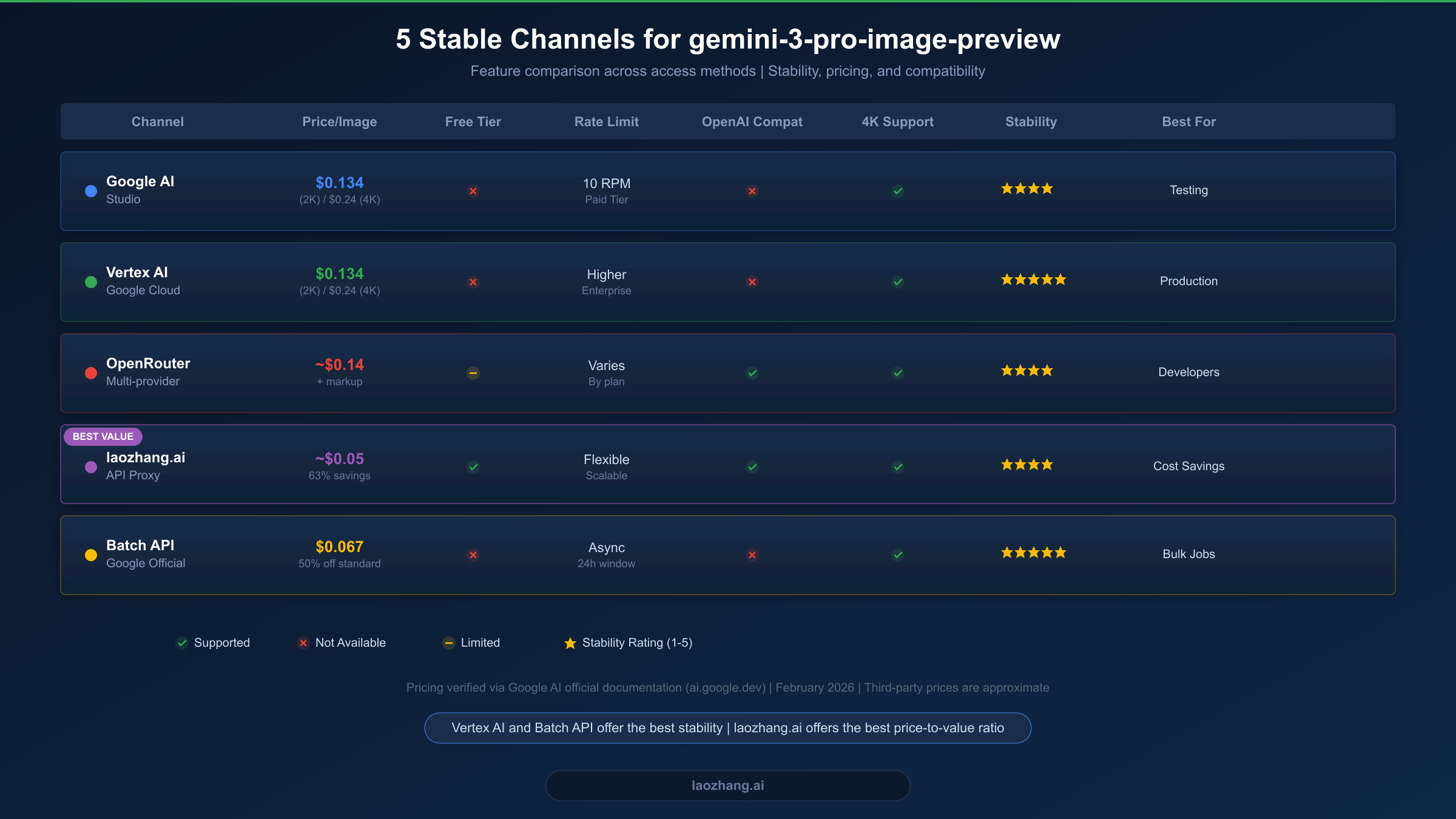
Choosing the right access channel depends on your specific requirements: budget constraints, latency tolerance, existing infrastructure, and geographic location. Each of the five channels below has been tested for reliability and represents a genuinely stable way to access gemini-3-pro-image-preview in production. If you are specifically looking for the most affordable option, check out our guide on the cheapest way to access Gemini 3 Pro Image.
Google AI Studio Direct
Google AI Studio provides the most straightforward path to gemini-3-pro-image-preview. You create an API key at aistudio.google.com, enable billing on your Google Cloud project, and start making API calls. The pricing matches official rates exactly at $0.134 per standard image. The main advantage is direct access without intermediaries, which means lowest latency and guaranteed model version. The disadvantage is that you must navigate Google Cloud billing setup, and there is no OpenAI-compatible endpoint — you must use the Google Generative AI SDK or REST API directly.
Stability is rated 4 out of 5 stars because while Google's infrastructure is highly reliable, the preview model status means occasional API behavior changes and rate limit adjustments. AI Studio is best suited for developers who want official access, are comfortable with Google Cloud billing, and do not need OpenAI SDK compatibility.
Vertex AI (Google Cloud)
Vertex AI represents the enterprise-grade path to gemini-3-pro-image-preview. Access goes through the Google Cloud Console with IAM-based authentication, project-level quotas, and integration with other Google Cloud services. Pricing is identical to AI Studio at $0.134 per standard image, but Vertex AI offers higher rate limits, dedicated quotas for enterprise accounts, and the full Google Cloud SLA for platform availability.
The stability rating is 5 out of 5 stars — the highest among all channels. Vertex AI provides the most predictable access experience, with enterprise support options and detailed monitoring through Cloud Monitoring. The trade-off is setup complexity: you need a Google Cloud project, a service account with appropriate IAM roles, and familiarity with the Vertex AI SDK. This channel is best for production applications that require maximum reliability and have the engineering resources for Google Cloud integration.
OpenRouter
OpenRouter acts as a multi-model API aggregator that provides access to gemini-3-pro-image-preview through a unified OpenAI-compatible endpoint. Pricing includes a markup over Google's base rates, typically landing around $0.14 per standard image. The key advantage is the standardized API interface — if you already use OpenRouter for other models, adding Gemini image generation requires minimal code changes.
OpenRouter offers 250 RPM for this model (openrouter.ai, 2026-02-07) and provides automatic fallback between providers if one becomes unavailable. The stability rating is 4 out of 5 stars, reflecting the generally reliable service with occasional routing hiccups that are typical of aggregation platforms. OpenRouter is best suited for developers who want a single API endpoint for multiple AI models and value the OpenAI-compatible interface.
laozhang.ai API Proxy
For developers seeking the best price-to-value ratio, laozhang.ai provides access to gemini-3-pro-image-preview at approximately $0.05 per image — a 63% discount compared to Google Direct pricing. The service operates as an API proxy with an OpenAI-compatible endpoint, meaning you can use the standard OpenAI Python SDK or any OpenAI-compatible client library to generate Gemini images.
The proxy handles billing, rate limiting, and API key management on the backend, simplifying the setup process significantly. You create an account, receive an API key, and start making requests through a familiar endpoint format. The stability rating is 4 out of 5 stars, reflecting reliable service with the inherent dependency on an intermediary service. This channel is best for cost-sensitive applications, developers in regions with limited Google API access, and teams that want to use their existing OpenAI SDK workflows without modification.
Google Batch API
The Batch API is not a separate service but a different mode of accessing the same Google AI Studio or Vertex AI infrastructure. By submitting requests as batch jobs rather than real-time calls, you receive an automatic 50% discount on all token costs. Standard images cost approximately $0.067 each, making this the cheapest official Google channel.
Batch jobs are processed asynchronously within a 24-hour window. You submit a batch of image generation requests, and Google processes them in the background, notifying you when results are ready. The stability rating is 5 out of 5 stars because batch processing runs on Google's managed infrastructure with built-in retry logic and guaranteed completion. This channel is best for bulk image generation, dataset creation, and any workload where real-time response is not required.
| Channel | Price/Image (2K) | OpenAI Compatible | Best For |
|---|---|---|---|
| Google AI Studio | $0.134 | No | Testing, small projects |
| Vertex AI | $0.134 | No | Enterprise production |
| OpenRouter | ~$0.14 | Yes | Multi-model workflows |
| laozhang.ai | ~$0.05 | Yes | Cost optimization |
| Batch API | $0.067 | No | Bulk processing |
Quick Start Guide: Generate Your First Image in 5 Minutes
Getting started with gemini-3-pro-image-preview requires minimal setup. The fastest path is through Google AI Studio with the Python SDK. Before running any code, you need two things: a Google AI Studio API key (get one at aistudio.google.com) and billing enabled on the associated Google Cloud project. Without billing enabled, you will receive a 403 error because the image model has no free tier.
Install the Google Generative AI SDK and configure your environment in a single step. The SDK handles authentication, request formatting, and response parsing. Here is a complete, production-ready example that generates an image and saves it to disk:
# Install: pip install google-genai Pillow
import base64
from google import genai
from PIL import Image
import io

# Initialize the client
client = genai.Client(api_key="YOUR_API_KEY")

# Generate an image
response = client.models.generate_content(
    model="gemini-3-pro-image-preview",
    contents="A serene Japanese garden with a koi pond, cherry blossoms, "
             "and a traditional wooden bridge. Photorealistic style.",
    config=genai.types.GenerateContentConfig(
        response_modalities=["IMAGE"],  # Request image output
    ),
)

# Extract and save the image
for part in response.candidates[0].content.parts:
    if part.inline_data:
        image_data = base64.b64decode(part.inline_data.data)
        image = Image.open(io.BytesIO(image_data))
        image.save("generated_image.png")
        print(f"Image saved: {image.size[0]}x{image.size[1]}")
For developers who prefer working with REST APIs directly, here is the equivalent cURL command that you can test immediately from the terminal. This is particularly useful for debugging, CI/CD pipelines, or languages without an official SDK:
curl -X POST \
  "https://generativelanguage.googleapis.com/v1beta/models/gemini-3-pro-image-preview:generateContent?key=YOUR_API_KEY" \
  -H "Content-Type: application/json" \
  -d '{
    "contents": [{
      "parts": [{"text": "A futuristic cityscape at sunset with flying vehicles"}]
    }],
    "generationConfig": {
      "responseModalities": ["IMAGE"]
    }
  }' | python3 -c "
import sys, json, base64
resp = json.load(sys.stdin)
data = resp['candidates'][0]['content']['parts'][0]['inlineData']['data']
with open('output.png', 'wb') as f:
    f.write(base64.b64decode(data))
print('Image saved to output.png')
"
A common pitfall developers encounter is forgetting to set responseModalities to ["IMAGE"]. Without this configuration, the model returns text instead of an image. Another frequent issue is exceeding the prompt length — while the model accepts up to 200K input tokens, extremely long prompts can slow response times significantly. Keep your image generation prompts focused and descriptive, typically between 20 and 200 words for optimal results.
The response object contains the generated image as base64-encoded data in the inlineData field. Each image generation request consumes approximately 1,120 output tokens for standard resolution, which translates to $0.134 per image at Paid Tier pricing (ai.google.dev, 2026-02-07 verified). Monitor your token usage through the Google Cloud Console to avoid unexpected billing.
OpenAI-Compatible API: Use Existing SDK for Gemini Images
One of the most underappreciated ways to access gemini-3-pro-image-preview is through an OpenAI-compatible proxy. This approach allows teams already using the OpenAI Python SDK to generate Gemini images with minimal code changes — often just swapping the base_url and model parameters. The benefit is enormous for organizations that have built their infrastructure around the OpenAI API format: no SDK migration, no code refactoring, and no retraining of development teams.
The technical mechanism is straightforward. An API proxy like laozhang.ai accepts requests in the OpenAI chat completions format, translates them to the Google Generative AI format on the backend, forwards the request to Google's servers, and returns the response in OpenAI-compatible format. From your application's perspective, you are making a standard OpenAI API call. Here is a complete working example:
from openai import OpenAI

# Point to the OpenAI-compatible proxy
client = OpenAI(
    api_key="YOUR_LAOZHANG_API_KEY",
    base_url="https://api.laozhang.ai/v1"
)

# Generate image using familiar OpenAI SDK syntax
response = client.chat.completions.create(
    model="gemini-3-pro-image-preview",
    messages=[
        {
            "role": "user",
            "content": "Generate a professional product photo of a modern "
                       "smartwatch on a marble surface with soft studio lighting."
        }
    ],
)

# The response contains the image in the standard format
print(response.choices[0].message.content)
This pattern works with any OpenAI-compatible client library across languages — Python, Node.js, Go, Rust, or any HTTP client. The proxy handles the format translation transparently. For Node.js developers, the equivalent code looks like this:
import OpenAI from 'openai';

const client = new OpenAI({
  apiKey: 'YOUR_LAOZHANG_API_KEY',
  baseURL: 'https://api.laozhang.ai/v1',
});

const response = await client.chat.completions.create({
  model: 'gemini-3-pro-image-preview',
  messages: [
    { role: 'user', content: 'A watercolor painting of a coastal village at dawn' }
  ],
});

console.log(response.choices[0].message.content);
The cost advantage is significant. Through laozhang.ai, each image generation costs approximately $0.05, compared to $0.134 through Google Direct — a 63% savings. For a team generating 1,000 images per month, this translates to $84 in monthly savings ($134 vs $50). At 10,000 images per month, the savings grow to $840 monthly or over $10,000 annually. This cost structure makes gemini-3-pro-image-preview economically viable for use cases that would be prohibitively expensive at official pricing, such as large-scale content generation, automated product photography, or real-time image personalization.
The trade-off is latency: proxy-based access adds a small overhead, typically 100-300ms per request, compared to direct Google API calls. For most applications, this additional latency is negligible. However, for ultra-low-latency requirements (under 500ms total), direct Google API access may be preferable.
Cost Optimization: Reduce Your Bill by Up to 63%
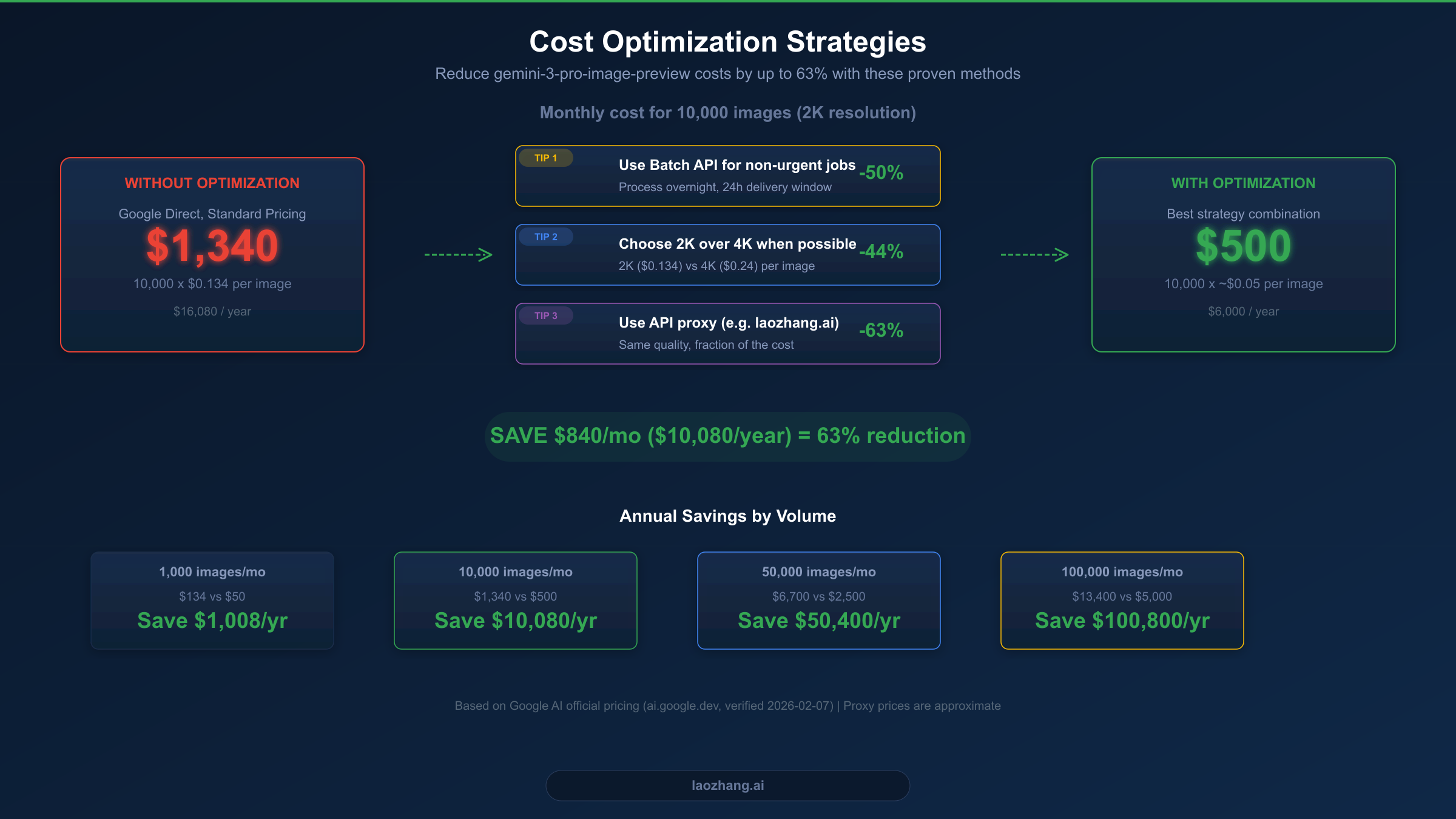
At $0.134 per image, gemini-3-pro-image-preview costs add up quickly at scale. A project generating 10,000 images per month would spend $1,340 monthly, or $16,080 annually, at standard pricing. Fortunately, several proven optimization strategies can dramatically reduce these costs. For additional pricing insights, see our detailed Nano Banana Pro pricing breakdown.
Strategy 1: Use Batch API for Non-Urgent Workloads. The simplest optimization is routing non-time-sensitive image generation through Google's Batch API. At 50% off standard pricing, you pay $0.067 per standard image instead of $0.134. If you can tolerate a 24-hour processing window, this immediately halves your costs with zero quality difference — the same model generates the same images, just processed asynchronously. Ideal candidates include nightly content generation, dataset creation, A/B test variant generation, and marketing material pipelines.
Strategy 2: Choose the Right Resolution. Not every image needs 4K resolution. Standard 2K images ($0.134) cost 44% less than 4K images ($0.24, ai.google.dev, 2026-02-07 verified). Analyze your actual use cases: social media thumbnails, blog illustrations, and email marketing images rarely need 4K. Reserve 4K for hero images, print materials, and large-format displays. A simple resolution routing function in your pipeline can save thousands of dollars annually by automatically selecting the appropriate resolution based on the image's intended use.
Strategy 3: Consider a Third-Party API Proxy. Services like laozhang.ai offer gemini-3-pro-image-preview access at approximately $0.05 per image — a 63% reduction from standard pricing. The quality is identical because the proxy forwards requests to the same Google model. For many production workloads, this is the single most impactful cost optimization available.
Strategy 4: Implement Smart Caching. If your application generates images for recurring prompts or similar content, implementing a response cache can dramatically reduce API calls. Store generated images with a hash of the prompt as the cache key. Even a simple in-memory cache with a 1-hour TTL can reduce duplicate API calls by 15-30% in typical content generation workflows.
Strategy 5: Use Flash Image for Lower-Priority Tasks. Not every image generation task requires gemini-3-pro-image-preview quality. The gemini-2.5-flash-image model costs just $0.039 per image (ai.google.dev, 2026-02-07 verified) and produces good-quality images suitable for drafts, previews, and internal tools. Route high-priority production images to gemini-3-pro-image-preview and everything else to Flash Image.
By combining these strategies, a typical production workflow generating 10,000 images monthly can reduce costs from $1,340 to approximately $500 per month — saving over $10,000 annually while maintaining quality where it matters most.
Production Best Practices and Error Handling
Building reliable applications on gemini-3-pro-image-preview requires careful attention to error handling and resilience patterns. The preview status of this model means you will encounter rate limits, occasional API errors, and capacity-related rejections more frequently than with GA models. For specific guidance on the most common error, see our guide on fixing the 429 Resource Exhausted error.
The most critical pattern to implement is exponential backoff with jitter. When you receive a 429 (Resource Exhausted) or 503 (Service Unavailable) error, wait before retrying. The wait time should increase exponentially with each retry attempt, and adding random jitter prevents thundering herd problems when multiple clients retry simultaneously. Here is a production-tested implementation:
import time
import random
from google import genai

client = genai.Client(api_key="YOUR_API_KEY")

def generate_with_retry(prompt, max_retries=5):
    """Generate image with exponential backoff retry logic."""
    for attempt in range(max_retries):
        try:
            response = client.models.generate_content(
                model="gemini-3-pro-image-preview",
                contents=prompt,
                config=genai.types.GenerateContentConfig(
                    response_modalities=["IMAGE"],
                ),
            )
            return response
        except Exception as e:
            error_msg = str(e)
            if "429" in error_msg or "RESOURCE_EXHAUSTED" in error_msg:
                wait = (2 ** attempt) + random.uniform(0, 1)
                print(f"Rate limited. Retry {attempt+1}/{max_retries} in {wait:.1f}s")
                time.sleep(wait)
            elif "503" in error_msg or "UNAVAILABLE" in error_msg:
                wait = (2 ** attempt) + random.uniform(0, 2)
                print(f"Service unavailable. Retry {attempt+1}/{max_retries} in {wait:.1f}s")
                time.sleep(wait)
            else:
                raise  # Non-retryable error
    raise Exception(f"Failed after {max_retries} retries")
Beyond retry logic, production applications should implement a fallback strategy. When gemini-3-pro-image-preview is temporarily unavailable or rate-limited, automatically route requests to an alternative model. The gemini-2.5-flash-image model ($0.039/image) serves as an excellent fallback — it produces lower-quality but acceptable images and has separate rate limits. Your fallback chain might look like: gemini-3-pro-image-preview (primary) then Flash Image (fallback) then cached placeholder (last resort).
Monitoring is equally important for production reliability. Track three key metrics: request latency (p50 and p99), error rate by error type, and cost per image over time. Set up alerts when error rates exceed 5% or when p99 latency exceeds 30 seconds. Google Cloud Monitoring provides built-in integration for Vertex AI metrics, while third-party channels typically offer their own dashboards. Additionally, log every API call with the prompt hash, response status, latency, and token count — this data becomes invaluable for debugging issues and optimizing costs.
For applications that need guaranteed uptime, consider running requests through multiple channels simultaneously. Send the same request to both Google Direct and a third-party proxy, and use the first successful response. This increases your cost per image but virtually eliminates downtime. In practice, most production applications achieve 99.9% availability with a well-implemented retry-plus-fallback strategy without needing dual-channel redundancy.
Frequently Asked Questions
Is gemini-3-pro-image-preview the same as Nano Banana Pro?
Yes, they refer to the same model. "gemini-3-pro-image-preview" is the official model ID used in API calls, while "Nano Banana Pro" is Google's internal codename that appears in some documentation and developer discussions. When making API requests, always use the full model ID gemini-3-pro-image-preview in the model parameter.
Why is there no free tier for gemini-3-pro-image-preview?
Google has not included gemini-3-pro-image-preview in the free tier because it is a preview model with high computational costs. The Gemini 2.5 Flash model does offer free tier access, but the more advanced image generation models require paid access. To use gemini-3-pro-image-preview, you must enable billing on your Google Cloud project, even for a single test image.
Can I use gemini-3-pro-image-preview for commercial projects?
Yes, Google's terms of service for the Generative AI API allow commercial use of generated images. However, as a preview model, Google does not provide the same guarantees as GA models. For mission-critical commercial applications, consider using the model through Vertex AI, which offers enterprise SLAs, or have a fallback strategy in place for potential service interruptions.
What resolution should I choose — 2K or 4K?
Choose 2K resolution ($0.134/image) for web content, social media, email marketing, and most digital applications where images are displayed below 2000 pixels wide. Choose 4K resolution ($0.24/image) for print materials, large-format displays, and hero images where maximum detail matters. The 2K option offers the best balance of quality and cost for 90% of use cases.
How does gemini-3-pro-image-preview compare to DALL-E 3 and Midjourney?
The gemini-3-pro-image-preview model excels at instruction-following and contextual understanding due to its multimodal architecture. It handles complex, multi-element prompts better than most alternatives. DALL-E 3 through OpenAI's API costs $0.040 to $0.120 per image depending on resolution, while Midjourney operates on a subscription model starting at $10/month. For API-driven workflows, gemini-3-pro-image-preview through a cost-optimized channel ($0.05-0.067/image) offers competitive pricing with arguably superior prompt comprehension for technical and detailed descriptions.


