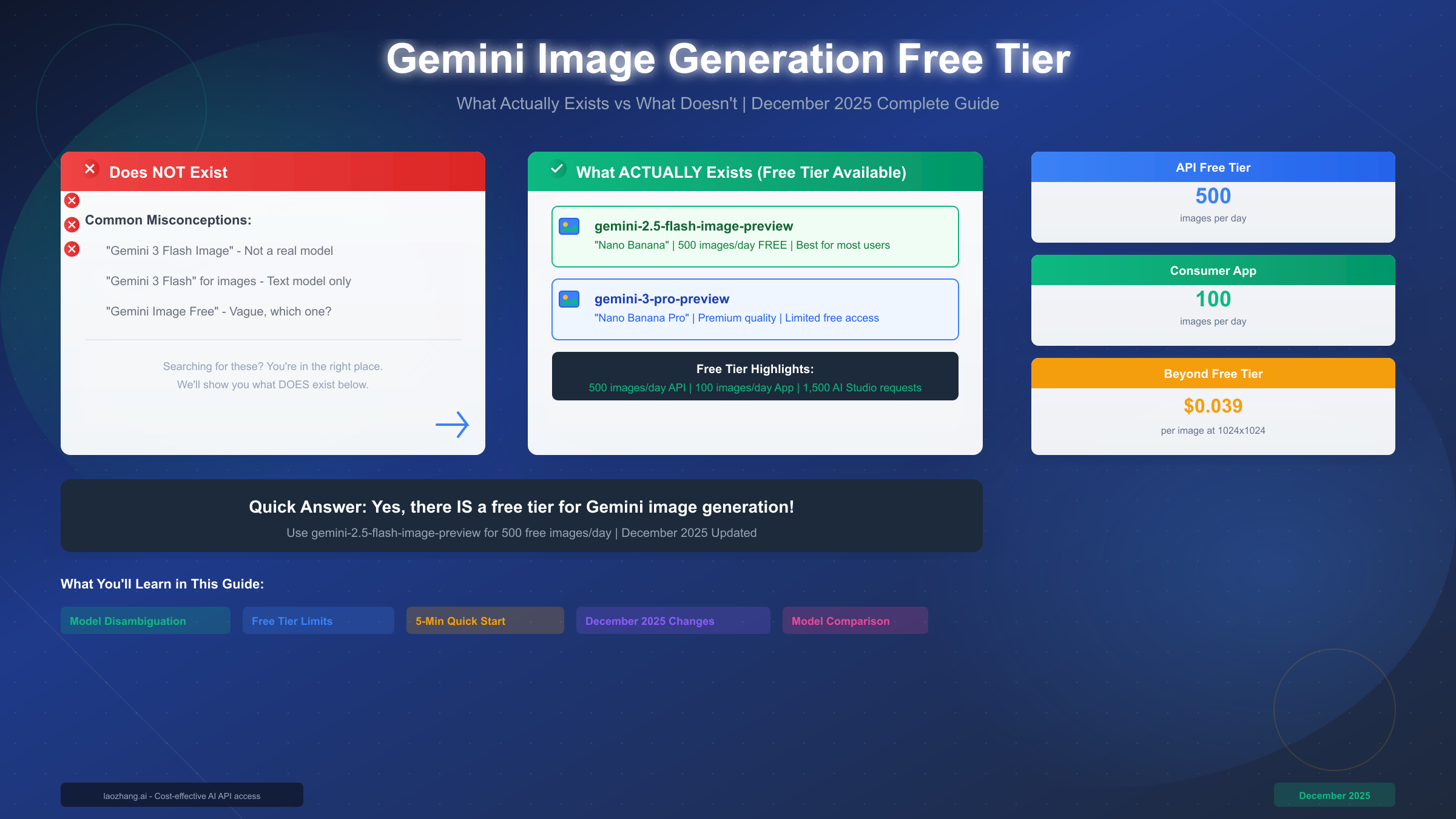
Gemini 3 Flash Image does not exist as a specific model—users searching for it typically want Gemini 2.5 Flash Image (codenamed "Nano Banana") or Gemini 3 Pro Image Preview. Good news: both have free tiers. As of December 2025, the API free tier provides up to 500 images per day for Gemini 2.5 Flash Image. This guide clarifies the model confusion, shows exactly what's available for free, and explains the December 2025 quota changes affecting all users.
Quick Answer: Does "Gemini 3 Flash Image" Exist?
Let's address the elephant in the room immediately: there is no model called "Gemini 3 Flash Image." This is a common misconception that stems from Google's somewhat confusing model naming conventions. When users search for this term, they're typically looking for one of two things—either the free tier limits for Gemini image generation, or the specific image generation capabilities of Gemini 3 series models.
The confusion arises because Google has released multiple model lines with overlapping capabilities. Gemini 3 Flash exists as a text and multimodal model released in 2025, optimized for speed and efficiency. However, it doesn't have a dedicated "Image" variant. The actual image generation models use different naming conventions entirely.
What you're probably looking for:
| Model Name You Might Search | What Actually Exists | Image Generation? |
|---|---|---|
| "Gemini 3 Flash Image" | Does NOT exist | N/A |
| "Gemini Flash Image" | gemini-2.5-flash-image-preview | Yes, 500 free/day |
| "Gemini 3 Pro Image" | gemini-3-pro-preview | Yes, limited free |
| "Nano Banana" | gemini-2.5-flash-image-preview | Yes, 500 free/day |
| "Nano Banana Pro" | gemini-3-pro-preview | Yes, limited free |
The two models that actually generate images are: gemini-2.5-flash-image-preview (the main workhorse with generous free limits) and gemini-3-pro-preview (the premium option with higher quality but more limited free access). The nicknames "Nano Banana" and "Nano Banana Pro" come from Google's internal development codenames that leaked into public documentation.
Understanding this distinction is crucial because it affects which model you should use for your projects. If you've been frustrated trying to find "Gemini 3 Flash Image" in the API documentation, now you know why—you should be looking for gemini-2.5-flash-image-preview instead. This model offers the best combination of free tier limits and quality for most users, which is why we recommend starting there regardless of your experience level.
Complete Free Tier Breakdown (December 2025)
Google provides multiple ways to access Gemini image generation for free, but the limits vary significantly depending on which method you choose. Understanding these differences will help you maximize your free usage and avoid unexpected rate limiting or quota exhaustion.
API Free Tier (Recommended for Developers)
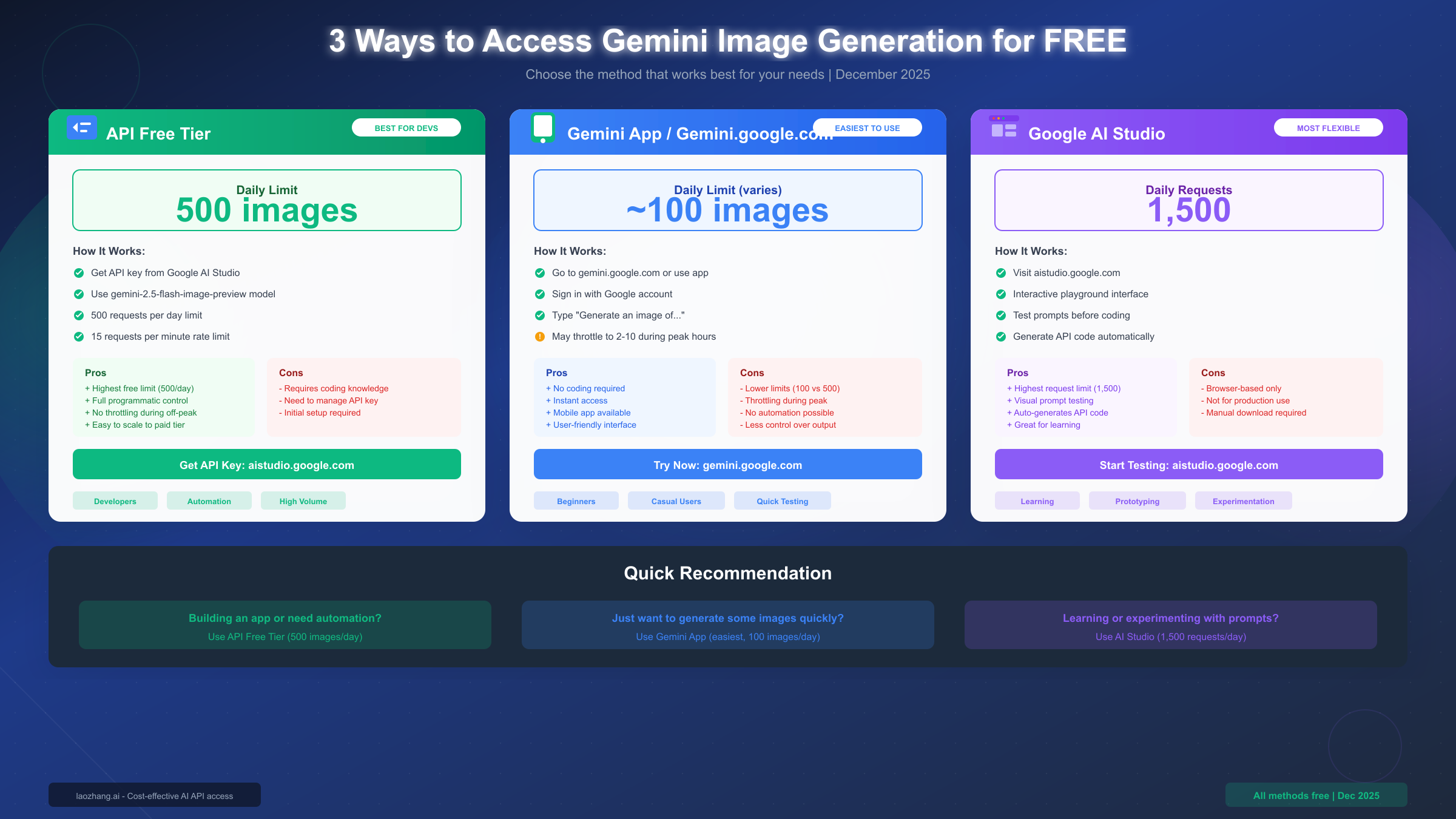
The API free tier offers the most generous limits for image generation. Using the gemini-2.5-flash-image-preview model through the API, you can generate up to 500 images per day at no cost. This limit resets at midnight UTC, not your local timezone—a detail that catches many developers off guard when they hit limits unexpectedly.
Beyond the daily limit, you'll also encounter a rate limit of 15 requests per minute and 1,500 requests per day for the overall API (across all request types, not just images). For image generation specifically, the 500 images per day is your effective limit. Each generation request counts as one image, regardless of resolution—generating a 1024x1024 image costs the same against your quota as a 512x512 image.
Consumer App (gemini.google.com)
The Gemini consumer app and website offer a simpler interface for generating images, but with significantly lower limits. Users can typically generate around 100 images per day under normal conditions. However, this number can drop dramatically during peak usage times—reports from December 2025 indicate throttling down to as few as 2-10 images during high-demand periods.
The throttling behavior makes the consumer app unreliable for any serious workflow. While it's perfect for occasional personal use or quick experiments, anyone planning to generate more than a handful of images should consider the API approach instead. The consumer app also offers less control over generation parameters and doesn't allow programmatic access.
Google AI Studio
AI Studio provides a middle ground between the consumer app and full API access. It offers up to 1,500 requests per day in its playground interface, making it excellent for testing prompts and experimenting with different approaches. The visual interface helps you understand how different parameters affect output before writing any code.
| Access Method | Daily Limit | Rate Limit | Best For |
|---|---|---|---|
| API Free Tier | 500 images | 15 req/min | Developers, automation |
| Consumer App | ~100 images* | Throttled | Casual users |
| AI Studio | 1,500 requests | Standard | Testing, learning |
*Consumer app limits vary based on server load and may be significantly lower during peak times.
What "Free" Really Means
The free tier isn't unlimited, and understanding its constraints helps set realistic expectations. All free tier usage is subject to Google's acceptable use policies, which prohibit generating harmful content, creating deepfakes of real people without consent, and other restricted content categories. Violating these policies can result in losing free tier access entirely.
Additionally, the free tier provides no guaranteed service level agreement. During periods of high demand or system maintenance, free tier users may experience degraded performance or temporary access restrictions. For production applications that require reliability, the paid tier offers better guarantees—though for testing, development, and moderate personal use, the free tier is more than sufficient.
Model Comparison: Which One Should You Use?
Choosing between Gemini 2.5 Flash Image and Gemini 3 Pro Preview depends on your specific requirements for quality, speed, cost, and use case. Both models are capable, but they serve different purposes and excel in different scenarios.
Gemini 2.5 Flash Image (Nano Banana)
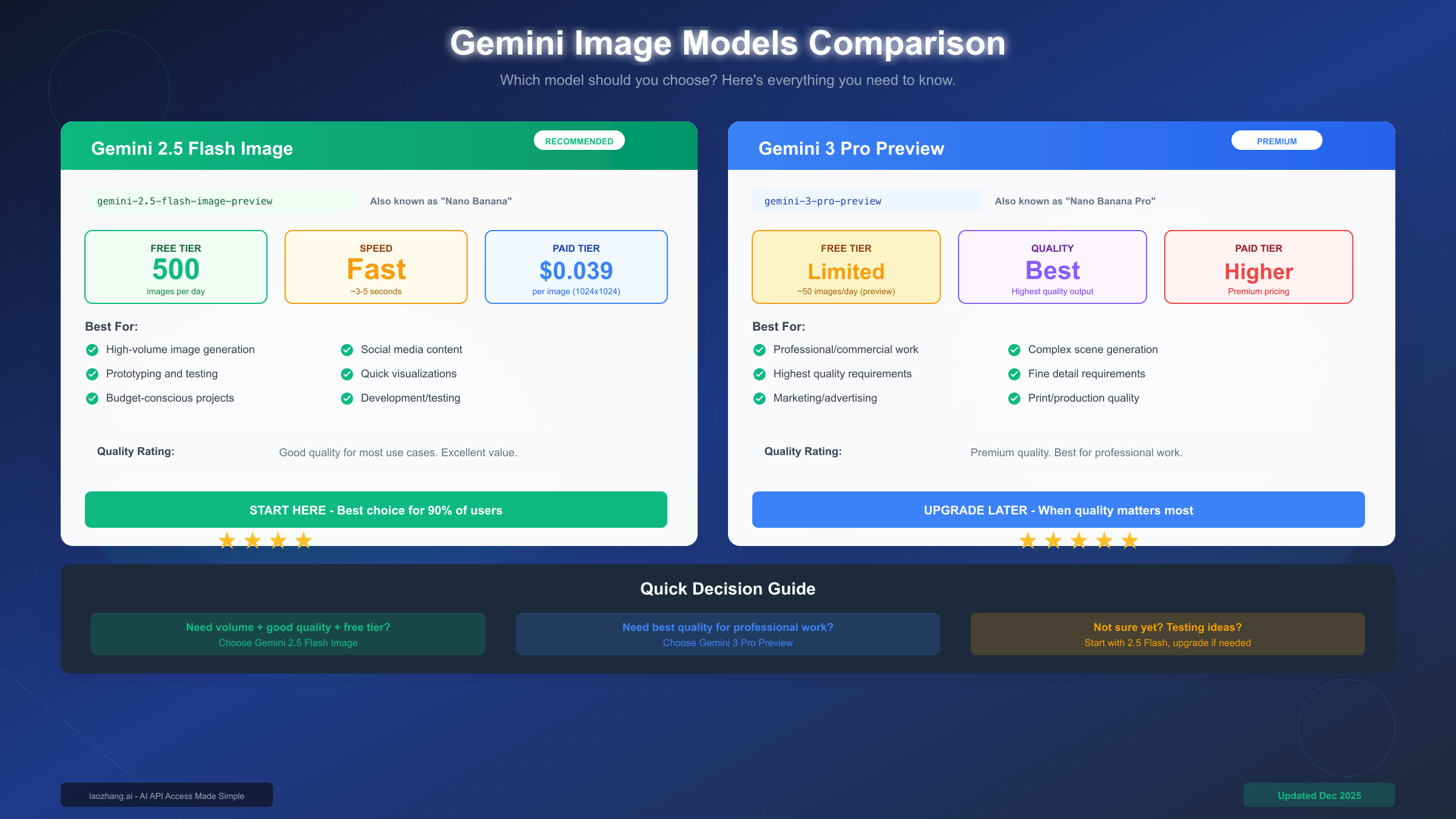
This model represents the best value for most users. It generates high-quality images quickly, typically in 3-5 seconds, and offers the most generous free tier at 500 images per day. The quality is more than sufficient for social media content, prototyping, blog illustrations, and most commercial applications.
The model ID is gemini-2.5-flash-image-preview. When making API calls, you'll use this exact string to specify which model to use. Despite the "preview" designation, this model has been stable and reliable in production environments throughout 2025. Google maintains this naming convention during extended preview periods before fully general availability.
Image quality from the 2.5 Flash model handles a wide range of prompts well. Photorealistic images, artistic styles, product mockups, and text rendering all perform reliably. The main limitation compared to the Pro model is in handling extremely complex scenes with many detailed elements—for these edge cases, the Pro model produces noticeably better results.
Gemini 3 Pro Preview (Nano Banana Pro)
The Pro model offers Google's highest-quality image generation, with better handling of complex compositions, more accurate text rendering, and finer detail preservation. However, these improvements come with trade-offs: slower generation times, higher costs on the paid tier, and more limited free access.
For the free tier specifically, Gemini 3 Pro Preview offers roughly 50 images per day during the preview period—significantly less than the 500 available with the Flash model. This makes it impractical for high-volume use cases but excellent for situations where quality matters more than quantity.
Decision Framework
The choice between models typically comes down to a few key questions:
Choose Gemini 2.5 Flash Image when:
- Volume matters—you need to generate many images
- Speed is important—3-5 second generation times
- Cost sensitivity—you want to maximize free tier usage or minimize paid costs
- Most commercial use cases—social media, marketing, content creation
- Development and testing—iterate quickly without worrying about limits
Choose Gemini 3 Pro Preview when:
- Quality is the top priority—professional print work, hero images
- Complex scenes—multiple subjects with fine details
- Text accuracy critical—logos, signage, detailed typography
- Limited generation volume—fewer images where each one matters
For most users starting out, we strongly recommend beginning with Gemini 2.5 Flash Image. You can always upgrade to the Pro model for specific images that require maximum quality, while using the Flash model for everything else. This hybrid approach maximizes both your free tier allocation and overall output quality.
Quick Start: Your First Image in 5 Minutes
Getting started with Gemini image generation is straightforward once you know which model to use. We'll cover two approaches: the no-code method using Google AI Studio, and the API method for developers who want programmatic access.
Method 1: Google AI Studio (No Code Required)
This is the fastest way to generate your first image if you don't need automation:
- Navigate to aistudio.google.com and sign in with your Google account
- Select "Create new prompt" and choose the Gemini model
- In the model settings, ensure you're using a model that supports image generation
- Enter your image prompt in natural language, such as "A serene Japanese garden at sunset with cherry blossoms"
- Click generate and wait a few seconds for your image
AI Studio automatically handles authentication and API configuration. You can experiment with different prompts, adjust parameters, and download generated images directly from the interface. Once you're comfortable with how prompts work, you can export working code to implement in your own applications.
Method 2: Python API (For Developers)
For programmatic access, you'll need to set up the Google AI SDK. If you haven't obtained an API key yet, follow our guide on getting your Gemini API key first.
Install the required package:
pip install google-generativeaiHere's a complete working example that generates an image and saves it to disk:
import google.generativeai as genai
from PIL import Image
import io

# Configure with your API key
genai.configure(api_key="YOUR_API_KEY_HERE")

# Initialize the model
model = genai.GenerativeModel("gemini-2.5-flash-image-preview")

# Generate an image
response = model.generate_content(
    "A photorealistic image of a golden retriever puppy playing in autumn leaves",
    generation_config={
        "response_mime_type": "image/png"
    }
)

# Save the generated image
if response.parts:
    image_data = response.parts[0].inline_data.data
    image = Image.open(io.BytesIO(image_data))
    image.save("generated_image.png")
    print("Image saved successfully!")
Common Errors and Solutions
Error: 429 Too Many Requests This error indicates you've hit a rate limit. Solutions:
- Wait a few seconds between requests (respect the 15 req/min limit)
- Check if you've exceeded your daily quota (500 images)
- Consider spreading requests across different times
Error: Invalid API Key Verify your API key is correct and has the necessary permissions. Keys created in Google Cloud Console may need specific API enablement.
Error: Content Blocked The model refused to generate the image due to safety filters. Rephrase your prompt to avoid content that might be flagged as harmful or inappropriate.
For a deeper dive into API integration patterns and advanced usage, see our comprehensive Gemini Flash Image API guide which covers error handling, batch processing, and production deployment strategies.
December 2025 Quota Changes Explained
In early December 2025, Google implemented significant changes to Gemini API quotas that affected many users. Understanding what changed and why helps you adapt your usage patterns accordingly.
What Changed on December 7, 2025
Google tightened free tier quotas across the Gemini API, particularly affecting image generation. The changes primarily impacted rate limits rather than daily quotas—the 500 images per day limit remained unchanged, but the requests-per-minute limits became more strictly enforced.
Previously, the API showed some flexibility in rate limiting during off-peak hours. After the December changes, limits are enforced consistently regardless of server load. This means exactly 15 requests per minute, with excess requests receiving immediate 429 errors rather than being queued.
| Aspect | Before December 2025 | After December 2025 |
|---|---|---|
| Daily image limit | 500 images | 500 images (unchanged) |
| Rate limit enforcement | Flexible | Strict |
| Off-peak flexibility | Some buffer | None |
| Error response | Sometimes delayed | Immediate 429 |
Why Google Made These Changes
The changes coincide with increased Gemini adoption and the need to ensure fair resource allocation across the growing user base. Google's infrastructure can handle enormous scale, but free tier resources are intentionally limited to encourage paid tier adoption for heavy usage.
The stricter enforcement also helps prevent abuse patterns where automated systems would burst requests hoping to exceed soft limits. By implementing hard limits with immediate enforcement, Google provides more predictable behavior for all users.
Workarounds and Best Practices
To work effectively within the new limits:
Implement proper rate limiting in your code. Don't rely on catching 429 errors—proactively space your requests at least 4 seconds apart to stay safely under the 15/minute limit.
Use exponential backoff for retries. When you do hit a limit, wait progressively longer between retry attempts (e.g., 1 second, then 2, then 4, then 8).
Cache generated images. If you might need the same image again, save it rather than regenerating. This preserves your quota for new generations.
Consider off-peak hours. While limits are now strictly enforced, overall API latency is still lower during off-peak hours (typically late night/early morning UTC), making your workflow faster even if limits don't flex.
Monitor your usage. Check your quota consumption in Google Cloud Console to avoid surprises. You can also programmatically check remaining quota in API responses.
Pricing: When Free Tier Isn't Enough
While the free tier is generous for many use cases, understanding paid tier pricing helps you plan for growth. Knowing the cost structure also helps you decide whether upgrading makes sense for your specific situation.
Current Pricing Structure (December 2025)
Gemini image generation pricing follows a resolution-based model. Higher resolution images cost more to generate, reflecting the additional computational resources required.
| Resolution | Price per Image | Monthly Cost (1,000 images) |
|---|---|---|
| 1024×1024 | $0.039 | $39 |
| 2048×2048 | $0.134 | $134 |
| 4096×4096 | $0.240 | $240 |
These prices apply to the gemini-2.5-flash-image-preview model. The Gemini 3 Pro Preview model has higher pricing that Google updates periodically during the preview period.
When to Consider Paid Tier
The transition from free to paid typically happens in a few scenarios:
Volume exceeds 500 images per day. If you're consistently hitting daily limits, upgrading to paid gives you unlimited generation (subject to rate limits and billing).
Production reliability required. Paid tier includes better SLA guarantees and priority support. For applications where image generation is critical to user experience, this reliability is worth the cost.
Rate limits are problematic. Paid tier offers higher rate limits, which matters for real-time applications or batch processing workflows.
Cost Optimization Tips
If you're approaching paid usage, several strategies help minimize costs:
Use the smallest resolution that meets your needs. A 1024×1024 image costs less than a third of a 4096×4096 image. Many web use cases don't need maximum resolution.
Batch similar requests. Grouping related generations can help you identify redundancies and avoid generating variations you don't need.
Implement a generation cache. Store generated images with their prompts as keys. Before generating, check if an identical or sufficiently similar request has already been fulfilled.
For detailed pricing analysis and comparison with other AI image providers, check our Gemini API pricing breakdown. For teams seeking cost-effective access without managing multiple API keys, API aggregators like laozhang.ai offer unified access to Gemini and other image models. Their Nano Banana Pro access is priced at approximately 50% of direct API cost, making it attractive for high-volume production use. More information is available at https://docs.laozhang.ai/
Frequently Asked Questions
Is Gemini image generation better than DALL-E?
Both have strengths. Gemini offers a more generous free tier (500/day vs DALL-E's limited free credits) and generally faster generation times. DALL-E 3 sometimes produces slightly more artistic interpretations, while Gemini tends toward more literal prompt following. For free access, Gemini is the clear winner. For paid access, the choice depends on which style better matches your needs.
Can I use API-generated images commercially?
Yes, according to Google's terms of service as of December 2025, images generated through the Gemini API may be used commercially. However, you must ensure your prompts don't violate content policies, and you're responsible for how you use generated content. Always review the current terms before commercial deployment.
What exactly is "Nano Banana"?
"Nano Banana" is Google's internal codename for the gemini-2.5-flash-image-preview model that leaked into public documentation and developer communities. It stuck as an informal name because it's easier to say than the full model ID. Similarly, "Nano Banana Pro" refers to gemini-3-pro-preview. These aren't official product names, just widely-used nicknames.
What happens when I hit the daily limit?
The API returns a 429 error with a message indicating quota exhaustion. Your quota resets at midnight UTC (not your local timezone). Until then, you can switch to paid tier, use the consumer app for a few more images, or simply wait for the reset. Attempting to circumvent limits by creating multiple accounts violates terms of service and can result in permanent bans.
When do daily limits reset?
All quotas reset at 00:00 UTC daily. This is approximately 5 PM Pacific, 8 PM Eastern, or 8 AM the next day in China (UTC+8). Plan your usage around this reset time if you're consistently approaching limits.
What are my alternatives if I hit limits frequently?
If you frequently hit rate limits or need access to multiple image models, API aggregators provide a solution. Services like laozhang.ai aggregate multiple models including Gemini, offering no rate limits and unified billing. You can also consider the paid tier for unlimited access, or optimize your usage through caching and efficient prompting.
Does Gemini support image editing or inpainting?
As of December 2025, the Gemini image models focus on generation from text prompts. While some limited editing capabilities exist through careful prompting, dedicated image editing features like DALL-E's inpainting aren't fully available. For heavy editing workflows, consider using Gemini for generation and other tools for post-processing.
Is the "preview" in model names something to worry about?
Despite the "preview" designation, these models have been stable in production for months. Google uses extended preview periods for new capabilities while maintaining stability commitments. The preview label mainly indicates that breaking API changes are possible (though rare), not that the model is unstable or unreliable.
Conclusion and Next Steps
The confusion around "Gemini 3 Flash Image" is understandable given Google's complex model naming, but now you know what actually exists: gemini-2.5-flash-image-preview for generous free access, and gemini-3-pro-preview for maximum quality. The free tier offers substantial value—500 images per day through the API is more than enough for most individual developers and small projects.
Your recommended path forward:
If you're new to Gemini image generation, start with Google AI Studio to experiment with prompts without any setup. Once comfortable, obtain an API key and try the Python example provided above. For production use, implement proper rate limiting and caching to maximize your free tier allocation.
For ongoing access beyond free tier limits or if you need simplified access to multiple AI image models, explore API aggregation services that can provide cost-effective access to Gemini and other providers through a unified interface.
The December 2025 quota changes mean stricter enforcement, but the free tier remains generous for typical use cases. Plan your usage around the daily reset at midnight UTC, implement proper error handling for rate limits, and you'll find Gemini image generation to be a powerful, cost-effective tool for your projects.


