Update (October 5, 2026): Pixlr's prices below still match its pricing page (Plus $2.49/month with 80 AI credits). Magic Hour has since changed how it describes its free plan: the pricing page no longer lists a fixed 400 credits and says free accounts "may receive starter credits", so treat the Magic Hour numbers below as a March 2026 snapshot.
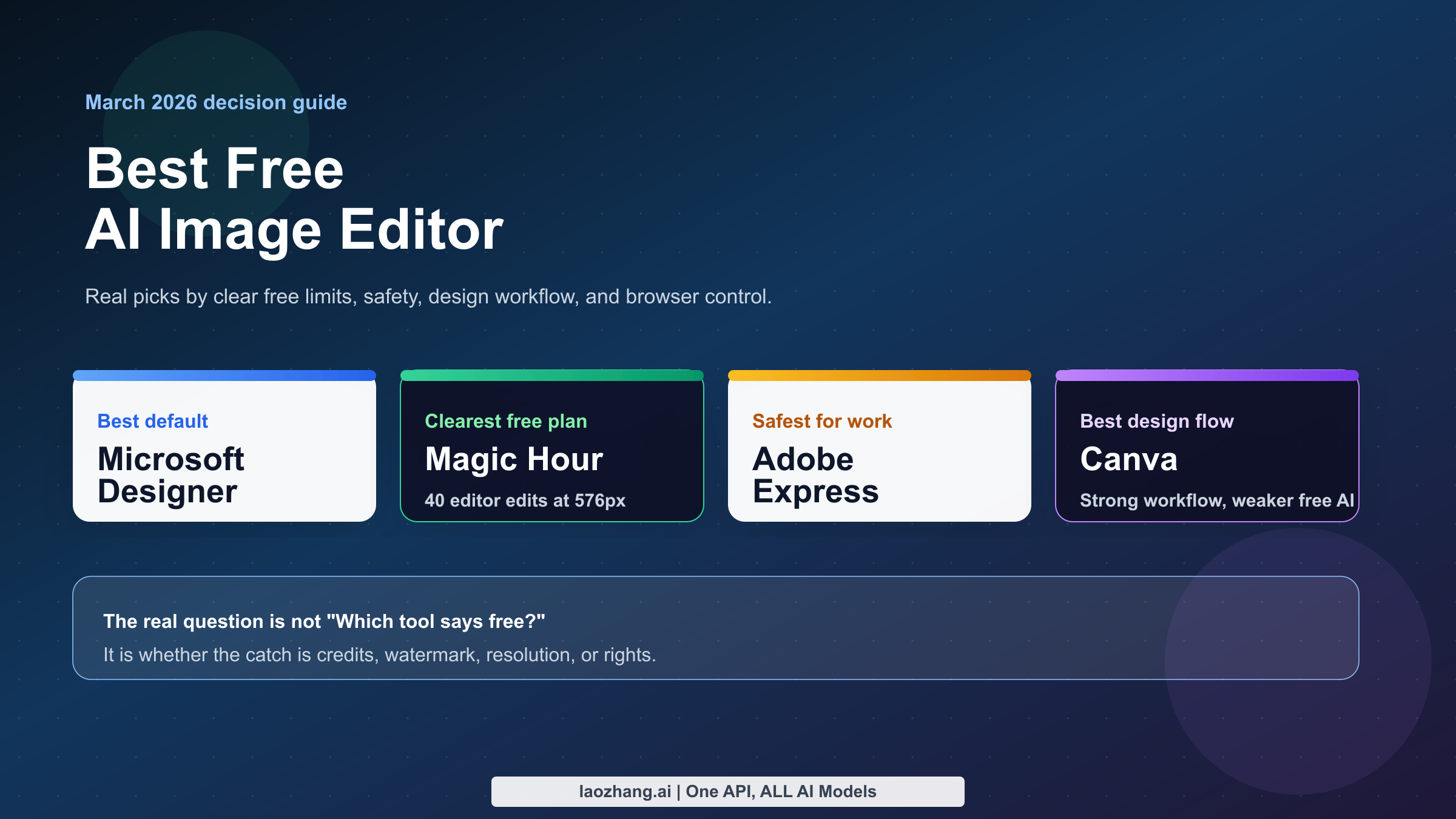
The best free AI image editor for most people in March 2026 is Microsoft Designer, because it is easy to open, feels mainstream instead of sketchy, and gives casual users a fast way to edit existing images with AI without learning pro software. But that is only the best default answer. If you mean actually free with clearly stated limits, Magic Hour is stronger. If you mean safer for business-facing design work, Adobe Express is the smarter pick. If you mean best design workflow with templates and layout, Canva still wins even though its best AI editing paths are mostly freemium.
That split matters because the current SERP keeps flattening three different things into one keyword: AI image generators, AI image editors for existing photos, and design suites with AI extras. Those are not the same product. A tool that is free for 40 edits at 576px with a watermark is not competing on the same terms as a tool that is free but vague about limits, and neither should be judged the same way as a design app whose best AI tools live behind a Pro plan. The useful question is not "Which brand says AI the loudest?" The useful question is "Which editor lets me finish my actual job before the free plan becomes annoying?"
I built this guide around that real decision. I checked current official pages for Microsoft Designer, Magic Hour, Adobe Express, Pixlr, Fotor, and Canva's current pricing/search surfaces on March 13, 2026, then compared them against the way independent reviewers like Zapier describe real-world friction. The result is not a gallery of pretty screenshots. It is a decision guide for readers who want to know what is genuinely free, what is only free on paper, and what to open first.
TL;DR
If you only want the answer and not the full argument, start here. The biggest mistake readers make with this keyword is treating free as a single category. In practice, the current market splits into four buckets: mainstream free tools with fuzzy limits, truly free tools with clear caps, freemium design suites with strong AI upsells, and "free" tools that are only free if you accept watermarks, public outputs, or limited rights.
The fastest honest recommendation is this: use Microsoft Designer if you want the safest default browser editor, Magic Hour if you want the clearest actually-free offer, Adobe Express if the image may touch client or brand work, Canva if you are really choosing a design stack rather than a pure editor, Pixlr if you still care about manual browser controls, and Fotor if you only need a few casual edits and can live with free-plan compromises.
| Need | Best pick | Why it wins | Real free reality checked March 13, 2026 |
|---|---|---|---|
| Best default for most people | Microsoft Designer | Mainstream, simple, and built around prompt-led editing instead of pro-tool complexity | Microsoft says Designer can be used for free, but paid Microsoft 365 and Copilot plans add monthly AI credits and commercial-use protections |
| Clearest truly free browser editor | Magic Hour | Free plan with no card required | As of October 2026 the free plan gives account-specific starter credits rather than the fixed 400 credits listed in March; check your account |
| Safest business-facing option | Adobe Express | Best mainstream answer when legal comfort and brand workflow matter | Free plan is $0/month with 5GB storage and limited generative credits; Premium is $9.99/month with 250 credits |
| Best design-heavy workflow | Canva | Best overall layout, template, and publishing ecosystem | Canva Free remains useful, but the strongest AI editing tools are limited compared with Pro |
| Best browser power editor | Pixlr | Feels closer to a real editor than a prompt-only toy | Serious AI use quickly becomes paid: Plus is $2.49/month with 80 AI credits, Premium is $9.99/month with 1,000 AI credits |
| Best casual starter if you only need a few quick edits | Fotor | Easy entry and broad feature list | Basic is free forever, but free exports are watermarked and credits are limited |
My most important negative conclusion is that there is still no mainstream AI image editor that is honestly unlimited and free in the browser. If a landing page sounds like it is offering that, the catch is usually somewhere in the plan table: limited credits, limited export quality, watermarking, public ownership, non-commercial rights, or an intentionally vague rolling limit. That does not make the tools useless. It does mean a serious roundup has to label the trap instead of repeating marketing copy.
What "free AI image editor" actually means in 2026
The current SERP is messy because the keyword itself is messy. When readers type free ai image editor, they usually think they are asking one simple question. Underneath, they are actually asking at least four different ones.
The first question is: Can I upload an existing photo and tell the tool what to change? That is a real editor question. The second is: Can I create a new image from scratch? That is closer to an image generator question, even if the vendor calls it editing. The third is: Can I also add text, resize layouts, and build social graphics? That is a design-suite question. The fourth is: Will I hit a paywall, watermark, or rights problem before I finish? That is the free-plan question, and it is the one most ranking pages bury.
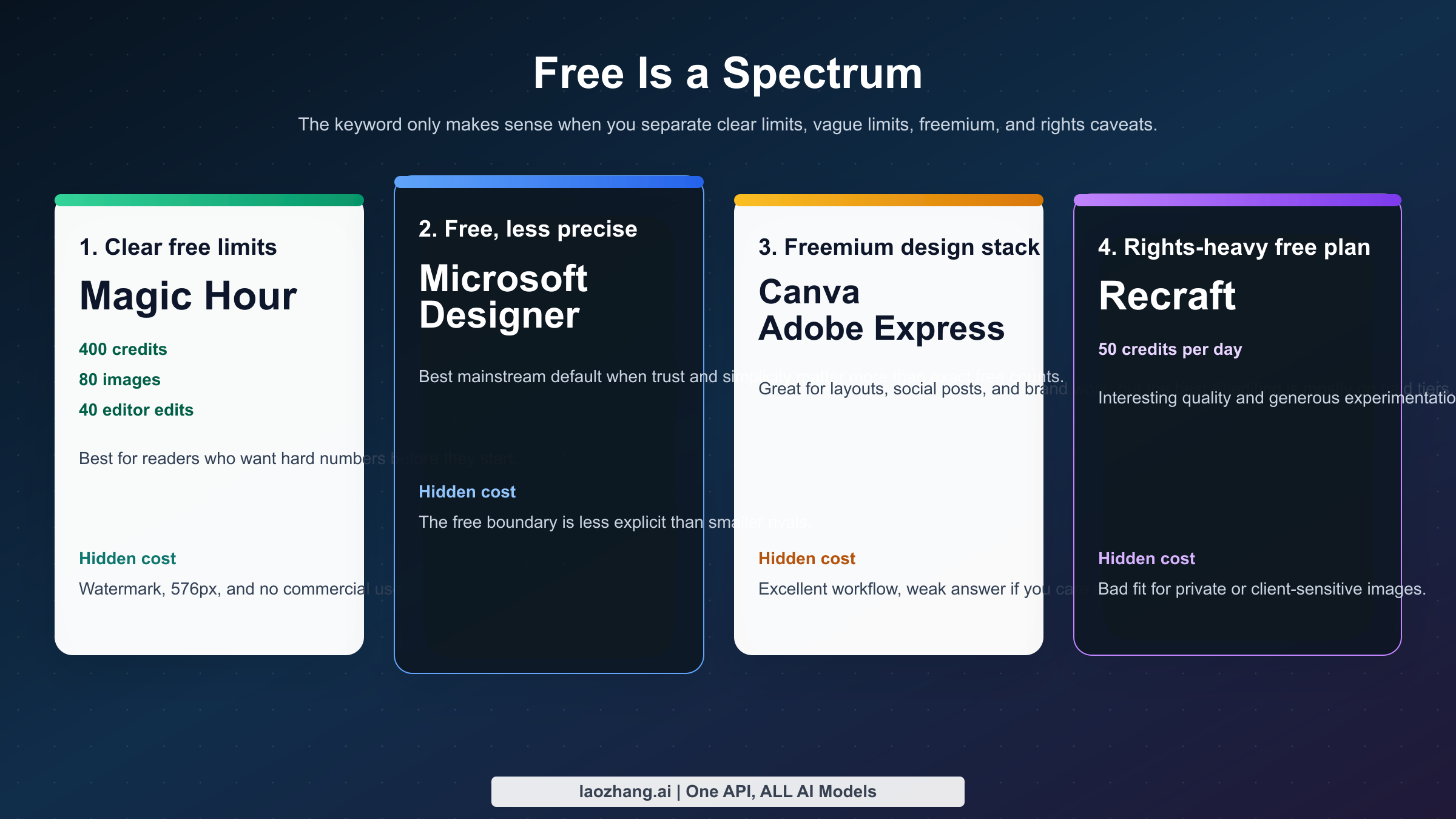
That is why the word free does not help as much as people expect. In March 2026, free AI image editors usually fit one of these buckets:
| Bucket | What it really means | Tools that fit | Main problem |
|---|---|---|---|
| Free with unclear rolling limits | The tool is free to open and use, but the vendor does not make the quota especially concrete | Microsoft Designer, sometimes Canva-style surfaces | Good for casual use, weak for planning or high-volume sessions |
| Free with clear limits | The product tells you the exact number of edits, credits, or output size | Magic Hour, some Fotor flows | Honest, but often smaller and more restrictive than the headline implies |
| Freemium design suite | The basic editor is free, but the strongest AI editing features live behind a plan | Canva, Adobe Express | Great workflows, weak answers if the reader explicitly cares about free |
| Free with rights or ownership caveats | You can use the tool free, but outputs may be public, limited, or not fully yours | Recraft-style free plans, some community-first products | Easy to miss until after you make something important |
This is also where the editor-vs-generator confusion hurts readers. An AI image generator is mostly about making new pictures from prompts. An AI image editor is about keeping some part of an existing image and changing the rest. The difference matters because a user editing a product photo, a selfie, or a banner usually cares about control more than novelty. They want to remove a person from the background, replace a sky, expand the canvas, erase an object, restyle part of the image, or fix text. A beautiful generator with no good edit loop is the wrong answer for that job.
The market is also shifting toward natural-language editing fast enough that stale roundups are misleading. Canva's Visual Suite 2.0 announcement on March 11, 2026 pushed Magic Layers and more prompt-led editing into the mainstream design conversation. Google Photos had already started its conversational editing rollout in late September 2025. Microsoft keeps framing Designer as an AI-first editing experience rather than a legacy image editor with some AI buttons bolted on. That means the winning product is no longer just the one with the most sliders. It is the one that lets an ordinary user say, "Remove the bag, brighten the face, and make the background cleaner," then actually delivers.
What most readers need, then, is not a beauty contest. They need a decision tree:
- Do you want the easiest browser tool from a major company?
- Do you need the clearest truly free plan?
- Do you care about rights and business-safe usage?
- Do you need layout and design tools as much as you need photo editing?
- Do you want a real editor with layers and more manual control?
The rest of this article is organized around those questions because that is the gap the current page one mostly fails to close.
The 6 free AI image editors worth your time
I deliberately kept this list short. The problem with many ranking pages is not that they are technically wrong. The problem is that they include too many tools that are functionally the same: vague browser editors, thin wrappers on top of old models, or landing pages that say free but reveal the real product only after login. The six below are the ones that currently cover the most useful reader scenarios without forcing you to open twelve tabs.
The shortlist is not six "equally best" tools. It is six different answers to six different jobs. Microsoft Designer is the strongest broad recommendation. Magic Hour is the cleanest genuinely free AI editor if you want hard numbers before signing up. Adobe Express is the best answer when the image might end up in a client-facing or brand-sensitive workflow. Canva is the best design-stack answer. Pixlr is the closest thing here to a classic browser editor with AI added. Fotor is the casual convenience pick if you only need a handful of edits and do not want a deeper workflow.
| Tool | Best for | Current free or entry offer | Biggest catch | Verdict |
|---|---|---|---|---|
| Microsoft Designer | Most people who want a simple, trustworthy browser editor | Microsoft says Designer can be used for free | Exact AI-credit boundaries are less transparent than some smaller rivals | Best overall default |
| Magic Hour | People who want a clearly stated truly free plan | Starter credits (account-specific since 2026; 400 credits in March 2026) | Watermark and no commercial use on free (March 2026) | Free entry point |
| Adobe Express | Business-facing or brand-sensitive work | $0/month, 5GB storage, limited generative credits | The best AI editing experience is not really the free tier | Best commercial-sensitive choice |
| Canva | Users who care about templates, layouts, and publishing as much as edits | Free editor plus limited AI usage | Best AI features mostly live inside Pro | Best design workflow |
| Pixlr | Users who still want manual controls in the browser | Low-cost plans start at $2.49/month with 80 AI credits | Serious AI usage is not meaningfully free | Best browser power editor |
| Fotor | Casual users who need quick cleanup or simple social visuals | Basic is free forever | Free exports are watermarked and credits are limited | Best casual backup pick |
The reason Microsoft Designer wins the broad recommendation is simple: it reduces the most common kinds of friction at the same time. It is from a major vendor, it feels familiar, it does not scream "temporary AI startup," and it is increasingly built around the way ordinary users now expect image editing to work. You do not have to think like a designer to get value out of it. That is a real product advantage, especially for readers who only need to fix or improve a few images a week.
Magic Hour wins a different kind of argument. It is not the most famous tool here, and it is not the most business-safe tool here, but it is unusually honest about what the free plan includes. The public pricing page tells you that Basic gives 400 credits, about 80 images, and 40 AI Image Editor uses at 576px, with a watermark and no commercial use. That is not magical, but it is useful because a reader can tell in advance whether the plan fits their job. Compared with the vague "free to try" language that dominates this category, that clarity is refreshing.
Adobe Express and Canva both rank because users trust them, and that trust is not irrational. If the image you are editing is likely to become a poster, thumbnail, flyer, deck slide, or social asset, a design suite can be a better answer than a pure image editor. The problem is that both tools are frequently presented as if they are straightforward free-AI-editor recommendations. That is only half true. They are great workflows. They are not the strongest answers if your literal question is "Which one is actually free enough that I can use the AI editing features without constantly hitting the upgrade boundary?"
Pixlr and Fotor matter because not every reader wants an assistant-style experience. Some readers still want something that feels like a browser photo editor first and an AI product second. That is Pixlr's role here. It feels more like an editor. Fotor, by contrast, is the convenience answer. It is good for a few quick fixes, a simple background cleanup, or casual content creation. It is not the tool I would build a serious ongoing workflow around if I cared about predictable free usage.
Best overall pick and the best alternatives by workflow
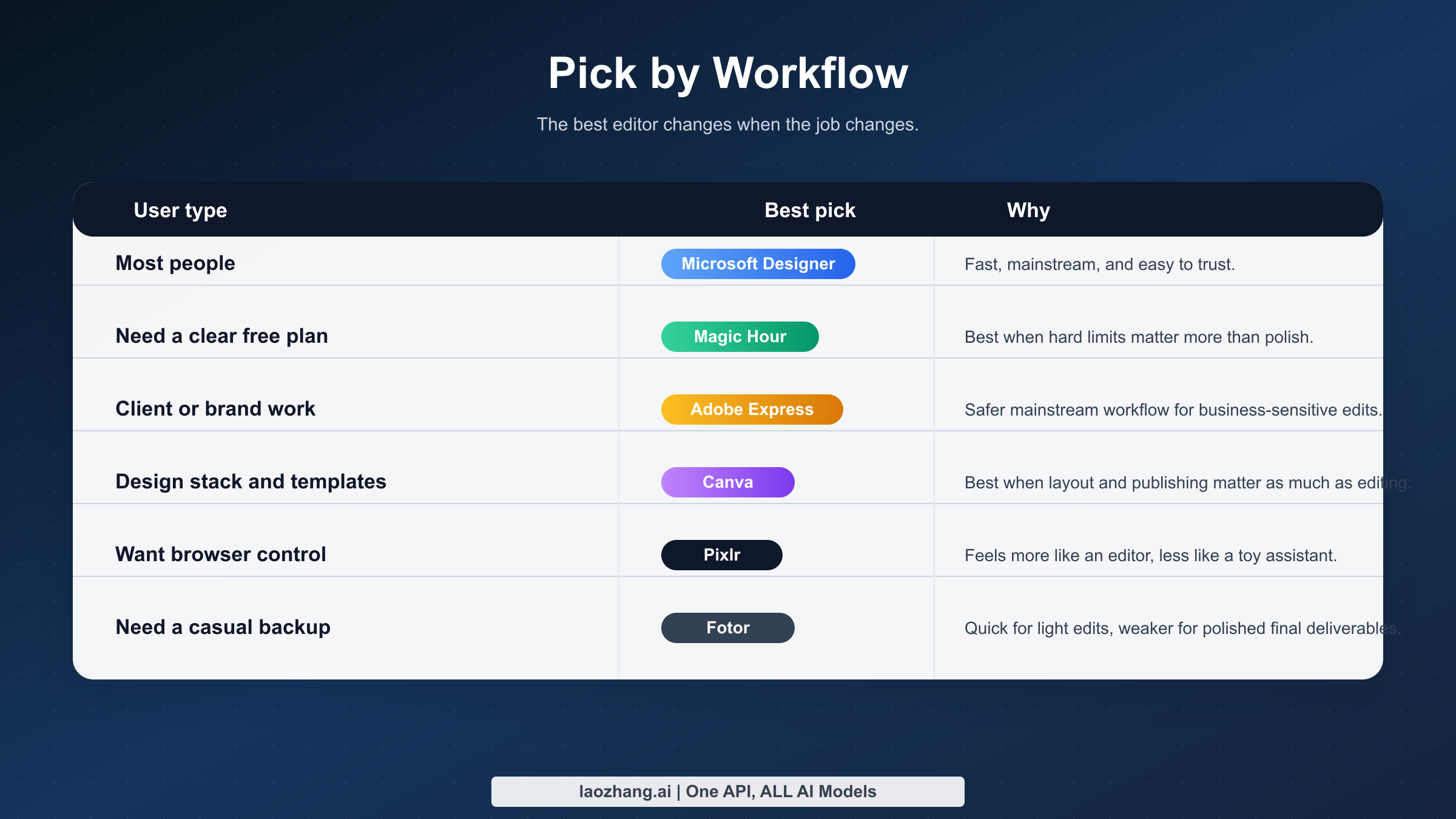
If I had to give one recommendation to the average reader without asking follow-up questions, I would still send them to Microsoft Designer first. The logic is not that Microsoft publishes the most generous free quota. It does not. The logic is that Designer gives the cleanest balance between trust, ease, and normal-user workflow. People searching this keyword usually do not want to manage credits like a game currency. They want to upload an image, type a prompt, fix what is wrong, and move on. Microsoft's current positioning fits that expectation better than most rivals.
The catch is that Microsoft is not especially elegant about explaining exactly where the free line ends. The official support FAQ, as surfaced in official-domain search results on March 13, 2026, says Designer can be used for free and points users toward Microsoft 365 Personal, Family, and Copilot Pro for monthly AI credits and commercial-use protections. That makes Designer a good recommendation for casual, general editing. It also means I would not call it the most transparent tool in the category. If you need hard free-plan numbers before you start, Magic Hour is easier to reason about.
Magic Hour is the best answer when the reader's real need is clarity. On the public pricing page checked March 13, 2026, Basic is free forever with 400 credits, roughly 80 images, and 40 AI Image Editor edits at 576px. The same page also says the free tier keeps a watermark and excludes commercial use. Creator costs $10/month for 4,000 credits and about 800 images, while Pro costs $50/month for 25,000 credits and around 5,000 images. Those numbers are valuable because they let you estimate whether the product is enough for you before login friction even begins.
I would not treat Magic Hour as the universal winner, though. Its free plan is generous in honesty, not in ceiling. If you are making client work, the no-commercial-use rule on the pricing page is a real blocker. The 576px output size is also small enough that many readers will outgrow it fast. There is another wrinkle here that generic listicles miss: older Magic Hour help snippets and surfaced FAQs do not always read exactly the same way as the pricing page on rights and usage. When an official site sends mixed signals, the safest move is to trust the stricter rule until the company clarifies it. That is why I classify Magic Hour as the clearest free offer, not the safest long-term workflow.
Adobe Express is the best answer when your real question is, "Which free AI image editor would I feel least nervous about using for work?" Adobe's public pricing page currently lists Express Free at $0/month with limited generative AI credits and 5GB of storage. Express Premium is $9.99/month and includes 250 generative credits. That is not the biggest free offer in this roundup, but it is also not the point. Adobe wins on workflow posture. If your edited image may end up in a client deck, an ad concept, a social campaign, or a branded asset, Adobe is simply easier to defend than many smaller AI-native editors.
That does not make Adobe the best pure free answer. It makes Adobe the safest answer for a specific kind of reader. If you are a solo creator who only wants to remove objects, restyle a thumbnail, or clean up a profile picture, Microsoft Designer or Magic Hour may be more practical. If you are already inside Adobe workflows, the convenience swing is obvious. But if you search this keyword because you are trying to avoid paying, Adobe is a reminder that a good free editor and a good professional workflow are not always the same product.
Canva remains the strongest answer when the image is only one part of a larger design job. If you are building Instagram posts, LinkedIn graphics, flyers, Pinterest pins, blog graphics, classroom materials, or simple one-page visuals, Canva is hard to beat on sheer workflow comfort. Official-domain pricing snippets checked March 13, 2026 show Canva Free surfacing the photo editor, large asset libraries, and limited Magic Studio usage, while Pro expands storage and AI usage materially. That aligns with what many users already feel in practice: Canva Free is useful, but the version of Canva people rave about is usually the paid version or the free version used very lightly.
The important distinction is that Canva is often a great free design app and only a conditional free AI image editor. If your task is mostly image editing, the design extras may not matter enough to justify the AI restrictions. But if your real workflow is "edit the image, add text, resize it for three channels, and export a post," then Canva becomes much more rational. This is exactly why the SERP is confusing. People type "free AI image editor" but sometimes mean "the easiest design workflow with AI help."
Pixlr is the answer for readers who still want a proper editor feel in the browser. Some users do not want a polite AI assistant and a simplified interface. They want layers, selections, more visible controls, and the sense that they are working in an editor rather than inside a content suite. Pixlr scratches that itch better than most AI-first tools. The tradeoff is that its pricing tells the real story quickly. Pixlr Plus is $2.49/month and includes 80 monthly AI credits. Pixlr Premium is $9.99/month with 1,000 monthly AI credits. That is affordable. It is not meaningfully "free AI editing" once you move beyond casual use.
That still leaves Pixlr as a useful recommendation, because not every reader values the same thing. A browser power editor with cheap upgrades may be more attractive than a heavily simplified assistant tool with vague limits. The mistake is presenting Pixlr as if it were the best free option on volume. It is not. It is the best fit if you already know you want more editor-like control and you are open to paying a small amount once the AI side becomes important.
Fotor is the best backup pick for the reader who wants a casual, low-commitment editor and does not mind that the free tier is obviously compromised. Official pricing/search surfaces indicate Fotor Basic is free forever, but free credits are limited and JPG, PNG, and PDF exports are watermarked. Search-result pricing snapshots also show Fotor Pro around $3.33/month and Pro+ around $7.49/month on yearly billing. That is not an embarrassing offer. It just means Fotor is most useful for light, short sessions, not as the foundation of a serious repeated workflow.
One tool I am intentionally not ranking above these six is Recraft, even though it is interesting. Recraft's pricing FAQ says the free plan gives 50 credits per day, but free-plan images are owned by Recraft, public in the community gallery, and only commercially usable with limitations. That is not a normal caveat. For experimentation, public sharing, or certain lightweight use cases, it may be acceptable. For private brand work, personal photos, or anything sensitive, it changes the risk profile too much for me to recommend it as a default free editor.
Which editors are actually free, and which ones are just freemium
Most of the disappointment in this category comes from a category mistake. Readers assume a free editor is free in the same way email or a calculator app is free. What they actually get is a ladder of increasing constraints. Sometimes the constraint is a quota. Sometimes it is output size. Sometimes it is a watermark. Sometimes it is a rights caveat that only matters after you have already made something you care about.
The cleanest way to see the difference is to stop grouping everything under one yes-or-no question and instead compare the hidden costs directly.
| Tool | Signup required | Watermark / output catch | Rights / privacy catch | When free stops being enough |
|---|---|---|---|---|
| Microsoft Designer | Yes | Microsoft does not market a watermark requirement on the core editor page used here | Free-vs-paid boundaries are fuzzier than smaller rivals | When you need predictable commercial protections or heavier AI use |
| Magic Hour | Yes | Free output is 576px and watermarked | Pricing page says no commercial use on free | As soon as you need client work, cleaner exports, or higher resolution |
| Adobe Express | Yes | Free tier is credit-limited rather than watermark-led | Better business comfort than most rivals, but still not open-ended | When generative editing becomes routine instead of occasional |
| Canva | Yes | Free is usable, but strongest AI tools are limited versus Pro | More a design stack than a pure free AI editor | When AI editing becomes central rather than occasional |
| Pixlr | Yes | Cheap, but meaningful AI use lives in paid credit tiers | No special public-ownership warning from the pricing page used here | When you need AI regularly rather than as a side feature |
| Fotor | Yes | Free JPG, PNG, and PDF exports are watermarked | Free credits are limited, so the plan feels like a starter lane | When you need clean deliverables rather than rough first drafts |
| Recraft | Yes | Free plan is generous on experimentation, not on control | Free outputs are public and owned by Recraft, with commercial limitations | Immediately, if the image is private, client-facing, or sensitive |
That table is the core of the whole keyword. A tool can be "free" and still be a bad free recommendation if the catch collides with the job the reader actually has. If you are editing your podcast cover, a watermark is annoying. If you are editing a client hero image, a watermark is a dead stop. If you are cleaning up a personal photo, public ownership or gallery exposure can be a bigger red flag than price. If you are making social content at speed, vague rolling limits may be fine right up until the day they are not.
This is why the category should not be judged by surface beauty alone. A nice-looking UI with an opaque free plan is often worse than an average-looking UI with an honest one. Magic Hour earns respect here not because the free plan is perfect, but because it is legible. Microsoft earns trust because it is mainstream and easy, but it loses points on free-plan transparency. Canva and Adobe earn workflow points but lose free-purist points. Pixlr earns editor points but loses free-volume points. Fotor earns convenience points but loses export-quality points.
If you remember only one sentence from this section, remember this one: the best free AI image editor is the one whose limitation hurts you the least. That is a better decision rule than trying to guess which homepage hero image looks most impressive.
The hidden catches most ranking pages bury
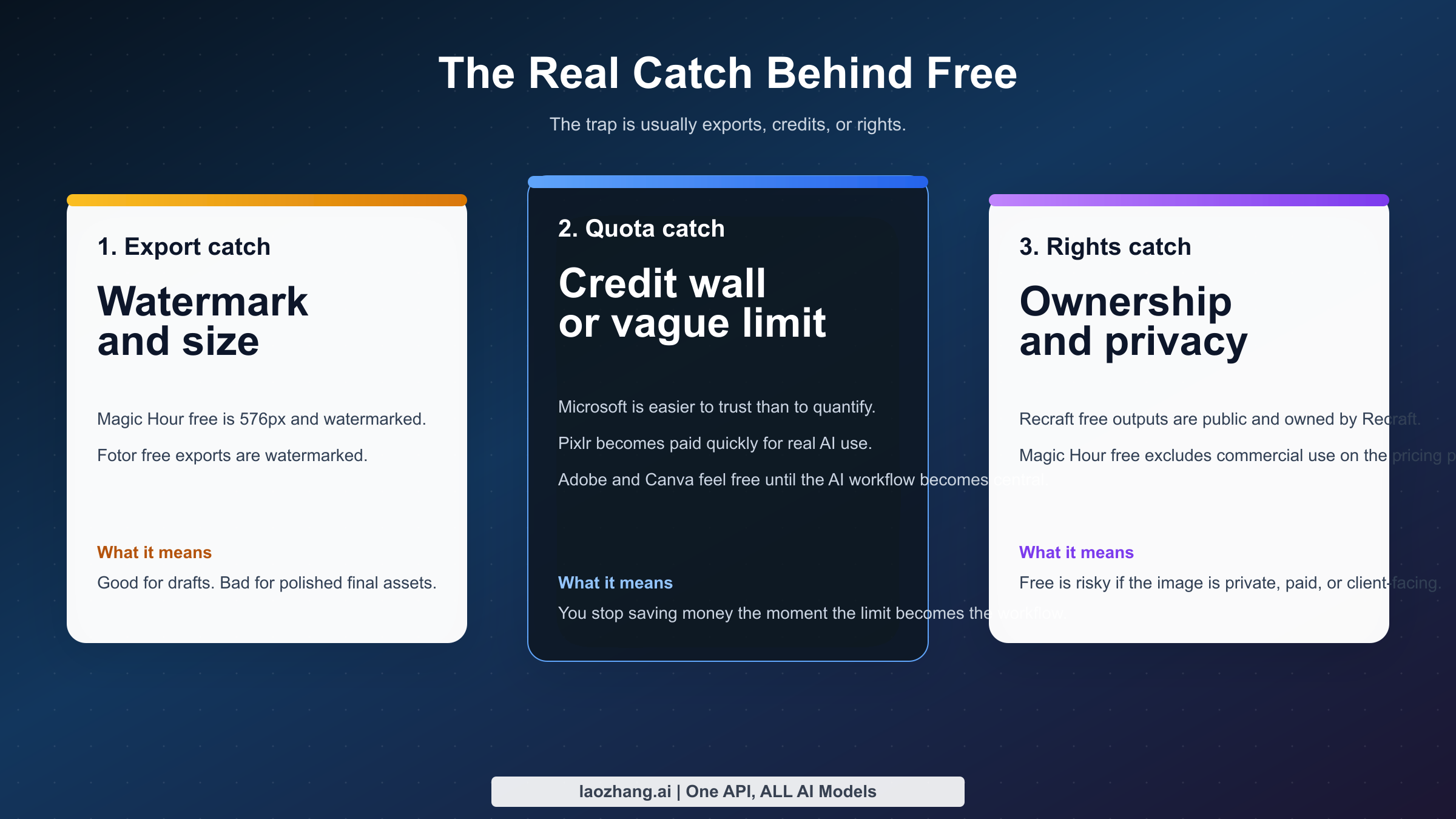
The first hidden catch is that free editing volume and good editing quality rarely live in the same place. Microsoft Designer is easier to trust than Magic Hour, but Magic Hour is easier to quantify. Adobe Express is easier to defend in work settings than Fotor, but Fotor may be faster for a casual user who only wants a quick effect or background cleanup. A lazy roundup compresses those tradeoffs into one score. A useful roundup surfaces them.
The second hidden catch is the difference between editor convenience and design convenience. Canva and Adobe Express rank well because a lot of users do not actually want an image editor in isolation. They want to fix an image, add text, resize the result, and publish it somewhere. That is a design workflow. If you only compare prompt quality or erase tools, you miss why those products keep winning attention. But the reverse is also true: if you only compare layout polish, you end up recommending a design suite to someone who just wanted to remove an object from a photo for free.
The third hidden catch is rights language. Magic Hour's pricing page says the free tier excludes commercial use. Recraft says the free tier's images are public, owned by Recraft, and commercially usable only with limitations. Canva Free and Adobe Free are safer-feeling because the products themselves feel more established, but even there the real answer depends on the specific workflow and plan. Readers usually do not think about these questions until after they have made the image. By then, the "free" win can turn into rework.
The fourth hidden catch is export quality. A watermarked or low-resolution export is not a small inconvenience. It changes whether the image is useful. Magic Hour's 576px free output is fine for testing and rough concepts. It is a bad final deliverable for many real-world needs. Fotor's watermarked free exports make it a weaker answer for serious finished assets than for experimentation. This is the kind of detail that matters more than a homepage calling the tool "professional."
The fifth hidden catch is how quickly free plans turn into paid plans once you succeed. Pixlr is the cleanest example. Its paid tiers are not expensive. Plus is $2.49/month and Premium is $9.99/month. If you already know you want a browser editor with manual controls, that may be an easy decision. But it also means Pixlr is not the strongest answer if the user explicitly asked for free AI editing because budget certainty matters more than editor depth. A low price is still not the same thing as free.
The sixth hidden catch is public-versus-private output. Recraft makes this unusually visible, which is good in one sense because at least the policy is explicit. But it also exposes a weakness in the rest of the SERP. Too many pages compare tools as if the only variable is image quality. In reality, whether your work remains private can matter more than whether the AI adds good lighting. This is especially true for founders testing product visuals, agencies drafting ad concepts, or ordinary people editing personal images.
There is also a broader market shift that changes how you should interpret rankings. In 2024, a lot of AI image tooling competed on raw generation wow-factor. By 2025 and 2026, the competitive edge is increasingly about editing loop quality. Can the tool understand a natural-language request? Can it keep the composition while changing one thing? Can it fit into a normal workflow instead of demanding that you rebuild the image from scratch? That is why older "best AI art app" articles are often poor guides for this keyword. A great generator is not automatically a great editor.
This is also why I recommend reading my best free AI image generator guide separately if what you really want is generation from scratch, and the free online AI image generator comparison if you are deciding between mainstream browser generators rather than editors. Those pages solve a different problem. Mixing the categories is exactly how readers end up opening the wrong tool first.
One more catch deserves its own paragraph: watermarks are not the only invisible signal. If you care about provenance, labeling, or downstream trust, it is also worth understanding how different ecosystems approach AI-generated imagery. I covered that in the context of SynthID watermarks in AI images. That topic is adjacent, not identical, but it matters because the line between editing and generation is getting harder to see in many consumer apps.
When a free browser editor is enough, and when you should switch
A free browser AI editor is enough if your work looks like this: a few profile photos, social graphics, blog headers, simple ecommerce cleanup, quick thumbnails, background removal, object erase, or a handful of product-shot variations. In that world, speed matters more than perfect precision. You want the result in minutes, not in a one-hour editing session. Microsoft Designer, Magic Hour, Canva, Fotor, or Pixlr can all be reasonable answers depending on which limitation bothers you least.
It is also enough if you are still figuring out what kind of edits you actually need. A lot of people reach for Photoshop-level tools too early. They imagine they need full manual control when what they really need is a better first pass. Browser AI editors are good at that. They reduce setup cost, lower the skill barrier, and make the first improvement easy. For a solo creator or marketer working alone, that is not a small benefit. It is often the entire point.
But the browser free path stops being enough when one of four things becomes true.
The first is precision. If you need careful masking, repeatable layer work, multi-step compositing, or exact brand control, you will hit the ceiling quickly. Prompt editing is good at removing obvious friction. It is bad at replacing deliberate craft when the image really matters. That is where Photoshop still wins, and where a skilled Photopea user can sometimes beat flashy AI-first tools simply by having better control.
The second is volume. If you are editing images daily, free plans stop feeling generous fast. A plan with 40 meaningful edits may be fine for a weekend. It is not a business process. A plan with vague limits may feel free until it interrupts a deadline. At that point, the free tier has stopped being cheap. It is now costing you reliability.
The third is rights certainty. If the image is for a client, a landing page, a paid ad, or anything contractual, it is rational to care less about "Can I avoid paying?" and more about "Can I defend this workflow?" That is exactly where Adobe Express becomes a stronger answer than a more playful but less clear free editor. It is also where public-output or limited-rights free plans become bad bets, no matter how good the results look.
The fourth is workflow integration. If editing the image is only step one, and step two is layout, reuse, resizing, brand kits, or collaborative review, then Canva or Adobe may save more time than a nominally freer pure editor. Likewise, if you need serious compositing and manual control, Pixlr may be a better bridge product than a prompt-only editor because it keeps one foot in the older editing world.
My practical rule is simple. Stay with free browser AI editors while the tool is accelerating your work more than its limitation is slowing you down. Switch the moment the limitation becomes the workflow. If you spend more time managing credits, redoing watermarked exports, checking rights language, or working around weak control than actually finishing images, you have already outgrown the free tier whether the homepage still says "free forever" or not.
To make that more concrete, imagine three ordinary scenarios. If you are a founder or marketer who needs a quick hero image cleanup, product-background fix, or social visual before a meeting, Microsoft Designer is probably the right first click because it reduces cognitive load. If you are a creator who wants to test a lot of ideas without paying and you can live with watermarks and smaller exports, Magic Hour is the more honest playground. If you are a freelancer building something that may touch client approvals, Adobe Express or Canva usually becomes rational faster than a smaller AI-native editor because the workflow around the image matters almost as much as the edit itself.
The same logic applies to students and casual users. A student making presentation visuals may care more about speed than about perfect rights clarity, which makes Microsoft Designer or Canva Free easy to justify. A hobbyist cleaning up profile photos or small social images may find Fotor perfectly acceptable because the goal is simply "good enough, quickly." A power user who keeps thinking, "I wish this let me fine-tune masks, layers, and selections instead of just guessing from prompts," is already halfway to choosing Pixlr, Photopea, or Photoshop. The wrong move is not choosing a limited free editor. The wrong move is pretending a limited free editor can be the right tool forever.
There is also a privacy threshold most generic listicles ignore. If you are editing personal photos, internal company graphics, or product concepts that should not be public, a tool with public-gallery defaults or fuzzy ownership language is not a harmless shortcut. That is why I treat Recraft as interesting but risky instead of ranking it as a mainstream recommendation. Free plans are not just about budget. They are also about what the vendor is allowed to do with your work, how clearly that rule is stated, and how painful it would be to discover the catch after the fact.
FAQ
What is the best free AI image editor right now?
For most readers, it is Microsoft Designer. It is the cleanest broad recommendation because it balances trust, simplicity, and practical AI editing. If you specifically want the clearest truly free plan with hard numbers, Magic Hour is the stronger answer.
Which free AI image editor has no signup?
In this source set, the cleanest answer for low-friction use is still Magic Hour's public-facing flow, but most serious tools in this category increasingly want an account. If no signup is your first priority, expect compromises in rights, output quality, or long-term usefulness.
Which free AI image editor has no watermark?
That is exactly where the category gets slippery. Fotor markets clean convenience in some flows, but its free plan surfaces watermarked exports in the pricing details I checked. Magic Hour's free Basic plan is also watermarked. In practice, many of the tools that feel best to use without paying still impose either a watermark, a low resolution, or some other tradeoff.
Can I use these tools commercially?
Sometimes, but not safely as a blanket assumption. Magic Hour's pricing page currently says no commercial use on the free plan. Recraft's free plan adds public ownership and commercial-use limitations. Adobe Express is the safest mainstream recommendation when commercial comfort matters, but you should still review the exact plan and workflow you are using.
Is any AI image editor really unlimited and free?
Not among the mainstream browser tools I reviewed. The catch is usually a daily cap, credits, a watermark, low-resolution output, vague throttling, or rights restrictions. Treat unlimited and free as a claim that needs proof, not as the default reality.
What is the difference between an AI image editor and an AI image generator?
An AI image generator makes a new image from a prompt. An AI image editor changes an existing image while keeping some of its original content. Many products now do both, which is why the keyword is so confusing. But if you are editing a real photo, product shot, or social asset, editor quality matters more than generator hype.