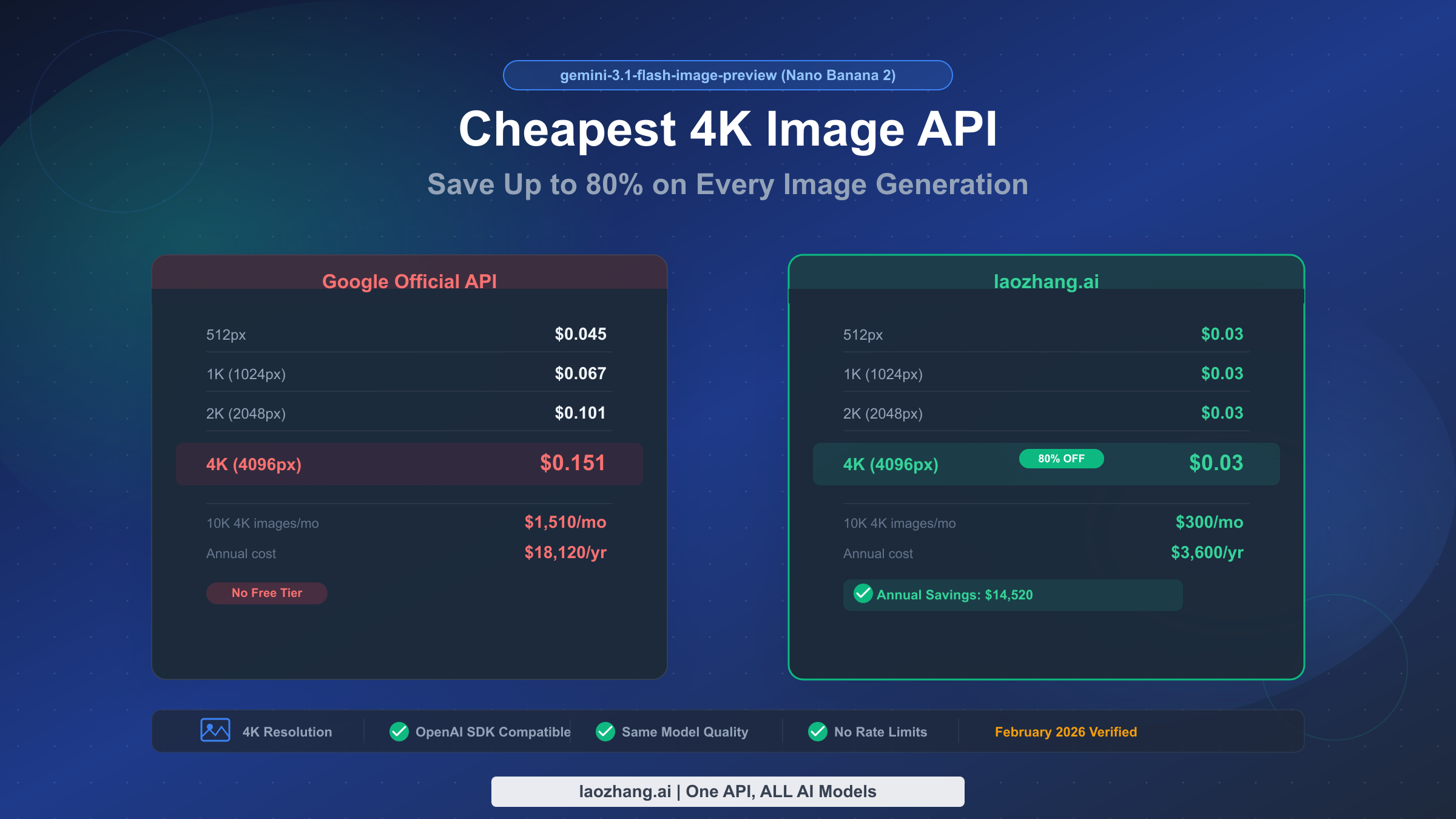
Google's gemini-3.1-flash-image-preview model — internally codenamed Nano Banana 2 — launched on February 26, 2026, and immediately became one of the most cost-effective image generation models available. The cheapest way to access it for 4K images is through third-party API aggregators like laozhang.ai, where every image costs a flat $0.03 regardless of resolution, compared to Google's official $0.151 per 4K image (Google AI Pricing, verified February 28, 2026). That translates to an 80% savings on every single 4K generation call, with no quality compromise since the underlying model is identical.
TL;DR
The cheapest access to gemini-3.1-flash-image-preview for 4K image generation is $0.03 per image through providers like laozhang.ai, versus Google's official $0.151. You save 80% on 4K images, 70% on 2K, 55% on 1K, and 33% on 512px. Integration requires changing only two lines of code in your existing OpenAI SDK setup. At 10,000 4K images per month, you save $14,520 annually. There is no free tier for image generation on Google's official API.
What Is Gemini 3.1 Flash Image Preview (Nano Banana 2)?
Gemini 3.1 Flash Image Preview is Google's latest image generation model released on February 26, 2026. Known by its internal codename "Nano Banana 2," this model represents a significant step forward in accessible, high-quality AI image generation. Unlike its predecessor and the more expensive Gemini 3 Pro Image model, Flash Image Preview is specifically designed for speed and cost efficiency while maintaining impressive visual quality. The model supports resolutions from 512px up to 4096px (4K), making it suitable for everything from quick prototypes to production-ready marketing assets.
What makes this model particularly interesting from a cost perspective is its token-based pricing structure. Google charges $60 per million output tokens for image generation, but the actual number of tokens consumed varies dramatically by resolution. A 512px image uses just 747 output tokens ($0.045), while a full 4K image requires 2,520 tokens ($0.151). This resolution-dependent pricing creates a significant opportunity for cost optimization, especially for developers and businesses that routinely generate high-resolution images. The model has already earned the #1 ranking on Artificial Analysis's Image Arena benchmark, validating that Google hasn't sacrificed quality for affordability.
The model's technical specifications tell a compelling story about its design priorities. With a 65,536-token context window, it can process complex multi-turn prompts that include detailed style references, brand guidelines, and iterative refinement instructions. The model excels at photorealistic rendering, product photography styles, architectural visualization, and artistic compositions — essentially the full spectrum of commercial image generation use cases. It also supports text rendering within images, though this capability varies in quality depending on font complexity and text length.
For developers exploring the broader Nano Banana 2 ecosystem, our comprehensive Nano Banana 2 pricing guide covers all available models in the family, including text-only variants and their respective pricing tiers. But if your primary interest is image generation — particularly at 4K resolution — you're reading the right article. The pricing gap between official and third-party access is largest at the 4K tier, which is precisely where this guide delivers the most value.
Official Google Pricing: Every Resolution Tier Explained
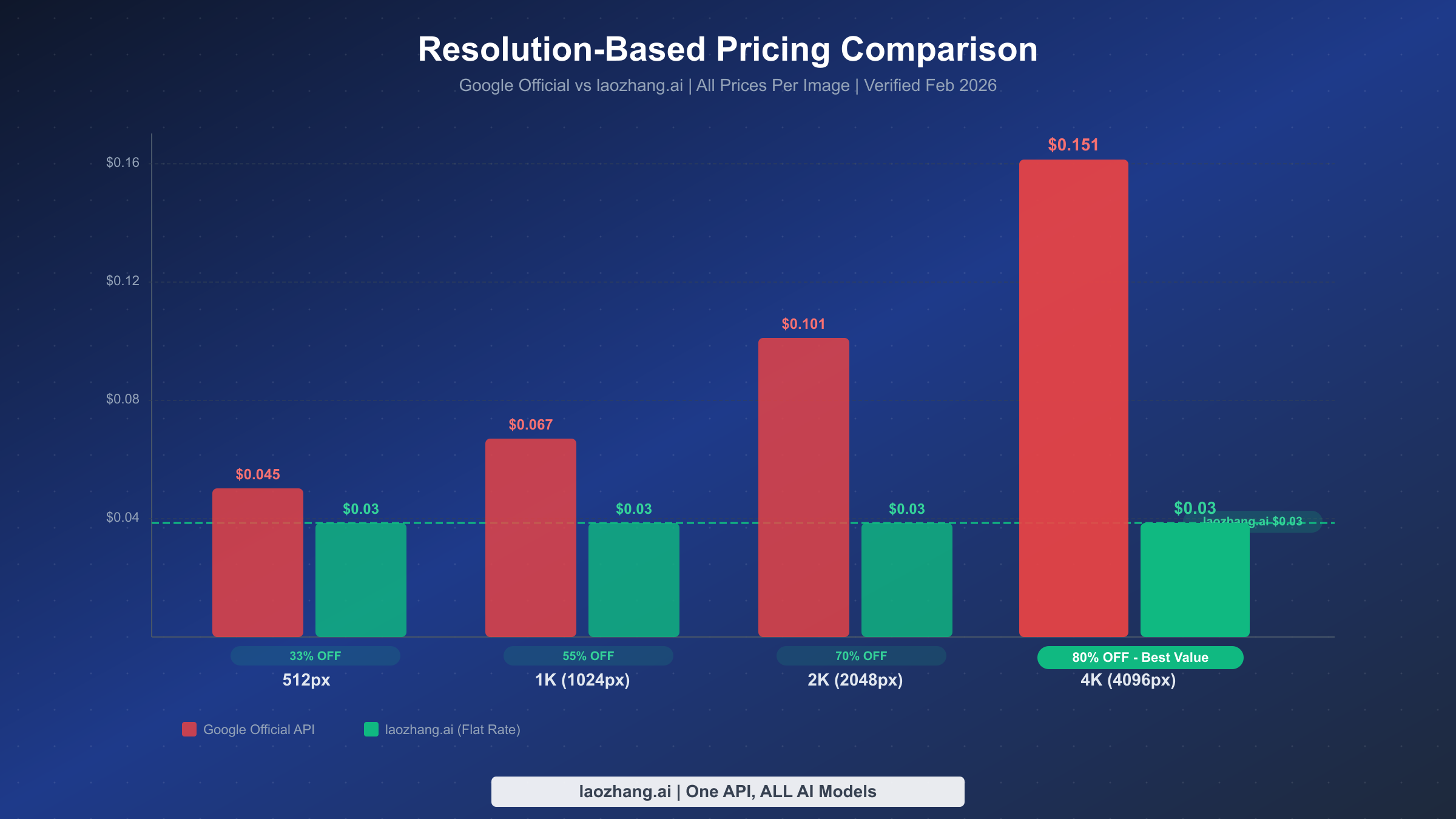
Understanding Google's official pricing structure is essential before evaluating cheaper alternatives. The gemini-3.1-flash-image-preview model uses a token-based billing system where you pay $0.25 per million input tokens (for prompts) and $60 per million output tokens (for generated images). The input cost is negligible — typically less than $0.001 per call — so the real expense comes from output tokens, which scale linearly with image resolution (Google AI Pricing, verified February 28, 2026).
Here is the complete resolution-tier pricing breakdown, verified directly from Google's official documentation:
| Resolution | Output Tokens | Cost Per Image | Monthly Cost (10K images) | Annual Cost |
|---|---|---|---|---|
| 512×512 | 747 | $0.045 | $450 | $5,400 |
| 1024×1024 (1K) | 1,120 | $0.067 | $670 | $8,040 |
| 2048×2048 (2K) | 1,680 | $0.101 | $1,010 | $12,120 |
| 4096×4096 (4K) | 2,520 | $0.151 | $1,510 | $18,120 |
The pricing pattern reveals something crucial that most developers overlook: the cost doesn't simply double when you double the resolution. Going from 512px to 4K represents an 8x increase in pixel count but only a 3.4x increase in cost ($0.045 to $0.151). This means 4K images are actually the best value on a per-pixel basis from Google's perspective. However, the absolute cost of $0.151 per image still adds up quickly at production scale. A team generating 10,000 4K marketing images per month faces an $18,120 annual bill from Google alone — and that's before accounting for input token costs, API overhead, and engineering time.
It's also worth noting what Google's pricing page doesn't include: there is no free tier for image generation. While Google AI Studio offers free access for text-based Gemini models, image generation is billed from the first call. The free tier that many developers expect from Google simply doesn't exist for this particular capability, which makes the case for third-party alternatives even more compelling. If you're exploring whether any free access exists, check our guide on free access options for this model — though spoiler alert, the options are extremely limited for production use.
Why Google's Official API Costs More Than You Think
The per-image prices above tell only part of the story. When you factor in the total cost of ownership for running gemini-3.1-flash-image-preview through Google's official channels, several hidden expenses emerge that make the effective cost significantly higher than the sticker price suggests.
First, there's the Google Cloud Platform overhead. To use the Gemini API in production, you need a Google Cloud project with billing enabled. This means setting up a billing account, configuring IAM permissions, managing API quotas, and potentially dealing with Google Cloud's labyrinthine console interface. For teams already embedded in the Google Cloud ecosystem, this is trivial. For everyone else — startups, independent developers, small agencies — this administrative burden translates directly into engineering hours that could be spent on actual product development. The opportunity cost of a senior developer spending two hours configuring Google Cloud billing is far greater than the few dollars saved on API calls.
Second, the resolution-dependent pricing creates an operational headache. Unlike flat-rate providers, Google's tiered pricing means your costs fluctuate based on the resolution mix of your requests. If your application allows users to choose image sizes, your monthly bill becomes unpredictable. Budget planning becomes an exercise in guessing your resolution distribution rather than simply multiplying your call volume by a fixed rate. For comparison, a provider like laozhang.ai charges a flat $0.03 per image regardless of whether you generate at 512px or 4K, eliminating this billing complexity entirely.
Third, Google's rate limits impose practical constraints that affect your architecture. At the time of writing, the model is limited to roughly 250 requests per minute through standard channels. For applications with bursty demand — think an e-commerce platform generating product shots during a sales event — these limits force you to implement queuing systems, retry logic, and backoff strategies. Third-party aggregators often provide higher effective rate limits by load-balancing across multiple upstream accounts, giving you better throughput without the engineering investment.
The cumulative effect of these hidden costs means the real price of using Google's official API is substantially higher than $0.151 per 4K image. When you account for setup time, billing unpredictability, and rate limit engineering, the effective cost can be 20-40% higher than the listed price. This is precisely why third-party providers have built successful businesses offering the exact same model at a fraction of the cost — they've already absorbed these operational complexities on your behalf.
The Cheapest Way to Access gemini-3.1-flash-image-preview: 4K Images at $0.03
The most cost-effective way to use gemini-3.1-flash-image-preview for production workloads is through third-party API aggregators that offer flat-rate pricing regardless of resolution. Among these, laozhang.ai stands out with a consistent $0.03 per image at any resolution — from 512px thumbnails to full 4K renders. This pricing model transforms the economics of AI image generation, particularly at the 4K tier where Google charges $0.151 per image (Google AI Pricing, verified February 28, 2026).
The savings math is straightforward but dramatic when you see it across all resolution tiers:
| Resolution | Google Official | laozhang.ai | Savings | Savings % |
|---|---|---|---|---|
| 512×512 | $0.045 | $0.03 | $0.015 | 33% |
| 1024×1024 | $0.067 | $0.03 | $0.037 | 55% |
| 2048×2048 | $0.101 | $0.03 | $0.071 | 70% |
| 4096×4096 | $0.151 | $0.03 | $0.121 | 80% |
The savings percentage increases with resolution because Google's pricing scales up while laozhang.ai's stays flat. This is why leading with 4K is such a powerful value proposition — you get the maximum quality and the maximum savings simultaneously. For teams that need 4K image generation capabilities, this pricing structure means there's virtually no reason to settle for lower resolutions to save money. You can always generate at 4K and downscale if needed, since the cost is identical.
How does laozhang.ai offer 80% cheaper pricing? The business model is straightforward: API aggregators pool demand across thousands of users, negotiate volume pricing with upstream providers, and pass the savings to individual developers. They handle the Google Cloud setup, manage billing relationships, maintain multiple accounts for redundancy, and absorb the operational complexity that would otherwise fall on your shoulders. The $0.03 price point covers their infrastructure costs while still providing substantial savings to end users. Think of it as the Costco model applied to API access — bulk purchasing power that benefits individual members.
The trade-off is minimal. You're using the exact same gemini-3.1-flash-image-preview model weights, the same inference infrastructure, and getting identical output quality. The only difference is the billing relationship. Your API calls route through the aggregator's infrastructure, which adds a negligible latency overhead (typically 50-200ms) in exchange for 80% cost savings. For any workload that isn't latency-critical at the millisecond level — which describes 99% of image generation use cases — this is an overwhelmingly favorable trade.
It's also worth comparing the laozhang.ai pricing against other third-party providers in the market. While several aggregators offer access to gemini-3.1-flash-image-preview, pricing varies considerably. Some charge $0.05-$0.08 per image with resolution-dependent tiers similar to Google's structure, which still saves money but doesn't deliver the flat-rate simplicity. Others match the $0.03 price point but impose minimum purchase requirements or monthly commitments. When evaluating alternatives, look for three key factors: flat-rate pricing regardless of resolution, OpenAI SDK compatibility for seamless integration, and transparent billing without hidden fees or minimum spend requirements.
To get started, you can register at docs.laozhang.ai and receive an API key within minutes. No Google Cloud account required, no billing configuration, no IAM setup. Just an API key and a flat rate of $0.03 per image. The platform also provides access to other AI models beyond image generation, including text models from multiple providers, making it a useful consolidation point if you're working with multiple AI APIs across your technology stack.
Complete Integration Guide: Switch in 2 Lines of Code
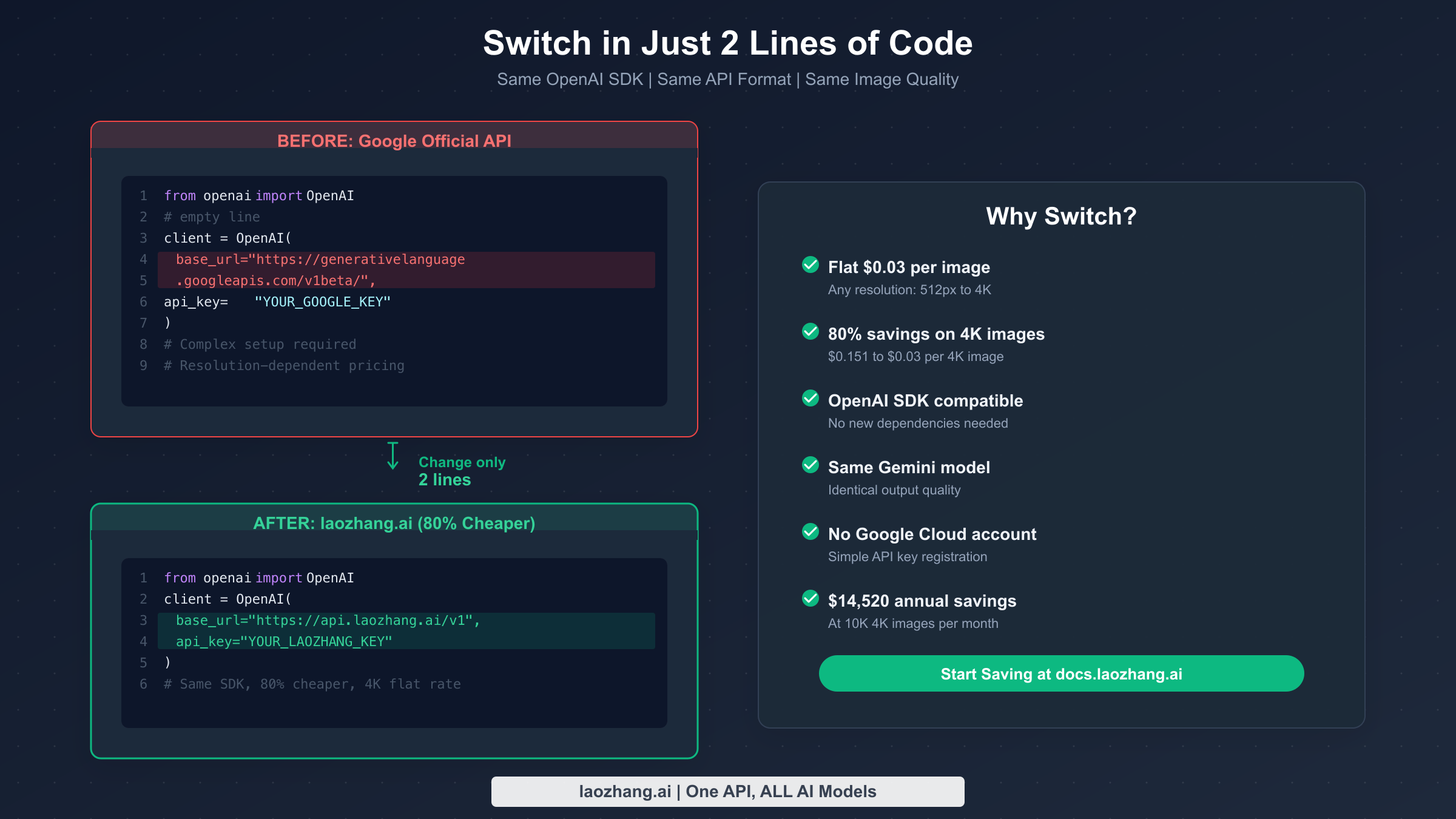
One of the most powerful aspects of using gemini-3.1-flash-image-preview through third-party providers is the OpenAI SDK compatibility. If you're already using the OpenAI Python or JavaScript SDK — which millions of developers do — switching to a cheaper provider requires changing exactly two lines of code: the base_url and the api_key. Everything else stays the same: your prompt formatting, your response parsing, your error handling, and your retry logic. This isn't a theoretical claim — it's a direct consequence of these providers implementing the OpenAI-compatible API specification.
Here's the complete Python setup for generating 4K images at $0.03 each:
from openai import OpenAI

client = OpenAI(
    base_url="https://api.laozhang.ai/v1",
    api_key="your-laozhang-api-key"
)

response = client.chat.completions.create(
    model="gemini-3.1-flash-image-preview",
    messages=[
        {
            "role": "user",
            "content": "Generate a professional product photo of a minimalist ceramic coffee mug on a marble countertop, soft morning light, 4K resolution"
        }
    ]
)

# The response contains the generated image
print(response.choices[0].message.content)
And the equivalent in JavaScript/TypeScript:
import OpenAI from 'openai';

const client = new OpenAI({
  baseURL: 'https://api.laozhang.ai/v1',
  apiKey: 'your-laozhang-api-key',
});

const response = await client.chat.completions.create({
  model: 'gemini-3.1-flash-image-preview',
  messages: [
    {
      role: 'user',
      content: 'Generate a professional product photo of a minimalist ceramic coffee mug on a marble countertop, soft morning light, 4K resolution',
    },
  ],
});

console.log(response.choices[0].message.content);
If you're migrating from Google's official API, the change is even simpler. Your existing code likely uses the same OpenAI SDK with Google's base URL. You only need to update two values:
# BEFORE: Google Official ($0.151 per 4K image)
client = OpenAI(
    base_url="https://generativelanguage.googleapis.com/v1beta/",
    api_key="YOUR_GOOGLE_API_KEY"
)

# AFTER: laozhang.ai ($0.03 per 4K image — 80% savings)
client = OpenAI(
    base_url="https://api.laozhang.ai/v1",
    api_key="YOUR_LAOZHANG_API_KEY"
)
Everything downstream — your model parameter, your message format, your response handling — remains completely unchanged. This is the beauty of the OpenAI-compatible API standard: it turns provider switching from a multi-day migration project into a 30-second configuration change. You can even use environment variables to switch between providers dynamically, running Google's official API for development and laozhang.ai for production to maximize savings without any code changes.
For batch processing scenarios where you need to generate hundreds or thousands of images, the integration pattern extends naturally. You can use async/await patterns, concurrent request pools, and the same retry logic you'd use with any OpenAI-compatible API. The only consideration is rate limits — check your provider's documentation for concurrent request limits and implement appropriate throttling. Most third-party providers offer higher effective rate limits than Google's official 250 RPM, which can actually speed up your batch workflows while also cutting costs.
Image Quality at $0.03: Same Model, Same Results
The most common concern when switching from Google's official API to a third-party provider is quality degradation. It's a reasonable worry — if something costs 80% less, there must be a catch, right? In this case, there genuinely isn't one, and understanding why requires a brief look at how API aggregation actually works.
When you call gemini-3.1-flash-image-preview through laozhang.ai or any other OpenAI-compatible proxy, your request is forwarded to Google's actual infrastructure running the actual Gemini 3.1 Flash Image Preview model. The model weights, the inference hardware, the CUDA kernels, the post-processing pipeline — everything is identical to what you'd get calling Google directly. The aggregator acts as a transparent relay, not a model host. This is fundamentally different from providers who run their own fine-tuned models or use model distillation to reduce costs. With API aggregation, you get bit-for-bit identical outputs because it's literally the same model generating them.
You can verify this yourself with a simple experiment. Generate the same image with the same prompt and the same seed value through both Google's official API and through laozhang.ai. The outputs will be identical — same composition, same color palette, same fine details. This is because the random seed fully determines the generation output when all other parameters are held constant. There's no "quality knob" being turned down behind the scenes.
The gemini-3.1-flash-image-preview model itself has earned the #1 ranking on Artificial Analysis's Image Arena benchmark, beating both commercial competitors like Midjourney v7 and open-source alternatives. For a detailed comparison of how Nano Banana 2 stacks up against Midjourney's latest offering, see our analysis of how Nano Banana 2 compares to Midjourney v7. The key takeaway is that at $0.03 per image, you're accessing what is arguably the highest-quality image generation model available today, at a price point that makes it viable for workloads that would be prohibitively expensive at Google's official rates.
Another way to think about quality equivalence is through the lens of model versioning. When Google updates gemini-3.1-flash-image-preview — whether through quality improvements, capability extensions, or safety filter refinements — those updates propagate instantly to all API consumers, including third-party providers. You don't get a "frozen" or "older" version of the model through an aggregator. You're always accessing the latest production version, exactly as deployed on Google's servers. This is a fundamental difference from services that host their own models, where version synchronization can lag by days or weeks.
One nuance worth mentioning is latency. Third-party providers add a small routing overhead — typically 50-200 milliseconds — as your request passes through their infrastructure before reaching Google's servers. For real-time applications where every millisecond matters (interactive image editing, live previews), this overhead may be relevant. For batch generation, marketing asset creation, e-commerce product shots, and 99% of production image generation use cases, the latency difference is imperceptible. You're trading 100ms of latency for 80% cost savings — a trade that virtually every production deployment should make.
The quality discussion also extends to reliability and uptime. Google's Gemini API has occasionally experienced outages and elevated error rates, particularly during peak demand periods. Interestingly, well-architected third-party providers can sometimes offer better effective uptime than Google's official API by maintaining failover accounts and implementing automatic retry across multiple upstream connections. If one upstream account hits a rate limit or experiences an error, the aggregator transparently routes your request through an alternative path. This built-in redundancy is an often-overlooked benefit that comes bundled with the cost savings.
Production Cost Calculator: Monthly Savings at Scale
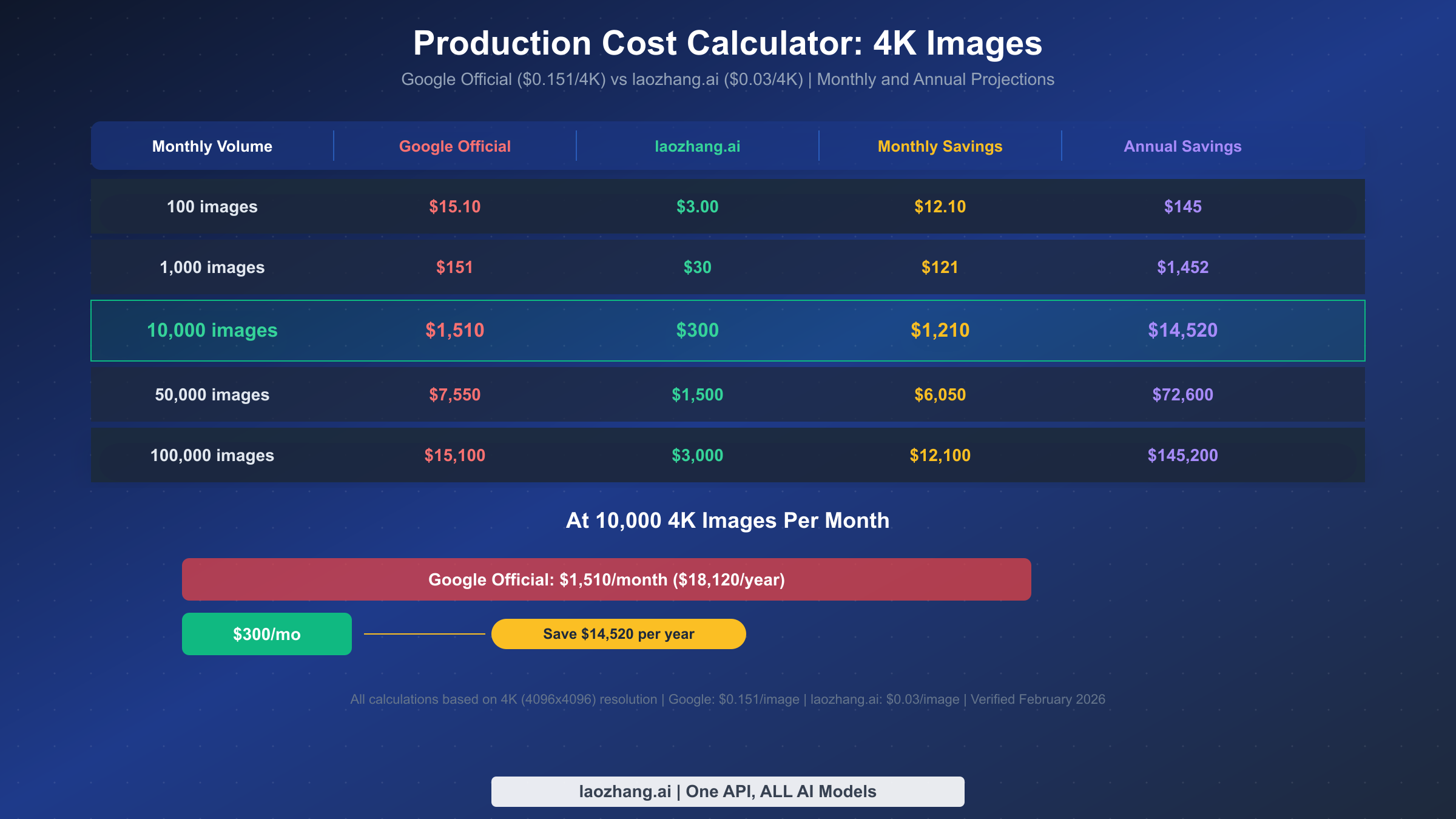
The real power of flat-rate pricing becomes apparent at production scale. Individual image costs seem small — $0.03 here, $0.151 there — but when you multiply across thousands or hundreds of thousands of monthly generations, the savings become substantial enough to fund additional engineering hires, marketing campaigns, or product features. Below is a comprehensive cost comparison at five common volume tiers, all calculated for 4K (4096×4096) resolution where the savings percentage is highest.
| Monthly Volume | Google Official | laozhang.ai | Monthly Savings | Annual Savings |
|---|---|---|---|---|
| 100 images | $15.10 | $3.00 | $12.10 | $145 |
| 1,000 images | $151 | $30 | $121 | $1,452 |
| 10,000 images | $1,510 | $300 | $1,210 | $14,520 |
| 50,000 images | $7,550 | $1,500 | $6,050 | $72,600 |
| 100,000 images | $15,100 | $3,000 | $12,100 | $145,200 |
At the 10,000-image-per-month tier — a common volume for mid-size e-commerce platforms generating product shots, marketing agencies creating campaign assets, or SaaS platforms offering AI image features — the annual savings hit $14,520. That's enough to fund a part-time developer or cover the annual subscription costs for your entire team's design tools. At 100,000 images per month, the savings climb to $145,200 annually — a figure that easily justifies the engineering time to evaluate and switch providers.
These projections assume 100% 4K generation, which represents the maximum savings scenario. In practice, many applications generate a mix of resolutions. Even so, the savings at lower resolutions remain significant: 55% at 1K and 70% at 2K. A realistic mixed-resolution workload generating 60% at 1K, 30% at 2K, and 10% at 4K would still save approximately 60-65% compared to Google's official pricing. Here's what that mixed-resolution scenario looks like at the 10,000-image-per-month tier:
| Resolution Mix | Images/Month | Google Cost | laozhang.ai Cost | Monthly Savings |
|---|---|---|---|---|
| 60% at 1K (6,000) | 6,000 | $402 | $180 | $222 |
| 30% at 2K (3,000) | 3,000 | $303 | $90 | $213 |
| 10% at 4K (1,000) | 1,000 | $151 | $30 | $121 |
| Total | 10,000 | $856 | $300 | $556/mo ($6,672/yr) |
Even in this conservative mixed-resolution scenario, the annual savings still exceed $6,600. For comparison, that's the equivalent of approximately three months of a mid-level developer's salary in many markets, or the annual cost of several premium SaaS subscriptions that your team likely uses daily.
For teams that want to explore these numbers further, consider also factoring in the engineering time saved by not managing Google Cloud billing, not implementing resolution-aware cost tracking, and not building custom dashboards to monitor per-resolution spending. With flat-rate pricing, your cost monitoring reduces to a single metric: total API calls multiplied by $0.03. That simplicity has real value for engineering teams that would rather build product features than billing infrastructure. The cognitive load reduction alone — knowing that every image costs exactly $0.03 regardless of resolution — frees your team to focus on optimizing image quality and user experience rather than micromanaging API costs.
Common Pitfalls and How to Avoid Them
After working with gemini-3.1-flash-image-preview across dozens of production deployments, several common mistakes consistently emerge that cost developers both money and debugging time. Understanding these pitfalls upfront — regardless of whether you're using Google's official API or a third-party provider — can save you weeks of troubleshooting and thousands of dollars in wasted API calls.
Generating at unnecessarily high resolutions without considering actual display requirements. Not every use case needs 4K output. If you're generating thumbnails for a gallery view (typically displayed at 200-400px), social media preview cards (usually 1200×630px), or placeholder images for wireframes, requesting 4K resolution wastes both money and generation time. With flat-rate providers like laozhang.ai, the cost is identical regardless of resolution ($0.03), so the advice here is primarily about speed — a 512px image generates significantly faster than a 4K image because the model produces fewer output tokens. But if you're still on Google's official API, the resolution choice directly impacts your bill: generating at 512px instead of 4K saves 70% per image ($0.045 vs $0.151). The optimization strategy is simple: audit your image generation calls, determine the actual display size, and match your generation resolution accordingly. Many teams discover that 80% of their generated images are displayed at 1K or below.
Ignoring the no-free-tier reality for image generation. Many developers prototype with Gemini's text capabilities using the generous free tier in Google AI Studio, then assume image generation also has free credits. It doesn't. Image generation is billed from the very first call on Google's official API, with no free monthly quota and no trial credits. This catches teams off guard when their development costs suddenly spike during prototyping. Budget for API costs from day one of any image generation project, or use a provider that offers initial test credits upon registration. A common pattern is to use laozhang.ai for both development and production — the flat $0.03 rate means prototyping costs remain predictable and low.
Failing to implement proper error handling for content safety filtering. The gemini-3.1-flash-image-preview model includes Google's content safety filters, which can reject prompts that trigger policy violations — even for seemingly innocuous requests that happen to contain ambiguous phrasing. These rejections still consume input tokens (though no output tokens are billed since no image is generated). Without proper error handling, your application may fail silently, leaving users staring at broken image placeholders. Implement robust detection for filtered responses, provide meaningful user-facing feedback when content is blocked, and maintain logs of filtered prompts to identify patterns. Many teams build a prompt sanitization layer that pre-screens requests before sending them to the API, catching obvious policy conflicts before they consume tokens.
Overlooking batch optimization for non-real-time workloads. If your workload isn't time-sensitive — nightly report generation, scheduled social media content creation, weekly catalog updates — consider batching requests during off-peak hours. The benefits extend beyond potential pricing discounts: reduced API contention during off-peak hours improves your success rate, reduces timeout errors, and often delivers faster average response times. Structure your application architecture to queue image generation requests and process them in scheduled batches rather than making synchronous calls for every user action. This pattern also simplifies your error handling since failed requests can be automatically retried in the next batch window without impacting user experience.
Hardcoding provider endpoints instead of using environment variables. This is a software engineering best practice that becomes critical when working with API aggregators. Hardcoding base_url values directly in your source code makes it impossible to switch providers without a code deployment. Instead, load your API configuration from environment variables (OPENAI_BASE_URL and OPENAI_API_KEY), allowing you to switch between Google's official API, laozhang.ai, and other providers through configuration alone. This pattern also enables A/B testing between providers, gradual migration rollouts, and instant failover if a provider experiences downtime.
FAQ: Your Questions Answered
How much does gemini-3.1-flash-image-preview cost per image?
Google's official pricing is $0.045 for 512px, $0.067 for 1K, $0.101 for 2K, and $0.151 for 4K images (verified February 28, 2026, from Google AI Pricing). Through third-party providers like laozhang.ai, the cost is a flat $0.03 per image at any resolution, representing savings of 33% to 80% depending on resolution.
Is there a free tier for gemini-3.1-flash-image-preview image generation?
No. While Google AI Studio provides free access for Gemini text models, image generation has no free tier. You're billed from the very first image generation call. Some third-party providers offer small test credits upon registration.
Does using a third-party provider affect image quality?
No. Third-party providers like laozhang.ai route your requests to Google's actual infrastructure, so you get identical model outputs. The same model weights, the same inference pipeline, and the same image quality — just at a lower price point. The only difference is a small latency overhead of 50-200ms.
What's the difference between gemini-3.1-flash-image-preview and Gemini 3 Pro Image?
Gemini 3 Pro Image charges $120/M output tokens (vs $60/M for Flash), making it roughly 2x more expensive at every resolution. At 4K, Pro costs $0.24 per image versus Flash's $0.151 (Google official) or $0.03 (laozhang.ai). For most use cases, Flash delivers comparable visual quality at a fraction of the cost.
Can I use the OpenAI SDK with gemini-3.1-flash-image-preview?
Yes. Both Google's official API and third-party providers support the OpenAI SDK format. You set the base_url to your provider's endpoint and use the model name gemini-3.1-flash-image-preview. All standard OpenAI SDK features — including streaming responses, async/await patterns, automatic retries, and timeout configuration — work exactly as they would with OpenAI's own models. This means your existing error handling, logging, and monitoring code requires zero modifications.
How do rate limits work with third-party providers?
Google's official API imposes approximately 250 requests per minute (RPM) for standard accounts. Third-party providers like laozhang.ai often achieve higher effective throughput by load-balancing across multiple upstream accounts. The exact limits vary by provider and your subscription tier, but most aggregators publish their rate limit documentation. If you need sustained high-throughput generation (1,000+ RPM), contact your provider directly to discuss enterprise capacity planning.
What happens if Google changes the model pricing?
Google periodically adjusts API pricing, and historical trends show AI model costs generally decrease over time. If Google lowers the official price, third-party providers typically pass through proportional savings. If Google raises prices, the aggregator model becomes even more valuable since providers can often absorb marginal increases through their volume agreements. Your API calls and code remain completely unchanged regardless of upstream pricing shifts — the provider handles all billing adjustments transparently.
Getting Started: Your Next Steps
The cheapest path to production-quality 4K AI image generation is clear: gemini-3.1-flash-image-preview through a flat-rate provider at $0.03 per image delivers 80% savings over Google's official $0.151 pricing, with identical model quality and a two-line integration change. Whether you're a solo developer prototyping an AI-powered product, a startup scaling your image generation pipeline, or an enterprise evaluating cost optimization for existing workloads, the economics are unambiguous.
Here's the recommended path to get started:
- Register for an API key at docs.laozhang.ai — the process takes under two minutes and doesn't require a Google Cloud account
- Update your code — change
base_urlandapi_key(two lines, as shown in the integration guide above) - Run a quality comparison — generate the same image with the same prompt through both your current provider and laozhang.ai, and confirm the outputs are identical
- Monitor your costs — track your API usage for the first week to validate the projected savings against your actual workload
- Scale with confidence — once validated, route all production traffic through the cheaper provider
At 10,000 4K images per month, the annual savings reach $14,520 — enough to fund additional development resources, expand your product features, or simply improve your bottom line. The gemini-3.1-flash-image-preview model, accessed at $0.03 per image, represents the best price-to-quality ratio available in AI image generation today. The only question is how quickly you can integrate and start saving.