OpenAI's ChatGPT subscription landscape changed significantly in late 2025, with the rebranding of ChatGPT Team to ChatGPT Business and the introduction of new features like GPT-5 access and flexible credits. For decision-makers evaluating whether to upgrade from Plus to Business—or trying to justify the expense to their organization—the question isn't just about features. It's about whether the additional $5 per seat per month delivers measurable value for your specific situation. This comprehensive guide breaks down everything you need to make that decision with confidence.
The ChatGPT Plus vs Business Question (Answered)
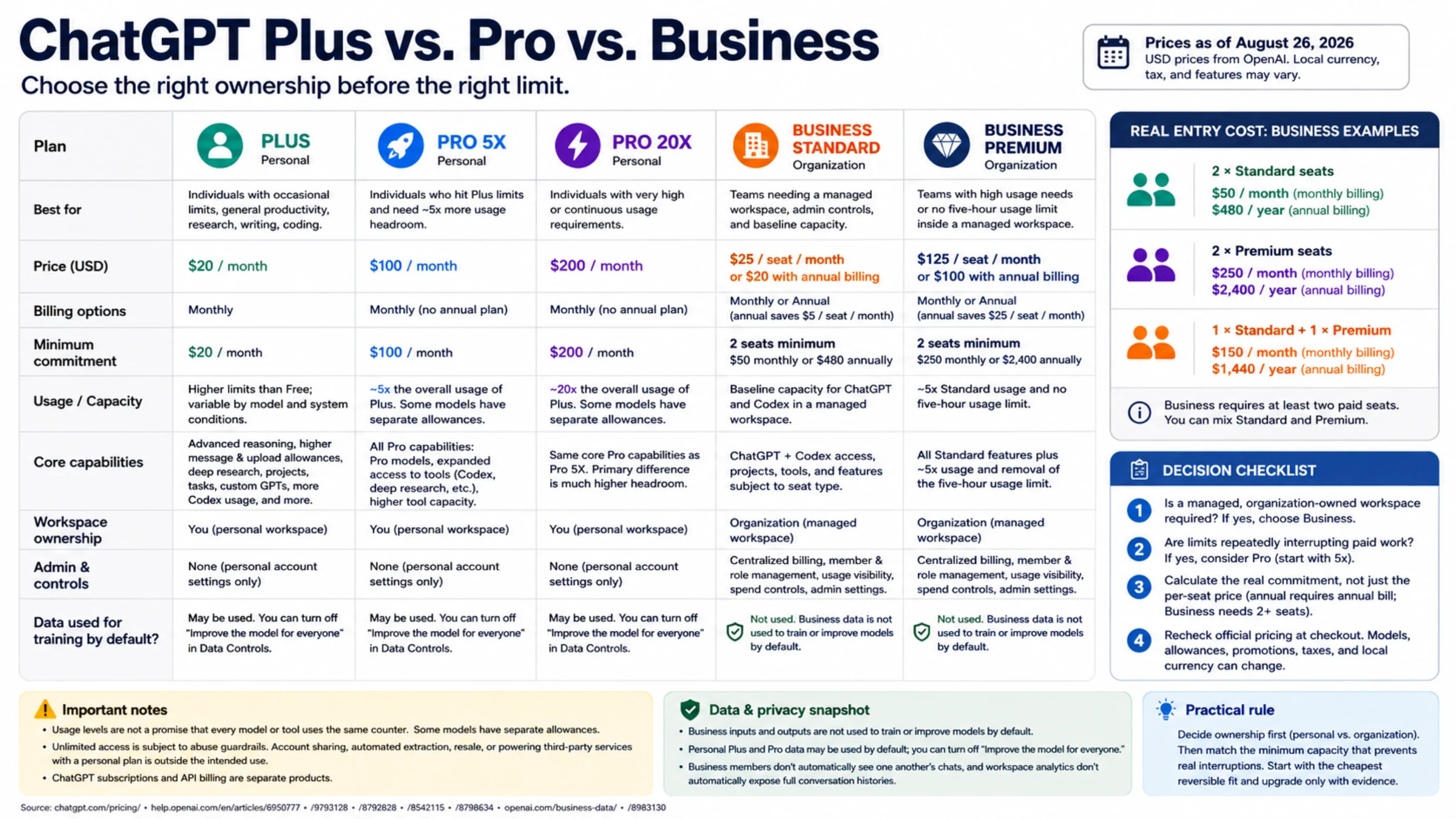
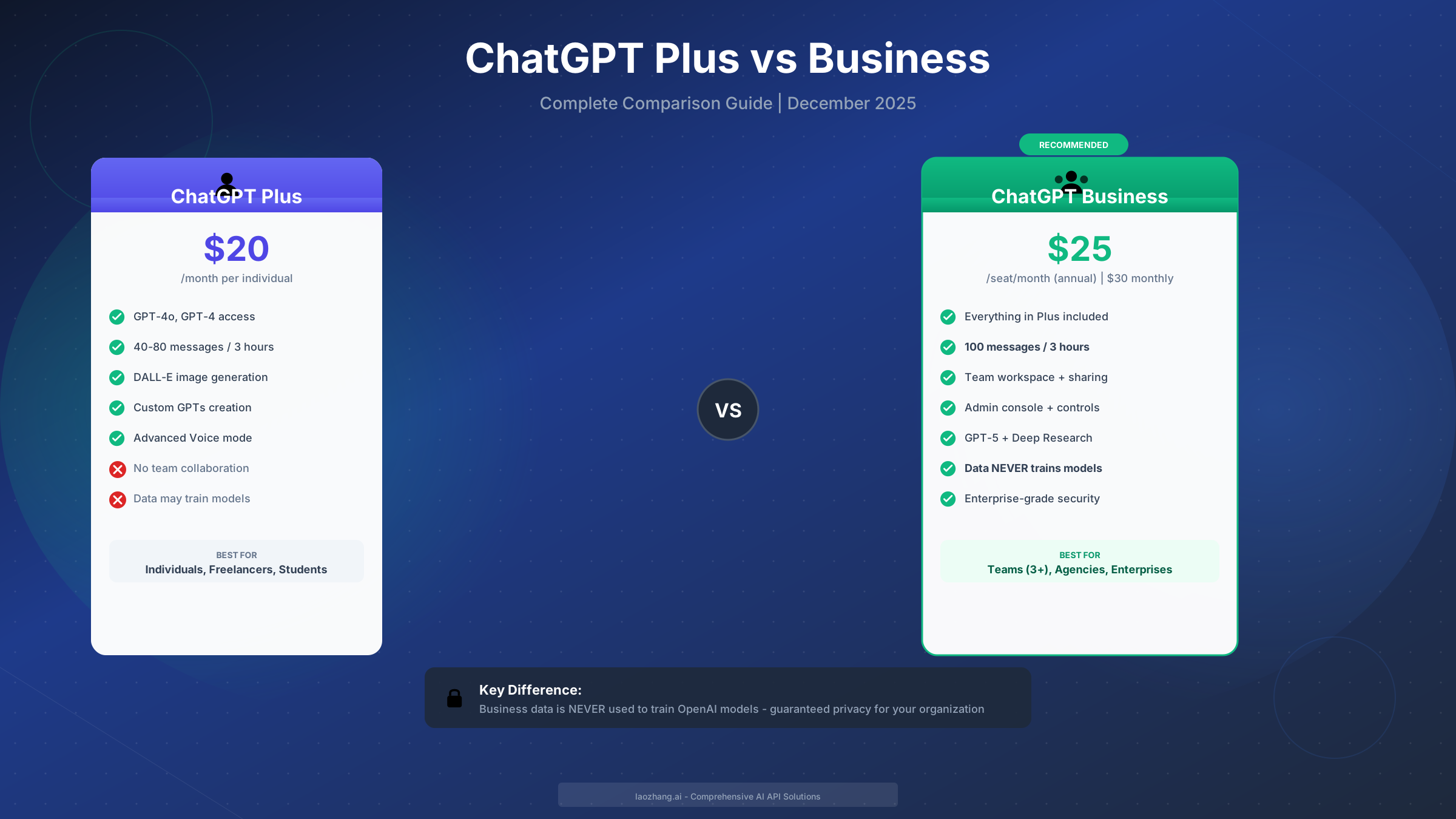
The fundamental difference between ChatGPT Plus and ChatGPT Business comes down to three core areas: data privacy guarantees, team collaboration capabilities, and usage limits. ChatGPT Plus at $20 per month serves individual users who need faster responses and access to advanced models like GPT-4o. ChatGPT Business at $25-30 per seat per month is designed for organizations that require shared workspaces, administrative controls, and the assurance that their conversations will never be used to train OpenAI's models.
According to OpenAI's official pricing page (https://openai.com/business/chatgpt-pricing/ ), the Business plan was renamed from "Team" in August 2025 and now includes enhanced features that weren't available in the original Team offering. This includes access to GPT-5 Thinking mode, Deep Research capabilities, and a flexible credit system for advanced features—making the comparison more nuanced than a simple $5 price difference might suggest.
| Aspect | ChatGPT Plus | ChatGPT Business |
|---|---|---|
| Price | $20/month | $25/seat/mo (annual) or $30/mo (monthly) |
| Target User | Individuals | Teams of 2+ people |
| Data Training | May train models (opt-out available) | Never trains on your data |
| Message Limits | 40-80 per 3 hours | 100 per 3 hours per user |
| Team Features | None | Shared workspace, admin console |
| Key Benefit | Personal productivity boost | Organizational AI adoption |
The decision framework is straightforward once you understand these distinctions: if you're an individual user or freelancer working alone, Plus provides excellent value. If you're part of a team that handles any confidential information—client data, internal communications, proprietary processes—or needs to manage multiple users centrally, Business becomes the clear choice despite the higher per-seat cost.
Complete Pricing Breakdown (December 2025)
Understanding the full pricing picture requires looking beyond the headline subscription costs. OpenAI's December 2025 pricing structure includes five distinct tiers, each targeting different use cases and organizational sizes. The pricing decisions made at the wrong tier can result in either overpaying for unused features or hitting frustrating limitations that reduce productivity.
Subscription Tier Overview
Free Tier remains available at no cost, providing access to GPT-4o mini with limited messages and standard features. It's suitable for casual exploration but quickly becomes limiting for any serious use case.
Plus at $20 per month unlocks GPT-4o, GPT-4, DALL-E image generation, Advanced Voice mode, and Custom GPT creation. The message limit of 40-80 messages per three-hour window typically suffices for individual knowledge workers, though heavy users may occasionally hit caps during intensive work sessions.
Pro at $200 per month targets power users who need unlimited access to GPT-5, o1-pro reasoning models, and extended context windows. This tier makes sense for researchers, technical professionals, and anyone whose work depends on AI assistance throughout their entire day.
Business at $25 per seat monthly (when billed annually) or $30 monthly provides everything in Plus plus team collaboration features, guaranteed data exclusion from training, administrative controls, and access to GPT-5 with flexible credits. The minimum requirement is 2 users, making it accessible even for small partnerships.
Enterprise uses custom pricing negotiated with OpenAI's sales team, typically targeting organizations with 150+ users who need SSO, SCIM provisioning, 196K extended context windows, SOC 2 compliance documentation, and 24/7 SLA-backed support.
Real Cost Calculations for Teams
The per-seat pricing requires careful calculation when comparing against alternatives. Consider a 10-person marketing team evaluating their options:
| Scenario | Monthly Cost | Annual Cost | Per-User Monthly |
|---|---|---|---|
| 10 × Plus subscriptions | $200 | $2,400 | $20 |
| Business (annual billing) | $250 | $3,000 | $25 |
| Business (monthly billing) | $300 | $3,600 | $30 |
The Business plan costs $50-100 more per month for 10 users—but delivers centralized billing, shared GPT templates, guaranteed data privacy, and higher per-user limits. For organizations handling client data or proprietary information, the privacy guarantee alone often justifies the premium.
Nonprofit organizations can access a 20% discount on Business plans through OpenAI for Nonprofits, reducing the annual rate to $20 per seat and the monthly rate to $24 per seat—bringing it to parity with individual Plus subscriptions while retaining all team features.
For teams that prefer API access over subscription interfaces, services like laozhang.ai offer OpenAI-compatible APIs with competitive pricing starting from $5 minimum balance. This can provide cost savings for developer-focused teams who build custom integrations rather than using the ChatGPT interface directly. The OpenAI API pricing guide explains how API costs compare to subscription plans for different usage patterns.
Feature-by-Feature Comparison
The feature comparison between Plus and Business extends beyond the headline differences of price and team features. Understanding the granular distinctions helps clarify whether specific capabilities matter for your use case—and whether you're potentially missing out on features that could accelerate your team's productivity.
Model Access and Performance
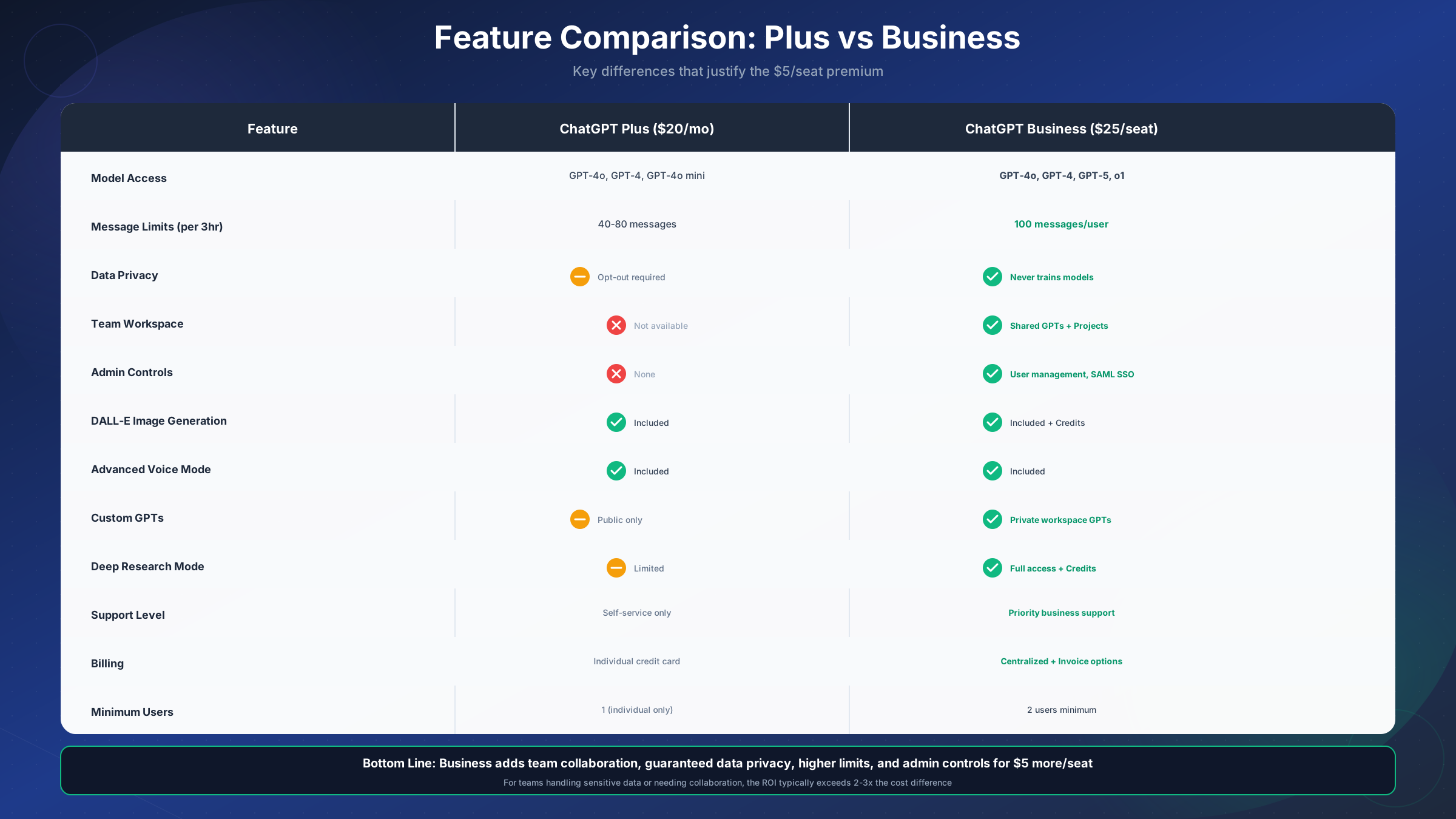
Both Plus and Business provide access to the same core model family, but the experience differs in meaningful ways. Business users receive priority access during high-demand periods, meaning faster response times when OpenAI's servers are under load. According to OpenAI's documentation, Business accounts also receive early access to new models and features before they roll out to Plus subscribers.
The December 2025 updates introduced GPT-5 Thinking mode access for Business subscribers, which provides enhanced reasoning capabilities for complex analytical tasks. Plus users can access GPT-5 through the standard interface but face stricter rate limits on the thinking-intensive features that require additional compute resources.
Usage Limits and Rate Limiting
Message limits represent one of the most practical differences affecting daily workflows. Plus subscribers receive 40-80 messages per three-hour rolling window for GPT-4o, depending on system load and account history. Business subscribers receive 100 messages per three-hour window per user, with limits that reset independently for each team member.
For context, the detailed ChatGPT Plus usage limits explain how these caps work in practice. A typical knowledge worker sending 25-30 messages per hour during focused work sessions would approach Plus limits during intensive days but rarely hit Business limits. Teams doing collaborative document review, content creation sprints, or research sessions benefit significantly from the higher Business allocation.
Data Privacy and Compliance
The data privacy distinction deserves special emphasis because it represents a fundamental difference in how OpenAI handles your information—not just a feature toggle but a contractual commitment backed by different Terms of Service.
Plus Subscribers: Conversations are used by default to train and improve OpenAI's models. Users can opt out through privacy settings (Settings → Data Controls → Improve the model for everyone → Off), but this requires manual action and may reset during account changes.
Business Subscribers: Conversations are contractually excluded from model training. This commitment appears in OpenAI's Enterprise Privacy Policy and Business Terms, providing legal assurance rather than relying on user-managed settings. For organizations subject to data protection regulations, NDAs with clients, or internal information security policies, this distinction often determines which tier is acceptable.
The compliance picture extends to certifications and security standards. Business plans include SOC 2 Type II compliance documentation, GDPR-compatible data processing terms, and the option for HIPAA Business Associate Agreements for healthcare organizations. Plus plans operate under consumer-grade privacy terms that may not satisfy enterprise procurement requirements.
Collaboration and Administration
Team workspace capabilities fundamentally change how organizations can deploy ChatGPT across their workforce. Business provides:
Shared Custom GPTs: Create specialized assistants (trained on company documentation, configured with specific instructions) that all team members can access. This enables consistency—everyone uses the same customer service GPT, the same code review GPT, the same brand voice GPT.
Centralized Projects: Organize related conversations, documents, and GPT configurations into projects that team members can access and contribute to, avoiding the siloed experience of individual Plus accounts.
Admin Console: Manage user provisioning, set usage policies, view aggregated usage analytics, and control which features are available to different user groups. For IT administrators, this reduces the overhead of managing individual subscriptions.
SAML Single Sign-On: Business includes SAML SSO for compatible identity providers (Okta, Azure AD, Google Workspace), enabling automated user provisioning and centralized access control aligned with existing corporate identity management.
Data Privacy & Security Reality
The data privacy difference between Plus and Business warrants deeper examination because it affects not just compliance checkboxes but also what you can safely discuss with ChatGPT. Organizations handling confidential information face real risks if they use consumer-tier AI services for business purposes—risks that go beyond theoretical concerns.
Training Data Exclusion: What It Actually Means
When OpenAI states that Business data "never trains our models," this creates a meaningful technical and legal separation. Your conversations, the documents you upload, the Custom GPTs you create, and the outputs generated in your workspace remain isolated from the broader training pipeline. This means:
Confidential Client Information: Law firms, consulting agencies, and professional services firms can discuss client matters without concern that sensitive details might influence model outputs visible to other users.
Proprietary Business Processes: Companies can document internal procedures, strategic plans, and competitive intelligence in ChatGPT conversations without contributing to models that competitors might later access.
Personal Data: Organizations subject to GDPR, CCPA, or sector-specific regulations can process personal data through ChatGPT with reduced risk profiles, though they should still conduct proper data protection impact assessments.
For Plus users who manually opt out of training, the protection is less robust. The opt-out applies to your account at a point in time but doesn't carry the same contractual weight as the Business exclusion. Account settings can inadvertently reset, new features may default to training participation, and the consumer Terms of Service provide weaker guarantees than the Business Terms.
Security Infrastructure
Both Plus and Business operate on the same underlying security infrastructure—TLS 1.2+ encryption in transit, AES-256 encryption at rest, and OpenAI's security operations center with 24/7 monitoring. The difference lies in audit trails, compliance documentation, and the additional controls available to administrators.
Business accounts receive access to audit logs showing user activity, API calls, and data access patterns—information required for SOC 2 audits and security incident investigations. They also receive quarterly security reviews and the ability to request additional compliance documentation from OpenAI.
Organizations with specific security requirements (government contractors, financial services, healthcare) should review OpenAI's Enterprise Privacy Policy and may need to engage with the Enterprise sales team for customized terms even if their user count would otherwise fit the Business tier.
Which Plan Fits Your Team Size?
The right plan depends on more than headcount—it requires understanding how your team actually uses AI tools and what organizational capabilities you need. These recommendations synthesize pricing economics with practical usage patterns.
Solo Operators and Freelancers (1-2 People)
Recommendation: Stay on Plus unless data privacy requirements mandate otherwise.
For individuals working independently, Plus provides the best value proposition. The $20 monthly cost includes all the core capabilities—GPT-4o, DALL-E, Advanced Voice, Custom GPTs—without the per-seat multiplier. Even if you occasionally hit message limits, the cost-effectiveness of Plus outweighs the benefits of Business features designed for team collaboration.
The exception: freelancers handling sensitive client information who need contractual privacy assurance. A solo consultant working with healthcare clients, for instance, might justify Business for the data protection commitment even without needing team features.
Small Teams (3-10 People)
Recommendation: Business is typically the right choice.
The economics shift once you have 3+ team members, particularly when considering the value of:
- Shared GPT templates that ensure consistent quality across the team
- Centralized billing that simplifies expense management
- Admin controls for onboarding and offboarding
- Privacy guarantees that satisfy client and legal requirements
At 5 users, Business costs $125/month versus $100/month for individual Plus subscriptions—a $25/month premium for significant organizational capability. At 10 users, the premium rises to $50-100/month but typically delivers proportionally more value through improved collaboration.
Mid-Size Teams (10-50 People)
Recommendation: Business, with Enterprise evaluation for 30+ users.
Teams in this range benefit most from Business features. The shared workspace becomes essential for maintaining consistency, the admin console provides necessary governance, and the per-seat economics remain reasonable. However, teams approaching 50 users should begin evaluating Enterprise pricing through OpenAI's sales team.
Enterprise may offer volume discounts that bring per-seat costs below Business rates while adding unlimited usage, SSO/SCIM integration, and dedicated support. The breakeven point varies by organization—some Enterprise contracts offer better economics starting at 30-40 seats.
Large Organizations (50+ People)
For organizations at this scale, Enterprise is typically the right choice.
Organizations at this scale typically require capabilities beyond Business: unlimited usage for power users, SCIM provisioning for automated user management, extended context windows for complex documents, and SLA-backed support for production dependencies. Enterprise also enables custom data retention policies, domain verification, and advanced analytics.
The negotiated pricing often includes API credits as well, enabling teams to build custom integrations without separate billing complexity.
Is the Extra Cost Worth It? (ROI Analysis)
The $5 per seat monthly premium for Business over Plus—or $60 per user annually—seems modest in isolation. The real question is whether this investment generates returns that exceed its cost. For most organizations with 3+ users, the answer is clearly yes, but understanding the specific value drivers helps justify the expense to finance teams and executives.
Productivity Gains from Collaboration Features
Research from Harvard Business School, cited in OpenAI's Enterprise documentation, found that GPT-4 access improved consulting task completion by 25% in terms of both speed and quality. Extending this to team settings, shared Custom GPTs and project workspaces amplify these gains by eliminating redundant setup time and ensuring best practices propagate across the organization.
Consider a 10-person content team where each member might spend 30 minutes weekly configuring and refining personal GPT assistants. With Business, a single well-optimized team GPT serves everyone, saving 5 hours weekly across the team. At a blended cost of $50/hour, that's $250 weekly—$1,000 monthly—recovered from a $50/month premium.
Risk Mitigation Value
The data privacy guarantee carries implicit value that doesn't appear in direct productivity metrics but protects against significant downside scenarios:
Regulatory Fines: Organizations subject to GDPR face fines up to 4% of annual revenue for data protection violations. Using consumer-grade AI services for processing personal data creates compliance gaps that Business resolves.
Client Liability: Professional services firms that inadvertently expose client confidential information through consumer AI services face malpractice claims, contract termination, and reputational damage. The Business contractual commitment provides defensible risk mitigation.
Internal Security Incidents: IT security teams can confidently authorize Business usage, while consumer Plus accounts often fall into "shadow IT" categories that create audit findings and require remediation.
Break-Even Analysis
For a team evaluating the Business premium, the break-even threshold is remarkably low:
| Team Size | Monthly Premium | Break-Even Hours Saved | Per-Person Monthly |
|---|---|---|---|
| 5 users | $25 | 0.5 hours total | 6 minutes each |
| 10 users | $50-100 | 1-2 hours total | 6-12 minutes each |
| 20 users | $100-200 | 2-4 hours total | 6-12 minutes each |
If each team member saves just 6-12 minutes monthly through better collaboration, faster message limits, or avoided compliance issues, the Business plan pays for itself. Most teams report significantly higher savings.
For organizations seeking even greater cost efficiency, especially for API-based integrations, exploring aggregation services can reduce costs further. The OpenAI API key guide explains how to set up API access for custom applications that might complement subscription-based ChatGPT usage.
December 2025 Feature Updates
OpenAI's December 2025 updates introduced several capabilities that affect the Plus vs Business comparison. Understanding these changes helps ensure your plan choice aligns with current offerings rather than outdated information.
GPT-5 and Thinking Mode Access
GPT-5 became generally available across paid tiers in late 2025, with access varying by subscription level. Plus users receive GPT-5 access with standard rate limits, while Business users receive higher limits and priority access to "Thinking Mode"—a capability that allows GPT-5 to engage in extended reasoning for complex problems.
Thinking Mode consumes additional compute resources, making it subject to usage caps even on Business plans. However, Business subscribers receive flexible credits (described below) that can be applied to Thinking Mode usage beyond base allocations.
Flexible Credits System
Business and Enterprise plans now include flexible credits that unlock additional access to premium features:
- Deep Research: Extended web search and synthesis for comprehensive research reports
- GPT-5 Thinking: Extended reasoning sessions beyond base limits
- Image Generation: DALL-E 3 generations beyond monthly allocations
- Advanced Voice: Extended real-time voice conversation sessions
Credits refresh monthly and can be redistributed across team members through the admin console. This system replaced the previous fixed feature limits with a more flexible approach that accommodates varying usage patterns across teams.
Enhanced Team Workspace
The December updates also expanded team workspace capabilities with:
Cross-Team GPT Sharing: Create GPTs that multiple teams can access while maintaining separate conversation histories
Project Templates: Pre-configured project structures for common use cases (content creation, code review, research)
Integration Hooks: Webhook notifications for project activity, enabling integration with Slack, Teams, and workflow automation tools
These features further differentiate Business from Plus by enabling organizational processes rather than individual productivity enhancements.
Making Your Decision + Next Steps
The choice between ChatGPT Plus and Business ultimately depends on three factors: team size, data sensitivity, and collaboration needs. Here's a structured approach to making and implementing your decision.
Decision Framework
Choose Plus if:
- You're an individual user or independent freelancer
- You don't handle sensitive client or organizational data
- You don't need to share GPT configurations or collaborate within ChatGPT
- Budget constraints require minimizing costs and you can manually manage data privacy settings
Choose Business if:
- You have 3+ team members who will use ChatGPT regularly
- You work with any confidential, proprietary, or regulated information
- You need centralized billing, user management, or usage analytics
- You want contractual data privacy guarantees rather than opt-out settings
- You plan to create shared GPT assistants or collaborative projects
Consider Enterprise if:
- You have 50+ potential users
- You require SSO/SCIM integration with existing identity management
- You need unlimited usage for power users
- You're subject to stringent compliance requirements (SOC 2 audits, government contracts)
Migration and Upgrade Process
Moving from Plus to Business is straightforward:
- Admin Setup: Create a Business workspace through chat.openai.com/admin or the enterprise contact form
- User Invitation: Invite team members via email; they can link existing Plus accounts or create new credentials
- GPT Migration: Export Custom GPTs from individual accounts and recreate them in the team workspace
- Billing Transition: Set up centralized payment; individual Plus subscriptions should be cancelled after transition
Existing conversation history doesn't automatically migrate between individual and team accounts, so teams should export important conversations before transitioning if retention is needed.
Exploring Alternatives
For teams with specific requirements that don't fit neatly into ChatGPT's subscription model, consider:
API Access: Build custom interfaces or integrate AI into existing tools via OpenAI's API. The ChatGPT free trial guide explains initial access options before committing to paid subscriptions.
Competitor Evaluation: Claude from Anthropic and Gemini from Google offer competing capabilities with different pricing and feature trade-offs. Multi-model strategies are increasingly common for organizations hedging on AI provider risk.
Hybrid Approaches: Some organizations use Business for teams requiring collaboration and privacy, Plus for individual power users, and API access for development workflows—choosing the right tool for each use case rather than forcing a single solution.
The AI landscape continues evolving rapidly, with OpenAI announcing new features and pricing adjustments regularly. Whichever plan you choose, plan for periodic reassessment as capabilities expand and organizational needs change.
Summary: ChatGPT Business at $25/seat monthly delivers meaningful value over Plus for teams of 3+ people through guaranteed data privacy, team collaboration features, higher usage limits, and administrative controls. The $5/seat premium typically pays for itself through productivity gains within the first week of use. For individuals and very small teams without privacy requirements, Plus remains the cost-effective choice. Evaluate your specific needs using the framework above, and don't hesitate to start with Plus before upgrading—the migration path is straightforward when your team outgrows individual subscriptions.