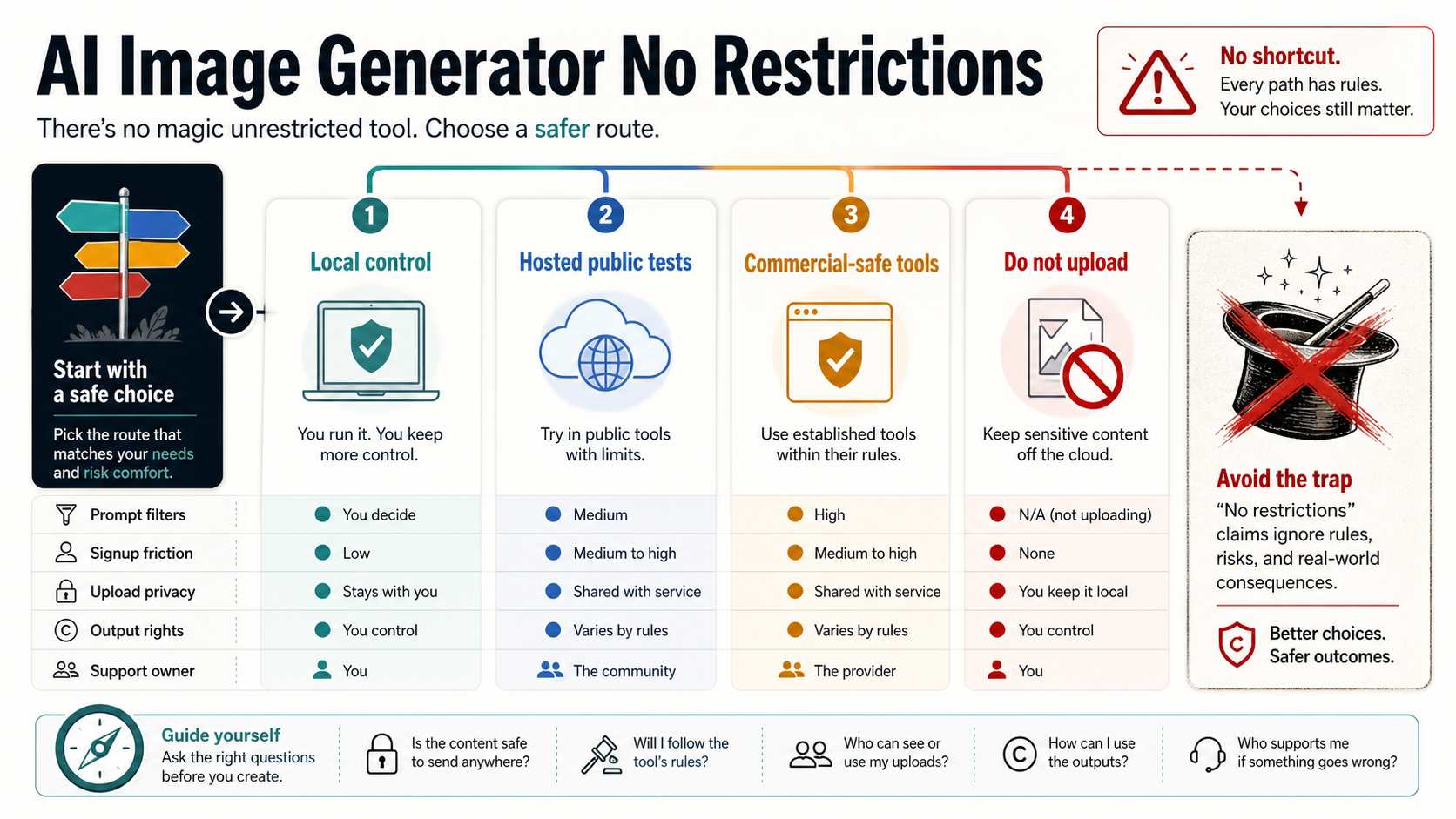
No safe AI image generator is literally restriction-free. If you want fewer prompt refusals or less signup friction, the right route depends on what you are creating, whether you need to upload files, and whether the output is for personal testing or client work.
Use local generation when control and privacy matter most. Use hosted no-sign-up tools only for low-risk public prompts. Use mainstream policy-governed tools when brand, client, or repeatable commercial work matters more than lower friction. Do not upload private people, client assets, product photos, copyrighted references, or adult or rights-sensitive material until you can verify retention, training use, deletion, output rights, and support owner.
| If you need... | Start here | Why |
|---|---|---|
| Maximum prompt and file control | Local generation | You keep files and model choices closer to your own environment. |
| A fast public-prompt test | Hosted no-sign-up tool | It is useful for low-risk ideas, not sensitive uploads. |
| Brand, client, or team work | Mainstream policy-governed tool | Restrictions can be safer than unclear rights or support. |
| Private people, client files, unreleased products, copyrighted references, or adult/rights-sensitive material | Do not upload yet | Verify retention, training use, deletion, output rights, and support owner first. |
What "no restrictions" can and cannot mean
The phrase usually hides several different requests. One reader wants fewer prompt refusals. Another wants no login. Another wants unlimited images. Another wants to upload a reference photo without the tool rejecting it. A fifth reader wants a commercial-safe result. Those are not the same problem, and solving one can make another worse.
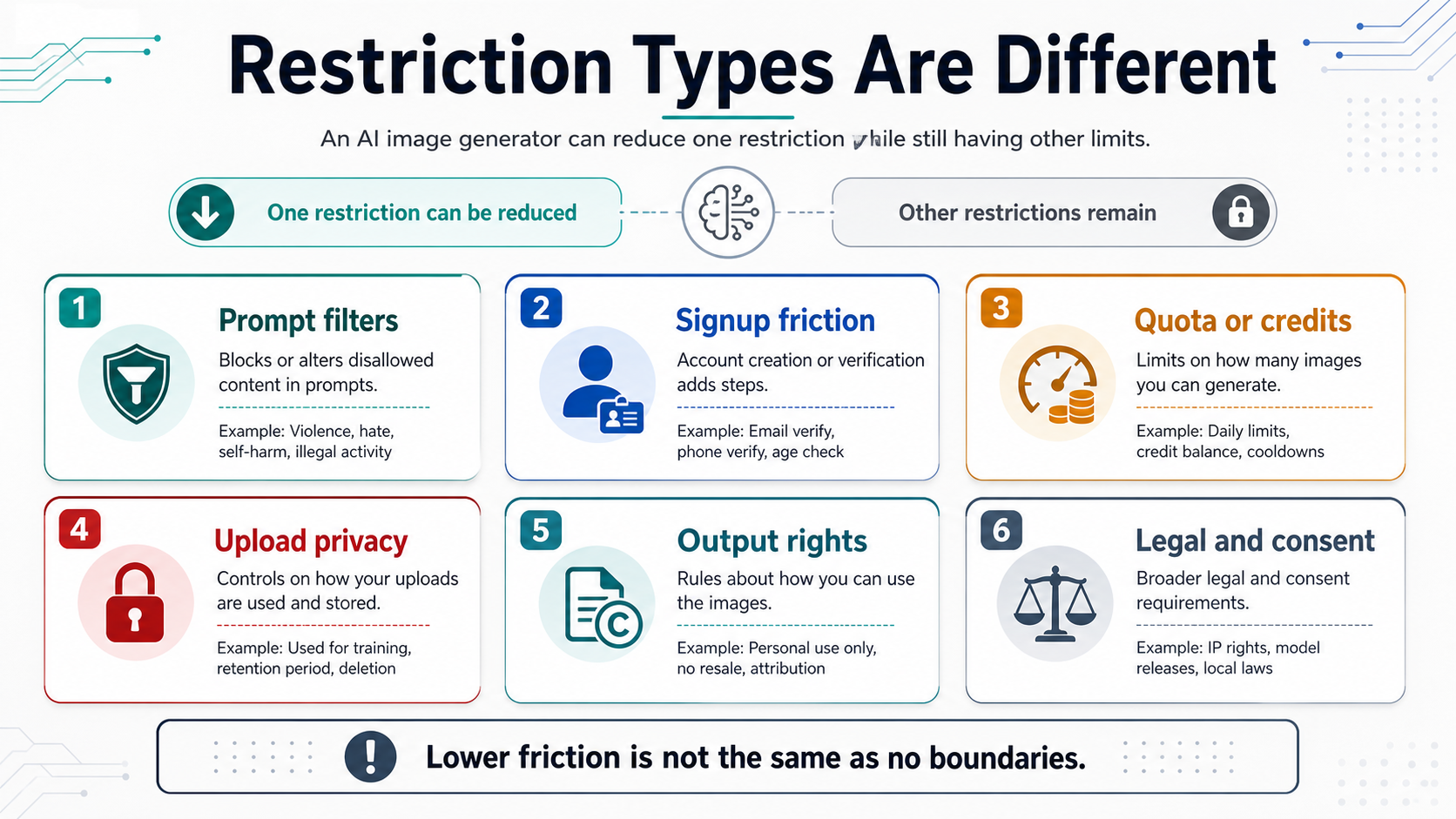
Prompt filters are the most visible restriction, because the refusal happens in front of the user. Account gates and credit systems are quieter restrictions: the tool may accept the prompt but stop after a few generations, ask for signup, or move useful exports behind a paid plan. Upload privacy is different again. A tool can be easy to use and still process prompts, images, device data, account data, or support information under a privacy policy you have not read.
Output rights are another separate layer. A landing page can say a generator is free, but that does not automatically answer whether you can use outputs in client work, resale, ads, product packaging, or a public campaign. Even local generation does not erase rights questions around copyrighted references, brand marks, likenesses, or model licenses.
The safest mental model is simple: "no restrictions" is not a tool category. It is a bundle of tradeoffs. You can reduce prompt friction, account friction, quota friction, or upload exposure, but each route still has boundaries.
The three practical routes
For most readers, there are only three useful route classes: local generation, hosted public-prompt testing, and mainstream policy-governed tools. The right choice depends on what you are protecting.
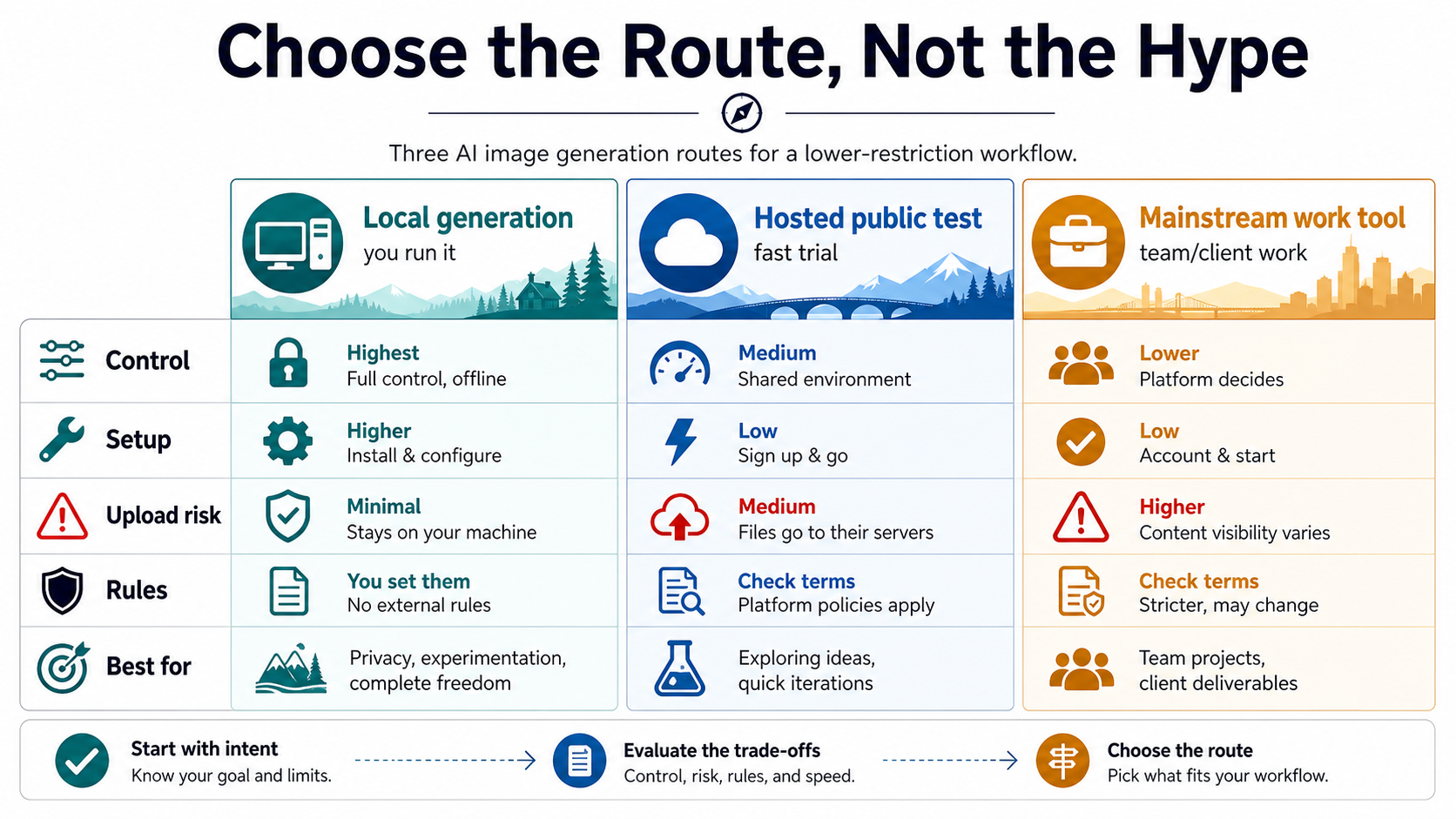
Local generation is the strongest route when control matters. Interfaces such as AUTOMATIC1111 Stable Diffusion WebUI and ComfyUI let technical users run text-to-image, image-to-image, inpainting, upscaling, model workflows, extensions, and repeatable graphs closer to their own environment. That can reduce upload exposure and provider policy surprises. It also adds setup work, hardware limits, model selection risk, extension hygiene, and responsibility for lawful use.
Hosted no-sign-up tools are best treated as disposable public-prompt sandboxes. They are useful when the prompt is not sensitive, the image is not tied to a client or private person, and losing the output would not matter. They are not good evidence that the service is private, unlimited, commercially safe, or stable. If a provider claims "free", "unlimited", "no filters", "private", or "commercial use", treat that as a provider-owned claim until its terms and privacy policy answer the details.
Mainstream policy-governed tools are often the better route for work. OpenAI, Google Gemini, Adobe Firefly, Stability AI services, and similar platforms maintain explicit rules around illegal activity, non-consensual intimate content, likeness misuse, child safety, deception, rights infringement, and safeguard circumvention. Those rules can feel restrictive, but for brand, client, team, or repeatable commercial workflows, predictable policy and support can be more valuable than a looser prompt box.
How to audit a hosted no-sign-up generator
Before using a hosted tool, separate what the page lets you do from what the contract lets you rely on. A prompt box proves only that the service is reachable. It does not prove that your inputs are private, that the model route is stable, that outputs are commercially safe, or that the tool will support you if something goes wrong.
Start with the promise that attracted you. If it says no signup, check whether the tool really allows full-resolution exports without an account. If it says unlimited, look for dynamic limits, fair-use language, queues, cooldowns, or paid-plan gates. If it says no filters, look for terms that still prohibit illegal, harmful, non-consensual, adult, violent, or rights-infringing content. If it says private, read what happens to prompts, uploads, generated media, logs, support data, and deletion requests.
FreeGen is a useful example of why this distinction matters. Its public positioning is built around free, fast, low-friction generation, but its terms still require lawful use, restrict content involving real individuals without consent, prohibit IP infringement, reserve refusal rights, and allow dynamic usage limits. That does not make the tool useless. It means the phrase on the first screen is not the whole contract.
The same logic applies to any wrapper or web app promising "uncensored", "no restriction", "no login", "4K", "commercial use", or "private". Those may be real product features, but they are not interchangeable. A low-friction page can still use third-party processors, store usage data, change limits, or make commercial rights conditional. The article free AI image editor covers the upload and editing side in more detail; for generation, keep the audit even stricter because prompts and reference images can carry private or client information.
Use this quick checklist before you trust a hosted generator:
| Check | What to look for | Why it matters |
|---|---|---|
| Route owner | Who runs the service, model, billing, and support? | A wrapper can disappear or change terms faster than a first-party tool. |
| Upload handling | Are files stored, deleted, reviewed, or used for training? | No login is not the same as no data processing. |
| Limits | Are "unlimited" claims backed by terms? | Dynamic throttles and paid gates can appear after the first use. |
| Output rights | Are commercial, resale, attribution, and client-use rights explicit? | Free generation does not automatically equal work-safe usage. |
| Policy scope | What content remains prohibited? | No-filter marketing can still sit on top of lawful-use and safety rules. |
| Support path | Who fixes failures or disputes? | Client work needs accountability, not only a working prompt box. |
When local generation is the real answer
If your main problem is prompt control, repeatability, private files, or high-volume experimentation, local generation is usually the closest honest answer. Running a Stable Diffusion or FLUX-style workflow locally means prompts, source images, models, extensions, seeds, and outputs can stay closer to your own machine or controlled infrastructure. You are no longer depending on an unknown hosted page to accept a prompt, keep an upload private, or preserve a feature tomorrow.
That control is why technical users often recommend local tools when someone asks for an unrestricted generator. AUTOMATIC1111 is built around a browser UI for Stable Diffusion tasks such as text-to-image, image-to-image, inpainting, outpainting, upscaling, checkpoints, extensions, and metadata workflows. ComfyUI is stronger for graph-based pipelines, repeatable workflows, LoRA and ControlNet-style routing, inpainting, upscaling, and saving workflows as JSON. For deeper local workflow comparisons, see ComfyUI vs Stable Diffusion, ComfyUI FLUX, and ComfyUI image to image.
Local does not mean effortless. You need compatible hardware or a remote machine you control, model files from sources you trust, safe extension habits, storage space, and a basic understanding of licenses. You also need to own content responsibility. Stability AI's acceptable use policy, OpenAI's usage policies, Google's Gemini prohibited use policy, and Adobe's generative AI guidelines all point to the same durable boundary: AI image generation is still governed by laws, rights, consent, child safety, impersonation, deception, and harm restrictions.
Use local generation when the work benefits from control. Do not use it as a mental shortcut for "anything goes." If the image would be illegal, non-consensual, deceptive, exploitative, or rights-infringing through a hosted tool, running it locally does not magically make it safe.
The upload stop rule
The most dangerous moment is not typing a public prompt. It is uploading a file that carries real-world consequences. A face, a client product, a confidential design, a copyrighted reference, a private location, a product image before launch, or a sensitive adult context can create privacy and rights exposure even if the tool never refuses the upload.
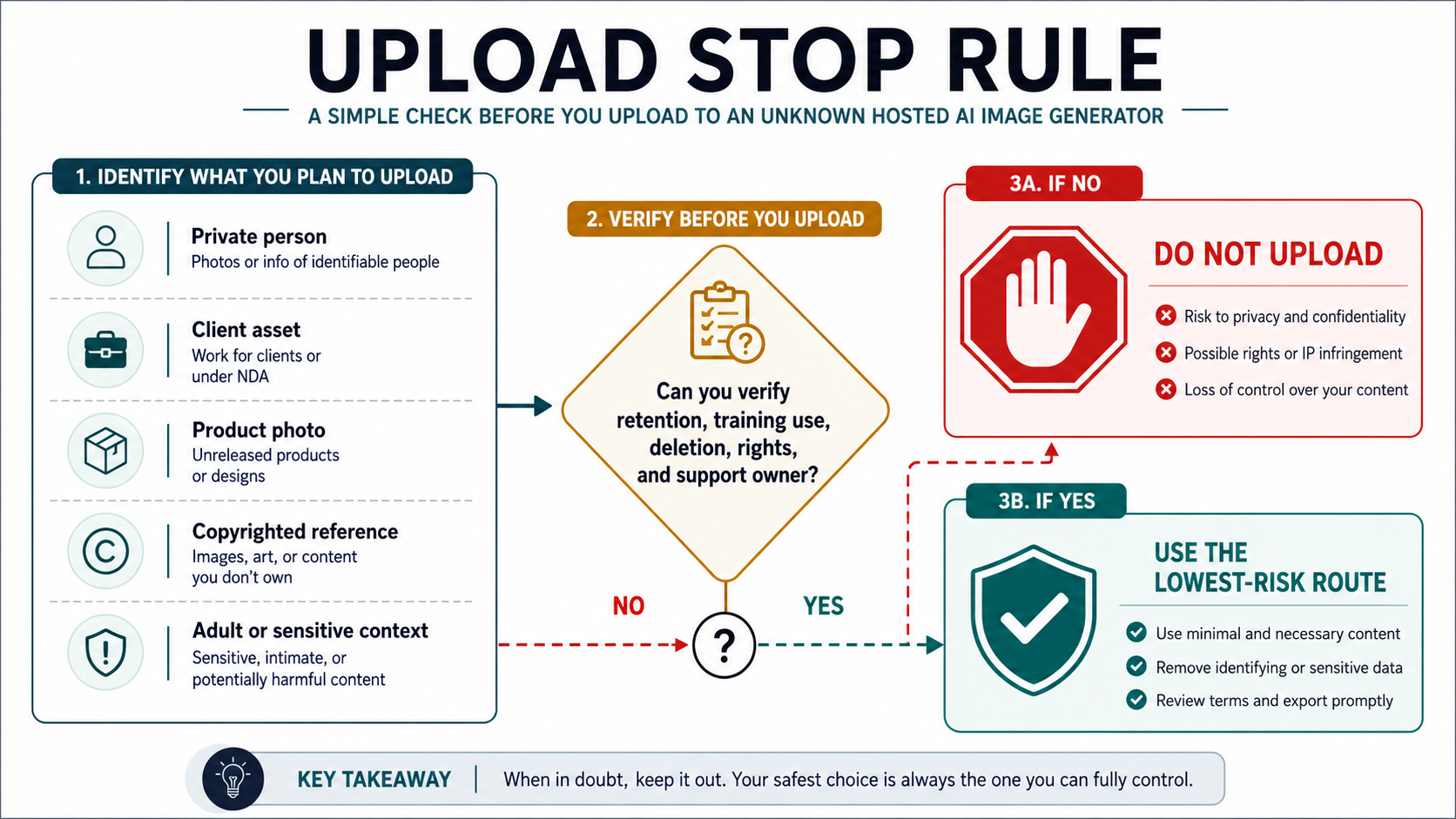
Use a hard stop before uploading any of these:
- private people or identifiable likenesses
- client files, work under NDA, or unreleased product imagery
- product photos you do not want stored or used outside your workflow
- copyrighted images, brand marks, character references, or style references you do not own
- intimate, adult, medical, legal, political, or otherwise sensitive material
If you cannot verify retention, training use, deletion rights, output rights, support owner, and lawful-use limits, do not upload. If you can verify those things, still minimize the input. Crop unnecessary context, remove identifiers, use synthetic references where possible, and keep export and deletion steps prompt.
This rule is deliberately conservative. Hosted generators are not all unsafe, and many reputable tools have serious privacy and policy programs. The point is that a no-login interface is a weak privacy signal. Real trust comes from a clear route owner, clear terms, clear deletion behavior, and a support path.
When a more restricted tool is better
The better tool for serious work is often the one with more explicit restrictions. For a brand team, agency, creator working with clients, or developer building a repeatable workflow, the important questions are not "Can I type anything?" and "Will it refuse less often?" The important questions are who owns the route, what the limits are, what rights attach to outputs, how failures are handled, and whether the workflow can be repeated next week.
This is where mainstream policy-governed tools earn their place. They may reject some prompts. They may require accounts, paid plans, watermarks, or review paths. But they also tend to publish clearer policies, support channels, and product boundaries. A refusal can be frustrating; an unclear rights or privacy situation can be much more expensive.
Use a restricted mainstream tool when the output will be used in:
- client deliverables or agency work
- ads, packaging, public product images, or brand campaigns
- repeated team workflows
- anything involving identifiable people
- educational, medical, legal, political, or other sensitive contexts
- workflows where support, billing, logs, and repeatability matter
Use hosted no-sign-up tools for low-risk ideation. Use local generation for control and experimentation. Use mainstream work tools when accountability matters. That route split is more useful than asking which generator has the loosest prompt box.
The practical decision checklist
Before choosing a generator, name the restriction you are trying to reduce. That one sentence prevents most bad choices.
| Your real problem | Best starting route | Do not skip |
|---|---|---|
| Prompt refusals on harmless creative prompts | Try a lower-restriction hosted tool or local generation | Check the content terms before assuming no filters means no policy. |
| No account or credit card | Hosted no-sign-up tool | Keep prompts public and disposable. |
| Private source images | Local generation or a provider with clear privacy terms | Verify retention, training use, deletion, and support owner. |
| Commercial or client use | Mainstream policy-governed tool or explicit provider contract | Confirm output rights, attribution, restrictions, and support. |
| High-volume experiments | Local generation or a documented paid provider route | Avoid "unlimited" claims without fair-use terms. |
| Image editing with uploads | A trusted editor route | Read the upload policy before using real photos. |
If your question is broad free-tool selection rather than restriction routing, the better next read is Best Free AI Image Generator or Best Free AI Image Generator Online. If your question is specifically editing uploaded images, use Free AI Image Editor. Stay with the route checklist when the word "restrictions" means filters, uploads, privacy, rights, and route control.
FAQ
Is there a truly unrestricted AI image generator?
Not in any safe or publishable sense. You can find routes with fewer prompt refusals, no signup, local control, or looser hosted policies, but law, consent, IP rights, platform terms, and provider limits still apply. Treat "unrestricted" as a marketing phrase unless the exact route and terms prove a narrower claim.
Are local Stable Diffusion or FLUX workflows the best no-restrictions option?
They are the best option when the real need is control: prompts, files, model choice, repeatability, and privacy. They are not the best option for everyone because setup, hardware, model sourcing, extensions, licenses, and content responsibility move onto you. Local control is powerful, not permissionless.
Are hosted no-sign-up generators safe for private images?
Not by default. No signup only means you may not need an account for the first interaction. It does not prove that uploads are not processed, stored, reviewed, retained, used for training, or handled by third-party processors. Do not upload private or client files until the route answers those questions clearly.
Can I use outputs commercially?
Only if the route you actually use grants the rights you need. Commercial use can depend on the provider, plan, input material, prompt, model license, attribution rules, and local law. Do not infer commercial permission from the words free, no filter, no login, or unlimited.
What should I avoid uploading?
Avoid private people, client assets, unreleased products, copyrighted references, brand marks, confidential designs, and adult or rights-sensitive material unless you can verify retention, training use, deletion behavior, output rights, and support owner. When in doubt, keep it local or use synthetic references.
Why not just rank the most uncensored tools?
A ranking would answer the least durable part of the problem. Hosted tools change limits, policies, prices, model routes, and upload behavior. A route checklist is more useful because it works on any new tool: identify the restriction, verify the contract, choose the lowest-risk route, and stop before sensitive uploads.