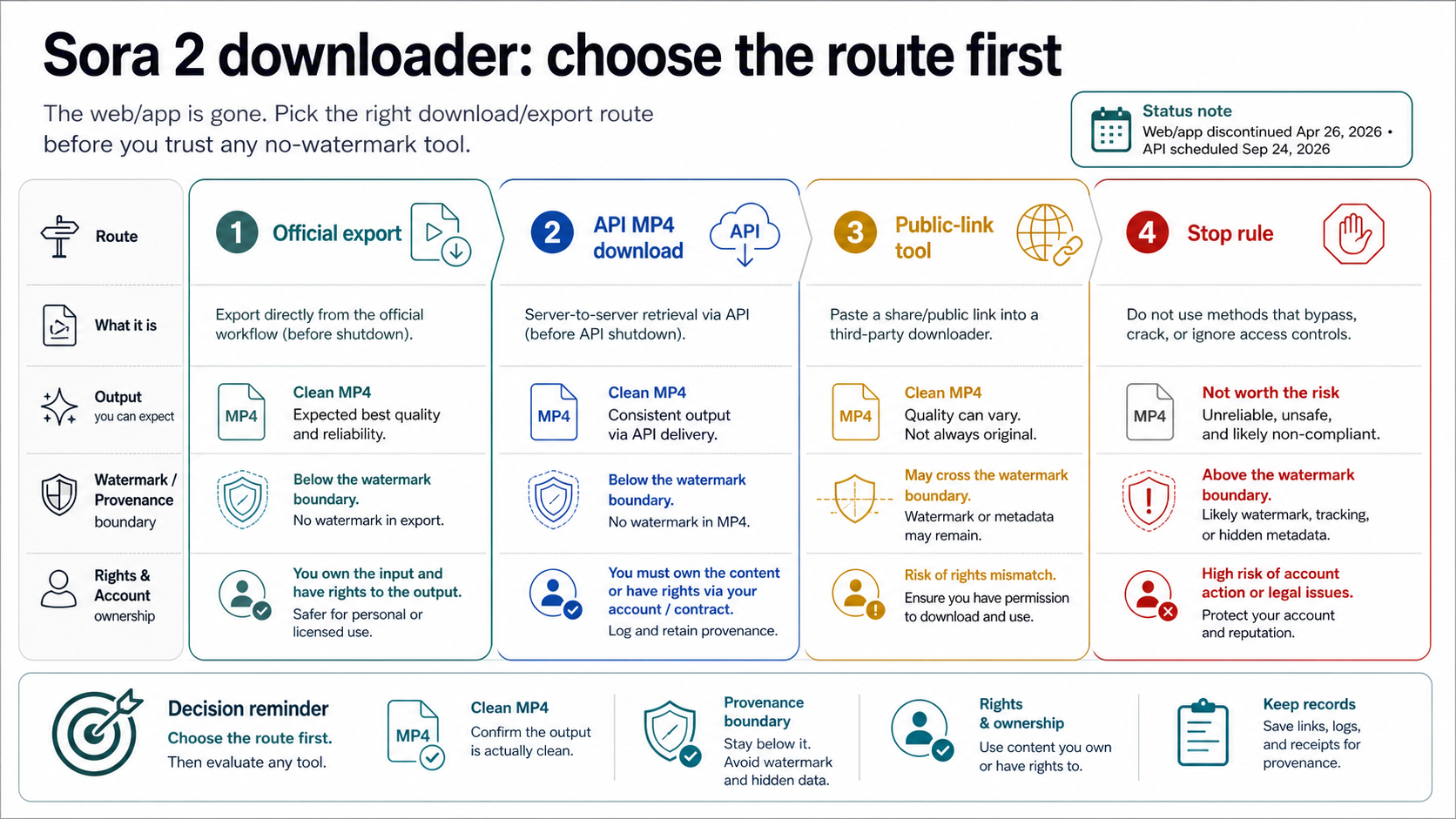
As of May 14, 2026, the right clean Sora video path depends on where the video came from. Use the official export path for your own Sora content, use the authenticated Videos API content endpoint for completed API jobs while it remains available, and treat public-link no-watermark downloaders as third-party claims that need permission and privacy checks.
The shutdown matters before the tool choice: Sora web and app experiences were discontinued on April 26, 2026, and the Sora API is scheduled for discontinuation on September 24, 2026. If the video is not yours, is private, or came from a copied link you are not authorized to use, stop before trying to remove a visible watermark.
| Branch | Use it when | First action |
|---|---|---|
| Official export | You are exporting your own Sora content | Start from the account export path and keep the ZIP or MP4 in owned storage |
| API download | You created the video through the API and the job is complete | Call GET /videos/{video_id}/content or the SDK download helper |
| Public-link tool | The Sora link is public and you have permission | Check the tool owner, login/token handling, and output provenance |
| Stop | The content is private, copied, or rights-unclear | Do not paste the link into a downloader |
Choose the branch that matches the source before you compare downloader sites. The point is to keep the file clean without confusing OpenAI's export/API contracts with third-party promises.
The current route split
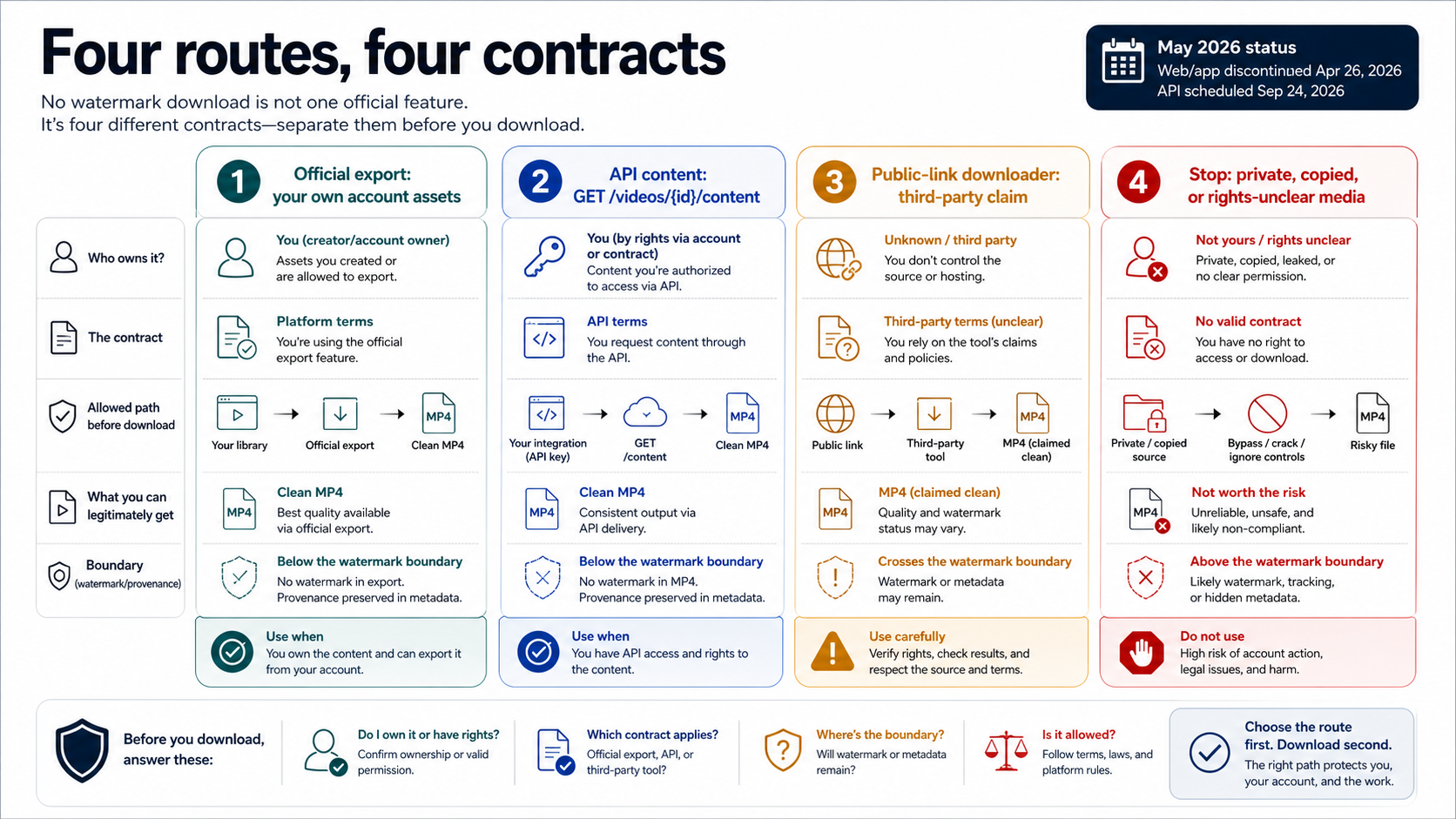
A "Sora 2 video downloader without watermark" search usually collapses four different jobs into one box. That shortcut is the risk. A downloader that works for a public Sora share link is not the same thing as OpenAI's official export path, and neither of those is the same thing as a developer retrieving a completed API job.
The official consumer branch is about preserving your own Sora content after the Sora product shutdown. OpenAI's Sora discontinuation notice says the Sora web and app experiences ended on April 26, 2026, with export access handled through its sunset flow. That route is account-bound and time-sensitive; it is not a universal paste-link downloader.
The developer branch is narrower and more mechanical. OpenAI's Videos API documentation describes a content download path for a completed video: GET /videos/{video_id}/content, with SDK helpers for downloading the MP4. That endpoint belongs only to API jobs you are authorized to access, and OpenAI's deprecation notice says the Sora 2 video-generation models and Videos API are scheduled for removal on September 24, 2026.
The third-party branch is a market layer. Public-link tools, browser extensions, and "no watermark" pages may promise an easy MP4, but those promises are owned by the tool operator, not by OpenAI. Treat them as claims that need verification, especially when they ask for a non-public link, account access, a browser extension permission, or a local installer.
Use official export for your own Sora content
If the video was created in your own Sora account, start with the official export path. The practical goal is simple: get the original file or archive into storage you control before any export window, account access, or shutdown route changes.
Do not treat export as a live downloader. It may involve an account-bound request, an email, a ZIP archive, or another sunset-specific handoff depending on OpenAI's current flow and your account state. Because the Sora app and web experiences are already discontinued, the safe assumption is that export availability is a recovery path, not a durable production workflow.
Once you receive the exported files, copy them out of temporary download locations and into owned storage. Keep the original archive, the extracted MP4, the export date, and any account or project notes that explain why you have the right to use the file. That record matters later if a platform, client, or collaborator asks where the video came from.
This branch is also the one least helped by random downloader pages. If the file belongs to your Sora account, a third-party public-link tool adds privacy and reliability risk without improving the chain of custody. Use a public-link downloader only when the official path is unavailable, the link is genuinely public, and the tool does not ask for account credentials or private tokens.
Use the API content endpoint for completed developer jobs
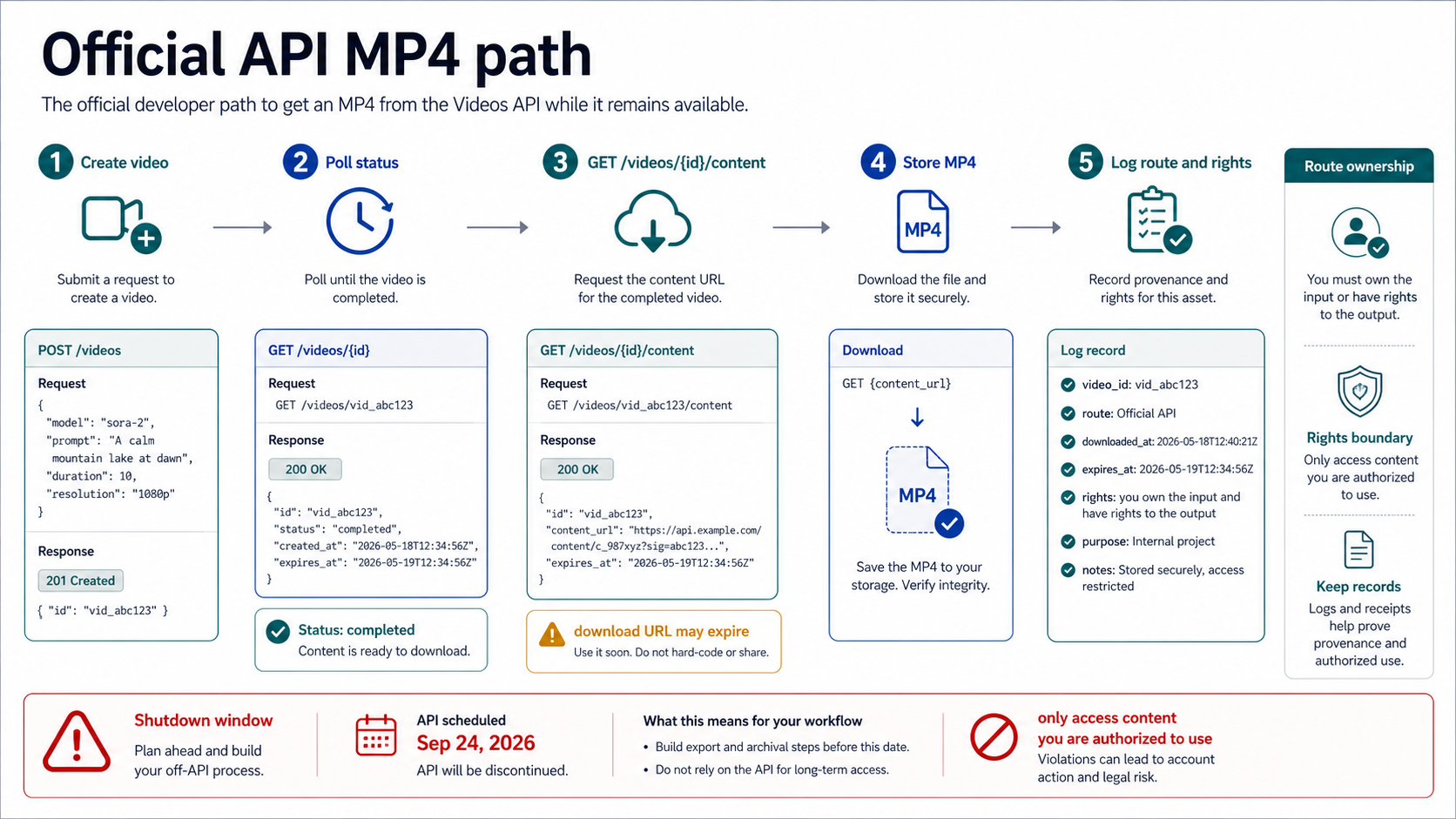
If the video was created through the API, use the API route instead of a downloader site. The official path is to wait until the video job is complete, then retrieve the MP4 through the content endpoint documented in OpenAI's video-generation guide.
The shape is straightforward:
curl -L -H "Authorization: Bearer $OPENAI_API_KEY" \
  "https://api.openai.com/v1/videos/{video_id}/content" \
  -o sora-video.mp4
In application code, use the SDK helper when it is available rather than scraping a browser URL. The API documentation notes that download URLs can be short-lived, so a production workflow should copy the MP4 into storage you own, log the video_id, preserve the request context, and record the license or customer job that authorized the download.
The September 24, 2026 API shutdown date changes how you should think about this branch. It can still be the right answer for completed Sora API jobs while access exists, but it should not be the foundation for a new long-term Sora workflow. If you still have Sora jobs in flight, retrieve the outputs, store them, and migrate future generation work to an active video route with a current contract.
The API branch is also where "without watermark" language can become misleading. The endpoint retrieves the file OpenAI makes available for that job; it is not a separate watermark-removal service. Do not promise that a file has no visible mark, no metadata, or no provenance signal unless you have inspected that exact output and have a source-backed reason to say so.
Risk-check public-link downloader tools
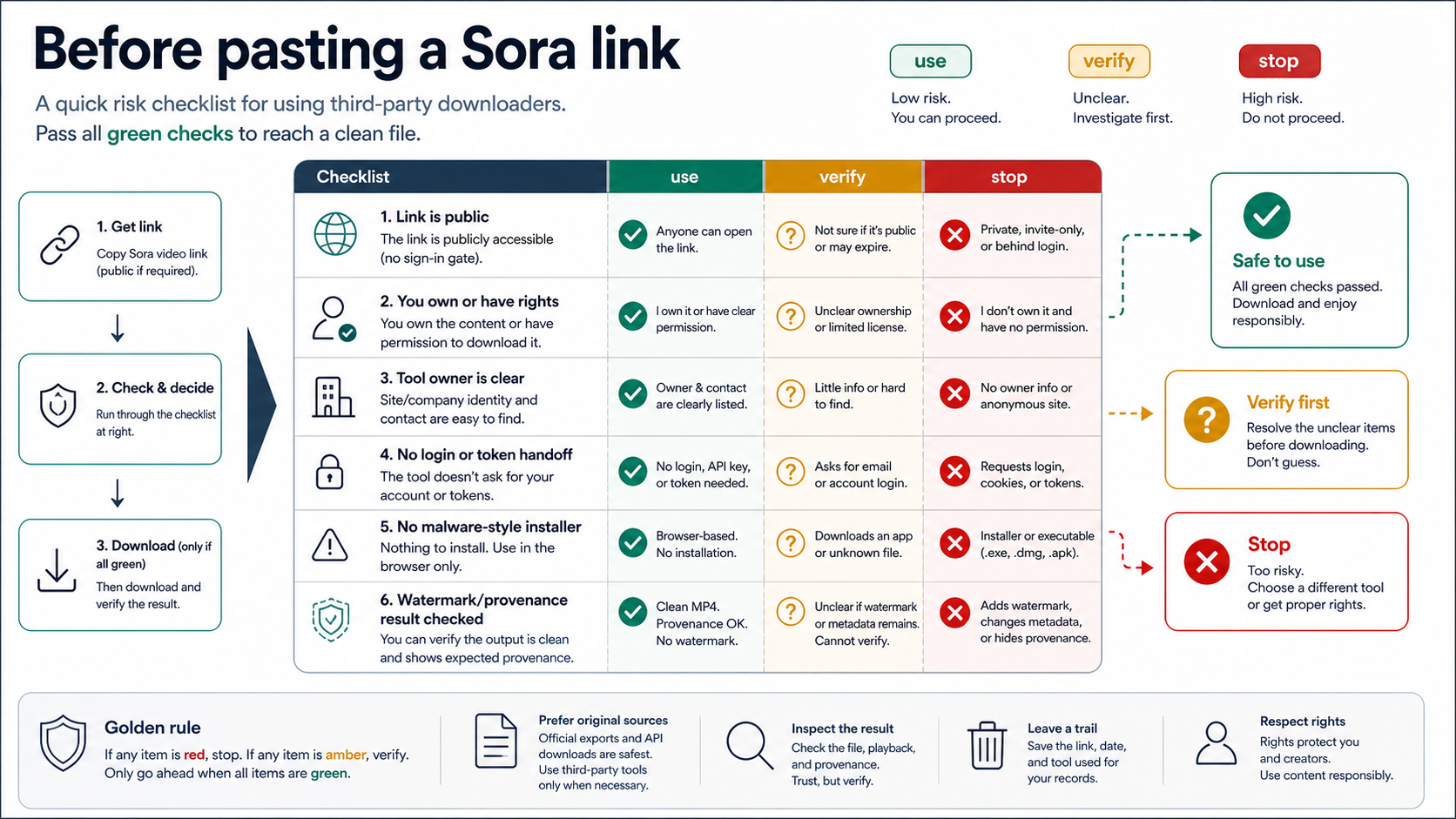
Public-link downloaders can be useful only inside a narrow lane: the Sora URL is public, you are allowed to save it, and the tool does not require credentials, private cookies, browser-session tokens, or an installer that changes your device trust boundary.
Run this check before pasting anything:
| Check | Why it matters | Stop when |
|---|---|---|
| The link is public | A public resolver cannot safely fetch private account content | The URL needs a login, cookie, invite, or token |
| You own or have permission | A clean file is still unauthorized if the rights are not yours | The video belongs to someone else and you lack permission |
| The tool owner is clear | You need to know who receives the link and file | The site hides operator, policy, or contact details |
| No account handoff | A downloader should not need your OpenAI login | It asks for credentials, session cookies, or extension-wide account access |
| No suspicious installer | Downloading a video should not require device-level trust | The path starts with an unknown executable or mobile APK |
| Output is checked | "No watermark" is a visual claim, not a provenance guarantee | The file still has marks, odd edits, or missing source context |
This check is deliberately stricter than many downloader landing pages. A fast MP4 result is not enough if the tool stores your link, rehosts the file, strips context you need, or turns a private/account-bound asset into a public fetch. The safer branch is always the route that preserves ownership, authorization, and a clear audit trail.
Be cautious with browser extensions
Browser extensions sit between normal download tools and account-level automation. They may see page contents, public-share URLs, request headers, or more depending on the permissions you grant. That can be acceptable for a clearly scoped extension you trust, but it should never be treated as a harmless button by default.
Before installing one, read the requested host permissions and the update history. A narrow extension that only runs on a public Sora share page is a different risk from an extension that can read and change data across every site. Avoid any extension that asks you to paste private account data or that works only by piggybacking on an authenticated page session.
For one-off public videos, a browser extension is usually unnecessary unless the normal share page blocks a direct save and you have verified the source. For account-owned or API-created files, use official export or API download. For videos you do not own, the extension route does not solve the rights problem.
Watermark, clean MP4, and provenance are not the same thing
The phrase "without watermark" usually means one of three things: no visible corner label, no platform overlay after export, or no detectable provenance signal. Those are different claims.
A clean-looking MP4 can still carry metadata, edit history, C2PA-style provenance, or surrounding context that identifies where it came from. A tool can also remove or blur a visible mark while introducing artifacts, recompressing the file, or damaging the frame near the former mark. That is why the safe language is "clean video file" or "no visible watermark after inspection", not a blanket claim that the video has no provenance.
If your actual task is watermark removal from an already exported file, keep it separate from this download route decision. The older Sora 2 video watermark removal branch deals with post-processing claims and removal tooling; the current retrieval choice comes first, before any downloader is trusted. Mixing those jobs is how stale provider lists and unsafe promises leak into a simple save-file task.
When a Sora link or downloader fails
Most failures are route mismatches, not proof that you need a better no-watermark tool. If an official export is missing, check whether the sunset export path is still open for your account and whether the asset is actually yours. If an API download fails, confirm the video job is complete, the video_id is correct, the API key still has access, and the Sora API route has not passed its scheduled removal date.
For public-link tools, first confirm that the URL is a public share link rather than a private account URL. Then test from a clean browser session that is not logged into the creator account. If the video is not reachable without private session state, a public downloader should not be your route.
If every Sora-specific path is closed, move the decision away from downloader hunting. Preserve any local files you already have, document the missing source, and use an active video-generation or editing route for future work. A stale Sora share link is not a reliable production asset.
FAQ
Can I still download my own Sora videos after the shutdown?
Use the official export path first. OpenAI says in its Sora discontinuation notice that Sora web and app experiences were discontinued on April 26, 2026, so any remaining export access should be treated as account-bound and time-sensitive rather than a normal app feature.
Is there an official Sora 2 downloader without watermark?
No. OpenAI's official routes are export for owned Sora content and authenticated API content retrieval for completed API jobs. A public-link "no watermark downloader" is a third-party claim, not an OpenAI feature name.
What is the official API download endpoint?
For a completed Videos API job, OpenAI documents GET /videos/{video_id}/content and SDK download helpers. Store the downloaded MP4 in your own storage because generated download URLs can be short-lived.
Are public-link Sora downloaders safe?
Only after the link, rights, tool owner, data handling, and output are checked. Do not paste private links, credentials, session cookies, or account tokens into a downloader. Avoid installers and broad browser-extension permissions for a simple MP4 save.
Does "without watermark" mean the metadata is gone?
No. A missing visible watermark is not proof that metadata, provenance, compression history, or source context has been removed. Use exact language: no visible watermark after inspection, clean exported file, or official API output, depending on what you actually verified.
Can I batch-download old Sora videos?
Batch only content you own or are authorized to export. Use official export or authenticated API retrieval when available. A batch public-link downloader has higher privacy and rights risk because every pasted URL and returned file can be stored or altered by the operator.
Should I use a mobile APK for Sora downloads?
Be careful. A mobile APK adds device-level trust for a task that usually only needs an export file, an API download, or a public URL check. Avoid APKs that are not from a trusted distribution path or that request unrelated permissions.
What should developers do before the September 24, 2026 API shutdown?
Retrieve completed Sora API outputs, store the MP4 files in owned storage, log the job and rights context, and migrate future video generation to an active route with a current API contract. Do not build new production logic around a route already scheduled for removal.