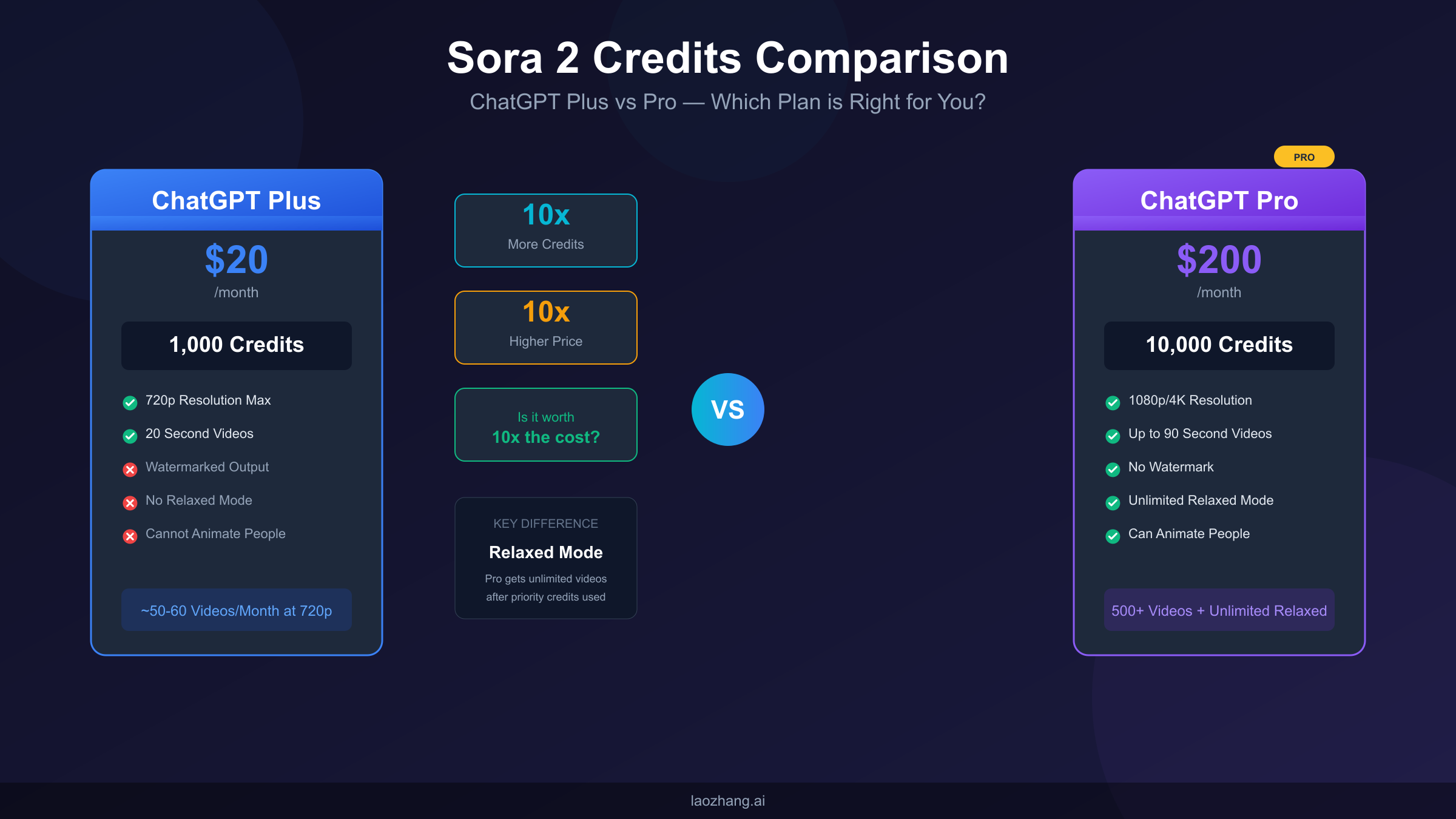
ChatGPT Plus ($20/month) provides 1,000 Sora credits monthly, while ChatGPT Pro ($200/month) includes 10,000 credits plus unlimited relaxed-mode generation. The key differences extend beyond credit allocation: Pro unlocks 1080p/4K resolution (versus Plus's 720p maximum), removes watermarks from downloads, provides priority queue access, and enables the ability to animate people in uploaded images. This guide helps you calculate exactly how many videos you can create with each plan and determine which subscription delivers better value for your specific use case.
Understanding Sora Credits: The Foundation of Video Generation
Before diving into the Plus versus Pro comparison, you need to understand what Sora credits actually represent and how the credit system fundamentally shapes your video creation experience. Sora credits function as the currency that powers OpenAI's video generation platform, and every video you create consumes a specific number of credits based on multiple factors including resolution, duration, and generation mode.
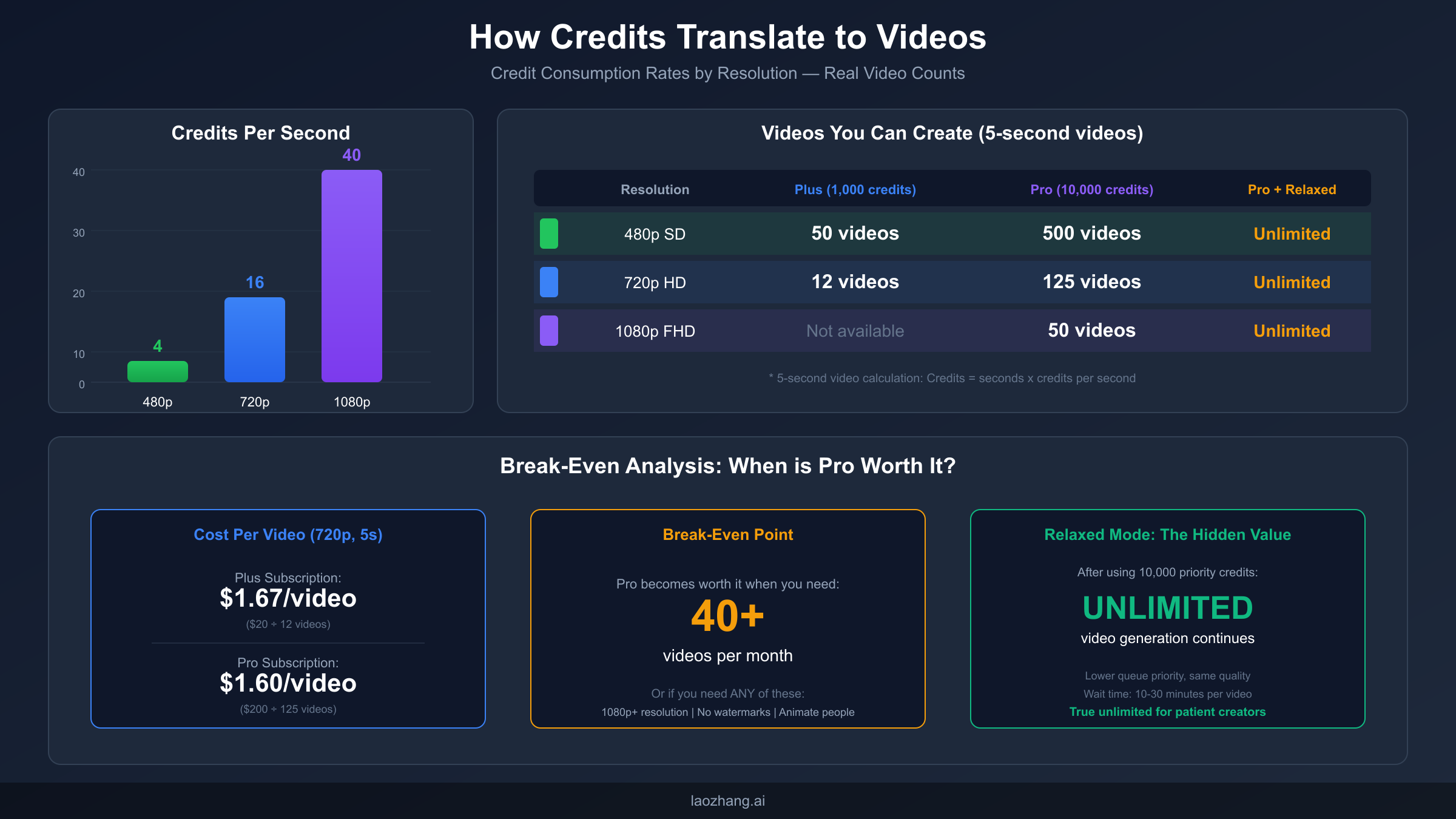
The credit consumption model works on a per-second basis, meaning longer videos naturally consume more credits than shorter clips. However, resolution plays an equally critical role in determining how quickly your monthly allocation depletes. A five-second video at 480p resolution costs approximately 20 credits (4 credits per second), while the same five-second video at 720p jumps to roughly 80 credits (16 credits per second). Push that resolution up to 1080p, and you're looking at around 200 credits for just five seconds of footage (40 credits per second).
This exponential increase in credit consumption at higher resolutions creates one of the most significant practical differences between Plus and Pro subscriptions. Plus subscribers face a hard ceiling at 720p resolution, which means their 1,000 monthly credits stretch further in terms of raw video count but sacrifice quality potential. Pro subscribers can access 1080p and even 4K resolution, giving them professional-grade output capability but burning through credits at a much faster rate when using these higher quality settings.
Monthly credit refresh policies add another layer of strategic consideration to your subscription choice. Both Plus and Pro credits reset at the beginning of each billing cycle, and critically, unused credits do NOT roll over to the next month. This use-it-or-lose-it policy means that hoarding credits provides no advantage—if you don't generate videos, those credits simply disappear when your billing cycle resets. Understanding this policy is essential for maximizing the value you extract from either subscription tier.
The credit system also interacts with different generation modes in ways that affect your planning. Text-to-video generation, where you describe a scene and Sora creates it from scratch, consumes credits at the standard rates described above. Image-to-video generation, where you upload a starting image and Sora animates it, follows similar credit consumption patterns but may vary slightly depending on the complexity of the animation requested. Both modes draw from the same monthly credit pool, so your generation strategy should account for how you plan to split usage between these approaches.
Beyond the raw numbers, the psychological impact of credit allocation shapes creator behavior in meaningful ways. Plus subscribers operating with a 1,000-credit ceiling often report feeling constrained, carefully rationing their generations and hesitating to experiment freely. Pro subscribers describe a fundamentally different experience—the 10,000-credit allocation plus relaxed mode fallback creates confidence to iterate, experiment, and refine without counting every generation. This mental freedom often translates to better creative output, as creators aren't second-guessing whether each generation "deserves" the credit expenditure.
Complete Plus vs Pro Comparison: Every Difference That Matters
The full spectrum of differences between ChatGPT Plus and Pro extends far beyond the headline credit allocation numbers. While the 1,000 versus 10,000 credit divide captures attention, informed subscribers recognize that features like relaxed mode, resolution limits, watermark policies, and queue priority collectively determine real-world value. Making the right subscription choice requires understanding how these factors interact with your specific use case rather than simply comparing raw specifications.
Many users initially focus on the "10x credits for 10x price" framing, which suggests equivalent value between tiers on a per-credit basis. This surface-level analysis misses the deeper reality: Pro's additional features create exponentially more value for specific user profiles while providing minimal additional benefit for others. The comparison below unpacks each difference so you can evaluate what genuinely matters for your situation.
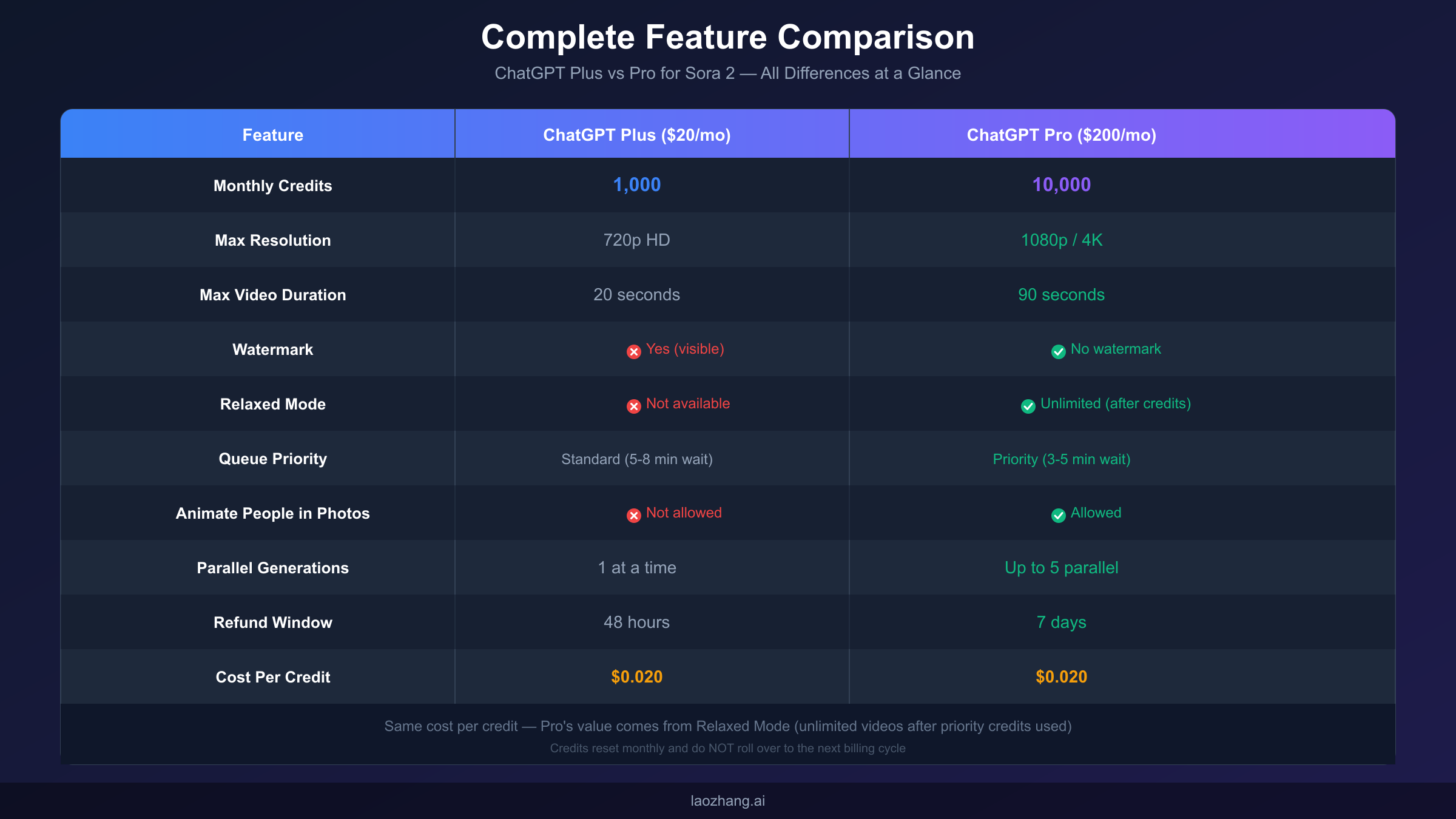
Starting with the fundamental specifications, ChatGPT Plus costs $20 per month and provides 1,000 Sora credits that refresh monthly. ChatGPT Pro commands $200 per month—a tenfold increase—and delivers 10,000 credits plus access to unlimited relaxed-mode generation after depleting priority credits. On a pure cost-per-credit basis, both plans charge effectively $0.02 per credit, making the raw economic equation appear balanced. The differentiation emerges through the exclusive features bundled with Pro.
Resolution capabilities represent one of the starkest contrasts between tiers. Plus subscribers can generate videos at 480p or 720p, with 720p representing the maximum quality ceiling. Pro subscribers unlock 1080p full HD and even 4K output options, enabling production-quality footage suitable for professional platforms like YouTube, broadcast television, or commercial client work. For anyone whose output needs to meet professional standards, this resolution limitation alone can justify the upgrade decision.
Video duration limits also differ significantly between plans. Plus users can create videos up to 20 seconds in length, while Pro extends this maximum to 90 seconds per generation. While neither plan allows feature-length content in a single generation, the ability to create 90-second clips opens possibilities for short-form content that would require multiple generations and editing on the Plus tier.
Watermark presence or absence often proves decisive for specific use cases. Every video generated through ChatGPT Plus includes a visible Sora watermark, marking the content as AI-generated. ChatGPT Pro removes this watermark entirely, delivering clean footage ready for commercial use, client delivery, or seamless integration into professional productions. If you're creating content for paying clients or published work where AI attribution would be inappropriate, the watermark-free output alone makes Pro essential.
Queue priority determines how quickly your generations complete, and here Pro delivers meaningful workflow improvements. Plus subscribers enter a standard queue with typical wait times between five and eight minutes per video. Pro subscribers receive priority placement, reducing average wait times to three to five minutes. While this difference might seem minor per individual video, creators generating multiple videos per session will find the cumulative time savings substantial over a month of regular production.
The practical workflow impact of queue priority becomes clearer through concrete scenarios. Imagine a production session where you need to generate 10 video variations to find the perfect one for your project. On Plus, with average 6.5-minute wait times, you're looking at over an hour of total waiting. On Pro, the same 10 generations complete in approximately 40 minutes—saving you 25+ minutes in a single session. Multiply this across regular production sessions throughout a month, and Pro subscribers reclaim hours of productive time.
The aspect ratio and format flexibility also differs between tiers in ways relevant to specific platforms. Both tiers support standard aspect ratios including 16:9 (landscape), 9:16 (portrait for TikTok/Reels), and 1:1 (square). However, Pro's higher resolution ceiling means these formats can be generated at significantly better quality. A 9:16 vertical video at 1080p provides substantially more pixel density than the same aspect ratio at 720p, which matters enormously for platforms where content competes in high-resolution feeds.
For a detailed breakdown of Plus subscription Sora limits, including specific generation caps and reset policies, our companion guide provides comprehensive coverage.
How Credits Translate to Videos: Real Numbers You Can Plan Around
Abstract credit allocations become meaningful only when translated into concrete video counts you can actually produce. Understanding how many videos your subscription supports requires calculating credit consumption across different resolution and duration combinations, then mapping those calculations to realistic production scenarios. The math isn't complicated, but the implications often surprise first-time subscribers who expect their credit allocation to stretch further than reality allows.
The fundamental equation governing Sora credit consumption multiplies three factors: resolution cost (credits per second), video duration (seconds), and number of generations. This creates a multiplicative relationship where high-resolution, longer videos consume credits at dramatically faster rates than low-resolution, short clips. Planning your production strategy requires understanding this relationship and making informed tradeoffs between quality, duration, and volume.
At 480p resolution, the lowest quality tier, credit consumption runs approximately 4 credits per second of video. A typical 5-second clip at this resolution costs 20 credits, meaning Plus subscribers with 1,000 credits could theoretically generate 50 such videos monthly. Pro subscribers with 10,000 credits could create 500 videos at this quality level. However, 480p output rarely satisfies modern content requirements—the resolution produces noticeably pixelated results that most platforms would consider substandard.
At 720p HD resolution, credit consumption jumps to approximately 16 credits per second. That same 5-second video now costs 80 credits, reducing the Plus subscriber's monthly capacity to roughly 12-13 videos at this quality level. Pro subscribers could generate approximately 125 videos at 720p with their 10,000 credit allocation. Since 720p represents the maximum quality Plus subscribers can access, this 12-13 video monthly ceiling represents their practical production limit for content that meets basic quality standards.
At 1080p full HD resolution, only accessible to Pro subscribers, credit consumption increases to approximately 40 credits per second. A 5-second video at this quality costs 200 credits, allowing Pro users to generate about 50 videos monthly at professional resolution. This 1080p capability enables YouTube-quality content, professional client deliverables, and footage suitable for larger screens without visible quality degradation.
The break-even analysis between Plus and Pro reveals interesting economics. On a cost-per-video basis at 720p resolution, Plus subscribers pay roughly $1.67 per video ($20 divided by approximately 12 videos). Pro subscribers pay about $1.60 per video at the same quality ($200 divided by approximately 125 videos). The per-video costs are remarkably similar, but this calculation ignores Pro's most valuable feature: relaxed mode unlimited generation after exhausting priority credits.
For detailed calculations on Plus credits video count across different scenarios, including longer video durations and mixed-quality production workflows, our dedicated guide provides extensive mathematical breakdowns.
When factoring in relaxed mode, Pro's value proposition transforms dramatically. After consuming 10,000 priority credits, Pro subscribers continue generating videos indefinitely at no additional credit cost—they simply wait longer in the queue. For high-volume creators who need 40 or more videos monthly, relaxed mode effectively makes Pro an unlimited generation subscription at professional resolution, fundamentally changing the value equation.
The mathematics become even more compelling when you consider specific production scenarios. A social media manager creating daily content for multiple client accounts might need 60+ videos monthly. On Plus, this would require purchasing three separate subscriptions ($60/month) and still face watermark and resolution limitations. On Pro, the same volume becomes achievable through a single subscription with relaxed mode, delivering superior quality at lower effective cost.
For creators interested in API-based workflows or higher-volume production beyond standard subscription limits, platforms like laozhang.ai offer alternative access models with pay-per-use pricing structures. These API aggregation services can complement subscription usage for specific professional workflows requiring more granular control or burst capacity.
Understanding how duration affects credit consumption also helps optimize your production approach. Shorter videos (5 seconds) at higher resolution can sometimes deliver more visual impact than longer videos at lower resolution. A 5-second 1080p clip costs 200 credits, while a 10-second 720p clip costs 160 credits—for similar credit expenditure, you might achieve better results by prioritizing resolution over duration depending on your content goals.
Understanding Relaxed Mode: Pro's Hidden Superpower
Relaxed mode represents ChatGPT Pro's most underappreciated and underexplained feature, yet it fundamentally transforms the subscription's value proposition for specific user types. While the headline "10,000 credits" captures attention, unlimited relaxed-mode access after depleting those credits provides the actual differentiating value that separates Pro from simply being "10x Plus." Understanding relaxed mode properly is essential for evaluating whether Pro delivers value commensurate with its premium pricing.
The concept of relaxed mode emerges from the need to balance resource allocation across different subscriber tiers. Priority credits guarantee fast queue placement because Pro subscribers pay premium pricing and expect responsive service. But once those premium credits are exhausted, the system faces a choice: stop generation entirely (like Plus) or continue at reduced priority. OpenAI chose the latter approach, creating a pathway for unlimited generation that serves high-volume users while managing server load through extended queue times.
The mechanics of relaxed mode work as follows: Pro subscribers receive 10,000 priority credits monthly that function identically to how credits work on Plus—fast queue placement, predictable wait times, immediate generation starts. Once those priority credits are exhausted, Pro subscribers don't hit a wall like Plus users would. Instead, they seamlessly transition to relaxed mode, where video generation continues indefinitely without consuming any credits.
The tradeoff in relaxed mode involves queue priority and wait times. Without priority credits, your generations enter a lower-priority queue where wait times extend significantly—typically 10 to 30 minutes per video depending on system load and demand. The quality of output remains identical; only the speed of delivery changes. For creators who can plan their workflow around longer turnaround times, relaxed mode provides essentially unlimited video generation capacity.
Consider the practical implications for different creator types. A YouTube content creator who needs three to five videos weekly for thumbnail sequences, B-roll footage, or visual elements could easily exhaust 10,000 priority credits by the second week of their billing cycle. Rather than facing a production stoppage, they continue generating through relaxed mode for the remaining two weeks. The wait times become a scheduling consideration rather than a barrier.
For production workflows where quality matters more than immediacy, relaxed mode proves invaluable. If you're building a library of stock footage, creating visual assets for future projects, or generating content that doesn't face immediate deadlines, the extended wait times become largely irrelevant. You queue multiple generations, work on other tasks, and return to completed videos.
The relaxed mode explained guide provides deeper analysis of optimal strategies for balancing priority and relaxed mode usage, including techniques for maximizing output while managing workflow around variable queue times.
Strategic credit management between priority and relaxed modes can dramatically extend your effective monthly capacity. Some Pro users deliberately reserve priority credits for time-sensitive projects while routing all non-urgent generation through relaxed mode from day one. This approach stretches priority credits across the full billing cycle while still producing high volumes through relaxed mode queues.
The workflow integration of relaxed mode works best when you batch your generation requests. Rather than waiting for each video individually, experienced Pro users queue 10-20 generations simultaneously in relaxed mode, then return hours later to review completed outputs. This batch approach transforms the extended wait times from a productivity drain into background processing that happens while you handle other work. The key insight is treating relaxed mode as an overnight or background process rather than expecting real-time turnaround.
Seasonal variations in system load affect relaxed mode performance in predictable patterns. During peak hours (typically evenings in US time zones and during major AI-related news events), relaxed mode queues extend toward the 30-minute end of the range. During off-peak hours (early mornings, weekends, holidays), wait times often drop closer to 10 minutes. Savvy Pro users time their relaxed mode batch generations for off-peak windows to minimize effective wait time.
Hidden Differences You Should Know Before Subscribing
Beyond the headline features, several less-publicized differences between Plus and Pro can significantly impact specific users. These hidden distinctions rarely appear in marketing materials but frequently surprise subscribers who discover them only after committing to a plan. Knowing these differences upfront prevents the frustration of discovering limitations that could have informed your initial subscription decision.
The hidden differences category includes restrictions, capabilities, and policies that affect specific use cases without being prominently featured in plan comparisons. Some of these "hidden" aspects are technically documented in fine print but rarely read; others emerge only through practical usage. This section covers the most impactful discoveries reported by active Sora users across both subscription tiers.
The ability to animate people in uploaded images represents one such hidden restriction. Plus subscribers cannot use Sora's image-to-video feature on photographs containing people—attempting to animate human subjects triggers a restriction notice. Pro subscribers face no such limitation and can freely animate images featuring people, opening creative possibilities for portrait animations, dynamic headshots, or character-based content. For users whose primary interest involves animating human subjects, this restriction makes Plus effectively unusable for their intended purpose.
Parallel generation capabilities differ substantially between tiers. Plus subscribers can run only one generation at a time, creating a sequential workflow where each video must complete before queuing the next. Pro subscribers can run up to five generations simultaneously, dramatically accelerating production sessions. When you need to create a dozen variations or test multiple prompts, parallel processing reduces total production time from hours to minutes.
Refund policies vary between subscription tiers in ways that affect your flexibility to test and potentially cancel. Plus offers a 48-hour refund window after subscription or renewal, giving you two days to evaluate and cancel if dissatisfied. Pro extends this window to seven full days, providing more generous evaluation time proportional to the higher financial commitment. If you're uncertain whether Pro justifies the $200 monthly cost, the longer refund window allows for more thorough testing before the decision becomes final.
Generation speed differences extend beyond queue priority. Even within the priority queue, Pro generations tend to complete faster than Plus generations—averaging 3-5 minutes versus 5-8 minutes. While this gap might seem minor per video, creators producing multiple videos per session experience cumulative time savings that compound throughout the month.
For comprehensive coverage of video generation limits including daily caps, cooldown periods, and other operational constraints, our detailed guide addresses the technical boundaries you'll encounter on either tier.
Batch generation workflows also favor Pro subscribers. The combination of parallel generation, priority queue access, faster individual generations, and relaxed mode fallback means Pro users can realistically produce 10-20 videos in a focused production session. Plus users, limited to sequential generation with longer wait times, might manage 3-5 videos in the same timeframe.
Content moderation and safety filter differences also exist between tiers, though these are less frequently discussed. Both Plus and Pro operate under OpenAI's content policies, but Pro users report slightly more lenient interpretation on edge cases—likely due to the assumption that professional subscribers have legitimate commercial reasons for their requests. This doesn't mean Pro bypasses safety guidelines, but the experience of encountering unexpected content rejections appears somewhat less common on the higher tier.
Download and export capabilities technically match between tiers—both allow downloading generated videos in standard formats. However, the watermark on Plus downloads affects how usable that content becomes for various purposes. The practical "export quality" from Plus is diminished by the watermark even though the technical file formats are identical. For anyone planning to use Sora output in edited projects or professional contexts, this hidden practical limitation significantly impacts Plus's real-world utility.
Storage and generation history work identically across both tiers. Your generated videos remain accessible in your account history, allowing you to download, share, or extend previous generations. The storage period and history limits appear consistent between Plus and Pro, so this doesn't factor into the subscription decision.
Which Plan Is Right for You? A Decision Framework
Choosing between Plus and Pro requires honest assessment of your actual usage patterns, quality requirements, budget constraints, and creative goals. Neither plan is universally superior—each serves specific user profiles optimally. The decision framework below helps you identify which category best matches your situation, providing specific criteria rather than vague generalizations.
The most common mistake in subscription selection is aspirational thinking—choosing based on the creator you want to become rather than the creator you currently are. Pro's feature set appeals universally when considered in abstract, but the $180 monthly premium only delivers value when you actually use the exclusive features. The framework below distinguishes between scenarios where each tier delivers genuine value versus situations where you'd be paying for capabilities you won't utilize.
ChatGPT Plus at $20/month suits you best if:
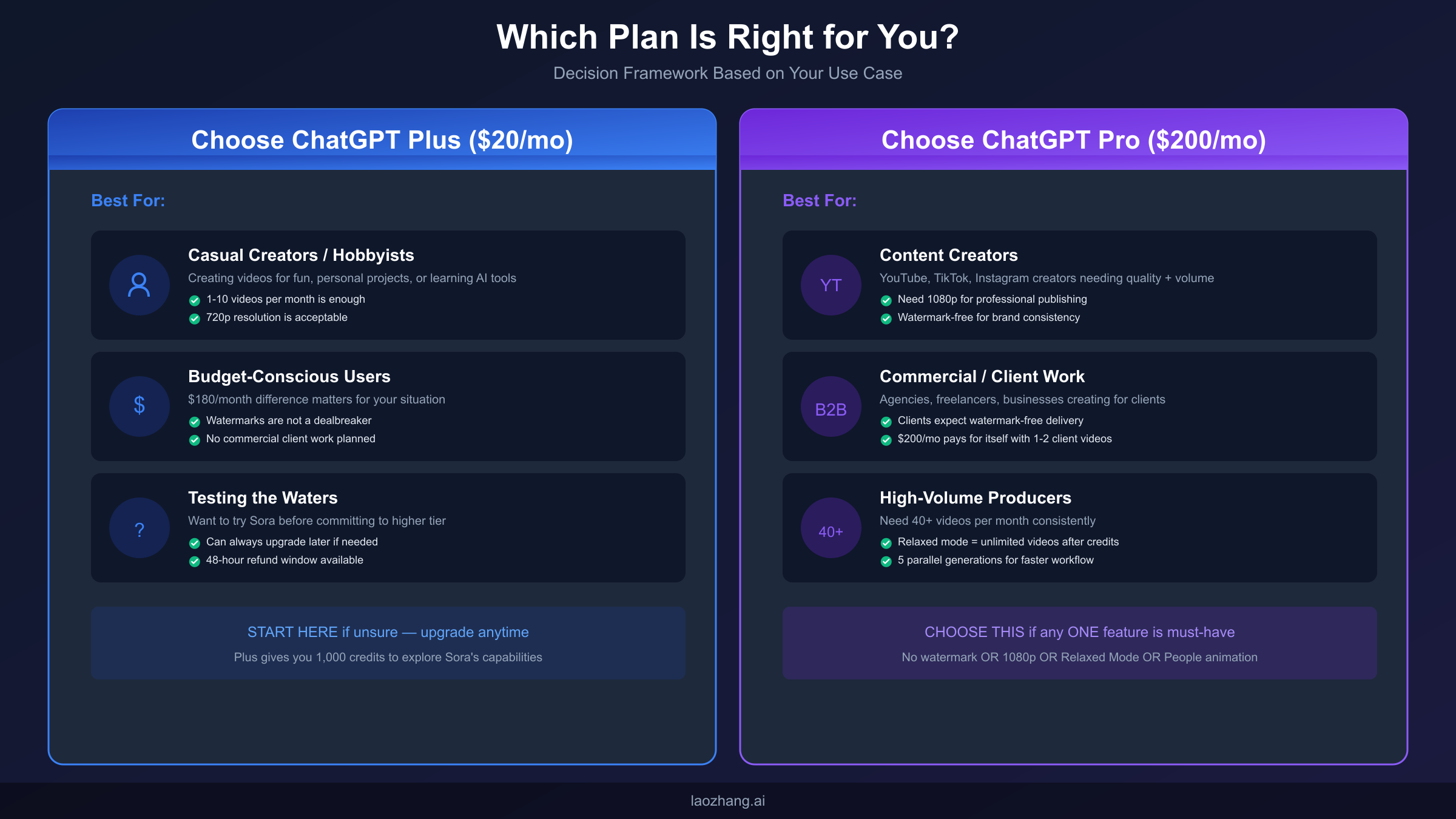
You're a casual creator or hobbyist exploring AI video generation for personal projects, learning purposes, or occasional creative experiments. If producing 5-10 videos monthly satisfies your needs, Plus provides adequate capacity without premium pricing. The 720p resolution ceiling, while limiting for professional use, delivers perfectly acceptable quality for social media, personal archives, or learning exercises.
You're budget-conscious and the $180 monthly difference between plans represents meaningful money in your situation. If watermarks don't disqualify your intended use and you won't need the premium features Pro provides, Plus delivers solid value at accessible pricing. The subscription covers Sora access along with all other ChatGPT capabilities, making it a reasonable all-in-one AI subscription for general users.
You're testing the waters before committing to heavier investment. Starting with Plus lets you explore Sora's capabilities, understand your actual usage patterns, and determine whether video generation becomes central enough to your workflow to justify upgrading. You can always move to Pro later if you outgrow Plus's limitations—there's no penalty for starting conservatively.
ChatGPT Pro at $200/month makes sense if:
You're a content creator publishing to YouTube, TikTok, Instagram, or other platforms where quality expectations and production volume both run high. The combination of 1080p resolution, no watermarks, and relaxed mode unlimited generation provides the professional foundation your channel or brand requires. If AI video becomes a significant component of your content strategy, Pro's capabilities justify the investment.
You're doing commercial or client work where deliverables must meet professional standards. Client expectations typically demand watermark-free delivery, and most commercial contexts require at least 1080p resolution. If you're billing clients for video content, the $200 monthly subscription likely pays for itself with a single client project—making it a reasonable business expense rather than a discretionary cost.
You're a high-volume producer who will exceed Plus's effective capacity of 12-15 quality videos monthly. Once you consistently need 40+ videos per month, Pro's economics become favorable through the relaxed mode unlimited generation pathway. The combination of 10,000 priority credits plus unlimited relaxed mode means production volume faces no practical ceiling.
You need any single Pro-exclusive feature as a must-have for your use case. If no watermarks are essential, if 1080p+ resolution is required, if animating people in images is your primary use case, or if relaxed mode unlimited generation is critical to your workflow—any ONE of these requirements makes Pro necessary regardless of other considerations.
Edge cases worth considering:
Educators and trainers using AI video for instructional content face an interesting decision. The watermark on Plus output can actually serve as beneficial transparency, openly demonstrating that AI generated the visual content. However, if the instructional videos will be distributed through professional channels or sold as courses, the watermark becomes distracting and unprofessional. The educational use case often splits cleanly: internal training materials can use Plus, while external-facing content requires Pro.
Small business owners and entrepreneurs often overestimate their video needs when considering Pro. The $200 monthly commitment represents significant recurring overhead for a small operation. Before upgrading, track your actual Plus usage for 2-3 months. Many small business users discover that 5-10 videos monthly satisfies their real needs, making Plus the economically rational choice even if Pro's features seem attractive.
Agencies serving multiple clients face the opposite consideration. The math on Pro becomes compelling quickly when generating content for several accounts. Client deliverables require watermark-free output, resolution expectations are typically professional-grade, and volume demands often exceed Plus limits within the first week. For agencies, Pro is effectively mandatory infrastructure rather than an optional upgrade.
Frequently Asked Questions
The questions below address the most common uncertainties that arise during the Plus versus Pro decision process. These answers draw from OpenAI's official documentation, practical user experiences, and observable platform behavior as of January 2026. Policies and features may evolve over time, so verify current details through OpenAI's official channels when making subscription decisions.
Can I upgrade from Plus to Pro mid-billing cycle?
Yes, OpenAI allows mid-cycle upgrades from Plus to Pro. When you upgrade, you'll receive a prorated credit for your remaining Plus subscription time, which applies toward your first Pro billing period. Your credit allocation immediately increases to Pro levels, and you gain instant access to all Pro features including relaxed mode, higher resolutions, and watermark-free downloads.
Do unused Sora credits roll over to the next month?
No, Sora credits do NOT roll over. Both Plus and Pro credits reset at the beginning of each billing cycle, and any unused credits from the previous period are lost. This policy encourages active use of your allocation and means there's no benefit to "saving" credits for future months. Plan your monthly production to fully utilize your available credits.
What happens if I run out of credits mid-month on Plus?
Plus subscribers who exhaust their 1,000 monthly credits before the billing cycle resets cannot generate additional Sora videos until the next billing period begins. There's currently no option to purchase additional credits separately. Your only alternatives are waiting for the monthly reset or upgrading to Pro for immediate access to 10,000 credits plus relaxed mode.
Is the quality difference between 720p and 1080p noticeable?
Yes, particularly on larger screens or professional platforms. 720p (1280×720 pixels) appears sharp on mobile devices but shows visible quality limitations on desktop monitors, tablets, and especially televisions. 1080p (1920×1080 pixels) maintains sharpness across all common viewing scenarios and meets the standard quality expectation for YouTube and most professional video platforms.
Does relaxed mode produce lower quality videos?
No. Relaxed mode generates identical quality output to priority mode—the only difference is queue placement and wait time. A 1080p video generated through relaxed mode is indistinguishable from one generated with priority credits. The extended wait time is the sole tradeoff; output quality remains constant.
Can I use Plus-generated videos commercially despite the watermark?
Technically yes, but practically challenging. OpenAI's terms permit commercial use of generated content, but the visible watermark on Plus videos identifies them as AI-generated, which may conflict with client expectations or brand presentation standards. Most commercial contexts effectively require Pro's watermark-free output.
How does billing work when upgrading mid-cycle?
When you upgrade from Plus to Pro during your billing period, OpenAI calculates a prorated credit for your unused Plus subscription time. This credit applies to your first Pro billing cycle, effectively reducing your initial Pro payment. Your new billing date aligns with the upgrade date, and credit allocations reset accordingly. The transition happens immediately—you gain Pro features and credit allocation as soon as the upgrade processes.
Are there any student or educational discounts available?
As of January 2026, OpenAI does not offer formal educational pricing for ChatGPT Plus or Pro subscriptions. However, institutional agreements may provide different terms for educational organizations purchasing bulk access. Individual students pay the same subscription rates as general users. Some educational institutions provide ChatGPT access through institutional licenses, potentially including Sora capabilities depending on the agreement terms.
What happens to my generated videos if I downgrade from Pro to Plus?
Your previously generated videos remain accessible in your account history regardless of subscription changes. Downgrading doesn't delete or restrict access to existing content. However, your future generation capabilities immediately drop to Plus limits—1,000 credits, 720p maximum, watermarks on new content, and no relaxed mode access. Any in-progress generations at the time of downgrade will complete under the tier they were initiated on.
Final Recommendation: Start Smart, Scale When Ready
After analyzing credit systems, feature comparisons, video calculations, relaxed mode mechanics, and hidden differences, the Plus versus Pro decision ultimately reduces to a straightforward assessment: does your use case require any Pro-exclusive feature, or can Plus's capabilities satisfy your needs? If you need 1080p+ resolution, watermark-free output, people animation, or unlimited relaxed mode generation, Pro is your only option regardless of price sensitivity. If none of those features are essential, Plus provides solid value at accessible pricing.
The decision tree simplifies to a single binary question: Is there ANY Pro-exclusive feature that represents a hard requirement for your use case? If yes, subscribe to Pro. If no, start with Plus and upgrade only when actual usage demonstrates the need. This framework prevents both overspending on unnecessary features and underestimating genuine requirements.
For users genuinely uncertain about their needs, starting with Plus represents the lower-risk approach. You'll learn your actual usage patterns, understand whether Sora video generation becomes central to your workflow, and make an informed decision about upgrading based on experience rather than speculation. The 48-hour refund window provides some protection if Plus proves immediately inadequate, and you can upgrade to Pro anytime if you outgrow the starter tier.
For creators already confident in their requirements—whether through experience with other AI video tools, clear commercial needs, or established production workflows—Pro's feature set justifies the premium pricing. The $200 monthly investment delivers professional capabilities, unlimited creative headroom through relaxed mode, and workflow advantages that compound over regular use.
Whichever plan you choose, remember that credits reset monthly and unused allocations disappear. Plan your production schedule to extract maximum value from your subscription, whether that means consistent weekly creation sessions or focused production sprints that fully utilize your available credits before each billing cycle resets.
The AI video generation landscape continues evolving rapidly, with Sora representing just one option among emerging competitors. Your subscription choice today doesn't lock you into any permanent commitment—monthly billing means you can adjust as your needs change, competitive offerings emerge, or OpenAI modifies Sora's capabilities and pricing. The optimal approach treats this as an ongoing optimization problem rather than a permanent decision, remaining flexible to shift resources as the technology and market develop.
For users requiring even more flexibility, API access through aggregation platforms provides an additional dimension beyond subscription-based access. Services that offer pay-per-generation pricing, including options available at laozhang.ai, can complement subscription usage for burst capacity or specialized workflows. The combination of a baseline subscription for regular work plus API access for overflow provides maximum flexibility for professional production environments.
Ultimately, the Plus versus Pro decision should align with your actual creative workflow rather than aspirational usage you hope to achieve. Honest assessment of your current needs, realistic projection of near-term growth, and clear understanding of which features are must-haves versus nice-to-haves will guide you toward the subscription tier that delivers genuine value for your situation.