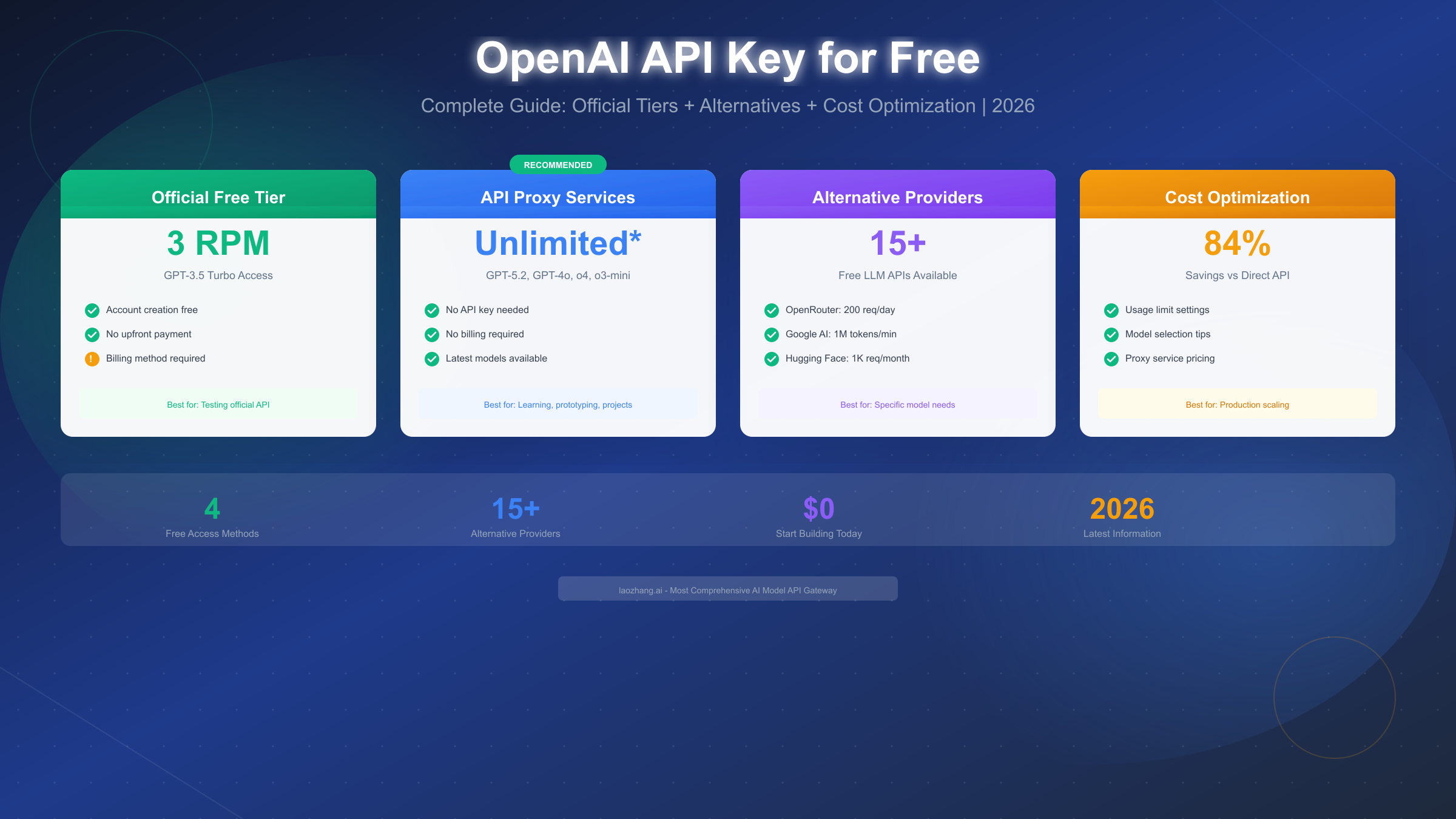
OpenAI offers a limited free tier with 3 requests per minute to GPT-3.5 Turbo, but requires a billing method to activate. For truly free access in 2026, developers have better options: API proxy services like Puter.js provide unlimited access to GPT-4o without payment, while platforms like OpenRouter offer 200 free requests daily. This guide covers all legitimate methods to access OpenAI's API without cost, from official free tiers to third-party alternatives, along with cost optimization strategies when you need to scale.
Key Takeaways
- Official OpenAI free tier: 3 RPM limit on GPT-3.5 Turbo, requires billing method registration
- API proxy services: Puter.js offers unlimited free GPT-4o access, OpenRouter provides 200 daily requests
- Best alternatives: Google AI Studio (1M tokens/min free), Groq (14,400 requests/day), Hugging Face (1,000 requests/day)
- Cost optimization: Can reduce API costs by up to 84% through model selection and caching strategies
- Security first: Never hardcode API keys, always use environment variables
Understanding OpenAI API Access in 2026
Before diving into free options, let's clarify what "free OpenAI API access" actually means in 2026. The landscape has evolved significantly since OpenAI first launched their API, and understanding the current state helps you make informed decisions.
The Reality of "Free" API Access
When developers search for "free OpenAI API key," they typically want one of three things:
- Zero-cost access to OpenAI's models for learning or testing
- No credit card required signup process
- Generous free tier sufficient for small projects
The challenge is that OpenAI's official offering doesn't fully satisfy any of these expectations. Since 2023, OpenAI discontinued their automatic $18 free credit program for new accounts. Today, accessing their API requires:
- A valid phone number for verification
- A credit card or payment method on file
- Agreement to usage-based billing
This doesn't mean free access is impossible—it means you need to look beyond the official portal to find legitimate alternatives.
How the OpenAI API Ecosystem Works
The OpenAI API operates on a pay-per-token model. Every request you make consumes tokens (roughly 4 characters per token in English), and you're billed based on:
- Input tokens: The text you send to the model
- Output tokens: The response generated by the model
- Model tier: GPT-4o costs more than GPT-3.5 Turbo
Current pricing as of January 2026:
| Model | Input (per 1M tokens) | Output (per 1M tokens) |
|---|---|---|
| GPT-4o | $2.50 | $10.00 |
| GPT-4o mini | $0.15 | $0.60 |
| GPT-3.5 Turbo | $0.50 | $1.50 |
Understanding this pricing structure is essential because many "free" alternatives work by subsidizing these costs or using different underlying models. For comprehensive pricing details, see our detailed OpenAI API pricing breakdown.
Why Free Alternatives Exist
Several legitimate reasons explain why free API access options exist:
- Developer acquisition: Companies offer free tiers to attract developers who may convert to paid users
- Model promotion: AI labs provide free access to showcase their models against OpenAI
- Infrastructure efficiency: Some providers achieve lower costs through optimization and pass savings to users
- Open-source movement: Community-driven projects enable free access through shared resources
The key is distinguishing legitimate free options from scams or services that may compromise your data security.
OpenAI's Official Free Options
Let's start with what OpenAI itself offers, as this establishes the baseline for comparing alternatives.
Current Free Tier Limits
As of January 2026, OpenAI provides a rate-limited free tier with the following specifications:
| Aspect | Free Tier Limit |
|---|---|
| Requests per minute (RPM) | 3 |
| Tokens per minute (TPM) | 40,000 |
| Available models | GPT-3.5 Turbo only |
| Daily limit | No explicit cap |
| Credit required | Yes (billing method) |
These limits are restrictive but functional for basic testing. The 3 RPM cap means you can make roughly one request every 20 seconds—sufficient for learning the API but impractical for any application with real users.
Account Setup Process
Setting up an OpenAI account involves several steps. For a detailed walkthrough, refer to our step-by-step API key setup tutorial.
Here's the condensed process:
- Create account: Visit platform.openai.com and sign up with email or Google/Microsoft account
- Verify phone: OpenAI requires phone verification to prevent abuse
- Add billing: Navigate to Settings → Billing → Add payment method
- Generate key: Go to API Keys → Create new secret key
- Set limits: Configure usage limits to prevent unexpected charges
The Billing Requirement Explained
Many developers are frustrated by the billing requirement for a "free" tier. Here's why OpenAI implements this:
- Abuse prevention: Credit card verification reduces bot signups and API abuse
- Seamless scaling: Users can exceed free limits without service interruption
- Revenue model: OpenAI's business relies on converting free users to paid
The billing requirement doesn't mean you'll be charged automatically. OpenAI allows you to set hard spending limits:
# OpenAI Dashboard Settings
# Set monthly budget limit to $0 to stay within free tier
# Settings → Limits → Set hard limit: $0
However, be aware that the free tier's 3 RPM limit often proves insufficient, leading many developers to seek alternatives.
Free Tier Limitations in Practice
Real-world testing reveals several practical limitations:
Rate limiting behavior: When you exceed 3 RPM, you receive a 429 error:
{
  "error": {
    "message": "Rate limit reached for gpt-3.5-turbo",
    "type": "rate_limit_error",
    "code": "rate_limit_exceeded"
  }
}
Model restrictions: Free tier only accesses GPT-3.5 Turbo. No GPT-4, GPT-4o, or other advanced models.
No fine-tuning: Custom model training requires a paid plan.
Limited support: Free tier users receive community support only.
For more context on free tier restrictions across ChatGPT and the API, see our guide on ChatGPT free tier limitations.
API Proxy Services: The Game Changer
Here's where the landscape gets interesting. API proxy services (also called API aggregators) have emerged as a legitimate way to access AI models without direct billing relationships.
What Are API Proxy Services?
API proxy services act as intermediaries between developers and AI model providers. Instead of calling OpenAI's API directly, you call the proxy's endpoint, which then routes your request to the appropriate model.
Your App → API Proxy → OpenAI/Anthropic/Google → Response → Your AppThese services provide value through:
- Unified API: Single endpoint for multiple AI providers
- Cost optimization: Bulk pricing passed to users
- Free tiers: Subsidized access for developers
- Additional features: Caching, fallbacks, analytics
Puter.js: Unlimited Free Access
Puter.js stands out as a remarkable option in 2026. This open-source platform provides a JavaScript SDK with completely free access to advanced AI models.
Key features:
- Unlimited requests to GPT-4o (no explicit rate limits published)
- No API key required for basic usage
- Browser-based SDK for frontend applications
- Open-source codebase
Basic implementation:
// Puter.js - Free GPT-4o Access
// No API key needed for basic usage

import Puter from 'puter';

const puter = new Puter();

async function chat(message) {
  const response = await puter.ai.chat(message);
  return response;
}

// Usage
const answer = await chat("Explain quantum computing in simple terms");
console.log(answer);
Limitations to consider:
- Primarily designed for browser environments
- May have undocumented rate limits during high traffic
- Less suitable for server-side production workloads
- Limited model selection compared to direct API access
Puter.js works best for learning projects, prototypes, and browser-based applications where you need quick AI integration without backend infrastructure.
OpenRouter: 200 Free Requests Daily
OpenRouter provides a more traditional API proxy experience with a generous free tier and access to dozens of models.
Free tier specifications:
- 200 requests per day across free models
- Access to multiple providers (OpenAI, Anthropic, Google, open-source)
- Standard REST API interface
- API key required (free registration)
Implementation example:
# OpenRouter API - Python Example
import requests

OPENROUTER_API_KEY = "your-free-api-key"

def chat_with_openrouter(message, model="openai/gpt-3.5-turbo"):
    response = requests.post(
        "https://openrouter.ai/api/v1/chat/completions",
        headers={
            "Authorization": f"Bearer {OPENROUTER_API_KEY}",
            "Content-Type": "application/json"
        },
        json={
            "model": model,
            "messages": [{"role": "user", "content": message}]
        }
    )
    return response.json()["choices"][0]["message"]["content"]

# Usage
result = chat_with_openrouter("What is machine learning?")
print(result)
Available free models on OpenRouter:
- google/gemma-2-9b-it
- meta-llama/llama-3.1-8b-instruct
- mistralai/mistral-7b-instruct
- Various other open-source models
laozhang.ai: Multi-Model Aggregator
Services like laozhang.ai aggregate multiple AI models with competitive pricing that matches or beats major providers. These aggregators offer developers a cost-effective alternative with several advantages:
Key benefits:
- Access to multiple models through unified API
- Competitive pricing on par with official providers
- Simplified billing across providers
- Additional features like request caching
API compatibility example:
# Multi-model aggregator API example
import openai

# Compatible with OpenAI SDK
client = openai.OpenAI(
    api_key="your-aggregator-key",
    base_url="https://api.laozhang.ai/v1"  # Aggregator endpoint
)

response = client.chat.completions.create(
    model="gpt-4o",
    messages=[{"role": "user", "content": "Hello!"}]
)

print(response.choices[0].message.content)
For documentation and getting started guides, visit docs.laozhang.ai.
Choosing Between Proxy Services
| Service | Best For | Free Limit | Key Advantage |
|---|---|---|---|
| Puter.js | Browser apps, learning | Unlimited* | No key needed |
| OpenRouter | Multi-model access | 200/day | Model variety |
| laozhang.ai | Production use | Trial credits | Unified billing |
*Subject to fair use policies
Free API Alternatives Comparison
Beyond proxy services, several AI providers offer generous free tiers that can serve as OpenAI alternatives. Here's a comprehensive comparison of all major options.
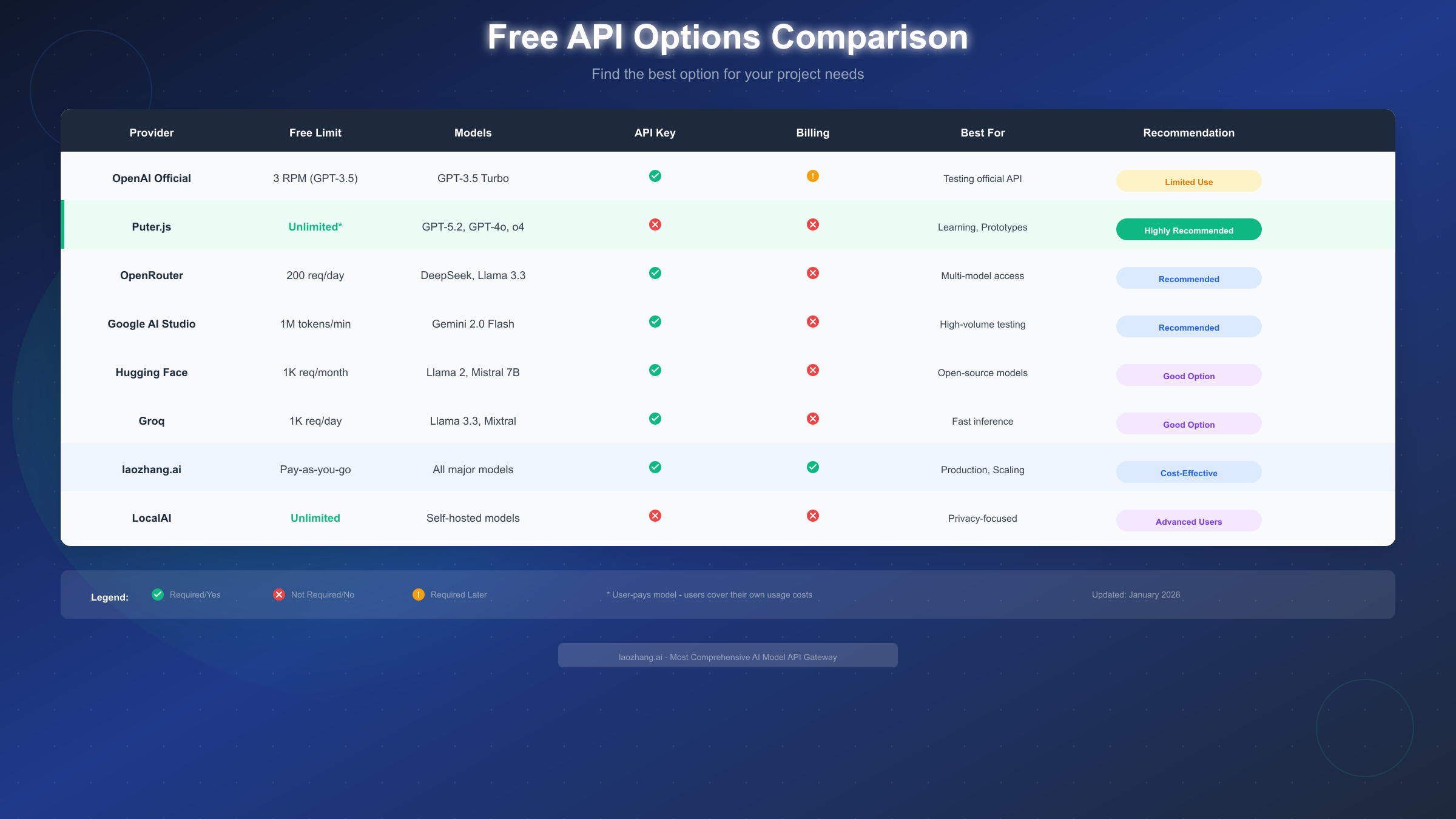
Complete Provider Comparison Table
| Provider | Free Limit | Models Available | API Key Required | Billing Required | Best For |
|---|---|---|---|---|---|
| OpenAI Official | 3 RPM | GPT-3.5 Turbo | Yes | Yes | Official access |
| Puter.js | Unlimited* | GPT-4o | No | No | Browser apps |
| OpenRouter | 200/day | 20+ models | Yes | No | Multi-model |
| Google AI Studio | 1M tokens/min | Gemini Pro/Flash | Yes | No | High volume |
| Hugging Face | 1,000/day | Open-source models | Yes | No | Model variety |
| Groq | 14,400/day | Llama, Mixtral | Yes | No | Speed |
| Anthropic | Limited trial | Claude 3 | Yes | Yes | Long context |
| Cohere | 1,000/month | Command models | Yes | No | Enterprise features |
| Together AI | $25 credit | 100+ models | Yes | No | Open-source |
| Replicate | Limited free | Various | Yes | No | Model hosting |
| laozhang.ai | Trial credits | Multiple providers | Yes | No | Unified access |
| Mistral AI | Free tier | Mistral models | Yes | No | European option |
| DeepSeek | 500K tokens/day | DeepSeek models | Yes | No | Cost efficiency |
| Fireworks AI | 600 RPM free | Open models | Yes | No | Low latency |
| LocalAI | Unlimited | Local models | No | No | Privacy |
Google AI Studio: The Volume Champion
Google AI Studio deserves special attention for its exceptionally generous free tier:
Free tier specifications:
- 1,500 requests per day for Gemini Pro
- 1,000,000 tokens per minute
- 15 RPM for Gemini 1.5 Pro
- 1,500 RPM for Gemini 1.5 Flash
# Google AI Studio - Python Example
import google.generativeai as genai

genai.configure(api_key="your-google-api-key")

model = genai.GenerativeModel('gemini-1.5-flash')
response = model.generate_content("Explain the theory of relativity")

print(response.text)
Google AI Studio is ideal for high-volume applications where you need consistent free access without strict rate limits.
Groq: Speed-Focused Free Tier
Groq's custom LPU (Language Processing Unit) hardware delivers exceptional inference speed with a generous free tier:
Free tier specifications:
- 14,400 requests per day (Llama 3.1 8B)
- 6,000 requests per day (Mixtral 8x7B)
- 30 RPM standard limit
- Response times under 500ms
# Groq API - Python Example
from groq import Groq

client = Groq(api_key="your-groq-api-key")

chat_completion = client.chat.completions.create(
    messages=[{"role": "user", "content": "Hello!"}],
    model="llama-3.1-8b-instant",
)

print(chat_completion.choices[0].message.content)
Hugging Face: Open-Source Gateway
Hugging Face provides access to thousands of open-source models through their Inference API:
Free tier specifications:
- 1,000 requests per day
- Access to 100,000+ models
- Serverless inference included
- Community model hosting
# Hugging Face Inference API
from huggingface_hub import InferenceClient

client = InferenceClient(token="your-hf-token")

response = client.text_generation(
    "The future of AI is",
    model="mistralai/Mistral-7B-Instruct-v0.2",
    max_new_tokens=100
)

print(response)
Model Capability Matrix
| Provider | GPT-4 Class | Long Context | Code Gen | Vision | Function Calling |
|---|---|---|---|---|---|
| OpenAI | Yes* | 128K | Excellent | Yes | Yes |
| Google AI | Yes | 2M | Excellent | Yes | Yes |
| Anthropic | Yes* | 200K | Excellent | Yes | Yes |
| Groq | No | 131K | Good | No | Yes |
| Hugging Face | Varies | Varies | Varies | Varies | Limited |
| Puter.js | Yes | 128K | Excellent | Yes | Limited |
*Requires paid tier for full GPT-4/Claude access
Choosing the Right Option
With so many options available, selecting the right free API access method depends on your specific needs. Here's a decision framework based on common use cases.
By User Type
Students and Learners:
- Primary choice: Puter.js or Google AI Studio
- Reasoning: No payment required, generous limits, good documentation
- Fallback: Hugging Face for exploring model variety
Indie Developers Building MVPs:
- Primary choice: OpenRouter or Google AI Studio
- Reasoning: Balance of model quality and free tier limits
- Fallback: Groq for speed-critical applications
Startups Testing Product Ideas:
- Primary choice: Multiple providers with fallback strategy
- Reasoning: Maximize free tier across providers, test different models
- Fallback: laozhang.ai for unified billing when scaling
Enterprise Developers Prototyping:
- Primary choice: Official OpenAI with strict limits
- Reasoning: Compliance requirements often mandate official providers
- Fallback: Google AI for internal tools
By Project Requirements
Chatbot or Conversational AI:
- Best options: Puter.js, Google AI Studio, OpenRouter
- Key factor: Consistent latency and natural conversation flow
Code Generation and Developer Tools:
- Best options: OpenAI GPT-4o (via proxy), Google Gemini, DeepSeek
- Key factor: Code quality and understanding of programming concepts
Content Generation at Scale:
- Best options: Google AI Studio (highest free volume), Groq
- Key factor: Token limits and throughput
Multi-Modal Applications (Text + Images):
- Best options: Google AI Studio (Gemini), OpenAI GPT-4o (via proxy)
- Key factor: Vision capability included in free tier
Real-Time Applications:
- Best options: Groq (fastest), Fireworks AI
- Key factor: Sub-second response times
Decision Flowchart Summary
Based on your primary need:
- Need official OpenAI specifically? → OpenAI Free Tier (with billing) or Puter.js
- Need highest volume for free? → Google AI Studio
- Need fastest responses? → Groq
- Need model variety? → OpenRouter or Hugging Face
- Need browser-only solution? → Puter.js
- Need unified multi-provider access? → laozhang.ai or OpenRouter
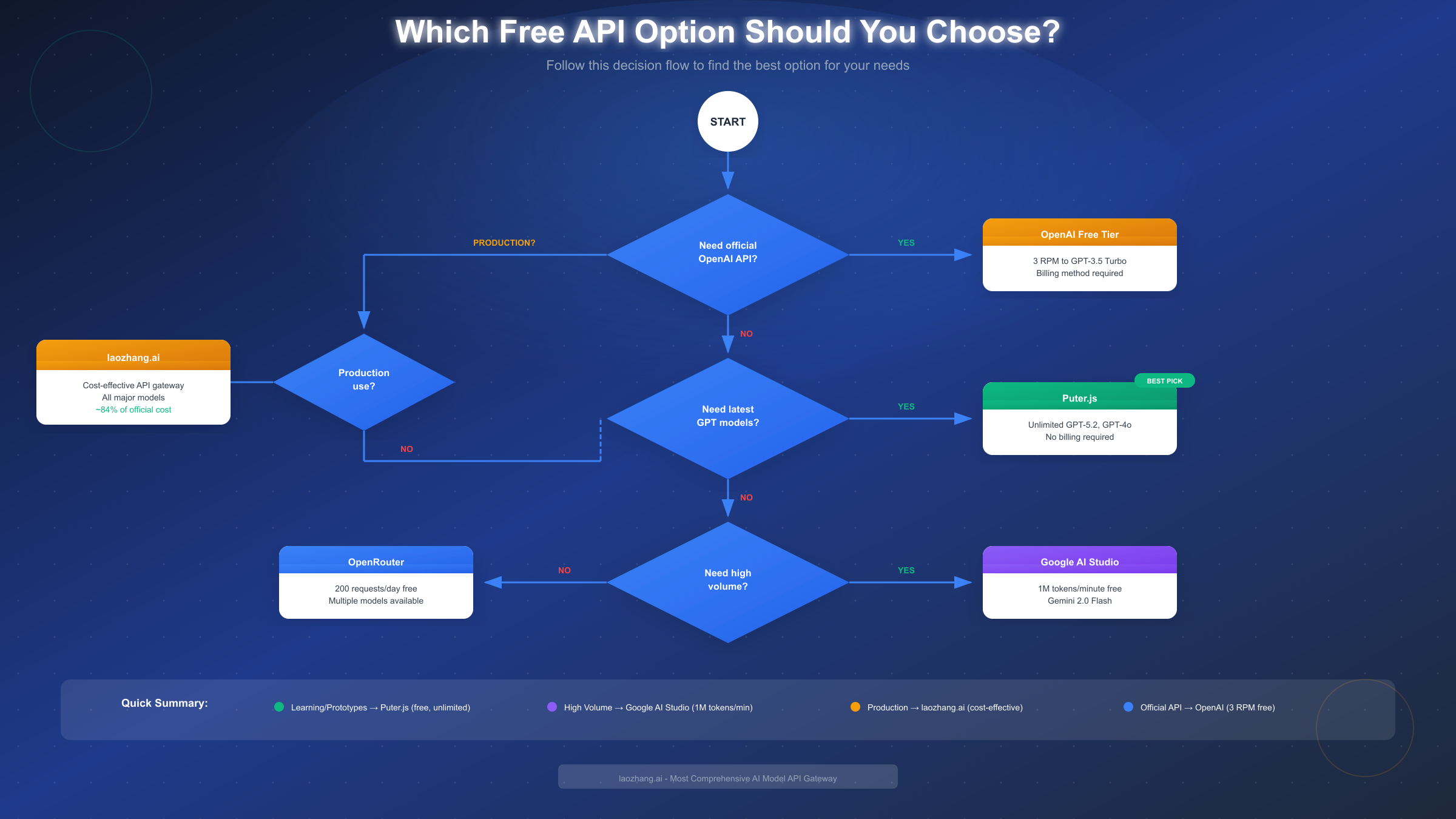
Recommendation Matrix
| Priority | Recommended Provider | Alternative |
|---|---|---|
| Zero setup | Puter.js | Hugging Face Spaces |
| Maximum free tokens | Google AI Studio | DeepSeek |
| Best GPT-4 alternative | Google Gemini | Anthropic Claude (trial) |
| Lowest latency | Groq | Fireworks AI |
| Most models | OpenRouter | Hugging Face |
| Production-ready free | Google AI Studio | OpenRouter paid |
Cost Optimization Strategies
Even with free tiers, understanding cost optimization prepares you for scaling beyond free limits. These strategies can reduce costs by up to 84% when you eventually need paid access.
Setting Usage Limits
Every major provider allows you to set spending caps. Here's how to configure them:
OpenAI Dashboard:
Settings → Limits → Usage limits
- Set hard limit: Maximum monthly spend
- Set soft limit: Email notification threshold
Example configuration:
- Hard limit: $10/month
- Soft limit: $5/month (notification at 50%)
This prevents unexpected charges while allowing some paid usage for testing.
Model Selection for Cost Efficiency
The model you choose dramatically affects costs. Here's the cost comparison for identical tasks:
| Task | GPT-4o Cost | GPT-4o mini Cost | Savings |
|---|---|---|---|
| 1M tokens processed | $12.50 | $0.75 | 94% |
| 100 chat messages | $0.25 | $0.015 | 94% |
| Daily chatbot (1000 users) | $25 | $1.50 | 94% |
When to use cheaper models:
- Simple Q&A and information retrieval
- Text summarization
- Basic code explanation
- Customer support automation
When to use premium models:
- Complex reasoning tasks
- Code generation for production
- Multi-step analysis
- Tasks requiring latest knowledge
Implementing Response Caching
Caching identical requests can dramatically reduce API calls:
import hashlib
import json
from functools import lru_cache

# Simple in-memory cache
@lru_cache(maxsize=1000)
def cached_api_call(prompt_hash):
    # Actual API call here
    pass

def get_response(prompt):
    # Create hash of the prompt
    prompt_hash = hashlib.md5(prompt.encode()).hexdigest()

    # Check cache first
    cached = cached_api_call(prompt_hash)
    if cached:
        return cached

    # Make API call if not cached
    response = actual_api_call(prompt)

    # Cache the result
    cached_api_call(prompt_hash, response)
    return response
For production applications, use Redis or similar for distributed caching:
import redis
import json

redis_client = redis.Redis(host='localhost', port=6379, db=0)

def get_cached_response(prompt, ttl=3600):
    cache_key = f"ai_response:{hashlib.md5(prompt.encode()).hexdigest()}"

    # Check cache
    cached = redis_client.get(cache_key)
    if cached:
        return json.loads(cached)

    # Get fresh response
    response = call_ai_api(prompt)

    # Cache for 1 hour
    redis_client.setex(cache_key, ttl, json.dumps(response))
    return response
When Free Is Enough vs. When to Upgrade
Free tier is sufficient when:
- Learning and experimentation
- Personal projects with < 100 daily users
- Prototype demonstrations
- Occasional automated tasks
Time to upgrade when:
- Consistent rate limit errors
- Need for GPT-4 class models
- Production application with real users
- SLA requirements (uptime guarantees)
- Need for fine-tuning capabilities
Hybrid Strategy: Maximizing Free Resources
Implement a fallback strategy across multiple free providers:
class AIClient:
    def __init__(self):
        self.providers = [
            {"name": "puter", "client": PuterClient()},
            {"name": "google", "client": GoogleClient()},
            {"name": "groq", "client": GroqClient()},
        ]

    def chat(self, message):
        for provider in self.providers:
            try:
                return provider["client"].chat(message)
            except RateLimitError:
                continue
        raise Exception("All providers exhausted")
This approach maximizes your effective free tier by distributing load across providers.
Security Best Practices
Whether using free or paid API access, security must be a priority. API key exposure is one of the most common security incidents in AI development.
Environment Variables: The Standard Approach
Never hardcode API keys in your source code:
# WRONG - Never do this
api_key = "sk-abc123..."

# CORRECT - Use environment variables
import os
api_key = os.environ.get("OPENAI_API_KEY")
Setting environment variables:
# Linux/macOS - Add to ~/.bashrc or ~/.zshrc
export OPENAI_API_KEY="your-key-here"
export GOOGLE_API_KEY="your-key-here"

# Windows PowerShell
$env:OPENAI_API_KEY="your-key-here"

# .env file (with python-dotenv)
OPENAI_API_KEY=your-key-here
GOOGLE_API_KEY=your-key-here
Loading from .env file:
from dotenv import load_dotenv
import os

load_dotenv()  # Load from .env file
api_key = os.environ.get("OPENAI_API_KEY")
Key Rotation Practices
Rotate API keys regularly, especially if:
- A team member leaves
- Keys may have been exposed
- Quarterly security audits require it
Rotation process:
- Generate new key in provider dashboard
- Update environment variables in deployment
- Test application with new key
- Revoke old key only after confirming new key works
Common Mistakes to Avoid
-
Committing keys to Git:
bash# Add to .gitignore .env .env.local *.key -
Logging API keys:
python# WRONG print(f"Using API key: {api_key}") # CORRECT print(f"Using API key: {api_key[:8]}...") -
Exposing keys in frontend code:
javascript// WRONG - Client-side code const response = await fetch(url, { headers: { "Authorization": `Bearer ${API_KEY}` } }); // CORRECT - Use backend proxy const response = await fetch("/api/chat", { method: "POST", body: JSON.stringify({ message }) }); -
Sharing keys across environments:
- Use separate keys for development, staging, production
- Limit permissions per environment when possible
-
Ignoring key exposure alerts:
- GitHub and GitLab scan for exposed secrets
- Treat any alert as a compromised key—rotate immediately
Secure Architecture Pattern
For production applications, implement a backend proxy:
User → Your Frontend → Your Backend (with API key) → AI ProviderThis ensures API keys never reach the client browser.
FAQ and Troubleshooting
Frequently Asked Questions
Q: Can I use OpenAI API completely free without a credit card?
A: Not directly through OpenAI's official platform. However, you can use API proxy services like Puter.js which provide free access to GPT-4o without requiring any payment method. OpenRouter also offers free tier access with just email registration.
Q: What happens if I exceed the free tier limits?
A: Behavior varies by provider. OpenAI returns a 429 rate limit error and won't charge you if you have hard limits set. Google AI Studio queues requests when limits are approached. Proxy services typically return errors or degrade to slower responses.
Q: Are API proxy services safe to use?
A: Reputable proxy services are generally safe for non-sensitive applications. However, consider that your prompts route through their servers. For sensitive data, use official APIs with direct connections. Always review the privacy policy of any proxy service.
Q: Which free option has the best GPT-4 equivalent?
A: Google's Gemini 1.5 Pro (free via Google AI Studio) is widely considered comparable to GPT-4 in most benchmarks. For direct GPT-4o access, Puter.js currently offers the best free option, though availability may vary.
Q: Can I build a commercial product using free API tiers?
A: Check each provider's terms of service. Most free tiers allow commercial use but have rate limits that make scaling difficult. Google AI Studio explicitly allows commercial use within their limits. OpenAI's free tier is primarily for evaluation.
Common Error Solutions
Error: 429 Rate Limit Exceeded
# Solution: Implement exponential backoff
import time

def call_with_retry(func, max_retries=3):
    for attempt in range(max_retries):
        try:
            return func()
        except RateLimitError:
            wait_time = 2 ** attempt  # 1, 2, 4 seconds
            time.sleep(wait_time)
    raise Exception("Max retries exceeded")
Error: Invalid API Key
Checklist:
- Verify key hasn't been revoked in dashboard
- Check for extra whitespace in environment variable
- Ensure key is for the correct environment (test vs production)
- Confirm key permissions match your API calls
Error: Model Not Found
This usually means:
- The model name is incorrect (check documentation)
- Your account doesn't have access to that model
- The model has been deprecated (use updated model name)
Error: Context Length Exceeded
# Solution: Truncate input or use summarization
def truncate_to_limit(text, max_tokens=4000):
    # Rough estimate: 1 token ≈ 4 characters
    max_chars = max_tokens * 4
    if len(text) > max_chars:
        return text[:max_chars] + "..."
    return text
Summary and Next Steps
Key Takeaways Recap
- OpenAI's official free tier provides limited access (3 RPM, GPT-3.5 only) and requires billing registration
- API proxy services like Puter.js offer the most accessible free option with GPT-4o access
- Google AI Studio provides the highest volume free tier for serious development
- Multiple providers can be combined for a robust free-tier strategy
- Security practices are essential regardless of which access method you choose
Recommended Action Plan
For immediate free access:
- Create a Google AI Studio account for high-volume needs
- Set up Puter.js for browser-based projects
- Register for OpenRouter for model variety
For building production applications:
- Start with free tiers to validate your concept
- Implement usage monitoring from day one
- Plan your migration path to paid tiers
- Consider aggregator services like laozhang.ai for unified billing
Additional Resources
- OpenAI API Documentation
- Google AI Studio Documentation
- Groq API Documentation
- laozhang.ai Documentation
- Hugging Face Hub
Stay Updated
The AI API landscape evolves rapidly. Free tiers change, new providers emerge, and pricing adjusts. Bookmark this guide and check back for updates as we track changes across all major providers.
Whether you're a student learning AI development, an indie developer building your next project, or a startup validating product ideas, free API access is more available than ever in 2026. The key is understanding your options and choosing the right approach for your specific needs.
Last updated: January 2026. Pricing and availability subject to change. Always verify current terms on provider websites.