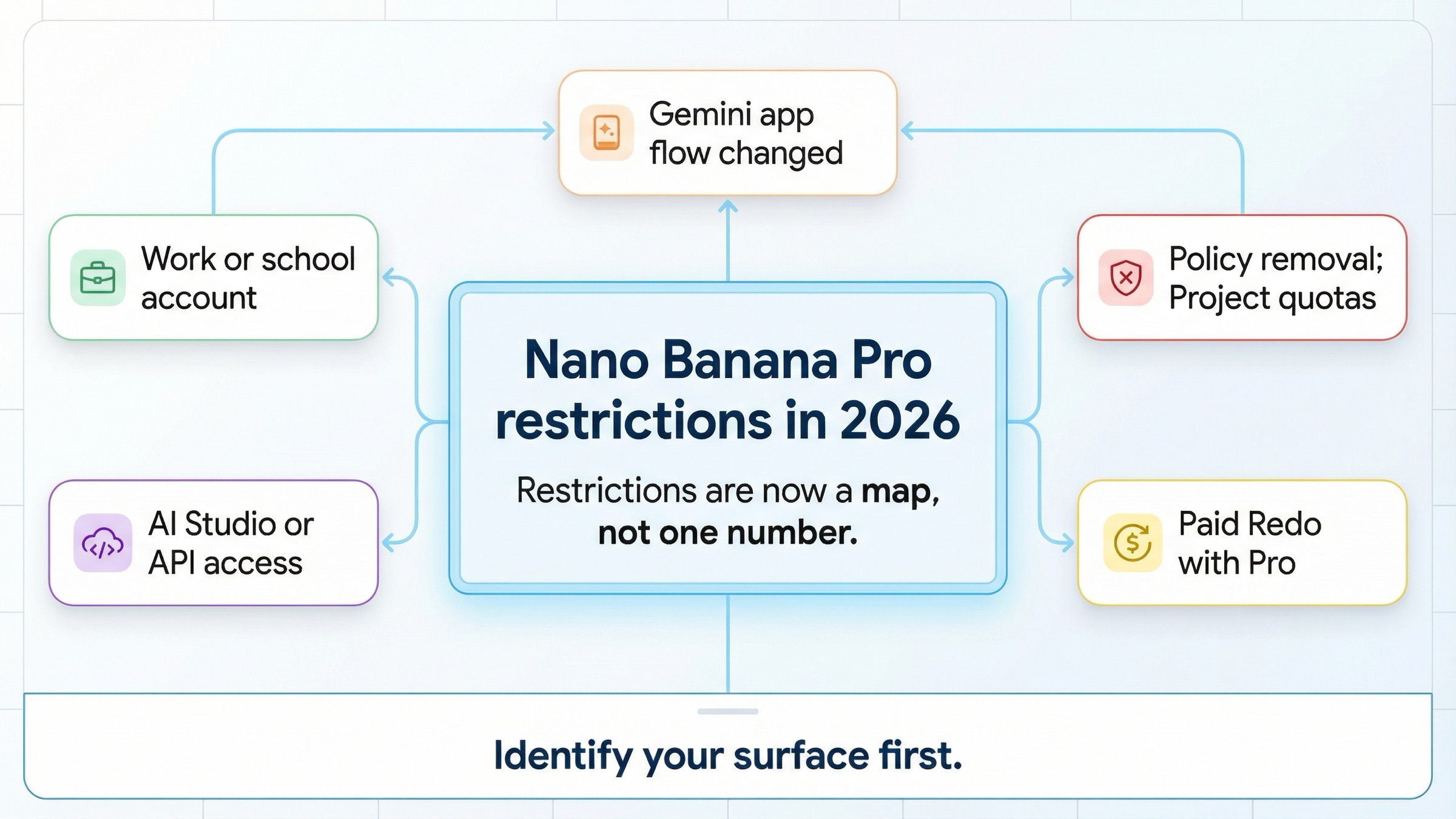
As of March 28, 2026, Nano Banana Pro restrictions no longer means one universal daily limit. The main restriction is structural: in the current Gemini app flow, you generate with Nano Banana 2 first, and Nano Banana Pro mainly appears as a paid Redo with Pro path rather than the default first-pass generator. On top of that, Google layers age rules, work or school license rules, supported-region checks for AI Studio and the Gemini API, policy removals, and project-based preview quotas on the API side.
That is why older Nano Banana Pro articles feel contradictory. Some late-2025 posts described Pro like a standalone image mode with one public quota table. The current official Gemini Apps help page does not frame it that way anymore. It says you create images with Nano Banana 2, and that paid subscribers can use Nano Banana Pro to regenerate an image. It also says that if you hit your daily Nano Banana 2 quota, you cannot redo additional images with Nano Banana Pro.
The fastest way to diagnose your restriction is to identify your surface before you trust any number or complaint thread. If you are in the Gemini app, your problem is usually quota, plan, or account access. If you are in AI Studio or the Gemini API, your problem is more likely region support, billing tier, or preview-model quota behavior. If the image itself is refused or removed, the blocker is usually policy rather than subscription.
TL;DR
| If you see this | What it usually means now | Official place to verify | Best next move |
|---|---|---|---|
| You cannot find Nano Banana Pro as a normal generator in Gemini | The app now starts with Nano Banana 2, and Pro mainly shows up as Redo with Pro | Generate & edit images with Gemini Apps | Treat this as a product-flow change, not an outage |
| You hit a daily cap and Pro redo stops working too | Your Nano Banana 2 daily quota is exhausted, so more Pro redos are blocked | Generate & edit images with Gemini Apps | Wait for refresh or move to a higher plan |
| You are on a work or school account and features are missing | Workspace license, admin enablement, or account-type restrictions are in the way | Use Gemini Apps with a work or school Google Account | Check your badge, then ask your admin |
| AI Studio says you cannot access the model | Region support, age verification, or billing setup is blocking the API surface | Available regions and rate limits | Verify region and age first, then billing and project tier |
| The model returns 429 or feels more limited than expected | Gemini 3 Pro Image Preview uses per-project preview-model quotas, not one shared consumer cap | Rate limits | Check live limits in AI Studio rather than copying an old blog number |
| Gemini removes or refuses the image | You are hitting Google's image policy filters, not a subscription bug | Generative AI Prohibited Use Policy | Rewrite the prompt toward a clearly allowed use case |
If you remember older claims like 2 images per day, 3 images per day, or a simple free-versus-paid Nano Banana Pro table, that memory is exactly why this keyword keeps generating confusion. The current official answer is split across different Google surfaces, and you have to sort those surfaces before the restriction starts making sense.
What Nano Banana Pro restrictions usually mean now
Most readers are not asking one question. They are collapsing several different restrictions into one label:
- product-flow restriction: Nano Banana Pro is no longer the obvious default generator in the Gemini app
- plan restriction: paid plans get more or higher access than the base consumer lane
- account restriction: personal accounts, work accounts, and school accounts do not behave the same way
- region restriction: AI Studio and the Gemini API are not available everywhere
- policy restriction: some prompts or outputs are blocked even when your plan is valid
- API restriction: preview-model quotas are tied to a project, usage tier, and current capacity
That mix is why page one still feels messy. Google's own December 23, 2025 product post said the Gemini app had free-tier limits and would fall back to the original Nano Banana after those limits were reached, while the current March 2026 help page focuses on Nano Banana 2 generation plus paid Redo with Pro. The product is still there, but the user-facing lane changed under the same nickname.
The safest mental model is simple. Nano Banana Pro is now a family label that behaves differently depending on where you touched it. In the Gemini app, think in terms of Nano Banana 2 generation plus optional Pro redo. In Google AI plans, think in terms of More, Higher, and Highest access rather than one published global cap table. In AI Studio and the Gemini API, think in terms of supported region, age verification, billing tier, and per-project preview quotas.
If your real problem is only that the feature is missing in the Gemini UI, the narrower fix page is Nano Banana Pro not showing in Gemini. This article is the umbrella map for the whole restriction cluster, not just the UI symptom.
Gemini app restrictions: quotas, paid redo access, and age rules
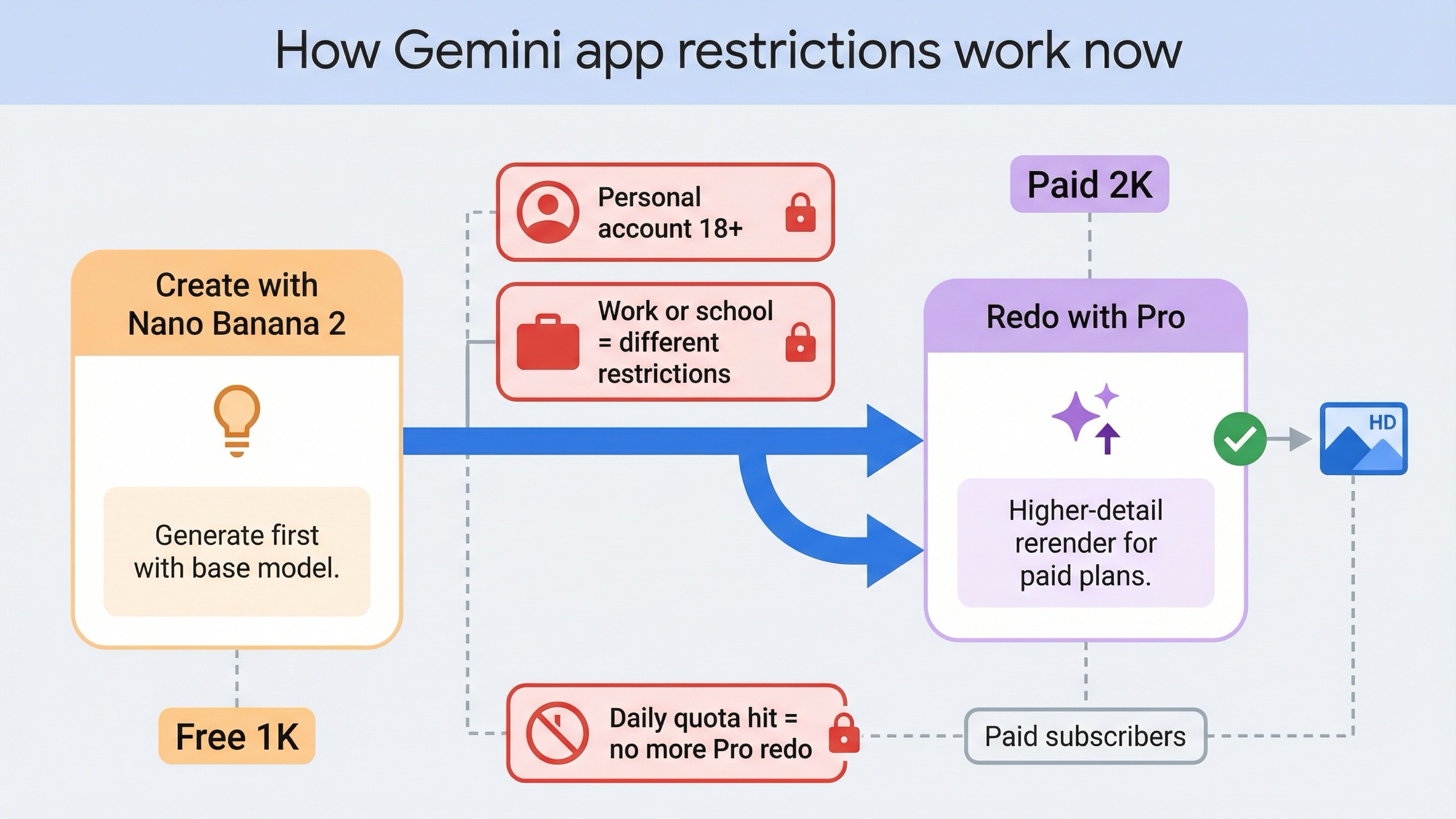
The current official Gemini Apps image guide is the most important page in this cluster, because it resets the entire conversation. It says you can create images with Nano Banana 2, and that paid subscribers can use Nano Banana Pro to regenerate an image. That means many users are not actually losing access to a single old feature. They are encountering a different product flow than the one older guides described.
The same help page adds three practical restrictions that matter immediately. First, the feature is not available to users under 18 on personal accounts. Second, school users may face different access restrictions. Third, if you hit your daily Nano Banana 2 quota, you cannot redo additional images with Nano Banana Pro. In other words, the Pro redo lane depends on the base generation lane still having room.
Google's current Google AI Plans page is also revealing for what it does not say. It does not publish one neat global Nano Banana Pro quota chart on the public plan page. Instead, it describes Nano Banana Pro access in the Gemini app and Search as More, Higher, or Highest depending on whether you are on Google AI Plus, Google AI Pro, or Google AI Ultra. That is a strong signal that Google wants you to think in tiered access rather than memorize one static public number forever.
There is one more current rule worth keeping straight. The help page says paid downloads can reach 2K, while free users download at 1K. So some complaints that sound like Nano Banana Pro is restricted are really quality-lane complaints: the user is still getting images, but not at the output quality or Pro rerender behavior they expected.
The practical rule is this:
If you are a regular Gemini user, assume the first question is Which lane am I in right now? not What is the old Nano Banana Pro cap? If the answer is free or lower-access lane, expect Nano Banana 2 first, lower output ceilings, and stricter quota pressure. If the answer is paid lane, expect Pro redo access, but do not assume that gives you unlimited first-pass generation or one stable public quota number.
If the pain point is specifically daily caps or 429-style quota behavior, the closer follow-up is Nano Banana Pro rate limits. That page goes deeper on what quota pressure looks like once the feature is actually available.
Work or school account restrictions: license and admin gates
Managed accounts create a different class of restriction, and many readers waste time treating them like consumer-plan issues. Google's work and school Gemini help page says access depends on the Workspace license, and that to use Gemini Apps with a work account you must be 18 or over. It also says access may need to be enabled by a Workspace administrator.
That matters because a work or school restriction often looks like a product failure when it is really a permissions failure. You may not see the same model badge, you may not get the same mobile behavior, and some Gemini mobile-app features are simply unavailable on work or school accounts. The page also notes that Gemini Apps limits may change without notice, including because of capacity constraints, which means managed-account users can experience both licensing restrictions and dynamic usage restrictions at the same time.
The fastest diagnostic here is to stop asking Is Nano Banana Pro down? and start asking:
- am I signed into a personal account or a managed Workspace account
- do I see a Pro, Expanded, or Ultra badge
- is this feature enabled by my administrator
- am I trying to use a mobile-app feature that Google does not expose on managed accounts
If you cannot answer those questions, you are still too early in the troubleshooting chain. For managed users, the default next step is not to clear cache or test a different prompt. It is to confirm your account type and licensing surface first.
This is also why a personal @gmail.com account can behave very differently from a company or school address even inside the same country. The restriction is not geographic; it is organizational.
AI Studio and API restrictions: region, billing, and preview quotas
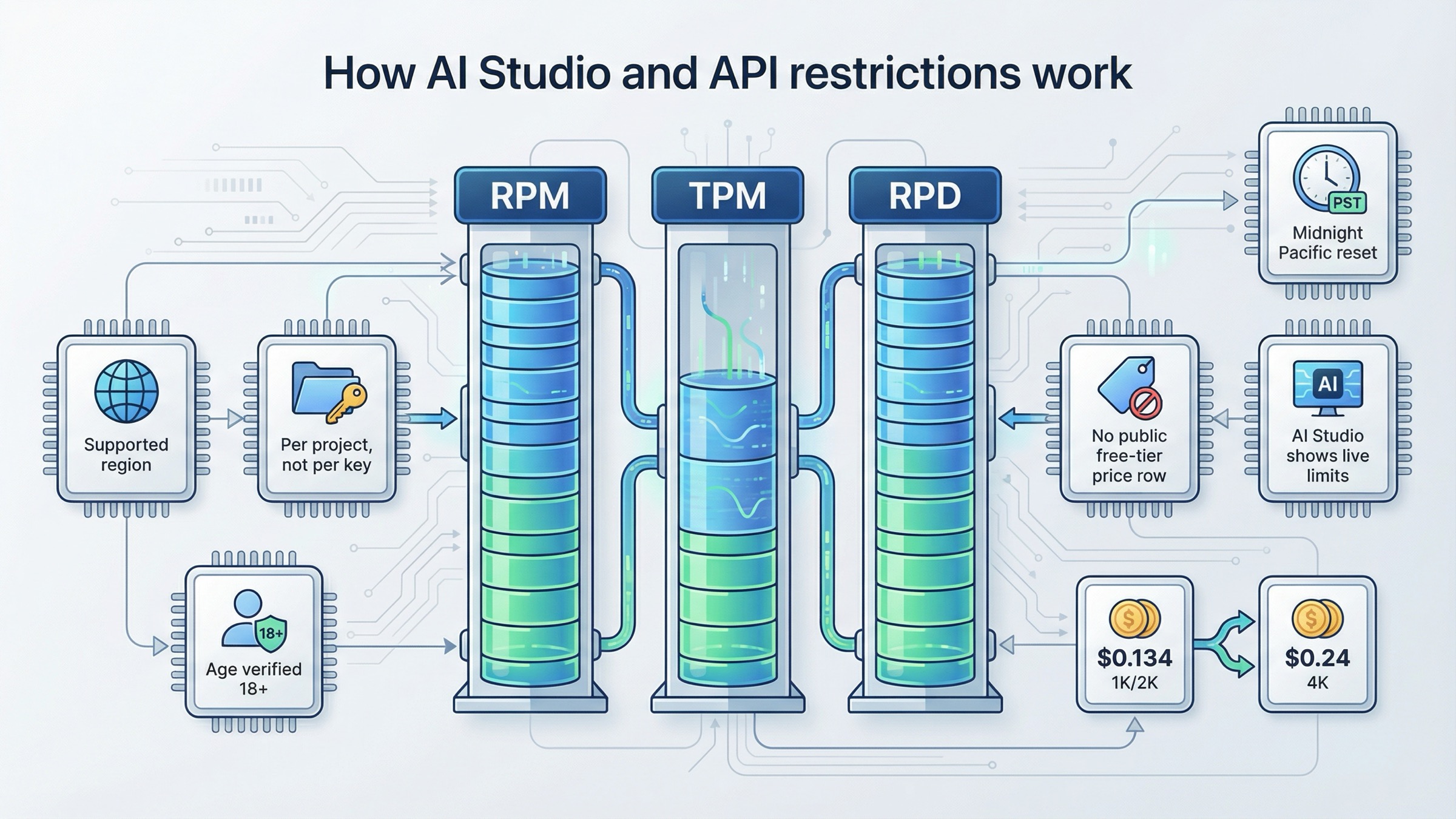
AI Studio and the Gemini API are a separate restriction world. The current Available regions for Google AI Studio and Gemini API page, last updated March 18, 2026 UTC, says access problems may come from regional restrictions, age requirements, or missing age verification on your Google account. It also says that if your country or territory is unsupported, you should try the Gemini API in Vertex AI instead.
That is already very different from the Gemini app story. The app question is usually Which image lane and plan am I in? The API question is usually Can this project access the surface at all, and what quota framework applies once it can?
On the quota side, Google's Rate limits page, last updated March 26, 2026 UTC, says Gemini API restrictions are measured across RPM, TPM, and RPD. It says those limits apply per project, not per API key, and that RPD resets at midnight Pacific time. It also explicitly says that preview models are more restricted, that active limits are viewed in AI Studio, and that specified limits are not guaranteed because actual capacity may vary.
That single paragraph is the reason you should distrust old blog posts that still publish one simple Nano Banana Pro API limit line as if it applies to everyone. Google's own live model surface no longer works that way. If you are using gemini-3-pro-image-preview, you are in a preview-model lane with project-specific conditions, and the exact live limit that matters to you may sit behind your signed-in AI Studio view.
Pricing is another hidden restriction for readers hoping the API is the free workaround. The current Gemini Developer API pricing page shows no free-tier price row for Gemini 3 Pro Image. It lists about $0.134 per 1K or 2K image and $0.24 per 4K image on the standard paid tier, with lower batch pricing. So if your question is Can I escape Gemini app restrictions by going to the Pro API for free?, the current public answer is no. The API is a different access surface, not a public free-tier loophole.
The safest API-side next step depends on which failure you are seeing:
- unsupported region or blocked AI Studio access: verify region support and age verification first
- 429 or quota-style failures: check project-level limits in AI Studio before changing code
- billing confusion: confirm that your project is actually on the billing tier you think it is
If your next question becomes setup instead of restrictions, go straight to Nano Banana Pro API. That page is the better fit for model IDs, request shapes, and route selection.
Policy restrictions: why Gemini removes or refuses some images
Not every Nano Banana Pro restriction is commercial or technical. Some are simply policy enforcement. The current Gemini Apps help page says Gemini may remove images for prompts when its systems detect a possible violation of Google's terms, including the Generative AI Prohibited Use Policy.
That policy is broader than many users assume. Google prohibits dangerous or illegal assistance, non-consensual intimate imagery, privacy or biometric misuse, tracking people without consent, safety-filter circumvention, hate, violence, sexually explicit content, and deceptive impersonation or misleading provenance claims. So if your prompt or output keeps getting removed, the correct question is not Why is my plan restricted? It is Does the request land in one of Google's blocked policy zones?
The current DeepMind Nano Banana Pro page adds another useful distinction. It says images created with Gemini are imperceptibly watermarked with SynthID, and it also lists current model limitations around factual accuracy, localization quality, complex edits, and character consistency. That means some disappointing results are not policy blocks at all. They are ordinary model limitations that still exist even in the Pro lane.
The watermark point matters because older Nano Banana Pro discussions still mix together visible watermark claims, free-tier memories, and invisible provenance tech. The official public wording on the current model page is the safest anchor: Google explicitly says images are imperceptibly watermarked with SynthID. If your real concern is how that affects downstream use, the narrower follow-up is Nano Banana Pro watermark and commercial use.
If your prompt is being blocked or you are seeing image-safety behavior that feels too aggressive, the deeper technical page is Nano Banana Pro image safety error. That article focuses on the image-safety problem itself rather than the broader restrictions map.
Troubleshooting: what to do in your situation
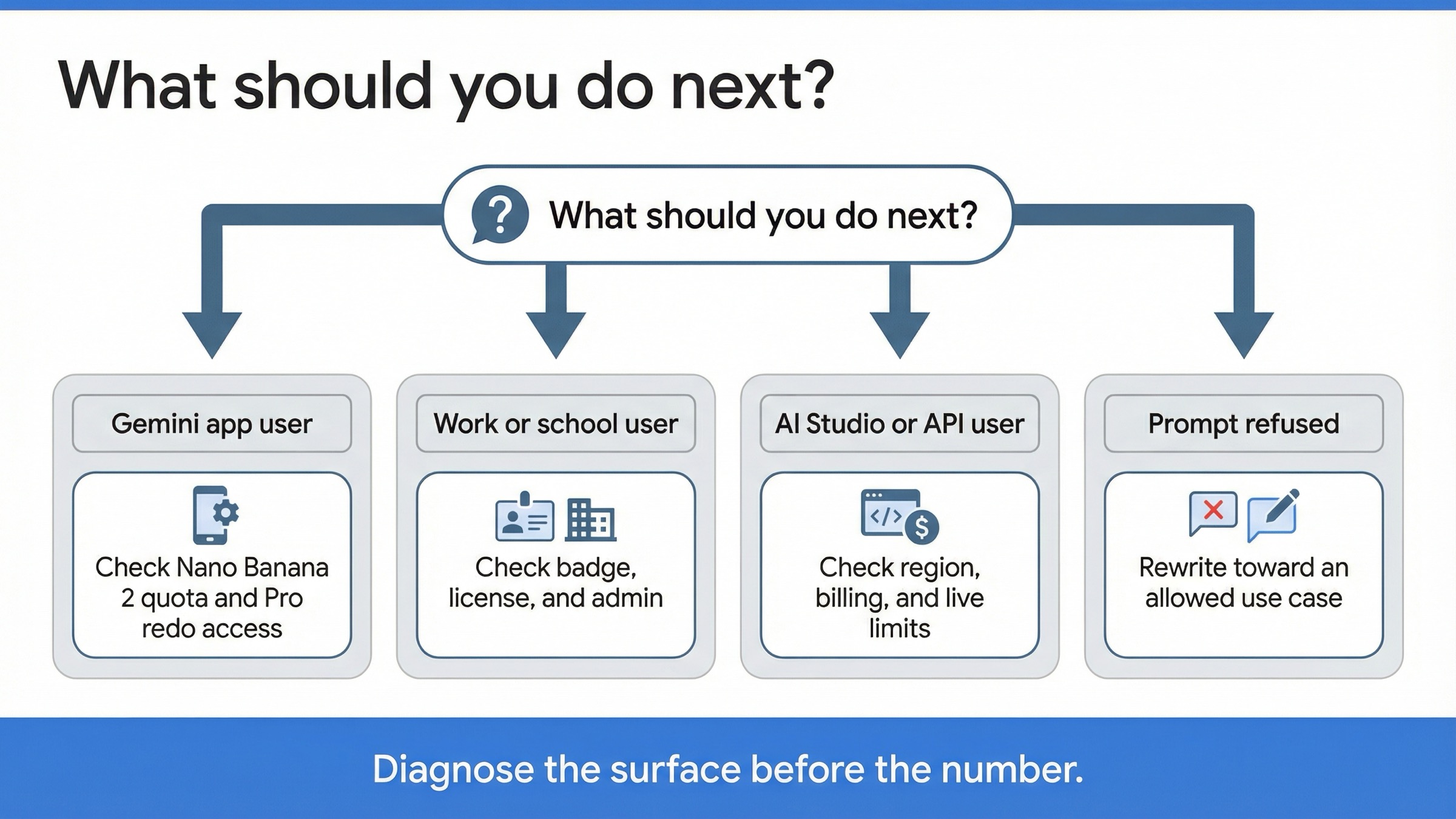
If you need the shortest possible decision rule, use this one:
Gemini app user: treat the restriction as a flow and quota question first. Confirm whether you are generating with Nano Banana 2, whether your plan actually grants Pro redo access, and whether your base daily generation quota is already exhausted. Do not start from old daily-limit blog posts.
Work or school user: treat the restriction as a licensing question first. Confirm the account type, feature badge, and admin state before you assume the product is missing globally.
AI Studio or API user: treat the restriction as an access-and-project question first. Verify region support, age verification, billing tier, and live AI Studio limits. Do not assume an old RPM number from a generic post still matches your project.
Prompt-refusal user: treat the restriction as a policy question first. Rewrite the prompt toward a clearly compliant goal instead of assuming the plan is broken.
That sounds obvious, but it is exactly the step most readers skip, which is why this query keeps resurfacing. People compare a Gemini app complaint to an API pricing page, then compare that to a Reddit thread about fallback behavior, and eventually conclude that Nano Banana Pro has random hidden restrictions. In reality, the product is fragmented across multiple current Google surfaces, and each surface answers a different restriction.
So the best next action is not to memorize one more stale quota number. It is to sort the restriction into the right bucket, then use the narrow guide that fits that bucket:
- missing or inconsistent Gemini feature: /en/posts/nano-banana-pro-not-showing-gemini
- consumer and API quota behavior: /en/posts/nano-banana-pro-rate-limits
- API route and model details: /en/posts/nano-banana-pro-api
- prompt or image safety blocks: /en/posts/nano-banana-pro-image-safety-error
- watermark or commercial-use questions: /en/posts/nano-banana-pro-watermark-commercial-use
FAQ
Did Google remove Nano Banana Pro from Gemini?
No, but Google changed how it appears. The current Gemini Apps help page says you generate with Nano Banana 2 and paid subscribers can use Nano Banana Pro to redo an image. So for many users, the visible change is a product-flow change rather than a total removal.
Why do older pages still mention tiny free daily caps like 2 or 3 images?
Because the query carries late-2025 product memory. Google has changed the way it publicly frames image generation, and the current March 2026 official pages no longer center the consumer story around one simple public Nano Banana Pro cap table.
Does the Gemini API use the same restrictions as the Gemini app?
No. The Gemini app is mainly a plan and product-flow question. The Gemini API is a region, billing-tier, and per-project preview-quota question. Treating them as one restriction system is the fastest way to misdiagnose the problem.


