Looking to use Google's Nano Banana API for free? You're in the right place. In this comprehensive December 2025 guide, I'll show you 8 verified methods to access Google's Gemini image generation models without paying a cent.
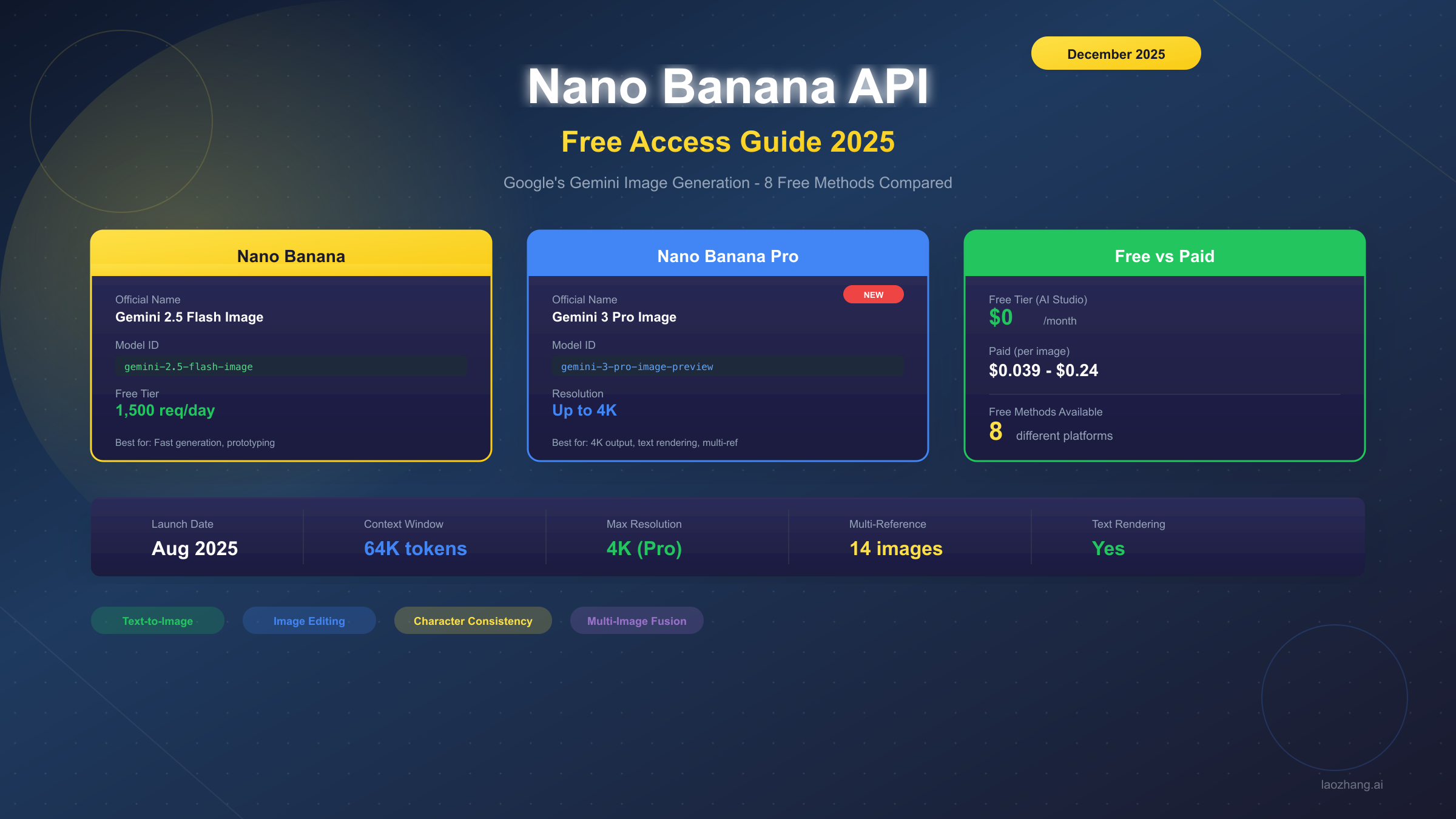
"Nano Banana" has become the community nickname for Google's Gemini 2.5 Flash Image model, while "Nano Banana Pro" refers to the newer Gemini 3 Pro Image. Both models offer impressive text-to-image generation, image editing, and even character consistency features.
What is Nano Banana? (December 2025 Update)
The name "Nano Banana" originated from the AI community after Google released Gemini 2.5 Flash with image generation capabilities on August 26, 2025. The playful nickname stuck because of the model's speed ("nano" suggesting small and fast) combined with Google's colorful branding.
Two Models Available
| Model | Nickname | Model ID | Launch Date |
|---|---|---|---|
| Gemini 2.5 Flash Image | Nano Banana | gemini-2.5-flash-image | August 2025 |
| Gemini 3 Pro Image | Nano Banana Pro | gemini-3-pro-image-preview | November 2025 |
Nano Banana (Gemini 2.5 Flash Image) is optimized for speed and cost-efficiency. It generates images quickly at 1024x1024 resolution and is perfect for prototyping and high-volume applications.
Nano Banana Pro (Gemini 3 Pro Image) launched in November 2025 with significant upgrades:
- Up to 4K resolution output
- Superior text rendering in images
- Multi-reference image support (up to 14 images)
- Better style consistency
For a deeper dive into the technical specifications, check out our Gemini 2.5 Flash Image API guide which covers the underlying architecture.
Key Capabilities
Both Nano Banana models support:
- Text-to-Image Generation: Create images from text prompts
- Image Editing: Modify existing images with text instructions
- Character Consistency: Maintain character appearance across multiple images
- Multi-Image Fusion: Combine multiple reference images
- In-Context Learning: Learn styles from provided examples
Official Free Tier (Google AI Studio)
The most reliable way to access Nano Banana for free is through Google AI Studio. Google provides a generous free tier that resets daily.
Free Tier Limits (December 2025)
| Resource | Free Limit | Resets |
|---|---|---|
| Requests | 1,500/day | Daily at midnight PT |
| Rate Limit | 10 RPM | Per minute |
| Images per Request | 1 | - |
Getting Your API Key
Follow these steps to get free access:
Step 1: Visit Google AI Studio
Step 2: Sign in with your Google account
Step 3: Click "Get API Key" in the left sidebar
Step 4: Create a new API key or use an existing one
Step 5: Copy and securely store your key
python# Your API key looks like this:
API_KEY = "AIzaSy..."  # Keep this secret!
Important Notes
- The free tier is for personal and prototyping use
- Commercial production requires paid API access
- Some regions may have restrictions
- Keys can be revoked if terms are violated
For more details on Gemini API pricing and tiers, see our comprehensive Gemini API pricing breakdown.
If you need more than 1,500 daily requests or want access to additional features, consider exploring free Gemini 2.5 Pro API options.
8 Free Access Methods Comparison
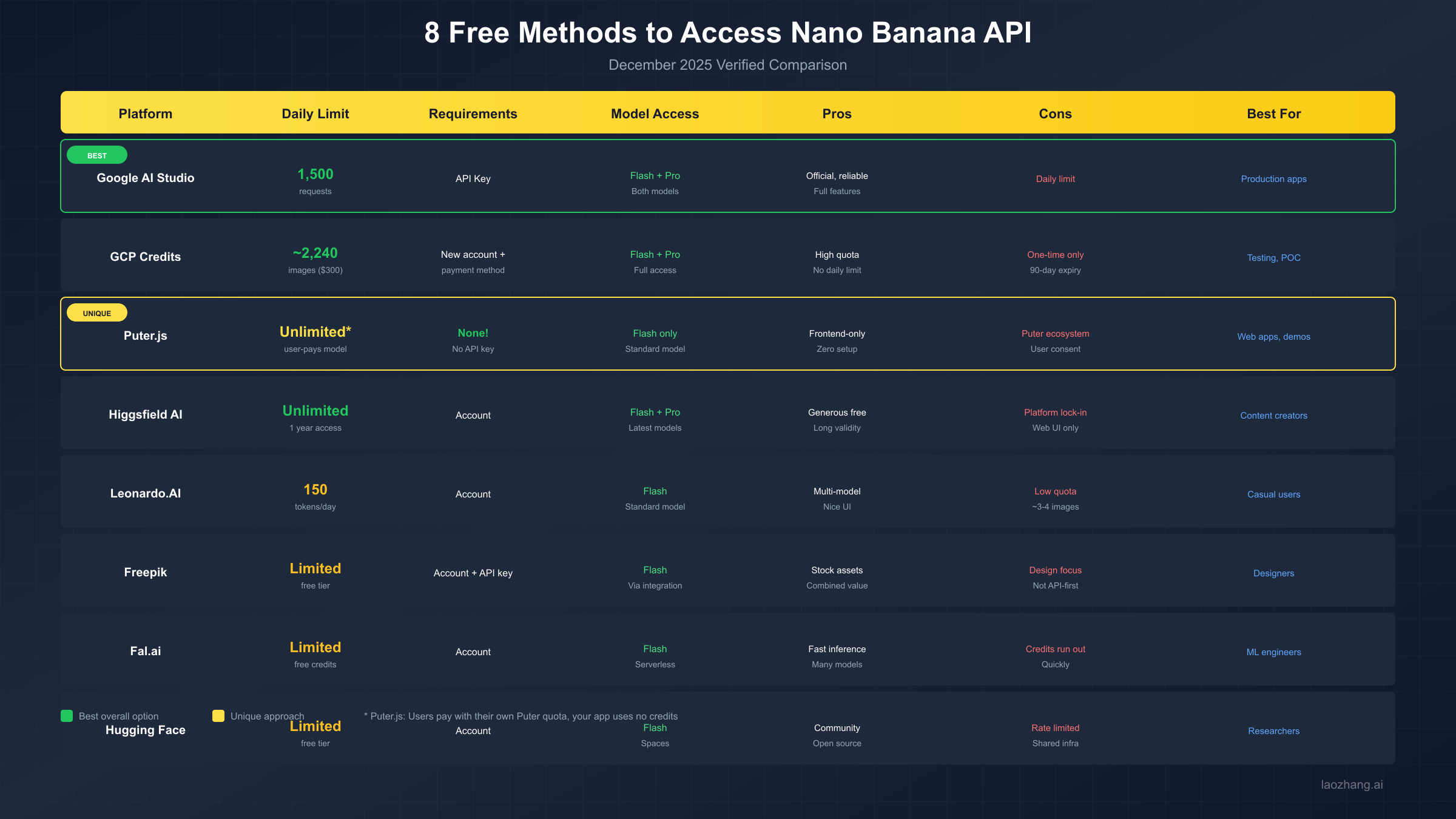
After testing all available options in December 2025, here are the 8 methods to access Nano Banana for free:
Complete Comparison Table
| # | Platform | Daily Limit | Requirements | Model Access | Best For |
|---|---|---|---|---|---|
| 1 | Google AI Studio | 1,500 requests | API Key | Flash + Pro | Production apps |
| 2 | GCP Credits | ~2,240 images | New account | Flash + Pro | Testing, POC |
| 3 | Puter.js | Unlimited* | None | Flash only | Web apps, demos |
| 4 | Higgsfield AI | Unlimited (1yr) | Account | Flash + Pro | Content creators |
| 5 | Leonardo.AI | 150 tokens/day | Account | Flash | Casual users |
| 6 | Freepik | Limited | Account + Key | Flash | Designers |
| 7 | Fal.ai | Limited credits | Account | Flash | ML engineers |
| 8 | Hugging Face | Limited | Account | Flash | Researchers |
*Puter.js uses a "user-pays" model where users spend their own Puter credits
Method 1: Google AI Studio (Recommended)
Pros:
- Official Google service
- Reliable and well-documented
- Access to both Nano Banana and Nano Banana Pro
- Full feature support
Cons:
- Daily limit of 1,500 requests
- Requires API key management
- Rate limited to 10 requests per minute
Method 2: GCP Free Credits
New Google Cloud Platform accounts receive $300 in free credits valid for 90 days.
Calculation:
- Standard image: $0.039/image
- $300 ÷ $0.039 = ~7,692 images (Nano Banana)
- Pro images at $0.134 = ~2,240 images (Nano Banana Pro)
Pros:
- Large one-time quota
- No daily limits
- Full API access
Cons:
- One-time only
- Requires payment method on file
- 90-day expiration
Method 3: Puter.js (Zero Cost for Developers)
Puter.js is unique because developers pay nothing—users pay with their own Puter quota.
Pros:
- No API key needed
- Frontend-only implementation
- Zero cost for your application
- Quick setup
Cons:
- Only supports Nano Banana (Flash model)
- Users must have Puter account
- Limited control over generation parameters
Methods 4-8: Third-Party Platforms
These platforms integrate Gemini image generation with varying free tiers:
- Higgsfield AI: Generous free tier, 1-year access
- Leonardo.AI: ~3-4 images per day with free tokens
- Freepik: Combined with stock asset access
- Fal.ai: Fast inference, credits deplete quickly
- Hugging Face: Community-driven, shared infrastructure
For higher limits and unified API access across multiple AI models, services like laozhang.ai offer cost-effective alternatives with simplified billing and higher quotas.
Python SDK Tutorial
The official Google Generative AI Python SDK provides the most complete access to Nano Banana features.
Installation
bashpip install google-genai
Basic Text-to-Image Generation
pythonfrom google import genai

# Initialize the client
client = genai.Client(api_key="YOUR_API_KEY")

# Generate an image
response = client.models.generate_content(
    model="gemini-2.5-flash-image",  # Nano Banana
    contents="A cute robot holding a yellow banana, digital art style",
    config={
        "response_modalities": ["IMAGE"]
    }
)

# Save the generated image
if response.candidates:
    image = response.candidates[0].content.parts[0]
    image.inline_data.save("robot_banana.png")
    print("Image saved successfully!")
Image Editing Example
pythonfrom google import genai
from PIL import Image
import base64
import io

client = genai.Client(api_key="YOUR_API_KEY")

# Load your source image
def load_image_as_base64(path):
    with open(path, "rb") as f:
        return base64.b64encode(f.read()).decode()

# Edit an existing image
response = client.models.generate_content(
    model="gemini-2.5-flash-image",
    contents=[
        {
            "role": "user",
            "parts": [
                {
                    "inline_data": {
                        "mime_type": "image/png",
                        "data": load_image_as_base64("input.png")
                    }
                },
                {"text": "Add a party hat to the character in this image"}
            ]
        }
    ],
    config={
        "response_modalities": ["IMAGE"]
    }
)

# Save edited image
if response.candidates:
    result = response.candidates[0].content.parts[0]
    result.inline_data.save("edited_output.png")
Character Consistency
Nano Banana Pro supports multi-reference images for character consistency:
python# Character consistency with multiple references
response = client.models.generate_content(
    model="gemini-3-pro-image-preview",  # Nano Banana Pro
    contents=[
        {
            "role": "user",
            "parts": [
                # Reference images
                {"inline_data": {"mime_type": "image/png", "data": ref_image_1}},
                {"inline_data": {"mime_type": "image/png", "data": ref_image_2}},
                # Instruction
                {"text": "Generate the same character from these references, now wearing a space suit"}
            ]
        }
    ],
    config={
        "response_modalities": ["IMAGE"]
    }
)
For alternative API access with higher rate limits, you can configure a different base URL:
python# Using alternative API endpoint (laozhang.ai example)
client = genai.Client(
    api_key="YOUR_LAOZHANG_KEY",
    http_options={"api_base": "https://api.laozhang.ai/v1"}
)
JavaScript/Puter.js Tutorial
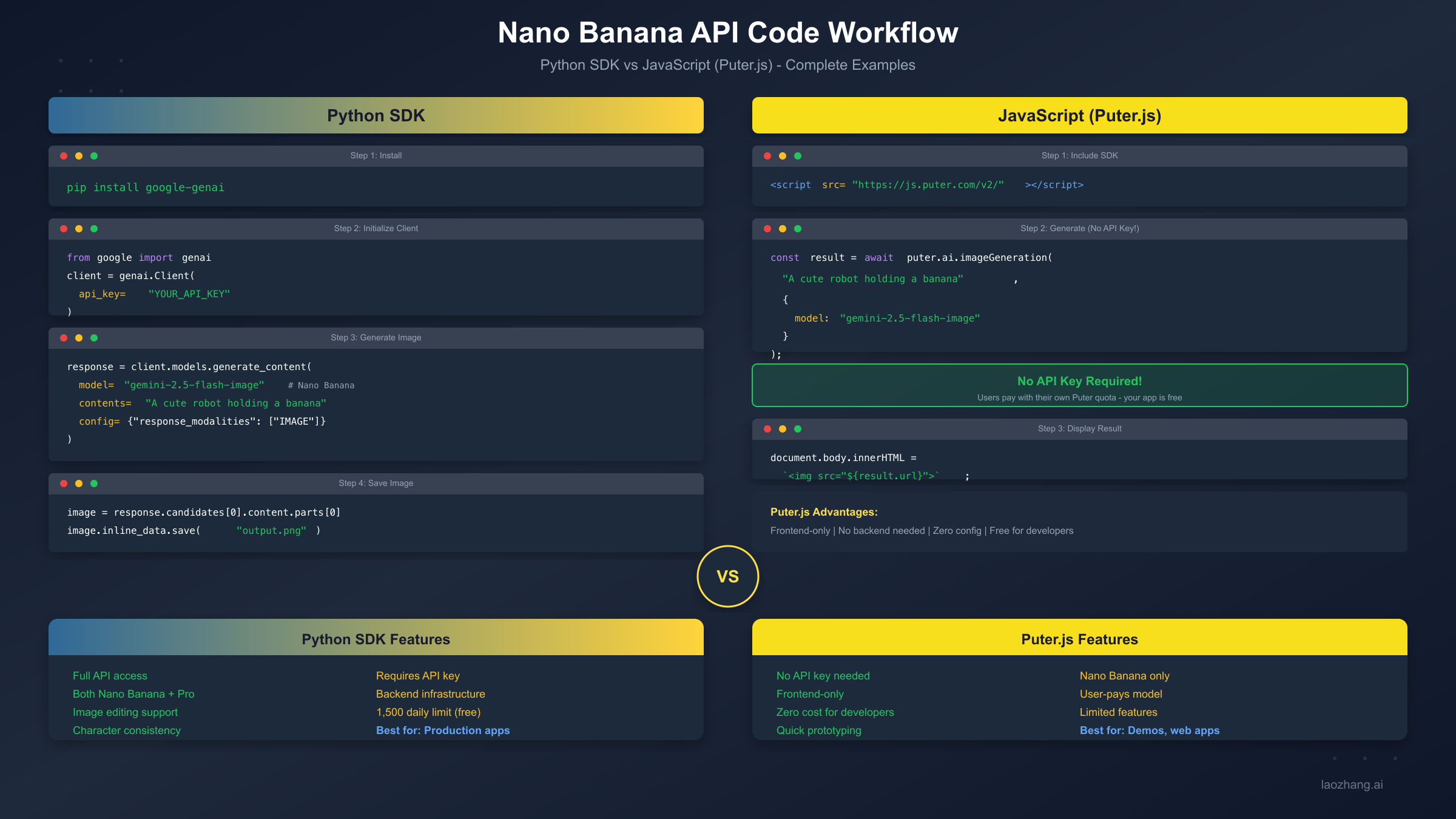
Puter.js offers a unique approach: no API key required. Your users pay for their own usage through their Puter accounts.
Basic Setup
html<!DOCTYPE html> <html> <head> <title>Nano Banana Demo</title> <script src="https://js.puter.com/v2/"></script> </head> <body> <div id="result"></div> <script> async function generateImage() { // No API key needed! const result = await puter.ai.imageGeneration( "A cute robot holding a banana, cartoon style", { model: "gemini-2.5-flash-image" } ); // Display the result document.getElementById('result').innerHTML = ``; } generateImage(); </script> </body> </html>
React Component Example
jsximport { useEffect, useState } from 'react';

function NanoBananaGenerator() {
    const [imageUrl, setImageUrl] = useState(null);
    const [loading, setLoading] = useState(false);
    const [prompt, setPrompt] = useState('');

    const generateImage = async () => {
        if (!prompt.trim()) return;

        setLoading(true);
        try {
            const result = await window.puter.ai.imageGeneration(
                prompt,
                { model: "gemini-2.5-flash-image" }
            );
            setImageUrl(result.url);
        } catch (error) {
            console.error('Generation failed:', error);
        } finally {
            setLoading(false);
        }
    };

    return (
        <div className="generator">
            <input
                type="text"
                value={prompt}
                onChange={(e) => setPrompt(e.target.value)}
                placeholder="Describe your image..."
            />
            <button onClick={generateImage} disabled={loading}>
                {loading ? 'Generating...' : 'Generate'}
            </button>
            {imageUrl && <img src={imageUrl} alt="Generated" />}
        </div>
    );
}
Puter.js Limitations
While Puter.js is convenient, be aware of its constraints:
| Feature | Puter.js | Python SDK |
|---|---|---|
| API Key Required | No | Yes |
| Model Selection | Flash only | Flash + Pro |
| Image Editing | Limited | Full |
| Multi-Reference | No | Yes (Pro) |
| Custom Parameters | Limited | Full |
| Backend Required | No | Yes |
Rate Limits & Error Handling
Understanding and handling rate limits is crucial for production applications.
Common Error Codes
| HTTP Code | Error | Cause | Solution |
|---|---|---|---|
| 429 | Rate Limited | Too many requests | Implement backoff |
| 403 | Forbidden | Invalid key or quota exceeded | Check API key |
| 400 | Bad Request | Invalid parameters | Validate input |
| 500 | Server Error | Google's infrastructure | Retry later |
Robust Error Handling Code
pythonimport time
from google import genai
from google.api_core import exceptions

def generate_with_retry(prompt, max_retries=3, base_delay=1):
    """Generate image with exponential backoff retry logic."""
    client = genai.Client(api_key="YOUR_API_KEY")

    for attempt in range(max_retries):
        try:
            response = client.models.generate_content(
                model="gemini-2.5-flash-image",
                contents=prompt,
                config={"response_modalities": ["IMAGE"]}
            )

            if response.candidates:
                return response.candidates[0].content.parts[0]

        except exceptions.ResourceExhausted as e:
            # 429 - Rate limited
            delay = base_delay * (2 ** attempt)
            print(f"Rate limited. Waiting {delay}s...")
            time.sleep(delay)

        except exceptions.InvalidArgument as e:
            # 400 - Bad request, don't retry
            raise ValueError(f"Invalid request: {e}")

        except exceptions.PermissionDenied as e:
            # 403 - Check your API key
            raise PermissionError(f"Access denied: {e}")

        except Exception as e:
            # Other errors - retry with backoff
            if attempt < max_retries - 1:
                delay = base_delay * (2 ** attempt)
                print(f"Error: {e}. Retrying in {delay}s...")
                time.sleep(delay)
            else:
                raise

    raise Exception("Max retries exceeded")

# Usage
try:
    image = generate_with_retry("A sunset over mountains")
    image.inline_data.save("output.png")
except Exception as e:
    print(f"Failed to generate: {e}")
Quota Management
Track your daily usage to avoid hitting limits:
pythonclass QuotaTracker:
    def __init__(self, daily_limit=1500):
        self.daily_limit = daily_limit
        self.used_today = 0
        self.last_reset = time.time()

    def can_generate(self):
        # Reset at midnight
        if time.time() - self.last_reset > 86400:
            self.used_today = 0
            self.last_reset = time.time()

        return self.used_today < self.daily_limit

    def record_usage(self, count=1):
        self.used_today += count

    def remaining(self):
        return self.daily_limit - self.used_today

# Usage
tracker = QuotaTracker()

if tracker.can_generate():
    image = generate_with_retry("Your prompt")
    tracker.record_usage()
    print(f"Remaining today: {tracker.remaining()}")
else:
    print("Daily quota exhausted. Try again tomorrow.")
For applications requiring higher limits, laozhang.ai provides increased quotas without daily caps, making it suitable for production workloads.
Advanced Prompt Strategies
Getting great results from Nano Banana requires effective prompting. Here are proven strategies.
Prompt Structure
A good prompt follows this structure:
[Subject] + [Style] + [Details] + [Quality modifiers]
Example:
A young astronaut (subject) in anime style (style),
floating in space station with Earth visible through window (details),
highly detailed, vibrant colors, cinematic lighting (quality)
Effective Prompt Patterns
| Pattern | Example | Best For |
|---|---|---|
| Detailed Description | "A golden retriever puppy wearing a red bandana, sitting in a sunlit meadow full of wildflowers, photorealistic style" | Realistic images |
| Style Reference | "A city skyline in the style of Van Gogh's Starry Night, swirling clouds, bold brushstrokes" | Artistic styles |
| Negative Context | "A clean modern living room, minimalist design, no clutter, bright natural lighting" | Avoiding unwanted elements |
| Technical Specs | "Product photo of a smartphone, white background, studio lighting, 4K detail" | Commercial images |
Character Consistency Tips
For maintaining character consistency across multiple generations:
- Create a Character Sheet First
python# Generate a character reference sheet
response = client.models.generate_content(
    model="gemini-3-pro-image-preview",
    contents="""Create a character reference sheet showing:
    - Front view, side view, back view
    - Character: Young female elf with silver hair and purple eyes
    - Wearing: Blue mage robes with gold trim
    - Style: Anime, detailed"""
)
- Use Reference Images in Subsequent Generations
python# Use the character sheet as reference
response = client.models.generate_content(
    model="gemini-3-pro-image-preview",
    contents=[
        {"inline_data": {"mime_type": "image/png", "data": character_sheet}},
        {"text": "Generate this character casting a fire spell, same style and outfit"}
    ]
)
Multi-Image Workflows
Nano Banana Pro supports up to 14 reference images for complex workflows:
python# Combine multiple style references
references = [style_ref_1, style_ref_2, character_ref]
parts = [{"inline_data": {"mime_type": "image/png", "data": ref}} for ref in references]
parts.append({"text": "Combine these styles to create a new character in a fantasy forest"})

response = client.models.generate_content(
    model="gemini-3-pro-image-preview",
    contents=[{"role": "user", "parts": parts}]
)
For more image generation techniques including alternative AI image models, check out our Flux image generation API guide.
FAQ
Is Nano Banana really free?
Yes, Google AI Studio offers 1,500 free requests per day. Puter.js is free for developers (users pay their own quota). Third-party platforms have varying free tiers.
What's the difference between Nano Banana and Nano Banana Pro?
Nano Banana (gemini-2.5-flash-image) is faster and cheaper. Nano Banana Pro (gemini-3-pro-image-preview) offers higher resolution (up to 4K), better text rendering, and multi-reference support.
Can I use Nano Banana for commercial projects?
The free tier is for personal/prototyping use. For commercial production, you need paid API access or should review Google's terms of service.
Why am I getting 429 errors?
You've hit the rate limit (10 requests per minute or 1,500 per day). Implement exponential backoff retry logic as shown in the Error Handling section.
Does Puter.js work with Nano Banana Pro?
Currently, Puter.js only supports Nano Banana (Flash model). For Pro features, use the Python SDK with an API key.
How do I get more than 1,500 daily requests?
Options include: GCP free credits ($300 for new accounts), paid Google API, or alternative providers like laozhang.ai that offer higher quotas.
Can Nano Banana edit existing images?
Yes! Both Nano Banana and Nano Banana Pro support image editing. Pass your image as base64 data along with editing instructions.
What image formats are supported?
Input: PNG, JPEG, WebP, GIF (first frame) Output: PNG (default), JPEG
Conclusion
Nano Banana (Google's Gemini image generation) offers impressive AI image capabilities with multiple free access paths:
For Developers building production apps: Start with Google AI Studio's 1,500 daily free requests. The Python SDK provides full feature access.
For Frontend/Web projects: Puter.js offers a unique zero-cost approach for developers—no API key, no backend needed.
For Testing and POC: GCP's $300 free credits give you ~7,000+ images to experiment with.
For Casual Users: Platforms like Higgsfield AI and Leonardo.AI provide user-friendly interfaces with free tiers.
Quick Recommendation Matrix
| Use Case | Best Method | Why |
|---|---|---|
| Production API | Google AI Studio | Official, reliable |
| Web Demo | Puter.js | No backend needed |
| High Volume Testing | GCP Credits | Large one-time quota |
| Character Consistency | Nano Banana Pro | Multi-reference support |
| Quick Prototyping | Any free tier | Fast iteration |
For applications requiring higher throughput, commercial use, or simplified billing across multiple AI models, consider laozhang.ai which offers unified API access to Nano Banana and other AI image models with competitive pricing.
Start generating images today with the free tier—1,500 requests is plenty for prototyping and learning the API!
Last verified: December 2025. Free tier availability and limits are subject to change by Google and third-party providers.